
Form 1040-SR (sp), U.S. Income Tax Return for Seniors (Spanish Version), is the Spanish-language edition of Form 1040-SR that the Internal Revenue Service (IRS) publishes for tax year 2025. It is the optional alternative to Form 1040 for taxpayers age 65 or older who want to report income, deductions and credits on a form printed in Spanish. On this page you can fill out the form online on FillingPDF and download or print the completed PDF. The original PDF is published by the IRS, and the instructions and latest information are at www.irs.gov/Form1040SRSP.
Last updated
What is 1040-SR (sp)?
Form 1040-SR (sp), U.S. Income Tax Return for Seniors (Spanish Version), is the Spanish-language edition of IRS Form 1040-SR, the optional return that taxpayers age 65 or older may use instead of Form 1040 to report income, deductions and credits for tax year 2025.
The Internal Revenue Service (IRS), part of the Department of the Treasury, issues the form under OMB No. 1545-0074. Everything printed on it is in Spanish, including its title, "Declaración de Impuestos de los EE. UU. sobre los Ingresos para Personas de 65 Años de Edad o Más". The IRS says Form 1040-SR uses the same schedules and instructions as Form 1040, and the form sends you to www.irs.gov/Form1040SRSP for instructions.
Completing it produces a federal income tax return that works out your total income, adjusted gross income, taxable income, total tax and total payments, and ends in either a refund or an amount you owe. The form is laid out in four pages:
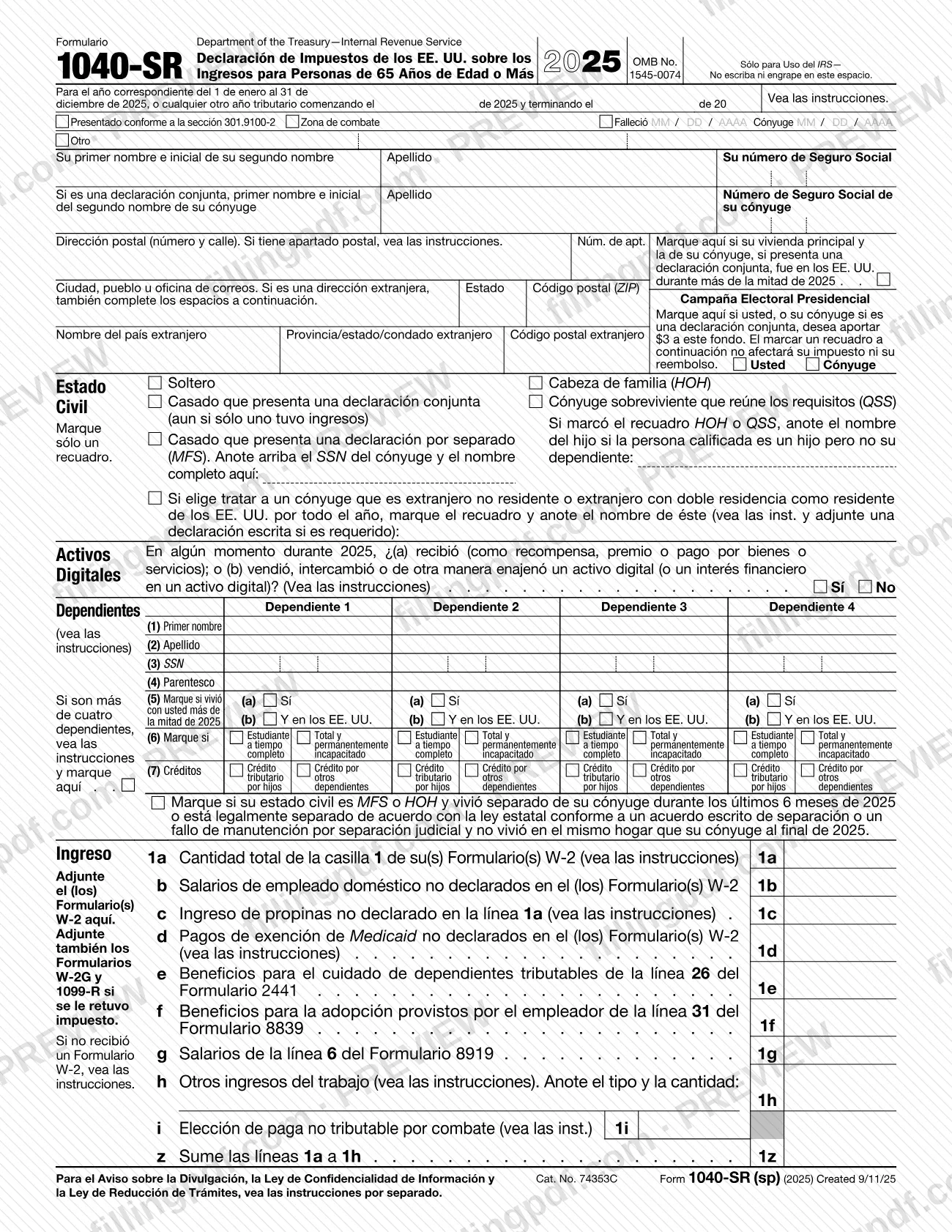
- Page 1: tax year, names, Social Security numbers, address, filing status, the digital assets question, dependents, and wages and other earned income (lines 1a to 1z).
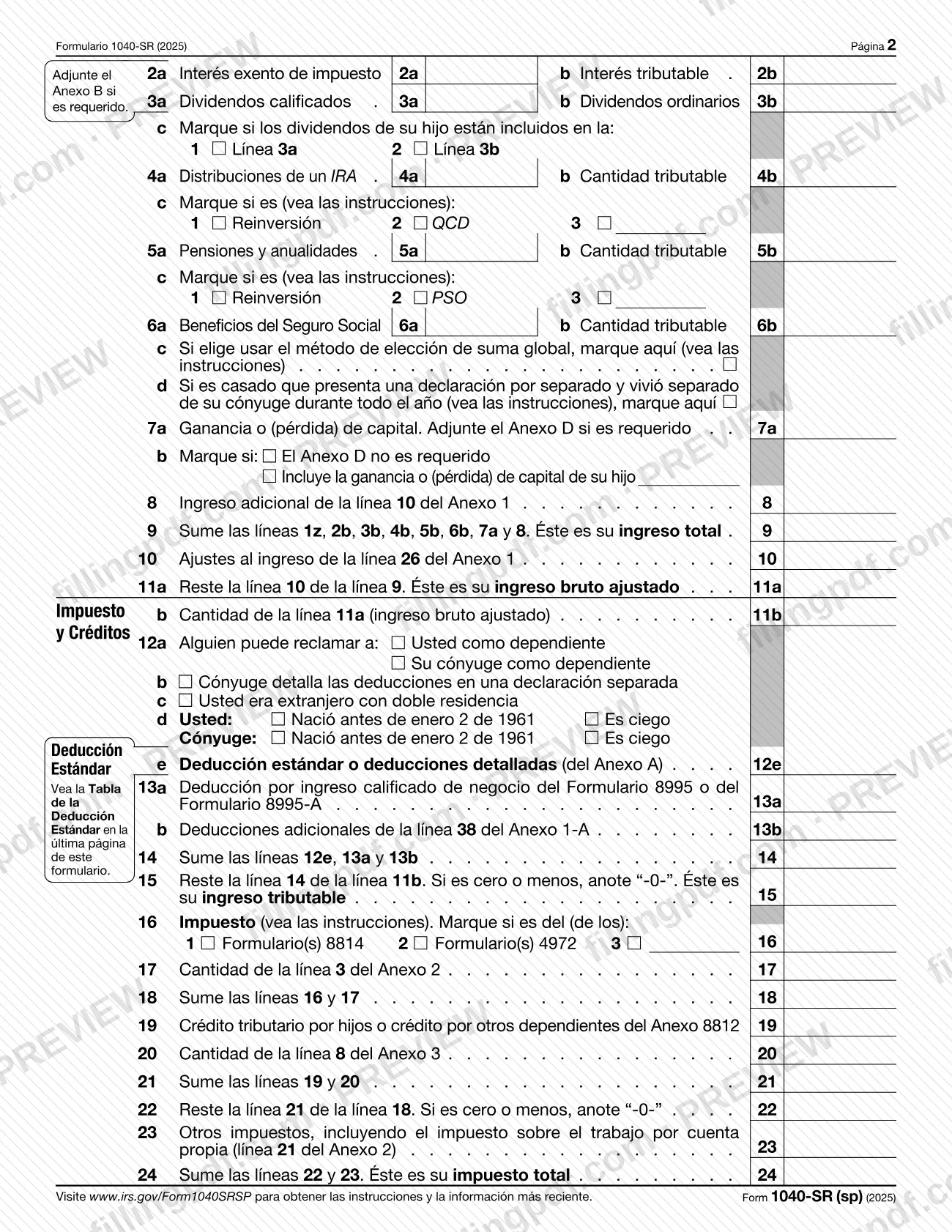
- Page 2: other income (lines 2a to 9), adjustments and adjusted gross income (lines 10 to 11b), deductions and taxable income (lines 12a to 15), and tax (lines 16 to 24).
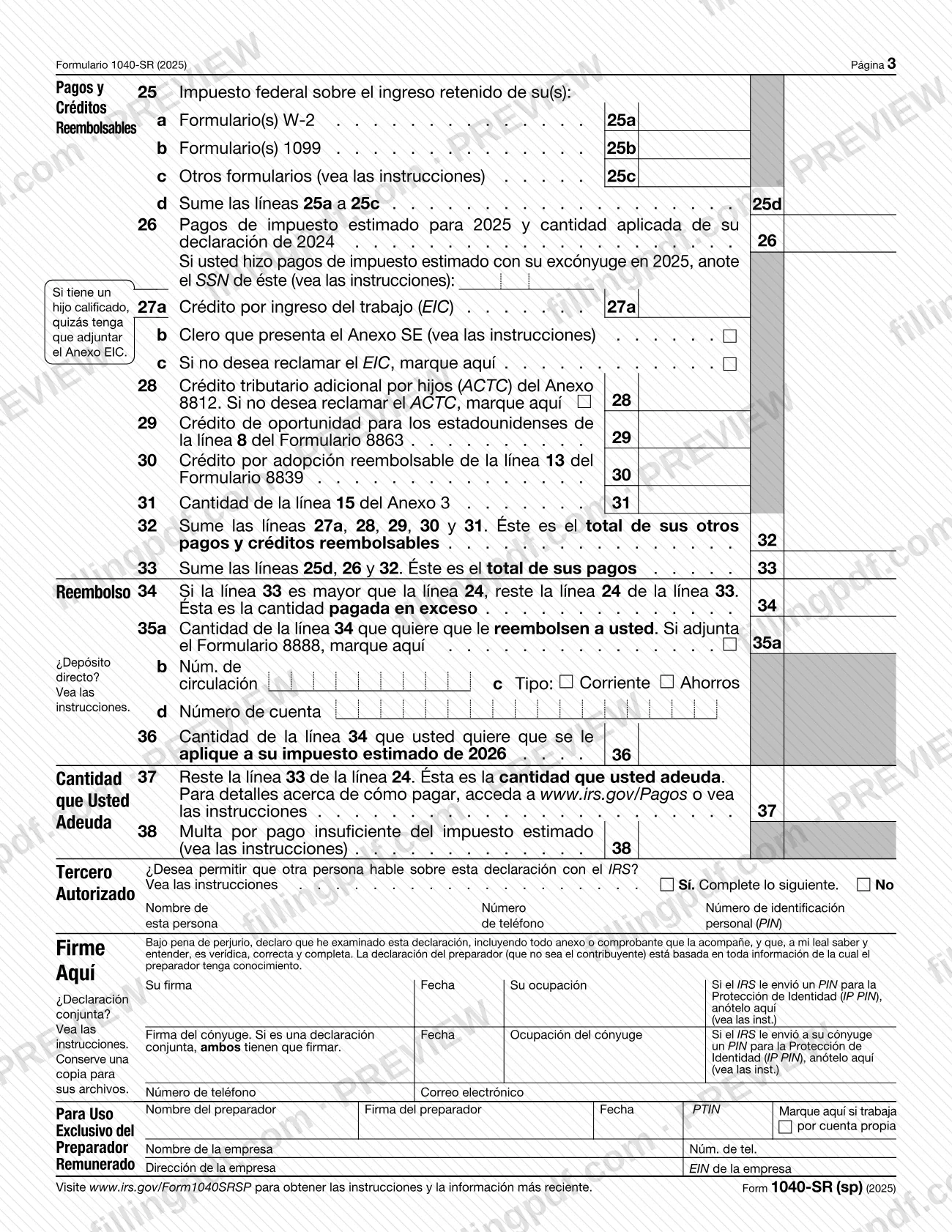
- Page 3: payments and refundable credits (lines 25 to 33), refund (lines 34 to 36), amount you owe (lines 37 and 38), third party designee, signature and paid preparer sections.
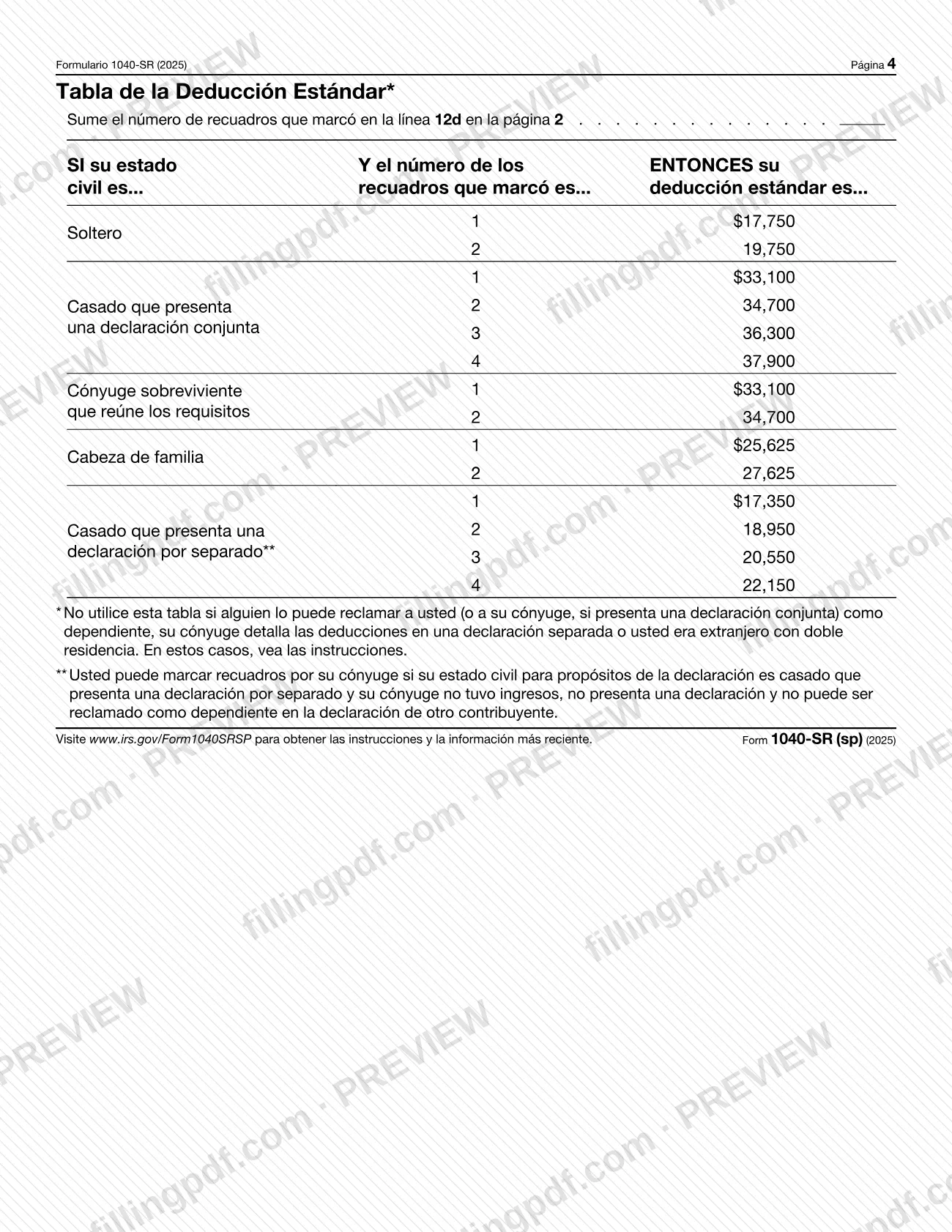
- Page 4: the Standard Deduction Table.
The (sp) in the number marks the Spanish edition. The English-language Form 1040-SR and Form 1040 are separate documents; this page covers only Form 1040-SR (sp).
Who needs to file 1040-SR (sp)?
Taxpayers age 65 or older who want to file their federal income tax return on a Spanish-language form can use Form 1040-SR (sp). The IRS describes Form 1040-SR as an optional alternative to Form 1040, so choosing it is a decision, not a requirement.
What the form itself asks of different filers:
- Age and blindness: line 12d has boxes for you and your spouse for "Nació antes de enero 2 de 1961" (born before January 2, 1961) and "Es ciego" (is blind). The number of boxes you check is used with the Standard Deduction Table on page 4.
- Joint returns: both spouses must sign.
- Married filing separately (MFS): enter your spouse's SSN at the top and your spouse's full name in the filing status box.
- Head of household (HOH) or qualifying surviving spouse (QSS): name the child if the qualifying person is a child who is not your dependent.
- Deceased taxpayer: the "Falleció" box at the top takes the date of death in MM / DD / AAAA format.
- Dependents: the form has room for four; for more, see the instructions and check the box.
The form does not state who must file a return or the income thresholds; those are in the IRS instructions at www.irs.gov/Form1040SRSP. Do not use the Standard Deduction Table if someone can claim you as a dependent, your spouse itemizes on a separate return, or you were a dual-status alien; the form sends those filers to the instructions. A paid preparer completes the preparer section.
When to file 1040-SR (sp)
Form 1040-SR (sp) is filed for the tax year printed at the top: January 1 to December 31, 2025, or another tax year that begins in 2025 and ends in 2026. The form prints no due date of its own, and the IRS instructions at www.irs.gov/Form1040SRSP cover the deadline and how it differs by situation.
The IRS Free File page refers to an April 15 deadline. It says that an extension request on Form 4868 gives you until October 15 to file, and that the extension applies only to filing: to avoid penalties, pay any balance due by the April 15 deadline. The same page says Free File cannot be used for a prior-year (past-due) return.
After you file, the IRS Where's My Refund tool shows refund status about 24 hours after you e-file a current-year return and about 4 weeks after you file a paper return.
Documents you need
- Form(s) W-2: attach to page 1 where the form says so, to support the wages you report on line 1a.
- Forms W-2G and 1099-R: attach only if federal income tax was withheld.
- Schedule B: attach if required, to report interest and dividends on lines 2a to 3b.
- Schedule D: attach if required for the capital gain or (loss) on line 7a; check the box on line 7b if Schedule D is not required.
- Schedule EIC: you may need to attach it if you have a qualifying child and claim the earned income credit on line 27a.
- Form 8888: attach if you split your refund, and check the box on line 35a.
- Written statement: attach if you choose to treat a nonresident or dual-status alien spouse as a U.S. resident for the whole year, as the instructions require.
- Statement for dependents: if you have more than four dependents, the form tells you to see the instructions and check the box.
How to fill out 1040-SR (sp)
Enter tax year and top-of-form boxes
Confirm the 2025 tax year, or enter the fiscal-year dates if your year is not January 1 to December 31. Check Falleció, Zona de combate or the other boxes at the top only if they apply, and enter dates as MM / DD / AAAA.
Enter names, SSNs and address
Enter your first name, middle initial, last name and Social Security number, then your spouse's if you file jointly. Enter your mailing address; complete the foreign address spaces only if you have a foreign address.
Check residence and campaign boxes
Check the box if your main home, and your spouse's on a joint return, was in the United States for more than half of 2025. Under Campaña Electoral Presidencial, check a box for you, your spouse or both only if you wish to contribute; the form says it does not affect your tax or refund.
Choose your filing status
Check only one box: Soltero, Casado que presenta una declaración conjunta, Casado que presenta una declaración por separado (MFS), Cabeza de familia (HOH) or Cónyuge sobreviviente que reúne los requisitos (QSS). Add your spouse's SSN and full name for MFS, or the child's name for HOH or QSS when required.
Answer the digital assets question
Check Sí or No to say whether in 2025 you received a digital asset as a reward, award or payment, or sold, exchanged or otherwise disposed of one or a financial interest in one.
List your dependents
For each of up to four dependents, enter first name, last name, SSN and relationship in columns (1) to (4). Then complete columns (5) to (7): lived with you more than half of 2025, student or permanently disabled, and the child tax credit or credit for other dependents.
Report wages and earned income
Enter box 1 of your Form(s) W-2 on line 1a and any other items on lines 1b to 1i. Add lines 1a to 1h on line 1z.
Report interest, dividends and other income
Complete lines 2a to 7a for interest, dividends, IRA distributions, pensions and annuities, Social Security benefits and capital gain or (loss). Enter additional income from Schedule 1, line 10 on line 8, and add lines 1z, 2b, 3b, 4b, 5b, 6b, 7a and 8 on line 9.
Figure adjusted gross income
Enter adjustments from Schedule 1, line 26 on line 10. Subtract line 10 from line 9 on line 11a, and copy the result to line 11b.
Claim deductions and find taxable income
On lines 12a to 12d check the boxes that apply, including your age and blindness boxes. Enter the standard deduction or Schedule A deductions on line 12e, add lines 12e, 13a and 13b on line 14, then subtract line 14 from line 11b on line 15, entering "-0-" if zero or less.
Figure tax and credits
Enter your tax on line 16 and mark Form(s) 8814 or 4972 if used. Add line 17 for line 18, subtract credits on lines 19 to 21 to get line 22, then add other taxes on line 23 to reach your total tax on line 24.
Enter payments and refundable credits
Report federal income tax withheld on lines 25a to 25c and total it on line 25d. Enter estimated payments on line 26, the earned income credit on line 27a, other credits on lines 28 to 31, and total them on lines 32 and 33.
Complete refund or amount you owe
If line 33 is more than line 24, enter the overpayment on line 34, the refund you want on line 35a with routing number, account type and account number on lines 35b to 35d, and any amount applied to 2026 estimated tax on line 36. If you owe, enter the amount on line 37 and any estimated tax penalty on line 38.
Review, sign and download the PDF
Complete the Tercero Autorizado section if you want another person to discuss the return with the IRS, then sign and date; a spouse signs too on a joint return, and a paid preparer completes the preparer section. Check every line, then download or print the completed PDF from FillingPDF and keep a copy.
How to submit 1040-SR (sp)
You can file your return electronically or on paper by mail.
- Electronically: the IRS Free File program, which you reach through IRS.gov/freefile, offers guided tax software and Free File Fillable Forms. Guided software is limited by income and by each partner's own criteria, and Free File Fillable Forms is open at any income level. Qualifying taxpayers can file for free in Spanish with the partner EzTaxReturn.com. The IRS sends an email confirmation when it accepts an e-filed return.
- By mail: the form prints no mailing address. The IRS says to see Where to file for Form 1040 on IRS.gov for the latest address for current and prior filing years. Attach your Form(s) W-2 where the form says, and keep a copy of the return for your records.
- Paying: if you owe tax, line 37 sends you to www.irs.gov/Pagos or the instructions for payment details.
Your IRS Individual Online Account also lets you check the status of payments and amended returns. FillingPDF lets you fill out and download the PDF; submission follows the channels above.
Common mistakes to avoid
- Entering a standard deduction without the Standard Deduction Table, or using the table when someone can claim you as a dependent, your spouse itemizes separately, or you were a dual-status alien.
- Miscounting the boxes on line 12d. The number of boxes you check decides your row in the Standard Deduction Table on page 4.
- Filing a joint return with only one signature. The form says both spouses must sign.
- Leaving the child's name blank under HOH or QSS when the qualifying person is a child who is not your dependent.
- Omitting your spouse's SSN and full name when your filing status is married filing separately (MFS).
- Skipping the digital assets question, which asks for a Sí or No answer for 2025.
- Entering a negative number on line 15 or line 22 instead of "-0-" when the result is zero or less.
- Not attaching Form(s) W-2, or Forms W-2G and 1099-R when tax was withheld.
- Mailing the return to an old address instead of the current one on the IRS Where to file for Form 1040 page.
Frequently asked questions
What is Form 1040-SR (sp)?
Form 1040-SR (sp) is the IRS Spanish-language edition of Form 1040-SR, the U.S. income tax return for taxpayers age 65 or older. This edition covers tax year 2025. You use it to report income, deductions and credits and to figure a refund or an amount you owe.
Do I have to use Form 1040-SR (sp) if I am 65 or older?
No. The IRS describes Form 1040-SR as an optional alternative to Form 1040 for taxpayers age 65 or older. It uses the same schedules and instructions as Form 1040. Choose the (sp) edition if you prefer a form printed in Spanish.
What is the difference between Form 1040-SR (sp) and Form 1040-SR?
Form 1040-SR (sp) is the Spanish-language edition: its text and line labels are printed in Spanish. Form 1040-SR is the English-language return for the same group of taxpayers, and both use the same schedules as Form 1040.
When is Form 1040-SR (sp) due?
The form prints no due date. The IRS Free File page refers to an April 15 deadline and says a Form 4868 extension gives you until October 15 to file, but not to pay. Check the instructions at www.irs.gov/Form1040SRSP for your situation.
Where do I mail Form 1040-SR (sp)?
The form prints no mailing address. The IRS says to see Where to file for Form 1040 on IRS.gov for the latest address for current and prior filing years. If you e-file, you do not mail it; Free File is available through IRS.gov/freefile.
What do I attach to Form 1040-SR (sp)?
Attach your Form(s) W-2, plus Forms W-2G and 1099-R if tax was withheld. Add Schedule B or Schedule D if required, Schedule EIC if you have a qualifying child and claim the earned income credit, and Form 8888 if you split your refund.
How do I find my standard deduction on Form 1040-SR (sp)?
Count the boxes you checked on line 12d, then find your filing status and that number in the Standard Deduction Table on page 4. Do not use the table if someone can claim you as a dependent, your spouse itemizes separately or you were a dual-status alien.
Can I fill out Form 1040-SR (sp) online on FillingPDF?
Yes. You can fill out the fillable PDF online on FillingPDF and download or print it. FillingPDF is an independent service and does not file the return with the IRS; you submit it electronically or by mail through the IRS channels.
Ready to fill out 1040-SR (sp)?
Fill out 1040-SR (sp) now