
Form 1095-C, Employer-Provided Health Insurance Offer and Coverage, is the Internal Revenue Service (IRS) statement that an Applicable Large Employer (ALE) furnishes to its employees to report the health coverage it offered them. Employees use it, among other things, to check their eligibility for the premium tax credit; employers complete it for each employee who was full-time for at least one month. On FillingPDF you can fill out the 2025 form online and download or print the completed PDF. The form and its instructions are published by the IRS at www.irs.gov/Form1095C.
Last updated
What is 1095-C?
Form 1095-C, Employer-Provided Health Insurance Offer and Coverage, is the Internal Revenue Service (IRS) statement in which an Applicable Large Employer reports the health coverage it offered to an employee and, when its plan is self-insured, who was covered under it.
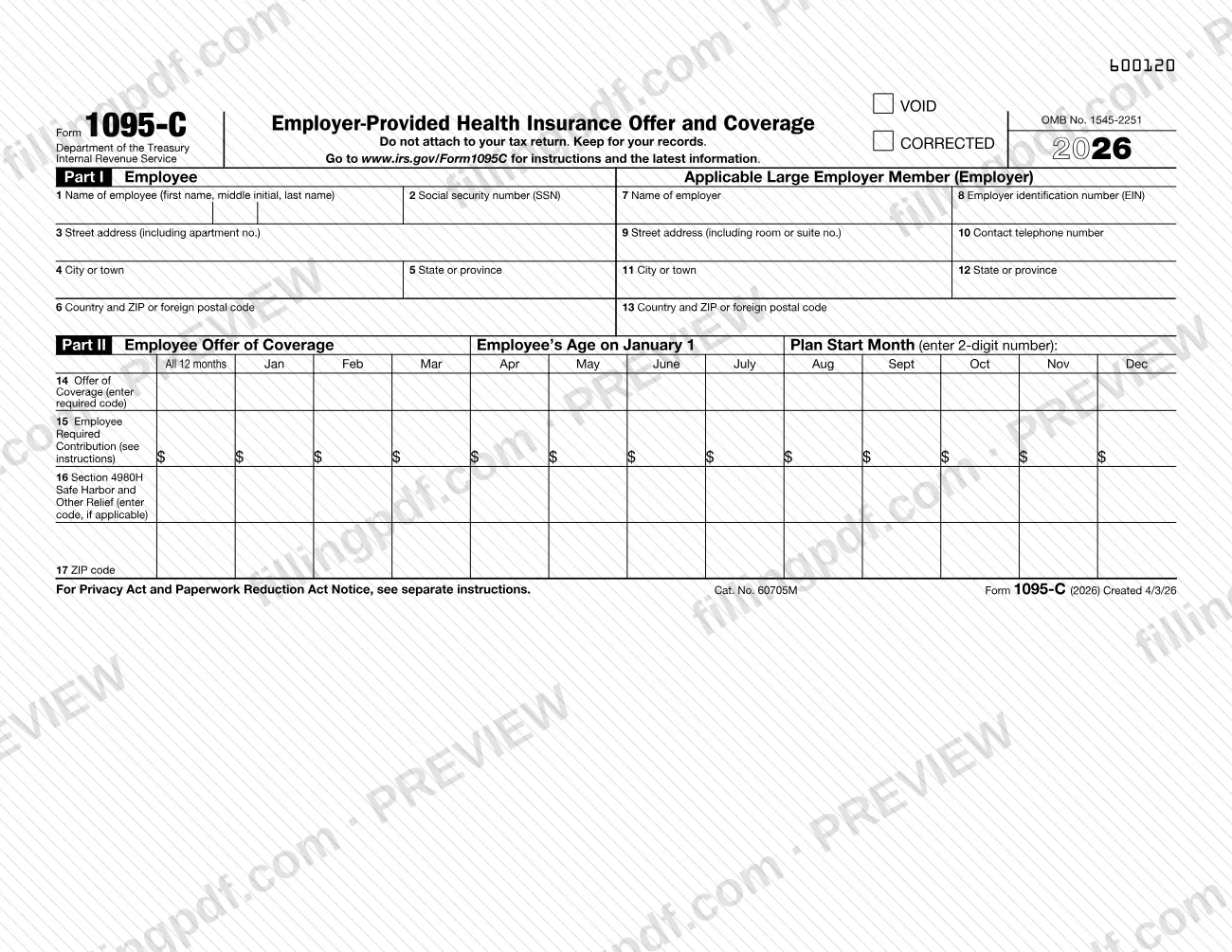
The form carries OMB No. 1545-2251, and this version is for 2025. It has three parts:
- Part I, lines 1–13: the employee (lines 1–6) and the Applicable Large Employer Member, meaning the employer (lines 7–13).
- Part II, lines 14–17: the offer of coverage. Line 14 holds the offer code, line 15 the employee required contribution, line 16 the Section 4980H safe harbor or other relief code, and line 17 a ZIP code used for individual coverage HRAs.
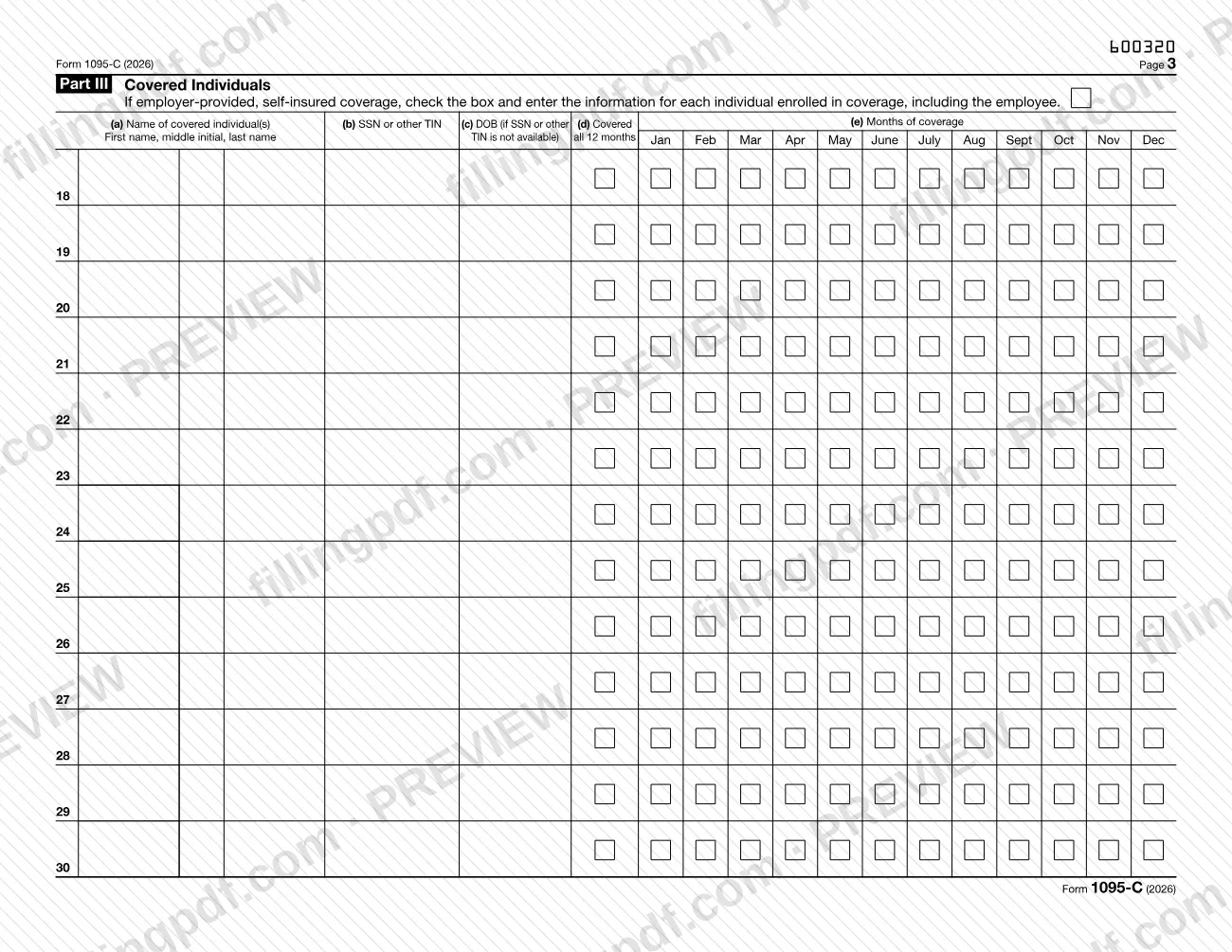
- Part III, lines 18–30: the covered individuals, completed only when the employer's plan is self-insured.
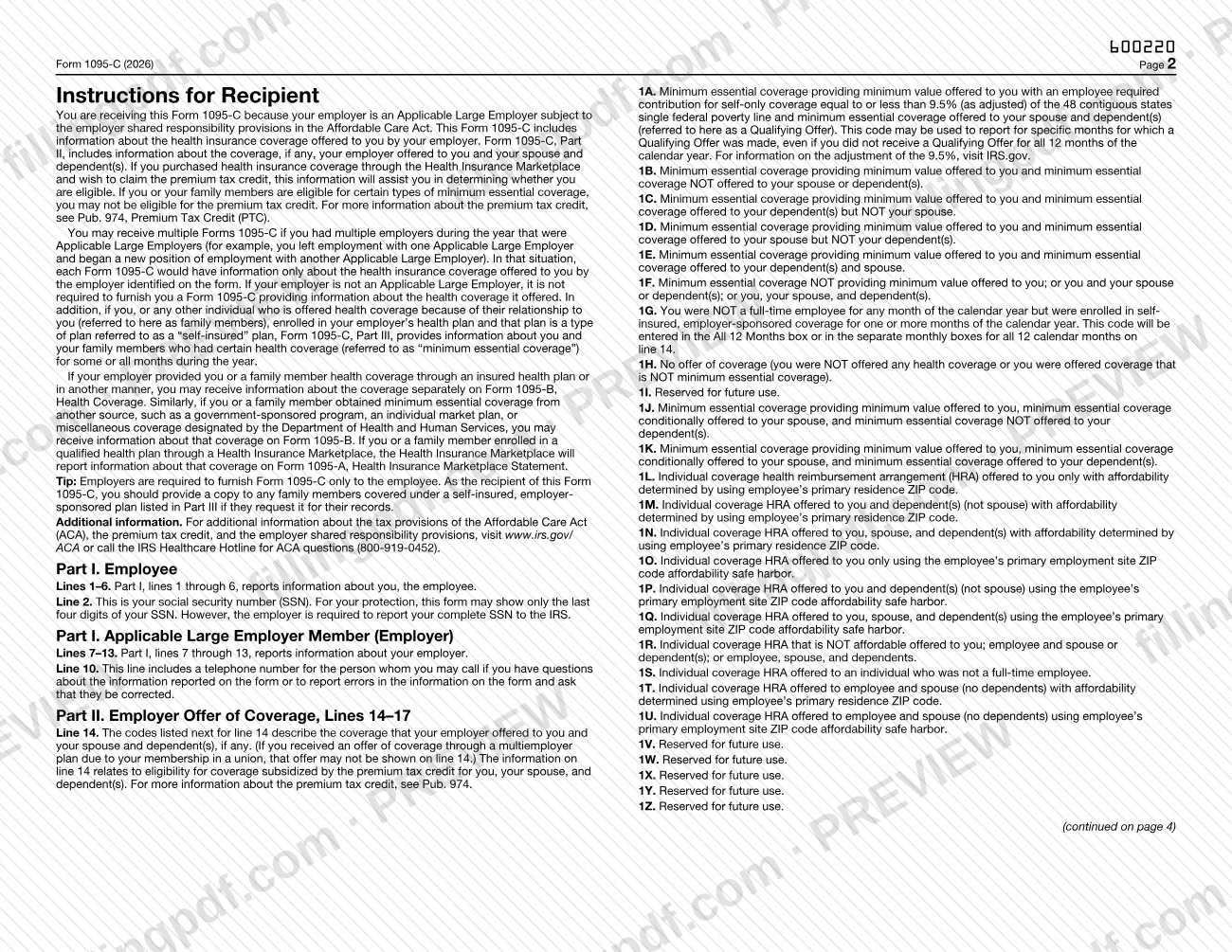
The recipient instructions printed on the form explain that the information helps employees who bought coverage through the Health Insurance Marketplace decide whether they are eligible for the premium tax credit (see Pub. 974). The form says not to attach it to your tax return and to keep it for your records.
Form 1095-C is not the only health coverage statement. Coverage through an insured plan or another source may be reported on Form 1095-B, Health Coverage, and Marketplace coverage is reported on Form 1095-A, Health Insurance Marketplace Statement. Form 1095-C reports what an Applicable Large Employer offered.
Who needs to file 1095-C?
Employers that are Applicable Large Employers (ALEs) subject to the employer shared responsibility provisions of the Affordable Care Act complete Form 1095-C. An ALE member files and furnishes it for any employee who was a full-time employee for one or more months of the calendar year. An employer that is not an ALE is not required to furnish the form.
Employees are the recipients. The employer furnishes Form 1095-C only to the employee, not to family members. You may get more than one form if you had several ALE employers during the year, such as when you left one ALE for another; each form describes only the coverage offered by the employer named on it. If your employer's plan is self-insured and covered your family members, you may give them a copy on request.
Part III is used only when the employer's health plan is self-insured. If your coverage came through an insured plan or another source, the information may arrive separately on Form 1095-B; Marketplace coverage is reported on Form 1095-A.
When to file 1095-C
The triggering event is an employee being a full-time employee for one or more months of the calendar year. The IRS says an ALE member then files and furnishes Form 1095-C for that employee, reporting information for all twelve months of the calendar year. The form in this version covers calendar year 2025.
For employees who were not full-time in any month but were enrolled in self-insured employer-sponsored coverage, the recipient instructions describe code 1G on line 14, entered for all 12 months.
The form prints no due date. For deadlines and other filing rules, use the instructions at www.irs.gov/Form1095C. As a recipient, you do not file the form with your return: keep it for your records.
How to fill out 1095-C
Enter the employee's details
In Part I, lines 1–6, enter the employee's name (line 1), social security number (line 2), street address (line 3), city or town (line 4), state or province (line 5) and country and ZIP or foreign postal code (line 6). The recipient copy may show only the last four digits of the SSN.
Enter the employer's details
In Part I, lines 7–13, enter the employer's name (line 7), employer identification number (line 8), address (lines 9, 11, 12 and 13) and the contact telephone number on line 10. Line 10 is the number the employee can call with questions or to report errors.
Enter age and plan start month
In Part II, enter the employee's age on January 1 and the plan start month as a 2-digit number in the boxes provided.
Enter the line 14 offer code
Choose the code that describes the coverage offered to the employee, spouse and dependents, such as 1A, 1B, 1E, 1H or 1G. Enter it in the All 12 Months box or in the monthly boxes; do not use reserved codes.
Report the required contribution on line 15
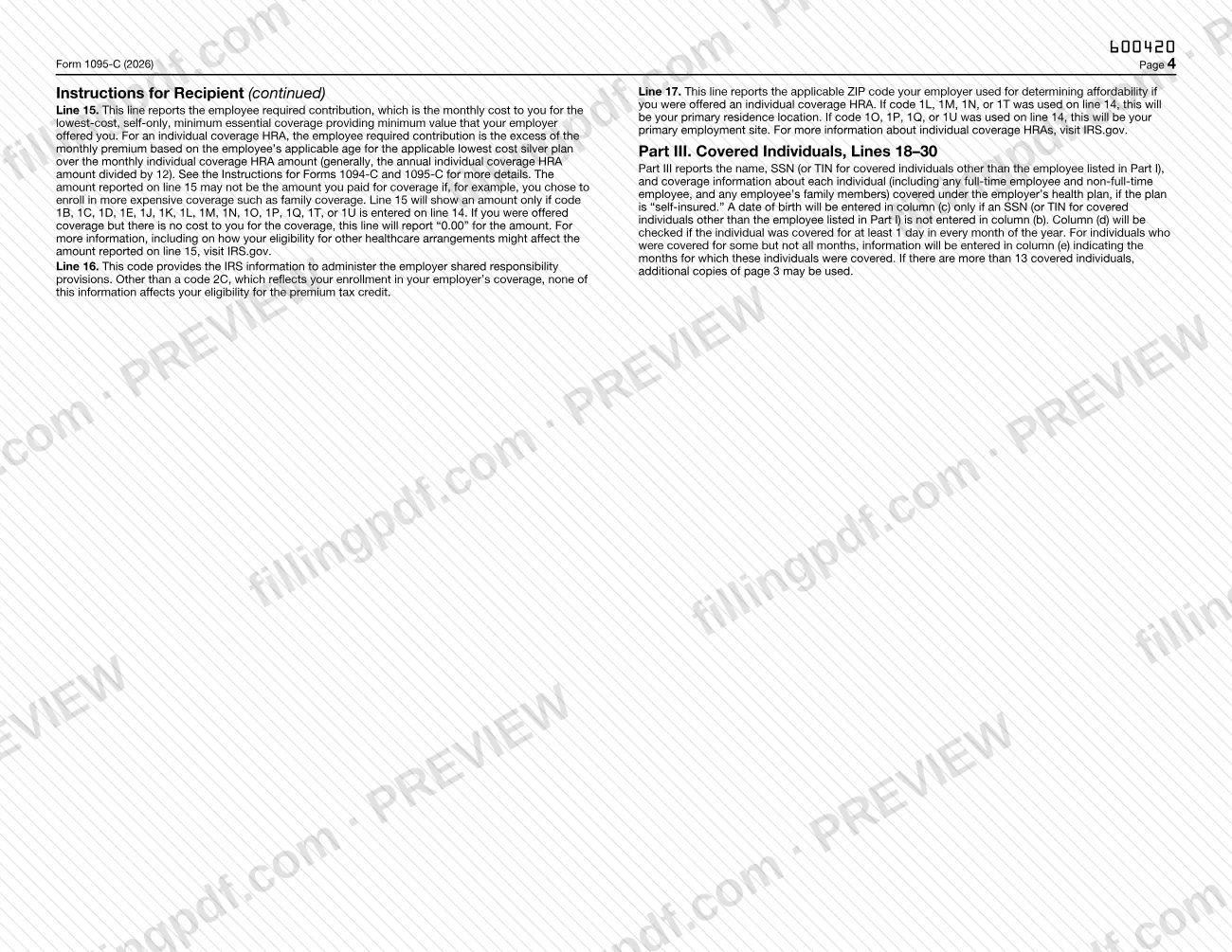
Enter the monthly cost of the lowest cost self-only minimum essential coverage providing minimum value that was offered. An amount is shown only with the line 14 codes listed in the instructions; report 0.00 if the coverage costs the employee nothing.
Enter the line 16 relief code
If applicable, enter the Section 4980H safe harbor or other relief code for each month. This code gives the IRS information to administer the employer shared responsibility provisions.
Enter the line 17 ZIP code
If an individual coverage HRA was offered, enter the ZIP code used to determine affordability: the primary residence for codes 1L, 1M, 1N or 1T, or the primary employment site for codes 1O, 1P, 1Q or 1U.
Check the self-insured box in Part III
If the employer's plan is self-insured, check the box at the top of Part III. Skip Part III if it is not.
List covered individuals on lines 18–30
For each person covered, including the employee, enter the name in (a) and SSN or TIN in (b); enter a date of birth in (c) only if no SSN or TIN is available. Check (d) for all 12 months, or mark the covered months in (e).
Review and download the completed PDF
Check names, numbers, codes and months against your records, then download or print the completed PDF from FillingPDF. Employees keep their copy; do not attach it to a tax return.
How to submit 1095-C
Form 1095-C is furnished by the employer; it is not something an employee submits.
- To the employee: the employer furnishes the form only to the employee. The form says not to attach it to your tax return and to keep it for your records.
- To the IRS: the employer reports the information, including the employee's complete SSN, to the IRS. The form prints no mailing address or portal, so use the instructions linked at www.irs.gov/Form1095C and the Instructions for Forms 1094-C and 1095-C for the reporting details.
- Questions or errors: line 10 gives the telephone number of the person to call about the information on the form or to report errors and ask for corrections. For ACA questions you can also call the IRS Healthcare Hotline at 800-919-0452.
FillingPDF lets you fill out and download the PDF; submission follows the channels above.
Common mistakes to avoid
- Attaching Form 1095-C to your tax return; the form says not to attach it and to keep it for your records.
- Treating the line 15 amount as what you paid; it is the monthly cost of the lowest cost self-only coverage offered, and may differ if you chose more expensive coverage such as family coverage.
- Entering a dollar amount on line 15 when line 14 does not carry code 1B, 1C, 1D, 1E, 1J, 1K, 1L, 1M, 1N, 1O, 1P, 1Q, 1T or 1U; the form shows an amount only with those codes.
- Using codes marked reserved for future use (1I, 1V, 1W, 1X, 1Y, 1Z) on line 14.
- Entering a date of birth in Part III column (c) when an SSN or other TIN is already in column (b).
- Checking column (d), covered all 12 months, for someone covered only part of the year; use the monthly boxes in column (e) for those months.
- Listing more than 13 covered individuals on one page 3 instead of using additional copies of page 3.
- Completing Part III for a plan that is not self-insured; it reports covered individuals only for self-insured plans.
Frequently asked questions
What is Form 1095-C used for?
Form 1095-C is the IRS statement in which an Applicable Large Employer reports the health coverage it offered to an employee, and who was covered if the plan is self-insured. Employees can use it to help determine eligibility for the premium tax credit.
Do I attach Form 1095-C to my tax return?
No. The form states "Do not attach to your tax return. Keep for your records." The information can help you determine whether you are eligible for the premium tax credit if you bought Marketplace coverage, but the form itself stays with your records.
Who receives a Form 1095-C?
Employees of an Applicable Large Employer who were full-time for one or more months of the year. The employer furnishes it only to the employee. If your employer is not an Applicable Large Employer, it is not required to furnish you this form.
Why did I get more than one Form 1095-C?
You likely had more than one Applicable Large Employer during the year, for example if you left one and started with another. Each form shows only the coverage offered by the employer named on that form.
What do the line 14 codes mean?
Line 14 describes the coverage offered to you, your spouse and dependents. For example, 1A is a Qualifying Offer, 1H is no offer of coverage, and 1G is a non-full-time employee enrolled in self-insured coverage. The full list, 1A through 1U, is on page 2 of the form.
Is the amount on line 15 what I paid for coverage?
Not necessarily. Line 15 shows the monthly cost of the lowest cost self-only coverage providing minimum value that was offered to you. If you chose more expensive coverage such as family coverage, your cost may differ. It shows 0.00 if the coverage costs you nothing.
What is the difference between Form 1095-C, 1095-B and 1095-A?
Form 1095-C reports the coverage an Applicable Large Employer offered. Form 1095-B, Health Coverage, reports coverage from insured plans and other sources. Form 1095-A, Health Insurance Marketplace Statement, reports Marketplace coverage.
Who do I contact if my Form 1095-C has an error?
Call the contact telephone number on line 10, which is for questions about the form or to report errors and ask for corrections. For ACA questions you can also call the IRS Healthcare Hotline at 800-919-0452.
Can I fill out Form 1095-C online?
Yes. You can fill out the 1095-C PDF online on FillingPDF and download or print it. FillingPDF is an independent service and does not furnish the form to employees or report it to the IRS; those steps follow the employer's channels.
Ready to fill out 1095-C?
Fill out 1095-C now