
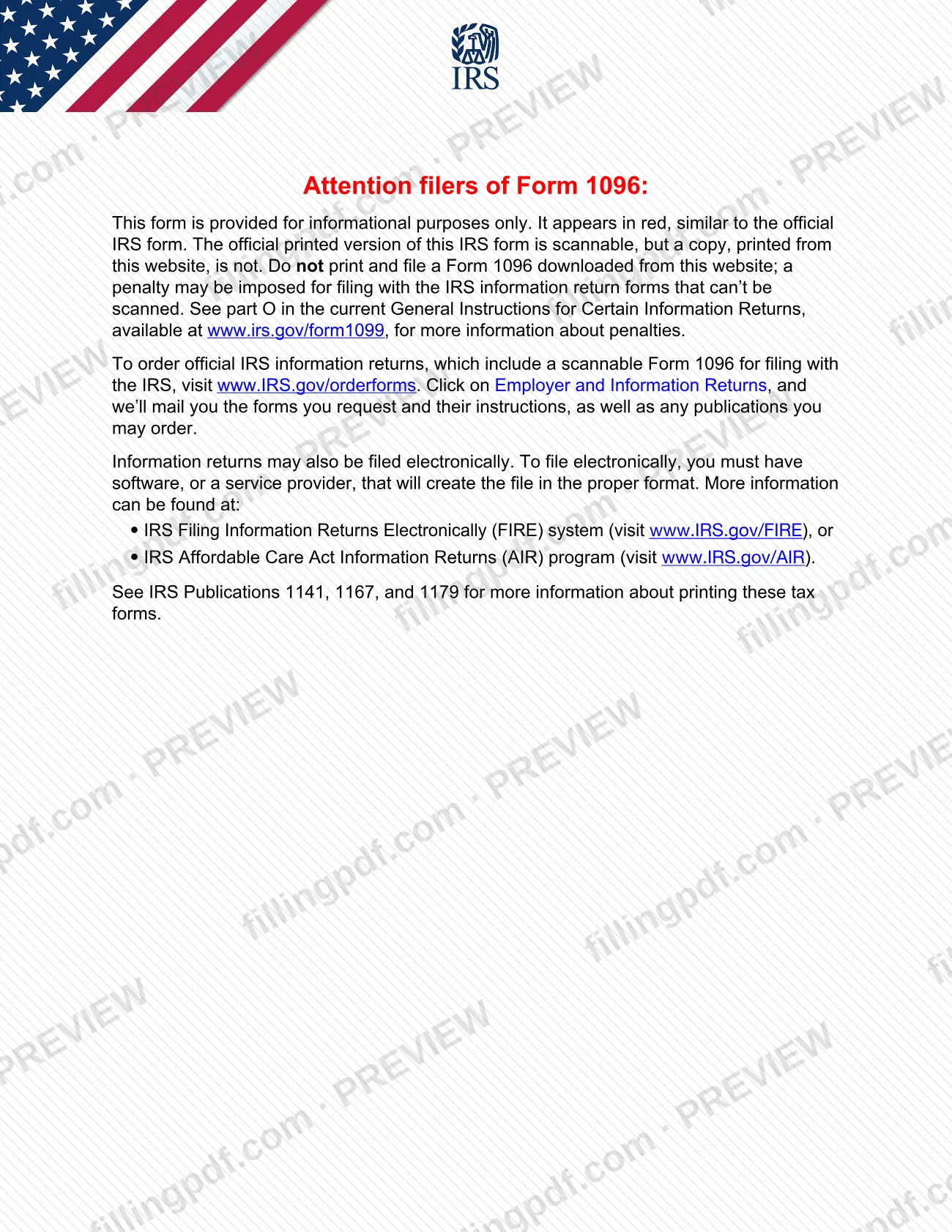
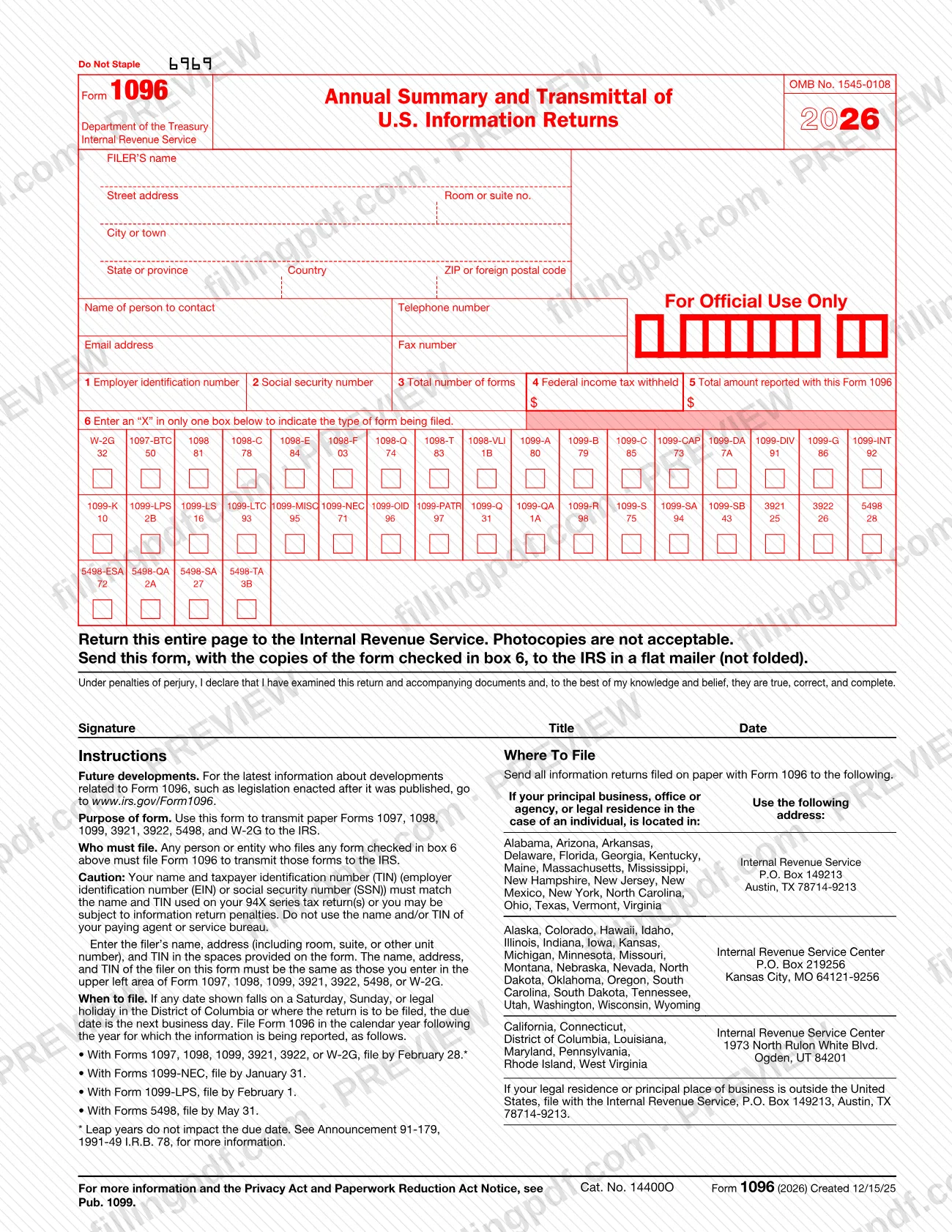
Form 1096 is the Internal Revenue Service (IRS) transmittal sheet that you send with paper information returns such as Forms 1098, 1099, 3921, 3922, 5498 and W-2G. Anyone who files those paper forms with the IRS sends one Form 1096 for each group of the same form type. On this page you can fill out the form online on FillingPDF and download or print the completed PDF. The IRS states that a copy printed from its website is not scannable and should not be filed, so order the official scannable forms through the IRS as described below.
Last updated
What is 1096?
Form 1096, Annual Summary and Transmittal of U.S. Information Returns, is the IRS transmittal form that accompanies paper Forms 1097, 1098, 1099, 3921, 3922, 5498 and W-2G sent to the Internal Revenue Service, summarizing each group in boxes 3, 4 and 5.
The form carries the filer's name, address and taxpayer identification number (TIN), the number of forms in the package, the federal income tax withheld shown on them and, for most form types, the total of specific amounts reported. Box 6 lists the form types, such as 1098-T, 1099-NEC or 5498-SA, and you mark only one.
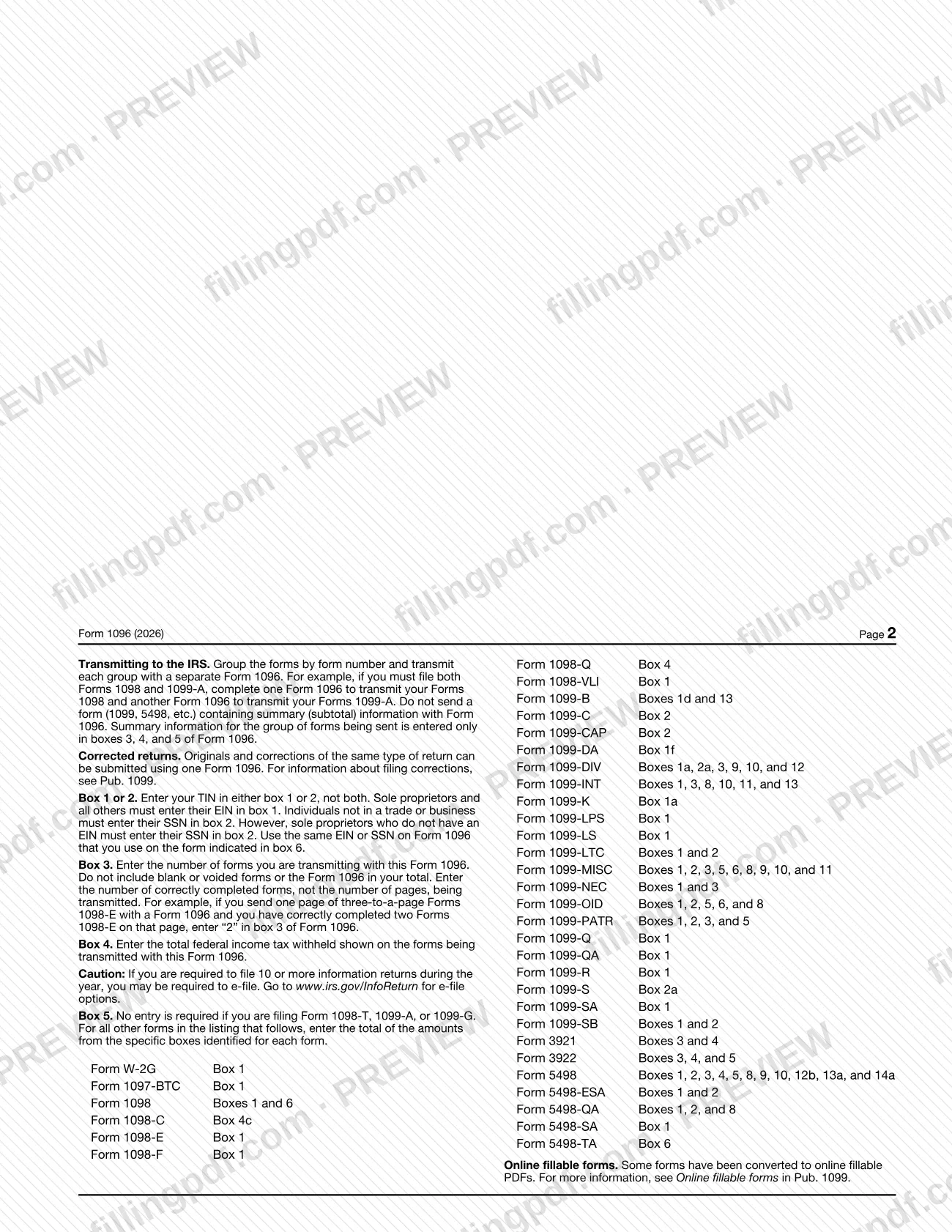
Forms are grouped by form number, and each group is transmitted with its own Form 1096. For example, a filer with both Forms 1098 and Forms 1099-A completes one Form 1096 for the 1098s and another for the 1099-As. Originals and corrections of the same type of return can go with one Form 1096. Do not send a form that contains summary (subtotal) information with it; the summary belongs only in boxes 3, 4 and 5.
The IRS says Form 1096 is not used to transmit returns electronically. Electronic filing goes through the IRS FIRE system or the Affordable Care Act Information Returns (AIR) program, and the electronic specifications are in Publication 1220.
Who needs to file 1096?
Any person or entity that files a paper Form 1097, 1098, 1099, 3921, 3922, 5498 or W-2G with the IRS must file Form 1096 to transmit it. The form types covered are the ones listed in box 6 of the form.
- Sole proprietors and all other businesses enter their employer identification number (EIN) in box 1.
- Individuals not in a trade or business enter their Social Security number (SSN) in box 2. Sole proprietors without an EIN also use box 2.
- The filer's name and TIN must match those used on the filer's 94X series tax returns, and must be the filer, not a paying agent or service bureau.
You do not use Form 1096 to transmit returns electronically. The IRS also cautions that a filer required to file 10 or more information returns during the year may be required to e-file; see www.irs.gov/InfoReturn for the options.
When to file 1096
File Form 1096 in the calendar year after the year for which the information is reported, by the due date for the forms it transmits. If a date falls on a Saturday, Sunday or legal holiday in the District of Columbia or where the return is filed, the due date is the next business day.
- Forms 1097, 1098, 1099, 3921, 3922 or W-2G: February 28. Leap years do not change this date.
- Forms 1099-NEC: January 31.
- Form 1099-LPS: February 1.
- Forms 5498: May 31.
The form printed for 2026 is labeled Form 1096 (2026).
Documents you need
- The paper copies of the forms checked in box 6 (Forms 1097, 1098, 1099, 3921, 3922, 5498 or W-2G), sent with the Form 1096 in a flat mailer, not folded.
- An official scannable Form 1096 ordered from the IRS at www.IRS.gov/orderforms, because a copy printed from the IRS website is not scannable.
How to fill out 1096
Enter the filer's name and address
Type the FILER'S name, street address with room or suite number, city or town, state or province, country and ZIP or foreign postal code. These must match what you enter in the upper left area of the forms you are transmitting.
Add contact details
Enter the name of the person to contact, telephone number, email address and fax number. Leave the For Official Use Only area blank.
Enter your TIN in box 1 or 2
Enter your EIN in box 1 or your SSN in box 2, not both. Use the same number that appears on the forms listed in box 6.
Enter the total number of forms
In box 3, enter the number of correctly completed forms you are transmitting, not the number of pages. Do not count blank or voided forms or the Form 1096.
Enter federal income tax withheld
In box 4, enter the total federal income tax withheld shown on the forms transmitted with this Form 1096.
Enter the total amount reported
In box 5, enter the total of the specific boxes the instructions list for your form type. Make no entry for Form 1098-T, 1099-A or 1099-G.
Mark the form type in box 6
Enter an "X" in only one box in box 6 to show the type of form you are filing, such as 1099-NEC or 5498.
Sign, title and date the declaration
Sign the penalties of perjury declaration, enter your title and the date.
Review and download the completed PDF
Check that boxes 1 through 6 match the forms you are sending, then download or print the completed PDF from FillingPDF. Order official scannable forms from the IRS for the copy you file, and follow the channels under How to submit.
How to submit 1096
Form 1096 is sent to the IRS on paper, by mail, together with the copies of the forms it transmits. The form is not used for electronic filing, which goes through the IRS FIRE system (www.IRS.gov/FIRE) or the AIR program (www.IRS.gov/AIR).
- Paper packaging: Return the entire page to the IRS with the copies of the form checked in box 6. Send it in a flat mailer, not folded. Do not staple. Photocopies are not acceptable.
- Official forms: The IRS says a Form 1096 printed from its website is not scannable and should not be filed; a penalty may be imposed. Order official scannable forms at www.IRS.gov/orderforms.
- Where to mail, by location of your principal business, office or agency, or legal residence for an individual:
- Alabama, Arizona, Arkansas, Delaware, Florida, Georgia, Kentucky, Maine, Massachusetts, Mississippi, New Hampshire, New Jersey, New Mexico, New York, North Carolina, Ohio, Texas, Vermont, Virginia: Internal Revenue Service, P.O. Box 149213, Austin, TX 78714-9213.
- Alaska, Colorado, Hawaii, Idaho, Illinois, Indiana, Iowa, Kansas, Michigan, Minnesota, Missouri, Montana, Nebraska, Nevada, North Dakota, Oklahoma, Oregon, South Carolina, South Dakota, Tennessee, Utah, Washington, Wisconsin, Wyoming: Internal Revenue Service Center, P.O. Box 219256, Kansas City, MO 64121-9256.
- California, Connecticut, District of Columbia, Louisiana, Maryland, Pennsylvania, Rhode Island, West Virginia: Internal Revenue Service Center, 1973 North Rulon White Blvd., Ogden, UT 84201.
- Outside the United States: Internal Revenue Service, P.O. Box 149213, Austin, TX 78714-9213.
FillingPDF lets you fill out and download the PDF; submission follows the channels above.
Common mistakes to avoid
- Filing a Form 1096 printed from the IRS website instead of the official scannable version; the IRS says a penalty may be imposed for forms that cannot be scanned.
- Stapling the form or folding the package; the form says Do Not Staple and asks for a flat mailer, not folded.
- Sending a photocopy of Form 1096; the form states photocopies are not acceptable.
- Putting different form types in one package; each group of the same form number needs its own Form 1096.
- Entering your TIN in both box 1 and box 2; enter it in one box only.
- Using the name or TIN of a paying agent or service bureau instead of your own, which can lead to information return penalties.
- Counting pages, or including blank or voided forms, in box 3; enter the number of correctly completed forms.
- Entering an amount in box 5 for Form 1098-T, 1099-A or 1099-G, which require no entry.
- Marking more than one form type in box 6; enter an X in only one box.
- Using Form 1096 to transmit returns electronically; it is only for paper filing.
Frequently asked questions
What is Form 1096 used for?
Form 1096 is the IRS transmittal form used to send paper Forms 1097, 1098, 1099, 3921, 3922, 5498 and W-2G to the IRS. It summarizes each group of forms by count, federal income tax withheld and total amount reported.
Can I print Form 1096 from the IRS website and file it?
No. The IRS says a copy printed from its website is not scannable, and a penalty may be imposed for filing forms that cannot be scanned. Order the official scannable Form 1096 at www.IRS.gov/orderforms.
When is Form 1096 due?
February 28 with Forms 1097, 1098, 1099, 3921, 3922 or W-2G; January 31 with 1099-NEC; February 1 with 1099-LPS; May 31 with Forms 5498. A weekend or legal holiday moves the date to the next business day.
Where do I mail Form 1096?
It depends on where your principal business or legal residence is. The addresses are P.O. Box 149213, Austin, TX 78714-9213; P.O. Box 219256, Kansas City, MO 64121-9256; or 1973 North Rulon White Blvd., Ogden, UT 84201. See How to submit for each state group.
Do I need a separate Form 1096 for each type of form?
Yes. Group the forms by form number and transmit each group with its own Form 1096. For example, one Form 1096 for Forms 1098 and another for Forms 1099-A. Originals and corrections of the same type can share one.
Do I need Form 1096 if I file information returns electronically?
No. Form 1096 transmits paper returns only. Electronic filing uses the IRS FIRE system or the AIR program. Filers of 10 or more information returns during the year may be required to e-file.
What do I enter in box 3 of Form 1096?
Enter the number of correctly completed forms you are sending, not the number of pages. If one page of three-to-a-page Forms 1098-E has two completed forms, enter 2. Do not count blank or voided forms.
Can I fill out Form 1096 online on FillingPDF?
Yes, you can fill out the PDF online on FillingPDF and download or print it. FillingPDF does not file anything with the IRS, and the IRS says printed copies are not scannable, so file the official scannable form by mail.
Ready to fill out 1096?
Fill out 1096 now