
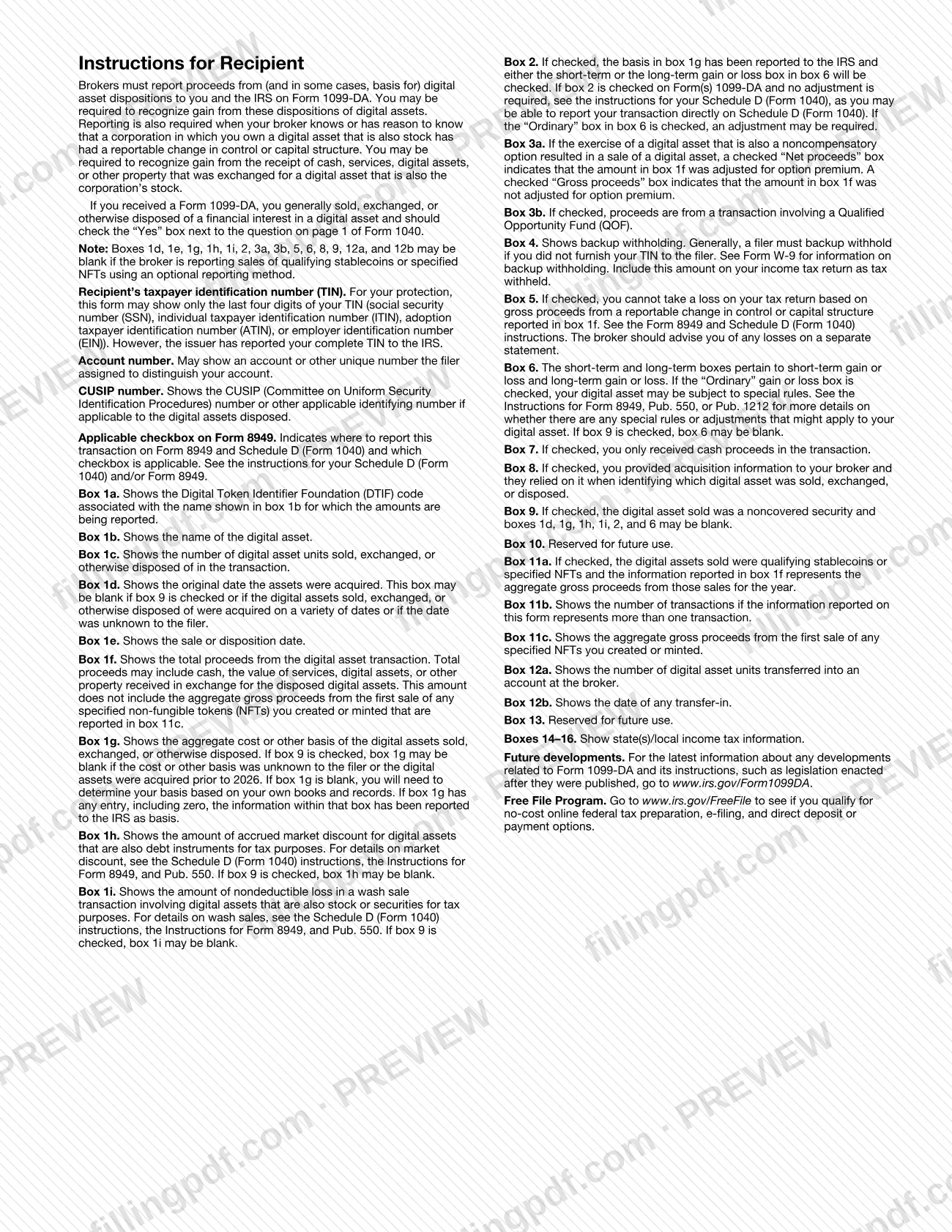
Form 1099-DA, Digital Asset Proceeds From Broker Transactions, is the Internal Revenue Service (IRS) information return on which a broker reports a customer's digital asset sales to the customer and to the IRS. Brokers, including digital asset middlemen, complete it; customers who receive it use it to report the transactions on Form 8949 and Schedule D (Form 1040). On this page you can fill out the form online on FillingPDF and download or print the completed PDF. The official form and instructions are published by the IRS at irs.gov.
Last updated
What is 1099-DA?
Form 1099-DA, Digital Asset Proceeds From Broker Transactions, is the Internal Revenue Service (IRS) information return on which a broker reports to a customer and to the IRS the proceeds, and in some cases the basis, from the customer's sales of digital assets.
The IRS instructions define a digital asset as any digital representation of value recorded on a cryptographically secured distributed ledger, such as a blockchain, that is not cash. For each sale a broker effects for customers after 2025, the broker completes the form. Basis is required for covered securities; for noncovered securities the broker may report it voluntarily and checks box 9.
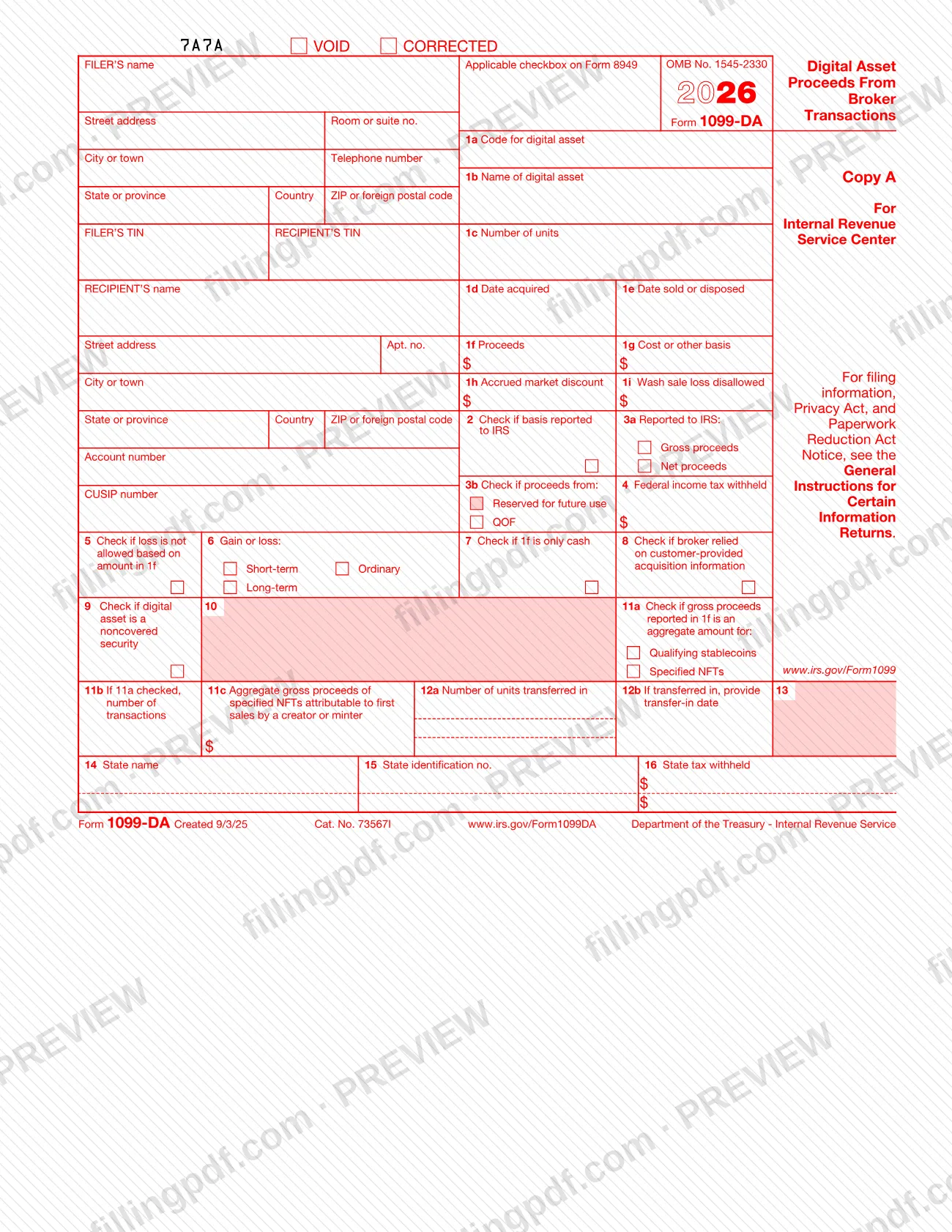
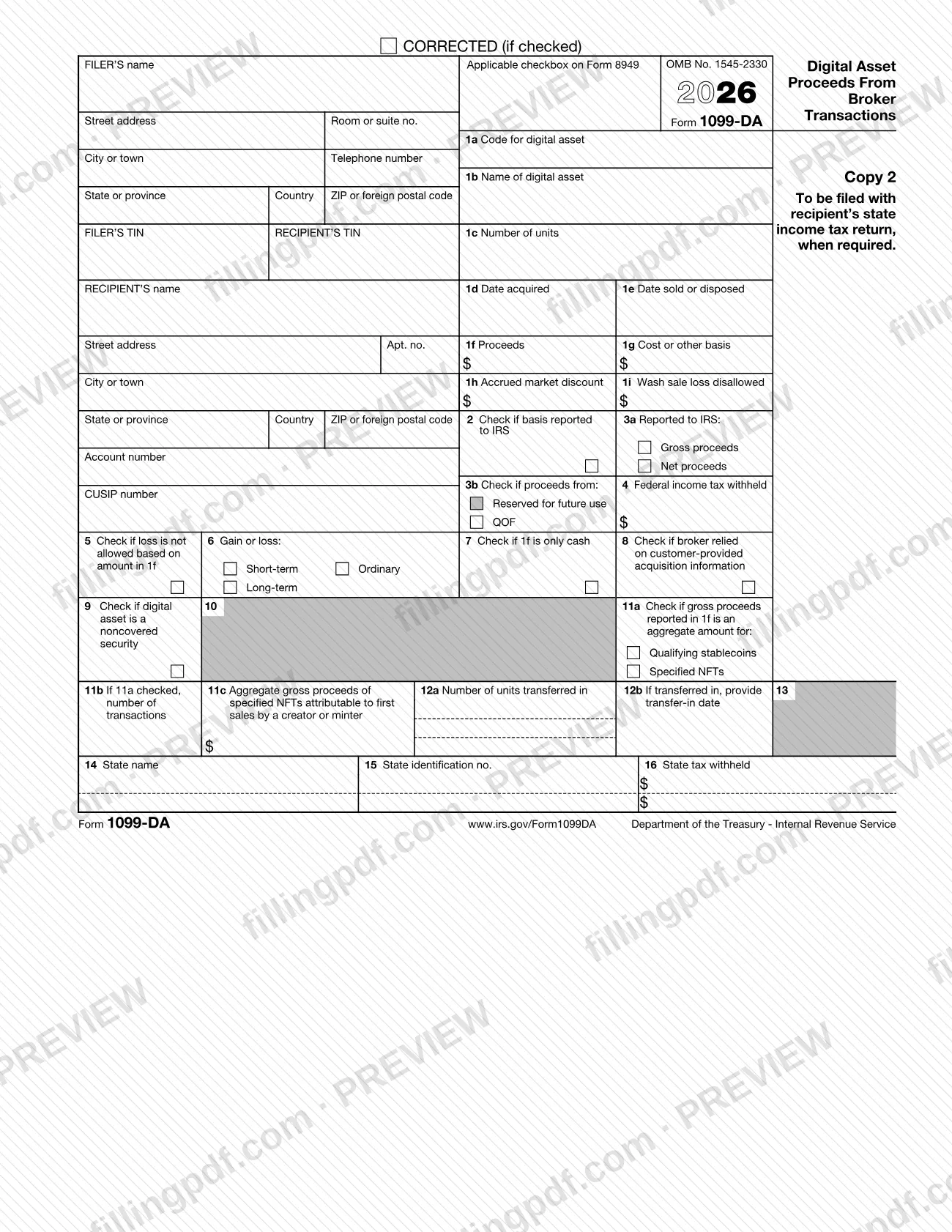
Each form shows the filer, the recipient, the digital asset (boxes 1a to 1c), dates, proceeds, basis, gain or loss and any backup withholding. An Applicable checkbox on Form 8949 tells the recipient where to report the transaction.
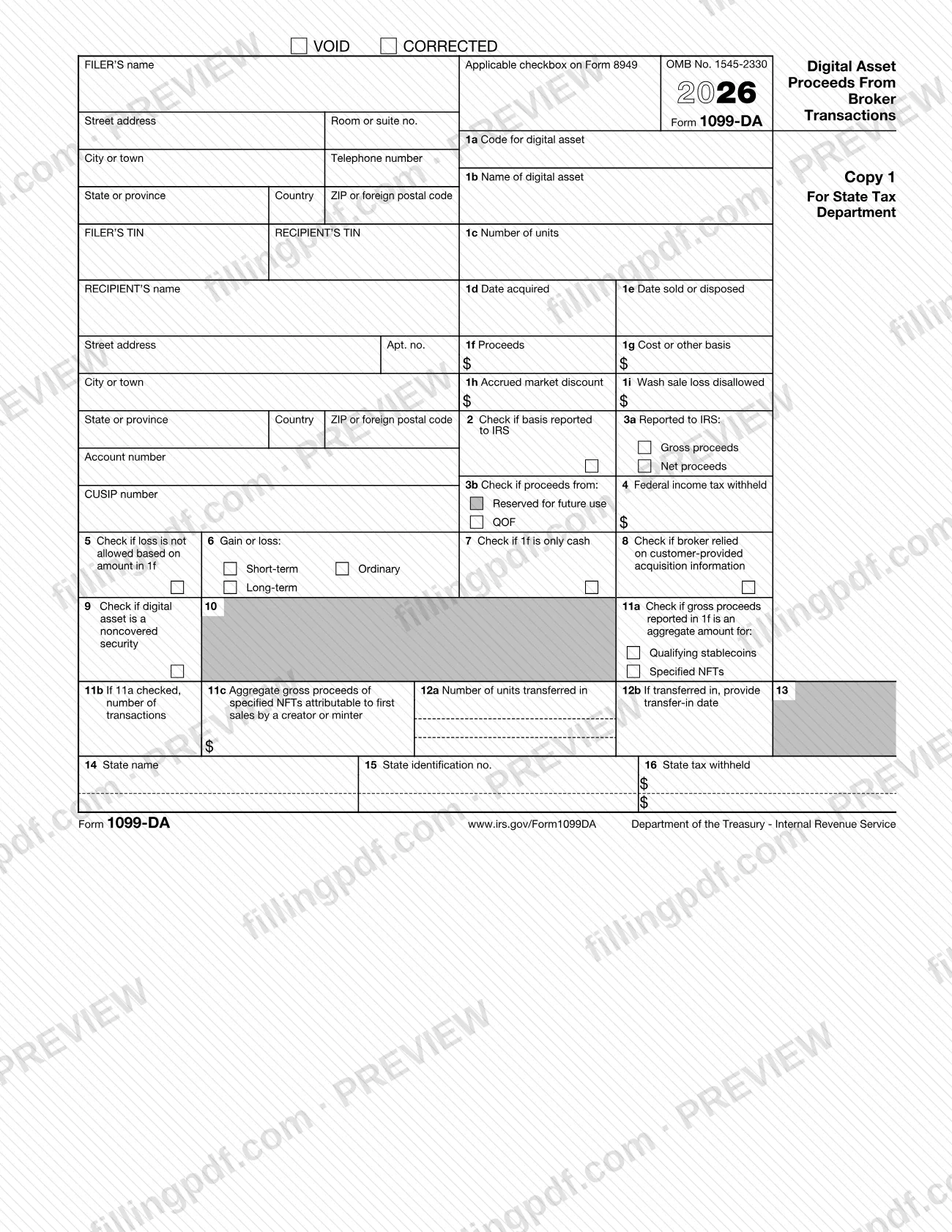
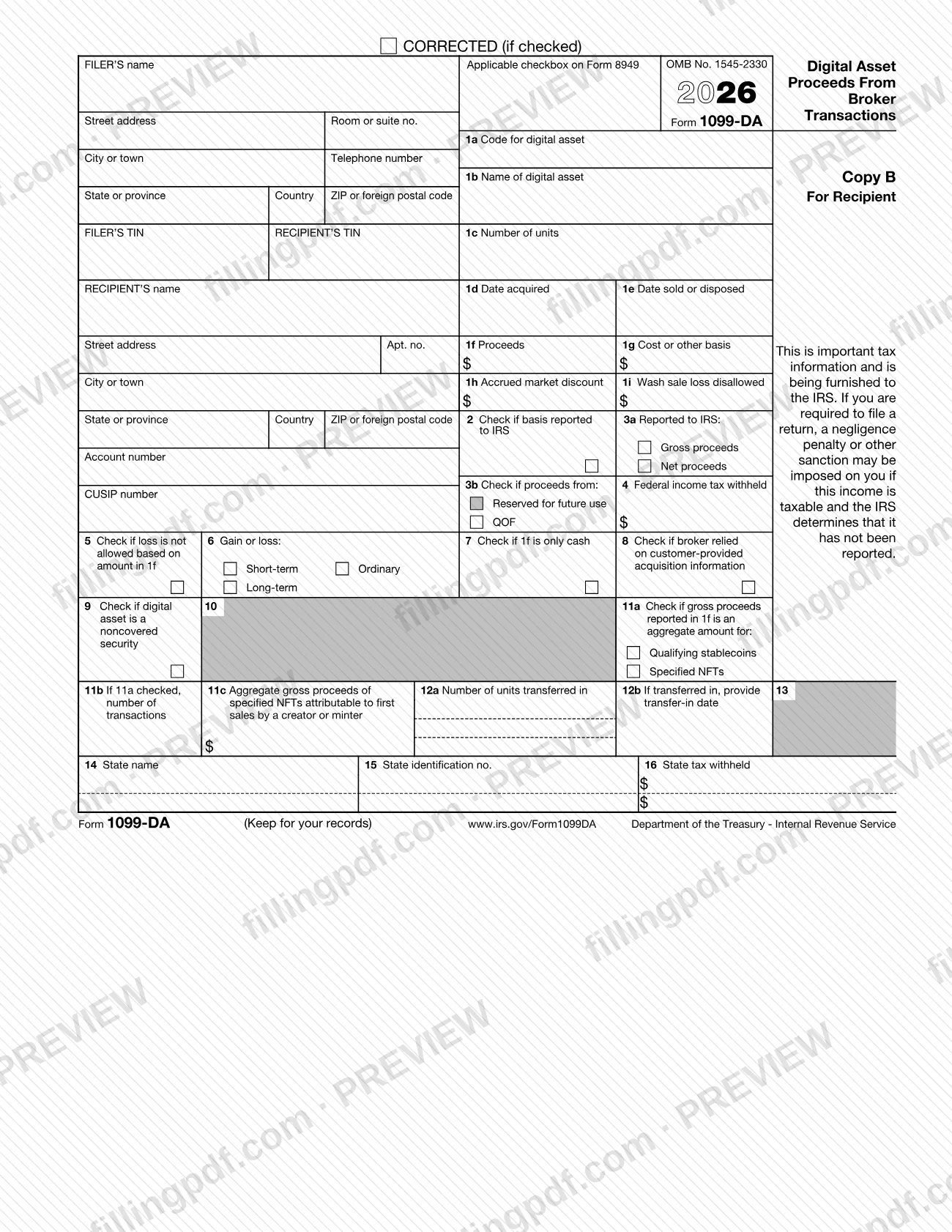
The 2026 revision prints several copies:
- Copy A, for the Internal Revenue Service Center.
- Copy 1, for the State Tax Department.
- Copy B, for the recipient.
- Copy 2, to be filed with the recipient's state income tax return, when required.
The form is not Form 1099-B. When a sale involves a digital asset that is also a security, the instructions say to file Form 1099-DA and not Form 1099-B, with three exceptions (section 1256 contracts, limited-access regulated networks and money market fund shares) described in the instructions.
Who needs to file 1099-DA?
Brokers that effect sales of digital assets for customers after 2025 complete Form 1099-DA. The instructions define a broker as a person who, in the ordinary course of a trade or business, stands ready to effect sales of digital assets made by others. You are a broker if you:
- regularly offer to redeem digital assets that you created or issued;
- effect dispositions of customers' digital assets as an agent, a dealer or a digital asset middleman.
Generally, only a U.S. digital asset broker must report on this form. Digital asset middlemen include processors of digital asset payments and operators of digital asset kiosks. A provider of only proof-of-work or proof-of-stake validation, or of only hardware or software for controlling private keys, is not a middleman.
Brokers are not required to, but may, file for exempt recipients such as charitable organizations, IRAs, HSAs and Archer MSAs, and for sales that fall under a de minimis rule. Rewards and staking payments are not reported on this form.
Customers who receive a Form 1099-DA generally sold, exchanged or otherwise disposed of a financial interest in a digital asset, and should check Yes on the digital asset question on page 1 of Form 1040.
When to file 1099-DA
The trigger is a sale of digital assets that a broker effects for a customer after 2025: for each such sale, the broker completes a Form 1099-DA. The 2026 revision is the one printed for reporting 2026 sales, and the IRS note printed with the form says information returns are filed with the IRS beginning in January of the following year.
The form and the instructions set no single due date. They refer filers to Pub. 1099, General Instructions for Certain Information Returns, for when and where to file and for furnishing statements to recipients (part M). A trustee or middleman of a widely held fixed investment trust must give the trust interest holder a tax information statement for 2026 on or before March 15, 2027.
Brokers using an optional reporting method or a de minimis rule may be excused from reporting some sales; the instructions explain each case.
How to fill out 1099-DA
Enter filer and recipient details
Complete FILER'S name, address, telephone number and FILER'S TIN, then RECIPIENT'S name, address and TIN. A recipient's TIN may be truncated on payee statements, but never on documents filed with the IRS, and a filer's TIN is never truncated.
Add account number and CUSIP
Enter the account number the broker assigned to the customer; it is required if you file more than one Form 1099-DA for recipients with multiple accounts. Enter a CUSIP number only for a tokenized security; otherwise it may be left blank.
Choose the Form 8949 checkbox code
Enter one letter: G (short-term, basis reported to the IRS), H (short-term, basis not reported), J (long-term, basis reported), K (long-term, basis not reported) or Y (holding period unknown).
Identify the digital asset in boxes 1a to 1c
Box 1a: the nine-character DTIF digital token identifier, or 999999999 if the asset is not registered. Box 1b: the full name of the asset. Box 1c: the number of units sold, exchanged or disposed of, to 18 decimal places.
Enter acquisition and sale dates
Box 1d: date acquired in MM/DD/YYYY format; leave it blank for assets acquired on various dates or in the cases the instructions list. Box 1e: date sold or disposed in MM/DD/YYYY format.
Report proceeds in box 1f
Enter gross proceeds reduced by transaction costs; show a loss in parentheses. Then check Gross proceeds or Net proceeds in box 3a (Net proceeds when you reduced proceeds by option premiums).
Report basis in boxes 1g to 1i and 2
Box 1g: adjusted basis. Box 1h: accrued market discount for covered securities that are also debt instruments. Box 1i: wash sale loss disallowed for tokenized securities. Check box 2 if basis is reported to the IRS.
Mark QOF, withholding and loss boxes
Box 3b: check QOF for a Qualified Opportunity Fund interest. Box 4: backup withholding, if any. Box 5 applies to a loss not allowed based on the amount in box 1f in an acquisition of control or capital structure change.
Complete gain or loss and status boxes
Box 6: check Short-term or Long-term, and Ordinary where it may apply. Check box 7 if only cash was paid, box 8 if you relied on customer-provided acquisition information, and box 9 for a noncovered security.
Complete optional reporting boxes 11a to 11c
If you use an optional reporting method, check Qualifying stablecoins or Specified NFTs in box 11a, enter the number of transactions in box 11b and, for first sales by a creator or minter, the aggregate gross proceeds in box 11c.
Enter transfer-in and state information
Box 12a: units transferred into a custodial account, to 18 decimal places. Box 12b: transfer-in date. Boxes 14 to 16: state name, filer's state identification number and state tax withheld, if used. Boxes 10 and 13 are reserved.
Review and download the completed PDF
Check the boxes against the instructions, remembering that Copy A is for information only. Fill out Copies B, 1 and 2 on FillingPDF, then download or print the completed PDF.
How to submit 1099-DA
Brokers file Form 1099-DA with the IRS electronically through the Information Returns Intake System (IRIS) or on paper using official, scannable Copy A, and furnish the recipient copies to customers.
- IRIS Taxpayer Portal: a free web-based system for up to 100 returns at a time, entered manually or by .csv upload. It requires an IRIS Transmitter Control Code (TCC), a 5-digit code usable only for IRIS. See IRS.gov/IRIS and IRS.gov/InfoReturn.
- IRIS Application to Application (A2A): for third-party software or services, up to 100 MB at a time. Apply for an A2A TCC, get an API Client ID and a schema package, then submit IRIS Assurance Testing System (ATS) transmissions.
- Paper: order official forms, with a scannable Copy A, at IRS.gov/EmployerForms. The order limit for most information returns is 10. Do not print and file Copy A from the PDF; the IRS may impose a penalty for returns it cannot scan.
- E-file requirement: the IRIS page says that starting tax year 2023, filers with 10 or more information returns must file them electronically.
- Recipient copies: give Copy B to the recipient. Use Copy 1 for a state tax department that requires a paper copy, and give Copy 2 to the recipient for the state income tax return.
The IRIS help desk is 866-937-4130, Monday to Friday, 7:30 a.m. to 7 p.m. Eastern. FillingPDF lets you fill out and download the PDF; submission follows the channels above.
Common mistakes to avoid
- Printing Copy A from the PDF and filing it with the IRS. Self-printed Copy A is not scannable, and the IRS may impose a penalty for returns it cannot scan.
- Combining several transactions on one form. Each transaction goes on a separate Form 1099-DA, and covered securities with short-term gain or loss, covered securities with long-term gain or loss and noncovered securities each need their own form.
- Reporting both short-term and long-term gain or loss on the same form. Check the Short-term or Long-term box in box 6 and also Ordinary if any part may be ordinary.
- Entering -0- in box 1g when the basis is unknown. Enter -0- only if the asset actually had a basis of zero; leave the box blank when box 9 is checked and you are not reporting basis.
- Checking box 9 for a covered security. Box 9 may be checked only for a noncovered security.
- Leaving box 1e or box 1f blank outside the optional reporting methods. Box 1e must be completed, and box 1f too unless box 11c is completed.
- Listing rewards or staking payments on the form. The instructions say not to report them on Form 1099-DA.
- Entering the customer's wallet address as the account number. The account number is the number the broker assigned to the customer.
- Reporting gross proceeds without reducing them by transaction costs such as fees, commissions and transfer taxes.
Frequently asked questions
What is Form 1099-DA used for?
Form 1099-DA is the IRS information return on which a broker reports a customer's digital asset sales to the customer and the IRS. It shows proceeds and, for covered securities, basis and gain or loss, so the customer can report the transactions on Form 8949 and Schedule D.
Who has to file Form 1099-DA?
A broker that effects sales of digital assets for customers after 2025 files it. Generally, only a U.S. digital asset broker must report. The instructions list exceptions, such as exempt recipients, reportable de minimis sales and rewards or staking payments, which are not reported.
Can I fill out Form 1099-DA online?
You can fill out the PDF online on FillingPDF and download or print it. The IRS says Copies B, 1 and 2 are fillable for furnishing to recipients. FillingPDF does not file anything with the IRS, and Copy A printed from the PDF cannot be filed.
I received a 1099-DA. What do I do with it?
Check Yes on the digital asset question on page 1 of Form 1040 and report each transaction on Form 8949 and Schedule D (Form 1040), using the Applicable checkbox on Form 8949 to pick the right box. If box 1g is blank, work out your basis from your own records.
Can I print Copy A of Form 1099-DA and mail it to the IRS?
No. Copy A in the PDF is for information only, and self-printed copies cannot be scanned. The IRS may penalize filing forms it cannot scan. Order scannable forms at IRS.gov/EmployerForms or e-file through IRIS.
Do I have to e-file Form 1099-DA?
If you have 10 or more information returns to file, the IRS IRIS page says you must file them electronically starting with tax year 2023. IRIS is free and offers a Taxpayer Portal and an Application to Application (A2A) channel.
Does a broker file one Form 1099-DA for each sale?
Generally yes: each transaction goes on a separate form. Covered securities with short-term gain or loss, covered securities with long-term gain or loss and noncovered securities are also reported on separate forms, even if sold together in one transaction.
What do I enter in box 1a if the asset has no DTIF code?
Enter 999999999. Box 1a otherwise takes the nine alphanumeric characters of the digital token identifier issued by the Digital Token Identifier Foundation (DTIF). For specified NFTs under the optional reporting method, also enter 999999999.
Are staking rewards reported on Form 1099-DA?
No. The instructions say not to report rewards and staking payments on Form 1099-DA. The reporting exception for staking transactions under Notice 2024-57 does not apply to rewards or other compensation earned in those transactions.
Ready to fill out 1099-DA?
Fill out 1099-DA now