

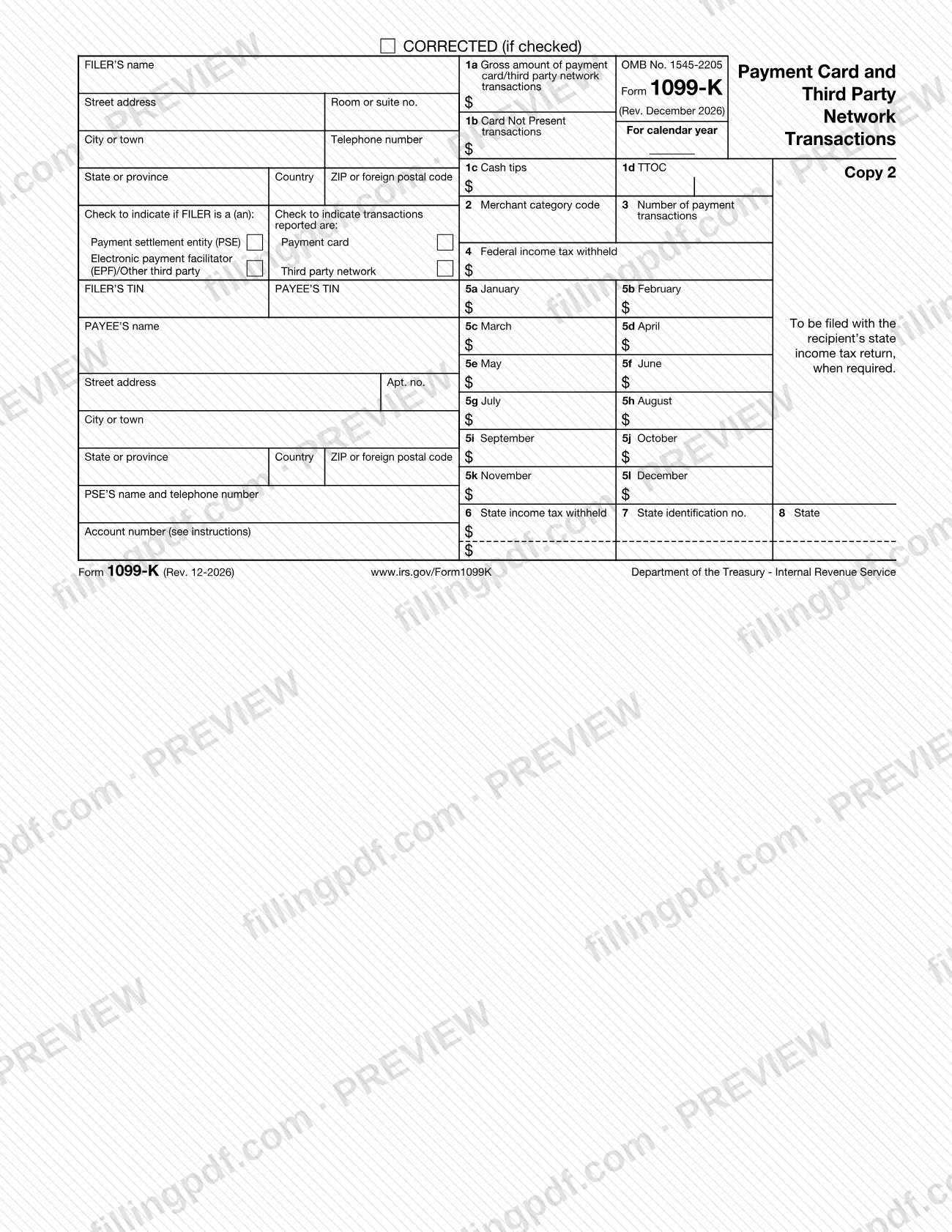
The 1099-K is the Internal Revenue Service (IRS) information return that reports the gross amount of payments a business or individual received through payment cards and third party networks during a calendar year. Payment settlement entities (PSEs) file it with the IRS and furnish a copy to each payee, who uses it when preparing an income tax return. On this page you can fill out the fillable copies of Form 1099-K online on FillingPDF and download or print the completed PDF; the official form and instructions are published by the IRS at IRS.gov/Form1099K.
Last updated
What is 1099-K?
Form 1099-K, Payment Card and Third Party Network Transactions, is the IRS information return on which a payment settlement entity (PSE) reports the gross amount of payment card and third party network transactions settled to a participating payee during a calendar year.
The reporting rule comes from Internal Revenue Code section 6050W. A PSE is a merchant acquiring entity (a bank or other organization obligated to pay participating payees for payment card transactions) or a third party settlement organization (TPSO), the central organization obligated to pay participating payees for third party network transactions.
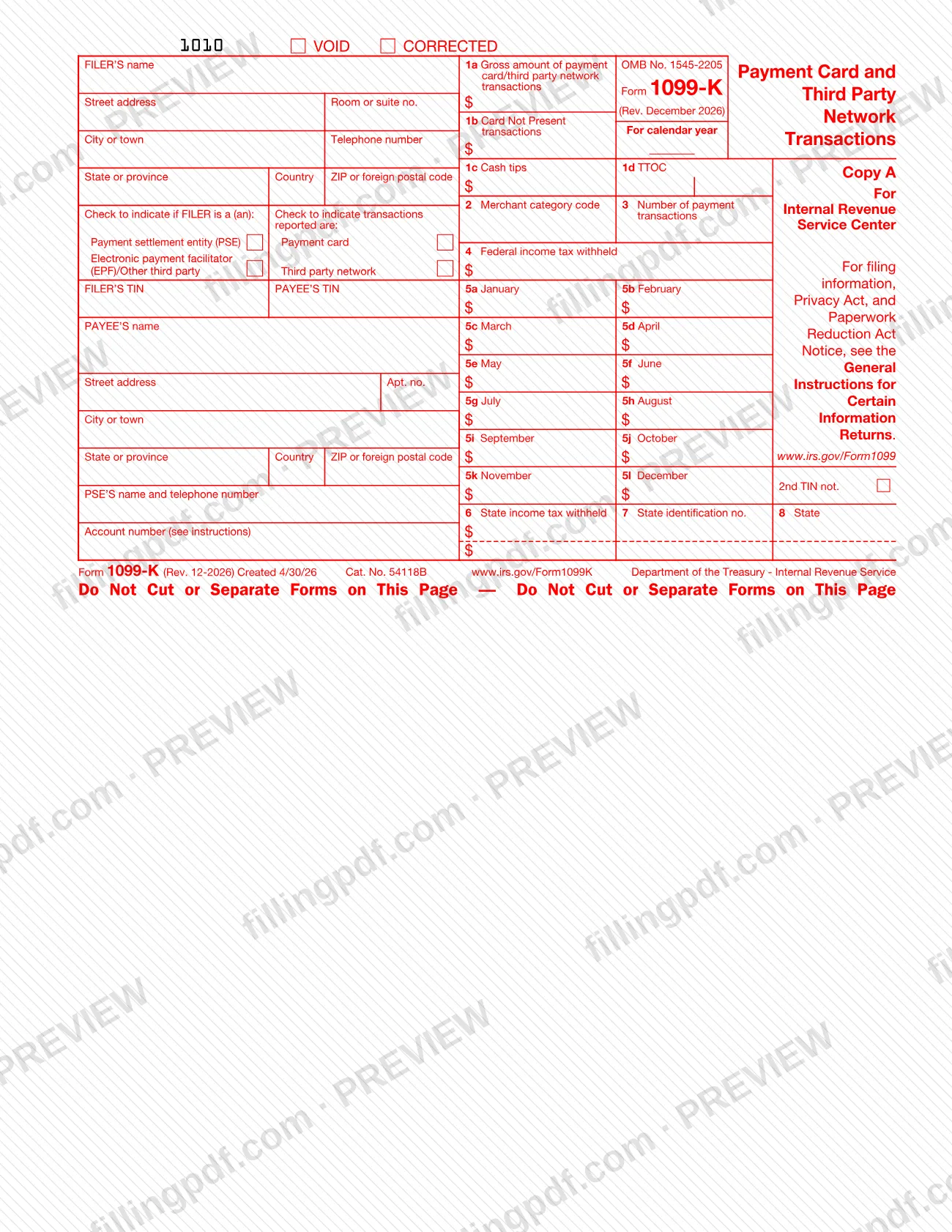
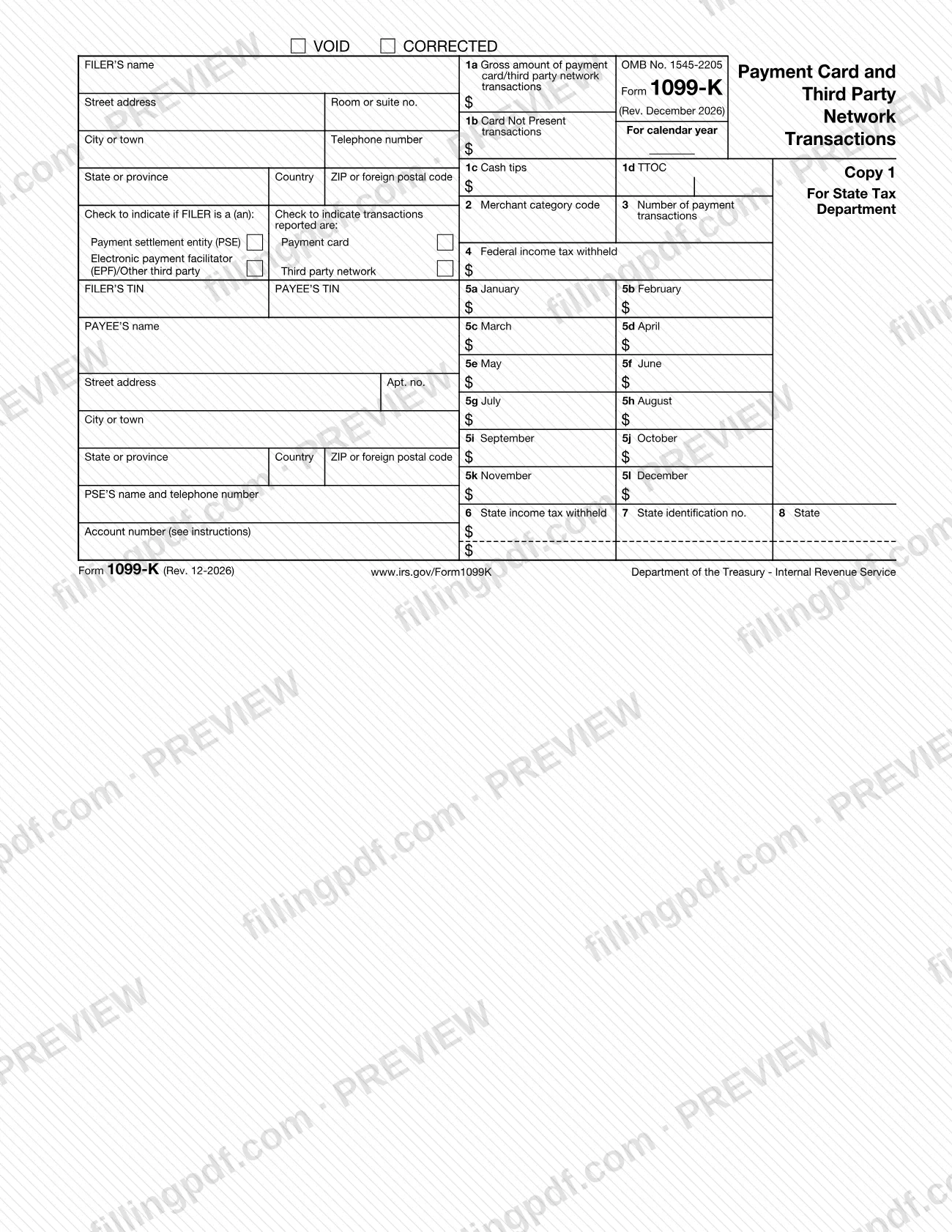
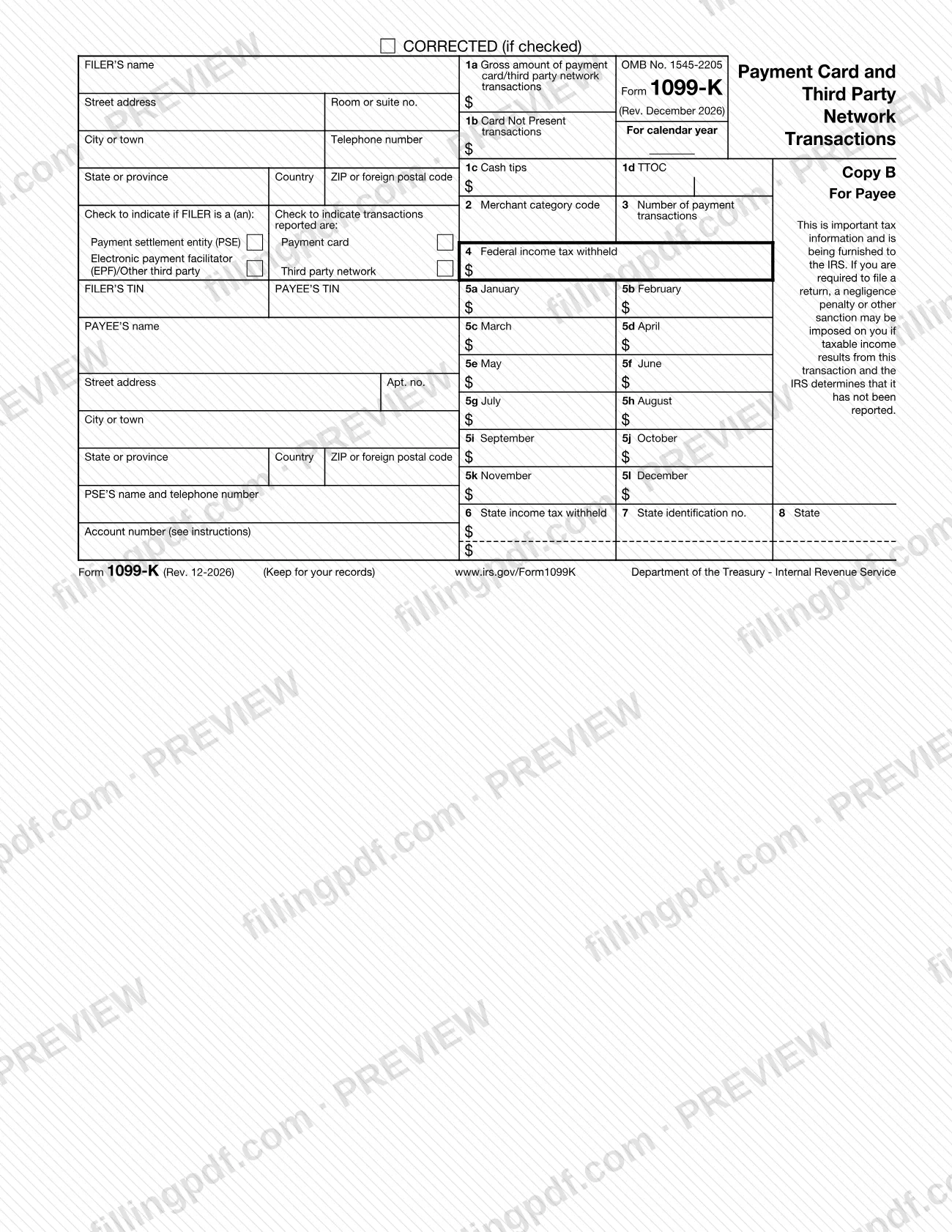
The PDF holds four copies: Copy A for the IRS, Copy 1 for the state tax department, Copy B for the payee and Copy 2 for the payee's state income tax return. The IRS makes Copy A available for information only, and it offers Copies 1, B and 2 as fillable online forms.
The boxes report:
- 1a: gross amount of reportable transactions for the year.
- 1b: the part of that amount where the card was not present.
- 1c and 1d: cash tips and Treasury Tipped Occupation Code(s) (TTOC). Both are new boxes in this revision.
- 2 and 3: merchant category code and number of payment transactions.
- 4: federal income tax withheld (backup withholding).
- 5a–5l: gross amount by month.
- 6–8: state income tax information.
The instructions treat several items as nonreportable, including ATM withdrawals and cash advances against a cardholder's account, and checks issued in connection with a payment card.
Who needs to file 1099-K?
The main filers are payment settlement entities. Every PSE, or other party that submits instructions to transfer funds to the account of a participating payee in settlement of reportable payment transactions, files a Form 1099-K for each participating payee for the calendar year and furnishes a statement to that payee.
- PSEs: merchant acquiring entities, and third party settlement organizations (TPSOs). A TPSO reports a payee's third party network transactions only when the gross amount exceeds the dollar threshold in the instructions and the number of transactions exceeds 200.
- Electronic payment facilitators (EPFs) and other third party payers: if a PSE contracts with one to make the settlement payments, the facilitator files in place of the PSE. The PSE can file by designation if the parties agree in writing, but remains liable for penalties.
- Who is not a TPSO: healthcare networks, in-house accounts payable departments and automated clearing houses do not report under section 6050W.
The instructions also list exceptions for payments made outside the United States to offshore accounts and to foreign payees.
Payees do not file this form. You receive it if you accepted payment cards or got payments through a third party network; contact the filer in the upper-left corner with questions, or the PSE shown above the account number if you do not recognize the filer.
When to file 1099-K
The triggering event is a payment in settlement of a reportable payment transaction: a PSE files Form 1099-K for each participating payee for each calendar year in which it makes such payments. The form has no due date printed on it. The instructions send filers to Pub. 1099, General Instructions for Certain Information Returns, for when and where to file, corrected and void returns, and statements to recipients.
The IRS releases information return forms up to a year before they must be filed, so issuers know what to collect during the year. It also notes that issuers may furnish recipient copies before they can file with the IRS.
Filers with 10 or more information returns, in the aggregate, may be required to e-file them. The IRIS page says that starting with tax year 2023, 10 or more information returns must be filed electronically.
How to fill out 1099-K
Choose the copy to complete
Copies 1, B and 2 are fillable online and meant for state filing, payee statements and your records. Copy A is for information only: do not file a self-printed Copy A with the IRS.
Enter filer information
In the upper-left boxes enter the filer's name, street address, city or town, state or province, country, ZIP or foreign postal code and telephone number. The number must reach a person who knows about the reported payments. Fill in the "For calendar year" space on the right.
Check the filer type box
Check Payment settlement entity (PSE) if the filer is a PSE. Check Electronic payment facilitator (EPF)/Other third party if the filer is an EPF or other third party payer.
Check the transactions reported box
Check Payment card or Third party network. If a payee has both types, complete a separate form for each, reporting the gross amount of that type.
Enter TINs and payee details
Enter the FILER'S TIN and the PAYEE'S TIN, then the payee's name, street address, apt. no., city or town, state or province, country and ZIP or foreign postal code. Country codes are at IRS.gov/CountryCodes.
Add PSE name and account number
If the filer is an EPF or other third party, enter the PSE's name and telephone number in the box above Account number. Enter an account number if you file more than one form for a payee; the IRS encourages one on every form.
Report gross amounts in boxes 1a and 1b
Box 1a: the gross amount of reportable transactions for the calendar year, with no adjustments for fees, refunds or credits. Box 1b: the part where the card was not present or the number was keyed in; leave it empty for third party network transactions.
Complete cash tips and TTOC
Box 1c: total cash tips, which are included in box 1a. Box 1d: up to two Treasury Tipped Occupation Codes; if any tips came from a nonqualifying occupation, enter 000 as one code.
Enter MCC and transaction count
Box 2: the four-digit merchant category code, unless you are a TPSO or use no classification system. Box 3: the number of payment transactions, not counting refunds.
Enter backup withholding in box 4
Enter federal income tax withheld as backup withholding when the payee did not furnish a correct TIN. Leave it empty if nothing was withheld.
Enter monthly amounts
In boxes 5a through 5l, enter the gross amount of reportable transactions for January through December.
Add state information and 2nd TIN
Boxes 6–8 (state, state identification no., state income tax withheld) cover up to two states and are optional for the IRS. Mark the 2nd TIN not. box only if the IRS notified you twice within 3 calendar years of an incorrect payee TIN.
Review and download the completed PDF
Check names, TINs, box amounts and the checkboxes, and mark VOID or CORRECTED where applicable (see Pub. 1099). Download or print the completed PDF from FillingPDF and send it through the channels under How to submit.
How to submit 1099-K
A filer sends Form 1099-K to the IRS electronically or on official paper copies, and furnishes a statement to each payee.
- E-file through IRIS: the free Information Returns Intake System accepts Form 1099-K for tax year 2022 and later; see https://www.irs.gov/filing/e-file-information-returns-with-iris. The IRIS Taxpayer Portal takes up to 100 returns at a time, entered manually or by .csv upload, and requires an IRIS Transmitter Control Code (TCC). IRIS Application to Application (A2A) lets software or a third-party service send up to 100 MB at a time. IRIS help desk: 866-937-4130, Monday–Friday, 7:30 a.m.–7 p.m. Eastern time.
- Paper: order official forms, which include a scannable Copy A, at IRS.gov/EmployerForms. Do not print Copy A from this PDF and file it; the IRS may impose a penalty for forms it cannot scan. The order limit for most information returns is 10 because of the e-file requirement.
- State tax department: if a state requires a paper copy, use Copy 1. Boxes 6–8 are for filers in the Combined Federal/State Filing Program (see Pub. 1220).
- Payee: furnish Copy B, and Copy 2 for the payee's state return. Statements may be furnished electronically instead of on paper.
FillingPDF lets you fill out and download the PDF copies; submission follows the channels above.
Common mistakes to avoid
- Printing Copy A from the PDF and filing it with the IRS; self-printed Copy A cannot be scanned and the IRS may impose a penalty.
- Reporting payment card and third party network transactions for the same payee on one form; the instructions require a separate Form 1099-K for the gross amount of each type.
- Truncating the payee's TIN on the copy filed with the IRS, or truncating the filer's TIN on any form; truncation is allowed only on payee statements.
- Reducing the gross amount in box 1a or 1b for fees, refunds, credits, discounts or shipping; gross means no adjustments.
- Completing box 2 as a TPSO or when no industry classification system is used; the instructions say not to complete it.
- Leaving out the PSE's name and telephone number above the account number when an EPF or other third party is the filer.
- Checking the 2nd TIN not. box when both IRS notices came in the same year, or related to returns for the same year; that counts as one notice.
- Entering box 1c cash tips that are not included in box 1a, or omitting code 000 in box 1d when any tips came from a nonqualifying occupation.
Frequently asked questions
What is a 1099-K and who sends it?
A 1099-K reports payment card and third party network payments made to you during the calendar year. A payment settlement entity (PSE), such as a merchant acquirer or third party settlement organization, files it with the IRS and furnishes you a copy under Internal Revenue Code section 6050W.
I received a Form 1099-K. What should I do with it?
Use it when preparing your income tax return, following your return's instructions. If you have questions about the amounts, contact the filer in the upper-left corner; if you do not recognize it, contact the PSE named above the account number. The IRS pages are IRS.gov/KnowYour1099K and IRS.gov/businesses/what-to-do-with-form-1099-k.
Can I fill out Form 1099-K online?
Yes. The IRS offers Copies 1, B and 2 as fillable PDFs, and you can complete them online on FillingPDF and download them. FillingPDF does not file with the IRS or send statements to payees, and Copy A is not for filing from a self-printed PDF.
Can I print Copy A of Form 1099-K and mail it to the IRS?
No. Copy A in the PDF is for information only, and self-printed copies are not scannable. The IRS may impose a penalty for forms it cannot scan. Order official forms at IRS.gov/EmployerForms or e-file, for example through IRIS.
Who has to file Form 1099-K?
PSEs file it, meaning merchant acquiring entities and third party settlement organizations. An electronic payment facilitator or other third party files instead when the PSE contracts with it to make the settlement payments. Healthcare networks, in-house accounts payable departments and ACHs do not qualify as TPSOs.
Do third party networks report every payee on a 1099-K?
No. A TPSO reports a payee's third party network transactions only when the gross amount exceeds the dollar threshold in the instructions and the number of such transactions exceeds 200. Payment card transactions are reportable without that threshold.
Do I have to e-file Form 1099-K?
Possibly. The IRS says you may be required to e-file if you have 10 or more information returns in the aggregate, and the IRIS page states that starting with tax year 2023 such filings must be electronic. IRIS is the IRS's free e-file system.
What are the new boxes 1c and 1d on Form 1099-K?
Box 1c reports total cash tips (included in box 1a). Box 1d reports up to two Treasury Tipped Occupation Codes. Payees use both to figure the deduction for qualified tips in Part II of Schedule 1-A (Form 1040); code 000 alone means the tips are not qualified.
Ready to fill out 1099-K?
Fill out 1099-K now