
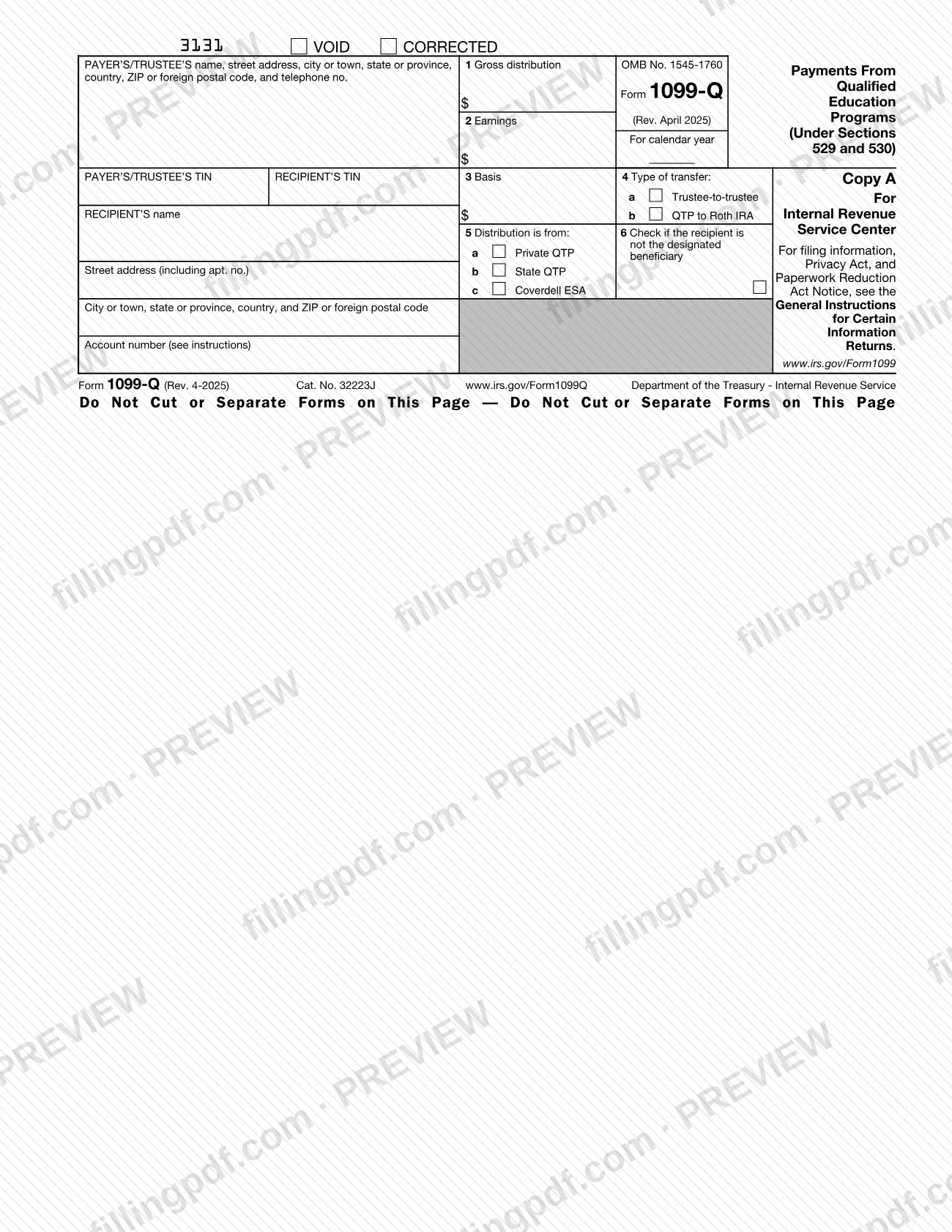
Form 1099-Q, Payments from Qualified Education Programs (Under Sections 529 and 530), is the Internal Revenue Service (IRS) information return that reports distributions from qualified tuition programs (QTPs) under section 529 and from Coverdell education savings accounts (ESAs) under section 530. The program officer or the Coverdell trustee that made the distribution files it and furnishes a copy to the recipient. On this page you can fill out the 1099-Q online on FillingPDF and download or print the completed PDF; the IRS publishes the form and its instructions at IRS.gov/Form1099Q.
Last updated
What is 1099-Q?
Form 1099-Q, Payments from Qualified Education Programs (Under Sections 529 and 530), is the IRS information return on which a QTP or a Coverdell ESA trustee reports the gross distribution, earnings and basis paid out of an education account during the calendar year.
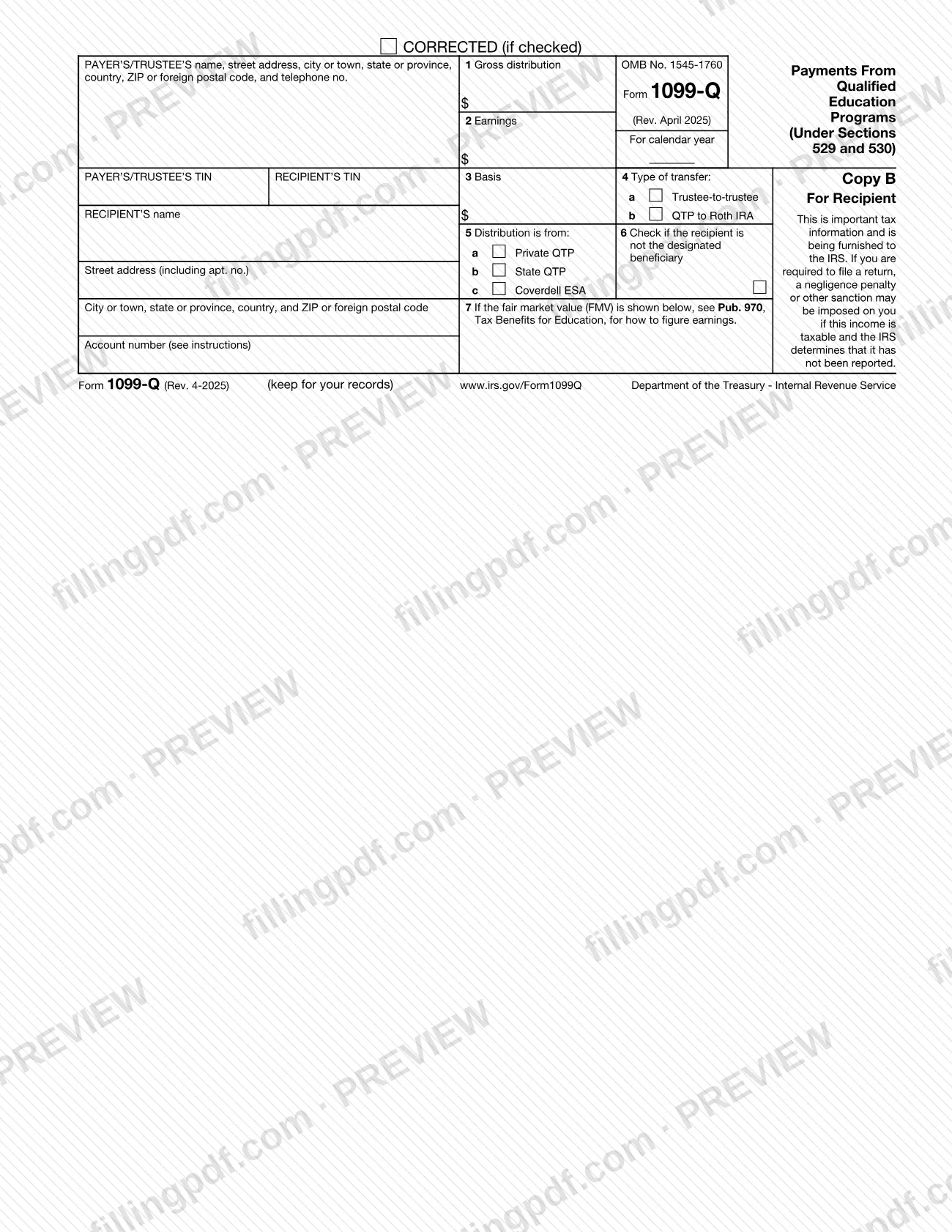
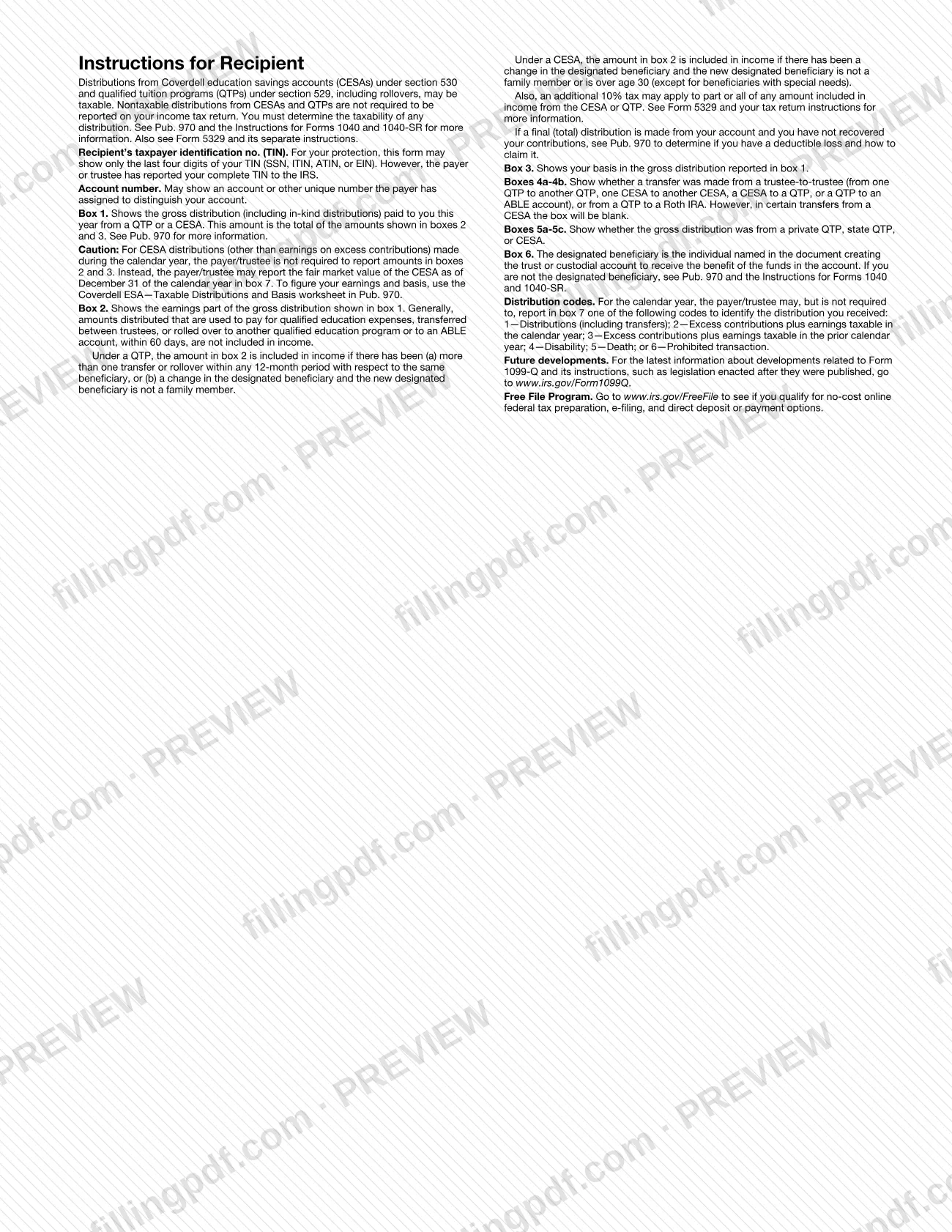
The form carries OMB No. 1545-1760 and is printed in copies: Copy A goes to the IRS and Copy B goes to the recipient, with the recipient's instructions on the back. Its boxes are:
- Box 1, gross distribution, including in-kind distributions.
- Box 2, the earnings part of the distribution.
- Box 3, basis.
- Boxes 4a and 4b, type of transfer (trustee-to-trustee, or QTP to Roth IRA).
- Boxes 5a to 5c, whether the distribution is from a private QTP, a state QTP or a Coverdell ESA.
- Box 6, a checkbox for a recipient who is not the designated beneficiary.
- Box 7, the fair market value (FMV) of a Coverdell ESA, or an optional distribution code from 1 to 6.
The form does not decide whether a distribution is taxable. The IRS tells recipients to determine taxability themselves using Pub. 970, the Instructions for Forms 1040 and 1040-SR, and Form 5329. Nontaxable distributions do not have to be reported on the recipient's income tax return.
The instructions say not to file Form 1099-Q for a change in the designated beneficiary of a QTP account when the new beneficiary is a member of the former beneficiary's family.
Who needs to file 1099-Q?
Form 1099-Q is filed by the payer or trustee, not by the person who receives the money. The IRS instructions name two groups:
- An officer or employee, or the designee of an officer or employee, who has control of a program established by a state or an eligible educational institution and who made a distribution from a QTP.
- The trustee of a Coverdell ESA, for distributions made from that account.
Recipients, who are the account owner or the designated beneficiary depending on the case, do not file the form. They receive Copy B. For a QTP, the designated beneficiary is listed as the recipient only when the distribution goes directly to the beneficiary, to an eligible educational institution for the beneficiary's benefit, or by trustee-to-trustee transfer to a Roth IRA for the beneficiary; otherwise the account owner is the recipient. For a Coverdell ESA, the designated beneficiary is the recipient.
Do not file Form 1099-Q for a change of designated beneficiary on a QTP when the new beneficiary is a family member of the former one. For a Coverdell ESA the new beneficiary must be a family member and under age 30, except beneficiaries with special needs. The instructions list who counts as family: the spouse, children, stepchildren, foster children and their descendants, siblings and their children, parents, their siblings and ancestors, stepparents, in-laws, the spouse of any of these, and any first cousin.
When to file 1099-Q
File Form 1099-Q for a calendar year in which you, as the QTP officer or Coverdell ESA trustee, made a distribution; the form is completed "For calendar year" and a copy must also be furnished to each recipient. The Instructions for Form 1099-Q do not repeat the due dates and refer to the current General Instructions for Certain Information Returns for when and where to file, statements to recipients, and corrected and void returns.
Two timing rules appear in the form's own instructions. In a trustee-to-trustee transfer between qualified education programs, the distributing program must give the recipient a statement of the earnings portion within 30 days of the distribution or by January 10, whichever is earlier. A separate Form 1099-Q is filed for each trustee-to-trustee transfer. The instructions are a continuous use revision for tax year 2025 and later years until a new revision is issued.
Documents you need
- Form 1096, printed from the IRS website, to accompany black-and-white Copy A when a filer with a low volume of recipients files Form 1099-Q on paper. Not needed for electronic filing through IRIS.
How to fill out 1099-Q
Set the form status and year
Leave the VOID and CORRECTED boxes empty on an original form; check CORRECTED only when correcting one already filed. Enter the calendar year next to For calendar year.
Enter the payer's or trustee's information
For a QTP, enter the name and EIN of the QTP; if a state program uses the state's EIN, put the state on the first name line and the program on the second. For a Coverdell ESA, enter the name and EIN of the trustee, plus the address and telephone number.
Enter the recipient's details
Enter the recipient's name, TIN and address. For a QTP, list the designated beneficiary only for a direct payment to them, to an eligible educational institution for their benefit, or to a Roth IRA for them; otherwise list the account owner. For a Coverdell ESA, list the designated beneficiary.
Add the account number
Enter the account number. It is required when you file more than one Form 1099-Q for a recipient with multiple accounts, and the IRS encourages it on all forms.
Enter the gross distribution
In box 1, enter the gross distribution paid this year, in cash or in kind, including tuition credits, payment vouchers, waivers and refunds. It equals box 2 plus box 3.
Enter earnings in box 2
Figure earnings with the earnings ratio described in the instructions. Enter zero if there are no earnings, or if there is a loss and it is not the final year of distributions.
Enter basis in box 3
If you can determine basis, enter the basis included in box 1. The amount in box 3 must equal box 1 minus box 2.
Check the type of transfer
Check 4a for a direct trustee-to-trustee transfer between QTPs, from a QTP to an ABLE account, or between Coverdell ESAs or from one to a QTP. Check 4b for a transfer from a QTP to a Roth IRA for the QTP beneficiary.
Show where the distribution came from
Check 5a for a private QTP established by one or more private eligible educational institutions, 5b for a state QTP, or 5c for a Coverdell ESA.
Mark box 6 if needed
Check box 6 if the recipient is not the designated beneficiary under the QTP or Coverdell ESA.
Complete box 7 if applicable
For a Coverdell ESA without reported earnings, enter the year-end FMV and label it "FMV". You may also enter one distribution code, 1 to 6, such as 1 for distributions or 4 for disability.
Review and download the PDF
Check that boxes 1 to 3 add up, that the TINs and the transfer and source boxes are right, then download or print the completed PDF from FillingPDF and file it as described under How to submit.
How to submit 1099-Q
Payers and trustees can file Form 1099-Q electronically through the IRS Information Returns Intake System (IRIS), or on paper when the IRS instructions allow it.
- IRIS Taxpayer Portal: a free, web-based system for up to 100 returns at a time, entered manually or uploaded as a .csv file. It requires a 5-digit IRIS Transmitter Control Code (TCC). See IRS.gov/IRIS.
- IRIS Application to Application (A2A): for third-party software or services, up to 100 MB at a time. It requires an IRIS A2A TCC, an API Client ID, a schema package and successful Assurance Testing System transmissions.
- Paper: because of the very low volume of paper 1099-Q forms, the IRS converted the form to an online fillable format at IRS.gov/Form1099Q. A filer with a low volume of recipients who files on paper can send black-and-white Copy A printed from the IRS website with Form 1096, also printed from the IRS website. Red-ink forms are not mentioned.
- Recipient copy: send Copy B to the recipient, or an acceptable substitute statement. A recipient's TIN may be truncated on the recipient copy but never on anything filed with the IRS.
If you have 10 or more information returns in total, you must file them electronically starting with tax year 2023. For IRIS help, call 866-937-4130, Monday to Friday, 7:30 a.m. to 7 p.m. Eastern time. FillingPDF lets you fill out and download the PDF; submission follows the IRS channels above.
Common mistakes to avoid
- Entering zero in boxes 2 and 3 for a Coverdell ESA distribution when earnings and basis are not reported; the instructions say to leave them blank and report the year-end FMV in box 7, labeled "FMV".
- Entering a loss in box 2 when it is not the final year for distributions from the account; the instructions say to enter zero unless it is the final year.
- Box 3 that does not equal box 1 minus box 2; the instructions require basis to match that difference when it can be determined.
- Filing Form 1099-Q for a change of designated beneficiary when the new beneficiary is a family member of the former one.
- Combining a returned Coverdell ESA contribution plus earnings with the rest of the account in one form; the instructions call for two Forms 1099-Q.
- Reporting a trustee-to-trustee transfer on the same form as other distributions; a separate Form 1099-Q is filed for each such transfer.
- Truncating the payer's or trustee's TIN, or any TIN on documents filed with the IRS; truncation is allowed only on payee statements, and only for the recipient's TIN.
- Listing the designated beneficiary as recipient of a QTP distribution that was not paid to them, to an eligible educational institution for them, or to their Roth IRA; the account owner is listed otherwise.
- Checking box 4a for a Coverdell ESA distribution without records showing it was a trustee-to-trustee transfer; the instructions say to leave it blank.
Frequently asked questions
What is Form 1099-Q used for?
Form 1099-Q reports distributions from section 529 qualified tuition programs and section 530 Coverdell education savings accounts. The payer or trustee files it with the IRS and gives a copy to the recipient, showing gross distribution, earnings and basis.
Who has to file Form 1099-Q?
An officer or employee, or a designee, who controls a program established by a state or eligible educational institution and who made a QTP distribution must file it. A Coverdell ESA trustee must file it for ESA distributions. The account recipient does not file it.
Do I have to report a 1099-Q on my tax return?
Not necessarily. The form says nontaxable distributions from CESAs and QTPs do not have to be reported on your income tax return, but you must determine taxability yourself. See Pub. 970, the Instructions for Forms 1040 and 1040-SR, and Form 5329.
What is the difference between box 4a and box 4b on Form 1099-Q?
Box 4a reports a direct trustee-to-trustee transfer, such as from one QTP to another or from a QTP to an ABLE account. Box 4b is new in the April 2025 revision and reports a QTP to Roth IRA transfer for the QTP beneficiary.
What do I enter for a Coverdell ESA if earnings are not reported?
Leave boxes 2 and 3 blank. Do not enter zero. Report the fair market value of the account at the end of the year in box 7 and label the amount "FMV".
Must Form 1099-Q be e-filed?
If you file 10 or more information returns in total, you must file them electronically starting with tax year 2023. The IRS offers IRIS, through its Taxpayer Portal or A2A, for e-filing Form 1099-Q.
Who is listed as the recipient on a QTP distribution?
The designated beneficiary, only if the money goes directly to them, to an eligible educational institution for their benefit, or by trustee-to-trustee transfer to a Roth IRA for them. In every other case, list the account owner.
Can I fill out Form 1099-Q online on FillingPDF?
Yes. You can fill out the PDF online on FillingPDF and download or print it. FillingPDF does not file the form or send copies to recipients; you do that through the IRS channels, such as IRIS or the paper process.
Ready to fill out 1099-Q?
Fill out 1099-Q now