
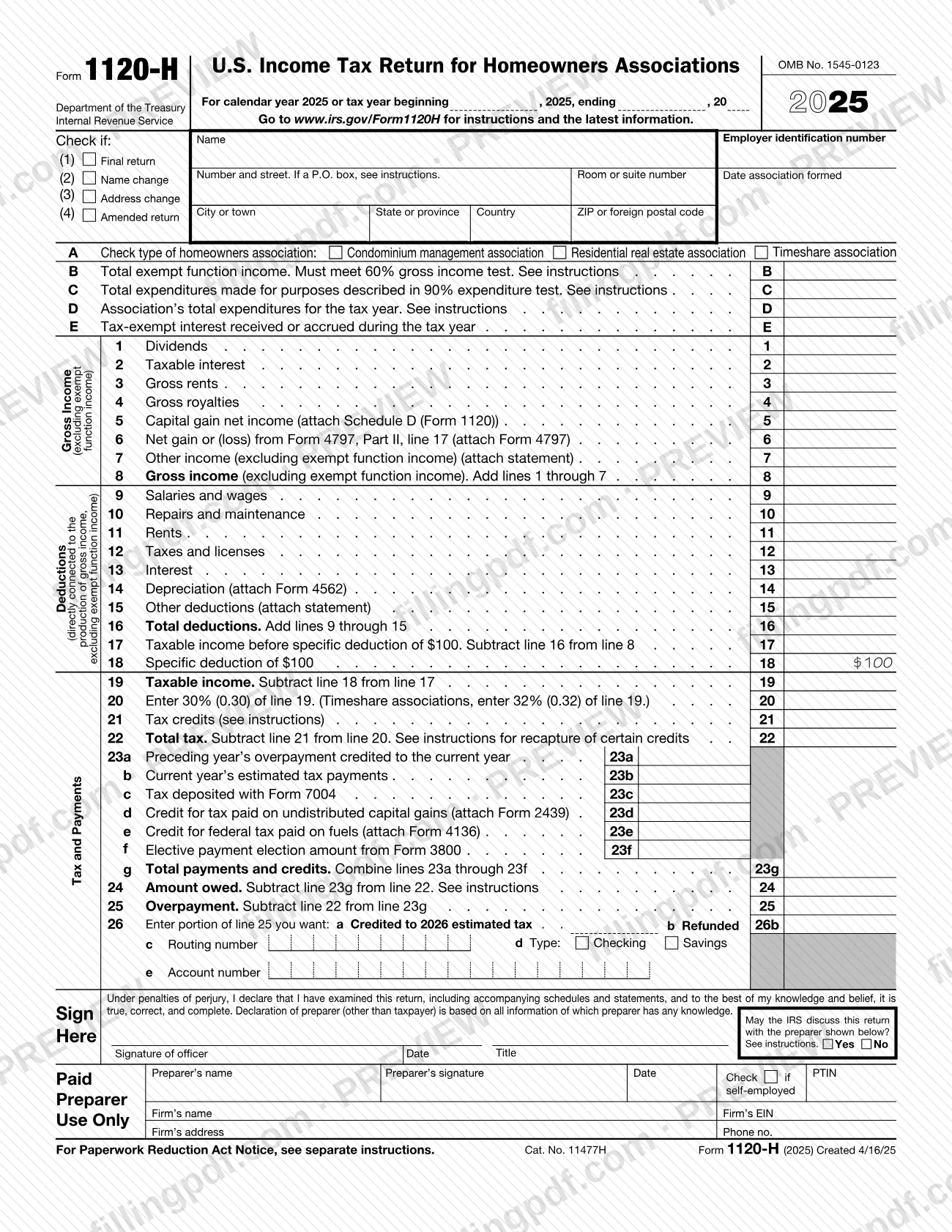
Form 1120-H, U.S. Income Tax Return for Homeowners Associations, is the Internal Revenue Service (IRS) return that a condominium, residential real estate or timeshare association files to take advantage of the tax benefits of section 528. Filing it is the association's election: the election is made separately for each tax year, and an association that does not make it files another income tax return, such as Form 1120. On FillingPDF you can fill out the 2025 form online and download or print the completed PDF; the IRS publishes the form and its instructions at www.irs.gov/Form1120H.
Last updated
What is 1120-H?
Form 1120-H, U.S. Income Tax Return for Homeowners Associations, is the IRS return that a condominium management, residential real estate management or timeshare association files to elect section 528 treatment, which lets it leave exempt function income out of its gross income.
The Internal Revenue Service (IRS) issues the form under OMB No. 1545-0123. A homeowners association makes the election by filing a properly completed Form 1120-H, and it must make it separately for each tax year. Once the return is filed, the association cannot revoke the election for that year unless the IRS consents, which it may request through a ruling request.
To qualify, at least 60% of the association's gross income for the year must be exempt function income, at least 90% of its expenses must go to acquiring, building, managing, maintaining and caring for association property, and no private shareholder or individual may profit from its net earnings except as the instructions allow. Exempt function income is mainly membership dues, fees or assessments paid by members as owners, not as customers of the association's services.
Taxable income is gross income without exempt function income, less deductions directly connected with producing that income. The form reports it in four blocks: gross income (lines 1 to 8), deductions (lines 9 to 16), taxable income and tax (lines 17 to 22), and payments, amount owed or overpayment (lines 23 to 26).
Form 1120-H is an alternative to Form 1120, U.S. Corporation Income Tax Return. The instructions suggest comparing the total tax figured on each form and filing the one that gives the lowest tax.
Who needs to file 1120-H?
A homeowners association that wants the section 528 benefits files Form 1120-H. The instructions recognize three types, which you mark in item A:
- a condominium management association that operates the property of a condominium project substantially all of whose units are homes for individuals;
- a residential real estate management association that operates a subdivision, development or similar area substantially all of whose lots or buildings are homes for individuals;
- a timeshare association, other than a condominium management association, that manages property whose members hold timeshare rights or ownership interests.
The association must also pass the 60% gross income test and the 90% expenditure test described in the instructions, and no private shareholder or individual may profit from its net earnings except as the instructions allow.
Do not use this form if the association is tax exempt under section 501(a); the instructions refer to section 6033 and its regulations for that case. An association that does not elect to use Form 1120-H must file the applicable income tax return, for example Form 1120.
An authorized association officer signs the return. A receiver, trustee or assignee who files for the association signs instead of an officer.
When to file 1120-H
Generally, file Form 1120-H by the 15th day of the 4th month after the end of the association's tax year. An association with a fiscal year ending June 30 files by the 15th day of the 3rd month after year end, and a short tax year ending in June is treated as ending June 30. If the due date falls on a Saturday, Sunday or legal holiday, you may file on the next business day.
The 2025 form covers calendar year 2025 and fiscal years that begin in 2025 and end in 2026. For a fiscal or short year, fill in the tax year space at the top.
To request more time to file, submit Form 7004, generally by the regular due date; the extension does not extend the time to pay. The election must generally be made by the due date of the return, including extensions. An association that misses it can get an automatic 12-month extension to make the election if it takes corrective action within 12 months of the due date, including extensions (Regulations section 301.9100-2).
Any tax due must be paid by the due date for filing, not counting extensions.
Documents you need
- Schedule D (Form 1120): attach if the association reports capital gain net income on line 5.
- Form 4797: attach if the association reports a net gain or (loss) from Form 4797, Part II, line 17, on line 6.
- A statement listing the type and amount of other income: attach it for line 7.
- Form 4562: attach if the association claims depreciation or section 179 expense on line 14.
- A statement listing by type and amount all other allowable deductions: attach it for line 15.
- The form for each credit claimed on line 21, such as Form 1118 (foreign tax credit) or Form 3800 (general business credit).
- Form 2439: attach if the association claims credit for tax paid on undistributed capital gains on line 23d.
- Form 4136: attach if the association claims the credit for federal tax paid on fuels on line 23e.
- Schedule D (Form 1120), Form 8949 and Form 8997: attach all three if the association deferred a capital gain in a qualified opportunity fund.
- A copy of the court order or instructions authorizing signature: attach if a receiver or trustee in bankruptcy signs for the association.
How to fill out 1120-H
Enter the tax year and check boxes
At the top, enter the calendar year 2025 or the fiscal or short tax year dates. Check any that apply: (1) Final return, (2) Name change, (3) Address change, (4) Amended return.
Enter name, address and EIN
Enter the association's true name as set out in its charter or other legal document, its address with any suite or room number, its employer identification number (EIN), and the date the association was formed. If it has no EIN yet, enter "Applied for" and the date you applied.
Check the association type
In item A, check Condominium management association, Residential real estate association or Timeshare association.
Complete items B through E
Enter total exempt function income in item B (it must meet the 60% gross income test) and expenditures for the 90% expenditure test in item C. Enter total expenditures for the year in item D and tax-exempt interest received or accrued in item E.
Report gross income on lines 1–8
Enter dividends, taxable interest, gross rents and gross royalties on lines 1 to 4, then capital gain net income (line 5), Form 4797 gain or loss (line 6) and other income (line 7). Add lines 1 through 7 on line 8, excluding exempt function income.
Enter deductions on lines 9–16
Enter salaries and wages, repairs and maintenance, rents, taxes and licenses, interest, depreciation and other deductions on lines 9 to 15. Add them on line 16; they must be directly connected with producing gross income, excluding exempt function income.
Figure taxable income and tax
Subtract line 16 from line 8 on line 17, subtract the specific deduction on line 18 and enter taxable income on line 19. On line 20 multiply line 19 by the percentage printed there; timeshare associations use the separate percentage printed on that line, and a zero or negative line 19 is entered as -0-.
Enter credits and total tax
Enter applicable credits on line 21 and attach the forms that support them. Subtract line 21 from line 20 on line 22, adding any credit recapture the instructions require.
Report payments on lines 23a–23g
Enter the prior year's overpayment (23a), estimated tax payments (23b), tax deposited with Form 7004 (23c), Form 2439 credit (23d), Form 4136 credit (23e) and the Form 3800 elective payment amount (23f). Combine lines 23a through 23f on line 23g.
Complete amount owed or overpayment
If line 22 is larger than line 23g, enter the amount owed on line 24. If line 23g is larger, enter the overpayment on line 25, then split it between line 26a (credited to 2026 estimated tax) and line 26b (refunded), with the routing number, account type and account number on lines 26c to 26e for direct deposit.
Sign and complete the preparer section
An authorized officer signs and dates the return and enters a title; check Yes or No for discussing the return with the preparer. A paid preparer completes the Paid Preparer Use Only area; if an association officer prepared the return, leave it blank.
Review, attach schedules and download
Check every entry and attach the supporting forms and statements, with the association's name and EIN on each statement. Download or print the completed PDF from FillingPDF and submit it as described under How to submit.
How to submit 1120-H
You can file Form 1120-H by mail or electronically.
- By mail: send the return to the address for the state of the association's principal business, office or agency. Connecticut, Delaware, District of Columbia, Georgia, Illinois, Indiana, Kentucky, Maine, Maryland, Massachusetts, Michigan, New Hampshire, New Jersey, New York, North Carolina, Ohio, Pennsylvania, Rhode Island, South Carolina, Tennessee, Vermont, Virginia, West Virginia and Wisconsin: Department of the Treasury, Internal Revenue Service Center, Kansas City, MO 64999-0012. All other states: Department of the Treasury, Internal Revenue Service Center, Ogden, UT 84201-0012. A foreign country or U.S. territory: Internal Revenue Service Center, P.O. Box 409101, Ogden, UT 84409.
- Electronically: associations can generally e-file Form 1120-H and Form 7004. An association that files 10 or more returns of any type during the calendar year must e-file, unless it requests a waiver.
- Private delivery service: use only a service designated by the IRS (IRS.gov/PDS). The street addresses are at IRS.gov/PDSStreetAddresses. These services cannot deliver to a P.O. box, so use the U.S. Postal Service for P.O. box addresses.
Do not include a payment with the return. Pay electronically; see IRS.gov/Payments. FillingPDF lets you fill out and download the PDF; submission follows the channels above.
Common mistakes to avoid
- Entering "See Attached" or "Available Upon Request" instead of completing the entry spaces on Form 1120-H.
- Filing Form 1120-H when the association is tax exempt under section 501(a); the instructions say not to file it in that case.
- Reporting tax-exempt interest on line 2; it belongs in item E, and line 2 is for taxable interest only.
- Counting nonmember payments, payments for special use of facilities or interest on a sinking fund as exempt function income.
- Including a payment with the return; tax due is paid electronically by the due date, not with the return.
- Sending the return through a private delivery service to a P.O. box address; only the U.S. Postal Service can deliver there.
- Mailing a paper return when the association files 10 or more returns of any type in the calendar year and has no waiver of the e-file requirement.
- Filling in the Paid Preparer Use Only area when an association officer prepared the return, or leaving it unsigned when a paid preparer did.
- Attaching a reasonable-cause explanation to the return; the instructions say to send it only after a penalty notice.
- Taking a net operating loss deduction or the special deductions for corporations, which are not allowed on this form.
Frequently asked questions
What is Form 1120-H used for?
Form 1120-H is the income tax return a homeowners association files to elect the tax benefits of section 528. Those benefits let the association exclude exempt function income, such as member dues and assessments, from its gross income. The election is made for each tax year by filing the form.
Who can file Form 1120-H?
A condominium management association, a residential real estate management association or a timeshare association that meets the 60% gross income test and the 90% expenditure test can file it. An association that is tax exempt under section 501(a) does not file Form 1120-H.
When is Form 1120-H due?
Generally by the 15th day of the 4th month after the tax year ends. An association with a fiscal year ending June 30 files by the 15th day of the 3rd month after year end. If that date is a weekend or legal holiday, you may file on the next business day.
Can I get an extension to file Form 1120-H?
Yes. File Form 7004, generally by the regular due date, to request more time to file. The extension does not extend the time to pay, so tax due is still owed by the original due date and interest is charged on late payment.
Where do I mail Form 1120-H?
It depends on where the association's principal business, office or agency is. Kansas City, MO 64999-0012 serves one group of states, Ogden, UT 84201-0012 serves the others, and P.O. Box 409101, Ogden, UT 84409 serves foreign and U.S. territory addresses. The instructions list the states for each.
Does a homeowners association have to e-file Form 1120-H?
Only if it files 10 or more returns of any type during the calendar year, including income tax, employment tax, excise tax and information returns. Such an association can request a waiver. Otherwise it may e-file or file on paper.
What happens if the association does not file Form 1120-H?
An association that does not elect to use Form 1120-H must file the applicable income tax return, such as Form 1120. One that misses the due date, including extensions, loses the right to elect and may be penalized unless it shows reasonable cause.
Who signs Form 1120-H?
The president, vice president, treasurer, assistant treasurer, chief accounting officer or another authorized officer signs and dates it. A receiver, trustee or assignee signs instead when filing for the association. A paid preparer also signs and completes the preparer area.
Can I fill out Form 1120-H online on FillingPDF?
Yes. You can fill out the fillable PDF online on FillingPDF and download or print it. FillingPDF is an independent service and does not file the return with the IRS; you submit it by mail or electronically through the IRS channels.
Ready to fill out 1120-H?
Fill out 1120-H now