

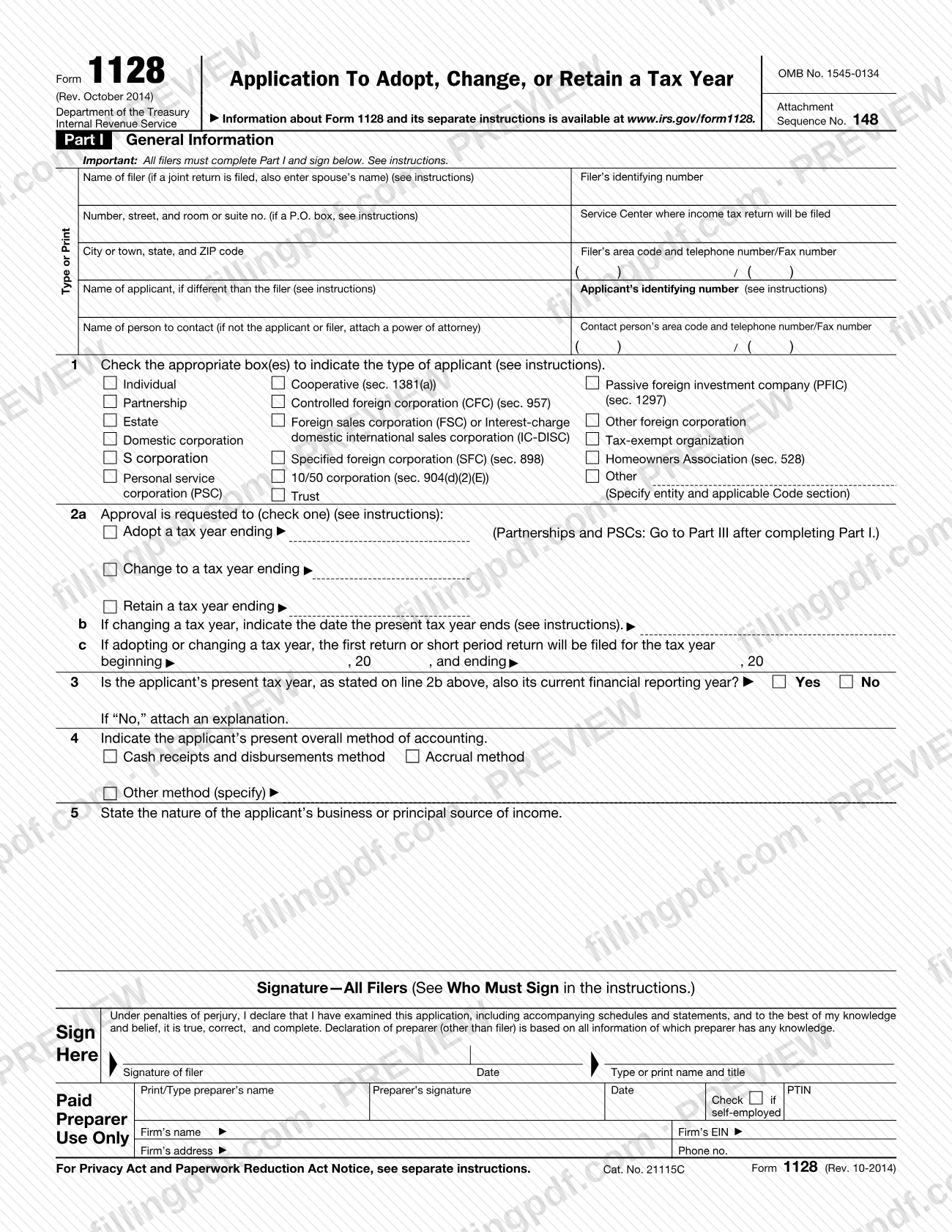
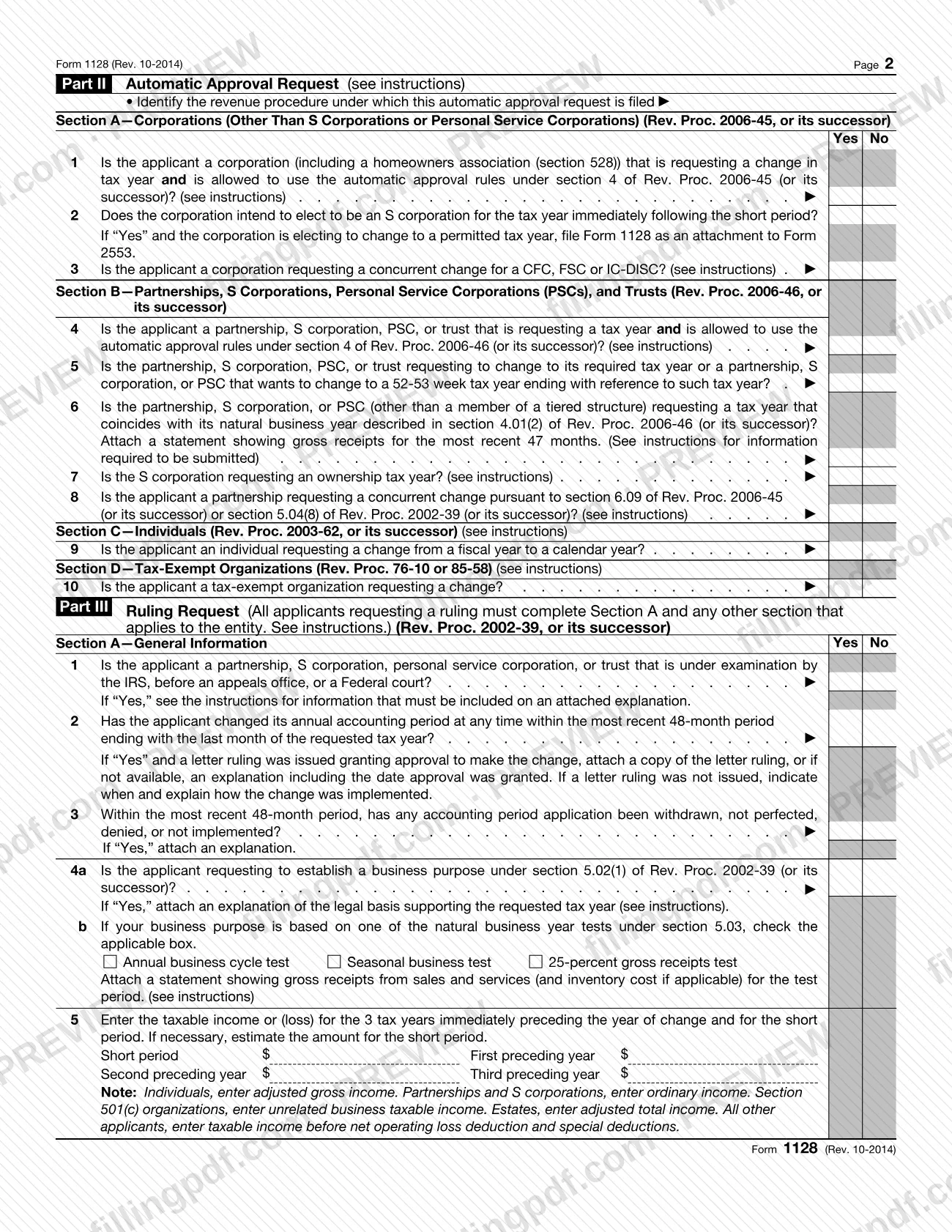
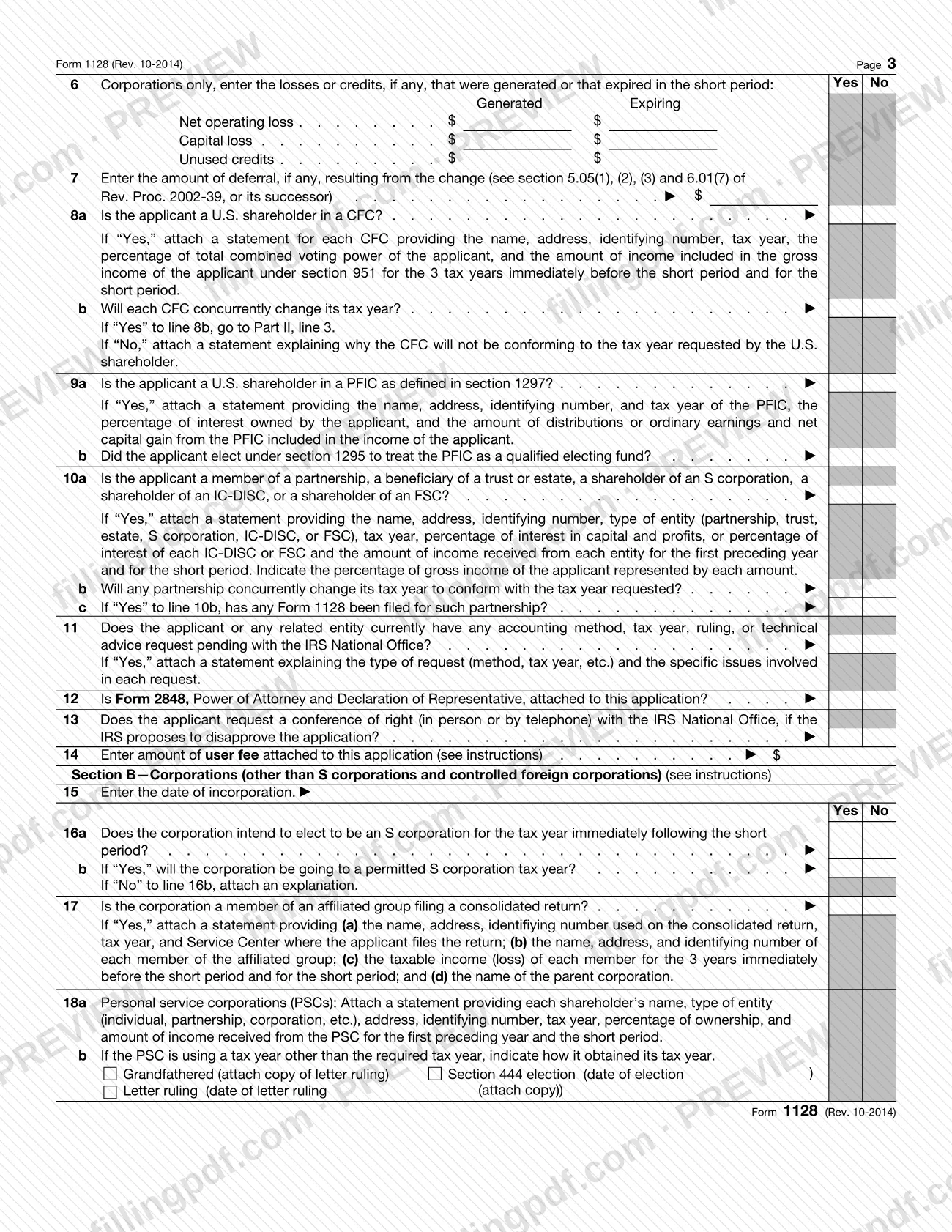
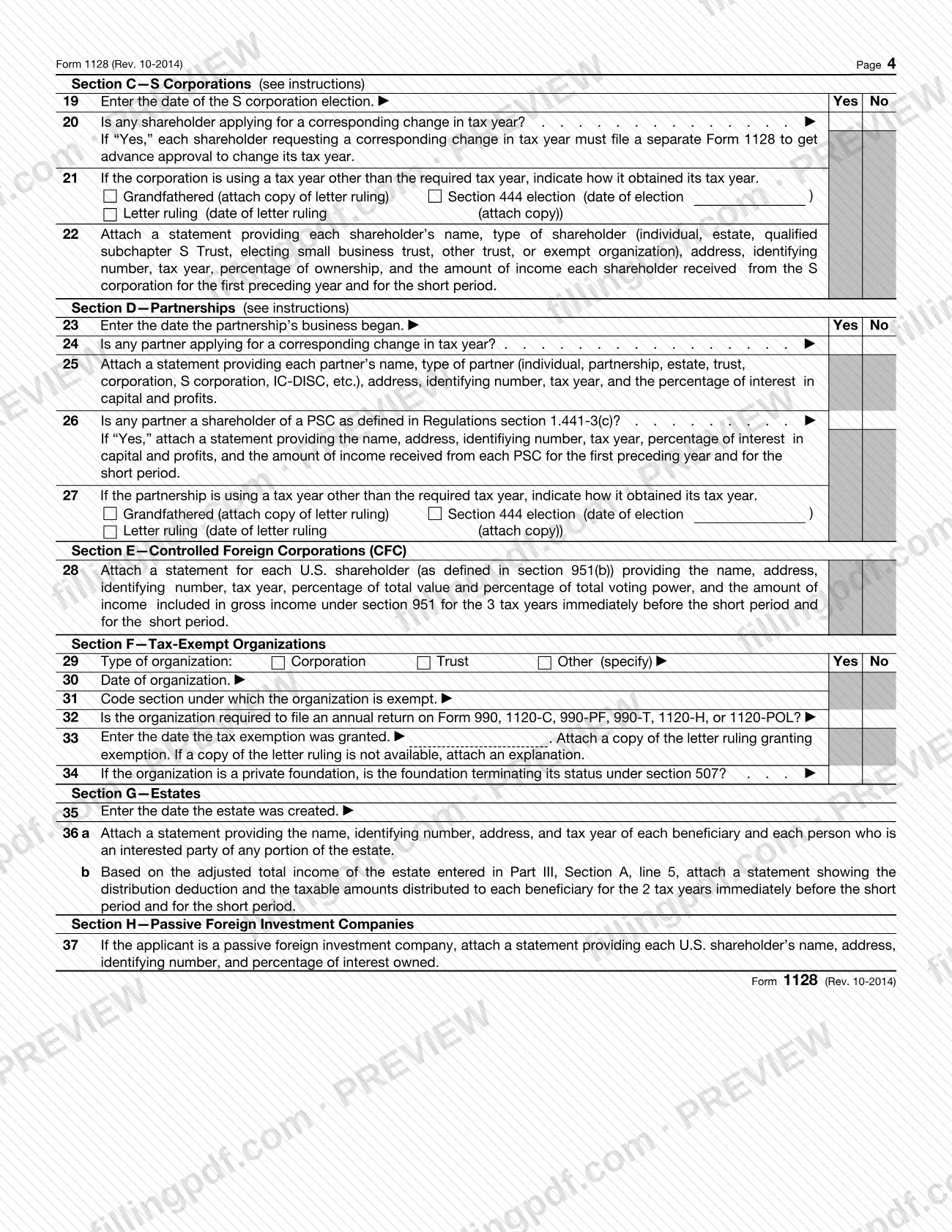
Form 1128 is the Internal Revenue Service (IRS) application used to request approval to change a tax year and, for certain partnerships, S corporations, personal service corporations (PSCs) and trusts, to adopt or retain one. Part II covers automatic approval requests and Part III covers ruling requests for applicants that do not qualify for automatic approval. On this page you can fill out Form 1128 online on FillingPDF and download or print the completed PDF. The form and its separate instructions are published by the IRS at www.irs.gov/form1128.
Last updated
What is Form 1128?
Form 1128, Application To Adopt, Change, or Retain a Tax Year, is the Internal Revenue Service form used to request a change in tax year or, for certain partnerships, S corporations, personal service corporations (PSCs) and trusts, to adopt or retain a tax year.
The IRS explains in the form's Privacy Act notice that section 442 requires IRS approval to adopt, change or retain a tax year, and that an application is how you obtain it. The form has three parts:
- Part I, General Information: completed and signed by every filer. It identifies the filer and applicant, the type of applicant, the tax year requested, the present accounting method and the nature of the business.
- Part II, Automatic Approval Request: for applicants that can use the automatic rules of Rev. Proc. 2006-45 (corporations), Rev. Proc. 2006-46 (partnerships, S corporations, PSCs and trusts), Rev. Proc. 2003-62 (individuals) or Rev. Proc. 76-10 or 85-58 (tax-exempt organizations), or their successors.
- Part III, Ruling Request: for applicants that do not qualify for automatic approval, under Rev. Proc. 2002-39 or its successor. It has Sections A through H, and the applicant completes Section A plus the sections that fit its entity type.
The instructions on file are Rev. November 2017, for use with the October 2014 revision of the form. A ruling request carries a user fee; an automatic approval request does not.
Who needs to file Form 1128?
Generally, taxpayers must file Form 1128 to adopt, change or retain a tax year. Partnerships, S corporations, PSCs and trusts may be required to file it to adopt or retain a certain tax year. All filers complete Part I. Applicants that qualify for automatic approval complete Part II only. Applicants that do not qualify complete Part III.
Who files for whom:
- The common parent of a consolidated group files one Form 1128 for the whole group.
- For a controlled foreign corporation (CFC) or 10/50 corporation, the controlling domestic shareholder(s) file on its behalf.
- If the person to contact is not the filer or applicant, attach Form 2848, Power of Attorney and Declaration of Representative.
The instructions say do not file Form 1128 in these cases:
- A corporation adopting its first tax year, or required to change its tax year to file a consolidated return with its new common parent.
- A newly formed partnership, electing S corporation or PSC adopting a required tax year (or a 52-53-week year tied to it).
- Newly married individuals changing to their spouse's tax year to file a joint return.
- A trust that adopts the calendar year as required by section 644, and an estate adopting its first tax year.
- An organization exempt under section 501(a), unless it changed its tax year within a 10-calendar-year period and had an annual filing requirement in that period; exceptions apply to sections 521, 526, 527, 528 and 401(a) organizations.
When to file Form 1128
The deadline depends on the kind of request.
- Ruling request (Part III): file by the due date, not counting extensions, of the federal income tax return for the first effective year. Do not file earlier than the day after that year ends. For a tax year change, the first effective year is the short period required to make the change.
- Automatic approval (Part II): file by the due date, including extensions, of the return for the short period required to effect the change. Tax-exempt organizations using Rev. Proc. 85-58 file by the 15th day of the 5th calendar month after the short period ends.
- Late applications: an application filed within 90 days after the due date may be treated as timely if the applicant acted reasonably and in good faith and relief will not prejudice the government's interests. Later applications are approved only in unusual and compelling circumstances, and the extension request requires a user fee.
Generally, an application submitted before the short period ends will not be considered. Do not file a return for the requested tax year until the IRS approves the application.
Documents you need
- Form 2848, Power of Attorney and Declaration of Representative, if the person to contact is neither the applicant nor the filer.
- An explanation, if the answer to Part I, line 3 is "No" (present tax year is not also the current financial reporting year).
- For Part II, Section B, line 6: a statement showing gross receipts for the most recent 47 months, for a partnership, S corporation or PSC requesting its natural business year.
- A copy of Form 1128 attached to the federal income tax return for the short period, for Part II automatic approval requests.
- The user fee payment (check or money order payable to the Internal Revenue Service, or payment through www.pay.gov), for Part III ruling requests.
- For Part III, line 4a: an explanation of the legal basis for the requested tax year, if you are establishing a business purpose.
- For Part III, line 4b: a statement of gross receipts from sales and services (and inventory cost if applicable) for the test period, if you rely on a natural business year test.
- For Part III, line 2 and line 3: a copy of any letter ruling approving a prior change, or an explanation, and an explanation of any withdrawn, denied or unimplemented accounting period application.
- For Part III, the section statements that apply: for each CFC (line 8a), PFIC (line 9a), affiliated group member (line 17), PSC shareholder (line 18a), S corporation shareholder (line 22), partner (line 25), CFC U.S. shareholder (line 28), estate beneficiary (line 36) or PFIC U.S. shareholder (line 37).
- For tax-exempt organizations, Part III, line 33: a copy of the letter ruling granting exemption, or an explanation if it is not available.
How to fill out Form 1128
Enter filer and applicant details
In Part I, enter the filer's name (add the spouse's name if a joint return is filed), identifying number, address, the Service Center where the return will be filed and phone and fax numbers. If the applicant differs from the filer, complete the applicant name and identifying number lines; enter "Applied for" if you have no EIN or SSN yet.
Name the contact person
Enter the person to contact and their phone and fax numbers. If that person is not the applicant or filer, attach Form 2848.
Check the type of applicant on line 1
Check every box that describes the applicant, such as individual, partnership, S corporation, PSC, tax-exempt organization or other. For "Other," specify the entity and applicable Code section.
Choose the request on line 2a
Check one: adopt, change to, or retain a tax year, and enter the ending date. Partnerships and PSCs go to Part III after completing Part I.
Enter present year and first return dates
On line 2b, give the date the present tax year ends if you are changing. On line 2c, enter the beginning and ending dates of the first or short period return.
Answer lines 3 to 5
Line 3: check Yes or No for whether the present tax year is the current financial reporting year, and attach an explanation if No. Line 4: check the accounting method. Line 5: state the nature of the business or principal source of income.
Sign Part I
Sign and date under the penalties of perjury statement, with printed name and title. Complete the Paid Preparer Use Only block if a paid preparer prepared the form.
Complete Part II if you qualify
Identify the revenue procedure, then answer only the section for your applicant: A (corporations), B (partnerships, S corporations, PSCs and trusts), C (individuals) or D (tax-exempt organizations). Attach the line 6 gross receipts statement where required.
Complete Part III Section A if not
If you do not qualify for automatic approval, answer lines 1 to 14: examination status, prior changes, business purpose, income for the preceding years and short period, deferral, CFC, PFIC and related-entity questions, Form 2848, conference of right and user fee.
Complete your entity section in Part III
Fill in Section B (corporations), C (S corporations), D (partnerships), E (CFCs), F (tax-exempt organizations), G (estates) or H (PFICs) as applicable, with the dates and statements each line requires.
Review, sign and download the PDF
Check names, identifying numbers, dates and attachments, and confirm every statement carries the applicant's name, number and address. Then download or print the completed PDF from FillingPDF and assemble the package described under How to submit.
How to submit Form 1128
Form 1128 is filed by mail, and the address depends on the part you complete. A ruling request fee is paid with the form.
- Part II, automatic approval: send the form to Internal Revenue Service Center, Attention: Entity Control, at the address where the applicant's income tax return is filed. Also attach a copy of Form 1128 to the federal income tax return for the short period required to effect the change. Do not send an automatic request to the Part III addresses; that causes significant delay. A corporation changing its year before an S election files Form 1128 as an attachment to Form 2553 instead.
- Part III, ruling request: mail the form and the user fee to Internal Revenue Service, Associate Chief Counsel (Income Tax and Accounting), Attention: CC:PA:LPD:DRU, P.O. Box 7604, Ben Franklin Station, Washington, DC 20044-7604.
- Exempt organizations requesting a ruling: mail to Internal Revenue Service, 1973 N Rulon White Blvd, M/S 6273, Ogden, Utah 84201.
Pay the user fee by check or money order payable to the Internal Revenue Service, attached to the form, or through www.pay.gov. The instructions point to Rev. Proc. 2017-1 or its successor for the current amount.
The IRS acknowledges an application within 45 days. To check status, write to Control Clerk, CC:ITA, Internal Revenue Service, Room 4516, 1111 Constitution Ave., NW, Washington, DC 20224-0002. If you hear nothing within 90 days, contact the Control Clerk. Exempt organizations can call 877-829-5500.
FillingPDF lets you fill out and download the PDF; submission follows the channels above.
Common mistakes to avoid
- Sending an automatic approval request (Part II) to the Part III National Office or Ogden addresses; the instructions say this causes a significant delay.
- Filing a tax return for the requested tax year before the IRS approves the application.
- Leaving the form unsigned or signed by the wrong person; the instructions say a form without a valid signature will not be considered, and both spouses must sign on a joint return.
- Submitting the application before the end of the short period, when the instructions say an early application will generally not be considered.
- Filing a ruling request without the user fee, which is required for Part III requests.
- Completing Part III after answering "Yes" to the Part II qualification question, when the instructions say not to complete Part III.
- Naming a contact person who is not the filer or applicant without attaching Form 2848.
- Attaching statements that omit the applicant's name, identifying number and address, or that do not say they are attachments to Form 1128.
- Filing a late application more than 90 days after the due date, which the instructions presume jeopardizes the government's interests.
- Using the old exempt organization ruling address; the note on the form gives the new Ogden, Utah address.
Frequently asked questions
What is Form 1128 used for?
Form 1128 is the IRS application to adopt, change or retain a tax year. Part II requests automatic approval for applicants that qualify under the listed revenue procedures, and Part III is a ruling request for applicants that do not qualify.
Who has to file Form 1128?
Generally, taxpayers file it to adopt, change or retain a tax year; partnerships, S corporations, PSCs and trusts may be required to file it to adopt or retain one. Corporations adopting a first tax year, estates adopting a first year and newly married individuals joining a spouse's year do not file.
What is the deadline to file Form 1128?
For a ruling request, by the due date (without extensions) of the federal return for the first effective year. For automatic approval, by the due date, with extensions, of the return for the short period. Applications filed within 90 days late may be treated as timely if relief conditions are met.
Where do I mail Form 1128?
It depends on the part. Automatic approval goes to the Internal Revenue Service Center, Attention: Entity Control, where your return is filed. Ruling requests go to Associate Chief Counsel (Income Tax and Accounting), P.O. Box 7604, Ben Franklin Station, Washington, DC 20044-7604; exempt organizations use the Ogden, Utah address.
Is there a fee to file Form 1128?
A user fee applies to Part III ruling requests and to late-filing relief requests, paid by check or money order to the Internal Revenue Service or through www.pay.gov. No user fee is required for Part II automatic approval requests. The instructions refer to Rev. Proc. 2017-1 or its successor for the amount.
How long does the IRS take to respond to Form 1128?
The IRS acknowledges receipt of the application within 45 days. The applicant then receives notice of approval or denial. If you have heard nothing within 90 days, the instructions say to contact the Control Clerk at the IRS.
Can I change my tax year before Form 1128 is approved?
No. The instructions say not to file a tax return using the requested tax year until the application is approved. An application submitted before the short period ends will generally not be considered.
Can I fill out Form 1128 online?
Yes, you can fill out the Form 1128 PDF online on FillingPDF and download or print it. FillingPDF is an independent service and does not file it with the IRS; you mail it through the IRS channels described above.
Do I file Form 1128 with Form 2553?
Only in one case: a corporation changing its tax year before electing S corporation status, where the requested year is a permitted S corporation tax year, files Form 1128 as an attachment to Form 2553 (see Part II, line 2).
Ready to fill out Form 1128?
Fill out Form 1128 now