
Form 13614-C is the Intake/Interview and Quality Review Sheet that the Internal Revenue Service (IRS) uses at Volunteer Income Tax Assistance (VITA) and Tax Counseling for the Elderly (TCE) sites. You use it to give the IRS-certified volunteer preparer your personal details, household members, income, expenses and tax-related events for 2026 before your return is prepared. On this page you can fill out the form online on FillingPDF and download or print the completed PDF; the official PDF is published by the IRS at irs.gov.
Last updated
What is 13614-C?
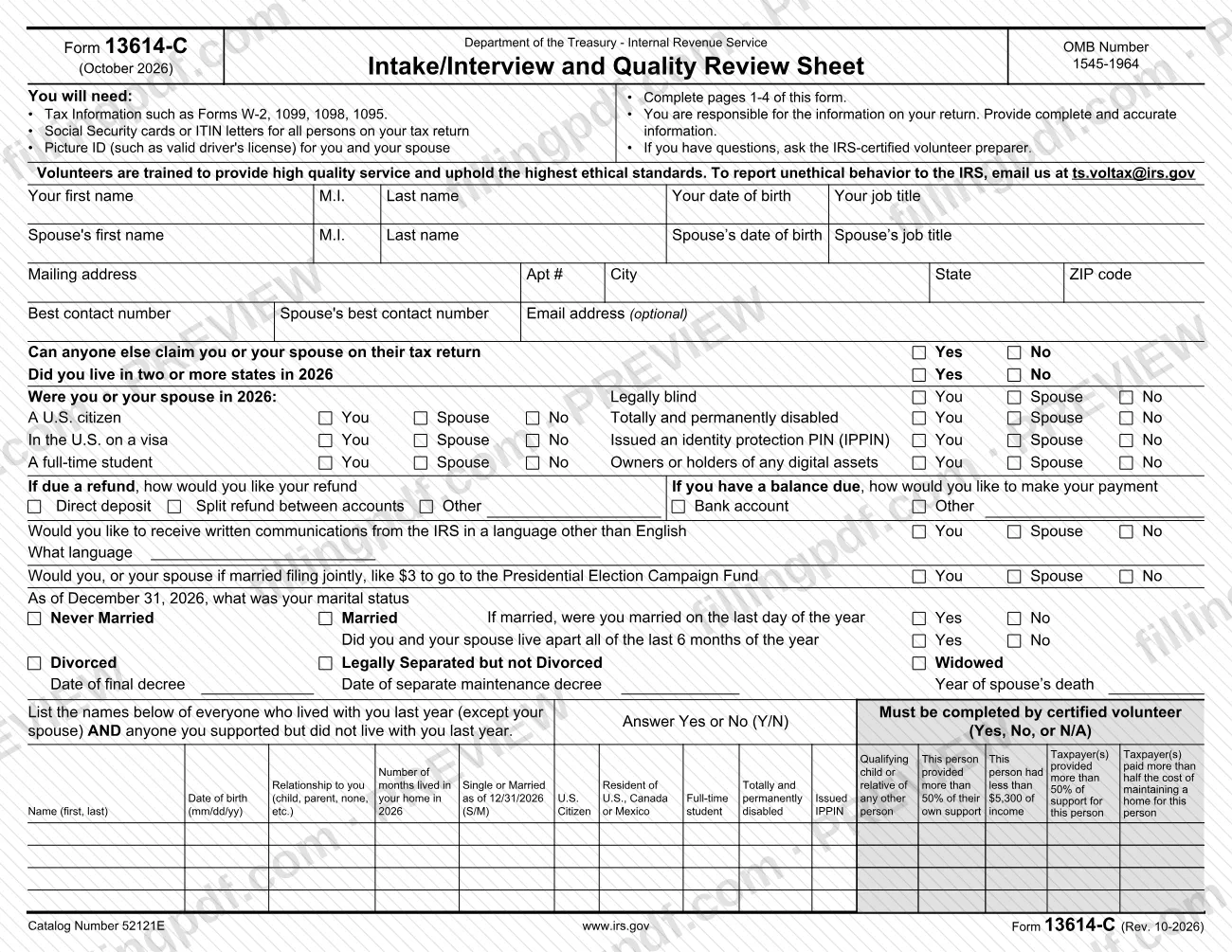
Form 13614-C, Intake/Interview and Quality Review Sheet, is the IRS form that a taxpayer completes for IRS-certified volunteer preparers in the Volunteer Income Tax Assistance (VITA) and Tax Counseling for the Elderly (TCE) programs, recording the information used to prepare a return.
The Department of the Treasury's Internal Revenue Service issues it under OMB Number 1545-1964. This edition (October 2026) asks about calendar year 2026.
The form is organized by page:
- Page 1: personal information, filing-related questions, refund and payment preferences, marital status as of December 31, 2026, and a table of everyone who lived with you or whom you supported.
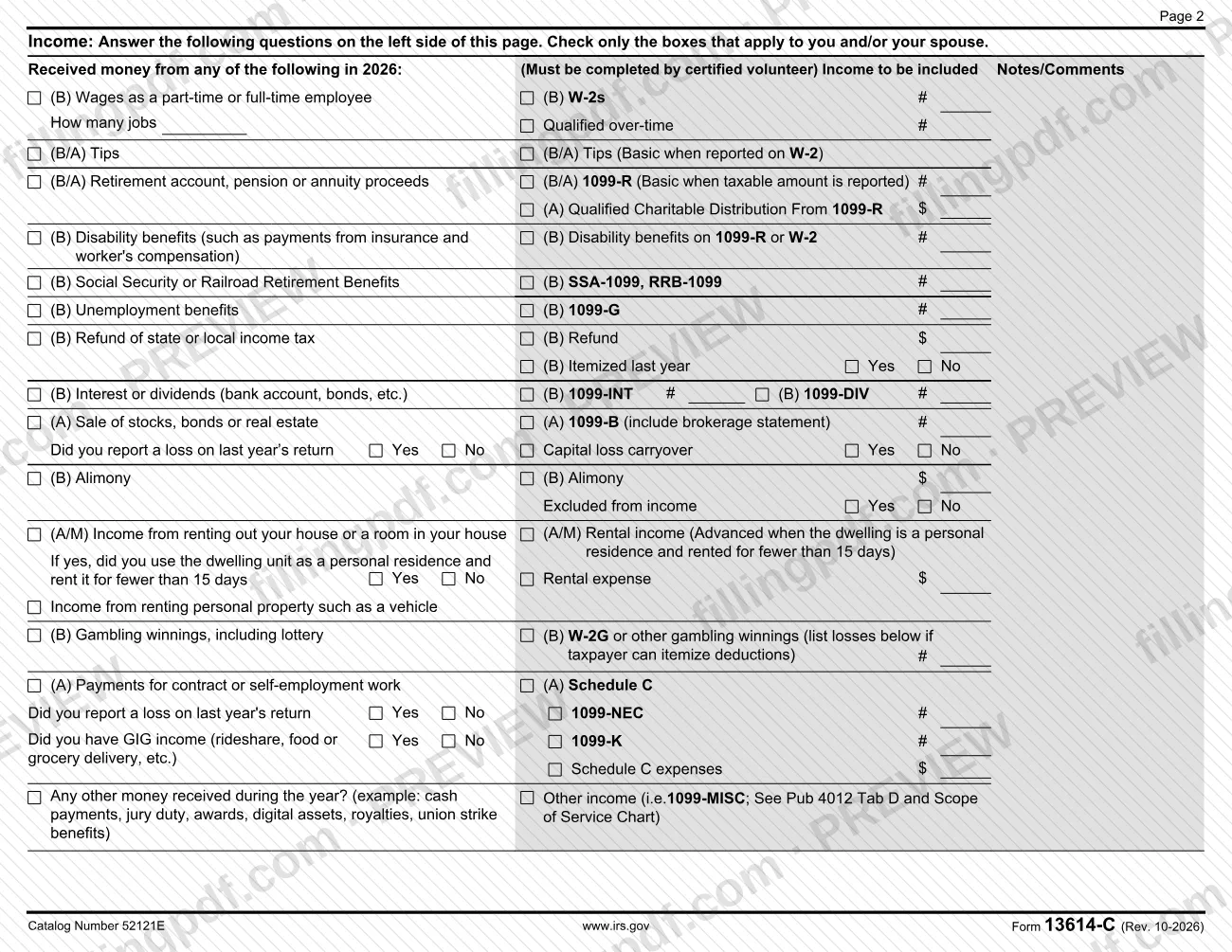
- Page 2: income received during 2026.
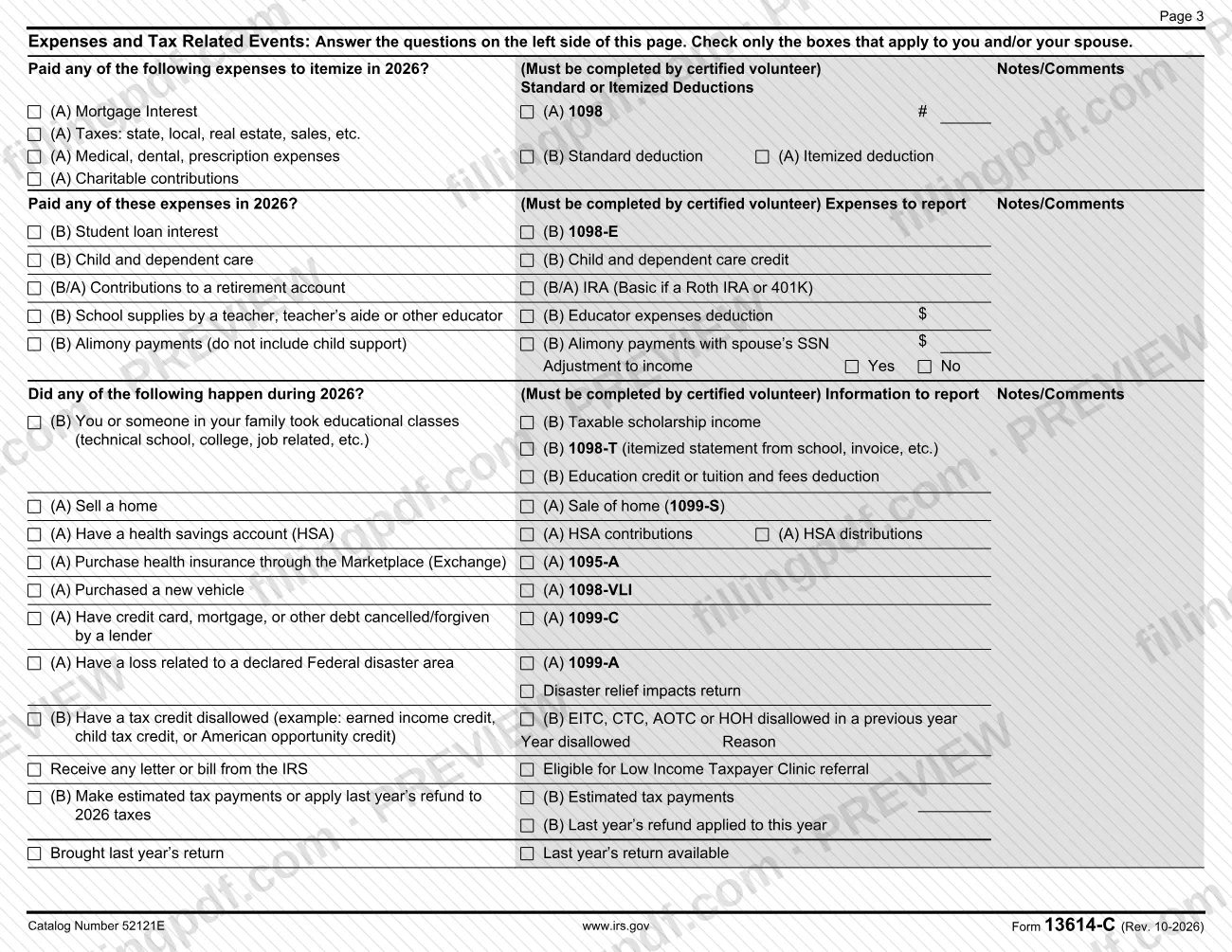
- Page 3: expenses and tax-related events.
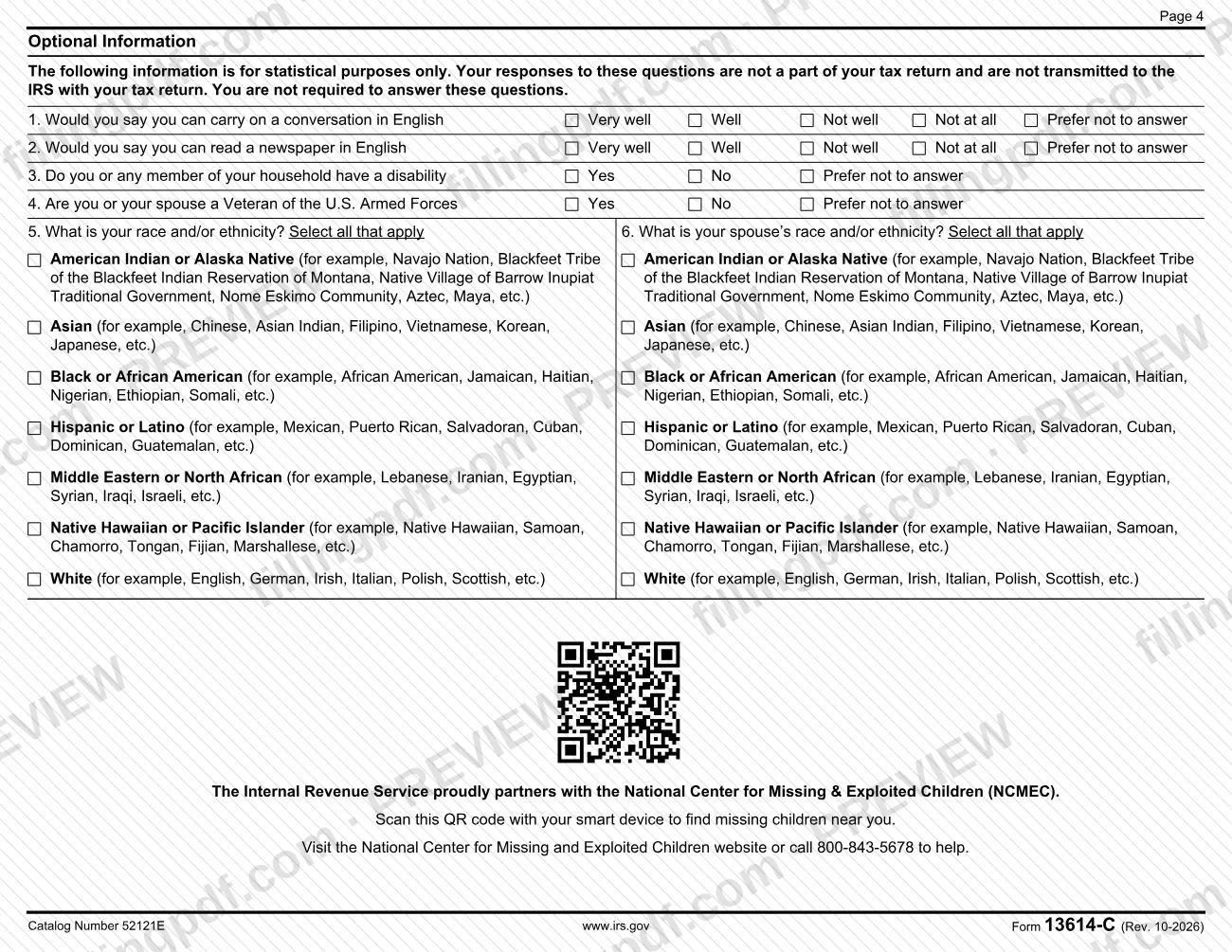
- Page 4: optional statistical questions.
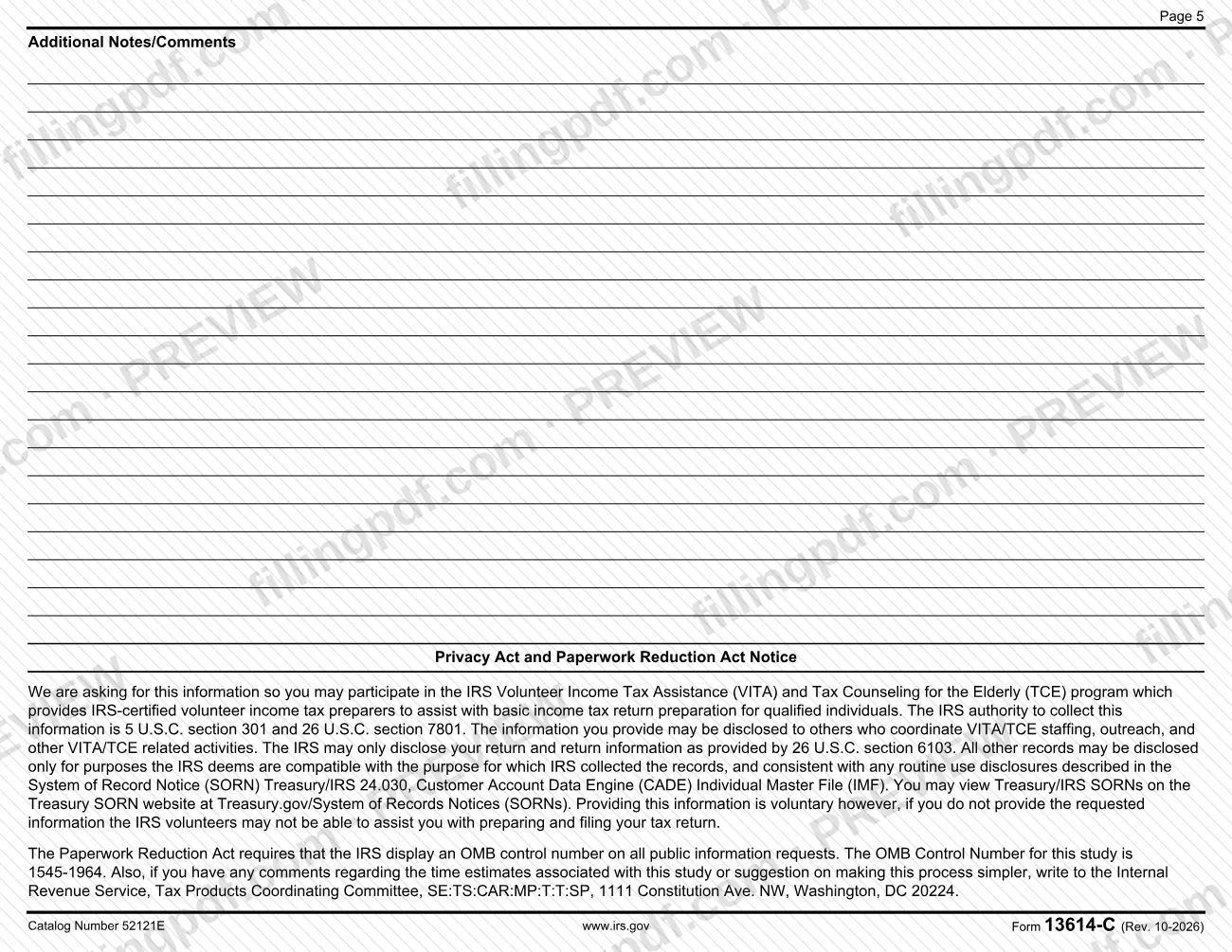
- Page 5: additional notes and comments, plus the Privacy Act and Paperwork Reduction Act Notice.
Areas marked "Must be completed by certified volunteer" are filled in by the volunteer, not by you. Items carry (B) or (A) codes, and some entries say when an item is Basic or Advanced.
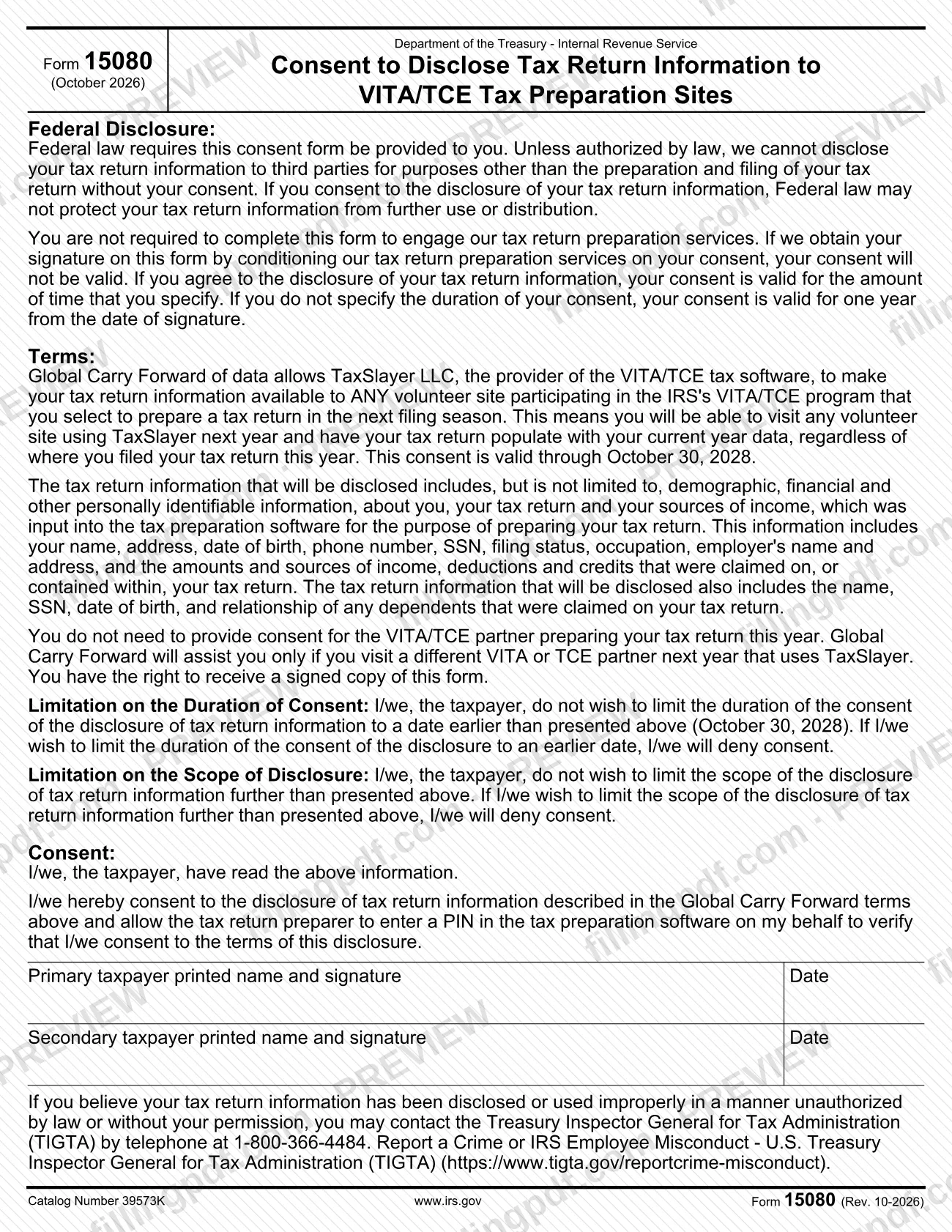
The PDF also contains Form 15080, Consent to Disclose Tax Return Information to VITA/TCE Tax Preparation Sites, a separate consent about Global Carry Forward of your data in the VITA/TCE tax software.
Who needs to file 13614-C?
Taxpayers who want an IRS-certified volunteer to help prepare their return at a VITA or TCE site complete Form 13614-C. The IRS describes these programs as providing volunteer preparers who assist qualified individuals with basic income tax return preparation.
- You and your spouse: the form has separate entries for each of you, including names, dates of birth, job titles, contact numbers and several yes/no questions, so a married couple completes one form together.
- Everyone in your household: the table on page 1 lists everyone who lived with you last year (except your spouse) and anyone you supported who did not live with you.
- Volunteers: the areas marked "Must be completed by certified volunteer" are for the volunteer, and the form's title includes its use as a quality review sheet.
Some parts are not mandatory. Page 4 is optional and statistical, and the form states you are not required to answer it. Form 15080 is also not required to receive tax preparation services. The form says that you are responsible for the information on your return and must provide complete and accurate information.
When to file 13614-C
Complete Form 13614-C when you go to a VITA or TCE site to have your return prepared, since the form tells you to complete pages 1-4 and bring your tax documents. The form asks about calendar year 2026 and your marital status as of December 31, 2026. No separate due date is printed on it.
Form 15080 has its own timing. Your consent lasts for the period you specify; if you do not specify one, it is valid for one year from the date of signature. The Global Carry Forward consent printed on the form is valid through October 30, 2028.
Documents you need
- Tax information such as Forms W-2, 1099, 1098 and 1095 for the income and expenses you report; the form lists these among the items you will need.
- Social Security cards or ITIN letters for all persons on your tax return.
- Picture ID, such as a valid driver's license, for you and your spouse.
- A brokerage statement, if you sold stocks or bonds and have a Form 1099-B; the form says to include it.
How to fill out 13614-C
Gather documents before you start
Collect your tax forms (W-2, 1099, 1098, 1095), Social Security cards or ITIN letters for everyone on the return, and a picture ID for you and your spouse.
Enter your personal information
On page 1, write your first name, M.I., last name, date of birth and job title, and the same details for your spouse. Add your mailing address, best contact number and, if you wish, an email address (optional).
Answer the yes/no questions
Mark whether anyone else can claim you or your spouse, whether you lived in two or more states in 2026, and which of you was legally blind, a U.S. citizen, totally and permanently disabled, on a visa, issued an IPPIN, a full-time student or an owner of digital assets.
Choose refund, payment and language options
Say how you want a refund (direct deposit, split refund or other) or how you will pay a balance due (bank account or other). Answer the questions on written IRS communications in another language and on the Presidential Election Campaign Fund.
Give your marital status
Mark your status as of December 31, 2026. If married, answer whether you were married on the last day of the year and whether you lived apart for all of the last 6 months. If divorced, separated or widowed, enter the decree date or year of spouse's death.
List household members and people you supported
In the table, enter each person's name, date of birth, relationship, months lived in your home, and the columns on marital status, citizenship or residency, student and disability status. Leave the columns marked for the certified volunteer blank.
Mark your income on page 2
Check only the income types you received in 2026, such as wages, tips, retirement, unemployment, interest, stock sales, rental or self-employment income. Note the number of forms and any amounts in the columns provided.
Mark expenses on page 3
Check the expenses you paid, such as mortgage interest, taxes, medical costs, charitable gifts, student loan interest, child and dependent care and retirement contributions.
Report 2026 tax-related events
Mark events such as taking classes, selling a home, having an HSA, buying Marketplace insurance, debt cancellation, a disaster loss, a disallowed credit, an IRS letter or bill, or estimated tax payments.
Answer the optional questions
Page 4 questions on English ability, disability, veteran status and race or ethnicity are statistical and optional. Select Prefer not to answer where offered, or skip them.
Add notes and consider Form 15080
Use page 5 for additional notes. Read Form 15080 and sign it only if you want your data available to other VITA/TCE sites; it is not required to receive services.
Review and download the completed PDF
Check every page for accuracy, then download or print the completed PDF from FillingPDF and bring it, with your documents, to the volunteer site.
How to submit 13614-C
Form 13614-C is given to the IRS-certified volunteer preparer at the VITA or TCE site where your return is prepared. The form prints no mailing address, portal or appointment rule for submitting it.
- At the volunteer site: bring the completed pages 1-4 with your tax documents, Social Security cards or ITIN letters for everyone on the return, and a picture ID for you and your spouse. If you have questions about the form, ask the volunteer preparer.
- Do not mail it to the page 5 address: the Washington, DC address printed there (Tax Products Coordinating Committee, 1111 Constitution Ave. NW) is for comments on time estimates and suggestions about the process.
- Reporting concerns: to report unethical behavior by a volunteer, email [email protected]. For improper use of disclosed return information, the Treasury Inspector General for Tax Administration can be reached at 1-800-366-4484.
FillingPDF lets you fill out and download the PDF; submission follows the channels above.
Common mistakes to avoid
- Bringing fewer than all four pages: the form says to complete pages 1-4 before your appointment.
- Arriving without Social Security cards or ITIN letters for every person on the return, or without a picture ID for your spouse.
- Writing in areas marked "Must be completed by certified volunteer" instead of leaving them for the volunteer.
- Checking boxes that do not apply; the income and expense pages say to check only the boxes that apply to you and/or your spouse.
- Leaving out someone you supported who did not live with you; the household table asks for both groups.
- Treating page 4 as required; it is optional, statistical, and not part of your tax return.
- Signing Form 15080 because you think it is required to get help; the form says tax preparation services cannot be conditioned on your consent.
- Mailing the form to the Washington, DC address on page 5, which is for comments on the paperwork burden.
Frequently asked questions
What is Form 13614-C used for?
Form 13614-C is the IRS Intake/Interview and Quality Review Sheet. At a VITA or TCE site you complete it so the IRS-certified volunteer preparer has your personal, household, income, expense and tax-event information for 2026 before preparing your return.
What do I need to bring with Form 13614-C?
Bring completed pages 1-4, tax documents such as Forms W-2, 1099, 1098 and 1095, Social Security cards or ITIN letters for everyone on the return, and a picture ID, such as a valid driver's license, for you and your spouse.
Can I fill out Form 13614-C online?
You can complete the PDF online on FillingPDF and download or print it. FillingPDF is an independent service and does not send the form to the IRS or a volunteer site; you give the completed form to your VITA or TCE volunteer preparer.
Where do I turn in Form 13614-C?
Give it to the IRS-certified volunteer preparer at your VITA or TCE site. The form prints no mailing address for submission; the Washington, DC address on page 5 is only for comments about the paperwork burden.
Do I have to answer the page 4 questions?
No. Page 4 is optional and used for statistical purposes only. The form says your answers are not part of your tax return, are not sent to the IRS with it, and that you are not required to answer.
Do I have to sign Form 15080 to get my taxes prepared?
No. Form 15080 says you are not required to complete it to use the tax return preparation services, and a consent obtained by conditioning those services is not valid. It only concerns Global Carry Forward of your data to other VITA/TCE sites using TaxSlayer.
How long is the Form 15080 consent valid?
It is valid for the time you specify. If you do not specify a duration, it lasts one year from the date of signature. The Global Carry Forward consent printed on the form is valid through October 30, 2028.
Who fills in the sections marked for the certified volunteer?
The IRS-certified volunteer completes them. Sections and columns labeled "Must be completed by certified volunteer" are not for you, so leave them blank and ask the volunteer if you have questions.
Ready to fill out 13614-C?
Fill out 13614-C now