
Form 13615 (sp), Volunteer Standards of Conduct Agreement - VITA/TCE Programs (Spanish Version), is the Spanish-language agreement the Internal Revenue Service (IRS) uses to certify volunteers in its free tax preparation programs. Every VITA/TCE volunteer signs and dates it before working at a site, and a coordinator, sponsoring partner, instructor or IRS contact must verify the volunteer's photo ID and sign it. On this page you can fill out the form online on FillingPDF and download or print the completed PDF; the form itself is published by the IRS at irs.gov.
Last updated
What is 13615 (sp)?
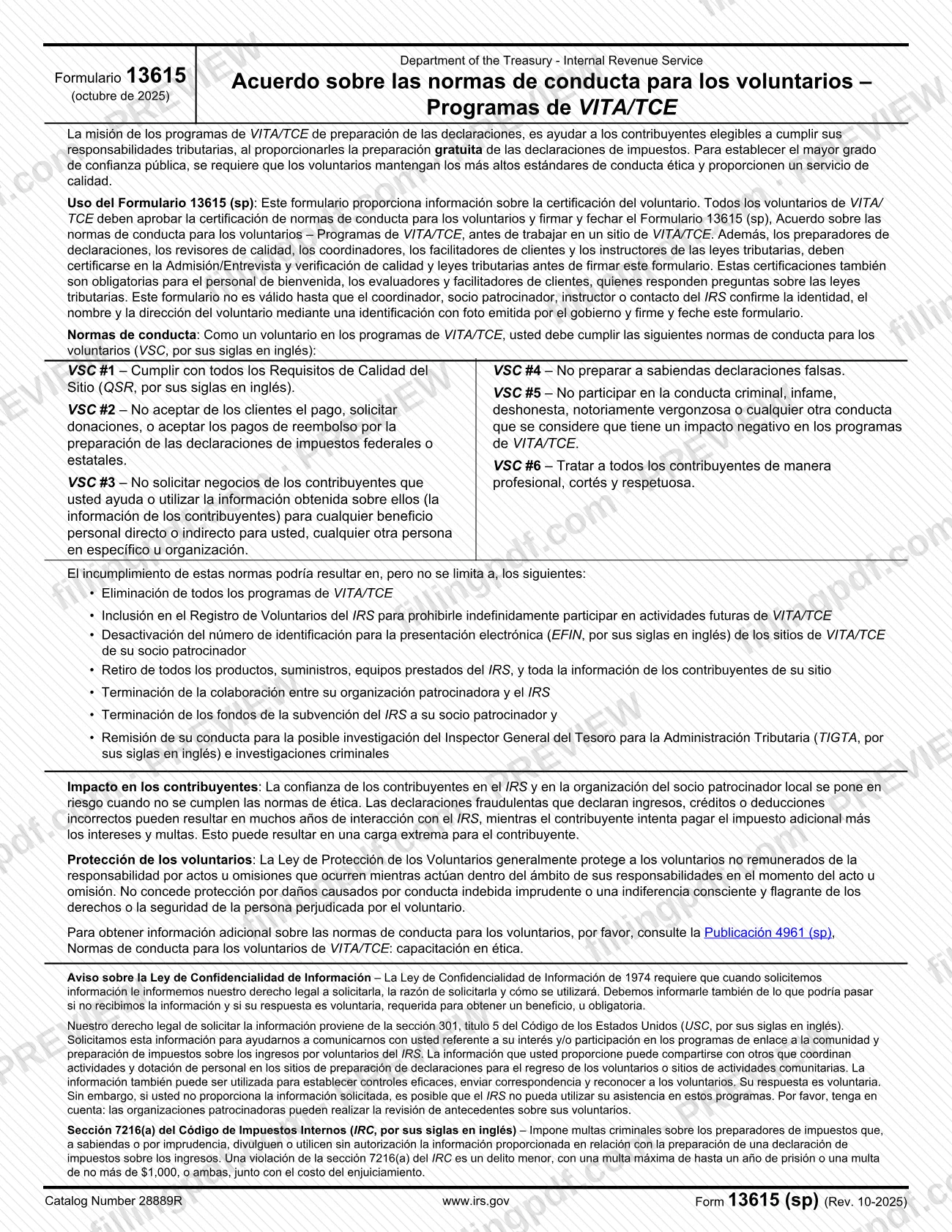
Form 13615 (sp), Volunteer Standards of Conduct Agreement - VITA/TCE Programs (Spanish Version), is the Spanish-language IRS agreement that every VITA/TCE volunteer signs to confirm they completed the standards of conduct certification and will follow the six volunteer standards of conduct (VSC).
The Internal Revenue Service (IRS) issues the form for its VITA/TCE programs, which give eligible taxpayers free tax return preparation. The six standards are: meet all Quality Site Requirements (QSR); do not accept payment or solicit donations from clients, or accept refund payments for preparing returns; do not solicit business from taxpayers you help or use their information for personal benefit; do not knowingly prepare false returns; do not engage in criminal, infamous, dishonest or notoriously disgraceful conduct or any conduct that harms the programs; and treat all taxpayers professionally, courteously and respectfully.
The form also lists the consequences of breaking the standards, including removal from all VITA/TCE programs, listing on the IRS Volunteer Registry, deactivation of the sponsoring partner's electronic filing identification number (EFIN) and referral to the Treasury Inspector General for Tax Administration (TIGTA). It summarizes the Volunteer Protection Act, the Privacy Act notice and the criminal penalties of section 7216(a) of the Internal Revenue Code for unauthorized disclosure or use of return information.
A separate section, for continuing education (CE) credits only, is completed by the coordinator or partner. The form refers to Publication 4961 (sp) for the conduct training; its CE section refers to Publications 5362 and 5683, both in English.
Who needs to file 13615 (sp)?
All VITA/TCE volunteers must pass the volunteer standards of conduct certification and sign and date Form 13615 (sp) before working at a VITA/TCE site.
Additional certification applies to certain roles. Return preparers, quality reviewers, coordinators, client facilitators and tax law instructors must certify in Intake/Interview and Quality Review and in tax law before signing the form. The same certifications are required for greeters, screeners and client facilitators who answer tax law questions.
- Volunteers: certify that they are a U.S. citizen, a legal resident, or otherwise lawfully reside in the United States.
- Minors: a parent or guardian signs to give permission for the child to volunteer.
- Coordinator, sponsoring partner, instructor or IRS contact: verifies the certification levels and the government-issued photo ID before the volunteer works at the site, and signs.
- Licensed professionals: attorneys, CPAs, CTEC registrants and enrolled agents fill in the professional designation, licensing jurisdiction and license details.
The form is not valid until the coordinator, sponsoring partner, instructor or IRS contact confirms the volunteer's identity, name and address with a government-issued photo ID and signs and dates it. The CE section applies only when a certified, unpaid volunteer requests continuing education credits.
When to file 13615 (sp)
Sign and date Form 13615 (sp) before you work at a VITA/TCE site, after passing the volunteer standards of conduct certification. If your role requires Intake/Interview and Quality Review or tax law certification, pass those first, because they must be completed before you sign. The coordinator, sponsoring partner, instructor or IRS contact must verify your certification levels and photo ID before allowing you to work.
The CE section is completed only when a certified, unpaid volunteer requests continuing education credits. The form sets a minimum of 10 volunteer hours before CE credits can be issued. The form prints no separate due date beyond these timing rules.
Documents you need
- A government-issued photo ID, shown to the coordinator, sponsoring partner, instructor or IRS contact so they can confirm your identity, name and address; the form is not valid without this verification.
- Proof that you passed the volunteer standards of conduct certification, required of all volunteers before you sign the form.
- For preparers, quality reviewers, coordinators, client facilitators and tax law instructors: completed Intake/Interview and Quality Review and tax law certification before signing.
- For CE credits only: the PTIN-account name and preparer tax identification number, unless you are a CPA, attorney or CFP, who do not require a PTIN but must check CE requirements with their boards.
How to fill out 13615 (sp)
Read the standards of conduct
Review the six volunteer standards of conduct (VSC #1 to #6) and the consequences listed on page 1 before signing. The form refers to Publication 4961 (sp) for more information.
Enter your personal information
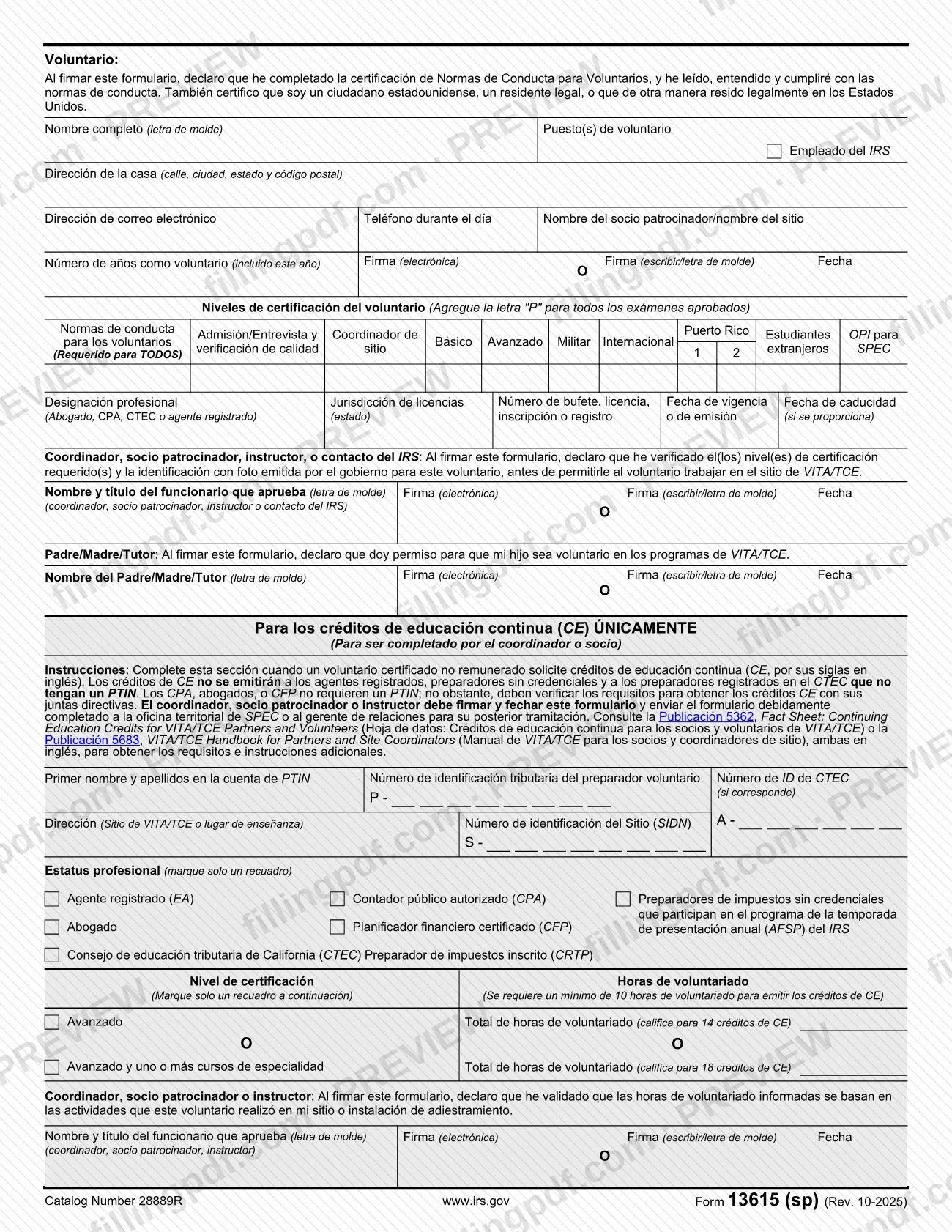
In the Voluntario section, print your full name and your volunteer position(s), and check the IRS employee box if it applies. Add your home address (street, city, state and ZIP code), email address and daytime phone number.
Name your site and years of service
Enter the sponsoring partner or site name and the number of years you have volunteered, including this year.
Sign and date as the volunteer
Sign electronically or by typing or printing your name in the signature spaces and enter the date. By signing you declare that you completed the certification, will follow the standards, and are a U.S. citizen, legal resident or otherwise lawfully residing in the United States.
Mark your certification levels
In the certification levels table, mark the levels that apply and add the letter "P" for every exam you passed. Volunteer Standards of Conduct is required for ALL volunteers.
Add professional credentials if you hold them
If you are an attorney, CPA, CTEC registrant or enrolled agent, enter the professional designation, licensing jurisdiction (state), firm, license, enrollment or registration number, effective or issue date and expiration date, if provided.
Have the coordinator verify and sign
The coordinator, sponsoring partner, instructor or IRS contact prints their name and title, signs and dates after checking your certification levels and government-issued photo ID.
Add parent or guardian permission
If the volunteer is a minor, the parent or guardian prints their name, signs and dates to give permission for the child to volunteer.
Complete the CE section if needed
Only when a certified, unpaid volunteer requests CE credits, the coordinator or partner enters the PTIN-account name, PTIN, CTEC ID (if applicable), site address, Site Identification Number (SIDN), professional status (one box), certification level (one box) and total volunteer hours.
Sign the CE hours validation
The coordinator, sponsoring partner or instructor prints their name and title, signs and dates to validate that the reported hours are based on the volunteer's activities at their site or training facility.
Review and download the completed PDF
Check names, dates and signature blocks, then download or print the completed PDF from FillingPDF and give it to your coordinator as described under How to submit.
How to submit 13615 (sp)
The form names no mailing address or portal for the agreement itself: the volunteer completes and signs it, then gives it to the coordinator, sponsoring partner, instructor or IRS contact who verifies it.
- Volunteer agreement: hand the signed form to the coordinator, sponsoring partner, instructor or IRS contact. That person checks your government-issued photo ID, confirms your name and address and your certification levels, and signs and dates the approval block.
- Minors: the parent or guardian signs the permission block before the form is returned.
- CE credits only: the coordinator, sponsoring partner or instructor signs and dates the CE section, then sends the completed form to the SPEC territory office or to the relationship manager for further processing.
FillingPDF lets you fill out and download the PDF; submission follows the channels above.
Common mistakes to avoid
- Working at a VITA/TCE site before signing and dating the form and passing the standards of conduct certification.
- Signing before completing the required Intake/Interview and Quality Review or tax law certification, when your role requires them.
- Submitting the form without the coordinator, sponsoring partner, instructor or IRS contact verifying your photo ID and signing; the form is not valid until they do.
- Leaving out the parent or guardian signature when the volunteer is a minor.
- Requesting CE credits as an enrolled agent, an unlicensed preparer or a CTEC-registered preparer without a PTIN; the form says credits are not issued to them.
- Filling in the CE section for fewer than 10 volunteer hours; the form requires a minimum of 10 hours to issue CE credits.
- Checking more than one box under professional status or certification level in the CE section; the form says to mark only one.
- Accepting payment, soliciting donations or soliciting business from the taxpayers you help, which breaks the standards of conduct you certify.
Frequently asked questions
What is Form 13615 (sp)?
Form 13615 (sp) is the Spanish version of the IRS Volunteer Standards of Conduct Agreement for VITA/TCE programs. Volunteers sign it to certify they completed the standards of conduct certification and will follow the six volunteer standards of conduct.
Who has to sign Form 13615 (sp)?
All VITA/TCE volunteers must sign and date it before working at a site. A coordinator, sponsoring partner, instructor or IRS contact must also sign after verifying the volunteer's photo ID, and a parent or guardian signs for a minor.
Can I fill out Form 13615 (sp) online?
Yes, you can fill out the fillable PDF online on FillingPDF and download or print it. FillingPDF is an independent service and does not send the form to the IRS or your site; you give the signed form to your coordinator.
Is the form valid without the coordinator's signature?
No. The form says it is not valid until the coordinator, sponsoring partner, instructor or IRS contact confirms your identity, name and address with a government-issued photo ID and signs and dates it.
Where do I send Form 13615 (sp)?
The form lists no mailing address for the agreement. You give it to your coordinator, sponsoring partner, instructor or IRS contact. Only the CE section is sent on: the coordinator sends the completed form to the SPEC territory office or relationship manager.
What happens if a volunteer breaks the standards of conduct?
The form says consequences can include removal from all VITA/TCE programs, listing on the IRS Volunteer Registry, deactivation of the partner's EFIN, and referral to TIGTA for possible investigation. The list is not limited to these.
Who can get continuing education credits through this form?
Certified, unpaid volunteers can request CE credits through the CE section. The form says credits are not issued to enrolled agents, unlicensed preparers or CTEC-registered preparers without a PTIN, and requires at least 10 volunteer hours.
How many CE credits can volunteer hours earn?
Under the CE section, total volunteer hours at the Advanced certification level qualify for 14 CE credits, and Advanced plus one or more specialty courses qualify for 18. A minimum of 10 volunteer hours is required before credits are issued.
Ready to fill out 13615 (sp)?
Fill out 13615 (sp) now