
Form 14157 (sp), Return Preparer Complaint (Spanish Version), is the Spanish-language form the Internal Revenue Service (IRS) provides for filing a complaint against a tax return preparer or a tax preparation business. Clients and other people with knowledge of a preparer's conduct use it to describe what happened, and tax professionals can also use it to report events that affect their paid preparer tax identification number (PTIN) or business. On this page you can fill out the form online on FillingPDF and download or print the completed PDF; the original is published by the IRS, which directs the public and tax professionals to send their report online at IRS.gov/SubmitATip.
Last updated
What is 14157 (sp)?
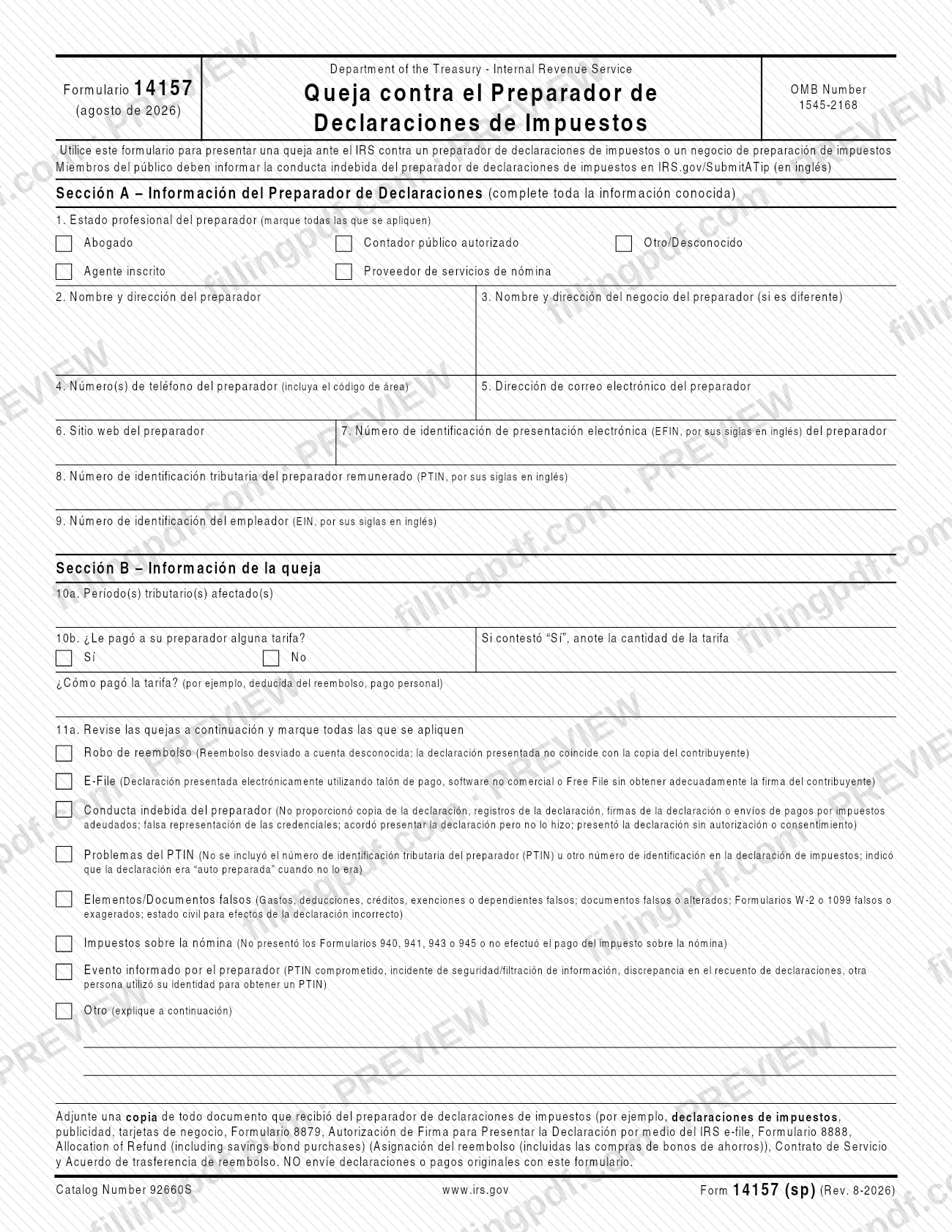
Form 14157 (sp), Return Preparer Complaint (Spanish Version), printed as Formulario 14157, Queja contra el Preparador de Declaraciones de Impuestos, is the IRS form used to file a complaint against a tax return preparer or tax preparation business.
The form has four parts. Section A identifies the preparer: professional status, name and address, business, contact details, and the EFIN, PTIN and EIN when known. Section B gives the tax periods affected, says whether you paid the preparer a fee, and lists the complaint types. Section C holds the taxpayer's information and signature. Section D is for the person filing when that person is not the taxpayer.
The complaint types you can check on line 11a are:
- Robo de reembolso (refund theft), such as a refund diverted to an unknown account.
- E-File, such as a return filed electronically without properly obtaining the taxpayer's signature.
- Conducta indebida del preparador (preparer misconduct).
- Problemas del PTIN (PTIN problems).
- Elementos/Documentos falsos (false items or documents).
- Impuestos sobre la nómina (payroll taxes).
- Evento informado por el preparador (event reported by the preparer).
- Otro (other).
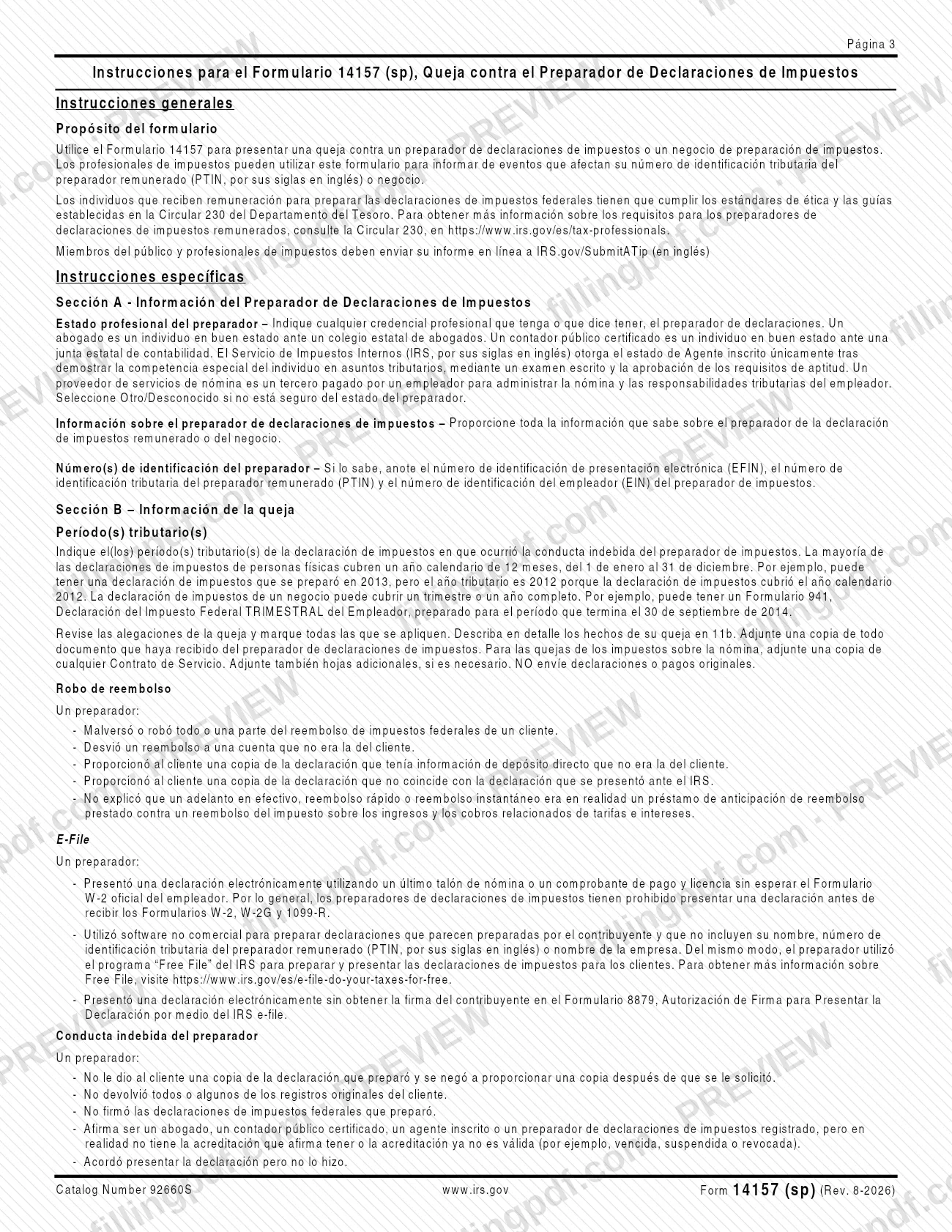
The IRS instructions note that people paid to prepare federal returns must meet the ethics standards and guidance in Treasury Department Circular 230. The form carries OMB Number 1545-2168 and Catalog Number 92660S, and the IRS estimates an average of 15 minutes to complete it. This page covers the Spanish-language edition, Form 14157 (sp), revision Rev. 8-2026.
Who needs to file 14157 (sp)?
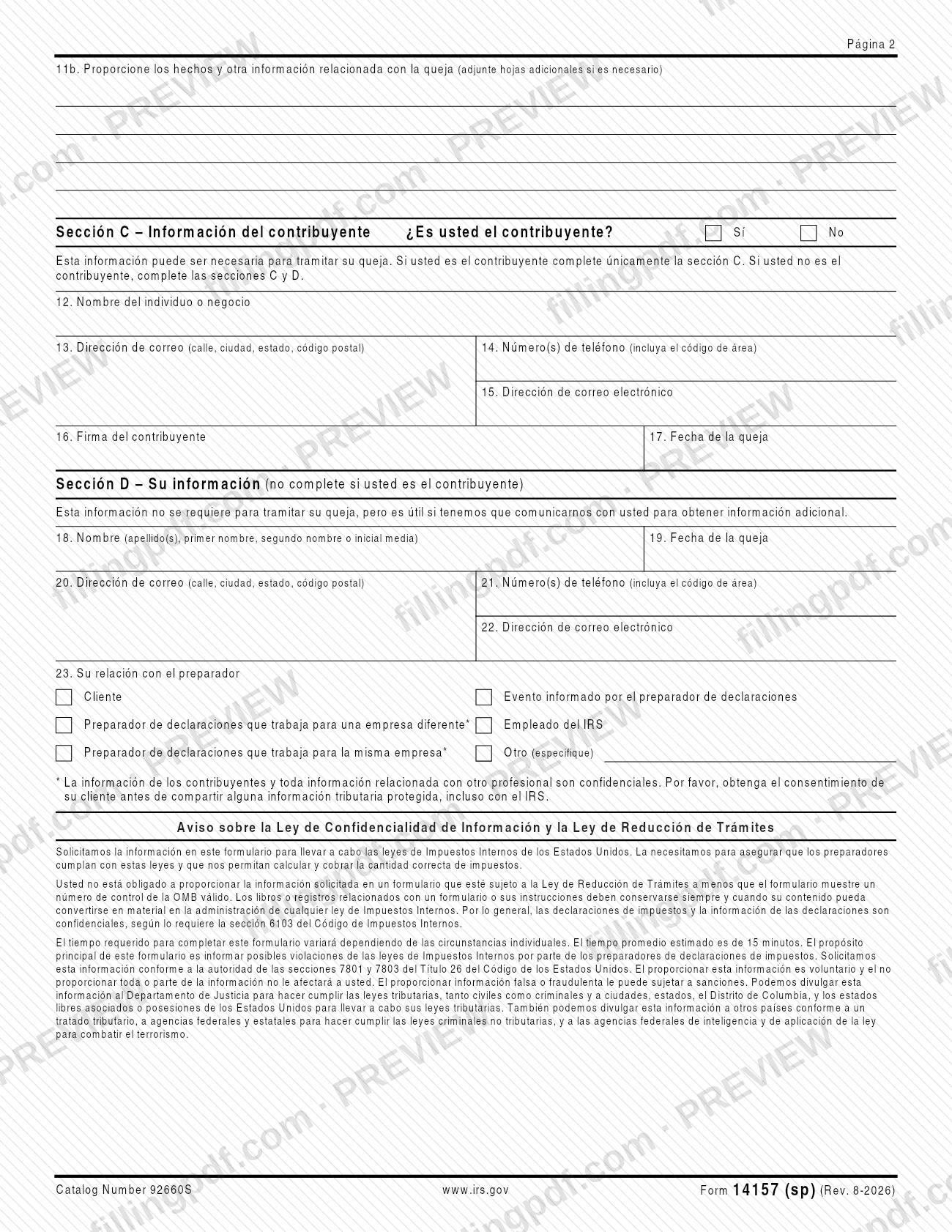
Anyone who wants to complain to the IRS about a tax return preparer or a tax preparation business can use Form 14157 (sp). The most direct case is a client, the taxpayer, who completes Section C only. If you are not the taxpayer, complete Sections C and D.
Line 23 lists the other relationships a filer may report:
- Cliente (client).
- Evento informado por el preparador de declaraciones (event reported by the preparer).
- A preparer working for a different company or for the same company as the preparer you are reporting.
- An IRS employee.
- Otro (other), which you specify.
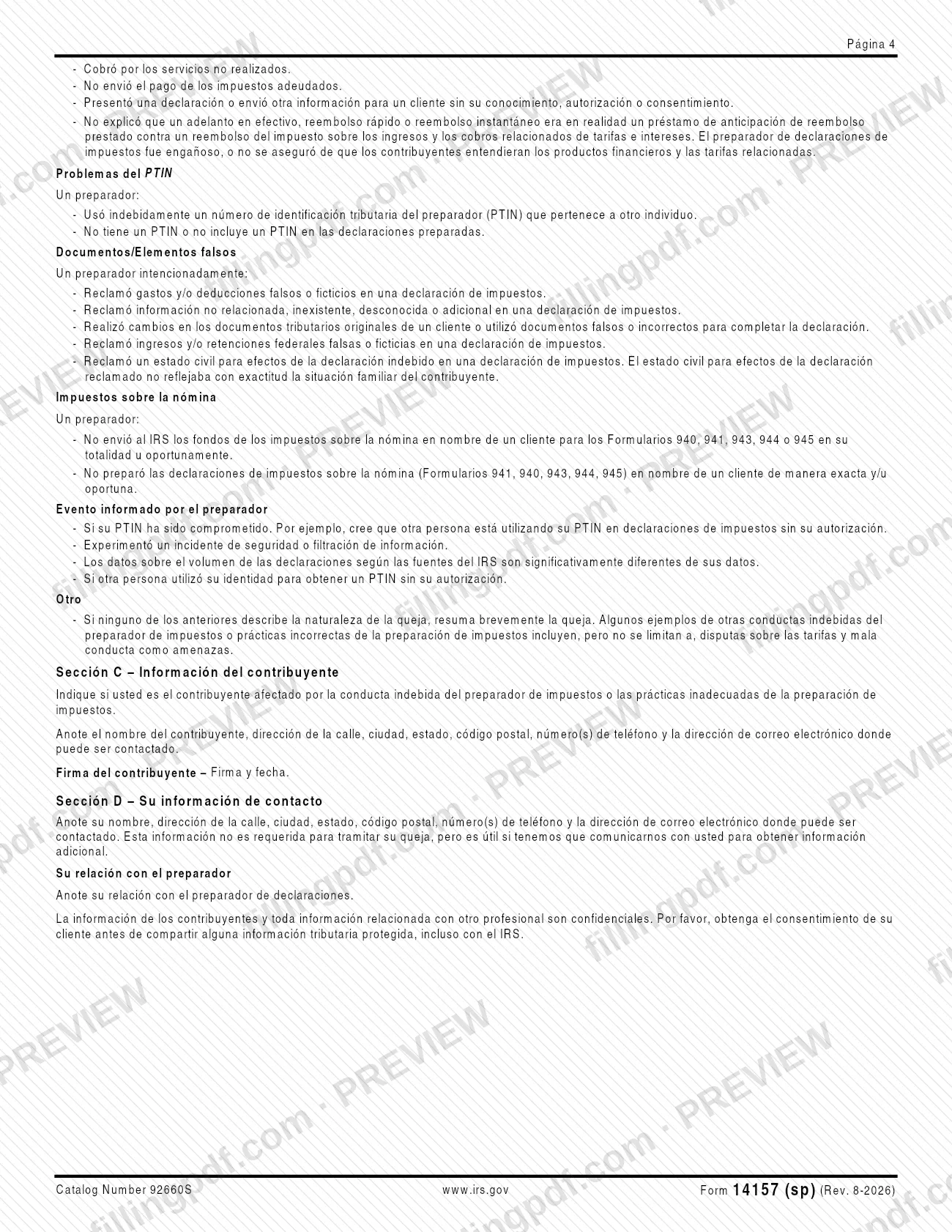
Tax professionals can use the form to report events that affect their PTIN or business, such as a compromised PTIN, a security incident or data breach, a return-count discrepancy, or someone else using their identity to obtain a PTIN.
Taxpayer information and any information about another professional are confidential. Preparers who work for a different or the same company should get the client's consent before sharing protected tax information, even with the IRS.
The form is a complaint, not a tax return or a payment: do not send original returns or payments with it.
When to file 14157 (sp)
Use Form 14157 (sp) when a tax return preparer or tax preparation business has engaged in conduct you want to report, or when a tax professional needs to report an event affecting a PTIN or business. The form prints no filing deadline.
Line 10a asks for the tax period or periods affected, meaning the period covered by the return where the misconduct occurred. For an individual return that is usually the calendar year the return covers: a return prepared in 2013 for the 2012 calendar year has tax year 2012. A business return can cover a quarter or a full year, such as a Form 941 for the period ending September 30, 2014.
Gather the preparer's details and any documents you received from the preparer before you start. The IRS estimates an average of 15 minutes to complete the form, and the time varies with individual circumstances.
Documents you need
- A copy of every document you received from the tax return preparer, such as tax returns, advertising and business cards.
- A copy of Form 8879, IRS e-file Signature Authorization, if the preparer gave it to you (the form lists it as an example of a document to copy).
- A copy of Form 8888, Allocation of Refund (including savings bond purchases), if the preparer gave it to you.
- A copy of any Service Contract or refund transfer agreement you received from the preparer; for payroll tax complaints, attach a copy of any Service Contract.
- Additional sheets with the facts of the complaint, only if line 11b does not leave enough room.
How to fill out 14157 (sp)
Mark the preparer's professional status
On line 1, check every box that applies: Abogado (attorney), Contador público autorizado (CPA), Agente inscrito (enrolled agent), Proveedor de servicios de nómina (payroll service provider) or Otro/Desconocido (other/unknown). Enter any credential the preparer holds or claims to hold, and choose Otro/Desconocido if you are not sure.
Enter the preparer and business names
On line 2, give the preparer's name and address. On line 3, give the preparer's business name and address if it is different. Complete all the information you know.
Add contact details and ID numbers
Lines 4 to 6 ask for the preparer's phone number with area code, email address and website. Lines 7 to 9 ask for the EFIN, the PTIN and the EIN; enter them only if you know them.
List the affected tax periods
On line 10a, enter the tax period or periods of the return where the misconduct occurred. Use the year the return covers, not the year it was prepared.
Report any fee you paid
On line 10b, check Sí or No for whether you paid the preparer a fee. If yes, enter the amount and explain how you paid, for example deducted from the refund or paid personally.
Check the complaint types
On line 11a, review the descriptions and check all that apply, such as refund theft, E-File, preparer misconduct, PTIN problems, false items or documents, payroll taxes, a preparer-reported event or other. If you check Otro, explain below.
Describe the facts of the complaint
On line 11b, write the facts and related information about the complaint in detail. Attach additional sheets if you need more room, plus copies of documents received from the preparer.
Say whether you are the taxpayer
In Section C, check Sí or No for whether you are the taxpayer. If you are the taxpayer, complete only Section C; if not, complete Sections C and D.
Enter the taxpayer's information
On lines 12 to 15, enter the name of the individual or business, mailing address (street, city, state, ZIP code), phone number with area code and email address where the taxpayer can be reached.
Sign and date as the taxpayer
Line 16 is the taxpayer's signature and line 17 is the date of the complaint.
Complete your information if not the taxpayer
In Section D, enter your name on line 18, the date on line 19, your address, phone and email on lines 20 to 22, and your relationship to the preparer on line 23. The IRS says this section is not required to process the complaint but helps if it needs to contact you.
Review and download the completed PDF
Check each section against what you know, then download or print the completed PDF from FillingPDF. Add copies of the preparer's documents and submit through the channels described under How to submit.
How to submit 14157 (sp)
The form directs members of the public and tax professionals to send their report online at IRS.gov/SubmitATip, a page published in English. The form prints no mailing address, fax number or other channel.
- Online: go to IRS.gov/SubmitATip to submit your report to the IRS.
- Attachments: include a copy of every document you received from the preparer, and extra sheets if line 11b needs more room. For payroll tax complaints, include a copy of any Service Contract (Contrato de Servicio).
- Originals: do not send original tax returns or payments with this form.
If you are a preparer who works for a different or the same company as the person you are reporting, get your client's consent before sharing protected tax information, even with the IRS. FillingPDF lets you fill out and download the PDF; submission follows the channels above.
Common mistakes to avoid
- Sending original tax returns or payments with the form; the form says not to send them, only copies of documents received from the preparer.
- Completing Section D when you are the taxpayer; the form says to complete only Section C in that case.
- Skipping Section D when you are not the taxpayer; the instructions say to complete Sections C and D.
- Checking only one box on line 11a when several complaint types apply; the form says to check all that apply.
- Writing a thin explanation on line 11b instead of the facts in detail, or not attaching additional sheets when more room is needed.
- Entering the year the return was prepared on line 10a instead of the tax year the return covers, for example 2013 instead of 2012.
- Leaving out Form 8879 or the Service Contract, or other documents you received from the preparer, when you have them.
- Sharing a client's protected tax information about another professional without the client's consent, even with the IRS.
- Submitting false or fraudulent information; the form warns it can lead to penalties.
Frequently asked questions
What is Form 14157 (sp)?
Form 14157 (sp), Return Preparer Complaint (Spanish Version), is the IRS form for filing a complaint against a tax return preparer or tax preparation business. It is the Spanish-language edition, titled Formulario 14157, Queja contra el Preparador de Declaraciones de Impuestos.
Where do I send Form 14157 (sp)?
The form directs members of the public and tax professionals to send their report online at IRS.gov/SubmitATip, which is in English. The form prints no mailing address or other channel. Send copies of supporting documents, never original returns or payments.
Can I fill out Form 14157 (sp) online?
You can fill out the PDF online on FillingPDF and download or print it. FillingPDF is an independent service and does not submit the complaint to the IRS; you report it through the IRS channel described on the form.
Do I have to fill out Section D?
Not if you are the taxpayer: the form says to complete only Section C in that case. If you are not the taxpayer, complete Sections C and D. The IRS says Section D is not required to process the complaint but helps if it needs to contact you.
What should I attach to the complaint?
Attach a copy of every document you received from the preparer, such as returns, advertising, business cards, Form 8879, Form 8888, a Service Contract or a refund transfer agreement, plus extra sheets if needed. Do not send original returns or payments.
What tax period do I enter on line 10a?
Enter the tax period of the return where the misconduct occurred. Most individual returns cover a calendar year, so a return prepared in 2013 for 2012 has tax year 2012. A business return can cover a quarter or a full year.
What kinds of complaints can I report on Form 14157 (sp)?
Line 11a lists refund theft, E-File problems, preparer misconduct, PTIN problems, false items or documents, payroll taxes, an event reported by the preparer and other. Check all that apply and explain the facts on line 11b.
Can a tax professional use Form 14157 (sp)?
Yes. The instructions say tax professionals can use it to report events affecting their PTIN or business, such as a compromised PTIN, a security incident or data breach, a return-count discrepancy, or someone using their identity to get a PTIN.
Ready to fill out 14157 (sp)?
Fill out 14157 (sp) now