
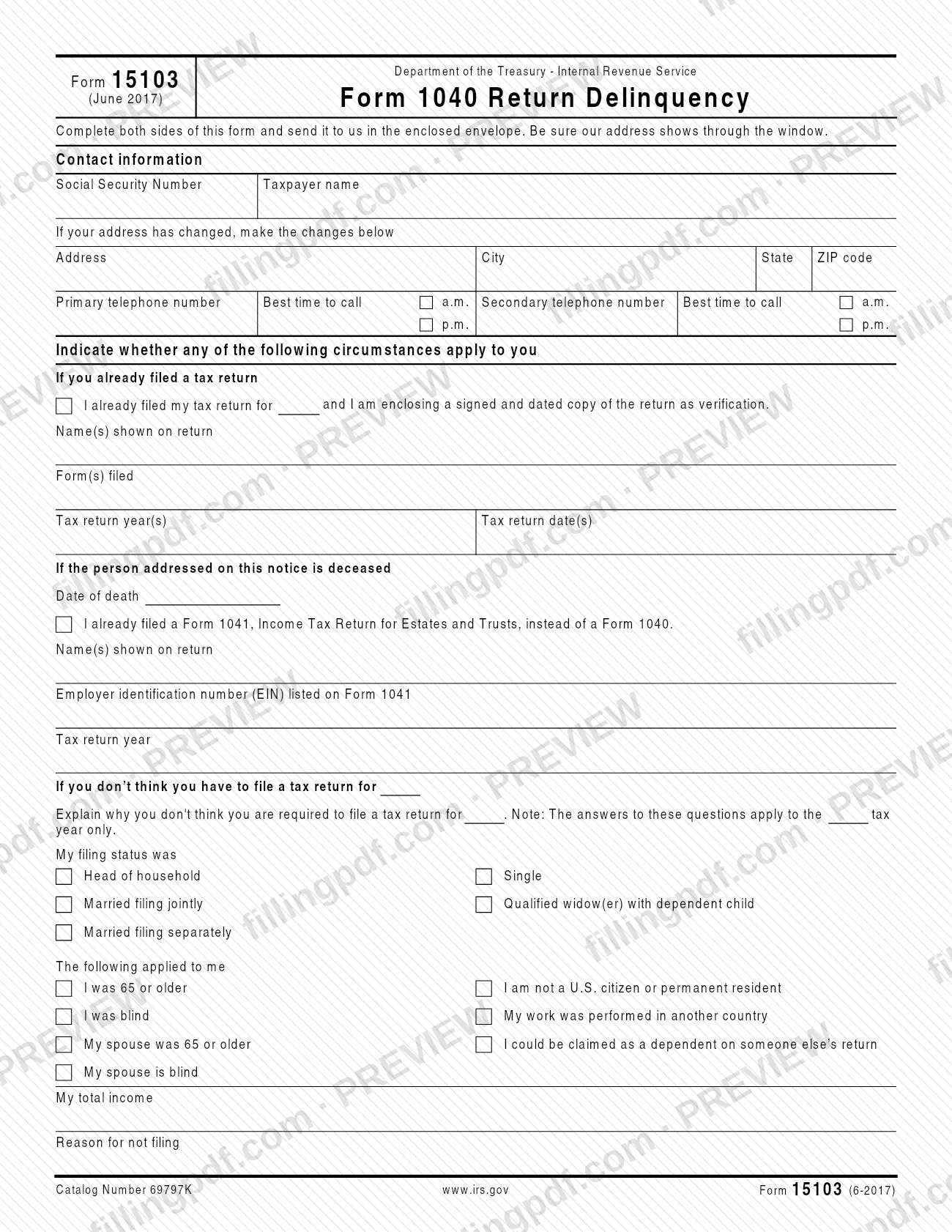
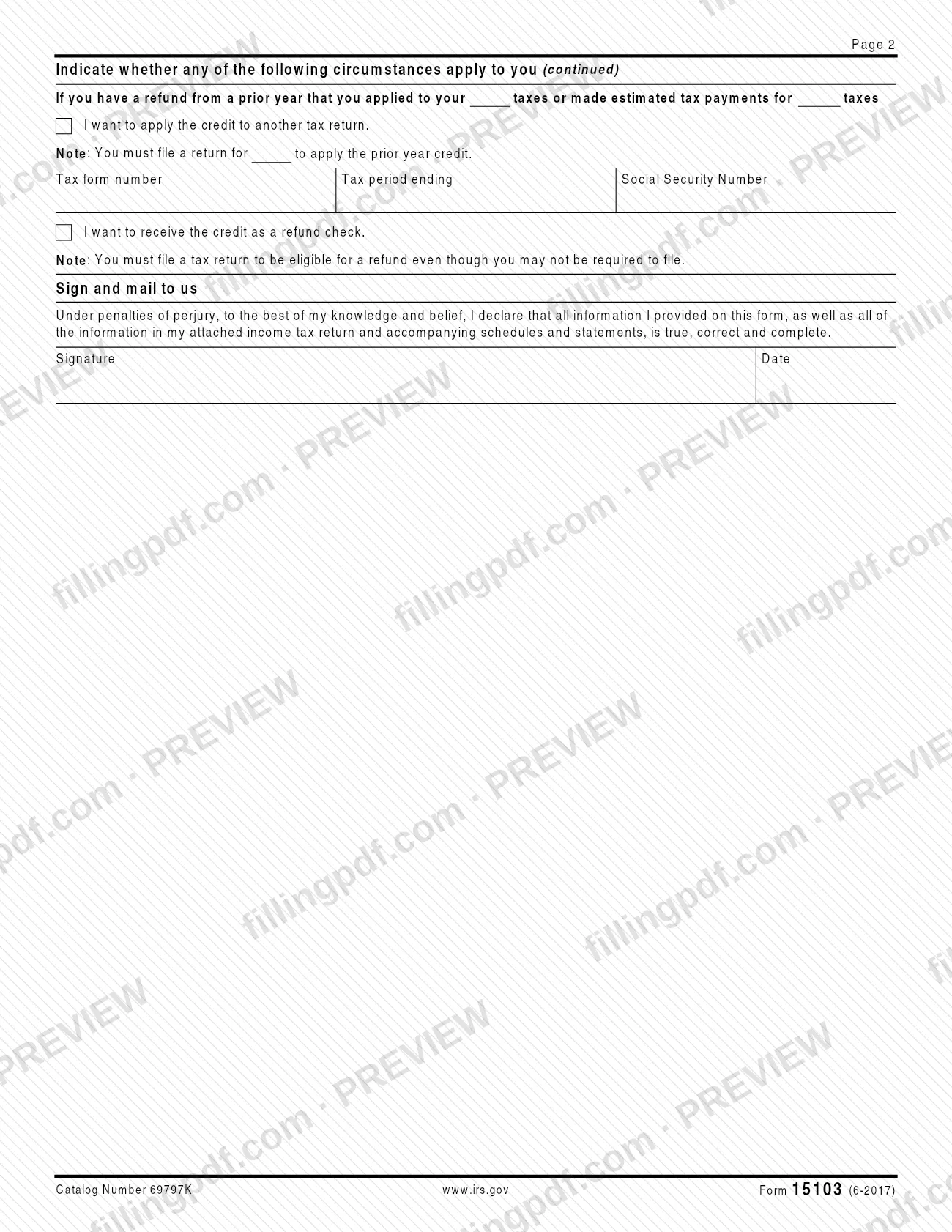
Form 15103, Form 1040 Return Delinquency, is a two-sided response form from the Internal Revenue Service (IRS). You use it to tell the IRS that you already filed your return, that the person addressed on the notice has died, or why you don't think you have to file a tax return. It also lets you say whether a prior-year credit should be applied to another return or paid as a refund check. On FillingPDF you can fill out Form 15103 online and download or print the completed PDF; the IRS publishes the original form at irs.gov.
Last updated
What is Form 15103?
Form 15103, Form 1040 Return Delinquency, is an Internal Revenue Service (IRS) form that a taxpayer completes and returns to tell the IRS whether a Form 1040 return was already filed, whether the person addressed has died, or why no return is required.
The form is printed on two sides (Catalog Number 69797K, revision June 2017) and its wording refers to "this notice" and an "enclosed envelope", so it is sent to you together with an IRS notice. It is organized in blocks:
- Contact information, including a changed address and two telephone numbers with the best time to call.
- If you already filed a tax return: the name(s) shown on the return, the form(s) filed and the tax return year(s) and date(s).
- If the person addressed is deceased: the date of death and, if a Form 1041, Income Tax Return for Estates and Trusts, was filed instead of a Form 1040, the name(s) on the return, the employer identification number (EIN) and the tax year.
- If you don't think you have to file: an explanation, your filing status, the circumstances that applied to you, your total income and your reason for not filing.
- Prior-year credit: apply it to another return or receive it as a refund check.
- A signature block with a declaration under penalties of perjury.
The form does not file a return for you. Where a return is still needed, for example to apply a prior-year credit or to be eligible for a refund, the form says you must file one.
Who needs to file Form 15103?
The main group is taxpayers who receive Form 15103 with an IRS notice about a Form 1040 return and need to answer it. Which block you complete depends on your situation:
- You already filed your return. Complete the "already filed" block and enclose a signed and dated copy of the return as verification.
- The person addressed on the notice is deceased. Enter the date of death. If a Form 1041, Income Tax Return for Estates and Trusts, was filed instead of a Form 1040, give the return details, the EIN listed on Form 1041 and the tax return year.
- You don't think you have to file. Explain why, and give your filing status, the circumstances that applied to you and your total income. The answers apply only to the tax year named on the form.
- You have a prior-year credit. If you applied a refund from a prior year to your taxes or made estimated tax payments, say whether to apply the credit to another return or to receive it as a refund check.
The form prints no rule about who may sign for someone else, so the signature block is the only signing instruction it gives.
When to file Form 15103
The triggering event is receiving Form 15103 with an IRS notice about your Form 1040 return: the form is meant to be completed and sent back in the envelope that came with it. No due date is printed on the form itself, so check the notice you received for any response date.
The tax year matters. The form states that your answers in the "don't think you have to file" block apply to the tax year named only, and that you must file a return for the year in question to apply a prior-year credit or to be eligible for a refund check, even if you may not be required to file.
Documents you need
- A signed and dated copy of your tax return, only if you check the box saying you already filed it; the IRS uses it as verification.
How to fill out Form 15103
Enter your contact information
Under Contact information, enter your Social Security Number and taxpayer name.
Update address and telephone numbers
If your address has changed, enter the new address, city, state and ZIP code. Add a primary and a secondary telephone number and mark a.m. or p.m. for the best time to call.
Report a return you already filed
If you already filed, check the box, enclose a signed and dated copy of the return, and enter the name(s) shown on the return, the form(s) filed and the tax return year(s) and date(s).
Complete the deceased taxpayer block
If the person addressed is deceased, enter the date of death. If a Form 1041 was filed instead of a Form 1040, check that box and give the name(s) on the return, the EIN listed on Form 1041 and the tax return year.
Explain why you need not file
If you don't think you have to file, explain why in the space provided, remembering that your answers apply to the tax year named on the form only.
Check your filing status
Check one: Head of household, Single, Married filing jointly, Qualified widow(er) with dependent child or Married filing separately.
Mark the circumstances that applied
Check each that applies: I was 65 or older, I was blind, My spouse was 65 or older, My spouse is blind, I am not a U.S. citizen or permanent resident, My work was performed in another country, or I could be claimed as a dependent on someone else's return.
Enter total income and reason
Under My total income, enter your income for that year. Under Reason for not filing, state why you did not file.
Choose how to use a prior-year credit
If you applied a prior-year refund or made estimated tax payments, check I want to apply the credit to another tax return and enter the tax form number, tax period ending and Social Security Number, or check the refund check option.
Sign and date the declaration
Under Sign and mail to us, sign and date the declaration made under penalties of perjury.
Review and download the completed PDF
Check that both sides are complete and that any copy of your return is ready to enclose. Download or print the completed PDF from FillingPDF and return it as described under How to submit.
How to submit Form 15103
Form 15103 is returned by mail, in the envelope that came with it.
- By mail: Complete both sides of the form, sign and date it, and send it to the IRS in the enclosed envelope. The form tells you to be sure the IRS address shows through the window of the envelope.
- If you already filed: Enclose a signed and dated copy of the return as verification, as the form directs.
The form prints no other mailing address, fax number, portal or appointment option, and it gives only www.irs.gov as a website. If the envelope is missing, use the contact details on the notice that came with the form. FillingPDF lets you fill out and download the PDF; submission follows the channels above.
Common mistakes to avoid
- Completing only one side; the form says to complete both sides before sending it.
- Leaving the signature and date blank; the declaration under penalties of perjury covers everything on the form and on any attached return.
- Checking "I already filed my tax return" without enclosing a signed and dated copy of the return.
- Mailing the form in an envelope where the IRS address does not show through the window of the enclosed envelope.
- Expecting a refund check without filing a return; the form says you must file a tax return to be eligible for a refund even if you may not be required to file.
- Asking to apply a prior-year credit to another return without filing a return for the year in question.
- Treating your "not required to file" explanation as covering other years; the answers apply only to the tax year named on the form.
- Giving a Form 1041 filing without the EIN listed on Form 1041 and the tax return year.
Frequently asked questions
What is Form 15103?
Form 15103, Form 1040 Return Delinquency, is an IRS form sent with a notice about a Form 1040 return. You use it to say you already filed, that the person addressed is deceased, or why you don't think you have to file, and to direct a prior-year credit.
What do I do if I already filed my return?
Check the box saying you already filed, then enter the name(s) shown on the return, the form(s) filed and the tax return year(s) and date(s). The form tells you to enclose a signed and dated copy of the return as verification.
Where do I mail Form 15103?
Send it in the envelope enclosed with the IRS notice, making sure the IRS address shows through the window. The form prints no other address, fax number or portal, so use the notice you received if the envelope is missing.
Can I fill out Form 15103 online?
Yes. You can fill out the PDF online on FillingPDF and download or print it. FillingPDF is an independent service and does not send the form to the IRS; you return it by mail as the form directs.
What if the person on the notice has died?
Enter the date of death in the deceased block. If a Form 1041, Income Tax Return for Estates and Trusts, was filed instead of a Form 1040, check that box and give the name(s) on the return, the EIN listed on Form 1041 and the tax return year.
Do I get a refund if I am not required to file?
Not automatically. The form says you must file a tax return to be eligible for a refund check even though you may not be required to file. The same applies to applying a prior-year credit to another return.
Does Form 15103 need a signature?
Yes. The last block, Sign and mail to us, asks for your signature and the date under a declaration, made under penalties of perjury, that the information on the form and in any attached return is true, correct and complete.
Ready to fill out Form 15103?
Fill out Form 15103 now