
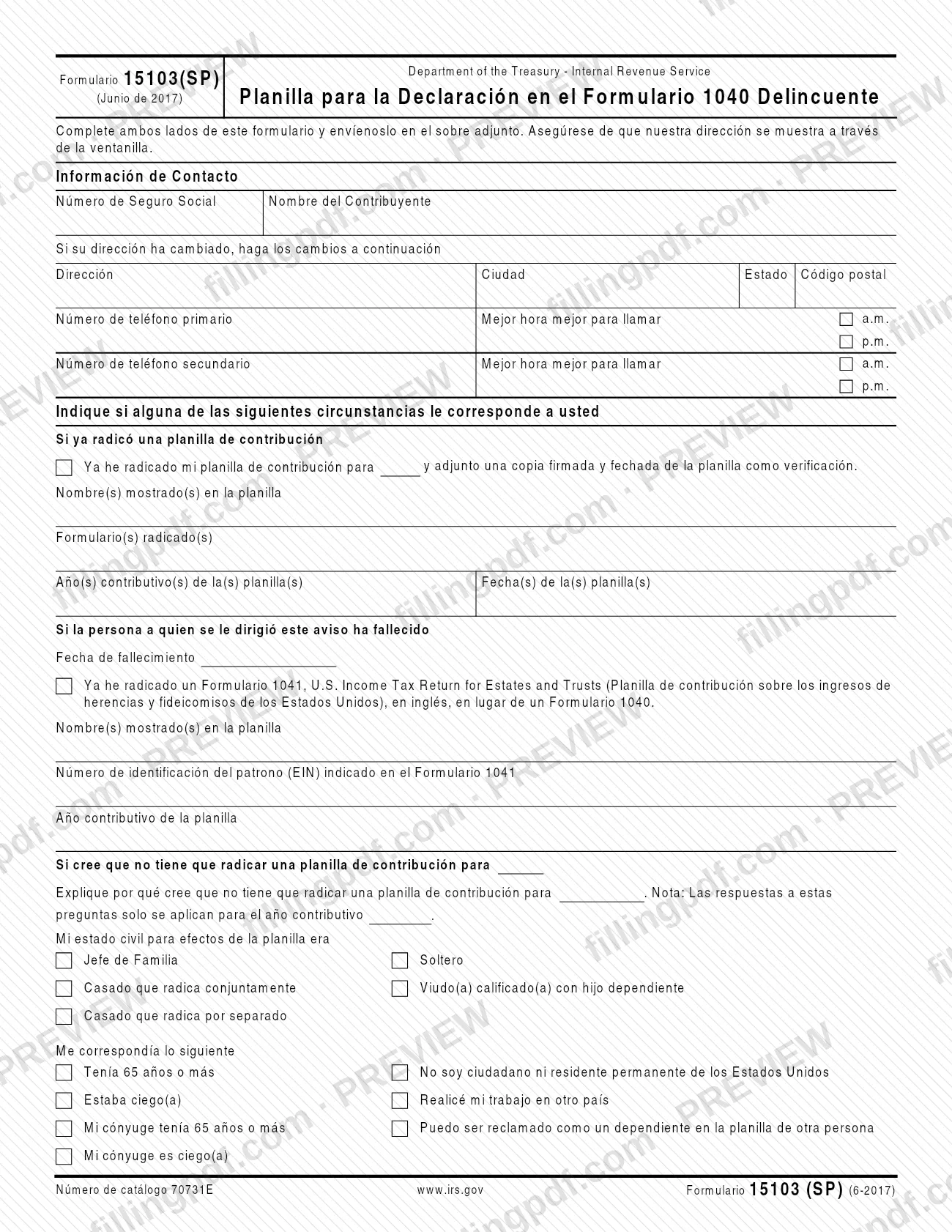
Form 15103 (SP), Form 1040 Return Delinquency (Spanish Version), is the Spanish-language response form the Internal Revenue Service (IRS) uses when a Form 1040 return appears to be delinquent. You use it to tell the IRS that you already filed, that you believe you do not have to file, that the taxpayer named in the notice has died, or what to do with a prior-year credit. On this page you can fill out the form online on FillingPDF and download or print the completed PDF; the IRS publishes the original at irs.gov, and you return the form in the envelope that came with your notice.
Last updated
What is 15103 (SP)?
Form 15103 (SP), Form 1040 Return Delinquency (Spanish Version), is the Internal Revenue Service (IRS) form on which a person answers a notice about a Form 1040 return that has not been filed, by giving the IRS the facts that explain the situation.
The form is printed entirely in Spanish under the title "Planilla para la Declaración en el Formulario 1040 Delincuente" and is dated June 2017 (catalog number 70731E). It has two sides, and the IRS asks you to complete both.
Completing it produces a signed statement, made under penalty of perjury, covering these items:
- your contact information and any change of address;
- whether you already filed a return for the year in question, with the form, tax year and date;
- whether the person the notice was addressed to has died, and whether a Form 1041, U.S. Income Tax Return for Estates and Trusts, was filed instead of a Form 1040;
- why you believe you do not have to file, with your filing status, your circumstances and your total income;
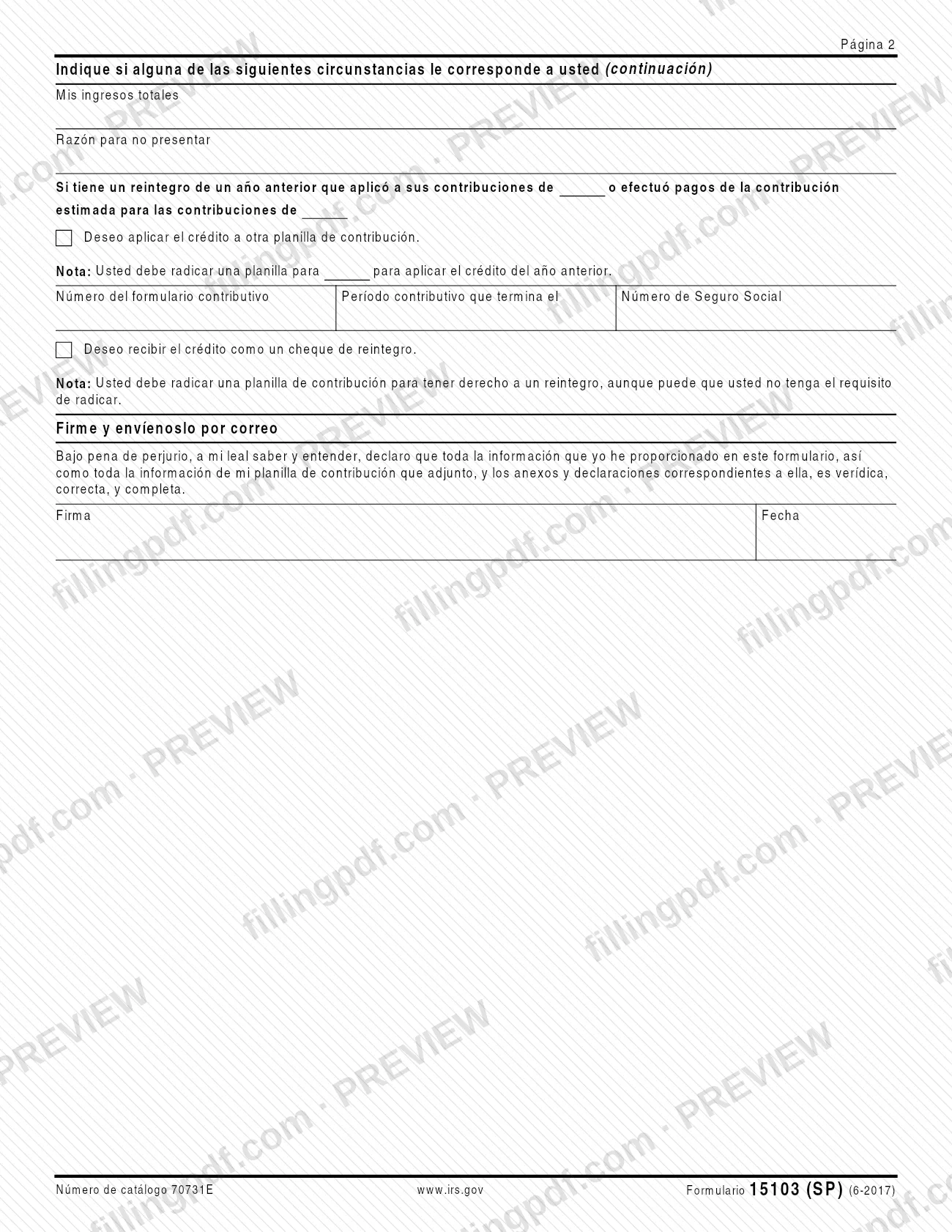
- what to do with a refund from a prior year that you applied to your taxes, or with estimated tax payments: apply the credit to another return or receive it as a refund check.
The form is not a tax return. A return must still be filed to apply a prior-year credit or to receive a refund.
Who needs to file 15103 (SP)?
The main group is taxpayers who received an IRS notice about a delinquent Form 1040 return and are asked to answer on this form. The form is addressed to "the person to whom the notice was sent," so it applies to the name and tax year shown on that notice.
Situations the form covers, each with its own section:
- You already filed: check the box, list the form, tax year and date, and attach a signed and dated copy of the return as verification.
- The person named in the notice has died: give the date of death. If a Form 1041 was filed instead of a Form 1040, give the name on the return, the Employer Identification Number (EIN) and the tax year.
- You believe you do not have to file: explain why, and give your filing status, your circumstances and your total income for that tax year only.
- You have a prior-year refund applied to your taxes, or estimated tax payments: choose whether the credit goes to another return or comes back as a refund check.
The form does not say who may sign for someone else. It has one signature line and the printed statement is made under penalty of perjury.
When to file 15103 (SP)
Complete Form 15103 (SP) when you receive the IRS notice about the delinquent Form 1040 return, since the form is returned in the envelope that comes with that notice. No separate due date is printed on the form itself, so check the notice you received for any response date.
The answers about not having to file apply only to the one tax year named in that section. If the notice covers a different year, the answers on this form do not carry over to it.
A prior-year credit does not remove the need to file. The form states that you must file a return for the year to apply the prior-year credit to another return, and that you must file a return to claim a refund even if you may not be required to file.
Documents you need
- A signed and dated copy of your return, only if you check the box saying you already filed a return for the year in the notice; it serves as verification of the filing.
How to fill out 15103 (SP)
Enter your contact information
Under Información de Contacto, enter the Social Security number and the taxpayer name (Número de Seguro Social, Nombre del Contribuyente) as shown on your notice.
Update your address and phones
If your address has changed, write the new Dirección, Ciudad, Estado and Código postal. Give a primary and a secondary phone number, each with the best time to call and a.m. or p.m.
Report a return you already filed
If you already filed, check the box under the heading for a filed return, enter the tax year, and list the name(s) on the return, the form(s) filed, the tax year(s) and the date(s). Attach a signed and dated copy.
Report if the taxpayer has died
If the person the notice was sent to has died, enter the date of death. If a Form 1041 was filed instead of a Form 1040, check that box and give the name(s) on the return, the EIN shown on Form 1041 and the tax year.
Explain why you do not have to file
If you believe you do not have to file for the year, explain why in that section. Remember the answers apply only to that tax year.
Mark your filing status
Check one: Jefe de Familia, Soltero, Casado que radica conjuntamente, Viudo(a) calificado(a) con hijo dependiente or Casado que radica por separado.
Check the circumstances that apply
Mark each that fits: age 65 or older, blind, spouse 65 or older, spouse blind, not a U.S. citizen or permanent resident, worked in another country, or can be claimed as a dependent on someone else's return.
Give total income and reason
On page 2, enter Mis ingresos totales and the Razón para no presentar (reason for not filing) for that tax year.
Choose what to do with a credit
If a prior-year refund was applied to your taxes or you made estimated payments, check either to apply the credit to another return, giving the form number, the period ending and the Social Security number, or to receive it as a refund check.
Sign and date the form
Under Firme y envíenoslo por correo, sign and date the statement made under penalty of perjury. It covers the form, the attached return and its schedules and statements.
Review and download the PDF
Check that both sides are complete and that any copy of a filed return is ready to attach. Download or print the completed PDF from FillingPDF and send it as described under How to submit.
How to submit 15103 (SP)
Return the completed form by mail in the envelope that came with your notice. The form printed no other channel.
- Mail: complete both sides of Form 15103 (SP), sign and date it, and send it in the enclosed envelope. Make sure the IRS address shows through the envelope window.
- Attachments: if you checked the box saying you already filed, attach a signed and dated copy of that return as verification.
The form gives no separate mailing address, portal or appointment option, so the envelope enclosed with the notice is the way to return it. Keep a copy of what you send for your records. FillingPDF lets you fill out and download the PDF; submission follows the channels above.
Common mistakes to avoid
- Completing only one side of Form 15103 (SP); the form tells you to complete both sides before sending it.
- Checking the box saying you already filed without attaching a signed and dated copy of the return.
- Mailing the form without signing and dating it; the statement is made under penalty of perjury and has a signature line.
- Applying your answers about not having to file to other years; they apply only to the tax year named in that section.
- Expecting a refund or a credit transfer without filing a return; the form says a return is needed even if you are not required to file.
- Sending the form so the IRS address does not show through the window of the enclosed envelope.
- Reporting a Form 1041 without the EIN shown on it and the tax year, when the notice addressee has died and an estate return was filed instead.
- Choosing to apply a credit to another return without giving the tax form number, the period ending and the Social Security number.
Frequently asked questions
What is Form 15103 (SP)?
Form 15103 (SP), Form 1040 Return Delinquency (Spanish Version), is the IRS form for responding to a notice about a delinquent Form 1040 return. You tell the IRS if you already filed, if the taxpayer has died, or why you believe you do not have to file.
Is Form 15103 (SP) the Spanish version?
Yes. Its name says Spanish Version, and the form is printed in Spanish as Formulario 15103(SP), dated June 2017. This page covers that Spanish-language edition, so use the labels exactly as they appear on the PDF.
Where do I send Form 15103 (SP)?
Send it by mail in the envelope enclosed with your IRS notice, after completing both sides. The form says to make sure the IRS address shows through the window. It prints no other mailing address or online option.
What if I already filed my tax return?
Check the box saying you already filed, enter the tax year, and list the names on the return, the forms filed, the tax years and the filing dates. Attach a signed and dated copy of the return as verification.
Do I still have to file if I expect a refund or a credit?
Yes. The form states that you must file a return to apply a prior-year credit to another return, and that you must file one to receive a refund check, even if you may not be required to file.
What do I do if the person named in the notice died?
Enter the date of death. If a Form 1041, U.S. Income Tax Return for Estates and Trusts, was filed instead of a Form 1040, check that box and give the name on the return, the EIN shown on it and the tax year.
Can I fill out Form 15103 (SP) online?
You can fill out the PDF online on FillingPDF and download or print it. FillingPDF is an independent service and does not send the form to the IRS; you return it by mail in the envelope enclosed with your notice.
Ready to fill out 15103 (SP)?
Fill out 15103 (SP) now