
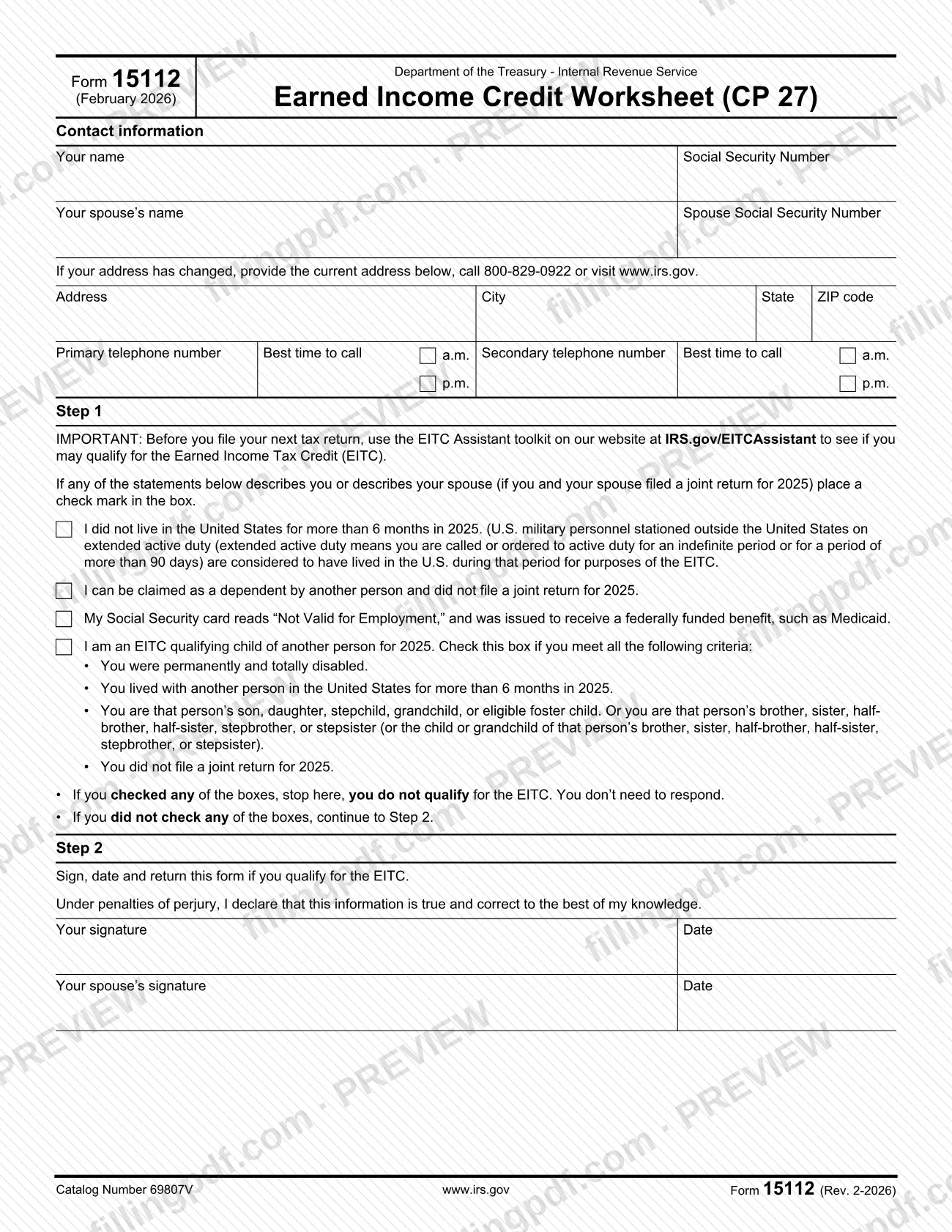
Form 15112 is the Earned Income Credit Worksheet (CP 27) published by the Internal Revenue Service (IRS). It asks you to check any statement about 2025 that describes you or your spouse; if one applies, you do not qualify for the Earned Income Tax Credit (EITC) and do not need to respond, and if none applies, you sign and return the form. On this page you can fill out the form online on FillingPDF and download or print the completed PDF; the original is published by the IRS at irs.gov.
Last updated
What is Form 15112?
Form 15112, Earned Income Credit Worksheet (CP 27), is an Internal Revenue Service (IRS) form, revision February 2026, on which you and your spouse state whether any of four statements about tax year 2025 describes you, which decides whether you qualify for the EITC.
The form has two steps. In Step 1 you check the box for each statement that describes you, or your spouse if you filed a joint return for 2025:
- You did not live in the United States for more than 6 months in 2025.
- You can be claimed as a dependent by another person and did not file a joint return for 2025.
- Your Social Security card reads "Not Valid for Employment" and was issued to receive a federally funded benefit, such as Medicaid.
- You are an EITC qualifying child of another person for 2025.
If you checked any box, the form tells you to stop: you do not qualify for the EITC and you do not need to respond. If you checked none, you continue to Step 2, where you sign, date and return the form under penalties of perjury.
The form also collects contact information (names, Social Security numbers, current address and telephone numbers) and points you to the EITC Assistant toolkit at IRS.gov/EITCAssistant, which you can use before you file your next tax return. It does not calculate a credit amount.
Who needs to file Form 15112?
Form 15112 is addressed to a taxpayer, and to the taxpayer's spouse if the two of you filed a joint return for 2025, who must say whether any of the four listed statements applies. The Step 1 check boxes cover people who did not live in the United States for more than 6 months in 2025, people who can be claimed as a dependent by another person and did not file a joint return, people whose Social Security card reads "Not Valid for Employment" and was issued to receive a federally funded benefit such as Medicaid, and people who are an EITC qualifying child of another person.
You do not need to respond if you check any box: the form says you do not qualify for the EITC and to stop there. Only if you check none do you sign, date and return it.
The qualifying-child statement applies only if you meet all of its criteria: you were permanently and totally disabled, you lived with another person in the United States for more than 6 months in 2025, you have one of the listed family relationships to that person, and you did not file a joint return for 2025. U.S. military personnel on extended active duty outside the United States are treated as having lived in the U.S. during that period for EITC purposes. The form prints no rule for a representative signing for you.
When to file Form 15112
The form prints no due date. Its triggering event is that you have received it and none of the Step 1 statements about tax year 2025 describes you or your spouse: only then do you continue to Step 2 and sign, date and return it. If you check any box, you stop and do not need to respond.
Step 1 also tells you to use the EITC Assistant toolkit at IRS.gov/EITCAssistant before you file your next tax return, to see whether you may qualify for the EITC. For a return deadline, a response date or any other timing question, call the IRS at 800-829-0922 or visit www.irs.gov, the contacts printed on the form.
How to fill out Form 15112
Enter your name and Social Security number
In the contact information block, write Your name and your Social Security Number.
Add your spouse's details
If you and your spouse filed a joint return for 2025, enter Your spouse's name and Spouse Social Security Number.
Update your address if needed
If your address has changed, enter the current Address, City, State and ZIP code. You can also call 800-829-0922 or visit www.irs.gov.
Give your telephone numbers
Enter your Primary telephone number and Secondary telephone number, and for each mark the Best time to call with a.m. or p.m.
Review the EITC Assistant note
Step 1 tells you to use the EITC Assistant toolkit at IRS.gov/EITCAssistant before you file your next tax return to see if you may qualify for the EITC.
Check the statements that describe you
Mark each box that describes you, or your spouse if you filed a joint return for 2025: not living in the U.S. for more than 6 months in 2025, being claimable as a dependent without a joint return, or a Social Security card reading "Not Valid for Employment".
Check the qualifying-child statement
Mark the box for being an EITC qualifying child of another person for 2025 only if you meet all four listed criteria.
Stop if you checked any box
If you checked any box, you do not qualify for the EITC and you do not need to respond. If you checked none, continue to Step 2.
Sign and date in Step 2
If you qualify, sign and date under penalties of perjury. Your spouse also signs and dates in Your spouse's signature if you filed a joint return.
Review and download the completed PDF
Check names, Social Security numbers and signatures, then download or print the completed PDF from FillingPDF and return it as described under How to submit.
How to submit Form 15112
Form 15112 says to return it if you qualify, but it prints no mailing address, fax number or online portal, so the channel is not stated on the form itself. The only IRS contacts it gives are 800-829-0922 and www.irs.gov, listed on the line for a changed address.
Before you send anything:
- Check Step 1. If any statement describes you or your spouse, do not sign and return the form; you do not need to respond.
- Sign and date Step 2. Your spouse also signs and dates if you filed a joint return for 2025.
- Update your address. If it has changed, write the current address on the form, or call 800-829-0922 or visit www.irs.gov.
Use the IRS contacts on the form to confirm where to return it. FillingPDF lets you fill out and download the PDF; submission follows the IRS channels, not this site.
Common mistakes to avoid
- Continuing to Step 2 and signing after checking a Step 1 box; the form says that if you checked any box you do not qualify for the EITC and do not need to respond.
- Checking the qualifying-child box without meeting all four criteria: permanent and total disability, living with the person in the U.S. for more than 6 months in 2025, the listed relationship, and no joint return for 2025.
- Checking the "did not live in the United States for more than 6 months" box because of overseas military service; extended active duty outside the U.S. counts as living in the U.S. for the EITC.
- Checking the dependent box when you filed a joint return for 2025; the statement applies only if you did not file a joint return.
- Returning the form unsigned or undated in Step 2 after checking no boxes.
- Omitting your spouse's signature and date when you and your spouse filed a joint return for 2025.
- Leaving an old address on the form when it has changed; the form asks for the current address or a call to 800-829-0922.
- Answering for the wrong year: the statements refer to 2025, not another tax year.
Frequently asked questions
What is Form 15112?
Form 15112 is the IRS Earned Income Credit Worksheet (CP 27), revision February 2026. You check any of four statements about 2025 that describe you or your spouse, which shows you do not qualify for the EITC, or you sign and return it if none applies.
Do I have to respond if I check a box on Form 15112?
No. The form says that if you checked any of the Step 1 boxes, you do not qualify for the EITC, you should stop there and you do not need to respond. You continue to Step 2 only if you checked none.
Who has to sign Form 15112?
You sign and date in Step 2 if you qualify for the EITC. If you and your spouse filed a joint return for 2025, your spouse also signs and dates. The signature is made under penalties of perjury, declaring the information true and correct to the best of your knowledge.
Where do I return Form 15112?
The form says to return it if you qualify, but it prints no mailing address, fax number or portal. The only IRS contacts printed are 800-829-0922 and www.irs.gov, so use them to confirm where to send the signed form.
Does military service outside the U.S. count as living abroad for the EITC?
No. The form says U.S. military personnel stationed outside the United States on extended active duty, meaning called or ordered to active duty for an indefinite period or more than 90 days, are considered to have lived in the U.S. during that period for the EITC.
What does "Not Valid for Employment" on my Social Security card mean for Form 15112?
If your Social Security card reads "Not Valid for Employment" and was issued to receive a federally funded benefit, such as Medicaid, you check that box. The form then says you do not qualify for the EITC and do not need to respond.
Can I fill out Form 15112 online?
Yes. You can fill out the fillable PDF online on FillingPDF and download or print it. FillingPDF is an independent service and does not send the form to the IRS; you return it through the IRS contacts printed on the form.
How do I update my address on Form 15112?
Write your current address in the Address, City, State and ZIP code lines. The form also says you can call 800-829-0922 or visit www.irs.gov if your address has changed.
Ready to fill out Form 15112?
Fill out Form 15112 now