
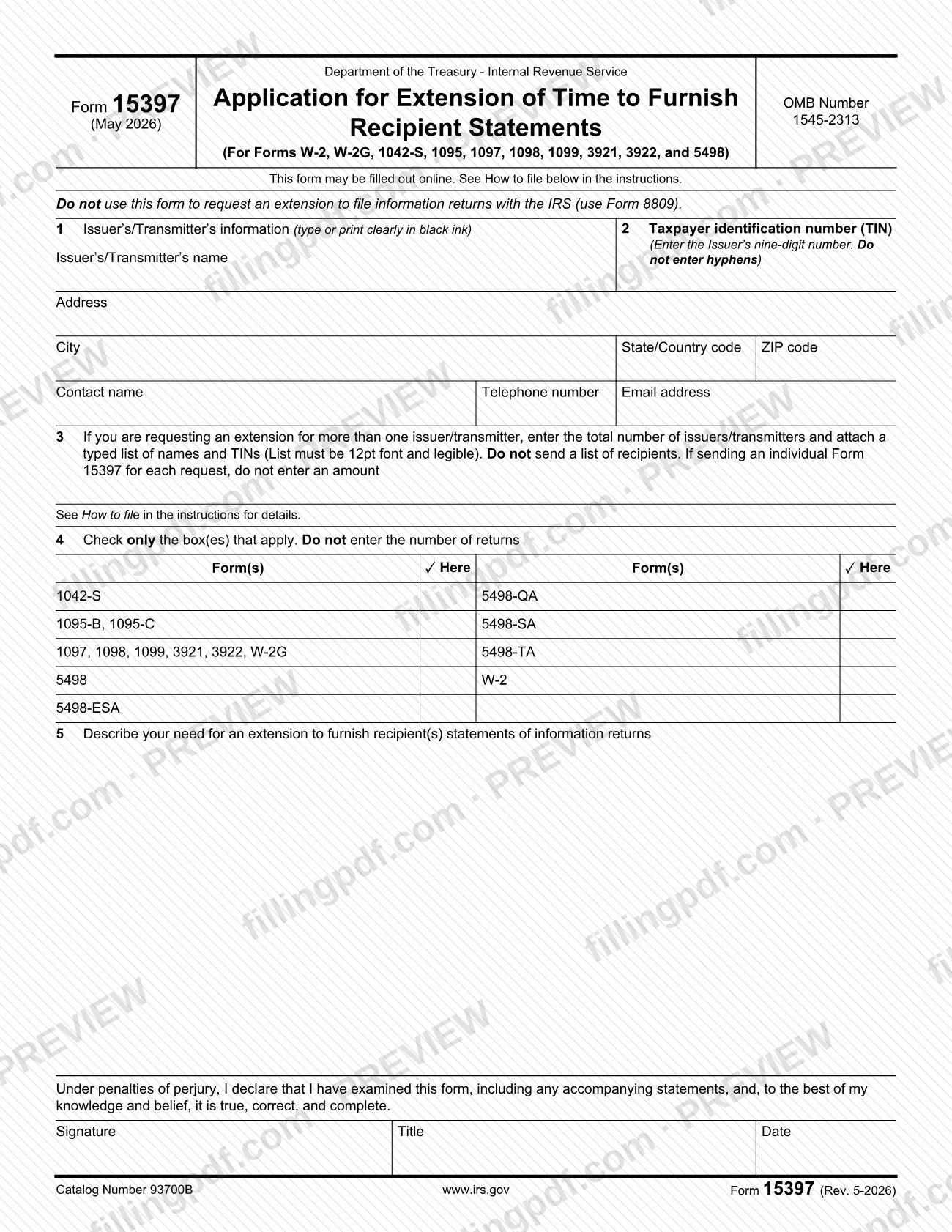
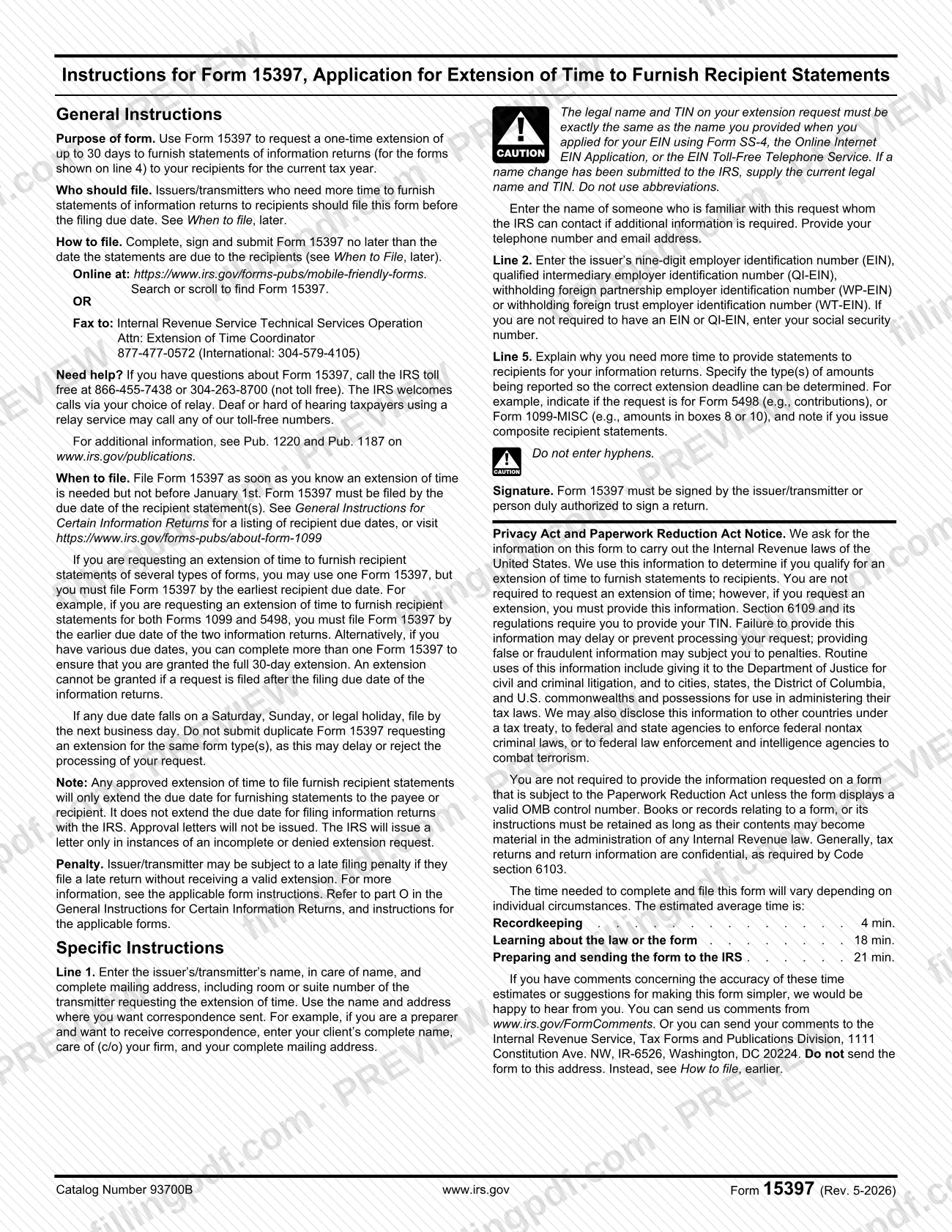
Form 15397 is the Internal Revenue Service (IRS) application that issuers and transmitters use to request a one-time extension of up to 30 days to furnish statements of information returns to their recipients. It covers statements for Forms W-2, W-2G, 1042-S, 1095, 1097, 1098, 1099, 3921, 3922 and 5498. On FillingPDF you can fill out the form online and download or print the completed PDF; the IRS accepts the request only through the channels described below, and the official PDF is published at irs.gov.
Last updated
What is Form 15397?
Form 15397, Application for Extension of Time to Furnish Recipient Statements, is the IRS form an issuer or transmitter files to request a one-time extension of up to 30 days to give recipients their statements of information returns for the current tax year.
The form applies to statements for Forms W-2, W-2G, 1042-S, 1095, 1097, 1098, 1099, 3921, 3922 and 5498. It is printed under OMB Number 1545-2313. The issuer or transmitter identifies itself on lines 1 and 2, states how many issuers are covered on line 3, checks the form types on line 4, explains the need for more time on line 5 and signs under penalties of perjury.
The extension is narrow. An approved extension only moves the due date for furnishing statements to the payee or recipient. It does not extend the due date for filing information returns with the IRS, and the IRS does not issue approval letters: it sends a letter only when a request is incomplete or denied.
Form 15397 is not the form for asking the IRS for more time to file the returns themselves. The form says to use Form 8809 for that request. The IRS points to Pub. 1220, Pub. 1187 and the General Instructions for Certain Information Returns for related rules.
Who needs to file Form 15397?
Issuers and transmitters who need more time to furnish statements of information returns to recipients file Form 15397. It covers statements for Forms W-2, W-2G, 1042-S, 1095, 1097, 1098, 1099, 3921, 3922 and 5498, using the form groups listed on line 4.
- A preparer who wants to receive the IRS correspondence enters the client's complete name, in care of (c/o) the preparer's firm, and the firm's mailing address on line 1.
- An issuer or transmitter requesting an extension for more than one issuer or transmitter enters the total number on line 3 and attaches a typed list of names and TINs.
- The form must be signed by the issuer or transmitter, or by a person duly authorized to sign a return.
Do not use Form 15397 to request an extension of time to file information returns with the IRS; the form directs you to Form 8809 for that. An issuer who does not need more time to furnish recipient statements does not file it, and the IRS notes that requesting an extension is not required.
When to file Form 15397
File Form 15397 as soon as you know an extension is needed, but not before January 1, and no later than the due date of the recipient statements. An extension cannot be granted if the request is filed after the due date of the information returns.
If you are asking for several types of forms on one Form 15397, you must file it by the earliest recipient due date; for example, for both Forms 1099 and 5498, by the earlier of the two dates. If your due dates vary, you can file more than one Form 15397 to secure the full 30-day extension for each. When a due date falls on a Saturday, Sunday or legal holiday, file by the next business day.
The extension is one-time and up to 30 days. Do not submit a duplicate request for the same form type or types, because duplicates may delay or reject processing. A person who files a late return without a valid extension may be subject to a late filing penalty; see the instructions for the applicable form.
Documents you need
- A typed list of issuer or transmitter names and TINs, in legible 12-point font, when line 3 asks for the total number of issuers or transmitters because you are requesting an extension for more than one. Do not send a list of recipients.
How to fill out Form 15397
Enter issuer or transmitter information
On line 1, type or print in black ink the issuer's or transmitter's name, in care of name, and complete mailing address with room or suite number. Use the name and address where you want correspondence sent; a preparer enters the client's name, c/o the firm.
Add contact details
Enter the name of someone familiar with the request whom the IRS can contact, plus a telephone number and email address.
Enter the taxpayer identification number
On line 2, enter the issuer's nine-digit EIN, QI-EIN, WP-EIN or WT-EIN, with no hyphens. If you are not required to have an EIN or QI-EIN, enter your Social Security number.
Match the legal name and TIN
The legal name and TIN must be exactly the same as those provided when you applied for your EIN. If a name change has been submitted to the IRS, use the current legal name and TIN, without abbreviations.
Complete line 3 for multiple issuers
If requesting an extension for more than one issuer or transmitter, enter the total number and attach a typed list of names and TINs in legible 12-point font. If you send an individual Form 15397 for each request, do not enter an amount.
Check the form types on line 4
Check only the box or boxes that apply among 1042-S, 1095-B/1095-C, the 1097/1098/1099/3921/3922/W-2G group, 5498, 5498-ESA, 5498-QA, 5498-SA, 5498-TA and W-2. Do not enter the number of returns.
Explain your need on line 5
Describe why you need more time to furnish recipient statements. Specify the types of amounts reported, such as Form 5498 contributions or Form 1099-MISC boxes 8 or 10, and note if you issue composite recipient statements.
Sign, title and date
Under penalties of perjury, the issuer or transmitter, or a person duly authorized to sign a return, signs and enters a title and date.
Review and download the completed PDF
Check the TIN, the checked boxes and the line 5 explanation, then download or print the completed PDF from FillingPDF. Submit it through the channels described under How to submit before the recipient due date.
How to submit Form 15397
You can submit Form 15397 online through the IRS mobile-friendly forms page or by fax.
- Online: go to https://www.irs.gov/forms-pubs/mobile-friendly-forms and search or scroll to find Form 15397.
- By fax: send it to Internal Revenue Service, Technical Services Operation, Attn: Extension of Time Coordinator, at 877-477-0572 (international: 304-579-4105).
Whichever channel you use, the form must be completed, signed and submitted no later than the date the statements are due to recipients. If you cover more than one issuer or transmitter, include the typed list of names and TINs with the request.
Do not send the form to the Tax Forms and Publications Division address in Washington, DC; that address is only for comments about the form. For questions, the IRS lists 866-455-7438 (toll free) and 304-263-8700 (not toll free). The IRS does not issue approval letters; it writes only when a request is incomplete or denied. FillingPDF lets you fill out and download the PDF; submission follows the channels above.
Common mistakes to avoid
- Using Form 15397 to ask for more time to file information returns with the IRS; the form says to use Form 8809 for that request.
- Filing after the due date of the recipient statements; the instructions say an extension cannot be granted once that date has passed.
- Entering hyphens in the nine-digit TIN on line 2.
- Entering a name and TIN that differ from those given when the EIN was applied for, or using abbreviations in the legal name.
- Attaching a list of recipients on line 3 instead of a typed list of issuer or transmitter names and TINs.
- Entering the number of returns on line 4; the form says to check only the box or boxes that apply.
- Submitting duplicate requests for the same form type or types, which may delay or reject processing.
- Leaving line 5 vague without saying which amounts are reported, such as Form 5498 contributions or Form 1099-MISC boxes 8 or 10.
- Sending the request unsigned; it must be signed by the issuer or transmitter or a person duly authorized to sign a return.
- Assuming the extension also moves the IRS filing due date for the returns; it applies only to furnishing statements to recipients.
Frequently asked questions
What is Form 15397 used for?
Form 15397 is the IRS application for a one-time extension of up to 30 days to furnish statements of information returns to recipients for the current tax year. It covers statements for Forms W-2, W-2G, 1042-S, 1095, 1097, 1098, 1099, 3921, 3922 and 5498.
Does Form 15397 extend the deadline to file with the IRS?
No. An approved extension only extends the due date for furnishing statements to the payee or recipient. To request more time to file information returns with the IRS, the form directs you to Form 8809 instead.
When is Form 15397 due?
File it as soon as you know you need more time, but not before January 1, and no later than the due date of the recipient statements. If several form types are on one request, file by the earliest recipient due date; a late request cannot be granted.
Where do I send Form 15397?
Submit it online through the IRS mobile-friendly forms page at https://www.irs.gov/forms-pubs/mobile-friendly-forms, or fax it to the Extension of Time Coordinator at 877-477-0572 (international: 304-579-4105). Do not mail it to the Washington, DC comments address.
Will the IRS send me an approval letter?
No. Approval letters are not issued. The IRS sends a letter only when an extension request is incomplete or denied, so a request that draws no letter has not been rejected as incomplete or denied.
Can I request an extension for several issuers on one Form 15397?
Yes. Enter the total number of issuers or transmitters on line 3 and attach a typed list of their names and TINs in legible 12-point font. Do not list recipients. If you send a separate form for each request, leave the amount on line 3 blank.
Who can sign Form 15397?
The issuer or transmitter signs it, or a person duly authorized to sign a return. The signature block also asks for a title and date and carries a declaration under penalties of perjury.
Can I fill out Form 15397 online on FillingPDF?
Yes. You can fill out the form online on FillingPDF and download or print the PDF. FillingPDF is an independent service and does not submit the request to the IRS; you file it through the IRS online page or by fax.
Ready to fill out Form 15397?
Fill out Form 15397 now