
Form 172 is the Internal Revenue Service (IRS) form that individuals, estates, and trusts use to figure how much of a net operating loss (NOL) is available to carry back or carry forward. Use it when your deductions for the year are more than your income and you need to compute the NOL, the NOL deduction in a carryback year, and any carryover to the next year. On this page you can fill out Form 172 online on FillingPDF and download or print the completed PDF. The IRS publishes the form and its instructions at www.irs.gov/Form172.
Last updated
What is 172?
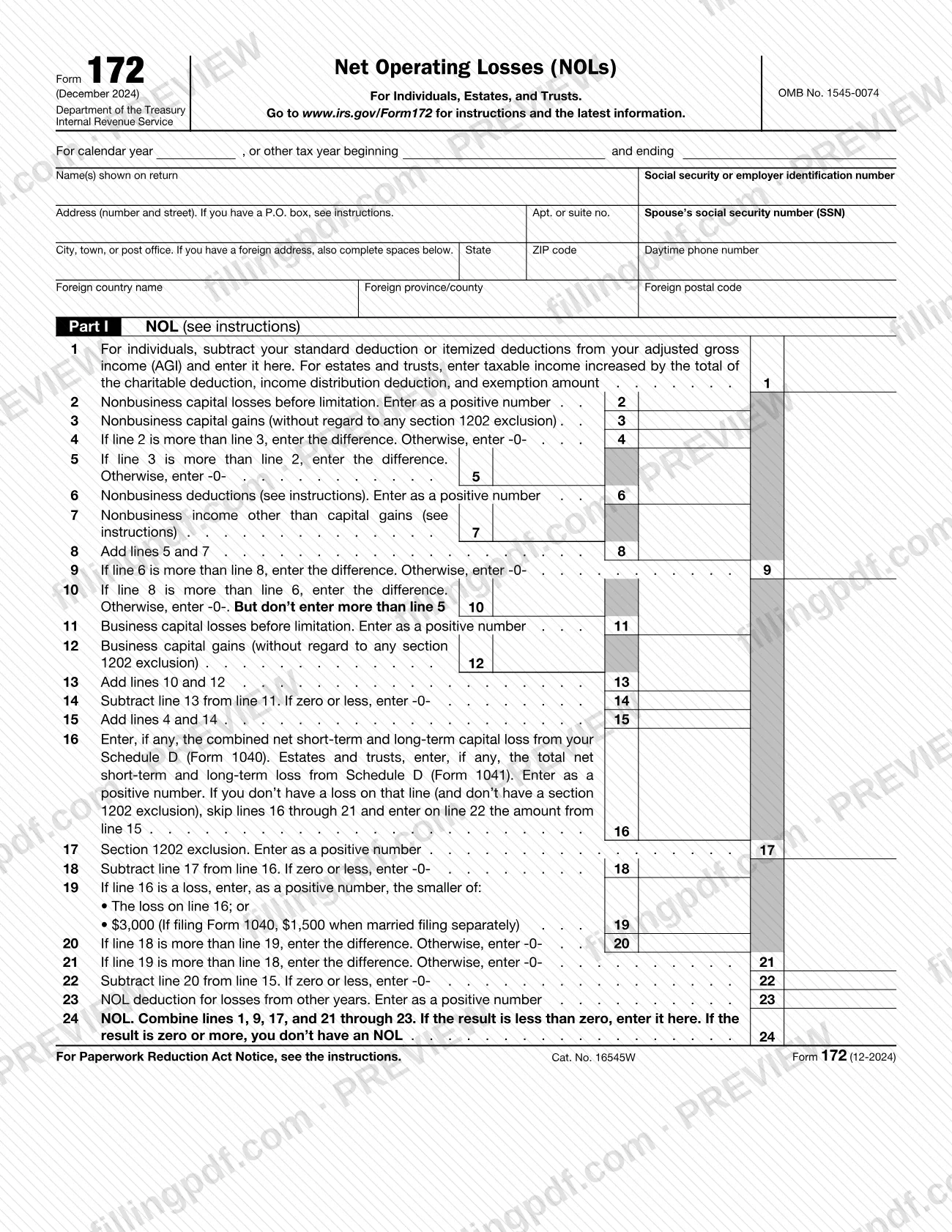
Form 172, Net Operating Losses (NOLs) For Individuals, Estates, and Trusts, is the IRS form taxpayers other than corporations use to figure the amount of a net operating loss that is available for carrying back or forward, and the carryover left after each year it is applied.
An NOL year is the year in which the loss occurs. If your deductions for the year are more than your income, you may have an NOL, and you use it by deducting it from income in another year or years. The IRS instructions say the loss must generally come from deductions for a trade or business, work as an employee, casualty and theft losses from a federally declared disaster, moving expenses, or rental property.
The form has two parts:
- Part I, NOL (lines 1 to 24) starts from the year's income less deductions and removes items not allowed in figuring an NOL, such as capital losses in excess of capital gains, the section 1202 exclusion, nonbusiness deductions in excess of nonbusiness income, the NOL deduction and the section 199A qualified business income deduction. Line 24 shows the NOL.
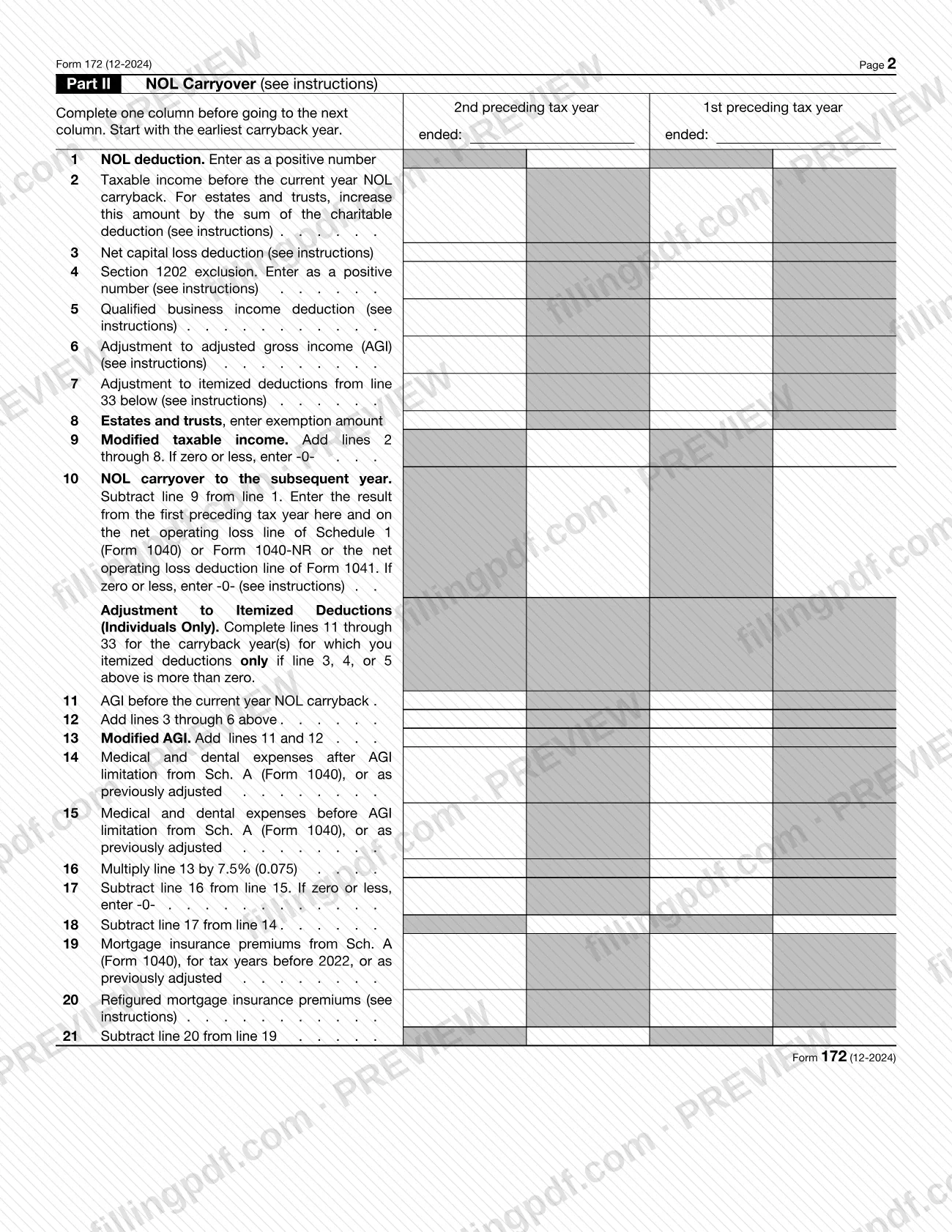
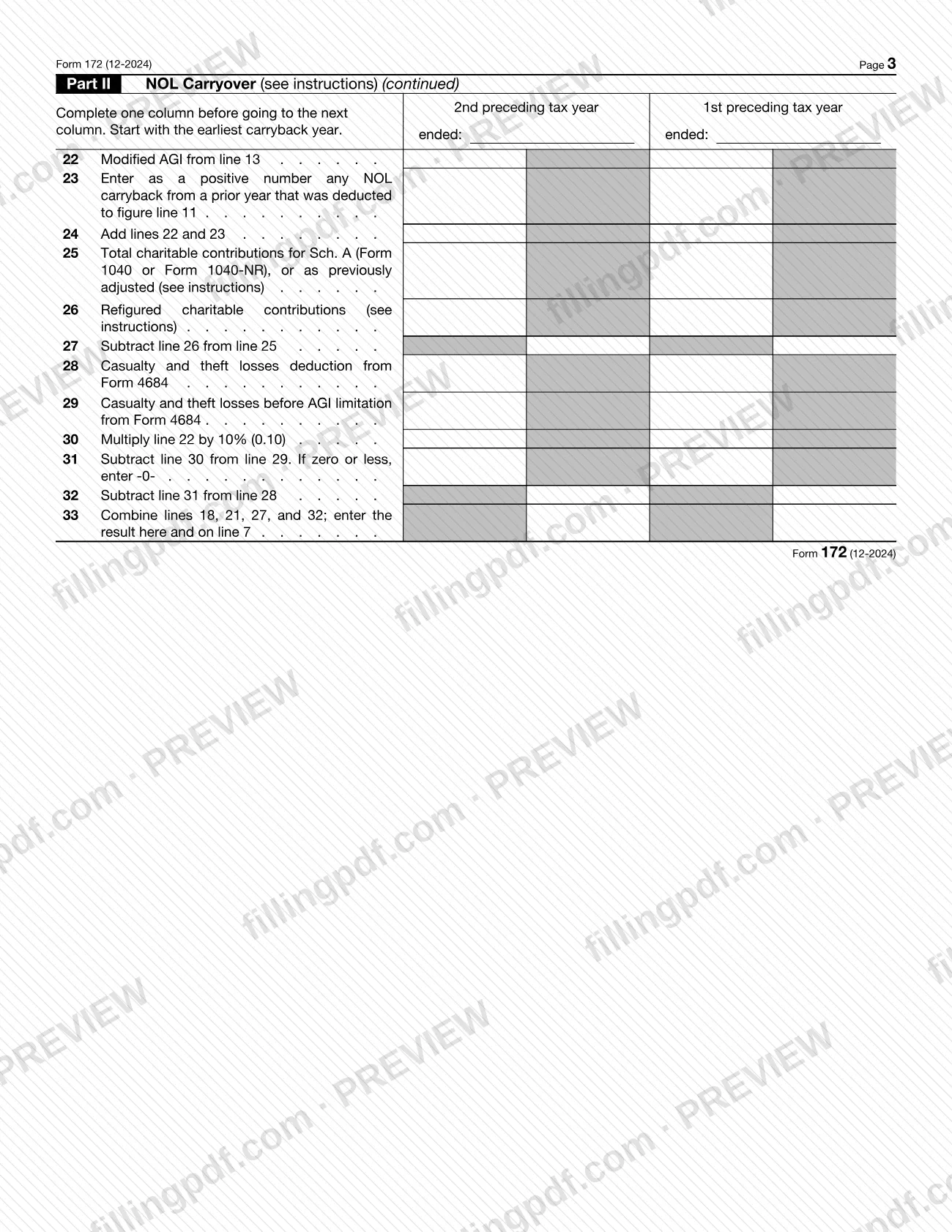
- Part II, NOL Carryover (lines 1 to 33) figures modified taxable income for each carryback year and the NOL carried to the subsequent year. Lines 11 to 33 adjust itemized deductions and are for individuals only.
Form 172 is a worksheet-style computation that travels with other filings: it is attached to Form 1045, Form 1040-X, Form 1040 or Form 1041, depending on how the NOL is used. It does not claim a refund by itself.
Who needs to file 172?
Individuals, estates, and trusts that have a net operating loss, or that carry an NOL to another year, use Form 172 to figure the NOL and the carryover. The form was created for taxpayers other than corporations.
- Individuals whose standard or itemized deductions exceed adjusted gross income (AGI) may have an NOL to figure in Part I.
- Estates and trusts start from taxable income increased by the charitable deduction, income distribution deduction and exemption amount.
- Farmers with a farming loss use Part II for the 2-year carryback that the instructions allow for the farming loss portion of an NOL.
- Married taxpayers whose marital status or filing status changed between the years involved should read the instructions on joint and separate returns before completing the form.
Exclusions in the instructions: partnerships and S corporations generally can't use an NOL, although their partners or shareholders can use their shares of business income and deductions to figure their own NOLs. Individuals, estates, and trusts that carry NOLs back to a year with a section 965(a) inclusion (a "965 year") may not use this form and must carry back to that year with an amended return.
When to file 172
Complete Form 172 after you have completed your tax return for the year and found a negative amount, that is, when your deductions exceed your income, and again for each year to which you apply the NOL.
The instructions say that for an NOL arising in a tax year ending after 2020, only the farming loss portion, if any, can be carried back (2 years). Other NOLs are carried forward, and no later date is printed for the form itself.
- Form 1045: file it on or after the date you file the return for the NOL year, but not later than 1 year after the end of the NOL year. If that day falls on a Saturday, Sunday or holiday, a postmark on the next business day is timely. Attach Form 172 to it if it applies.
- Form 1040-X: generally file it within 3 years after the due date, including extensions, for the return for the NOL year.
- Waiving the carryback: attach the statement to the original return filed by its due date, including extensions.
Keep records for any NOL year for 3 years after you have used the carryback or carryforward, or 3 years after the carryforward expires.
Documents you need
- Form 1045, Form 1040-X, Form 1040 or Form 1041: Form 172 is attached to the filing that carries back or deducts the NOL, when it applies to the computation.
- A computation showing how you figured the adjustments on Part II, line 6 (adjustment to AGI), attached to the form.
- A statement showing how you figured the 80% limitation, attached to your tax return, if the 80%-of-taxable-income limit applies to NOLs arising after 2017 and carried forward to a year after 2020.
- A statement choosing to waive the carryback period under section 172(b), attached to the original return filed by the due date (including extensions) for the NOL year, if you waive the carryback.
- A statement showing how you figured your refund, if you were not married in the NOL year (or were married to a different spouse) and filed a joint return in the carryback year.
- A computation showing how you figured the AGI adjustments for line 26 (refigured charitable contributions), if you cannot use the amount from line 24 as your AGI.
How to fill out 172
Enter tax year and taxpayer details
Above your name, enter the calendar year or the beginning and ending months of your fiscal year. Then enter name(s) as shown on the return, your social security or employer identification number, spouse's SSN, address and daytime phone number.
Complete the address correctly
Enter a P.O. box number only if your post office doesn't deliver mail to your home. For a foreign address, enter only the city on the city line, complete the foreign country, province/county and postal code spaces, and don't abbreviate the country name.
Start Part I on line 1
Individuals subtract the standard deduction or itemized deductions from AGI and enter the result on line 1. Estates and trusts enter taxable income increased by the charitable deduction, income distribution deduction and exemption amount.
Figure nonbusiness capital gains and losses
On lines 2 and 3, enter nonbusiness capital losses (as a positive number) and nonbusiness capital gains, without regard to any section 1202 exclusion. Lines 4 and 5 show the difference, entering -0- on the line that does not apply.
Enter nonbusiness deductions and income
On line 6, enter nonbusiness deductions as a positive number; on line 7, nonbusiness income other than capital gains. Don't include business deductions on line 6 or business income on line 7. Complete lines 8 to 10 as the form directs.
Complete business capital losses and gains
Enter business capital losses on line 11 and business capital gains on line 12, then complete lines 13 to 15 by adding and subtracting as the form states.
Apply the capital loss limitation
On line 16, enter the net capital loss from Schedule D (Form 1040) or Schedule D (Form 1041). If you have no loss and no section 1202 exclusion, skip lines 16 through 21 and enter the line 15 amount on line 22. Otherwise complete lines 17 to 22.
Enter other-year NOL deduction and find the NOL
On line 23, enter the NOL deduction for losses from other years as a positive number. On line 24, combine lines 1, 9, 17 and 21 through 23; a result less than zero is your NOL, and zero or more means you don't have an NOL.
Set up the Part II carryback columns
Enter the date each carryback year ends in the column headings. Start with the earliest carryback year, complete one column before going to the next, and enter the NOL deduction on line 1 as a positive number.
Figure modified taxable income
Complete Part II lines 2 to 9, using lines 3 to 8 for the net capital loss deduction, section 1202 exclusion, QBI deduction, AGI adjustment, itemized deduction adjustment and (estates and trusts) exemption amount. Line 9 is the total, or -0- if zero or less.
Find the NOL carryover
On line 10, subtract line 9 from line 1, entering -0- if zero or less. Carry the first preceding tax year result to the net operating loss line of Schedule 1 (Form 1040) or Form 1040-NR, or the net operating loss deduction line of Form 1041.
Complete itemized deduction adjustments
Individuals who itemized in a carryback year complete lines 11 to 33 only if line 3, 4 or 5 is more than zero; enter the line 33 result on line 7. Skip these lines if you didn't itemize or lines 3 through 5 are zero.
Review and download the PDF
Check that every column and line ties to your return and any attached computations. Download or print the completed PDF from FillingPDF and attach it to Form 1045, Form 1040-X, Form 1040 or Form 1041 as described under How to submit.
How to submit 172
Form 172 is not filed on its own. You attach it to the return or claim that uses the NOL:
- Carryback with Form 1045: attach Form 172 to Form 1045, the application for a quick refund, if it applies. Form 1045 can apply an NOL to all carryback years.
- Carryback with Form 1040-X: attach a Form 172 for each NOL to your Form 1040-X if it applies to the computation of your NOL. Use a separate Form 1040-X for each carryback year. Estates and trusts that do not file Form 1045 file an amended Form 1041 for each carryback year.
- Carryforward: attach a Form 172 for each NOL to your Form 1040 or Form 1041 if it applies. Individuals list the NOL deduction as a negative figure on Schedule 1 (Form 1040); estates and trusts include it on Form 1041.
Form 172 prints no mailing address, portal or appointment rule of its own. Follow the filing instructions of the return or claim you attach it to (Form 1045, Form 1040-X, Form 1040 or Form 1041). The instructions also point to IRS.gov/Form172 for the latest developments. FillingPDF lets you fill out and download the PDF; submission follows the channels above.
Common mistakes to avoid
- Carrying back a nonfarming NOL from a tax year ending after 2020; the instructions allow a carryback only for the farming loss portion, for 2 years.
- Leaving the waiver statement off the original return and expecting to waive the carryback later; if you do not file it on time, you cannot waive the period, and the late-election route is limited to an amended return within 6 months of the due date.
- Using Form 172 to carry back to a section 965(a) inclusion year; those years require an amended return.
- Including capital losses in excess of capital gains, the section 1202 exclusion, the NOL deduction or the section 199A deduction when figuring the NOL.
- Entering business deductions on line 6 (nonbusiness deductions), such as rental losses or self-employed health insurance, or business income on line 7.
- Filing Form 1045 more than 1 year after the end of the NOL year, when that is the deadline for it.
- Entering a zero on Part II, line 2 for a carryback year with zero taxable income, instead of refiguring it without limiting the result to zero and entering it as a negative number.
- Skipping the attachment of a computation for the line 6 adjustments when you entered an amount on line 3 or line 4.
Frequently asked questions
What is Form 172 used for?
Form 172 is used by individuals, estates, and trusts to figure the net operating loss (NOL) available to carry back or forward, and the NOL carryover after each year it is applied. It is a computation attached to the return or claim that uses the NOL.
Can I carry back an NOL with Form 172?
Only for a farming loss. For an NOL in a tax year ending after 2020, only the farming loss portion can be carried back, for 2 years. Other NOLs are carried forward, and a taxpayer may also elect to waive the carryback period.
How do I waive the NOL carryback period?
Attach a statement to your original return, filed by the due date including extensions for the NOL year, showing you choose to waive the carryback under section 172(b). If you filed on time without it, an amended return within 6 months of the due date can carry the statement.
Where do I file Form 172?
You don't file it alone. Attach it to Form 1045, to Form 1040-X for each carryback year, or to your Form 1040 or Form 1041 when carrying the NOL forward. The form prints no address; use the filing instructions of the form you attach it to.
What is the deadline for Form 1045 with Form 172 attached?
File Form 1045 on or after the date you file the return for the NOL year, but not later than 1 year after the end of the NOL year. If the last day is a Saturday, Sunday or holiday, a postmark on the next business day is timely.
Can partnerships or S corporations use Form 172?
Generally no: partnerships and S corporations can't use an NOL themselves. Their partners or shareholders can use their share of the entity's business income and deductions to figure their own NOLs on Form 172.
How long should I keep records for an NOL?
Keep records for any tax year that generates an NOL for 3 years after you have used the carryback or carryforward, or 3 years after the carryforward expires.
Can I fill out Form 172 online on FillingPDF?
Yes. You can fill out the fillable PDF online on FillingPDF and download or print it. FillingPDF is an independent service and does not file anything with the IRS; you attach the form to your return or claim and submit it through IRS channels.
Ready to fill out 172?
Fill out 172 now