
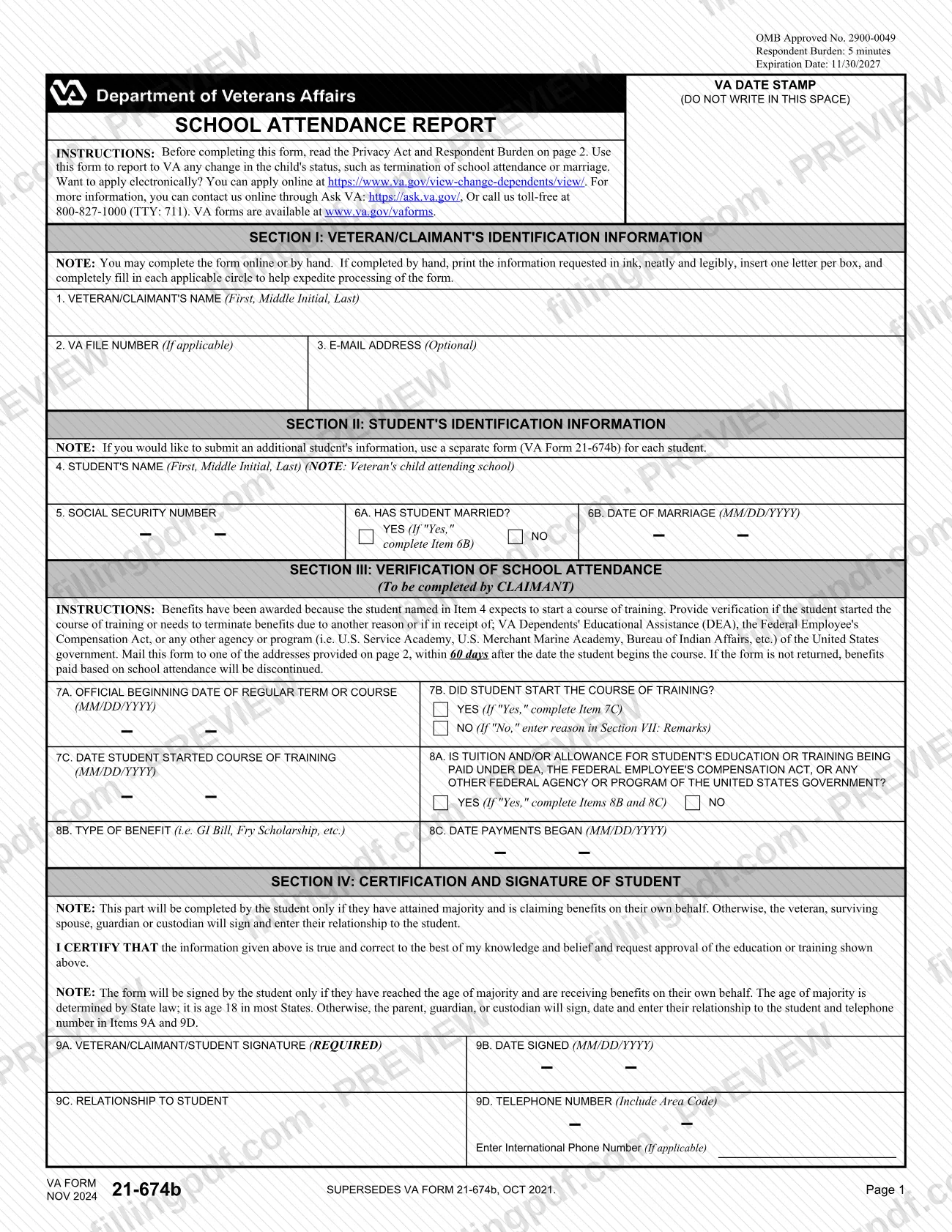
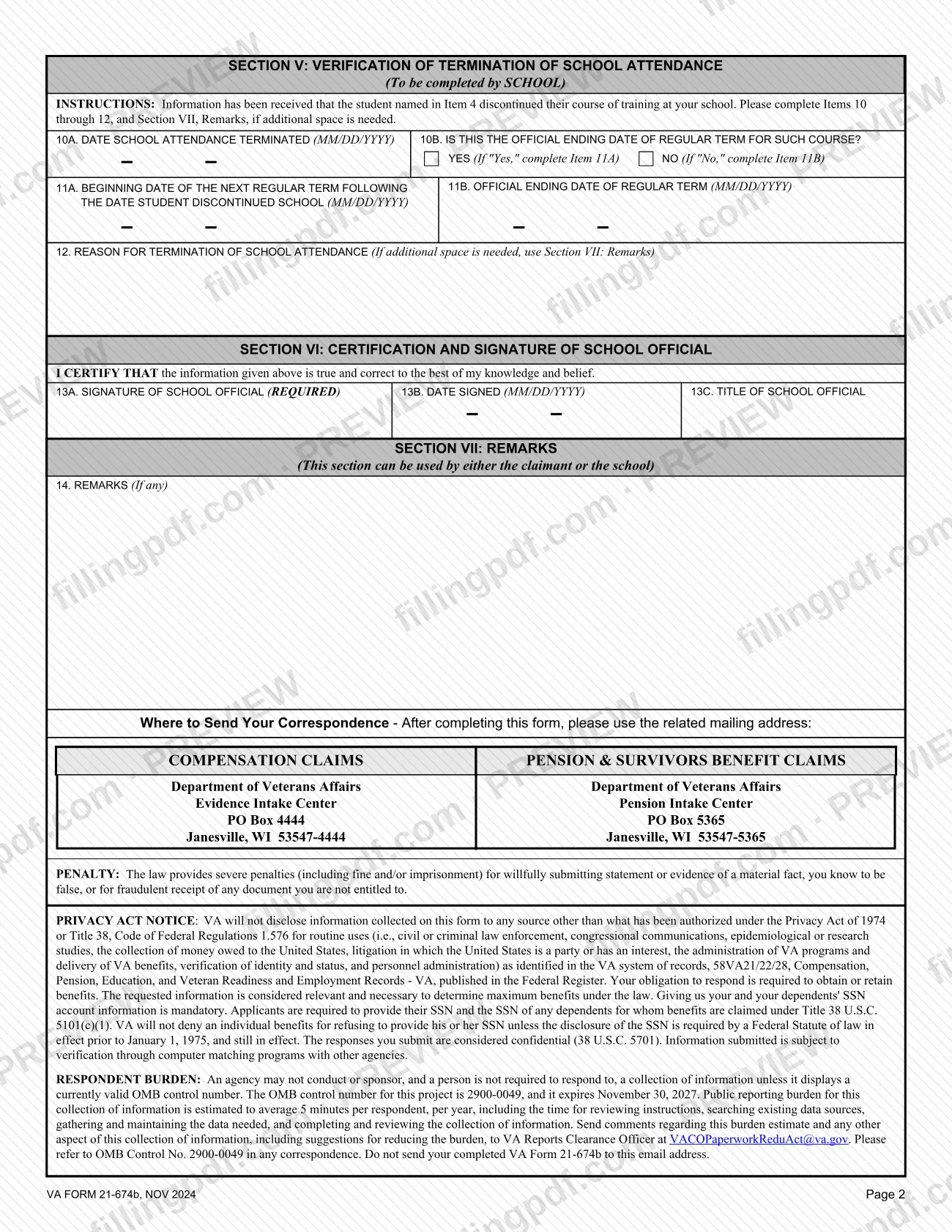
VA Form 21-674b, School Attendance Report, is the Department of Veterans Affairs (VA) form used to report a change in a child's status, such as termination of school attendance or marriage, and to verify that a student started a course of training. A veteran or claimant who receives benefits for a child in school completes the claimant sections, and the school completes the termination section when attendance ends. On this page you can fill out 21-674b online on FillingPDF and download or print the completed PDF; the form and its mailing addresses are published by VA.
Last updated
What is 21-674b?
VA Form 21-674b, School Attendance Report, is the Department of Veterans Affairs form used to report to VA any change in a child's status, such as termination of school attendance or marriage, and to verify that a student has started or stopped a course of training.
The Veterans Benefits Administration (VBA) publishes the form under OMB No. 2900-0049. The printed revision is NOV 2024, which supersedes the OCT 2021 edition of VA Form 21-674b.
The form has seven sections:
- Section I: the veteran or claimant's identification.
- Section II: the student's identification, including whether the student has married.
- Section III: verification of school attendance, completed by the claimant.
- Section IV: certification and signature of the student or of the person signing for the student.
- Section V: verification of termination of school attendance, completed by the school.
- Section VI: certification and signature of the school official.
- Section VII: remarks, which either the claimant or the school may use.
Section III applies when benefits were awarded because the student expected to start a course of training. It also covers a student who needs to terminate benefits for another reason, or who receives VA Dependents' Educational Assistance (DEA), benefits under the Federal Employee's Compensation Act, or another federal agency or program. One form covers one student.
Who needs to file 21-674b?
The main group is the veteran or claimant who receives benefits for a child attending school and must tell VA that the child started a course of training, stopped attending, or married. The form says to use it to report any change in the child's status, such as termination of school attendance or marriage.
- Claimants complete Sections I through III and sign in Section IV, or have the student sign when the student qualifies.
- Students sign Section IV only if they have reached the age of majority and are receiving benefits on their own behalf. State law sets the age of majority; it is 18 in most States.
- Parents, guardians, custodians, a surviving spouse or the veteran sign in the student's place otherwise, and enter their relationship to the student in Item 9C and a telephone number in Item 9D.
- School officials complete Section V (Items 10 through 12) and sign Section VI when the school learns that the student discontinued the course of training.
If you report on more than one student, use a separate VA Form 21-674b for each student.
When to file 21-674b
Mail the form within 60 days after the date the student begins the course. The form states that if it is not returned, benefits paid based on school attendance will be discontinued.
Section III applies when benefits were awarded because the student expected to start a course of training. It also applies when the student needs to terminate benefits for another reason, or receives DEA, Federal Employee's Compensation Act benefits or another federal program's benefits. Item 7A asks for the official beginning date of the regular term or course.
Section V is completed by the school after VA receives information that the student discontinued the course of training at that school. The form sets no other deadline.
How to fill out 21-674b
Enter veteran or claimant details
In Section I, enter the name in Item 1 (First, Middle Initial, Last), the VA file number in Item 2 if applicable, and an optional email address in Item 3.
Identify the student
In Section II, enter the veteran's child's name in Item 4 (First, Middle Initial, Last) and the Social Security number in Item 5. Use a separate form for each additional student.
Report any marriage
Item 6A asks whether the student has married. If you answer Yes, enter the date of marriage in Item 6B as MM/DD/YYYY.
Verify the start of the course
In Section III, enter the official beginning date of the regular term or course in Item 7A. In Item 7B say whether the student started; if Yes, give the start date in Item 7C, and if No, explain in Section VII.
Report other federal education payments
Item 8A asks whether tuition or allowance is paid under DEA, the Federal Employee's Compensation Act, or another federal program. If Yes, enter the type of benefit in Item 8B and the date payments began in Item 8C.
Sign the certification
In Section IV, the claimant or student signs Item 9A and dates it in Item 9B. If a parent, guardian or custodian signs, enter the relationship in Item 9C and a telephone number in Item 9D.
Have the school complete Section V
If the student discontinued the course, the school enters the termination date in Item 10A and answers Item 10B. It then completes Item 11A or 11B, depending on the answer, and gives the reason in Item 12.
Have the school official sign
In Section VI, the school official signs Item 13A, enters the date in Item 13B and gives a title in Item 13C.
Add remarks if needed
Use Item 14 in Section VII for any remarks. The claimant or the school may use it, including for extra space for the reason in Item 12.
Review and download the completed PDF
Check every item, signature and MM/DD/YYYY date. Download or print the completed PDF from FillingPDF, then send it to VA as described under How to submit.
How to submit 21-674b
You can submit VA Form 21-674b by mail, or you can apply electronically through VA online.
- By mail: use the address that matches your benefit.
- Compensation claims: Department of Veterans Affairs, Evidence Intake Center, PO Box 4444, Janesville, WI 53547-4444.
- Pension and survivors benefit claims: Department of Veterans Affairs, Pension Intake Center, PO Box 5365, Janesville, WI 53547-5365.
- Online: the form directs you to apply electronically at https://www.va.gov/view-change-dependents/view/.
- Questions: contact VA online through Ask VA at https://ask.va.gov/, or call toll-free 800-827-1000 (TTY: 711).
Do not send the form to the VA Reports Clearance Officer email address printed on page 2; that address is only for comments on the respondent burden. Where the student's school completes Section V, the completed form goes to VA at one of the addresses above. FillingPDF lets you fill out and download the PDF; submission follows the channels above.
Common mistakes to avoid
- Mailing the form more than 60 days after the student begins the course; the form says benefits paid based on school attendance will be discontinued if it is not returned.
- Using one form for several students; the form says to use a separate VA Form 21-674b for each student.
- Answering No in Item 7B without entering the reason in Section VII: Remarks.
- Answering Yes in Item 8A without completing Items 8B and 8C, the type of benefit and the date payments began.
- Leaving the signature in Item 9A blank; it is marked required.
- Having the student sign when the student has not reached the age of majority or is not receiving benefits on their own behalf; the parent, guardian or custodian signs and enters the relationship and phone number.
- Leaving Section V for the claimant to fill in; the form assigns Items 10 through 12 and Section VI to the school.
- Sending the completed form to the VA Reports Clearance Officer email address, which is only for burden comments.
Frequently asked questions
What is VA Form 21-674b used for?
VA Form 21-674b, School Attendance Report, is used to report to VA any change in a child's status, such as termination of school attendance or marriage. It also verifies that a student started a course of training, so that benefits based on school attendance continue.
When do I have to send 21-674b to VA?
Mail it within 60 days after the date the student begins the course. The form states that if it is not returned, benefits paid based on school attendance will be discontinued. The form prints no other deadline.
Where do I mail VA Form 21-674b?
For compensation claims, mail it to the Evidence Intake Center, PO Box 4444, Janesville, WI 53547-4444. For pension and survivors benefit claims, mail it to the Pension Intake Center, PO Box 5365, Janesville, WI 53547-5365.
Who signs the School Attendance Report?
The student signs Item 9A only if they have reached the age of majority and receive benefits on their own behalf. Otherwise the veteran, surviving spouse, guardian or custodian signs and enters their relationship to the student in Item 9C. State law sets the age of majority; it is 18 in most States.
Does the school have to fill out any part of the form?
Yes, if the student stopped attending. The school completes Section V (Items 10 through 12), where it gives the termination date and reason, and a school official signs Section VI. The claimant completes Sections I through IV.
Can I apply for this change online instead of mailing it?
Yes. The form says you can apply electronically at https://www.va.gov/view-change-dependents/view/. You can also contact VA through Ask VA at https://ask.va.gov/ or call 800-827-1000 (TTY: 711).
Can I fill out VA Form 21-674b online on FillingPDF?
Yes. You can fill out the PDF online on FillingPDF and download or print it. FillingPDF is an independent service, not affiliated with VA, and does not file the form; you send it to VA by mail or use VA's online option.
What if the student is attending more than one school or there is more than one student?
Use a separate VA Form 21-674b for each student. The form states this in Section II. It does not describe how to report more than one school, so contact VA at 800-827-1000 if that applies.
Ready to fill out 21-674b?
Fill out 21-674b now