
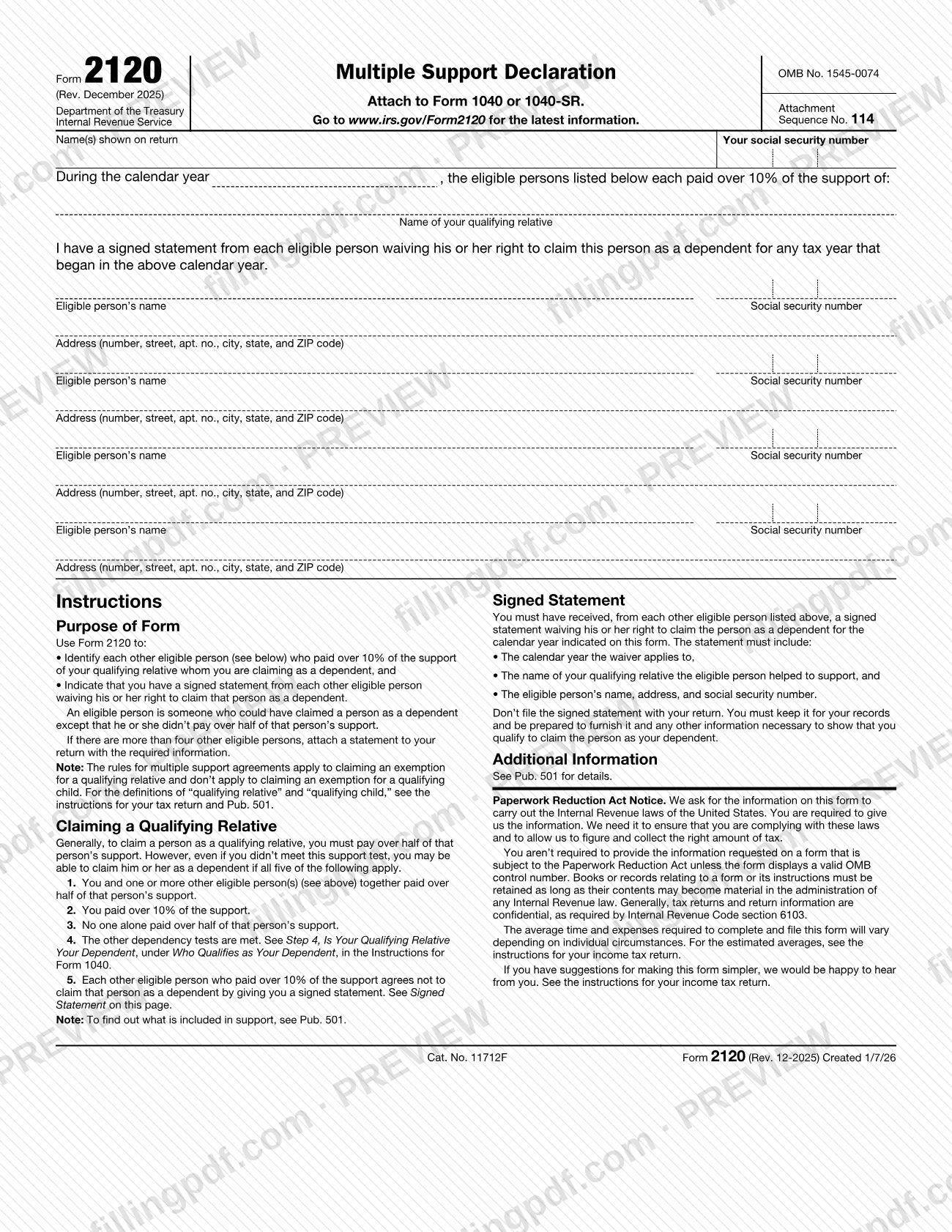
Form 2120 is the Multiple Support Declaration, an Internal Revenue Service (IRS) form that you attach to Form 1040 or 1040-SR when you claim a qualifying relative as a dependent and several people shared that person's support. It lists each other eligible person who paid over 10% of the support and states that you hold their signed waivers. On FillingPDF you can fill out the form online and download or print the completed PDF; the IRS publishes the original form and the latest information at www.irs.gov/Form2120.
Last updated
What is Form 2120?
Form 2120, Multiple Support Declaration, is the IRS form used with a Form 1040 or 1040-SR to identify each other eligible person who paid over 10% of the support of a qualifying relative you claim as a dependent, and to state that you hold their signed waivers.
An eligible person, in the IRS definition, is someone who could have claimed the person as a dependent except that he or she did not pay over half of that person's support. The form lists the calendar year, the name of your qualifying relative and, for each other eligible person, name, social security number and address. It has room for four eligible persons.
The IRS instructions on the form explain the rule behind it. Generally you must pay over half of a qualifying relative's support to claim that person. Even if you did not, you may still claim him or her when all five of these apply:
- You and one or more other eligible persons together paid over half of the person's support.
- You paid over 10% of the support.
- No one alone paid over half of the support.
- The other dependency tests are met (see Step 4 in the Instructions for Form 1040).
- Each other eligible person who paid over 10% agrees, by a signed statement, not to claim the person.
The form carries OMB No. 1545-0074, Attachment Sequence No. 114. It applies only to a qualifying relative, not to a qualifying child. For what counts as support, the form refers to Pub. 501.
Who needs to file Form 2120?
You use Form 2120 if you want to claim a qualifying relative as your dependent, you did not pay over half of that person's support yourself, and the five conditions printed on the form are met. The main condition is that you and other eligible persons together paid over half, you paid over 10%, and no one alone paid over half.
Before you complete the form you must have received a signed statement from each other eligible person listed. Each of those people agrees not to claim the same person as a dependent for the calendar year shown on the form.
Who is not covered:
- Claims for a qualifying child. The form states that the multiple support rules apply to claiming an exemption for a qualifying relative and not to a qualifying child.
- Anyone who paid over half of the person's support alone; that person meets the general support test and has no need for this form.
The form is attached to Form 1040 or 1040-SR, so it is completed by the person who files that return. The definitions of "qualifying relative" and "qualifying child" are in the instructions for your tax return and in Pub. 501.
When to file Form 2120
Form 2120 is needed when you file the Form 1040 or 1040-SR on which you claim a qualifying relative under a multiple support agreement. It has no due date of its own: it is attached to the return and travels with it.
Collect the signed statements before you complete the form. The form asks you to confirm that you have a signed statement from each other eligible person waiving the right to claim the person for any tax year that began in the calendar year entered at the top. Each statement must name that calendar year, so the waiver and the form must cover the same year.
For any deadline or extension that applies to the return itself, see the instructions for your income tax return, as the form directs.
Documents you need
- A signed statement from each other eligible person listed on the form, waiving his or her right to claim your qualifying relative as a dependent for the calendar year shown. Keep it; do not file it with your return.
- The signed statement must include the calendar year the waiver applies to, the name of your qualifying relative the eligible person helped support, and the eligible person's name, address and social security number.
- An attached statement with the required information for each additional eligible person, only if there are more than four other eligible persons.
How to fill out Form 2120
Enter your name and Social Security number
At the top, write the name(s) shown on your return and your social security number.
Enter the calendar year
In the sentence starting "During the calendar year," enter the year in which the eligible persons paid the support. It must match the year in the signed statements.
Name your qualifying relative
Under the line for the eligible persons' support, write the name of your qualifying relative, the person you are claiming as a dependent.
Confirm you hold the signed statements
Mark the statement that you have a signed statement from each eligible person waiving the right to claim this person as a dependent for any tax year that began in that calendar year.
List the first eligible person
Enter the name and social security number of an eligible person who paid over 10% of the support, then the address: number, street, apartment number, city, state and ZIP code.
List the other eligible persons
Repeat for each additional eligible person; the form has room for four blocks. Do not list yourself.
Attach a statement for extra persons
If more than four other eligible persons paid over 10%, attach a statement to your return giving the same information for the rest.
Review and download the completed PDF
Check the year, names, social security numbers and addresses against the signed statements, then download or print the completed PDF from FillingPDF and attach it to Form 1040 or 1040-SR.
How to submit Form 2120
Form 2120 is not filed on its own. You attach it to your Form 1040 or 1040-SR and submit the return through whatever channel you use for that return; the form prints no separate address, portal or appointment rule.
- Attach to the return: include the completed Form 2120 with your Form 1040 or 1040-SR.
- More than four eligible persons: the form has space for four. Attach a statement to your return with the required information for the others.
- Signed statements: do not file them with your return. Keep them for your records and be ready to furnish them, with any other information needed to show that you qualify to claim the person as a dependent.
For the latest information, the form points to www.irs.gov/Form2120. FillingPDF lets you fill out and download the PDF; submission follows the channels used for your return.
Common mistakes to avoid
- Filing the signed waiver statements with your return. The form says not to file them; you keep them and furnish them if asked.
- Completing Form 2120 without having received a signed statement from every other eligible person listed.
- Using the form to claim a qualifying child. The multiple support rules apply only to a qualifying relative.
- Writing a different calendar year on the form than the year the signed statements cover.
- Leaving out an eligible person who paid over 10% of the support, or listing someone who did not.
- Listing more than four other eligible persons on the form instead of attaching a statement with the required information.
- Claiming a person under multiple support when you paid 10% or less, or when someone alone paid over half of that person's support.
- Omitting an eligible person's social security number or full address, which the form and the signed statement both require.
Frequently asked questions
What is Form 2120 used for?
Form 2120, Multiple Support Declaration, identifies each other eligible person who paid over 10% of the support of a qualifying relative you claim as a dependent. It also indicates that you hold a signed statement from each of them waiving the right to claim that person.
Do I attach Form 2120 to my tax return?
Yes. The form says to attach it to Form 1040 or 1040-SR. It has no separate address or due date, so you submit it with the return through the channel you use for that return.
Do I send the signed waiver statements to the IRS?
No. The instructions say not to file the signed statement with your return. Keep it for your records and be prepared to furnish it, and any other information needed, to show that you qualify to claim the person as your dependent.
Can I use Form 2120 for a qualifying child?
No. The form states that the multiple support rules apply to claiming an exemption for a qualifying relative and do not apply to a qualifying child. The definitions of both terms are in the instructions for your tax return and in Pub. 501.
What are the conditions for claiming someone under multiple support?
All five must apply: you and other eligible persons together paid over half the person's support, you paid over 10%, no one alone paid over half, the other dependency tests are met, and each other eligible person who paid over 10% gives you a signed waiver.
What if more than four people shared the support?
The form has room for four other eligible persons. If there are more, attach a statement to your return with the required information for the others, as the form's instructions direct.
Can I fill out Form 2120 online?
You can fill out form 2120 online on FillingPDF and download or print the completed PDF. FillingPDF is an independent service and does not file the form with the IRS; you attach it to your Form 1040 or 1040-SR and submit the return through your usual channel.
Ready to fill out Form 2120?
Fill out Form 2120 now