
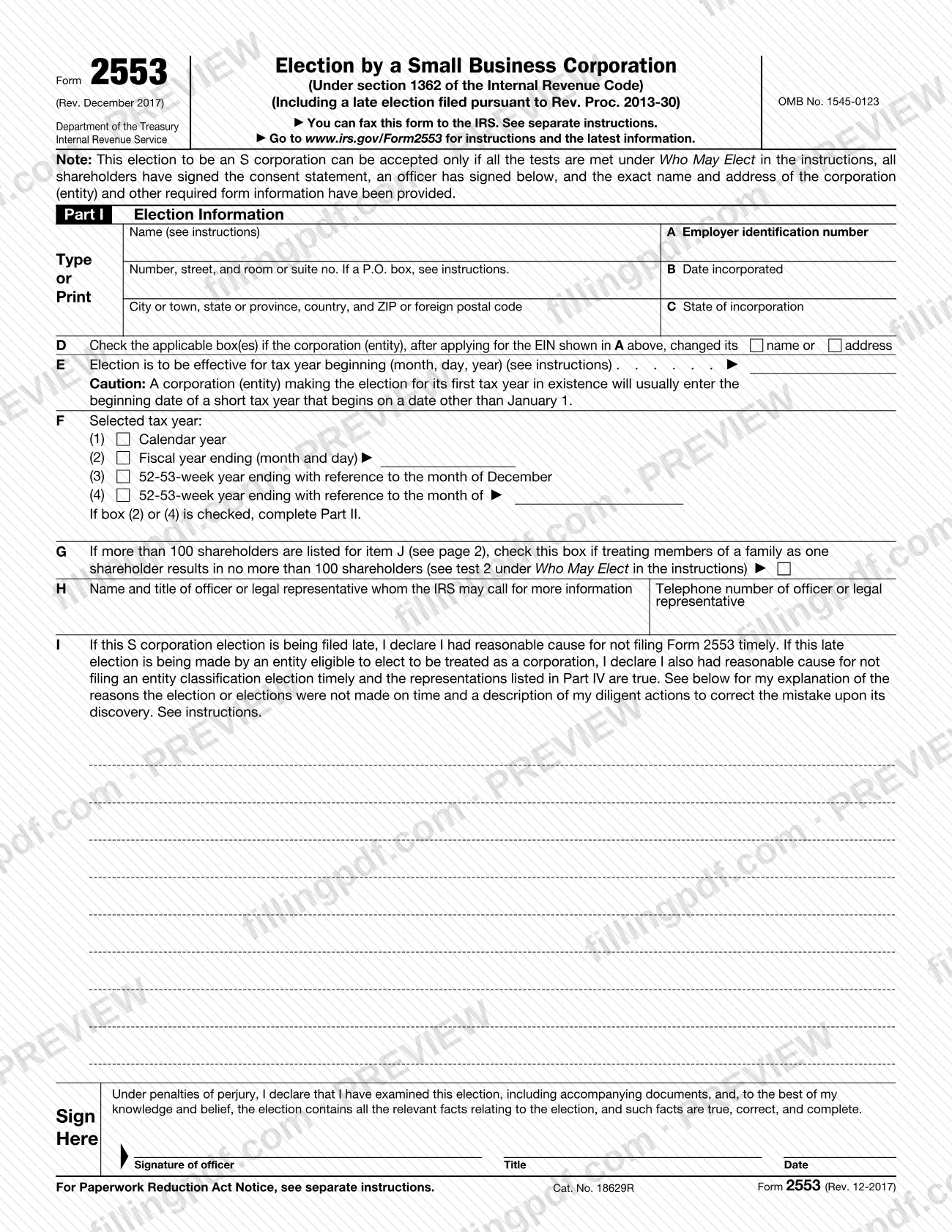
Form 2553, Election by a Small Business Corporation, is the Internal Revenue Service (IRS) form that a corporation, or an entity eligible to be treated as a corporation, uses to elect S corporation status under section 1362(a). Use Form 2553 when the business wants its income generally taxed to its shareholders rather than to the corporation, and every shareholder has signed the consent statement. On FillingPDF you can fill out the form online and download or print the completed PDF; the original PDF and instructions are published by the IRS, which receives the election only through the channels it lists.
Last updated
What is 2553?
Form 2553, Election by a Small Business Corporation, is the IRS form that a corporation, or another entity eligible to elect to be treated as a corporation, files to make the election under section 1362(a) of the Internal Revenue Code to be an S corporation.
The income of an S corporation is generally taxed to its shareholders rather than to the corporation itself, although an S corporation may still owe tax on certain income. An entity eligible to be treated as a corporation that meets the tests in the instructions is treated as a corporation from the effective date of the S election and does not need to file Form 8832, Entity Classification Election.
The form (OMB No. 1545-0123, printed Rev. December 2017) has four parts:
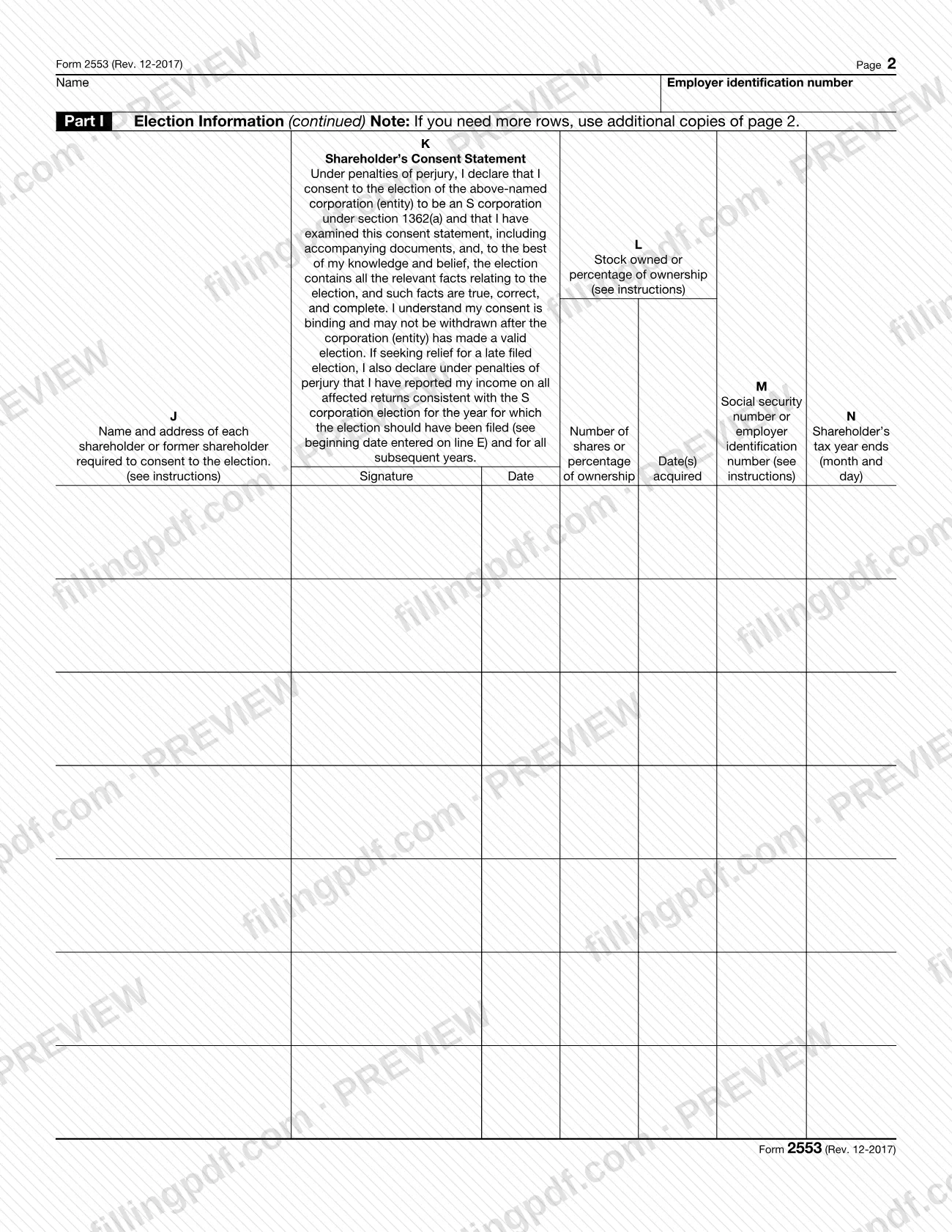
- Part I, Election Information, including the shareholders' consent statement in columns J through N.
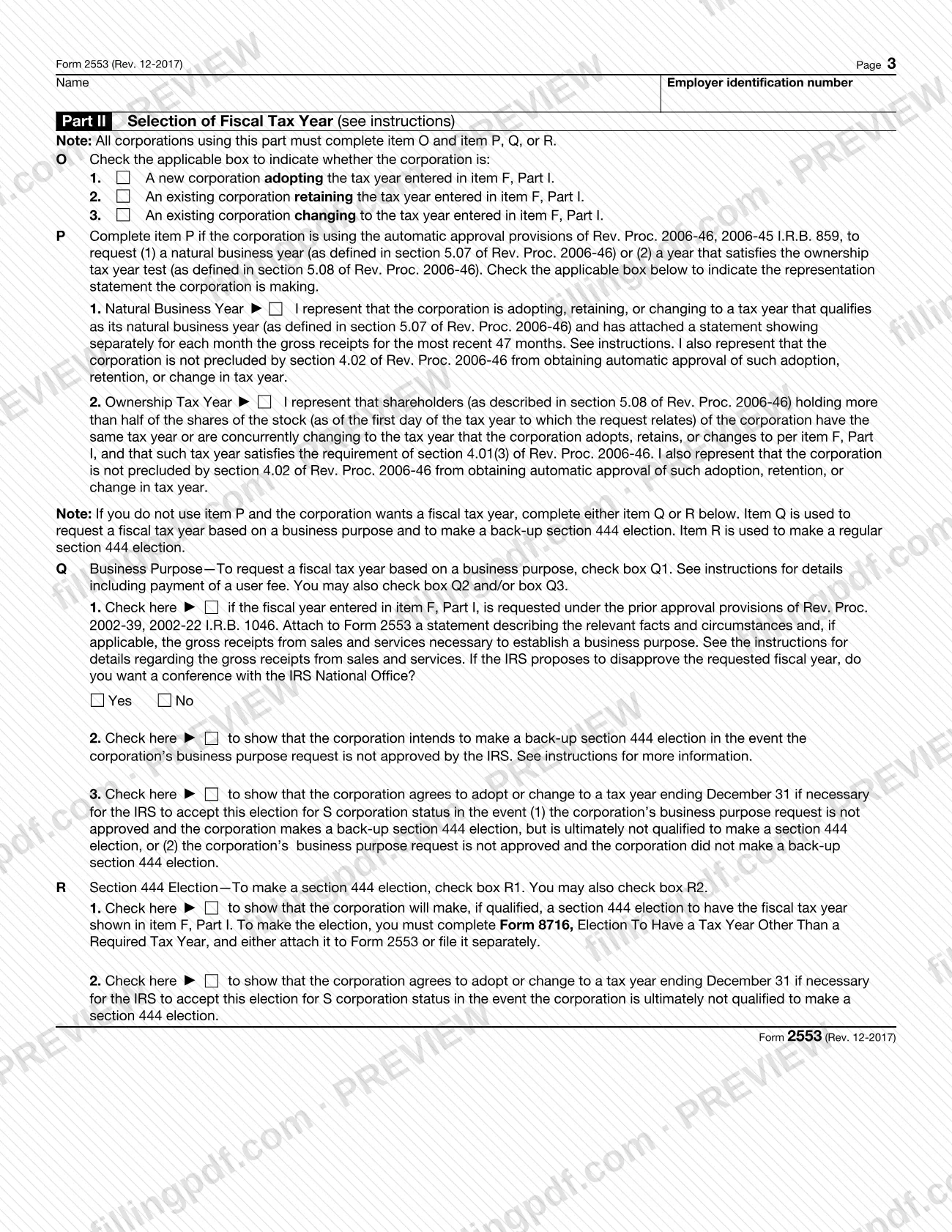
- Part II, Selection of Fiscal Tax Year, completed only when a fiscal year is chosen.
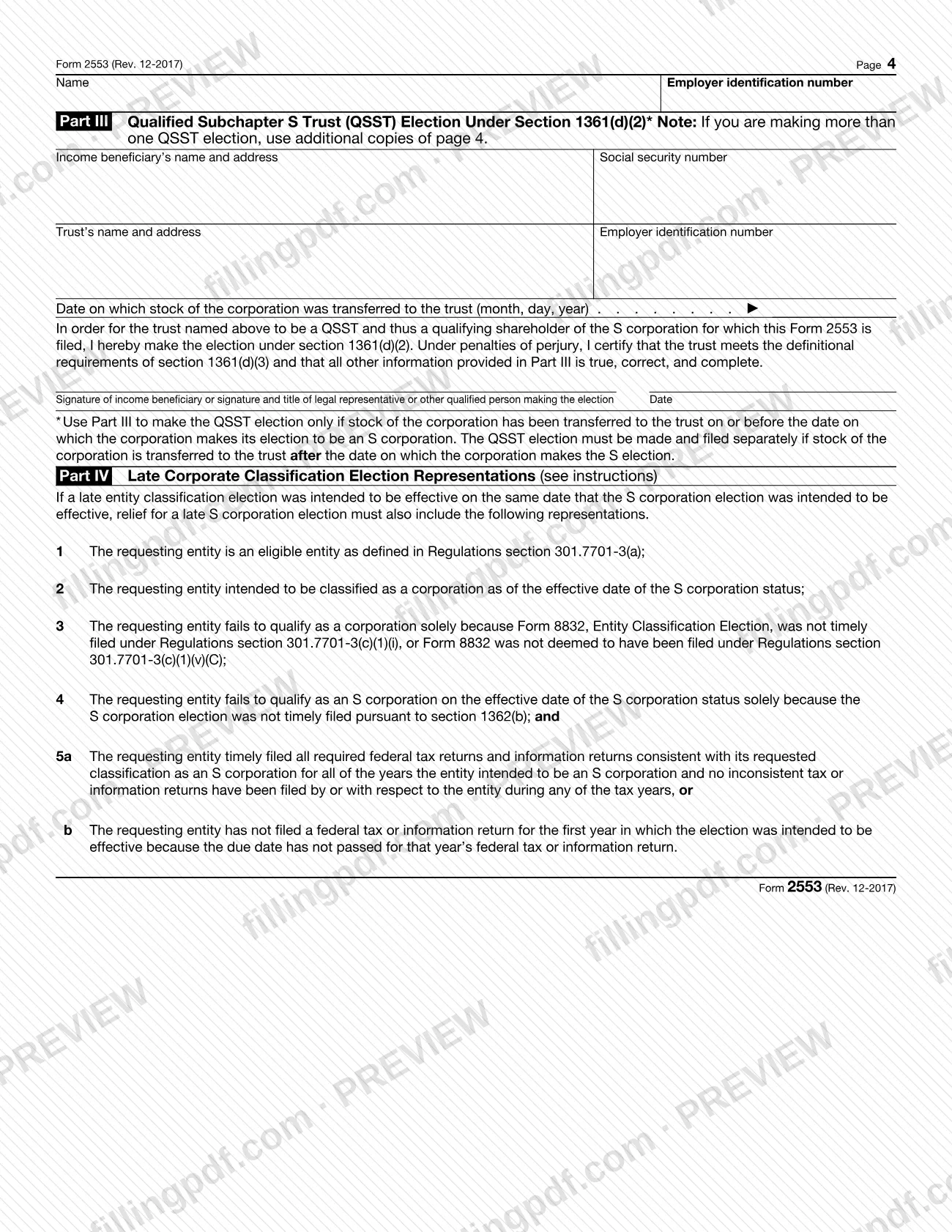
- Part III, Qualified Subchapter S Trust (QSST) Election under section 1361(d)(2).
- Part IV, Late Corporate Classification Election Representations.
The form also covers late elections filed under Rev. Proc. 2013-30. It is not the form for a parent S corporation that wants to treat a wholly owned subsidiary as a qualified subchapter S subsidiary: the instructions point to Form 8869, Qualified Subchapter S Subsidiary Election, for that.
Who needs to file 2553?
A domestic corporation, or a domestic entity eligible to elect to be treated as a corporation, that wants S corporation status files Form 2553, provided it meets every test under Who May Elect in the IRS instructions:
- It has no more than 100 shareholders. A spouse (and their estates) may be treated as one shareholder, and so may all members of a family as defined in section 1361(c)(1)(B) and their estates; check box G if you rely on the family rule.
- Its only shareholders are individuals, estates, exempt organizations described in section 401(a) or 501(c)(3), or certain trusts described in section 1361(c)(2)(A).
- It has no nonresident alien shareholders, other than as potential current beneficiaries of an ESBT.
- It has only one class of stock.
- It is not a bank or thrift institution using the reserve method for bad debts under section 585, an insurance company subject to tax under subchapter L, or a DISC or former DISC.
- It has or will adopt a permitted tax year.
- Each shareholder consents.
Shareholders sign the consent in column K; rules for spouses with a community interest, co-owners, minors, estates and trusts appear in the instructions. An officer authorized to sign must sign the form. The income beneficiary of a QSST may make the QSST election in Part III.
When to file 2553
File Form 2553 no more than 2 months and 15 days after the beginning of the tax year the election is to take effect, or at any time during the tax year before that year. The 2-month period starts on the day of the month the tax year begins. For a first tax year there is no prior year: a corporation whose first tax year begins January 7 must file between January 7 and March 21, and an election made before January 7 is not valid.
A late election is generally effective for the following tax year. Relief may be available if the corporation or entity shows reasonable cause for filing late and files within 3 years and 75 days of the date entered on line E, meeting the other conditions in the instructions.
The IRS service center generally notifies the corporation of its determination within 60 days after filing. If box Q1 is checked, it generally takes an additional 90 days.
Documents you need
- Statement of gross receipts for each month of the most recent 47 months, if you check box P1 (natural business year).
- Statement of relevant facts and circumstances to establish a business purpose, if you check box Q1; include the gross receipts or monthly figures the instructions describe.
- Form 8716, Election To Have a Tax Year Other Than a Required Tax Year, if you check box R1; attach it to Form 2553 or file it separately.
- Form 1128, Application To Adopt, Change, or Retain a Tax Year, if you change tax years and do not want S status for the short year; attach it only if it is an automatic approval request (Part II).
- Continuation sheet or separate consent statement, if you need more room for shareholders; it must show the corporation's name, address and EIN and the information in columns J through N.
- Explanation of the present tax year and the basis for the change, if a shareholder is changing tax years (column N).
- Additional copies of page 4, or a separate election statement, if you are making more than one QSST election.
- Explanation of reasonable cause and diligent corrective actions, on line I or an attached statement, if the election is late.
How to fill out 2553
Enter corporation name and address
In Part I, enter the true name from the corporate charter, the address (C/O if it is someone else's address; a P.O. box only if the Post Office does not deliver to the street address) and the EIN in item A.
Complete items B, C and D
Enter the date incorporated (B) and state of incorporation (C). Check the box in item D if the name or address changed after you applied for the EIN.
Set the effective date in item E
Enter the tax year beginning date the election takes effect. For a first tax year, usually enter the earliest of the date the entity first had shareholders, assets, or began doing business.
Select the tax year in item F
Check box (1) calendar year, (2) fiscal year ending, (3) 52-53-week year ending in December, or (4) 52-53-week year ending in another month. If (2) or (4), complete Part II.
Answer items G, H and I
Check G only if the family rule brings more than 100 listed shareholders down to 100 or fewer. In H give the officer or representative the IRS may call. Use I only for a late election, with the reasonable-cause explanation.
Sign and date the form
An authorized corporate officer, such as the president, treasurer or chief accounting officer, signs, enters the title and dates the form.
List shareholders in columns J through N
Enter each shareholder's name and address (J), signature and date of consent (K), shares or ownership percentage and dates acquired (L), SSN or EIN (M) and tax year end (N). Use -0- for former shareholders in L.
Complete Part II for a fiscal year
Check item O, then item P (natural business or ownership tax year), Q (business purpose) or R (section 444 election). Complete only the item that matches the year you selected.
Complete Part III for a QSST
If stock has been transferred to a QSST, enter the beneficiary, the trust, the transfer date and sign. Use additional page 4 copies for more than one QSST.
Complete Part IV for a late classification election
If a late entity classification election was intended for the same effective date, the Part IV representations must accompany the late S election.
Review, sign and download the PDF
Check that every shareholder consent and the officer signature are in place, and that required statements are ready. Download or print the completed PDF from FillingPDF, then submit it through the channels described under How to submit.
How to submit 2553
You can mail the original Form 2553, send it by an IRS-designated private delivery service, or fax it to the IRS service center for the state of the corporation's principal business, office or agency. Send the original (no photocopies); if you fax it, keep the original with the corporation's permanent records.
- Kansas City: Department of the Treasury, Internal Revenue Service Center, Kansas City, MO 64999; fax 855-887-7734. For Connecticut, Delaware, District of Columbia, Georgia, Illinois, Indiana, Kentucky, Maine, Maryland, Massachusetts, Michigan, New Hampshire, New Jersey, New York, North Carolina, Ohio, Pennsylvania, Rhode Island, South Carolina, Tennessee, Vermont, Virginia, West Virginia and Wisconsin.
- Ogden: Department of the Treasury, Internal Revenue Service Center, Ogden, UT 84201; fax 855-214-7520. For Alabama, Alaska, Arizona, Arkansas, California, Colorado, Florida, Hawaii, Idaho, Iowa, Kansas, Louisiana, Minnesota, Mississippi, Missouri, Montana, Nebraska, Nevada, New Mexico, North Dakota, Oklahoma, Oregon, South Dakota, Texas, Utah, Washington and Wyoming.
- Private delivery service: use a service on the list at IRS.gov/PDS and the street address at IRS.gov/PDSStreetAddresses.
Filing information is subject to change; check IRS.gov/Filing/Where-To-File-Your-Taxes-for-Form-2553. Certain late elections can be attached to Form 1120-S. If you have no notice of acceptance within 2 months (5 months if box Q1 is checked), call 1-800-829-4933. FillingPDF lets you fill out and download the PDF; submission follows the channels above.
Common mistakes to avoid
- Leaving Form 2553 unsigned by an authorized officer; the instructions say an unsigned form is not considered timely filed.
- Omitting a shareholder's consent, or the consent of both spouses when they have a community interest in the stock or its income.
- Filing for a first tax year before the corporation exists; with no prior tax year, an election made before the first tax year begins is not valid.
- Missing the 2-month-and-15-day window after the beginning of the tax year without requesting late-election relief.
- Skipping Part II when box (2) or (4) is checked in item F, or checking Q1 without attaching the facts-and-circumstances statement.
- Filing a Form 1120-S for a year before the election takes effect; continue filing Form 1120 or the applicable return until then.
- Filing Form 2553 with only Part III completed; the instructions say Part III can be used only along with the election in Part I.
- Sending a photocopy by mail instead of the original election.
- Paying the box Q1 user fee with the form; the instructions say not to pay it when filing.
- Omitting "FILED PURSUANT TO REV. PROC. 2013-30" in the top margin of page 1 on a late election.
Frequently asked questions
What is Form 2553 used for?
Form 2553 is how a corporation, or an entity eligible to be treated as a corporation, elects S corporation status under section 1362(a). It must meet the tests in the instructions and all shareholders must consent. An eligible entity does not also need Form 8832.
When is Form 2553 due?
No more than 2 months and 15 days after the start of the tax year the election takes effect, or any time during the preceding tax year. A corporation with no prior year cannot file before its first tax year begins.
What if I filed Form 2553 late?
A late election generally takes effect the next tax year, but relief may be available for reasonable cause if filed within 3 years and 75 days of the line E date and other conditions are met. Explain it on line I, and write "FILED PURSUANT TO REV. PROC. 2013-30" at the top of page 1.
Where do I send Form 2553?
To the Kansas City, MO 64999 or Ogden, UT 84201 IRS service center, depending on the state of the principal business, office or agency. You can mail the original or fax it (855-887-7734 for Kansas City, 855-214-7520 for Ogden).
Who has to sign Form 2553?
An authorized corporate officer signs the form, and each shareholder signs the consent in column K or on a separate consent statement. The form is not considered timely filed if the officer has not signed it.
How long does the IRS take to accept Form 2553?
Generally within 60 days after filing, with an additional 90 days if box Q1 is checked. If you hear nothing within 2 months (5 months with Q1), call 1-800-829-4933.
How do I prove the IRS received Form 2553?
Acceptable proof is a timely postmarked certified or registered mail receipt (or the designated private delivery service equivalent), a form with an accepted stamp or stamped IRS received date, or an IRS letter stating it was accepted.
Can I fill out Form 2553 online on FillingPDF?
Yes. You can fill out the fillable PDF online on FillingPDF and download or print it. FillingPDF is independent of the IRS and does not file the election; you send it to the IRS by mail, private delivery service or fax.
Ready to fill out 2553?
Fill out 2553 now