
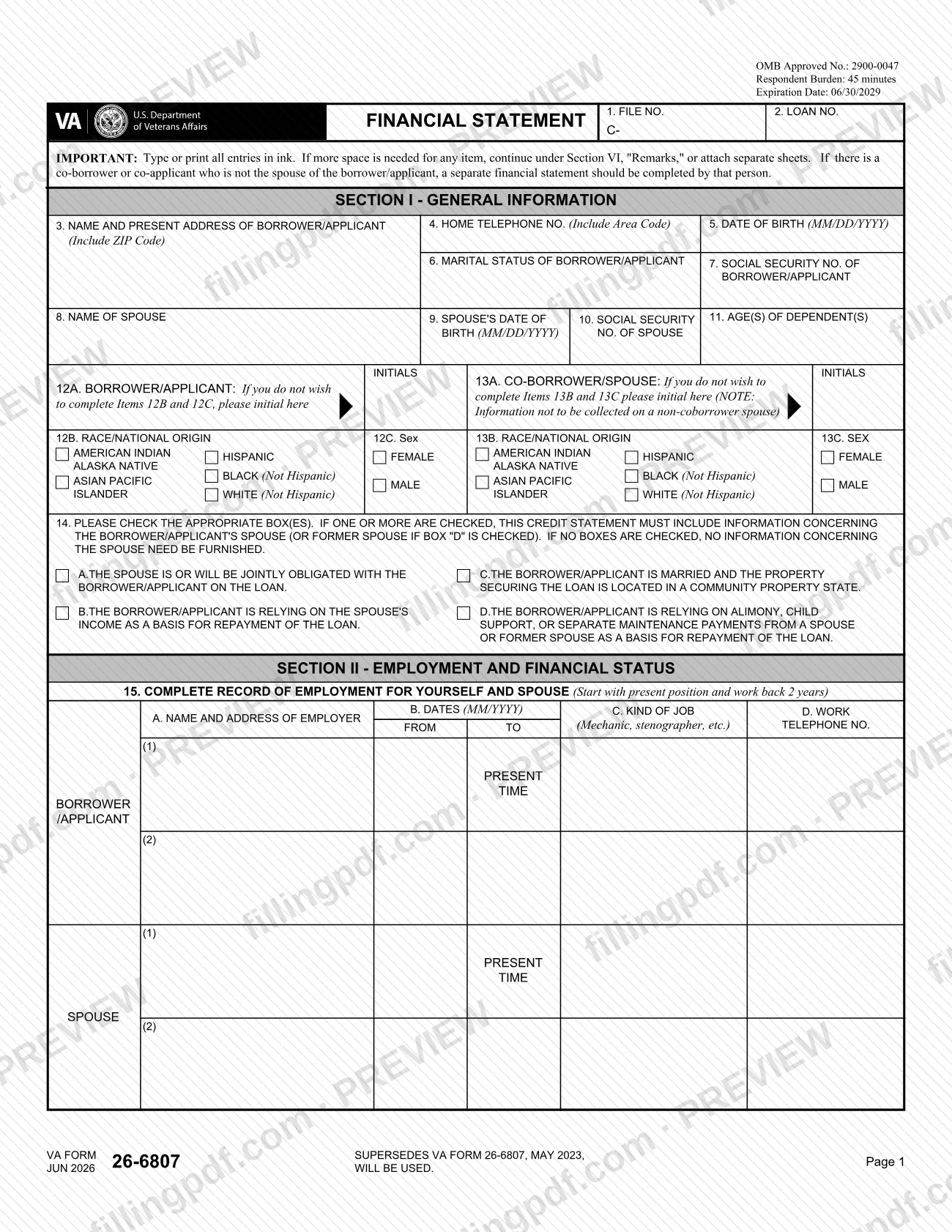
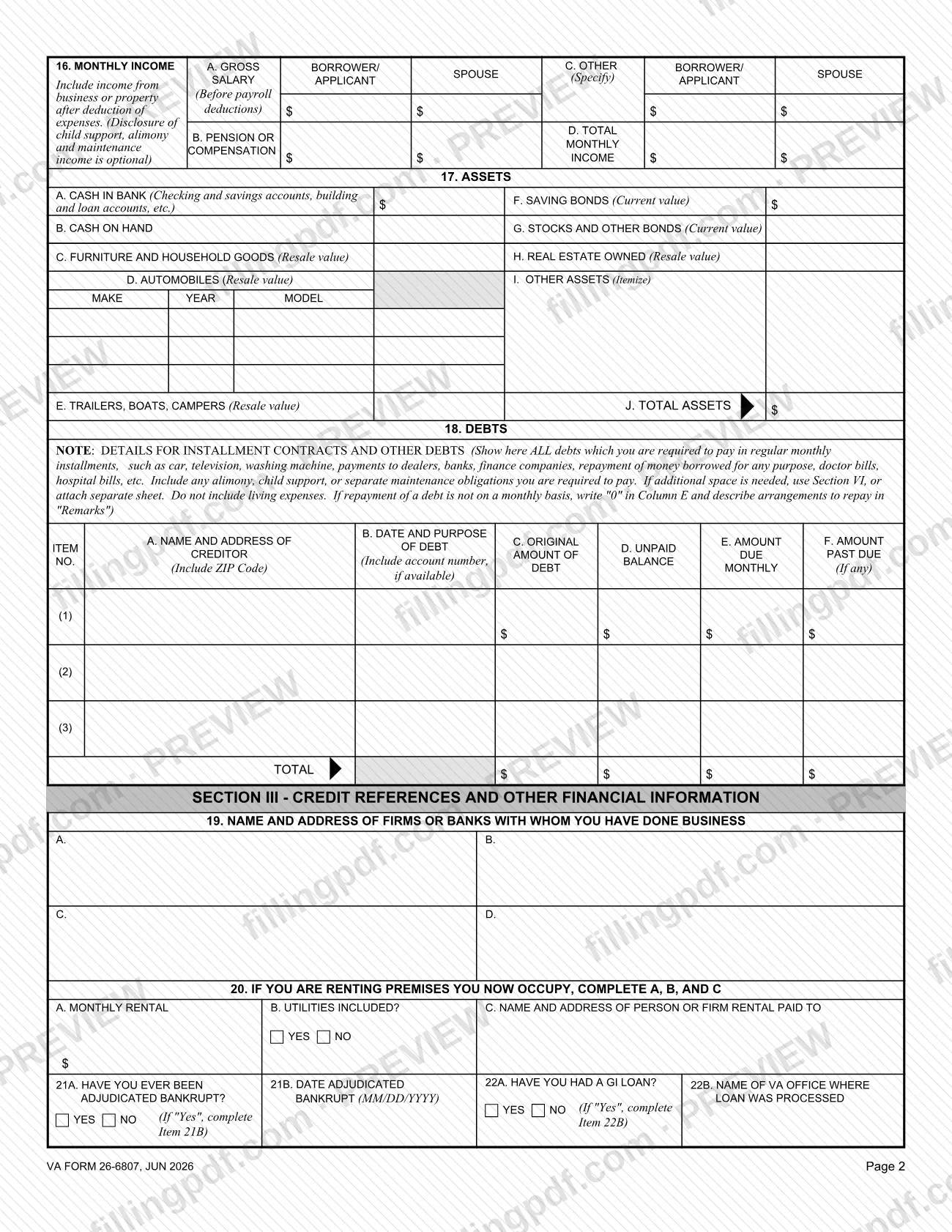
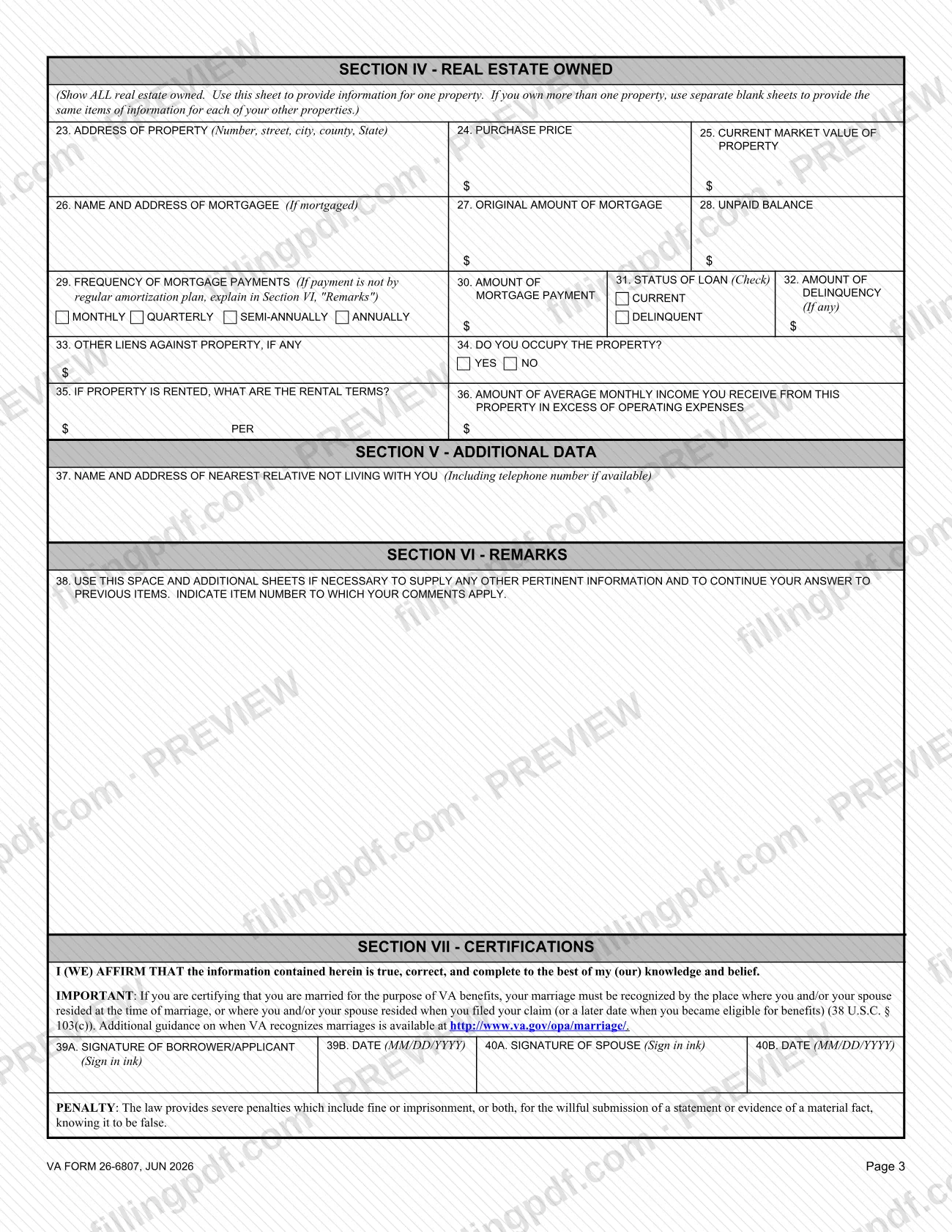
VA Form 26-6807, Financial Statement, is the U.S. Department of Veterans Affairs (VA) form that collects a borrower's or applicant's employment record, monthly income, assets, debts, credit references and real estate owned. It is listed by VA under housing assistance, so anyone looking for a financial statement for a VA loan file will find it here by its number. The borrower or applicant completes it, and the spouse's information is added in the cases Item 14 describes. On FillingPDF you can fill out the form online and download or print the completed PDF; the official PDF and form page are published by VA.
Last updated
What is 26-6807?
VA Form 26-6807, Financial Statement, is the Department of Veterans Affairs form on which a borrower or applicant lists employment history, monthly income, assets, debts, credit references and real estate owned in connection with a VA loan.
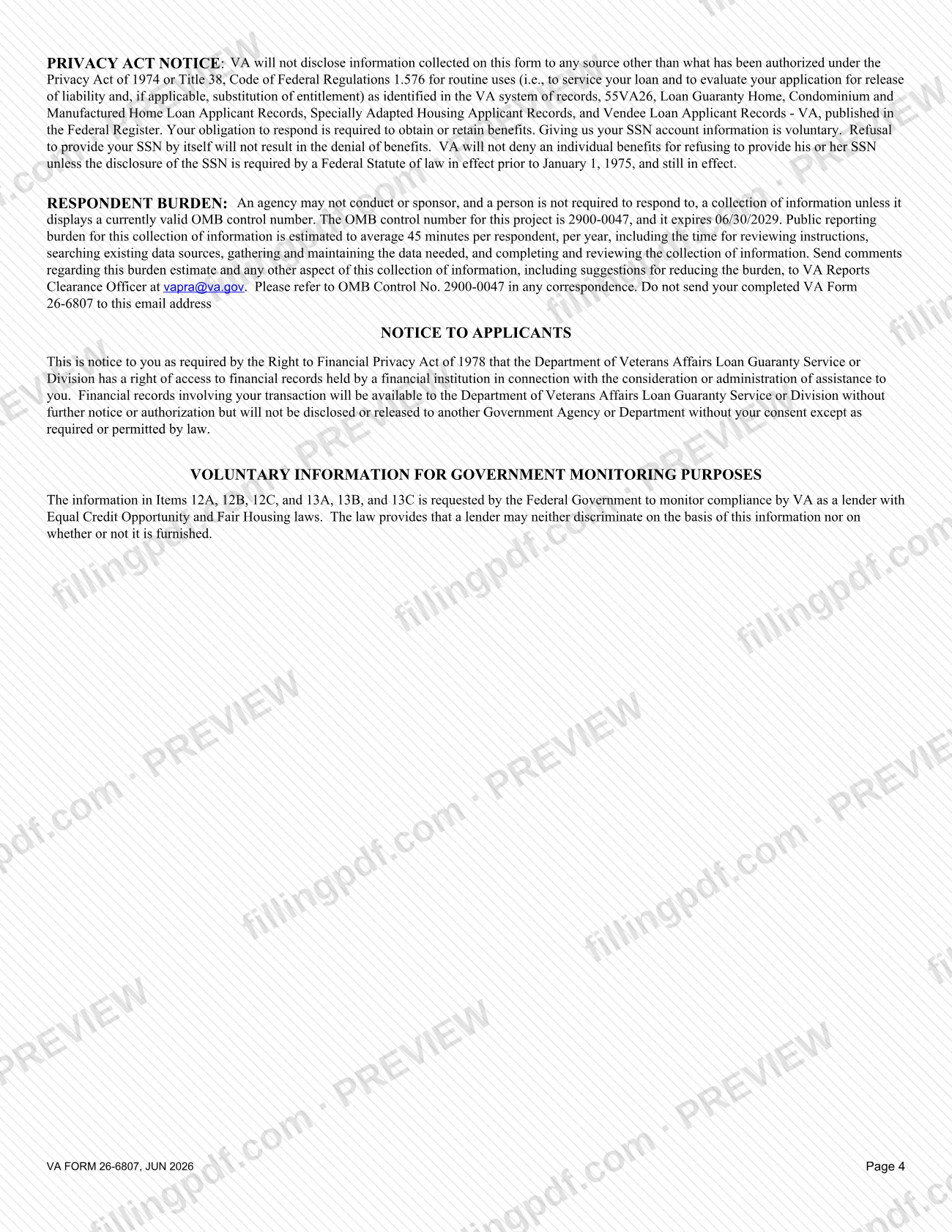
The U.S. Department of Veterans Affairs, through the Veterans Benefits Administration (VBA), issues the form under OMB No. 2900-0047. The form carries a File No. and a Loan No. at the top, which tie each statement to a specific loan file. VA's form page lists it as related to housing assistance. The Privacy Act notice printed on the form names its routine uses: to service your loan and to evaluate your application for release of liability and, if applicable, substitution of entitlement.
The form has seven sections:
- Section I: general information, spouse details and voluntary monitoring items.
- Section II: employment record, monthly income, assets and debts.
- Section III: credit references, rental information, bankruptcy and prior GI loan questions.
- Section IV: real estate owned, one sheet per property.
- Section V: nearest relative not living with you.
- Section VI: remarks.
- Section VII: certifications and signatures.
The June 2026 edition supersedes the May 2023 edition of VA Form 26-6807. The name "financial statement" is generic: this page covers only the VA loan form identified by number 26-6807.
Who needs to file 26-6807?
The borrower or applicant on a VA loan completes VA Form 26-6807, entering their own information in Sections I through V and signing in Section VII.
The spouse's information is required only in certain cases. Item 14 asks you to check any box that applies:
- the spouse is or will be jointly obligated on the loan;
- the borrower or applicant is relying on the spouse's income to repay the loan;
- the borrower or applicant is married and the property securing the loan is in a community property state;
- the borrower or applicant is relying on alimony, child support or separate maintenance payments from a spouse or former spouse.
If one or more boxes are checked, the statement must include information about the spouse (or former spouse if box D is checked). If no box is checked, no information about the spouse needs to be furnished.
A co-borrower or co-applicant who is not the borrower's or applicant's spouse must complete a separate financial statement. Items 12A through 13C are voluntary government-monitoring items; the form notes that information is not collected on a non-coborrower spouse.
When to file 26-6807
VA Form 26-6807 prints no due date of its own. Its timing follows the loan matter it supports: the Privacy Act notice on the form says VA uses the information to service your loan and to evaluate an application for release of liability and, if applicable, substitution of entitlement. Complete it when VA or your loan file calls for a financial statement, and check the File No. and Loan No. boxes so the statement matches that file.
Before you start, gather your employment record for the present position and the past 2 years, your monthly income figures, your asset values, your debt details and the details of any real estate you own. The form estimates an average of 45 minutes per respondent to complete.
Documents you need
- Continuation sheets, only if more space is needed for any item: attach separate sheets or use Section VI, Remarks, and indicate the item number each comment applies to.
- A separate blank Section IV sheet for each additional property, only if you own more than one property; the form says to show all real estate owned.
- A separate financial statement completed by a co-borrower or co-applicant, only if that person is not the borrower's or applicant's spouse.
How to fill out 26-6807
Enter file and loan numbers
At the top of page 1, write the VA file number in box 1 (FILE NO.) and the loan number in box 2 (LOAN NO.). Type or print every entry in ink.
Complete borrower general information
Item 3: your name and present address with ZIP Code. Item 4: home telephone with area code. Item 5: date of birth as MM/DD/YYYY. Items 6 and 7: marital status and Social Security number.
Enter spouse and dependent details
Item 8: name of spouse. Item 9: spouse's date of birth as MM/DD/YYYY. Item 10: spouse's Social Security number. Item 11: ages of dependents.
Decide on the voluntary monitoring items
Items 12A to 12C (borrower/applicant) and 13A to 13C (co-borrower/spouse) are for government monitoring. Initial 12A or 13A if you do not wish to complete the race/national origin and sex items that follow.
Check the spouse boxes in Item 14
Check every box A to D that applies. If any box is checked, include the spouse's information (or the former spouse's if box D is checked); if none is checked, no spouse information is needed.
List your employment record
Item 15: start with the present position and work back 2 years, for yourself and your spouse. For each job give employer name and address, dates from and to as MM/YYYY, kind of job and work telephone number.
Report monthly income
Item 16: enter gross salary, pension or compensation, and other income (specify) for borrower/applicant and spouse, then the total in D. Include business or property income after expenses; disclosing child support, alimony and maintenance income is optional.
Value your assets
Item 17A to 17I: cash in bank, cash on hand, furniture, automobiles (make, year, model), trailers, boats and campers, savings bonds, stocks and other bonds, real estate and other assets. Enter the total in 17J.
Itemize your debts
Item 18: list every debt paid in regular monthly installments, with creditor, date and purpose, original amount, unpaid balance, monthly amount and any past due amount, then totals. Write "0" in Column E for a non-monthly debt and explain it in Remarks.
Complete credit and rental information
Item 19: firms or banks you have done business with. Item 20: if renting, monthly rent, whether utilities are included and who is paid. Items 21A to 22B: bankruptcy and GI loan answers, with the date or VA office when you answer Yes.
Describe each property in Section IV
Items 23 to 36: address, purchase price, current market value, mortgage details, payment frequency, delinquency, other liens, occupancy and rental income. Use a separate blank sheet for each additional property.
Add relative and remarks
Item 37: name, address and telephone of your nearest relative not living with you. Item 38: remarks, with the item number each comment continues.
Review, sign and download the PDF
Check every item, then sign and date Items 39A and 39B; the spouse signs and dates 40A and 40B where included. Download or print the completed PDF from FillingPDF and send it as described under How to submit.
How to submit 26-6807
VA Form 26-6807 names no submission channel of its own: it prints no mailing address, upload portal or appointment rule. The File No. and Loan No. boxes tie it to a specific VA loan file, so send the signed statement the way VA directed for that file, for example through the VA Loan Guaranty office handling it.
- Do not email it. The VA Reports Clearance Officer address on the form ([email protected]) is only for comments about the burden estimate. The form says not to send your completed VA Form 26-6807 to that address.
- Include every sheet. If you used Section VI, extra sheets, or separate Section IV sheets for more than one property, send them with the form.
- Sign in ink. The borrower or applicant signs Item 39A, and the spouse signs Item 40A when a spouse's information is included.
VA's form page is at https://www.va.gov/forms/26-6807. FillingPDF lets you fill out and download the PDF; submission follows the channels VA gives for your loan file.
Common mistakes to avoid
- Completing the form in pencil; the form says to type or print all entries in ink, and both signatures are to be made in ink.
- Omitting the spouse's information when a box in Item 14 is checked; the statement must then include the spouse, or the former spouse if box D is checked.
- Listing living expenses under Item 18; the debts section is for installment contracts and other debts paid in regular monthly installments, plus alimony, child support or separate maintenance obligations.
- Leaving Column E blank for a debt not repaid monthly; the form says to write "0" there and describe the repayment arrangements in Remarks.
- Combining a co-borrower who is not the spouse into the same statement; that person must complete a separate financial statement.
- Listing several properties on one Section IV sheet; the form says to use one sheet per property and separate blank sheets for each additional one.
- Emailing the completed form to [email protected]; that address is only for burden comments, and the form says not to send the completed form there.
- Using the May 2023 edition when the June 2026 edition is available; the form states that it supersedes the May 2023 edition.
Frequently asked questions
What is VA Form 26-6807?
VA Form 26-6807, Financial Statement, is the Department of Veterans Affairs form for reporting a borrower's or applicant's employment, income, assets, debts, credit references and real estate. VA lists it as related to housing assistance, and its Privacy Act notice ties it to servicing a loan and release of liability.
Who has to complete the financial statement, and does my spouse?
The borrower or applicant completes it. The spouse's information is required only if a box in Item 14 is checked, for example when the spouse is jointly obligated on the loan or the spouse's income is relied on. With no box checked, no spouse information is needed.
Can a co-borrower who is not my spouse use the same form?
No. The form says a co-borrower or co-applicant who is not the borrower's or applicant's spouse should complete a separate financial statement. Each person fills out and signs their own VA Form 26-6807.
Can I fill out VA Form 26-6807 online?
Yes. You can fill out the PDF online on FillingPDF and download or print it. FillingPDF is an independent service and does not submit the form to VA; you send it through the channels VA gives for your loan file.
Where do I send VA Form 26-6807?
The form names no address or portal. It carries a File No. and Loan No., so send it the way VA directed for your loan file. Do not email it to [email protected]: that address only receives comments on the burden estimate.
Do I have to give my race, sex or Social Security number?
Items 12A to 12C and 13A to 13C are voluntary; initial 12A or 13A to skip them, and the lender may not discriminate on whether they are furnished. VA says giving your SSN is voluntary and refusing it by itself will not result in denial of benefits.
What do I do if I run out of space?
Continue under Section VI, Remarks, or attach separate sheets, and indicate the item number each comment applies to. For more than one property, use a separate blank Section IV sheet for each additional property.
What happens if I put false information on the form?
The form warns that the law provides severe penalties, including fine or imprisonment or both, for the willful submission of a statement or evidence of a material fact, knowing it to be false. Your signature affirms the information is true, correct and complete to the best of your knowledge.
Ready to fill out 26-6807?
Fill out 26-6807 now