
Form 2624 is the Internal Revenue Service (IRS) consent form you use to authorize the IRS to contact a financial institution, employer or other payer on your behalf, or to revoke that authorization. It applies when an information return filed with the IRS shows an income amount you dispute. On this page you can fill out the form online on FillingPDF and download or print the completed PDF; the IRS publishes the form and its latest information at www.irs.gov/Form2624.
Last updated
What is Form 2624?
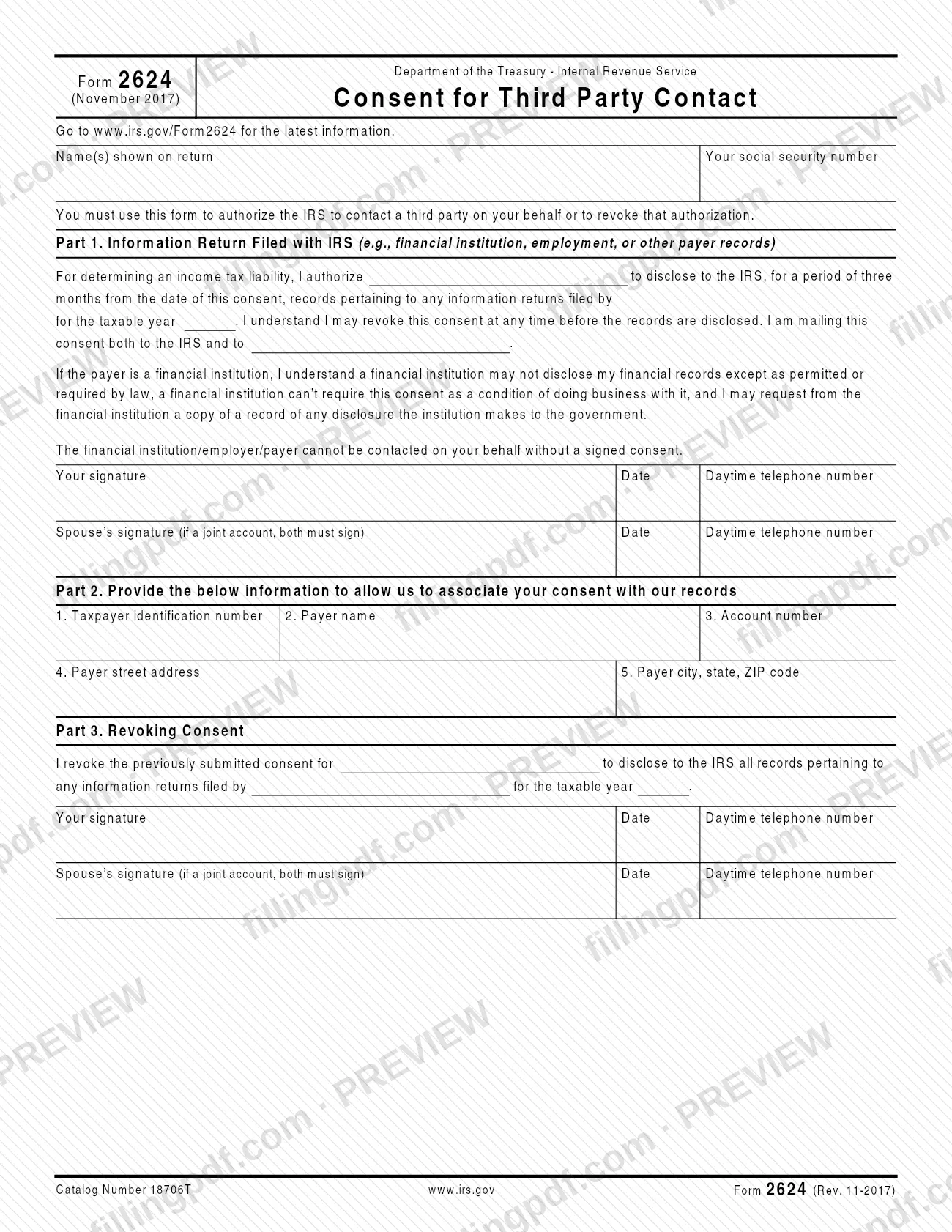
Form 2624, Consent for Third Party Contact, is the IRS form on which a taxpayer authorizes the IRS to contact a financial institution, employer or other payer about an information return, or revokes an authorization given earlier. The form states that you must use it for either purpose.
The form has three parts. Part 1 is the consent itself: you name the payer and the taxable year, and you authorize that payer to disclose to the IRS, for a period of three months from the date of the consent, the records about any information returns it filed. You may revoke the consent at any time before the records are disclosed. Part 2 asks for the details the IRS uses to match your consent to its records: a taxpayer identification number, the payer name, an account number, and the payer's street address, city, state and ZIP code. Part 3 revokes a consent you submitted before.
The form also carries a notice for financial institutions: a financial institution may not disclose your financial records except as permitted or required by law, it cannot require this consent as a condition of doing business with it, and you may ask it for a copy of the record of any disclosure it makes to the government.
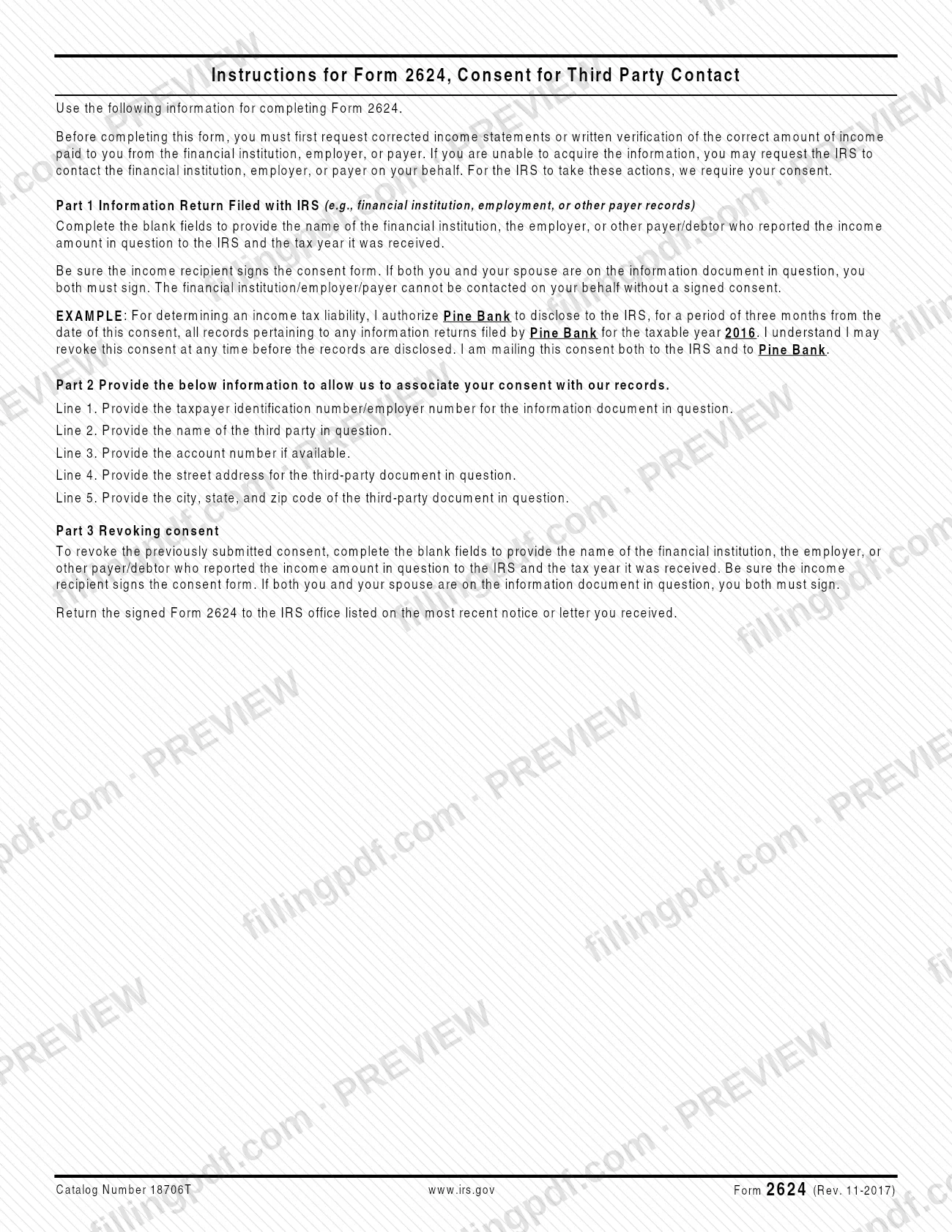
The IRS instructions describe the situation behind the form: you first ask the payer for corrected income statements or written verification of the correct amount, and only if you cannot get them do you ask the IRS to contact the payer, which requires your consent.
Who needs to file Form 2624?
Taxpayers who dispute an income amount reported to the IRS on an information document use Form 2624 when they cannot get corrected information from the payer themselves. The payer can be a financial institution, an employer or another payer or debtor that reported the income.
- Income recipient: you must sign the consent. The IRS cannot contact the financial institution, employer or payer on your behalf without a signed consent.
- Spouses: if both you and your spouse are on the information document in question, you both must sign. The form says that for a joint account both must sign.
- Anyone revoking a consent: use Part 3 of the same form to revoke a consent you submitted earlier, again signed by the income recipient (and by both spouses when both are on the document).
The IRS instructions say that, before completing the form, you must first request corrected income statements or written verification of the correct amount of income from the payer. The form is therefore for people who were unable to get that information. The form does not describe any representative or other person signing for the taxpayer.
When to file Form 2624
The trigger is that you could not obtain corrected income statements or written verification of the correct income amount from the financial institution, employer or payer. Only then do the IRS instructions have you ask the IRS to contact the payer, which requires this signed consent.
The form sets no separate due date. Timing is tied to the consent itself: the authorization in Part 1 covers records disclosed within three months from the date of the consent, and you may revoke it at any time before the records are disclosed. To revoke, complete Part 3 with the payer's name and the taxable year, sign it, and return it the same way as the consent.
The form also directs you to return the signed Form 2624 to the IRS office listed on the most recent notice or letter you received, so use the contact details in that correspondence.
How to fill out Form 2624
Enter your name and Social Security number
At the top, write the name(s) shown on your return and your social security number.
Complete the Part 1 consent sentence
In the blanks, enter the name of the financial institution, employer or other payer/debtor that reported the income in question, and the taxable year the income was received. Use the same payer name in each blank of the sentence, including the one naming where you are mailing the consent.
Sign and date Part 1
The income recipient signs and dates in the Your signature area and adds a daytime telephone number.
Add your spouse's signature if required
If you and your spouse are both on the information document, or it is a joint account, your spouse also signs, dates and adds a daytime telephone number on the Spouse's signature line.
Enter the identification number on line 1
In Part 2, line 1, enter the taxpayer identification number or employer number for the information document in question.
Enter the payer name and account number
Line 2: the name of the third party in question. Line 3: the account number, if available.
Enter the payer's address
Line 4: the street address for the third-party document in question. Line 5: the city, state and ZIP code.
Complete Part 3 only to revoke
To revoke a consent you already submitted, fill in the payer name and taxable year in the Part 3 sentence, then sign and date, with your spouse's signature if both of you are on the document. Leave Part 3 blank if you are giving consent.
Review, sign and download the PDF
Check that the payer name, taxable year and numbers are correct and that every required signature is present. Download or print the completed PDF from FillingPDF and send it as described under How to submit.
How to submit Form 2624
Form 2624 is returned to the IRS by mail, to the office named in your IRS correspondence.
- To the IRS: return the signed Form 2624 to the IRS office listed on the most recent notice or letter you received. The form prints no mailing address of its own.
- To the payer: the consent wording in Part 1 states that you are mailing the consent both to the IRS and to the named financial institution, employer or payer, so send the payer its copy as well.
- Revocations: a signed Part 3 is returned the same way, to the IRS office on your latest notice or letter.
Make sure every required signature is on the form before you send it, because the payer cannot be contacted on your behalf without a signed consent. The IRS publishes the form and its latest information at www.irs.gov/Form2624. FillingPDF lets you fill out and download the PDF; submission follows the channels above.
Common mistakes to avoid
- Sending Form 2624 without a signature; the financial institution, employer or payer cannot be contacted on your behalf without a signed consent.
- Having only one spouse sign when both spouses are on the information document in question; both must sign.
- Filing the consent before first asking the payer for corrected income statements or written verification of the correct income amount.
- Leaving the payer name or the taxable year blank in the Part 1 consent sentence or in the Part 3 revocation sentence.
- Forgetting to send the payer its copy, although the consent states it is being mailed both to the IRS and to the payer.
- Returning the form to an IRS office other than the one listed on the most recent notice or letter you received.
- Leaving out the taxpayer identification number or payer name and address in Part 2, which the IRS uses to associate your consent with its records.
- Expecting the consent to cover records disclosed more than three months after the date of the consent.
Frequently asked questions
What is Form 2624 used for?
Form 2624, Consent for Third Party Contact, authorizes the IRS to contact a financial institution, employer or other payer on your behalf about an information return, or revokes that authorization. The form states you must use it for either purpose.
Do I need to contact the payer before filing Form 2624?
Yes. The IRS instructions say you must first request corrected income statements or written verification of the correct income amount from the financial institution, employer or payer. If you cannot get the information, you may ask the IRS to contact the payer, which needs your consent.
Who has to sign Form 2624?
The income recipient must sign Part 1. If both you and your spouse are on the information document in question, you both must sign; the form says both must sign for a joint account. The payer cannot be contacted on your behalf without a signed consent.
How long does the consent on Form 2624 last?
The consent in Part 1 covers disclosure of records for a period of three months from the date of the consent. You may revoke it at any time before the records are disclosed.
How do I revoke a consent given on Form 2624?
Complete Part 3, Revoking Consent, with the payer name and the taxable year, then sign and date it. If both spouses are on the information document, both sign. Return it to the IRS office listed on your most recent notice or letter.
Where do I send Form 2624?
Return the signed form to the IRS office listed on the most recent notice or letter you received; the form prints no address of its own. The consent wording also says you are mailing it to the payer, so send the payer a copy too.
Can I fill out Form 2624 online?
You can complete the PDF online on FillingPDF and download or print it. FillingPDF is an independent service and does not send the form to the IRS or the payer; you return it through the channels the IRS names.
What goes in Part 2 of Form 2624?
Part 2 has five lines: the taxpayer or employer identification number for the information document (line 1), the payer name (line 2), the account number if available (line 3), and the payer's street address (line 4) and city, state and ZIP code (line 5). The IRS uses them to match your consent to its records.
Ready to fill out Form 2624?
Fill out Form 2624 now