
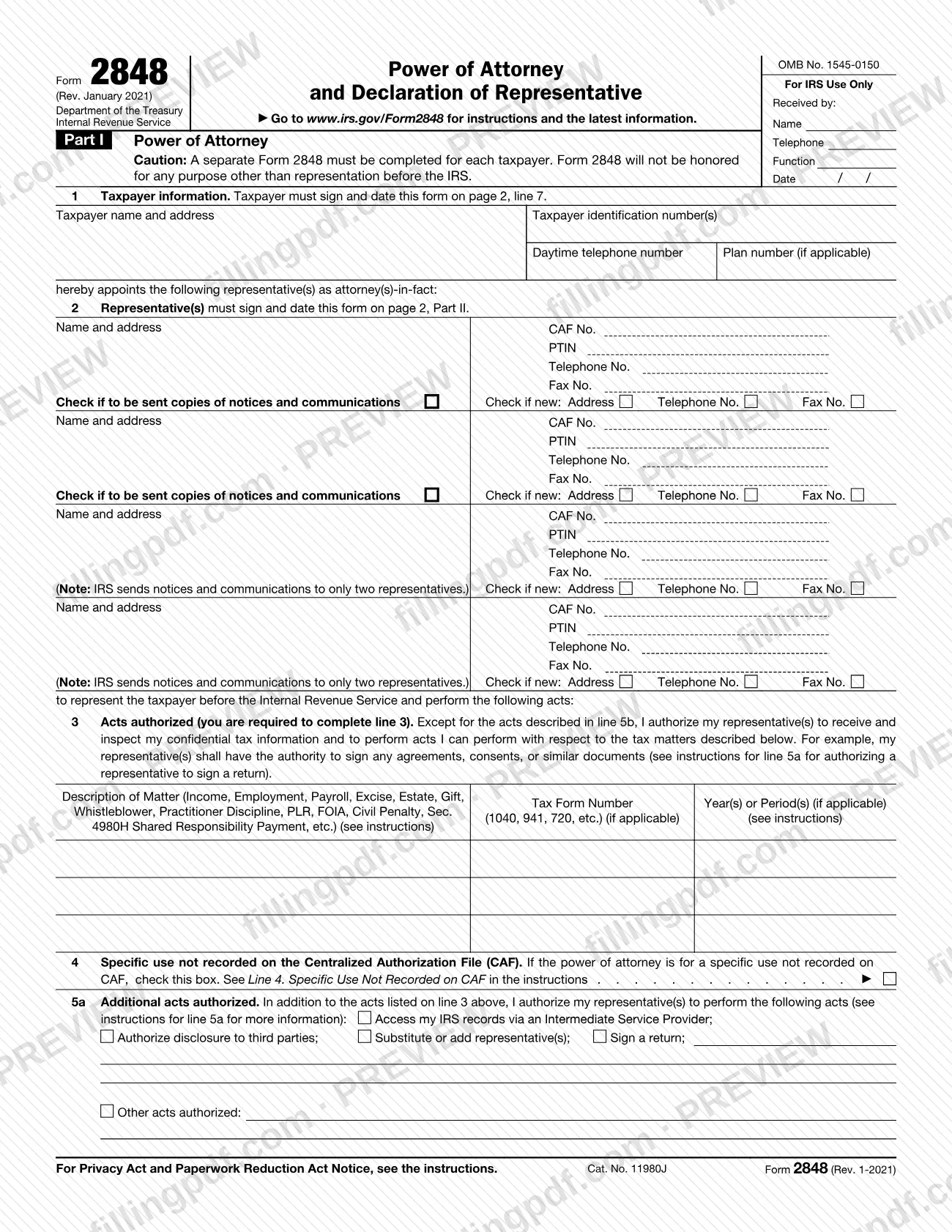
Form 2848, Power of Attorney and Declaration of Representative, is the Internal Revenue Service (IRS) form that lets you authorize an eligible individual to represent you before the IRS. Taxpayers use it to name an attorney, certified public accountant (CPA), enrolled agent or another eligible representative, who then signs a declaration in Part II. On this page you can fill out the form online on FillingPDF and download or print the completed PDF; the form and its instructions are published by the IRS at www.irs.gov/Form2848.
Last updated
What is Form 2848?
Form 2848, Power of Attorney and Declaration of Representative, is the IRS form a taxpayer uses to authorize an individual to represent them before the Internal Revenue Service and to receive and inspect their confidential tax information for the matters described on the form.
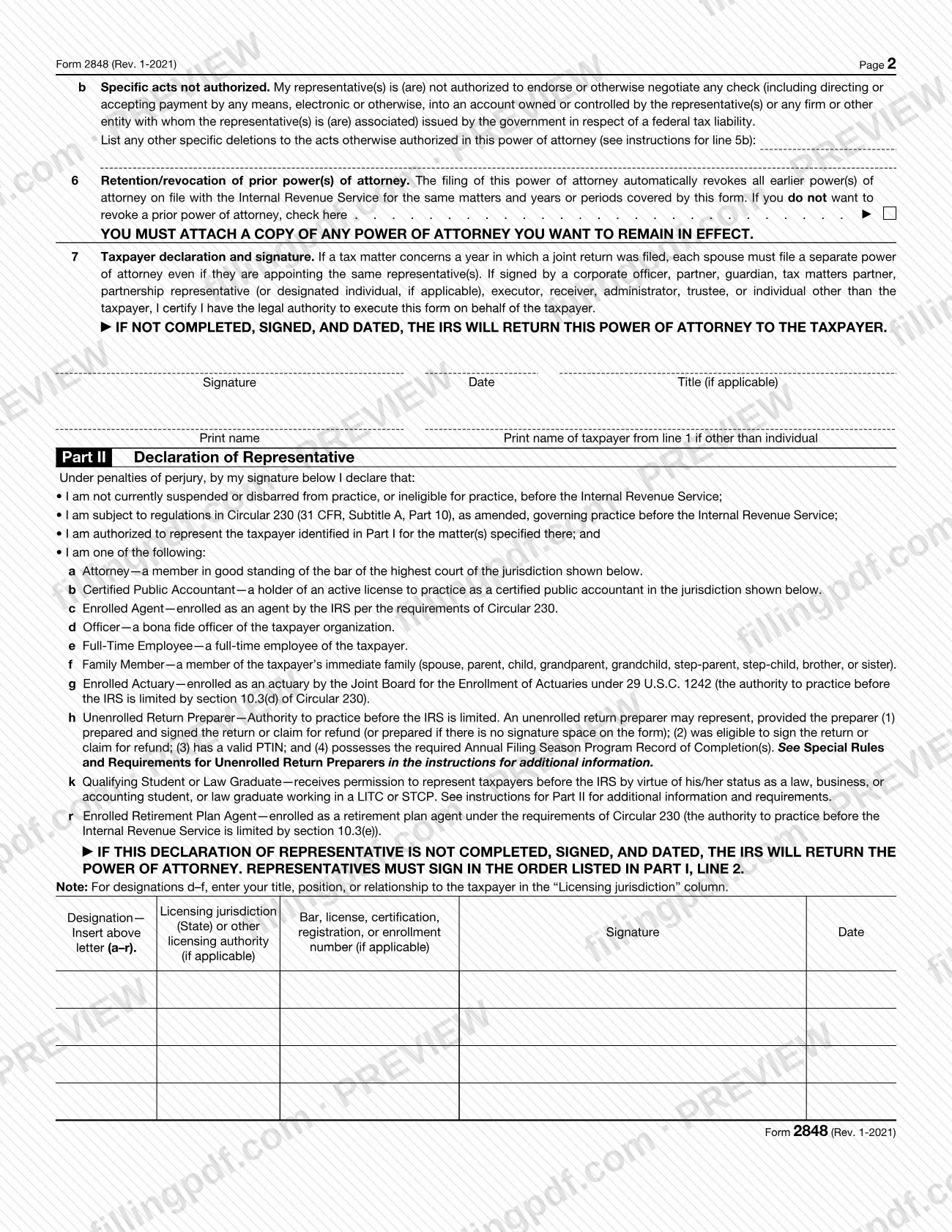
The form has two parts. In Part I, the taxpayer names the representative(s), lists the tax matters, forms and years or periods covered, and signs. In Part II, each representative declares, under penalties of perjury, that he or she is eligible to practice before the IRS and is subject to Circular 230, and enters one of the designations (a) through (r), such as attorney, CPA, enrolled agent, officer, full-time employee, family member or enrolled retirement plan agent.
Unless the taxpayer limits it, the power of attorney lets the representative perform acts the taxpayer could perform on those matters, including signing agreements, consents and waivers. It does not by itself include the power to substitute or add a representative, sign certain returns, authorize disclosure to third parties or use an Intermediate Service Provider; those are granted on line 5a. A representative may not endorse or negotiate a government check for a federal tax liability.
Form 2848 is not the right form in every case. Form 8821, Tax Information Authorization, only lets someone inspect or receive your tax information, without representing you. Form 56, Notice Concerning Fiduciary Relationship, notifies the IRS of a fiduciary relationship. Authorizing a representative does not relieve you of your tax obligations.
Who needs to file Form 2848?
Taxpayers who want an individual eligible to practice before the IRS to represent them use Form 2848. This covers individuals, corporations, partnerships, exempt organizations, trusts, estates and employee plans. A separate Form 2848 must be completed for each taxpayer.
- Joint returns: if a tax matter concerns a year in which a joint return was filed, each spouse must submit a separate Form 2848, even when both name the same representative.
- Signing for someone else: a corporate officer, partner, guardian, executor, trustee or other person signing for the taxpayer certifies on line 7 that he or she has legal authority. For a taxpayer under 18 who cannot sign, a parent or a court-appointed guardian (with court documents) may sign.
- Representatives: only individuals eligible to practice before the IRS may be named. Part II lists the eligible designations. Unenrolled return preparers have limited rights, and qualifying students or law graduates in a Low Income Taxpayer Clinic (LITC) or Student Tax Clinic Program (STCP) must list the lead attorney or CPA first.
- Outside the United States: any individual may represent a taxpayer before IRS personnel outside the United States.
Do not use Form 2848 if you only want to let someone inspect or receive your tax information; the instructions point to Form 8821 for that. Fiduciaries who need to notify the IRS of their role use Form 56.
When to file Form 2848
There is no fixed due date: file Form 2848 when you appoint a representative, before that person needs to act for you with the IRS. Representation applies only to the matters and years or periods listed on line 3. You may list the current year, years already ended and future years, but the IRS will not record on the Centralized Authorization File (CAF) future periods that exceed 3 years from December 31 of the year it receives the form.
When the taxpayer signs first, the representative must sign within 45 days of the taxpayer's signature date for domestic authorizations (60 days for taxpayers residing abroad). If the representative signs first, there is no time limit for the taxpayer. For a qualifying student or law graduate, the CAF automatically purges the representative 130 days after the taxpayer's signature date.
The IRS processes forms in the order received, whether online, by fax or by mail, and does not notify you when processing is done. If the representative's address changes, no new Form 2848 is needed; the representative sends written notice of the new information to the location where the form was filed.
Documents you need
- A copy of any power of attorney you want to remain in effect, only if you check the box on line 6; otherwise filing Form 2848 revokes earlier powers of attorney for the same matters and periods.
- Court documents, when a court-appointed guardian signs for a taxpayer under 18 who cannot sign.
- A copy of the partner's authorization to act in the partnership's name, only when a single partner signs for the partnership instead of all partners.
- Form 56, Notice Concerning Fiduciary Relationship, only when a trustee signs for an employee plan trust, to identify the current trustee.
- A copy of the Taxpayer Advocate Service letter authorizing practice before the IRS, only for a qualifying student or law graduate in an LITC or STCP.
- Additional Form(s) 2848, only when you name more than four representatives.
- Form 8857, Request for Innocent Spouse Relief, only if you attach it instead of describing innocent spouse relief on line 3.
- Form 8453 with Form 2848 attached, only when an agent who is not your representative e-files your return under the authority to sign a return.
How to fill out Form 2848
Enter the taxpayer information
On line 1, enter the taxpayer's name, street or post office box address, taxpayer identification number(s), daytime telephone number and plan number if applicable. Do not enter the representative's or your spouse's information; a sole proprietor authorizing business matters enters both the SSN (or ITIN) and the EIN.
Name your representative(s)
On line 2, enter each representative's full name and mailing address, nine-digit CAF No. (enter "None" if not assigned), PTIN if applicable ("applied for" if pending), telephone and fax. Check the notices box for up to two representatives who should get copies; for more than four, write "See attached for additional representatives" and attach additional Form(s) 2848.
Describe the acts authorized on line 3
Enter the description of the matter, the tax form number (such as 1040 or 941) and the year(s) or period(s); line 3 is required. Use "through," "thru" or a hyphen for ranges, YYYYMM for fiscal years, and "Not Applicable" where a column does not apply.
Check line 4 for specific uses
Check the box on line 4 only if the power of attorney is for a specific use the IRS does not record on the CAF, such as an EIN application, and describe that matter on line 3.
Add additional acts on line 5a
Check the box for each extra act you authorize: access IRS records via an Intermediate Service Provider, authorize disclosure to third parties, substitute or add representative(s), or sign a return. Use "Other acts authorized" for anything else.
List acts not authorized on line 5b
Line 5b already excludes endorsing or negotiating government tax checks. Write any other act you do not want your representative(s) to perform.
Decide about prior powers of attorney
Line 6: filing this form revokes earlier powers of attorney on file for the same matters and periods. If you want one to remain in effect, check the box and attach a copy.
Sign and date line 7
The taxpayer signs and dates line 7, with title if applicable, and prints the name; entities also print the taxpayer's name from line 1. If you sign for someone else, you certify you have legal authority. The form is returned if line 7 is not completed, signed and dated.
Complete Part II for each representative
Each representative enters a designation letter (a–r), the licensing jurisdiction or title/relationship (for designations d–f), the bar, license, enrollment or other number if applicable, signs and dates in the order listed on line 2.
Review, sign and download the PDF
Check that line 3 has no general references, that every signature and date is present and that the correct boxes are checked. Download or print the completed PDF from FillingPDF, then submit it through one of the channels described under How to submit.
How to submit Form 2848
You can submit Form 2848 online, by fax or by mail. If you checked the box on line 4 (specific use not recorded on the CAF), mail or fax it to the IRS office handling the specific matter instead.
- Online: submit securely at IRS.gov/Submit2848. You need a Secure Access account. Submit one form at a time, even for spouses filing jointly; save attachments together with the form in one file (PDF, JPG or GIF). Do not submit online a form you already faxed or mailed. Electronic signatures are accepted only for forms submitted online.
- Fax or mail: use the Where To File Chart in the instructions. The form must carry a handwritten (wet ink) signature; digital, electronic or typed signatures are not valid by fax or mail.
- Internal Revenue Service, 5333 Getwell Road, Stop 8423, Memphis, TN 38118; fax 855-214-7519 (states in the chart's first row, such as New York, Florida and Ohio).
- Internal Revenue Service, 1973 Rulon White Blvd., MS 6737, Ogden, UT 84201; fax 855-214-7522 (states in the chart's second row, such as California and Texas).
- Internal Revenue Service, International CAF Team, 2970 Market Street, MS: 4-H14.123, Philadelphia, PA 19104; fax 855-772-3156 or 304-707-9785 (outside the United States), for APO/FPO addresses, U.S. territories and foreign countries.
Fax numbers may change; check IRS.gov/Form2848 under "Recent Developments". Do not send Form 2848 to the Tax Forms and Publications address in Washington, DC. To discuss a case immediately, fax the signed form to the IRS employee handling it or contact the Practitioner Priority Service. FillingPDF lets you fill out and download the PDF; submission follows the channels above.
Common mistakes to avoid
- Entering a general reference such as "All years," "All periods" or "All taxes" on line 3; the IRS returns any power of attorney with a general reference.
- Leaving line 3 blank or incomplete; the matter, form number and years or periods must be entered for the power of attorney to be valid.
- Submitting the form without the taxpayer's signature and date on line 7, or without the representative's signed and dated declaration in Part II; the IRS returns it.
- Having representatives sign out of order; they must sign in the order listed on line 2.
- Using one Form 2848 for both spouses on a joint return; each spouse must file a separate form even for the same representative.
- Mailing or faxing a form with a typed, digital or electronic signature; those are valid only when the form is submitted online.
- Entering the representative's address on line 1; line 1 is for the taxpayer's information only.
- Checking the notices box for more than two representatives; the IRS sends notices and communications to only two.
- Submitting online a form you already faxed or mailed, or submitting more than one form at a time online; the extra forms are rejected.
- Forgetting to check the line 6 box and attach the earlier power of attorney when you want it to stay in effect.
Frequently asked questions
What is Form 2848 used for?
Form 2848 is the IRS power of attorney form. You use it to authorize an individual eligible to practice before the IRS to represent you, and to receive and inspect your confidential tax information, for the matters and years or periods listed on line 3.
Who can I name as my representative on Form 2848?
Only individuals eligible to practice before the IRS. Part II lists the designations: attorney, CPA, enrolled agent, officer, full-time employee, family member, enrolled actuary, unenrolled return preparer (limited), qualifying student or law graduate, and enrolled retirement plan agent.
Can I file Form 2848 online?
Yes. You can submit it securely at IRS.gov/Submit2848 with a Secure Access account, and electronic signatures are accepted only online. You can also fax or mail it with a handwritten signature. Do not submit online a form you already faxed or mailed.
Do spouses need separate Forms 2848?
Yes, when a matter concerns a year in which a joint return was filed. Each spouse must submit a separate Form 2848, even if both appoint the same representative. Online, submit one form at a time.
Can I write "all years" on line 3 of Form 2848?
No. The IRS returns any power of attorney with a general reference such as "All years," "All periods" or "All taxes." List the specific matter, form number and years or periods, for example "Income, 1040" for "2018 thru 2020".
What is the difference between Form 2848 and Form 8821?
Form 2848 authorizes someone to represent you before the IRS. Form 8821, Tax Information Authorization, only lets a person or organization inspect or receive your confidential tax information, without authority to represent you.
How do I revoke or withdraw a power of attorney?
To revoke, write "REVOKE" across the top of the first page with a current signature and date, then mail or fax a copy to the IRS using the Where To File Chart. A representative who withdraws writes "WITHDRAW" on the first page, signs and dates it.
Does the IRS tell me when Form 2848 is processed?
No. The IRS sends an email when an online submission is received but does not notify you when processing is done. Forms are processed in the order received; check the Form 2848 and 8821 processing status on IRS.gov.
Can I fill out Form 2848 online on FillingPDF?
You can fill out the PDF online on FillingPDF and download or print it. FillingPDF is an independent service and does not file the form with the IRS; you submit it online, by fax or by mail through the IRS channels.
Ready to fill out Form 2848?
Fill out Form 2848 now