
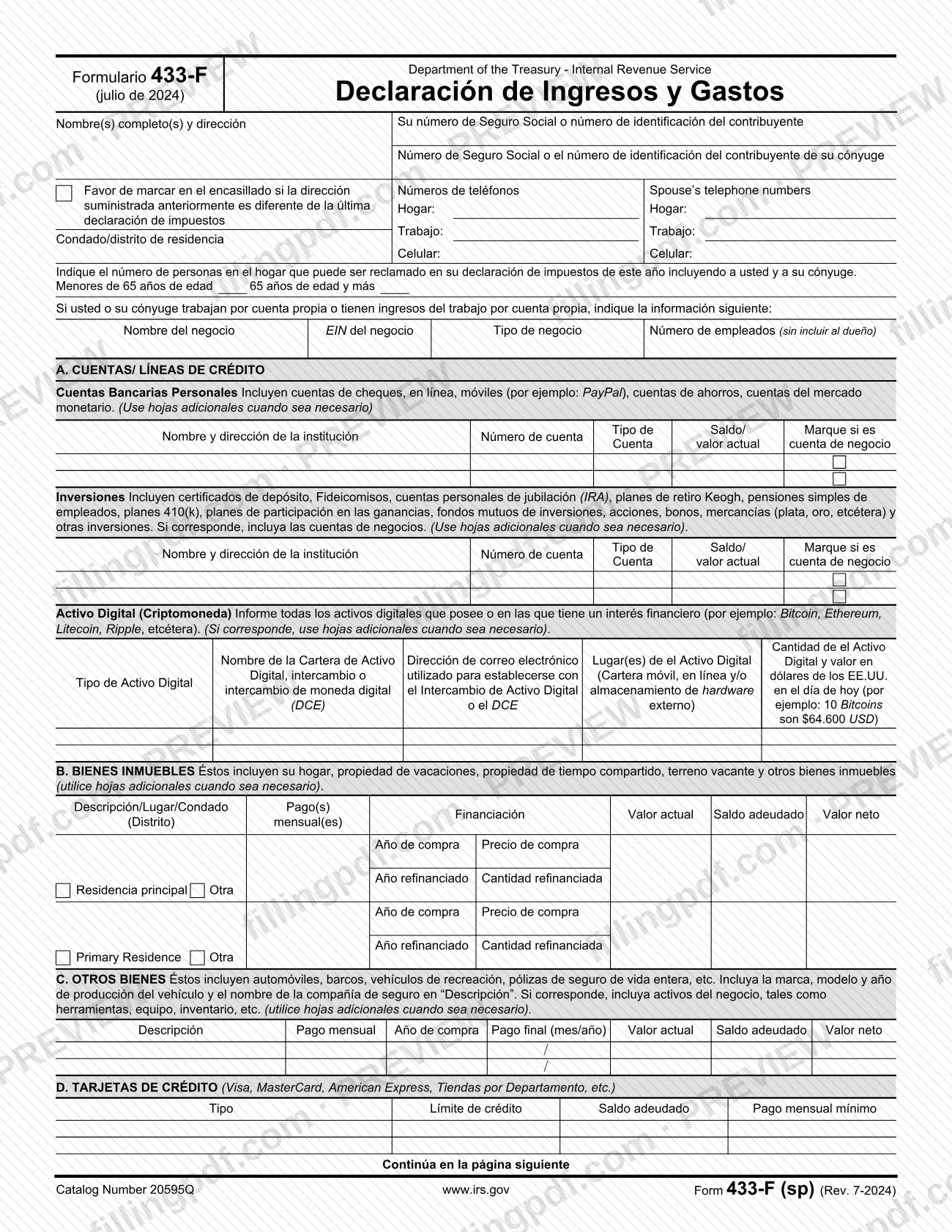
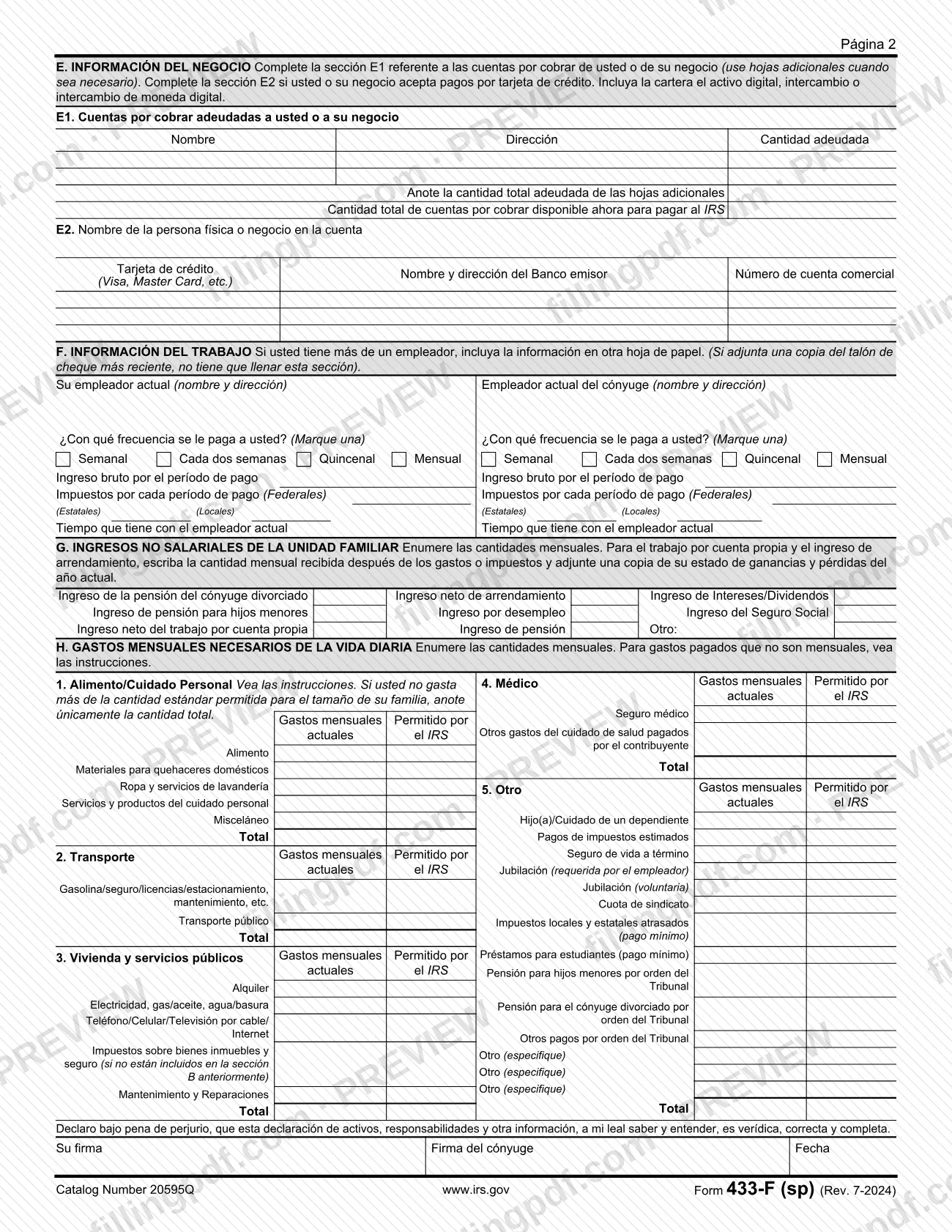
Form 433-F (sp), Collection Information Statement (Spanish version), is the Spanish-language financial statement of the Internal Revenue Service (IRS), printed as "Declaración de Ingresos y Gastos". It collects the current financial information the IRS needs to decide how a wage earner or a self-employed person can settle an unpaid tax debt. On this page you can fill out the form online on FillingPDF and download or print the completed PDF. The original form and its instructions are published by the IRS at irs.gov.
Last updated
What is 433-F (sp)?
Form 433-F (sp), Collection Information Statement (Spanish version), is the Spanish-language IRS form that gathers current financial information on a household's accounts, property, debts, income and monthly living expenses, so the IRS can determine how a wage earner or self-employed person can pay a tax debt.
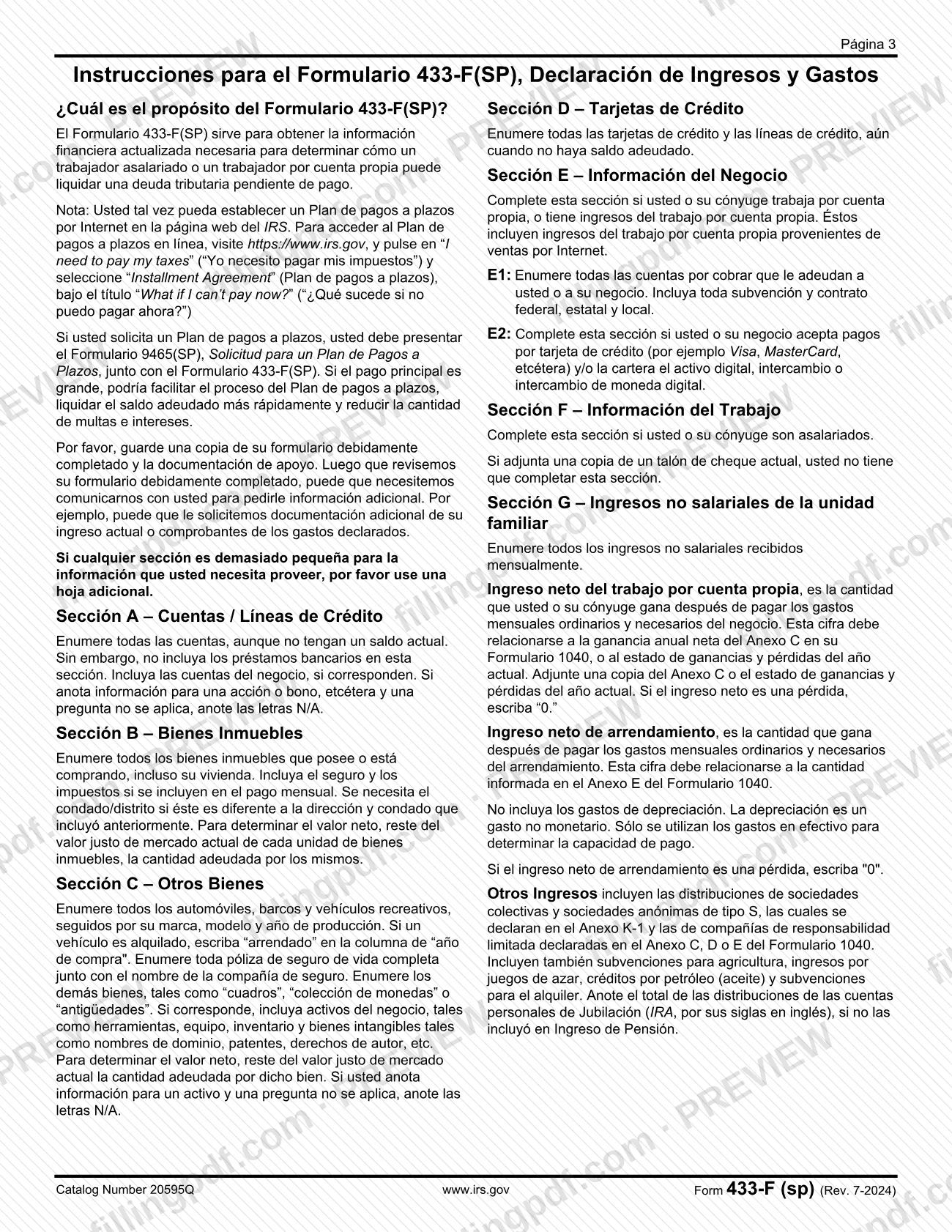
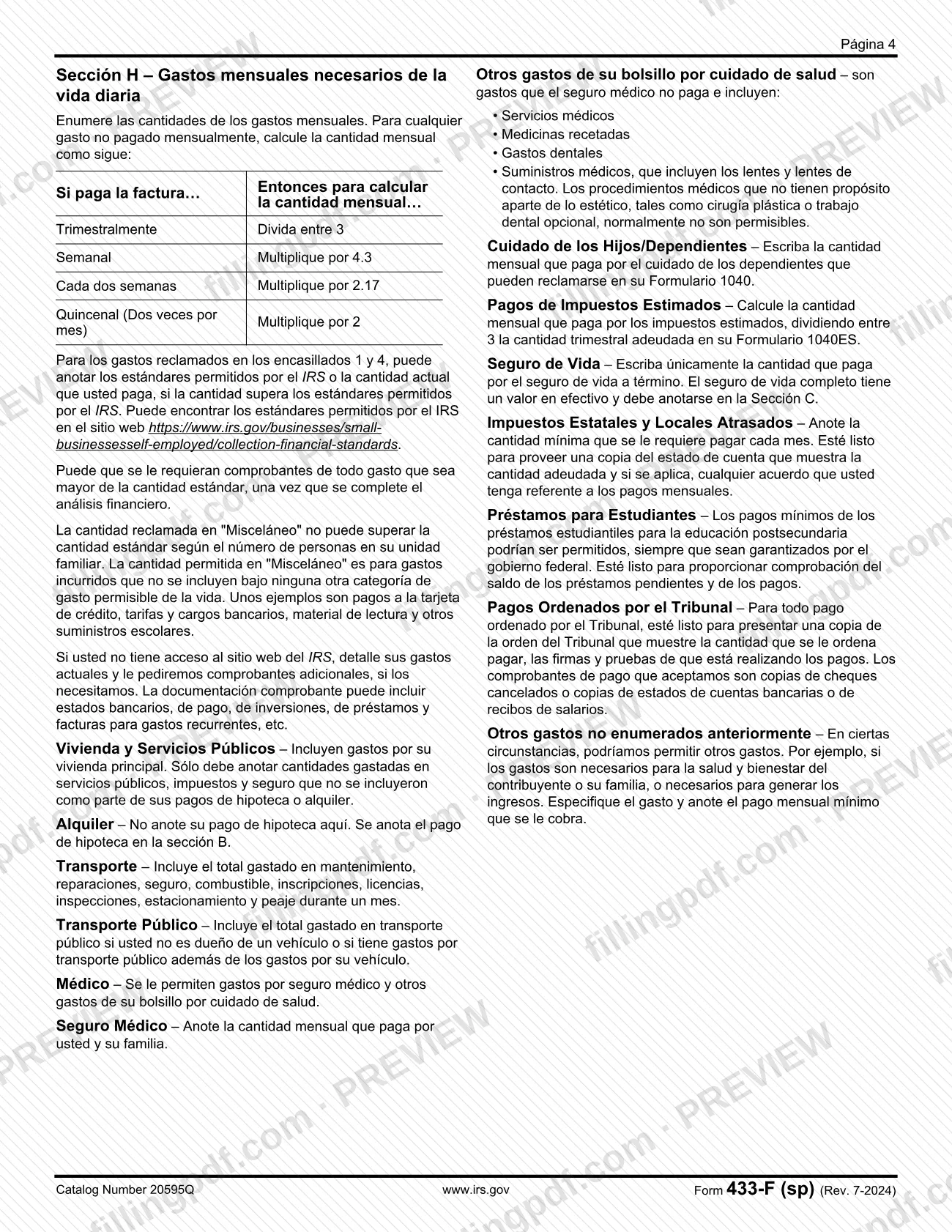
The "sp" in the number marks the Spanish version. The printed form (revision July 2024, "Rev. 7-2024") is titled "Declaración de Ingresos y Gastos" and has its own instructions, "Instrucciones para el Formulario 433-F(SP)", on pages 3 and 4 of the PDF.
The form is organized in lettered sections:
- A: bank accounts and credit lines, investments, and digital assets (cryptocurrency).
- B: real estate. C: other assets, such as vehicles and whole life insurance. D: credit cards.
- E: business information, including accounts receivable (E1) and credit card or digital asset payments accepted (E2).
- F: employment. G: household income that is not wages. H: necessary monthly living expenses.
It ends with a declaration under penalty of perjury, signed and dated by you and, if applicable, your spouse. The IRS instructions say the IRS may contact you after reviewing the completed form to request more information, such as proof of income or of the expenses you reported.
Who needs to file 433-F (sp)?
The main group is wage earners and self-employed individuals who owe the IRS an unpaid tax debt and must give the IRS current financial information so it can determine how the debt can be paid. The IRS instructions describe the form's purpose in exactly those terms.
Details that decide how you complete it:
- Married filers: the form has fields for your spouse's Social Security or taxpayer identification number, telephone numbers, employer and pay information, and a spouse signature.
- Salaried workers: complete Section F for yourself and your spouse; you can skip it if you attach a copy of your most recent pay stub.
- Self-employed people, or people with self-employment income (including income from internet sales): complete the business line at the top of page 1 and Section E, and attach the profit and loss statement or Schedule C described in Section G.
- People who also want an installment agreement: the instructions say that if you request one, you must submit Form 9465(SP), Solicitud para un Plan de Pagos a Plazos, with this form.
The instructions also note that you may be able to set up an installment agreement online on the IRS website.
When to file 433-F (sp)
Complete Form 433-F (sp) when you need to show the IRS your current finances to resolve an unpaid tax debt. The IRS instructions say it is used to determine how a wage earner or self-employed person can pay that debt. No separate due date is printed on the form.
If you request an installment agreement, the instructions say you must submit Form 9465(SP) together with Form 433-F (sp), so the two go in at the same time. The instructions add that a large down payment can make the installment agreement process easier, settle the balance faster and reduce penalties and interest.
Enter current amounts: the form asks for current balances, current values and monthly figures. After the IRS reviews the completed form, it may contact you for additional documentation of your income or of the expenses you claimed.
Documents you need
- A copy of your most recent pay stub, if you want to skip Section F (Información del Trabajo); the form says you need not complete that section when you attach it.
- A copy of your current-year profit and loss statement or Schedule C, if you or your spouse have net self-employment income reported in Section G.
- A copy of your current-year profit and loss statement, if you have net rental income reported in Section G; the amount should match Schedule E of Form 1040.
- Form 9465(SP), Solicitud para un Plan de Pagos a Plazos, only if you are requesting an installment agreement; the instructions require it with this form.
- Additional sheets of paper, when a section is too small or you have more than one employer; the form tells you to use them.
- On request after review: proof of expenses above the IRS allowable standards, statements of past-due state and local taxes, court orders for court-ordered payments, and proof of student loan balances and payments.
How to fill out 433-F (sp)
Enter personal and household details
At the top of page 1, enter your full name(s) and address, your Social Security number or taxpayer identification number, your spouse's number, and telephone numbers (home, work, cell). Check the box if the address differs from your last tax return, and give your county or district of residence.
Count household members
Enter the number of people in the household who can be claimed on this year's tax return, including you and your spouse, in the two groups: under 65 and 65 or older.
Add business details if self-employed
If you or your spouse are self-employed or have self-employment income, enter the business name, business EIN, type of business and number of employees, not counting the owner.
Complete Section A accounts
List every personal bank account, investment and digital asset (cryptocurrency) with institution name and address, account number, current balance or value, and the box for business accounts. Include accounts with no balance, leave out bank loans, and write N/A where a question does not apply.
Describe real estate in Section B
List every property you own or are buying, including your home, with description and county/district, purchase and refinance data, current value, monthly payment, amount owed and net value. Net value is current fair market value minus the amount owed.
List other assets in Section C
Enter vehicles, boats, recreational vehicles with make, model and year, whole life insurance policies with the company name, and other assets such as collections, plus business assets if they apply. Write "arrendado" in the purchase-year column for a leased vehicle.
List credit cards in Section D
Enter every credit card and credit line, even without a balance owed, with type, credit limit, balance owed and minimum monthly payment.
Complete the business section E
In E1, list accounts receivable owed to you or your business, with name, address and amount, including government grants and contracts. In E2, complete the credit card and digital asset payment information if you or your business accept those payments.
Report employment in Section F
Enter current employer name and address, pay frequency (weekly, every two weeks, twice a month or monthly), gross pay per period, federal, state and local taxes per period, and time with the employer, for you and your spouse. Skip this section if you attach your latest pay stub.
Enter non-wage income in Section G
List monthly amounts for alimony, child support, net rental income, unemployment, Social Security, net self-employment income, pensions, interest and dividends, and other income. Enter "0" for a net loss and attach the current-year profit and loss statement or Schedule C where required.
Fill in monthly expenses in Section H
Complete boxes 1 to 5 (food and personal care, transportation, housing and utilities, medical, other) with current monthly amounts and the IRS allowable standard where listed. Convert non-monthly bills using the table in the instructions, and enter totals for each box.
Review, sign and download the PDF
Check that every section is complete and that amounts match your records. Sign and date the declaration under penalty of perjury, add your spouse's signature if applicable, then download or print the completed PDF from FillingPDF and attach any required documents.
How to submit 433-F (sp)
Form 433-F (sp) prints no mailing address, fax number or portal of its own, so how it reaches the IRS depends on why you complete it. The IRS instructions name two routes:
- With an installment agreement request: submit Form 9465(SP), Solicitud para un Plan de Pagos a Plazos, together with Form 433-F (sp), as the instructions require.
- Online payment plan: the instructions say you may be able to set up an installment agreement on the IRS website. Go to https://www.irs.gov, click "I need to pay my taxes" ("Yo necesito pagar mis impuestos") and select "Installment Agreement" ("Plan de pagos a plazos") under "What if I can't pay now?" ("¿Qué sucede si no puedo pagar ahora?").
Keep a copy of the completed form and your supporting documentation. The IRS may contact you after it reviews the form to ask for more information, so keep recent pay stubs, bank, investment and loan statements, and bills for recurring expenses within reach. If a section is too small, attach an additional sheet.
FillingPDF lets you fill out and download the PDF; submission follows the IRS channels above.
Common mistakes to avoid
- Listing bank loans in Section A; the instructions say not to include them there, only accounts and credit lines, even if the balance is zero.
- Entering your mortgage payment on the Alquiler (Rent) line of Section H; the instructions say a mortgage payment goes in Section B.
- Including depreciation as a business or rental expense; the instructions say only cash expenses are used to determine ability to pay.
- Writing a negative number for net self-employment or net rental income; if the result is a loss, the instructions say to enter "0".
- Claiming more under "Misceláneo" than the standard amount for your household size; the instructions set that amount as the maximum.
- Entering whole life insurance premiums in Section H; only term life insurance goes there, while whole life insurance has cash value and is listed in Section C.
- Entering a weekly, biweekly, quarterly or semimonthly expense without converting it to a monthly amount (for example, weekly times 4.3).
- Omitting the Schedule C or profit and loss statement when reporting self-employment or rental income in Section G.
- Requesting an installment agreement without submitting Form 9465(SP) with this form.
- Leaving the spouse signature blank on a form that includes the spouse's information.
Frequently asked questions
What is Form 433-F (sp)?
Form 433-F (sp), Collection Information Statement (Spanish version), is an IRS form, printed as "Declaración de Ingresos y Gastos", that collects current financial information to determine how a wage earner or self-employed person can pay an unpaid tax debt.
Do I need Form 9465(SP) with Form 433-F (sp)?
Only if you request an installment agreement. In that case the IRS instructions say you must submit Form 9465(SP), Solicitud para un Plan de Pagos a Plazos, together with Form 433-F (sp). The instructions also say you may be able to set up an installment agreement online.
Can I fill out Form 433-F (sp) online?
You can fill out the fillable PDF online on FillingPDF and download or print it. FillingPDF is an independent service and does not send the form to the IRS; you submit it through the IRS channels that apply to your situation.
Do I have to complete Section F if I attach a pay stub?
No. Section F (Información del Trabajo) says you do not need to complete it if you attach a copy of your most recent pay stub. If you have more than one employer, include the additional information on another sheet of paper.
What do I enter if my self-employment income is a loss?
Enter "0". The instructions for Section G say that if net self-employment income, or net rental income, is a loss, you write "0". Net income is what remains after ordinary and necessary monthly business expenses, and depreciation is not counted.
How do I convert expenses that are not paid monthly?
Use the table in the instructions for Section H: divide a quarterly bill by 3, multiply weekly by 4.3, every two weeks by 2.17, and twice-a-month (quincenal) by 2. Enter the resulting monthly amount.
Do I list my mortgage payment under Rent in Section H?
No. The instructions say not to enter your mortgage payment on the Alquiler line; the mortgage payment goes in Section B (Bienes Inmuebles), along with insurance and taxes if they are included in the monthly payment.
Can I use my actual expenses instead of the IRS allowable standards?
For food and personal care (box 1) and medical (box 4), you can enter the IRS allowable standard or your actual amount if it exceeds the standard. The IRS may require proof of any amount above the standard after the financial analysis.
Ready to fill out 433-F (sp)?
Fill out 433-F (sp) now