
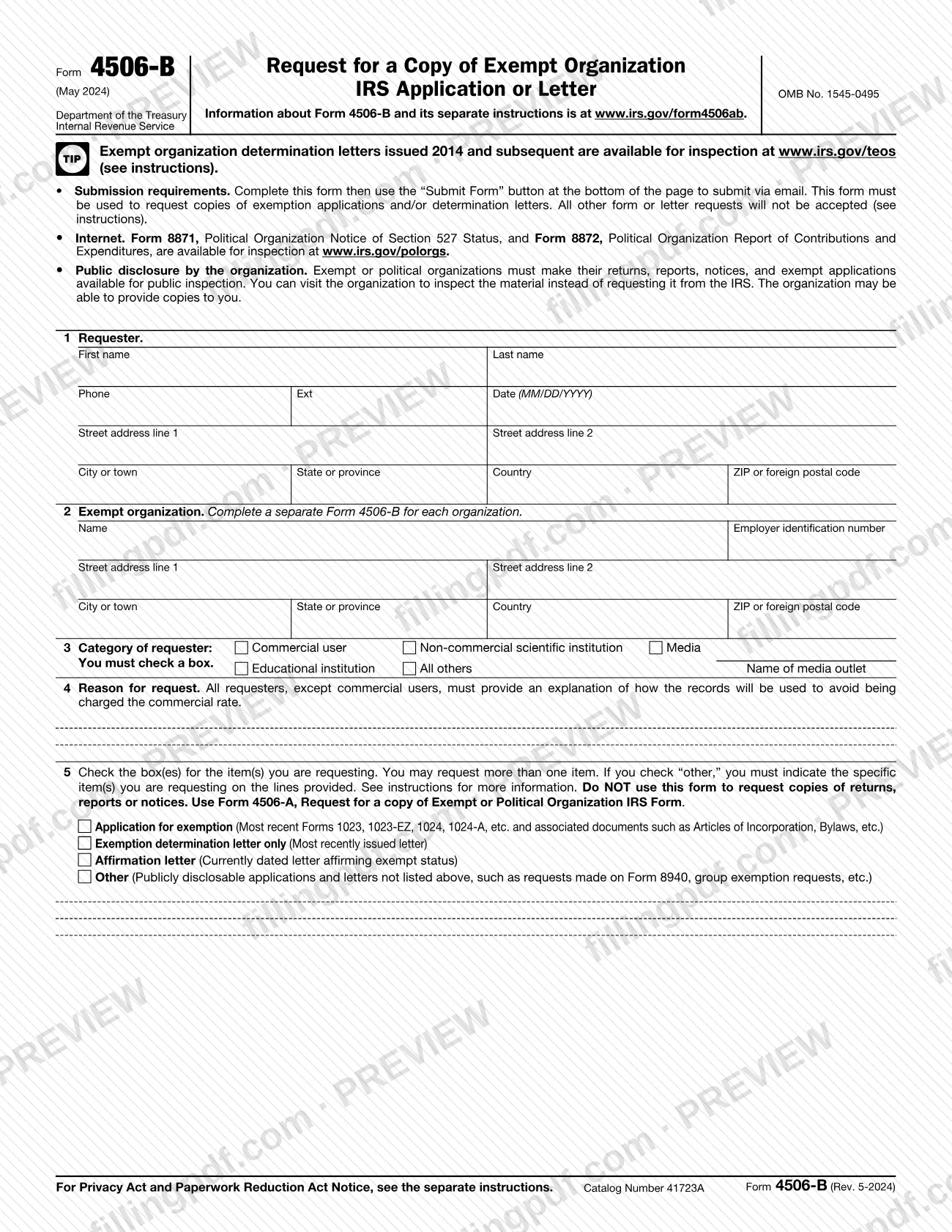
Form 4506-B is the Internal Revenue Service (IRS) form for requesting a copy of a tax-exempt organization's exemption application or determination letter under Section 6104. Use it when you need the application, the most recent determination letter, a current affirmation letter, or another publicly disclosable application or letter. On this page you can fill out the form online on FillingPDF and download or print the completed PDF; the form and its instructions are published by the IRS at www.irs.gov/form4506ab.
Last updated
What is Form 4506-B?
Form 4506-B, Request for a Copy of Exempt Organization IRS Application or Letter, is the Internal Revenue Service (IRS) form used under Section 6104 to ask for a copy of an exempt organization's exemption application or determination letter.
The form is issued under OMB No. 1545-0495. On line 5 you choose what you want:
- Application for exemption: the most recently approved application (Form 1023, 1023-EZ, 1024, 1024-A and so on) with its supporting documentation and the determination letter.
- Exemption determination letter only: the letter issued on the most recently approved application.
- Affirmation letter: a currently dated letter affirming the organization's exempt status.
- Other: publicly disclosable applications and letters not listed above, such as group exemption requests, some requests made on Form 8940, and prior exemption applications. You must name the items on the lines provided.
Since the August 2023 instructions, Form 4506-B is the only way to ask for copies of exemption applications and determination letters; other form or letter requests are not accepted. It is not for copies of returns, reports or notices. For those, the form directs you to Form 4506-A, Request for a copy of Exempt or Political Organization IRS Form. Determination letters issued 2014 and later can be inspected and printed on Tax Exempt Organization Search (TEOS) at www.irs.gov/teos.
Who needs to file Form 4506-B?
Anyone who wants a copy of an exempt organization's exemption application or determination letter from the IRS uses Form 4506-B. Line 3 sorts requesters into Commercial user, Non-commercial scientific institution, Media, Educational institution and All others, and you must check one box.
- An organization or its officers may request the organization's own application on this form. They receive only the copy that is open for public inspection, which leaves out, for example, information that could identify a contributor and filed documents that are not open to public inspection.
- Complete a separate Form 4506-B for each organization.
Do not use this form to request copies of returns, reports or notices; use Form 4506-A instead. Form 8871 and Form 8872 for political organizations can be inspected and printed at www.irs.gov/polorgs. You also do not need the IRS if you only want the organization's papers: exempt organizations must make their applications available for public inspection, so you can visit the organization, which may also provide copies. To check whether contributions are deductible, use TEOS.
When to file Form 4506-B
The form has no due date. You send it when you need a copy of an exemption application or determination letter and cannot get it another way. Determination letters issued 2014 and later are available for inspection and printing on TEOS at www.irs.gov/teos, and an organization may let you inspect or copy its application directly. Requests for Other items take longer to process and could result in significant delays, according to the IRS instructions. The instructions give no overall processing time.
How to fill out Form 4506-B
Enter the requester's name and phone
On line 1, enter the requester's first and last name, phone number and extension, and the date in MM/DD/YYYY format.
Enter the requester's address
Still on line 1, give street address lines 1 and 2, city or town, state or province, country, and ZIP or foreign postal code.
Identify the exempt organization
On line 2, enter the organization's official name under which exempt status was approved, and its employer identification number. Complete a separate form for each organization.
Enter the organization's address
On line 2, give the organization's street address, city or town, state or province, country, and ZIP or foreign postal code.
Check the category of requester
On line 3, check one box: Commercial user, Non-commercial scientific institution, Media, Educational institution or All others. If you are Media, enter the name of the media outlet.
Explain the reason for request
On line 4, explain how the records will be used. Every requester except a commercial user must do this to avoid the commercial rate.
Choose the items you want
On line 5, check the box for each item: Application for exemption, Exemption determination letter only, Affirmation letter or Other. You may check more than one.
Describe any other items
If you checked Other, write the specific items on the lines provided, such as a group exemption request or a prior application.
Review and download the completed PDF
Check the organization's name and EIN and that line 3 is checked. Download or print the completed PDF from FillingPDF, then submit it as described under How to submit.
How to submit Form 4506-B
Form 4506-B is submitted by email only, through the Submit Form button at the bottom of the form.
- Email: complete the form, then click Submit Form. The IRS instructions say you need Adobe Reader installed and that you should submit, save or print using Adobe Reader rather than your web browser.
- Security: the form warns that your email submission is not encrypted.
- Fees: the IRS bills you for the photocopy cost, and asks for payment in advance on larger orders. Commercial users are charged per page; educational institutions, media, non-commercial scientific institutions and all other requesters get the first 100 pages free. Check the chart in the instructions for the rate.
- Comments: the Washington, DC address in the instructions is for comments on the form only. Do not send Form 4506-B to it.
Incomplete requests and requests for documents not listed on the form, such as returns, are rejected. FillingPDF lets you fill out and download the PDF; submission follows the channel above.
Common mistakes to avoid
- Using Form 4506-B to request copies of returns, reports or notices; the form says to use Form 4506-A for those, and such requests are rejected.
- Requesting a document the form does not list, such as a return, instead of one of the line 5 items; requests for documents not specified on the form are rejected.
- Leaving line 3 blank; you must check a requester category box.
- Skipping the line 4 explanation of how the records will be used, which non-commercial requesters need to avoid the commercial rate.
- Entering a name on line 2 other than the official name under which exempt status was approved, which may keep the IRS from locating the item.
- Listing several organizations on one form; a separate Form 4506-B is required for each organization.
- Checking Other without naming the specific items on the lines provided, or expecting prior applications from the Application for exemption box, which returns only the most recent one.
- Submitting from a web browser instead of Adobe Reader, which the instructions tell you to use for submitting, saving or printing.
- Mailing the form to the Tax Forms and Publications Division address, which is only for comments.
Frequently asked questions
What is Form 4506-B used for?
Form 4506-B is the IRS form for requesting, under Section 6104, a copy of an exempt organization's exemption application or determination letter. You can also ask for an affirmation letter or other publicly disclosable applications and letters.
What is the difference between Form 4506-A and Form 4506-B?
Form 4506-B requests exemption applications and determination letters. Form 4506-A requests copies of an exempt or political organization's returns, reports or notices. The instructions say not to use 4506-B for returns, and such requests will be rejected.
Can I fill out Form 4506-B online?
You can fill out the PDF online on FillingPDF and download or print it. FillingPDF is independent of the IRS and does not send the request. You submit it to the IRS yourself by email using the form's Submit Form button.
How do I submit Form 4506-B to the IRS?
By email only, using the Submit Form button at the bottom of the form. The instructions say to use Adobe Reader rather than your web browser to submit, save or print. The form warns that email submission is not encrypted.
Is there a fee for a copy requested on Form 4506-B?
Yes, the IRS bills for the photocopy cost, and asks for payment in advance on larger orders. Commercial users pay per page. Other requesters get the first 100 pages free. The instructions give the current rates.
Can I get an exempt organization's determination letter without Form 4506-B?
Often yes. Determination letters issued 2014 and later can be inspected and printed on Tax Exempt Organization Search at www.irs.gov/teos. You can also visit the organization, which must make its application available for public inspection.
Can an organization request its own application on Form 4506-B?
Yes. An organization or its officers may request the organization's application on Form 4506-B, but they receive only the copy that is open for public inspection. It leaves out contributor-identifying information and documents not open to public inspection.
How do I request more than one organization's records?
Complete a separate Form 4506-B for each organization. Line 2 takes one organization's official name, EIN and address.
Ready to fill out Form 4506-B?
Fill out Form 4506-B now