
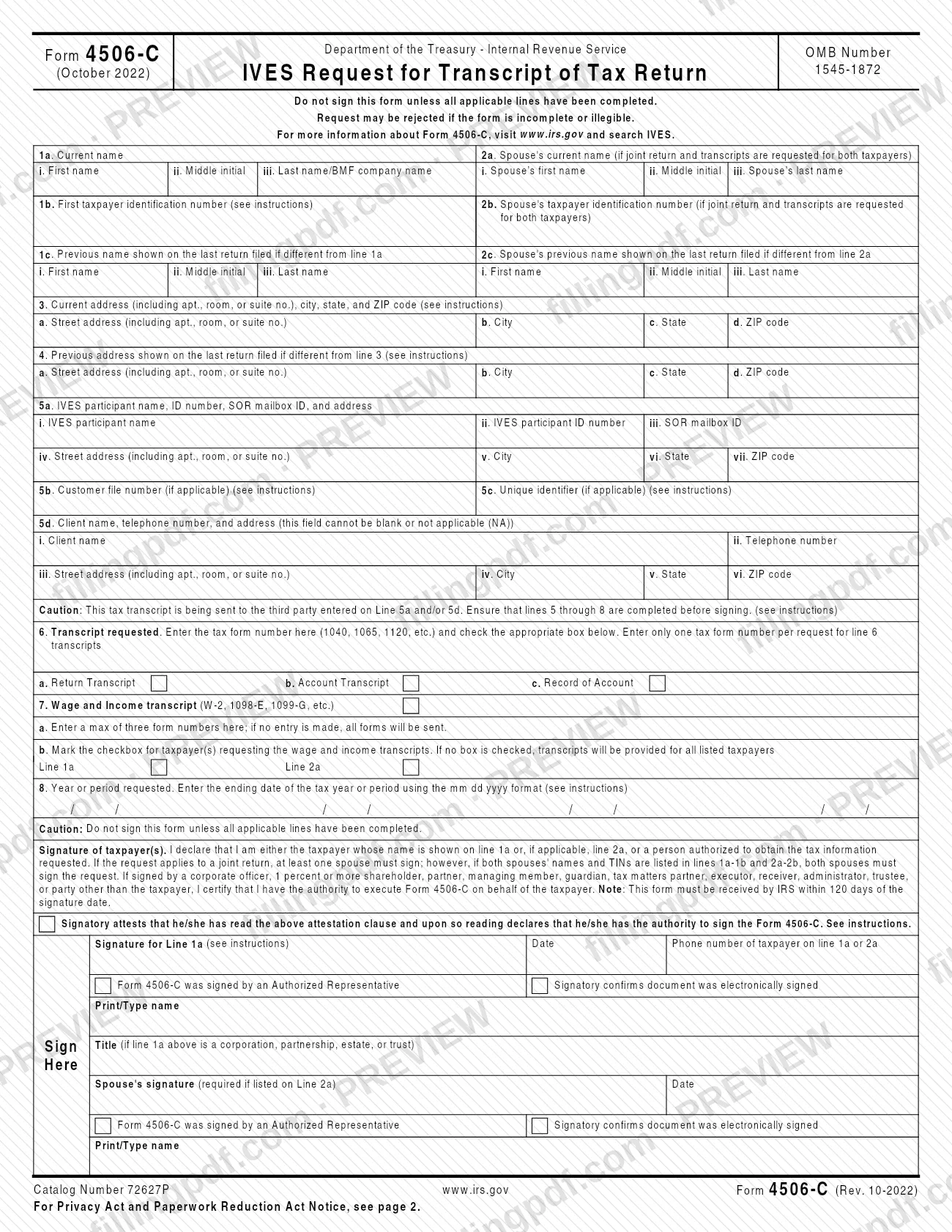
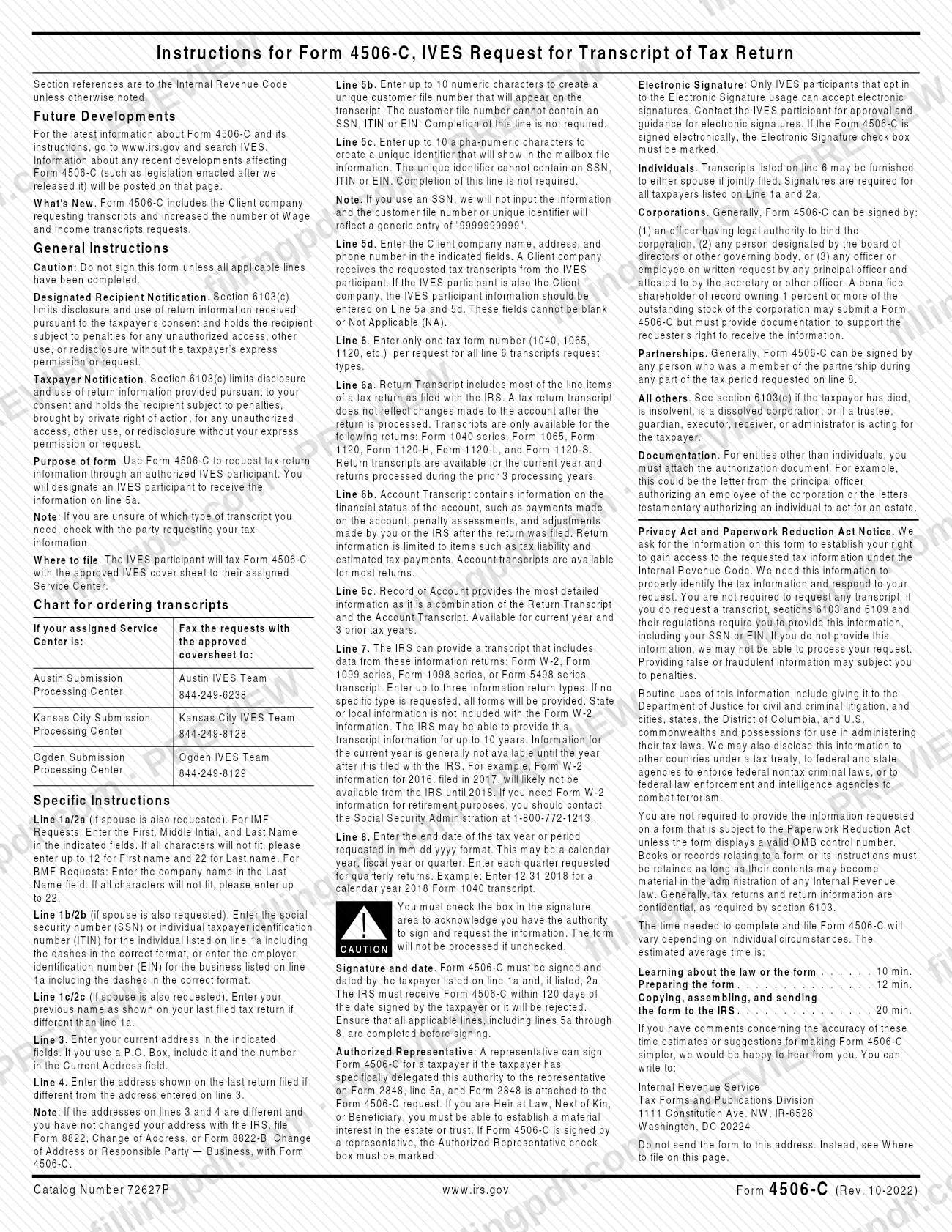
Form 4506-C, IVES Request for Transcript of Tax Return, is the Internal Revenue Service (IRS) form for requesting tax return information through an authorized IVES participant, who receives the transcript at the address entered on line 5a. It is used when a third party, such as the client company named on line 5d, needs a taxpayer's transcript. On FillingPDF you can fill out the form online and download or print the completed PDF; the IVES participant, not the taxpayer, faxes it to the IRS, as described under how to submit.
Last updated
What is 4506-C?
Form 4506-C, IVES Request for Transcript of Tax Return, is the IRS form used to request tax return information through an authorized IVES participant, which you designate on line 5a to receive the transcript.
The form carries OMB Number 1545-1872 and is dated October 2022. A taxpayer signs it to consent to the release of return information to the IVES participant on line 5a and to the client company on line 5d. The IRS instructions explain that Section 6103(c) limits how the recipient may use or redisclose that information.
You choose what to request:
- Line 6a, Return Transcript: most line items of the return as filed. It does not reflect changes made after the return was processed. It is available for the Form 1040 series, Form 1065, Form 1120, Form 1120-H, Form 1120-L and Form 1120-S, for the current year and returns processed during the prior 3 processing years.
- Line 6b, Account Transcript: the financial status of the account, such as payments, penalty assessments and adjustments made after the return was filed. It is available for most returns.
- Line 6c, Record of Account: a combination of the Return Transcript and the Account Transcript, for the current year and 3 prior tax years.
- Line 7, Wage and Income transcript: data from Form W-2, the 1099 series, the 1098 series or the Form 5498 series, for up to three form types per request.
The IRS notes that the form includes the Client company requesting the transcripts and allows more Wage and Income requests than before. The IRS instructions suggest asking the party that wants your tax information if you are unsure which transcript type you need.
Who needs to file 4506-C?
The taxpayer whose return information is requested signs Form 4506-C, and the form is used by anyone who must route that request through an IVES participant.
- Individuals: transcripts may be furnished to either spouse if the return was filed jointly. Signatures are required for all taxpayers listed on lines 1a and 2a. If the request applies to a joint return, at least one spouse must sign, but if both spouses' names and TINs are listed, both must sign.
- Corporations: generally an officer with legal authority to bind the corporation, a person designated by the board or other governing body, or an officer or employee acting on written request by a principal officer attested by the secretary or another officer. A shareholder of record owning 1 percent or more of the stock may submit the form but must provide documentation of the right to receive the information.
- Partnerships: generally any person who was a member of the partnership during any part of the tax period on line 8.
- Authorized representatives: a representative may sign only if the taxpayer specifically delegated that authority on Form 2848, line 5a, and Form 2848 is attached.
- Others: the instructions refer to section 6103(e) when the taxpayer has died, is insolvent, is a dissolved corporation, or when a trustee, guardian, executor, receiver or administrator acts for the taxpayer. An heir at law, next of kin or beneficiary must be able to establish a material interest in the estate or trust.
When to file 4506-C
The IRS must receive Form 4506-C within 120 days of the date the taxpayer signed it, or the request is rejected. The form repeats this beside the signature block. Do not sign until every applicable line, including lines 5a through 8, is completed, because the date you sign starts the 120 days.
The form has no other fixed deadline; it is used whenever a transcript is needed. Availability depends on what you request. Return Transcripts cover the current year and returns processed during the prior 3 processing years, and a Record of Account covers the current year and 3 prior tax years. Wage and Income information can be provided for up to 10 years, but the current year is generally not available until the year after it is filed with the IRS.
Documents you need
- Authorization document for any taxpayer that is not an individual, such as a letter from the principal officer authorizing an employee of the corporation or letters testamentary authorizing someone to act for an estate.
- Form 2848, if an authorized representative signs for the taxpayer; the taxpayer must have specifically delegated that authority on Form 2848, line 5a.
- Documentation supporting the requester's right to receive the information, if a shareholder of record owning 1 percent or more of a corporation's stock submits the form.
- Form 8822, Change of Address, or Form 8822-B, Change of Address or Responsible Party — Business, if the addresses on lines 3 and 4 differ and you have not changed your address with the IRS.
- The approved IVES cover sheet, which the IVES participant faxes together with Form 4506-C to its assigned Service Center.
How to fill out 4506-C
Enter the taxpayer's name
On line 1a enter the first name, middle initial and last name. If all characters will not fit, use up to 12 for the first name and 22 for the last name. For a business request, enter the company name in the Last name field, up to 22 characters.
Enter the taxpayer identification number
On line 1b enter the SSN or ITIN of the individual on line 1a, or the EIN of the business, including the dashes in the correct format.
Add a previous name if different
On line 1c enter the name shown on the last return filed, only if it differs from line 1a.
Complete spouse lines when needed
Fill in lines 2a, 2b and 2c only if the return was joint and transcripts are requested for both taxpayers. Use the same format as lines 1a to 1c.
Enter current and previous addresses
On line 3 enter your current address, including a P.O. Box and number in the street address field if you use one. On line 4 enter the address on the last return filed, if different from line 3.
Identify the IVES participant
On line 5a enter the IVES participant name, ID number, SOR mailbox ID and address, as given by the participant that will receive the transcript.
Add optional file identifiers
Line 5b takes up to 10 numeric characters for a customer file number and line 5c up to 10 alpha-numeric characters for a unique identifier. Neither may contain an SSN, ITIN or EIN, and neither is required.
Enter the client company on line 5d
Enter the client name, telephone number and address. This field cannot be blank or NA. If the IVES participant is also the client company, enter its information on lines 5a and 5d.
Choose the transcript on line 6
Enter one tax form number (1040, 1065, 1120, etc.) and check Return Transcript, Account Transcript or Record of Account. Use line 6 only for these transcript types.
Request wage and income data
On line 7a enter up to three form numbers (W-2, 1098-E, 1099-G, etc.); if you enter none, all forms are sent. On line 7b mark the taxpayer or taxpayers requesting them; if no box is checked, transcripts go to all listed taxpayers.
Enter the year or period
On line 8 enter the ending date of each tax year or period in mm dd yyyy format. For quarterly returns, enter each quarter requested.
Review, sign and download the PDF
Check that lines 5 through 8 are complete, mark the attestation box, then sign and date, adding the phone number, printed name and title if line 1a is an entity. Add the spouse's signature if listed on line 2a. Download or print the completed PDF from FillingPDF for the IVES participant.
How to submit 4506-C
Form 4506-C is not mailed or filed online by the taxpayer: the IVES participant faxes it, together with the approved IVES cover sheet, to its assigned IRS Service Center.
- Austin Submission Processing Center: Austin IVES Team, fax 844-249-6238.
- Kansas City Submission Processing Center: Kansas City IVES Team, fax 844-249-8128.
- Ogden Submission Processing Center: Ogden IVES Team, fax 844-249-8129.
Before it is faxed, attach whatever your situation requires: the authorization document for an entity other than an individual, Form 2848 when an authorized representative signs, and Form 8822 or Form 8822-B when the addresses on lines 3 and 4 differ and you have not changed your address with the IRS. The IRS must receive the form within 120 days of the signature date.
Electronic signatures are accepted only by IVES participants that opt in; contact the IVES participant for approval and guidance. Do not send the form to the Tax Forms and Publications Division address in Washington, DC, which is only for comments on the form. FillingPDF lets you fill out and download the PDF; submission follows the channels above.
Common mistakes to avoid
- Signing before all applicable lines are completed; the form warns not to sign until lines 5 through 8 are filled in, and an incomplete or illegible request may be rejected.
- Leaving line 5d blank or entering NA; the Client name, telephone number and address cannot be blank or not applicable.
- Not checking the attestation box in the signature area; the form will not be processed if it is unchecked.
- Entering more than one tax form number on line 6; only one form number is allowed per request for line 6 transcripts.
- Sending the form so the IRS receives it more than 120 days after the signature date, which leads to rejection.
- Putting an SSN, ITIN or EIN in the customer file number (line 5b) or the unique identifier (line 5c), or exceeding 10 characters.
- Getting only one signature when both spouses' names and TINs are listed on lines 1a-1b and 2a-2b; both must sign.
- Having a representative sign without attaching Form 2848 or without marking the Authorized Representative box.
- Entering the line 8 date in the wrong format; use mm dd yyyy with the ending date of the period, for example 12 31 2018 for calendar year 2018.
- Mailing the form to the Washington, DC address in the instructions, which is for comments, instead of using the IVES participant's fax to the Service Center.
Frequently asked questions
What is Form 4506-C used for?
Form 4506-C is the IRS form used to request tax return information through an authorized IVES participant. The taxpayer consents on the form, and the transcript is sent to the IVES participant on line 5a and, where listed, the client company on line 5d.
Where do I send Form 4506-C?
You do not send it to the IRS yourself. The IVES participant faxes the form with the approved IVES cover sheet to its assigned Service Center: Austin 844-249-6238, Kansas City 844-249-8128 or Ogden 844-249-8129.
How long is Form 4506-C valid after I sign it?
The IRS must receive it within 120 days of the date the taxpayer signed, or the request is rejected. Complete every applicable line, including lines 5a through 8, before signing so the clock does not run on an incomplete form.
Can I request more than one tax form on Form 4506-C?
For line 6 transcripts, no: enter only one tax form number (1040, 1065, 1120, etc.) per request. On line 7 you can list up to three information return types, such as W-2 or 1099 forms, and if you list none, all forms are provided.
What is the difference between a Return Transcript and an Account Transcript?
A Return Transcript shows most line items of the return as filed and does not reflect later changes. An Account Transcript shows payments, penalty assessments and adjustments after filing. A Record of Account combines both.
Can someone else sign Form 4506-C for me?
A representative can sign only if you specifically delegated that authority on Form 2848, line 5a, and Form 2848 is attached; the Authorized Representative box must be marked. Officers, partners and fiduciaries may sign for entities and estates as the instructions describe.
Can Form 4506-C be signed electronically?
Only if the IVES participant has opted in to electronic signatures. Contact the participant for approval and guidance, and mark the electronic signature checkbox if the form is signed that way.
Can I fill out Form 4506-C online?
You can fill out the PDF online on FillingPDF and download or print it. FillingPDF does not send it to the IRS and is not connected to the agency; the IVES participant submits the form by fax to its Service Center.
Ready to fill out 4506-C?
Fill out 4506-C now