
Form 4506-T is the Internal Revenue Service (IRS) request you sign to get a transcript of a tax return, a tax account, a record of account, wage and income data, or proof that no return was filed. Individuals, spouses on joint returns, businesses and authorized representatives use it when the IRS must mail the transcript by request. On this page you can fill out the form online on FillingPDF and download or print the completed PDF; the form and its instructions are published by the IRS at www.irs.gov/form4506t.
Last updated
What is 4506-T?
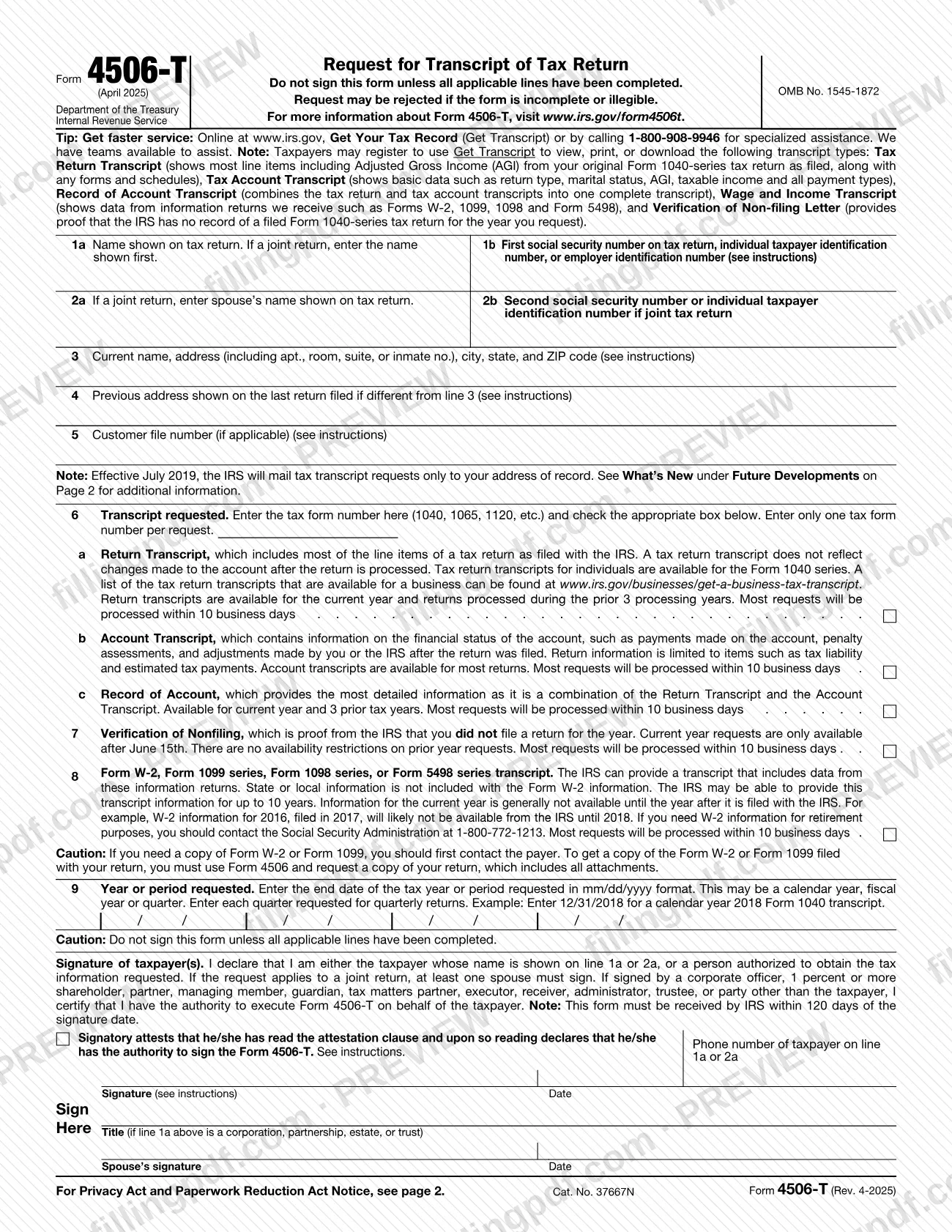
Form 4506-T, Request for Transcript of Tax Return, is the IRS form used to request tax return information in transcript form: a return transcript, an account transcript, a record of account, a verification of nonfiling, or a Form W-2, 1099, 1098 or 5498 series transcript.
The IRS issues transcripts in a format that partially masks personal information, such as all but the last four digits of a Social Security number, while financial data such as wages and taxable income stays fully visible. Because the taxpayer identification number is masked, the form has an optional customer file number on line 5 that prints on the transcript.
The transcript types on the form are:
- Return Transcript (line 6a): most line items of the return as filed; it does not reflect changes made after processing.
- Account Transcript (line 6b): payments, penalty assessments and adjustments made after the return was filed.
- Record of Account (line 6c): the Return Transcript and Account Transcript combined. The instructions suggest it if you are unsure which type you need.
- Verification of Nonfiling (line 7): proof from the IRS that you did not file a return for the year.
- W-2, 1099, 1098 or 5498 series transcript (line 8): data from information returns.
Form 4506-T is not a request for a copy of a return. For a copy of a tax return, the IRS directs you to Form 4506, Request for Copy of Tax Return. The IRS also lists Form 4506-T-EZ, which offers only the tax return transcript delivered by mail.
Who needs to file 4506-T?
Taxpayers who want an IRS transcript of their own return or account, and people authorized to obtain it, use Form 4506-T. It is available for individual returns (Form 1040 series) and for business returns such as Forms 1065 and 1120. Taxpayers whose tax year begins in one calendar year and ends in the next (fiscal tax year) must use Form 4506-T to request a return transcript.
Who may sign:
- Individuals: the taxpayer on line 1a or 2a. On a joint return a transcript may go to either spouse and only one signature is required.
- Corporations: generally an officer with legal authority to bind the corporation, a person designated by the board, or an officer or employee named in a written request by a principal officer and attested by the secretary or another officer. A shareholder of record owning 1 percent or more may submit the form with documentation of the right to receive the information.
- Partnerships: generally any person who was a member during any part of the period on line 9.
- Representatives: only if the taxpayer delegated the authority on Form 2848, line 5, and the representative attaches Form 2848.
- Estates and others: see section 6103(e) if the taxpayer has died, is insolvent or is a dissolved corporation, or if a trustee, guardian, executor, receiver or administrator acts for the taxpayer.
If you only need a copy of a return, use Form 4506 instead. If you need a copy of Form W-2 or 1099, contact the payer first.
When to file 4506-T
The IRS must receive Form 4506-T within 120 days of the date the taxpayer signed it, or the request is rejected. The form sets no other due date, so file it when you need the transcript.
Availability depends on the transcript type:
- Return transcripts cover the current year and returns processed during the prior 3 processing years; a record of account covers the current year and 3 prior tax years.
- Account transcripts are available for most returns.
- Current-year verification of nonfiling is available only after June 15th; prior-year requests have no availability restriction.
- Form W-2, 1099, 1098 and 5498 series data may be available for up to 10 years, but current-year information is generally not available until the year after it is filed with the IRS.
The form states that most requests are processed within 10 business days.
Documents you need
- Authorization document for entities other than individuals, such as a principal officer's letter authorizing an employee of a corporation or letters testamentary authorizing someone to act for an estate.
- Form 2848, showing the delegation on line 5, when a representative signs Form 4506-T for the taxpayer.
- Documentation supporting the right to receive the information, when a bona fide shareholder of record owning 1 percent or more of a corporation's stock submits the form.
- Proof of a material interest in the estate or trust, when you sign as heir at law, next of kin or beneficiary of a taxpayer who has died or is insolvent.
How to fill out 4506-T
Enter the name and number on the return
Line 1a: the name shown on the tax return; for a joint return, the name shown first. Line 1b: the first SSN or ITIN on the return, or the EIN if the request relates to a business return.
Add the spouse's details for joint returns
Line 2a: the spouse's name as shown on a joint return. Line 2b: the second SSN or ITIN on the joint return.
Enter your current and previous address
Line 3: your current address, including apt., room, suite, P.O. box or inmate number. Line 4: the address on the last return filed, only if different from line 3.
Add a customer file number if wanted
Line 5 is optional: enter up to 10 numeric characters that will print on the transcript. Do not use an SSN or name.
Enter the tax form number on line 6
Enter one tax form number per request, such as 1040, 1065 or 1120, and check the box for 6a Return Transcript, 6b Account Transcript or 6c Record of Account.
Request nonfiling or information return data
Use line 7 for Verification of Nonfiling, or line 8 for a Form W-2, 1099, 1098 or 5498 series transcript. Use these in place of line 6 boxes only when that is what you need.
Enter the year or period requested
Line 9: the end date of each tax year or period in mm/dd/yyyy format, with each quarter listed for quarterly returns. For calendar year 2018, enter 12/31/2018.
Check the authority box and sign
Check the box in the signature area acknowledging your authority to sign. Sign and date as your name appeared on the return, and add your current name too if it changed; one spouse's signature is enough on a joint return.
Complete title and phone number
Enter the phone number of the taxpayer on line 1a or 2a. Add your title if line 1a is a corporation, partnership, estate or trust.
Review, sign and download the PDF
Check that all applicable lines are filled, then download or print the completed PDF from FillingPDF. Attach any authorization document or Form 2848 and submit within 120 days of the signature date as described under How to submit.
How to submit 4506-T
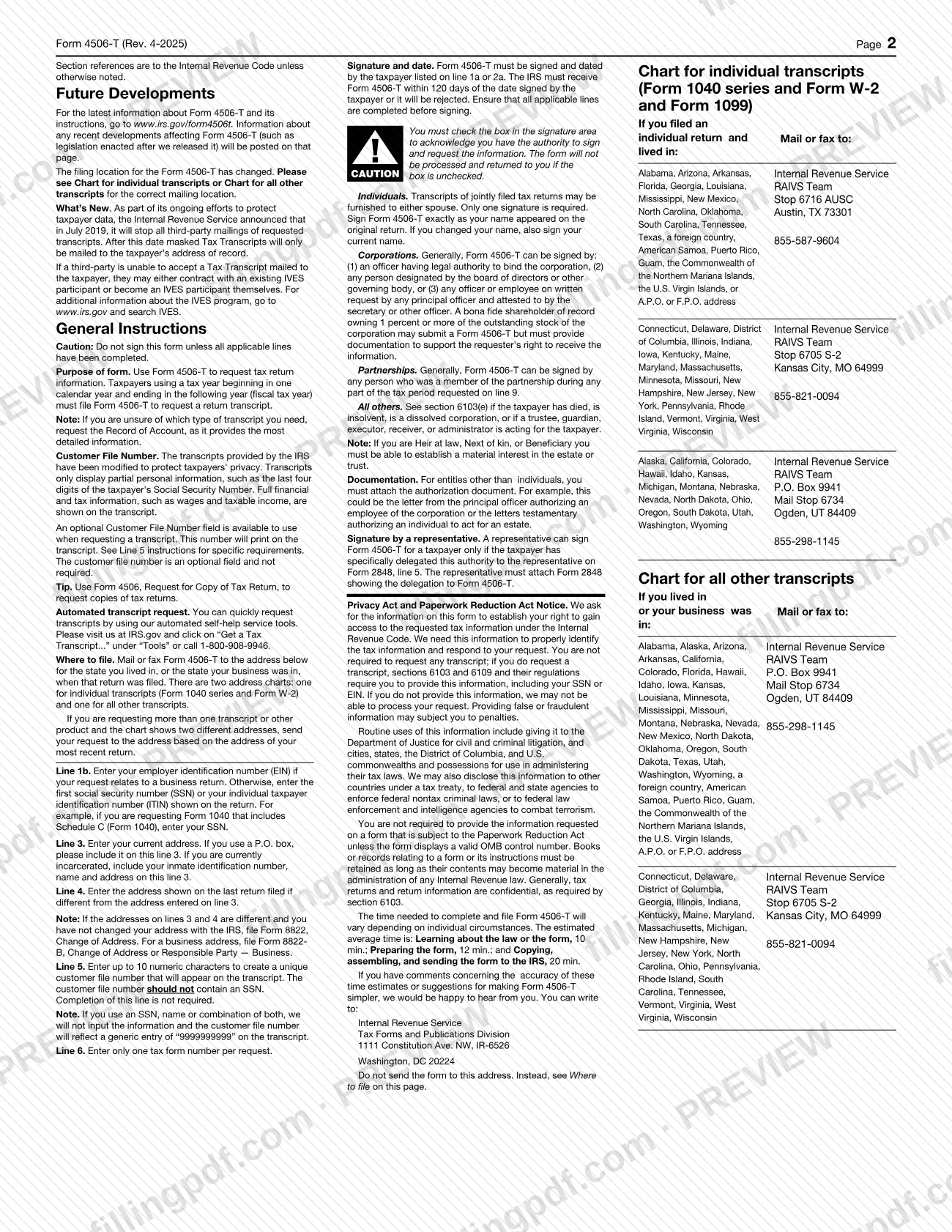
Form 4506-T is mailed or faxed to the IRS RAIVS Team at the location for the state where you lived (or your business was) when the return was filed. The form has two charts on page 2: one for individual transcripts (Form 1040 series, Form W-2 and Form 1099) and one for all other transcripts.
- By mail or fax, individual transcripts: the chart gives three RAIVS Team locations: Stop 6716 AUSC, Austin, TX 73301 (fax 855-587-9604); Stop 6705 S-2, Kansas City, MO 64999 (fax 855-821-0094); and P.O. Box 9941, Mail Stop 6734, Ogden, UT 84409 (fax 855-298-1145). Check your state in the chart.
- All other transcripts: use the second chart, which groups states differently.
- More than one transcript: if the chart shows two different addresses, send the request to the address for your most recent return.
- Authorization documents: entities other than individuals attach the authorization document; representatives attach Form 2848.
Do not send the form to the Tax Forms and Publications Division address printed on page 2. The IRS mails transcripts only to the address of record. For faster service, the form points to Get Your Tax Record (Get Transcript) at www.irs.gov or 1-800-908-9946. FillingPDF lets you fill out and download the PDF; submission follows the channels above.
Common mistakes to avoid
- Signing before every applicable line is completed; the form warns not to sign until they are, and an incomplete or illegible request may be rejected.
- Leaving the box in the signature area unchecked; the form will not be processed or returned without it.
- Letting the IRS receive the form more than 120 days after the signature date, which causes rejection.
- Entering more than one tax form number on line 6; only one is allowed per request.
- Using an SSN, name or both as the customer file number on line 5; the transcript then shows a generic 9999999999.
- Expecting the transcript to be mailed to a third party; since July 2019 it goes only to the taxpayer's address of record.
- Sending the form to the wrong RAIVS Team location instead of the one for the state on the return, or to the Tax Forms and Publications Division address.
- Using Form 4506-T to request a copy of Form W-2 or 1099 filed with a return; that requires Form 4506.
- Requesting current-year verification of nonfiling before June 15th.
- Entering a different address on line 3 than on line 4 without having filed Form 8822 (or Form 8822-B for a business) to change it with the IRS.
Frequently asked questions
What is Form 4506-T used for?
Form 4506-T is the IRS form for requesting a tax return transcript, account transcript, record of account, verification of nonfiling, or a W-2, 1099, 1098 or 5498 series transcript. Transcripts partially mask personal data; they are not photocopies of the return.
What is the difference between Form 4506-T and Form 4506?
Form 4506-T requests transcripts of return information; Form 4506, Request for Copy of Tax Return, requests actual copies of returns. Use Form 4506 if you need a copy of a return with its attachments, including the Form W-2 or 1099 filed with it.
Can I fill out Form 4506-T online?
You can complete the PDF online on FillingPDF and download or print it. The IRS does not receive it through this site: you mail or fax it to the RAIVS Team location in the form's chart. FillingPDF is independent of the IRS.
Where do I mail or fax Form 4506-T?
To the IRS RAIVS Team address or fax number in the chart on page 2, chosen by the state where you lived or your business was when the return was filed. Individual transcripts use one chart; all other transcripts use a second chart.
How long is Form 4506-T valid after I sign it?
The IRS must receive it within 120 days of the signature date, or the request is rejected. Sign only after all applicable lines are completed, and send the form soon after signing.
How long does it take to get a transcript with Form 4506-T?
The form says most requests are processed within 10 business days. For individuals, the IRS also offers online access through Get Transcript, and mailed return or account transcripts that arrive in 5 to 10 calendar days at your address on file.
Can a third party, such as a lender, receive my transcript?
Not directly by mail. The IRS stopped third-party mailings in July 2019 and mails transcripts only to the taxpayer's address of record. A third party that cannot accept this may contract with an IVES participant or become one.
Who can sign Form 4506-T for me?
A representative can sign only if you delegated that authority on Form 2848, line 5, and the representative attaches Form 2848. For joint returns, either spouse may sign. Corporate officers and others signing for entities must certify their authority.
What should I enter on line 9 of Form 4506-T?
Enter the end date of each tax year or period requested in mm/dd/yyyy format. For a calendar year 2018 Form 1040 transcript, enter 12/31/2018. For quarterly returns, enter each quarter requested.
Ready to fill out 4506-T?
Fill out 4506-T now