
Form 4972 is the Internal Revenue Service (IRS) form for figuring the tax on a qualified lump-sum distribution from a qualified plan of a participant born before January 2, 1936. Recipients use it to apply the 20% capital gain election, the 10-year tax option, or both, and attach it to Form 1040, 1040-SR, 1040-NR, or 1041. On FillingPDF you can fill out Form 4972 online and download or print the completed PDF; the IRS publishes the form and its instructions at www.irs.gov/Form4972.
Last updated
What is 4972?
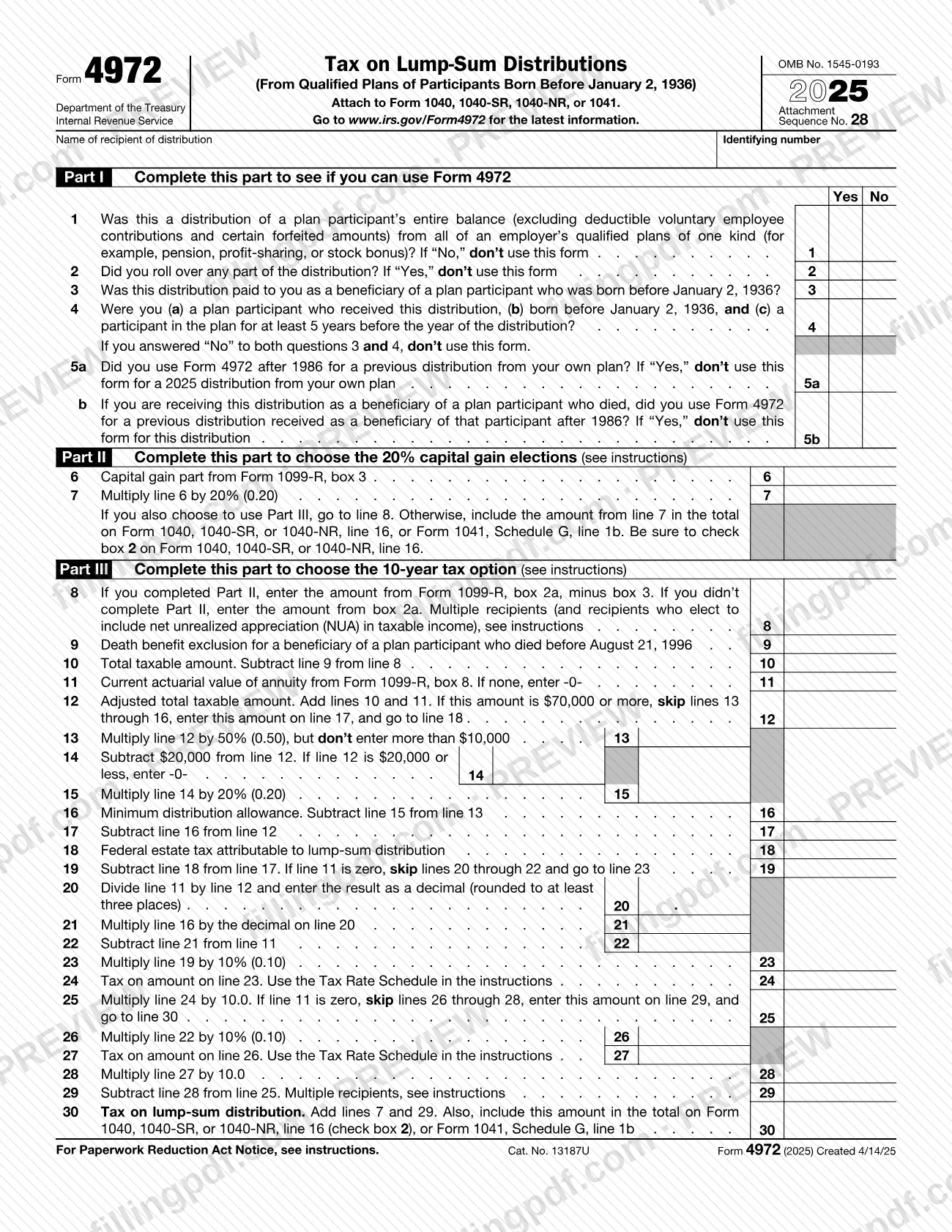
Form 4972, Tax on Lump-Sum Distributions (From Qualified Plans of Participants Born Before January 2, 1936), is the IRS form used to figure a separate tax on a qualified lump-sum distribution, using the 20% capital gain election, the 10-year tax option, or both.
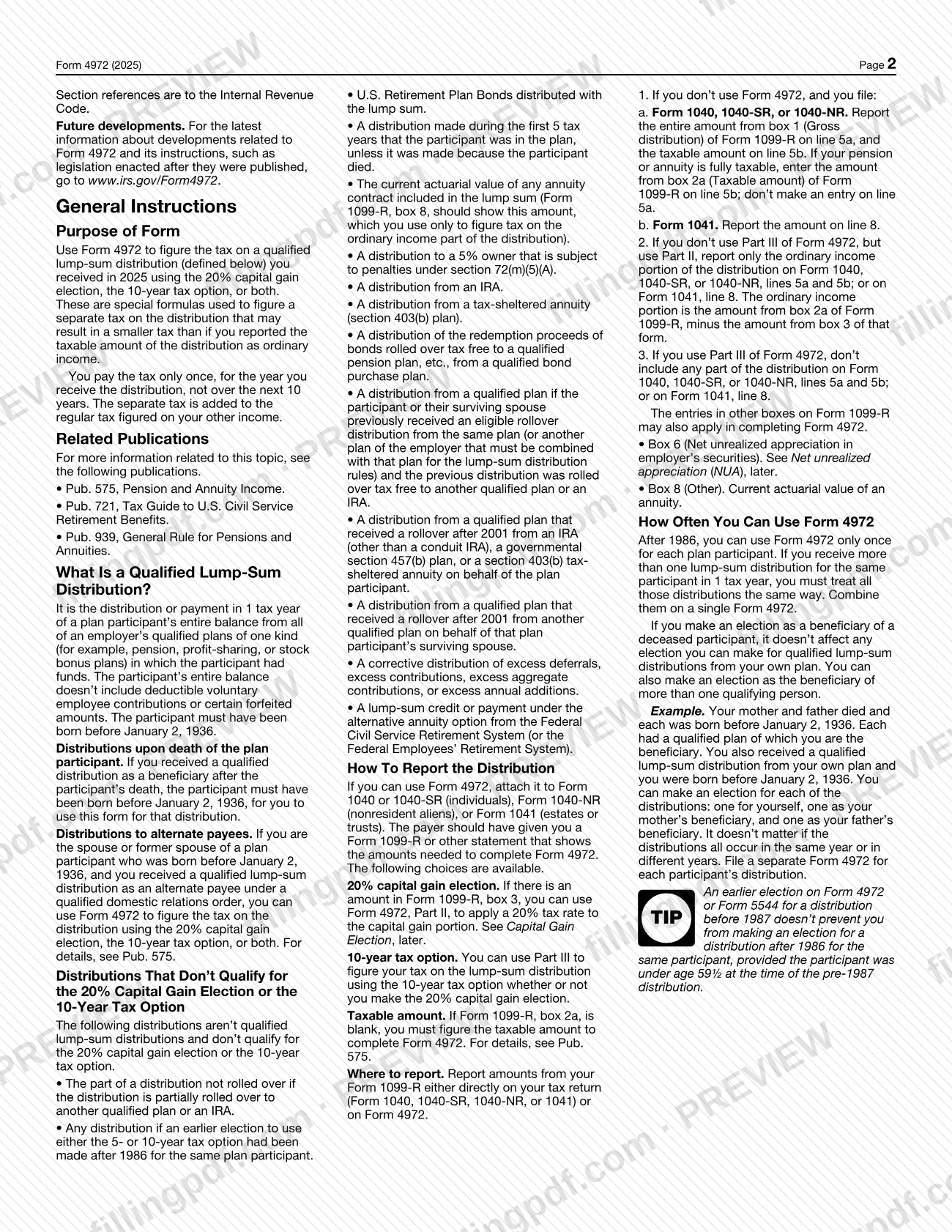
The IRS describes these as special formulas that produce a separate tax on the distribution, which may be smaller than the tax you would owe by reporting the taxable amount as ordinary income. You pay the tax once, for the year you receive the distribution, not over the next 10 years. The separate tax is added to the regular tax figured on your other income.
The form has three parts. Part I (lines 1 to 5b) tests whether you can use the form at all. Part II (lines 6 and 7) is the 20% capital gain election. Part III (lines 8 to 30) is the 10-year tax option and ends with the tax on the lump-sum distribution on line 30. The figures come mostly from Form 1099-R, which the payer should give you.
A qualified lump-sum distribution is the payment, in one tax year, of a participant's entire balance from all of an employer's qualified plans of one kind, such as pension, profit-sharing or stock bonus plans. The instructions list distributions that do not qualify, including distributions from an IRA or a section 403(b) tax-sheltered annuity and the part of a distribution that is rolled over. The IRS refers to Pub. 575, Pension and Annuity Income, for more detail.
Who needs to file 4972?
You may use Form 4972 if you received a qualified lump-sum distribution in 2025 and one of these applies, as the Part I questions on the form lay out:
- You received it as a beneficiary of a plan participant who was born before January 2, 1936 (line 3).
- You are a plan participant who received it, were born before January 2, 1936, and took part in the plan for at least 5 years before the year of the distribution (line 4).
- You are the spouse or former spouse of such a participant and received the distribution as an alternate payee under a qualified domestic relations order.
Do not use the form if the distribution was not the participant's entire balance from all of the employer's qualified plans of one kind (line 1), or if you rolled over any part of the distribution (line 2). After 1986 you can use Form 4972 only once for each plan participant (lines 5a and 5b). If you received lump sums for more than one participant, file a separate Form 4972 for each participant.
The form is attached to Form 1040 or 1040-SR (individuals), Form 1040-NR (nonresident aliens), or Form 1041 (estates or trusts). On a joint return where both spouses received a lump-sum distribution, each spouse completes a separate Form 4972.
When to file 4972
File Form 4972 with the tax return for the year in which you received the qualified lump-sum distribution; the 2025 form covers distributions received in 2025. It has no separate due date: it is attached to Form 1040, 1040-SR, 1040-NR, or 1041 and follows that return's deadline.
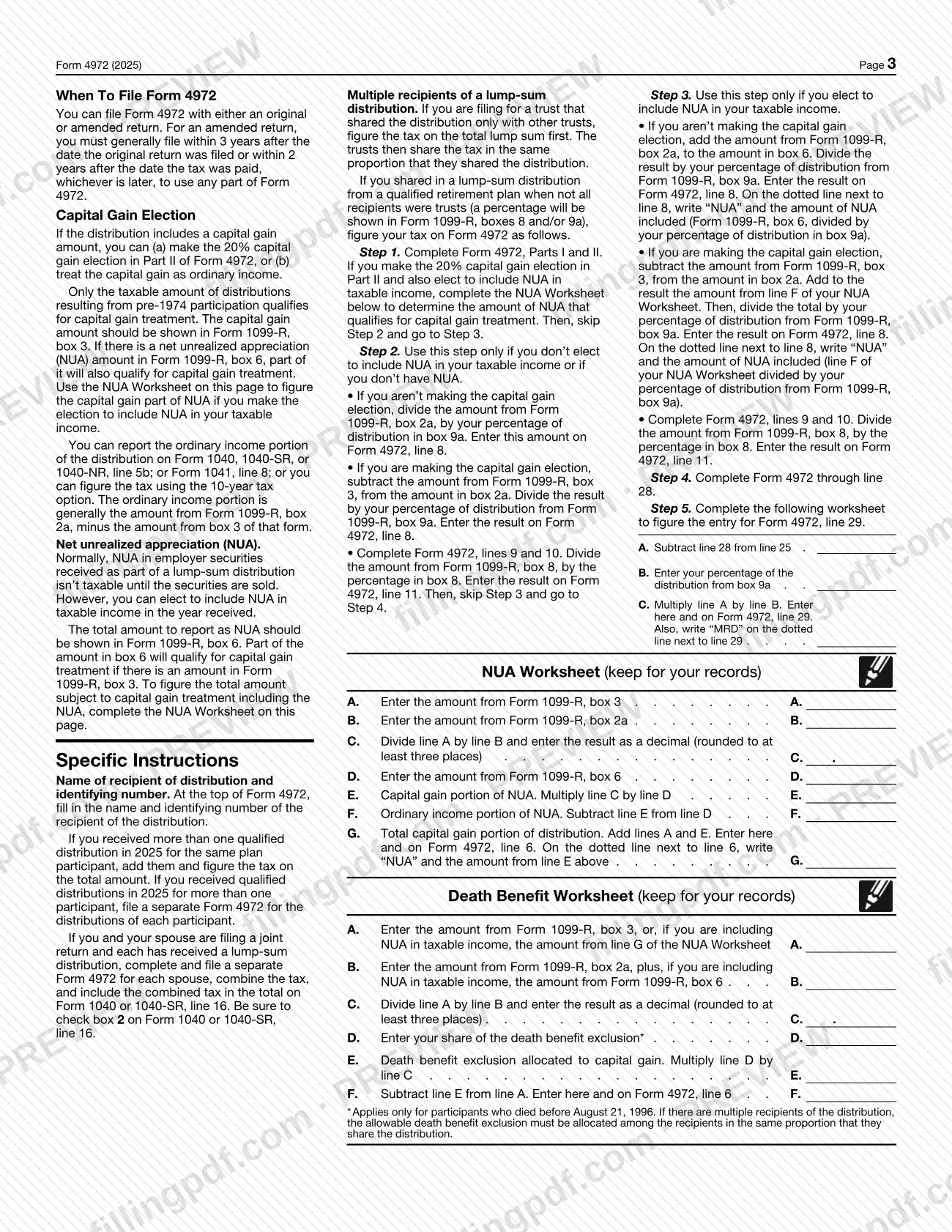
You can file Form 4972 with an original or an amended return. To use any part of the form on an amended return, you must generally file within 3 years after the date the original return was filed or within 2 years after the date the tax was paid, whichever is later.
If you received more than one qualified distribution in 2025 for the same plan and participant, add them and figure the tax on the total on one form.
Documents you need
- Form 1099-R from the payer, or another payer statement showing the amounts needed (boxes 2a, 3, 6, 8 and 9a as they apply). If box 2a is blank, you must figure the taxable amount yourself (see Pub. 575).
- The federal return you attach Form 4972 to: Form 1040, 1040-SR, 1040-NR, or 1041.
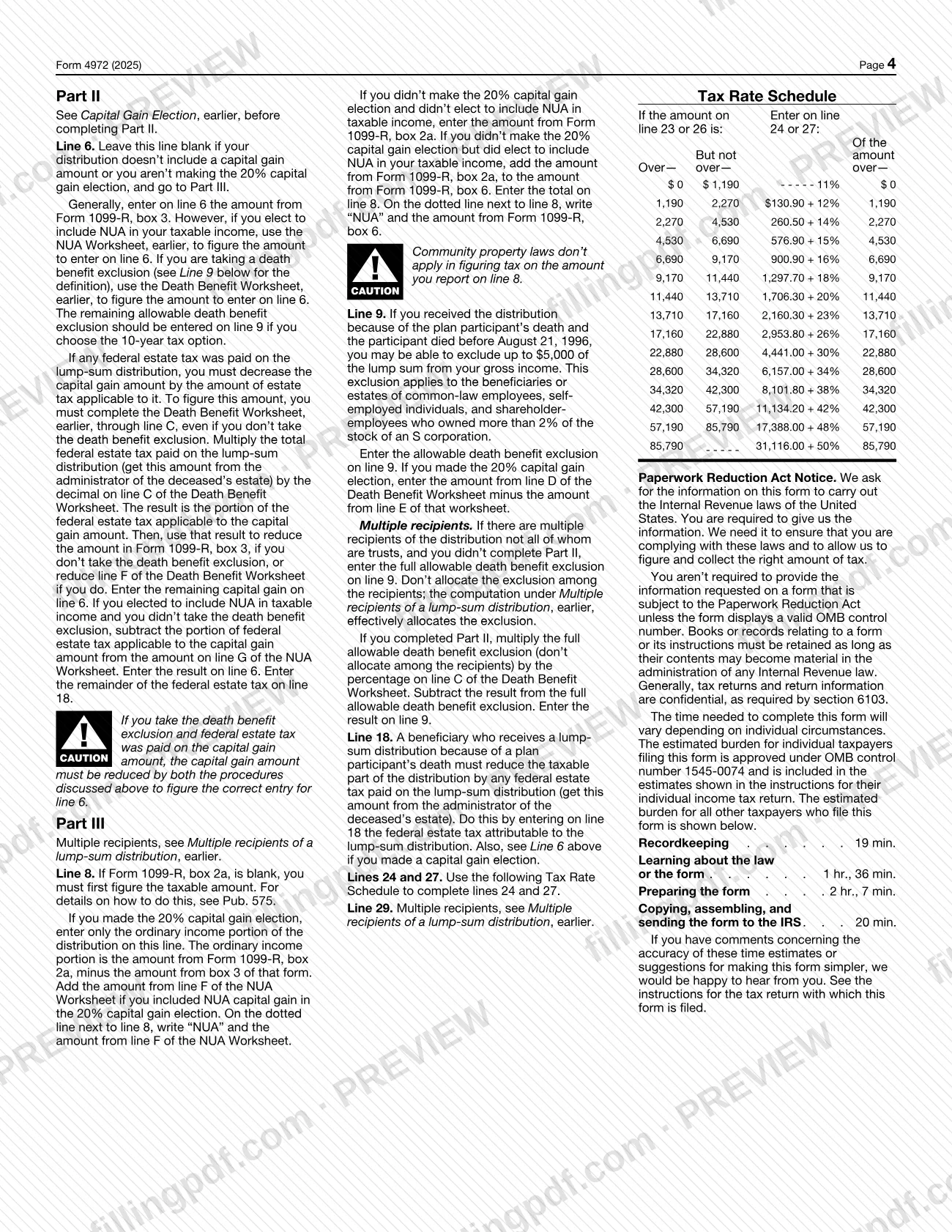
- Amount of federal estate tax paid on the lump sum, from the administrator of the deceased's estate, when you received the distribution because of the participant's death and estate tax applies (line 18).
- NUA Worksheet, only if you elect to include net unrealized appreciation in taxable income and have a capital gain amount; keep it for your records.
- Death Benefit Worksheet, only if the participant died before August 21, 1996 or estate tax applies to the capital gain amount; keep it for your records.
How to fill out 4972
Enter recipient name and number
At the top, enter the name of the recipient of the distribution and the identifying number. If you received qualified distributions for more than one participant, complete a separate form for each.
Answer the Part I questions
Answer Yes or No on lines 1 to 4, 5a and 5b. If a line tells you not to use the form, or you answer "No" to both lines 3 and 4, stop: you cannot use Form 4972.
Complete the capital gain election
In Part II, enter the capital gain part from Form 1099-R, box 3, on line 6, then multiply it by 20% (0.20) on line 7. Leave line 6 blank if there is no capital gain or you are not making the election, and go to Part III.
Enter the taxable amount
On line 8, enter box 2a of Form 1099-R minus box 3 if you completed Part II, or box 2a if you did not. On line 9, enter any death benefit exclusion, and on line 10 subtract line 9 from line 8.
Add the annuity value
On line 11, enter the current actuarial value of the annuity from Form 1099-R, box 8, or -0- if none. On line 12, add lines 10 and 11, and follow the instruction printed there if the amount reaches the stated threshold.
Figure the minimum distribution allowance
Complete lines 13 to 16 as printed: 50% of line 12 up to the cap shown, minus 20% of the excess over the amount on line 14. Then subtract line 16 from line 12 on line 17.
Subtract estate tax and split the annuity
On line 18, enter any federal estate tax attributable to the lump sum, then subtract it on line 19. If line 11 is not zero, complete lines 20 to 22; if it is zero, go to line 23.
Apply the tax rate schedule
Multiply line 19 by 10% (0.10) on line 23 and use the Tax Rate Schedule in the instructions for line 24. Multiply line 24 by 10.0 on line 25, then complete lines 26 to 28 the same way if line 11 is not zero.
Compute the tax on the distribution
On line 29, subtract line 28 from line 25, using the multiple-recipient rules if they apply. On line 30, add lines 7 and 29 to get the tax on the lump-sum distribution.
Review and download the PDF
Check that each amount matches Form 1099-R and that required notations such as "NUA" are on the dotted lines. Download or print the completed PDF from FillingPDF and attach it to your return as described under How to submit.
How to submit 4972
Form 4972 is not filed on its own: you attach it to the federal return it supports, and the return goes to the IRS through its usual channels.
- Attach to your return. Use Form 1040 or 1040-SR (individuals), Form 1040-NR (nonresident aliens), or Form 1041 (estates or trusts).
- Carry the tax to the return. Include the line 30 amount in the total on Form 1040, 1040-SR, or 1040-NR, line 16, and check box 2 there, or on Form 1041, Schedule G, line 1b. If you use only Part II, carry the line 7 amount instead.
- Where to send the return. Follow the instructions for the return you attach it to; Form 4972 prints no separate address or portal.
Keep the NUA Worksheet and Death Benefit Worksheet, if you use them, for your records. FillingPDF lets you fill out and download the PDF; submission follows the channels that apply to your return.
Common mistakes to avoid
- Using Form 4972 after rolling over any part of the distribution; the form says to answer line 2 and not use the form if you did.
- Using the form a second time for the same plan participant after 1986; lines 5a and 5b exist to stop this.
- Treating an IRA or section 403(b) tax-sheltered annuity distribution as a qualified lump sum; the instructions list both as non-qualifying.
- Filing separate forms for several lump sums from the same plan and participant in 2025 instead of adding them and figuring tax on the total.
- Combining two participants' distributions on one form; file a separate Form 4972 for each participant.
- Forgetting to check box 2 on Form 1040, 1040-SR, or 1040-NR, line 16, when including the tax from line 30 or line 7.
- Also reporting the distribution on lines 5a and 5b of Form 1040, 1040-SR, or 1040-NR when you use Part III; the instructions say to include no part of it there.
- Leaving line 8 blank or guessing when Form 1099-R, box 2a, is blank; you must figure the taxable amount first.
- Omitting the dotted-line notation, such as "NUA" next to line 6 or 8, or "MRD" next to line 29, where the instructions require it.
Frequently asked questions
What is Form 4972 used for?
Form 4972 is used to figure the tax on a qualified lump-sum distribution from a qualified plan, using the 20% capital gain election, the 10-year tax option, or both. These special formulas produce a separate tax that may be smaller than reporting the taxable amount as ordinary income.
Who can use Form 4972?
Plan participants born before January 2, 1936 who were in the plan at least 5 years before the distribution year, and beneficiaries of a participant born before that date. Alternate payees under a qualified domestic relations order may also use it. You cannot use it if you rolled over any part of the distribution.
Where do I attach Form 4972?
Attach it to Form 1040 or 1040-SR, Form 1040-NR, or Form 1041, depending on who received the distribution. Carry the line 30 tax to Form 1040, 1040-SR, or 1040-NR, line 16 (check box 2), or to Form 1041, Schedule G, line 1b.
Can I use Form 4972 more than once?
After 1986, you can use Form 4972 only once for each plan participant. Multiple lump sums for the same participant in one tax year must be combined on a single form. As a beneficiary you can also make a separate election for each deceased participant.
Do I need Form 1099-R to complete Form 4972?
Yes, in practice. The payer should give you a Form 1099-R or other statement with the amounts needed, such as boxes 2a, 3, 6, 8 and 9a. If box 2a is blank, you must figure the taxable amount yourself; the instructions point to Pub. 575.
What is the difference between Part II and Part III of Form 4972?
Part II is the 20% capital gain election, which applies a 20% rate to the capital gain part from Form 1099-R, box 3. Part III is the 10-year tax option. You can use Part III whether or not you make the capital gain election.
Can I file Form 4972 with an amended return?
Yes. You can file it with an original or an amended return. To use any part of the form on an amended return, you must generally file within 3 years after the original return was filed or 2 years after the tax was paid, whichever is later.
Can I fill out Form 4972 online?
Yes. You can fill out the PDF online on FillingPDF and download or print it. FillingPDF is an independent service and does not file the form with the IRS; you submit it with your return through the IRS channels.
Ready to fill out 4972?
Fill out 4972 now