
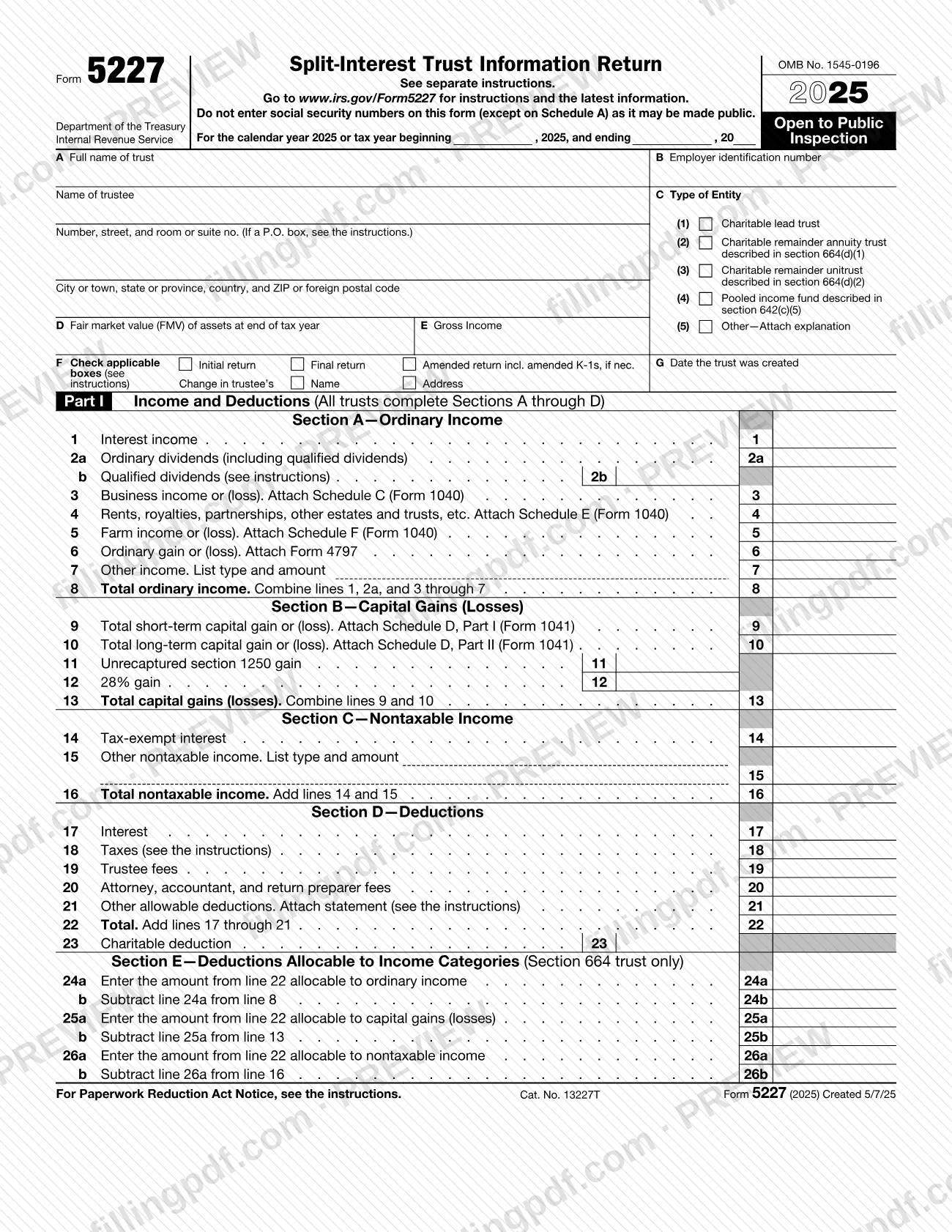
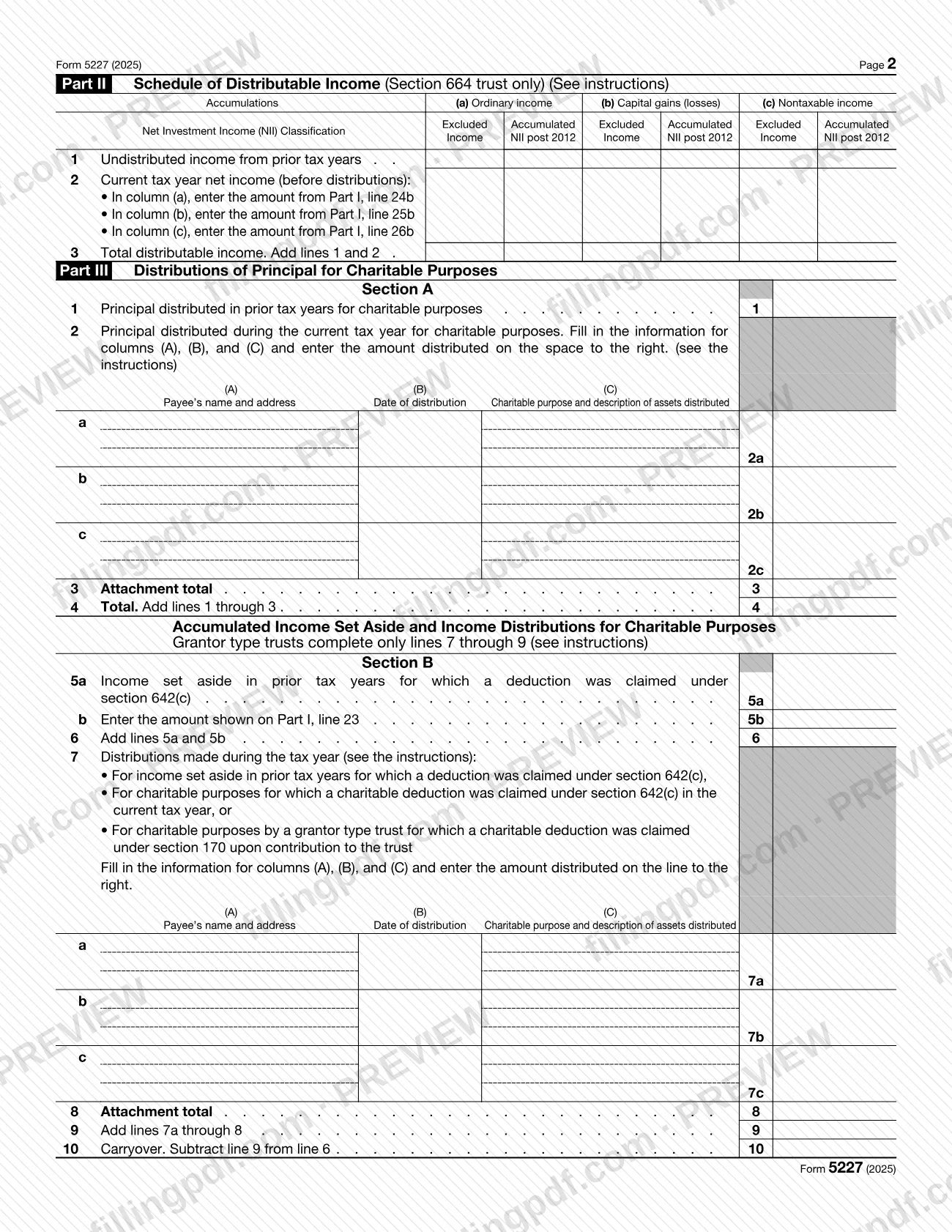
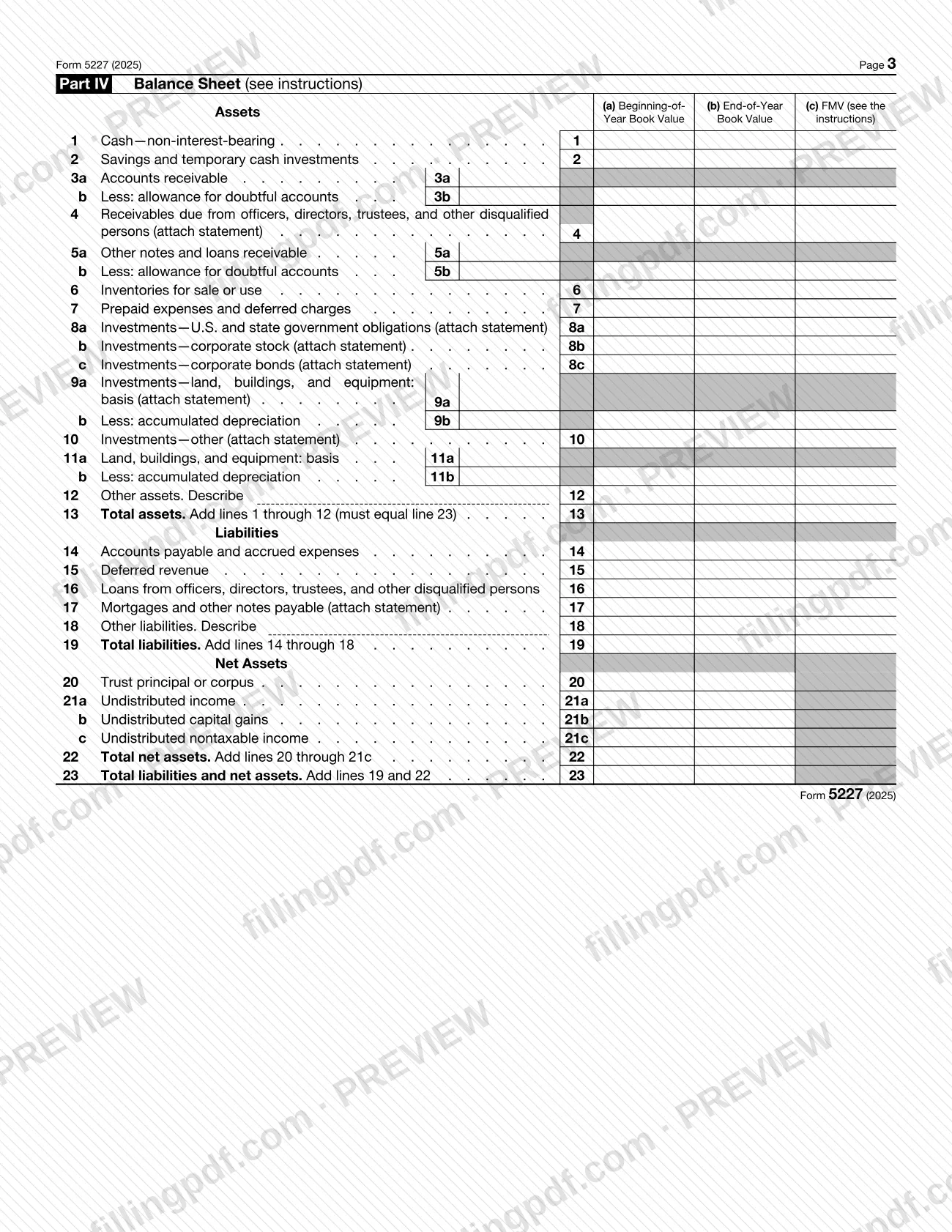
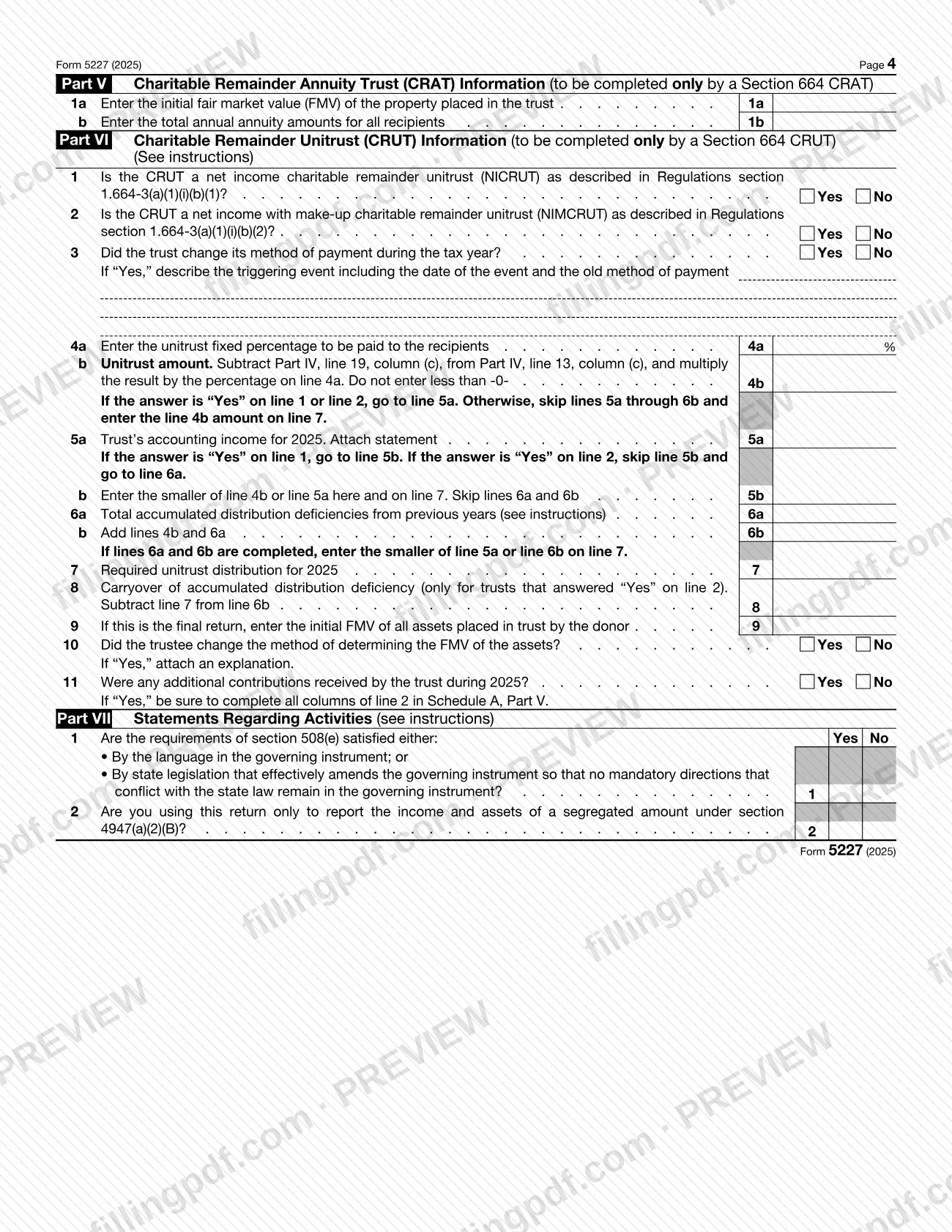
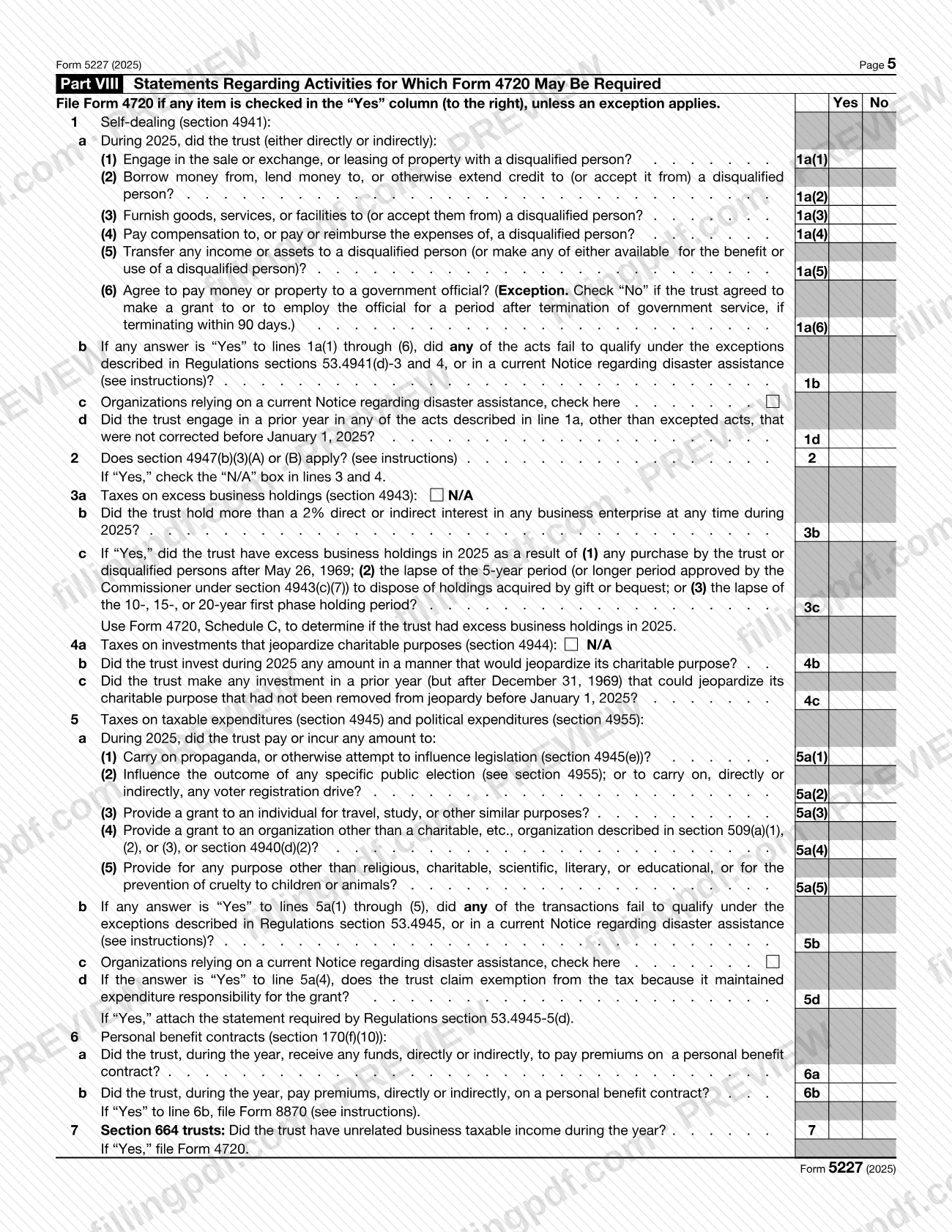
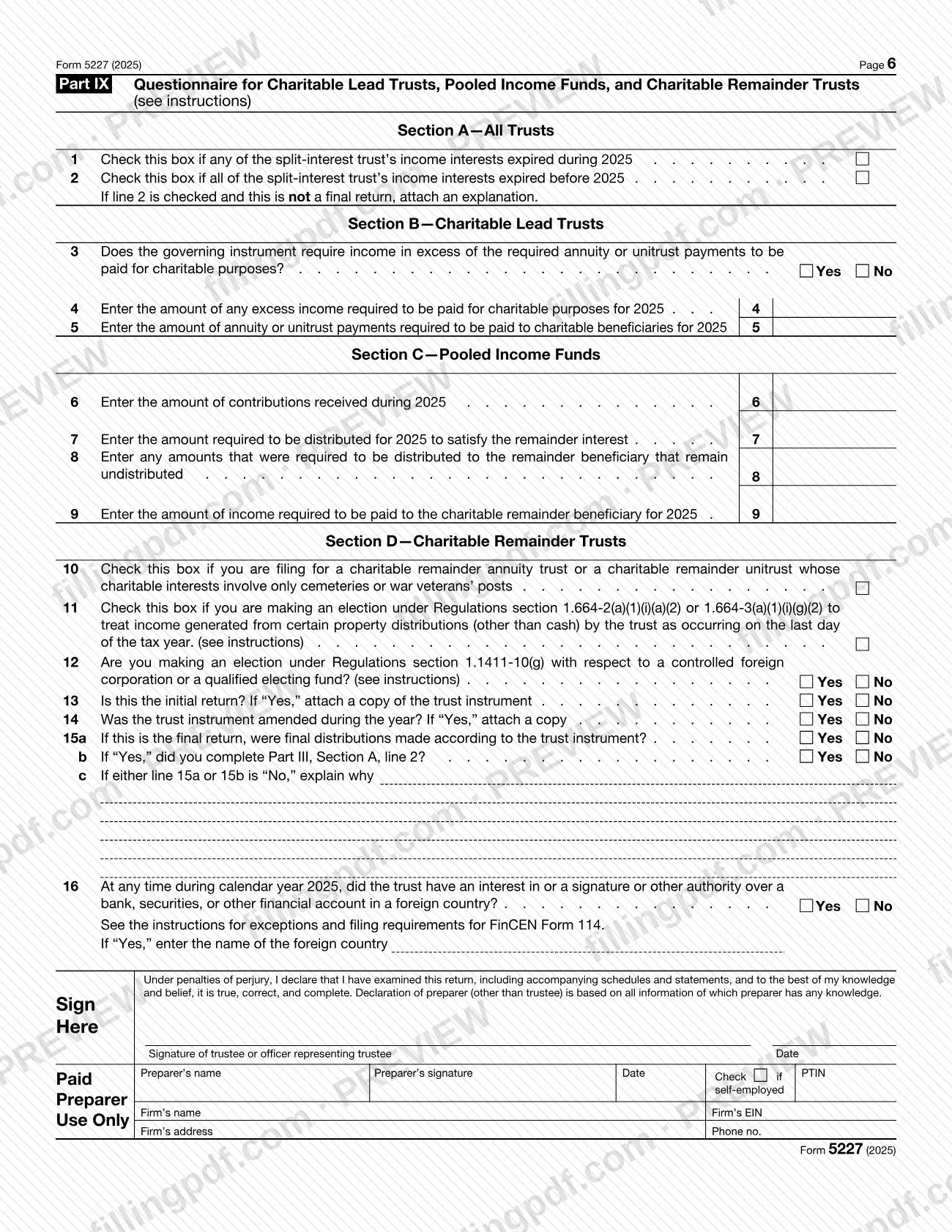
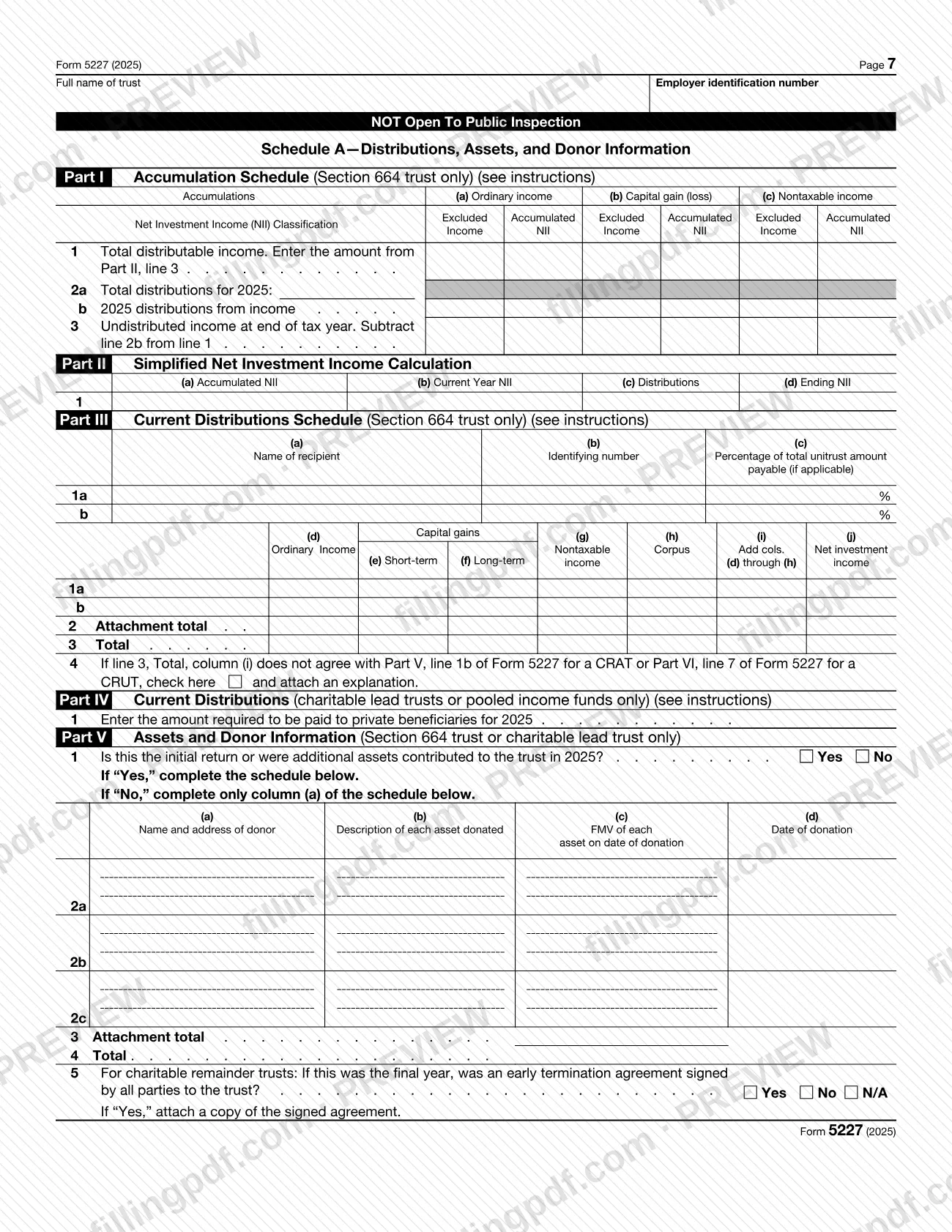
Form 5227 is the Internal Revenue Service (IRS) return that charitable remainder trusts, pooled income funds and other split-interest trusts such as charitable lead trusts use to report their financial activity each year. It also reports charitable deductions and distributions, and it helps determine whether the trust is treated as a private foundation for chapter 42 excise tax purposes. On this page you can fill out the 2025 form online on FillingPDF and download or print the completed PDF. The form and the IRS instructions are published by the IRS at www.irs.gov/Form5227.
Last updated
What is 5227?
Form 5227, Split-Interest Trust Information Return, is the IRS form a split-interest trust files each calendar year to report its financial activity, give information about charitable deductions and distributions, and determine whether it is treated as a private foundation subject to certain chapter 42 excise taxes.
The IRS instructions define a split-interest trust as a trust that is not exempt under section 501(a), has unexpired interests devoted to non-charitable purposes, and received amounts after May 26, 1969 for which a deduction was allowed under a section listed in section 4947(a)(2). Box C on the form identifies the type: charitable lead trust, charitable remainder annuity trust (CRAT), charitable remainder unitrust (CRUT), pooled income fund, or other.
The form has nine parts. Part I covers income and deductions, Part II the schedule of distributable income, Part III charitable distributions, Part IV the balance sheet, Parts V and VI CRAT and CRUT information, and Parts VII to IX activity statements and a questionnaire. Schedule A lists accumulations, distributions to recipients and donor information.
Form 5227 is open to public inspection, except Schedule A, Schedules K-1 (Form 1041), the trust agreement and certain other attachments. It replaces Form 1041-B for charitable remainder trusts and Form 1041-A for split-interest trusts. Excise taxes themselves are reported on Form 4720, not on this form.
Who needs to file 5227?
All charitable remainder trusts (CRTs) described in section 664 must file Form 5227. So must all pooled income funds described in section 642(c)(5), and all other trusts, such as charitable lead trusts, that meet the definition of a split-interest trust under section 4947(a)(2).
Exception. A split-interest trust is not required to file if it was created before May 27, 1969, and either all transfers of corpus occurred before May 27, 1969, or no deduction was allowed under a section listed in section 4947(a)(2) for any transfer made after May 26, 1969. If such a trust later receives a contribution to corpus that qualifies for a deduction, it loses the exception. It then files for the year of the transfer and every later year.
Parts VII and VIII are not completed by a charitable remainder or charitable lead trust whose charitable interests involve only cemeteries or war veterans' posts.
The return must be signed by the trustee or an authorized representative. A paid preparer must sign for a CRT; for other trusts the preparer block is optional.
Do not use this form to report the trust's excise taxes; Form 4720 is used for that.
When to file 5227
For calendar year 2025, file Form 5227 by April 15, 2026. For a final short-year return, the due date is the 15th day of the 4th month following the date the trust terminated.
The form is filed for each calendar year; the 2025 revision covers calendar year 2025 or a tax year beginning in 2025. You can request an automatic extension of time to file on Form 8868, and the request must be filed by the due date of the return.
A trust that files late, files an incomplete return or furnishes incorrect information is subject to a failure-to-file penalty unless it shows reasonable cause. A trustee who knowingly fails to file can be penalized in the same way. The initial return of a CRT must include a copy of the trust instrument, and a final return requires the Part IX questions on final distributions.
Documents you need
- A copy of the trust instrument with a written declaration under penalties of perjury that it is a true and complete copy, with the first return of a charitable remainder annuity trust or unitrust, or charitable lead annuity trust or unitrust.
- A copy of the amended trust instrument, if the trust instrument was amended during the year (Part IX, line 14).
- A copy of each Schedule K-1 (Form 1041) for the recipients listed in Schedule A, Part III; the trust also gives each recipient a copy.
- Schedule C, Schedule E or Schedule F (Form 1040), Form 4797 and Schedule D (Form 1041), as needed to figure lines 3 through 6, 9 and 10 of Part I.
- Statements for balance sheet lines the form marks "attach statement" (for example lines 4, 8a to 8c, 9, 10, 16 and 17 of Part IV), plus a statement for line 21 of Part I if other deductions are claimed.
- An explanation, if Part IX line 2 is checked and this is not a final return; also if the answer to line 15a or 15b is "No", or if the amounts on Schedule A, Part III do not agree.
- The statement required by Regulations section 53.4945-5(d), if you answer "Yes" to Part VIII, line 5d.
- A copy of the signed early termination agreement, if you answer "Yes" on Schedule A, Part V, line 5.
- A statement with the CRT's name, EIN and the CFCs or QEFs identified, if you make the Regulations section 1.1411-10(g) election on Part IX, line 12.
- A signed affidavit explaining the circumstances, if you cannot provide the identifying number of a recipient or income beneficiary listed on Schedule A.
- An explanation of changes on an attachment, identifying the lines and amounts changed, when filing an amended return.
How to fill out 5227
Complete the heading items A through G
Enter the trust name exactly as on Form SS-4 (A), the trustee name and address, the EIN (B), the type of entity (C), year-end fair market value of assets (D), gross income (E) and the date the trust was created (G). In F, check initial, final or amended return, or a change of trustee name or address, as applicable.
Report ordinary income (Part I, Section A)
Enter interest on line 1, dividends on lines 2a and 2b, and net results from Schedule C, Schedule E, Schedule F and Form 4797 on lines 3 through 6. List other income on line 7, then combine lines 1, 2a and 3 through 7 on line 8.
Report capital gains and nontaxable income
Take lines 9 and 10 from Schedule D (Form 1041); enter unrecaptured section 1250 gain on line 11 and 28% gain on line 12, and combine lines 9 and 10 on line 13. In Section C, enter tax-exempt interest on line 14 and other nontaxable income on line 15, and total them on line 16.
Enter deductions and allocations
List interest, taxes, trustee fees, professional fees and other allowable deductions on lines 17 to 21, total them on line 22, and enter any charitable deduction on line 23. Section 664 trusts also complete Section E, lines 24a through 26b.
Complete Part II, distributable income
Section 664 trusts only: enter undistributed income from prior years on line 1, the current-year amounts from Part I lines 24b, 25b and 26b on line 2, and the totals on line 3, split between Excluded Income and NII post 2012.
Report charitable distributions in Part III
In Section A, enter prior-year and current-year principal distributed for charitable purposes, with the payee, date and specific purpose for each. Complete Section B, lines 5a through 10, if the instructions say it applies; grantor type trusts complete only lines 7 through 9.
Complete the Part IV balance sheet
Enter beginning-of-year and end-of-year book values in columns (a) and (b) for lines 1 through 23; all CRUTs also complete column (c) with fair market value. Total assets on line 13 must equal line 23.
Complete Part V or Part VI
A CRAT enters the initial fair market value on line 1a and the total annual annuity amounts on line 1b. A CRUT answers lines 1 through 3, enters the fixed percentage on line 4a and the unitrust amount on line 4b, and follows the line 5 to 8 routing to reach the required distribution on line 7.
Answer Parts VII and VIII
Answer every question in Part VII, entering "N/A" where a line does not apply. In Part VIII, check Yes or No for each self-dealing, excess business holdings, jeopardizing investment, taxable expenditure and personal benefit contract question, and file Form 4720 if the form tells you to.
Complete the Part IX questionnaire
Check lines 1 and 2 about expired income interests, then complete the section that matches the trust type: charitable lead trust (lines 3 to 5), pooled income fund (lines 6 to 9) or CRT (lines 10 to 15). All trusts answer line 16 about foreign financial accounts.
Complete Schedule A
Fill in the accumulation schedule (Part I), the simplified NII calculation (Part II) and the current distributions schedule (Part III) for section 664 trusts. Charitable lead trusts and pooled income funds complete Part IV, and Part V lists donors and assets.
Review, sign and download the PDF
Check that required attachments and statements are noted, then have the trustee or authorized representative sign and date; a paid preparer completes the preparer block. Download or print the completed PDF from FillingPDF and send it through the channels described under How to submit.
How to submit 5227
You can file Form 5227 electronically or on paper by mail, but electronic filing is mandatory for some filers.
- Electronic filing: a filer required to file at least 10 returns of any type during the calendar year (information, income tax, employment tax and excise tax returns all count) must file electronically. Failure to file electronically when required is treated as failure to file, even if a paper return is submitted. The IRS may waive the requirement for undue hardship.
- U.S. Postal Service, from the United States: Department of the Treasury, Internal Revenue Service Center, Ogden, UT 84201-0027.
- Designated private delivery service, or from a foreign country or U.S. territory: Internal Revenue Service Center, 1973 Rulon White Blvd., M/S 6054, Ogden, UT 84201. Private delivery services cannot deliver to P.O. boxes; the current list of designated services is at IRS.gov/PDS.
Attach a copy of each Schedule K-1 (Form 1041) to the return and give a copy to each recipient. For questions, the IRS lists 877-829-5500. Do not file FinCEN Form 114 with Form 5227. FillingPDF lets you fill out and download the PDF; submission follows the IRS channels above.
Common mistakes to avoid
- Entering Social Security numbers on the form. The form warns not to enter them (except on Schedule A) because the return may be made public.
- Leaving out the copy of the trust instrument and the penalties-of-perjury declaration when filing the first return of a charitable remainder or charitable lead annuity trust or unitrust.
- Filing on paper when the filer must file at least 10 returns of any type in the calendar year. The IRS treats that as a failure to file.
- Sending the return by private delivery service to the Ogden P.O. box address. Private delivery services cannot deliver to P.O. boxes and must use the 1973 Rulon White Blvd. address.
- Leaving a line blank in Part VII instead of entering "N/A" when it does not apply, or skipping Part VII and VIII questions.
- Leaving Part VI, line 4b blank. The instructions say it must always have an entry, even if zero; the same applies to columns (a) and (b) on Part IV, lines 13, 19 and 23.
- Entering only a general category such as "charitable" in Part III, column (C), instead of the specific purpose and a description of the assets distributed.
- Filing FinCEN Form 114 with Form 5227. It is not a tax form and is filed separately with the Department of the Treasury through the BSA E-Filing System.
- Signing as a paid preparer, or completing the preparer block, when the trustee prepared the return, or entering a Social Security number instead of a PTIN.
- Listing U.S. Government obligations together with state and municipal obligations on the Part IV, line 8a statement; the instructions say not to combine them.
Frequently asked questions
What is Form 5227 used for?
Form 5227 is the IRS return a split-interest trust files to report its financial activity, provide information on charitable deductions and distributions, and determine whether the trust is treated as a private foundation subject to certain chapter 42 excise taxes.
Who has to file Form 5227?
All charitable remainder trusts described in section 664, all pooled income funds described in section 642(c)(5), and other split-interest trusts such as charitable lead trusts must file. A trust created before May 27, 1969 may be excepted if the IRS instructions' conditions are met.
When is Form 5227 due for 2025?
April 15, 2026, for calendar year 2025. A final short-year return is due by the 15th day of the 4th month after the trust terminates. Form 8868 gives an automatic extension of time to file if it is filed by the due date of the return.
Where do I mail Form 5227?
From the United States by U.S. Postal Service: Department of the Treasury, Internal Revenue Service Center, Ogden, UT 84201-0027. Private delivery services, and filers abroad, use Internal Revenue Service Center, 1973 Rulon White Blvd., M/S 6054, Ogden, UT 84201.
Do I have to e-file Form 5227?
Yes, if you file at least 10 returns of any type (information, income, employment or excise) during the calendar year. The IRS may waive the requirement for undue hardship, and a required paper filing is treated as not filed.
Is Form 5227 open to public inspection?
Yes, the form and most attachments are public. Schedule A, Schedules K-1, the trust agreement, amendments and certain other attachments are not. For that reason, do not put Social Security numbers anywhere except Schedule A.
What happens if I file Form 5227 late?
A failure-to-file penalty applies to the trust for filing late, incompletely or with incorrect information, unless the failure is due to reasonable cause. A trustee who knowingly fails to file can be charged the same penalty. Check the IRS instructions for the current amounts.
Can I fill out Form 5227 online on FillingPDF?
Yes. You can fill out the fillable PDF online on FillingPDF and download or print it. FillingPDF is an independent service and does not file the return with the IRS; you submit it electronically or by mail through the IRS channels.
Ready to fill out 5227?
Fill out 5227 now