
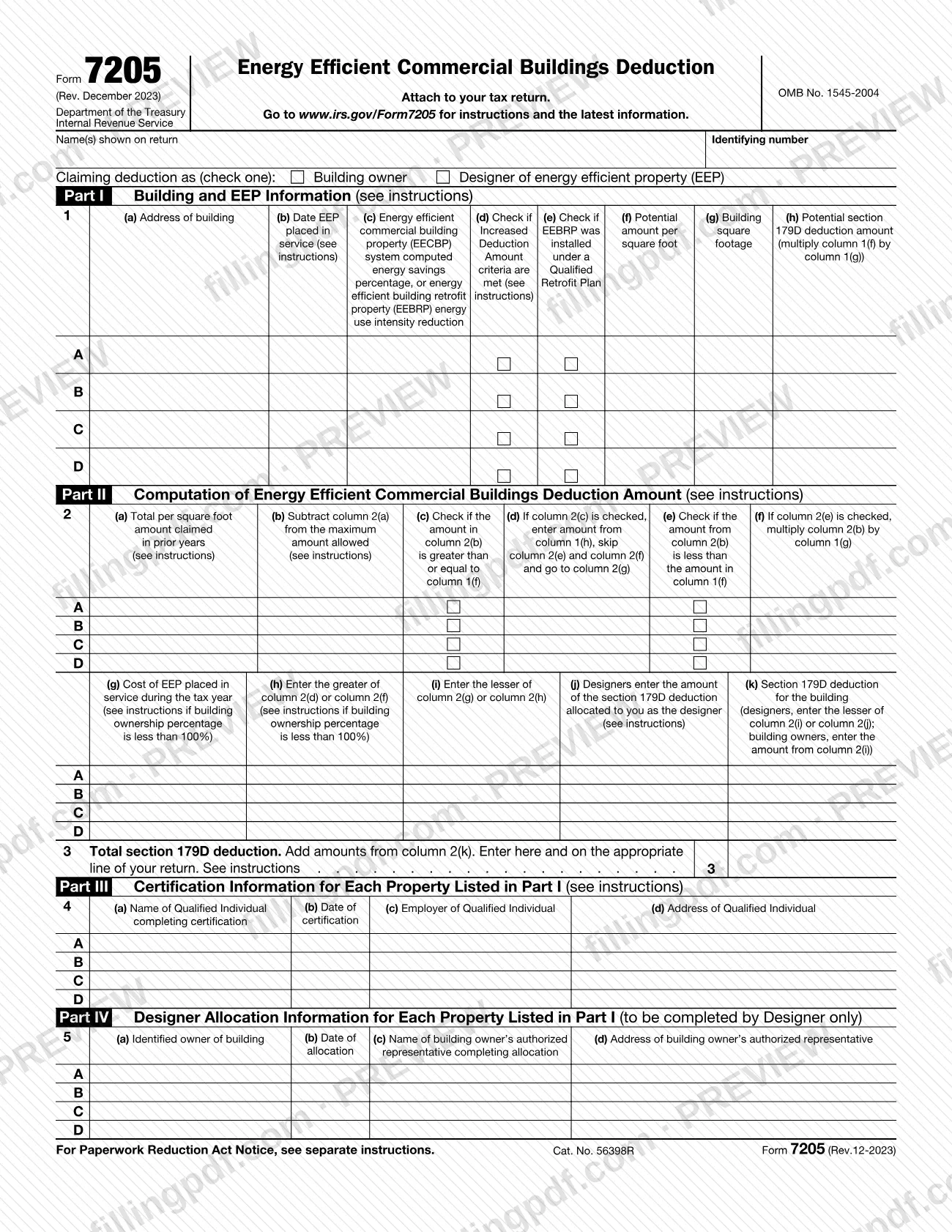
Form 7205 is the Internal Revenue Service (IRS) form used to figure and claim the section 179D deduction for energy efficient property placed in service during the tax year. Building owners use it, and so do designers of property installed on or in buildings owned by specified tax-exempt entities. On this page you can fill out the form online on FillingPDF and download or print the completed PDF. The form and its instructions are published by the IRS at www.irs.gov/Form7205.
Last updated
What is 7205?
Form 7205, Energy Efficient Commercial Buildings Deduction, is the IRS form used to calculate and claim the section 179D deduction for qualifying energy efficient commercial building property placed in service during the tax year. It is attached to your tax return.
According to the IRS instructions, the form has four jobs: it computes the deduction, identifies you as either the building owner or a designer, gives information about the person who performed the certification, and gives information about the person who completed the allocation.
Part I describes each building and its energy efficient property (EEP). EEP is either energy efficient commercial building property (EECBP) or energy efficient building retrofit property (EEBRP). Part II computes the deduction for up to four properties, lettered A to D, and line 3 totals the section 179D deduction. Part III lists the qualified individual or qualified professional who certified each property. Part IV is completed by designers only.
The form carries OMB No. 1545-2004. The December 2023 revision is used for property placed in service after December 31, 2022; for property placed in service before January 1, 2023, the instructions say to use the December 2022 revision. When a section 179D deduction is allowed for EECBP, the basis of the property is reduced by the deduction allowed. The instructions also state that P.L. 119-21 ended the deduction for property whose construction begins after June 30, 2026.
Who needs to file 7205?
Individuals and business entities that qualify for the deduction for EEP placed in service during the tax year must file Form 7205 to claim it. Check only one status at the top of the form.
- Building owner: you own the building and claim the deduction for qualifying property installed on or in it.
- Designer of energy efficient property (EEP): the deduction may go to the designer instead of the owner when the EEP is installed on or in property owned by a specified tax-exempt entity. You must be the person primarily responsible for designing the EEP, you must have created the technical specifications for the installation, and the tax-exempt owner must have given you a written statement allocating the deduction to you. A person who merely installs, repairs or maintains the property is not a designer.
Specified tax-exempt entities include government entities, Indian tribal governments, Alaska Native corporations and organizations exempt from tax under chapter 1.
Both owners and designers need a certification: from a qualified individual for EECBP, or from a qualified professional for EEBRP. Only designers complete Part IV. If you claim more than four properties, attach additional Forms 7205.
When to file 7205
File Form 7205 with the tax return for the year in which the energy efficient property was placed in service, since the form claims the deduction for property placed in service during the tax year. It has no separate due date printed on it.
If you claim the increased deduction amount for meeting the prevailing wage and apprenticeship requirements, attach a statement to your timely filed income tax return, including extensions.
The section 179D deduction for EEBRP is not available in tax years ending on or before December 31, 2023, because the energy use intensity must be certified more than 1 year after the property is placed in service. The instructions also state that the deduction ended for property whose construction begins after June 30, 2026 (P.L. 119-21).
Documents you need
- Certification by a qualified individual (EECBP): required for both building owners and designers, and it must meet Notice 2006-52, Section 4. The individual's details go in Part III.
- Certification by a qualified professional (EEBRP): required for both owners and designers when EEBRP is installed under a qualified retrofit plan. The professional's details go in Part III.
- Designers only: a written allocation from the specified tax-exempt entity owner that meets Notice 2008-40, Section 3.04. Part IV records who is the identified owner and who completed the allocation.
- Statement attached to your timely filed income tax return, including extensions, showing you met the prevailing wage and apprenticeship requirements. Needed only if you claim the increased deduction amount.
- Additional Forms 7205, only if you claim the deduction for more than four properties. Complete line 3 on one form only.
- Worksheet for Form 7205, Line 1, Column (f): complete it for each building. It is marked Keep for Your Records and is not attached.
How to fill out 7205
Enter your name and identifying number
At the top, enter the name(s) shown on your return and your identifying number.
Check who is claiming the deduction
Check one box: Building owner or Designer of energy efficient property (EEP). Designers must also complete Part IV.
List each building and placed-in-service date
In Part I, line 1, use rows A to D, one building per row. Column (a) takes the name, street address, city or town, state and ZIP code; column (b) takes the date placed in service. Keep buildings separated.
Enter the percentage and check the boxes
Column (c) takes the energy savings percentage (PRM) or EUI reduction, rounded to two decimal places. Check column (d) only if the increased deduction criteria are met, and column (e) only if EEBRP was installed under a qualified retrofit plan.
Figure the potential amount and square footage
Use the Worksheet for Form 7205, Line 1, Column (f) for each building and enter the result in column (f). Enter the building square footage in column (g), then multiply (f) by (g) for column (h).
Complete columns 2(a) through 2(f)
Enter prior-year per square foot amounts in 2(a) and subtract from the maximum amount for 2(b). Check 2(c) or 2(e) as the form directs: with 2(c) checked, enter the column 1(h) amount in 2(d) and go to 2(g); otherwise enter zero in 2(d) and complete 2(f).
Complete columns 2(g) through 2(k)
Enter the cost of EEP placed in service in 2(g), then the greater of 2(d) or 2(f) in 2(h) and the lesser of 2(g) or 2(h) in 2(i). Designers enter the allocated amount in 2(j) and the lesser of 2(i) or 2(j) in 2(k); owners copy 2(i) into 2(k).
Total the deduction on line 3
Add the amounts in column 2(k) and enter the total on line 3 and on the applicable line of your return. With several Forms 7205, complete line 3 on only one.
Describe the certification in Part III
For each property on lines A to D, enter the name of the qualified individual (or qualified professional if column 1(e) is checked), date of certification, employer and address.
Complete Part IV if you are a designer
Enter the identified building owner, the date of allocation, and the name and address of the owner's authorized representative who completed the allocation. Owners skip this part.
Review and download the completed PDF
Check every line, the totals and the attachments, then download or print the completed PDF from FillingPDF and attach it to your tax return as described under How to submit.
How to submit 7205
Form 7205 is not filed on its own. Attach it to your tax return and submit the return the way you normally file it.
- Attach to your return: enter the line 3 total on the applicable line of your return. For example, the instructions say a Form 1120 filer includes the total on line 25. See the instructions for your own return.
- More than four properties: complete and attach as many Forms 7205 as needed, but complete line 3 on only one form. That amount must include the combined total for all properties on all the forms.
- Increased deduction statement: if you claim the increased deduction amount, attach a statement establishing that you meet the prevailing wage and apprenticeship requirements to your timely filed income tax return, including extensions.
The form and instructions give no separate mailing address or portal for Form 7205. For the latest information, go to www.irs.gov/Form7205. FillingPDF lets you fill out and download the PDF; submission follows the channels above.
Common mistakes to avoid
- Checking both the Building owner and Designer boxes at the top. The instructions say to check only one status.
- Claiming as a designer without a written allocation from the specified tax-exempt entity owner, or when you only install, repair or maintain the property.
- Completing line 3 on every Form 7205 when you claim more than four properties. Complete it on only one form, with the combined total for all properties.
- Claiming a building whose energy savings percentage on line 1, column (c) is below 25%; the worksheet says to stop, because you cannot claim the deduction for that building.
- Putting EECBP and EEBRP information for the same building on one line. Enter the EECBP information on a separate line.
- Entering the cost of the whole building or a general renovation in line 2, column (g). Enter only the cost of the building systems that make up the EEP.
- Checking column 1(d) without meeting the prevailing wage and apprenticeship requirements, or without installation having begun before January 29, 2023.
- Leaving out the prior 3 years (4 if allocated to a designer) of amounts claimed for the building, including amounts claimed by previous owners, in line 2, column (a).
- Using the December 2023 revision for property placed in service before January 1, 2023; that property uses the December 2022 revision.
Frequently asked questions
What is Form 7205 used for?
Form 7205 is used to calculate and claim the section 179D deduction for qualifying energy efficient commercial building property placed in service during the tax year. It also identifies you as the building owner or a designer and records the certification and allocation details.
Who can claim the deduction on Form 7205?
Commercial building owners can claim it. Designers can claim it for EEP installed on or in buildings owned by specified tax-exempt entities, such as government entities, Indian tribal governments, Alaska Native corporations and exempt organizations, but only with a written allocation from the owner.
Do I file Form 7205 by itself?
No. Form 7205 is attached to your tax return. The line 3 total goes on the applicable line of your return; for example, the instructions say a Form 1120 filer includes it on line 25. The form prints no separate mailing address.
Can I fill out Form 7205 online?
Yes. You can fill out the fillable PDF online on FillingPDF and download or print it. FillingPDF is independent of the IRS and does not file the form; you submit it with your tax return through the IRS channels that apply to that return.
What do I do if I have more than four properties?
Complete and attach as many Forms 7205 as you need to list the properties, four per form. Complete line 3 on only one form, and make that amount the combined total for all properties on all the forms.
Is the section 179D deduction still available?
The instructions say P.L. 119-21 terminated the deduction for property the construction of which begins after June 30, 2026. Check the IRS instructions at www.irs.gov/Form7205 for the latest developments.
What is the difference between EECBP and EEBRP on Form 7205?
EECBP is property certified as part of a plan to cut a building's energy and power costs by 25% or more against a Standard 90.1 reference building. EEBRP is property installed under a qualified retrofit plan; check column 1(e) for it and use a separate line from EECBP.
Who can certify the property on Form 7205?
For EECBP, a qualified individual: someone unrelated to the claimant who is a properly licensed professional engineer or contractor where the building is located. For EEBRP, a qualified professional: a licensed architect or engineer with the credential to create the qualified retrofit plan.
Ready to fill out 7205?
Fill out 7205 now