
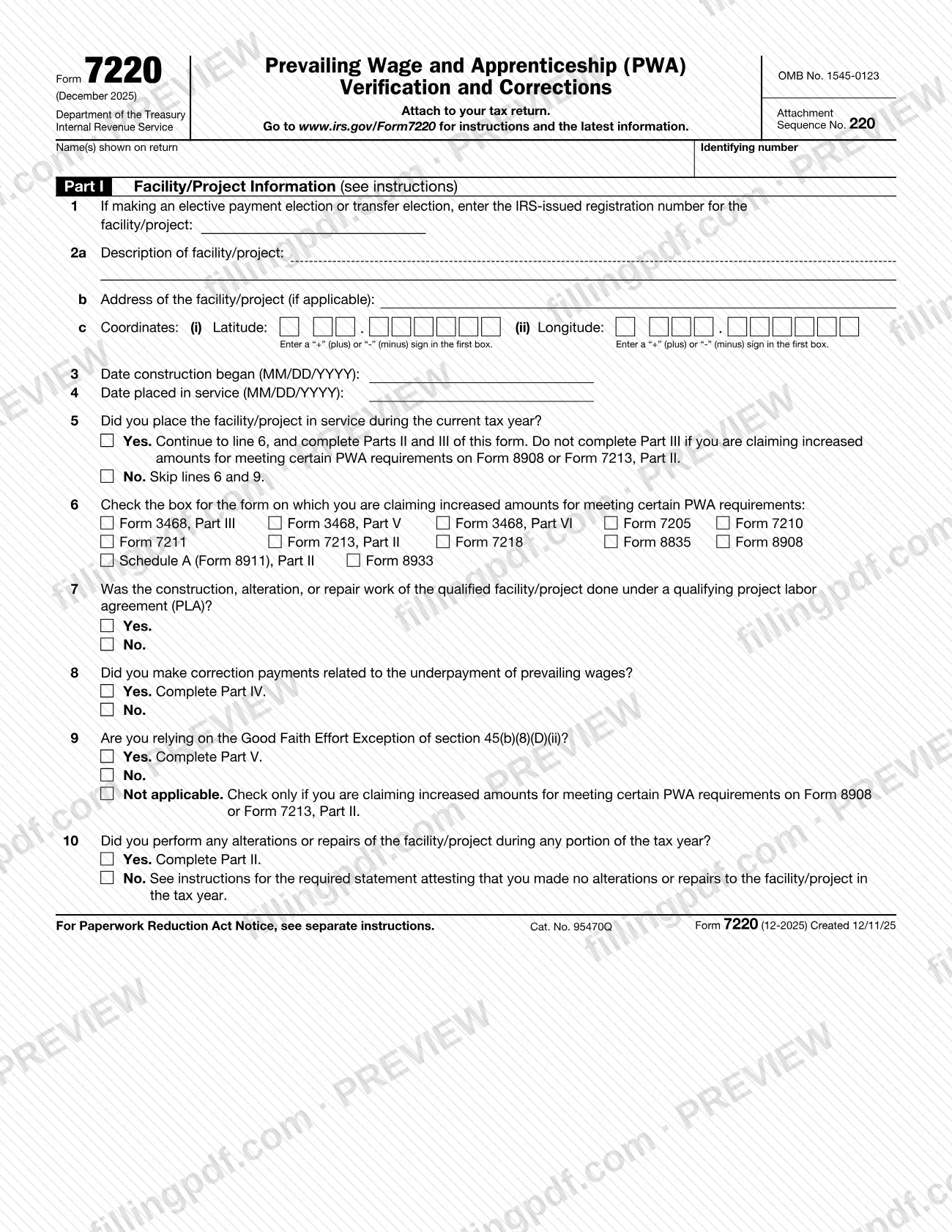
Form 7220, Prevailing Wage and Apprenticeship (PWA) Verification and Corrections, is the Internal Revenue Service (IRS) form you attach to your tax return when you claim increased credit or deduction amounts for meeting certain PWA requirements. You complete one for each facility or project, and it also calculates any penalties owed for missing those requirements. On FillingPDF you can fill out the form online and download or print the completed PDF; the form and its instructions are published by the IRS at www.irs.gov/Form7220.
Last updated
What is Form 7220?
Form 7220, Prevailing Wage and Apprenticeship (PWA) Verification and Corrections, is the IRS form used to report, for each facility, the information that supports increased credit or deduction amounts claimed for satisfying certain prevailing wage and apprenticeship requirements, and to calculate any related penalties.
The IRS describes it as the form that provides information showing you met the prevailing wage and apprenticeship requirements in order to claim the bonus credit amount on the general business credit forms. It is a new form with a December 2025 revision, issued under OMB No. 1545-0123, and it is attached to your tax return.
The form has five parts:
- Part I: facility or project information, including dates, location and which claiming form is involved.
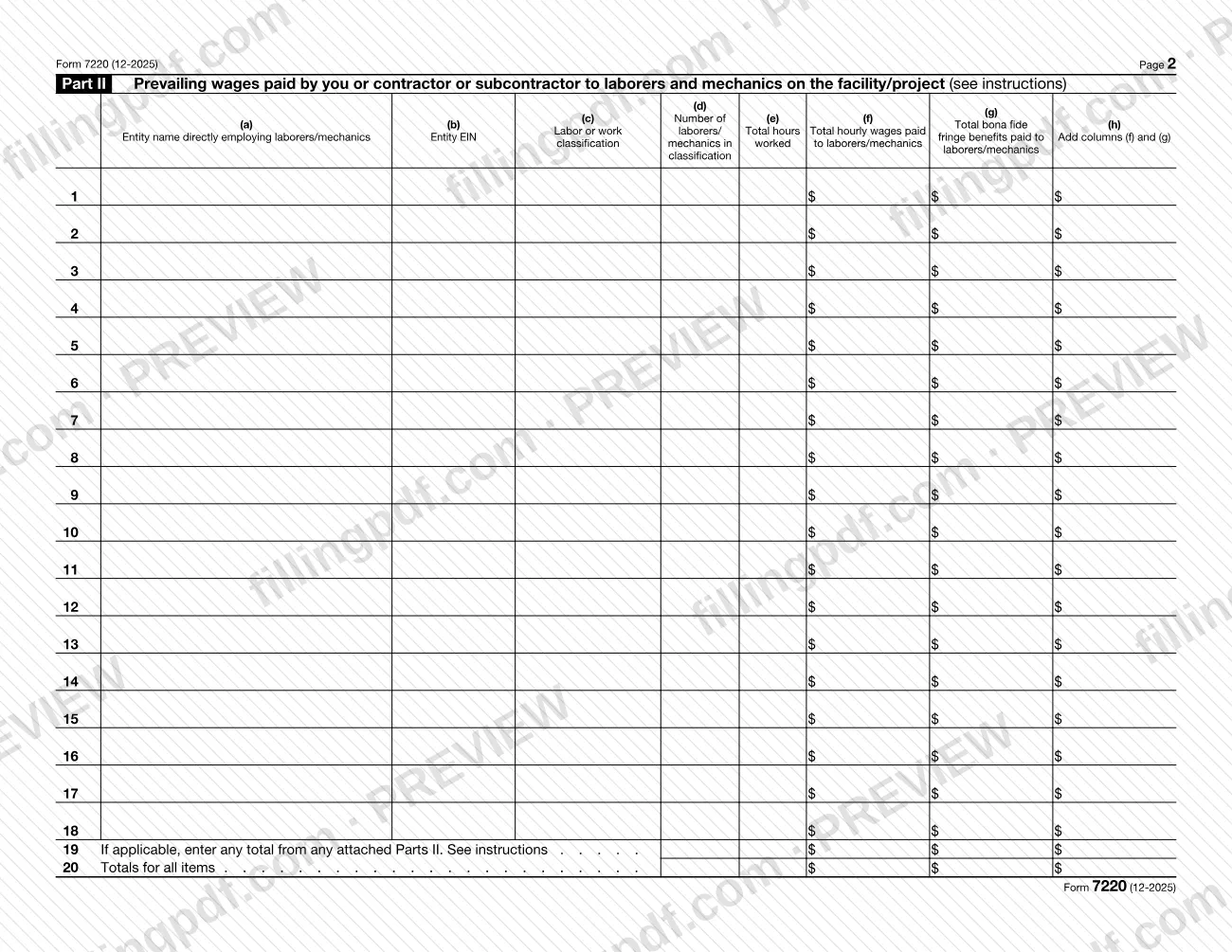
- Part II: prevailing wages paid by you or a contractor or subcontractor to laborers and mechanics.
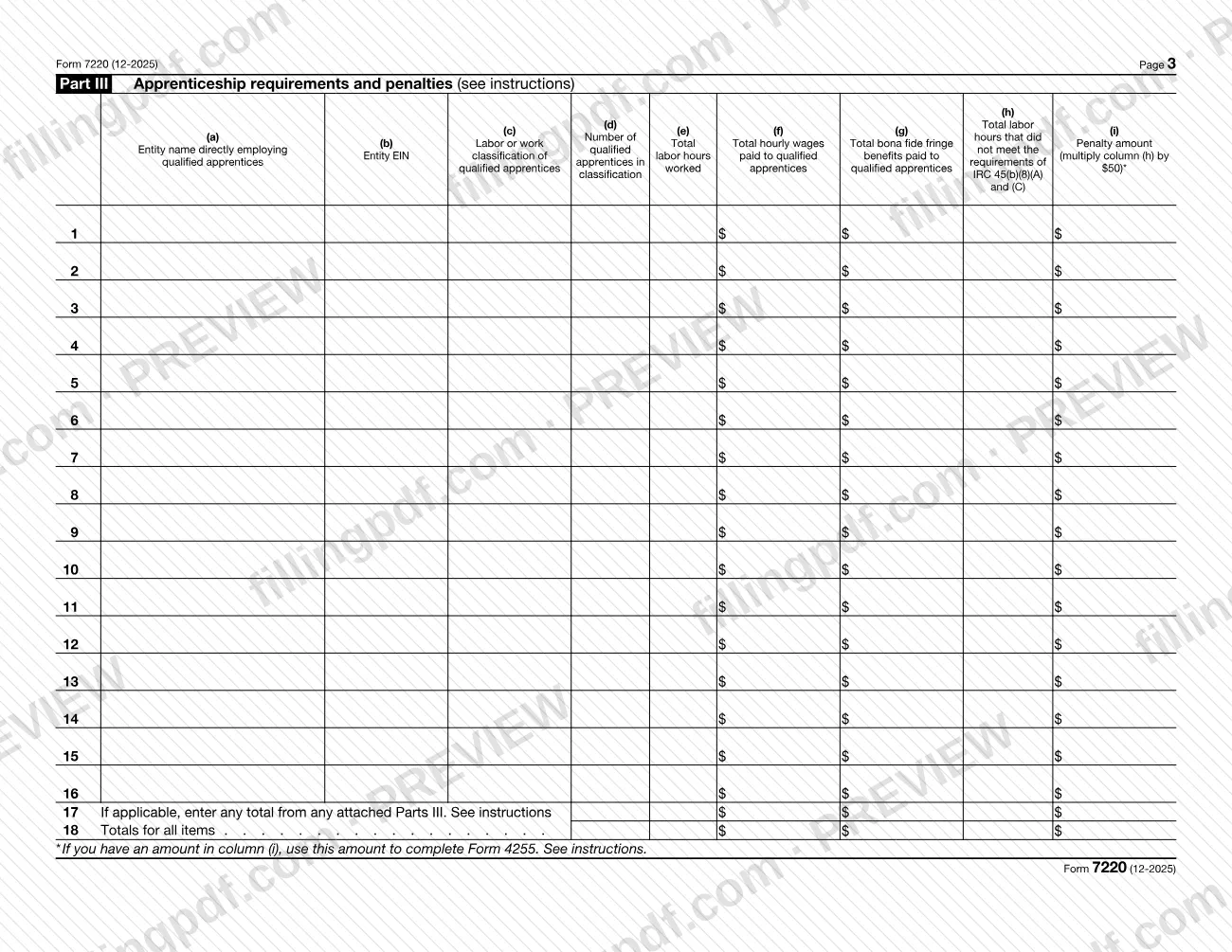
- Part III: apprenticeship requirements and the penalty amounts that apply when the labor hours or participation requirements are not met.
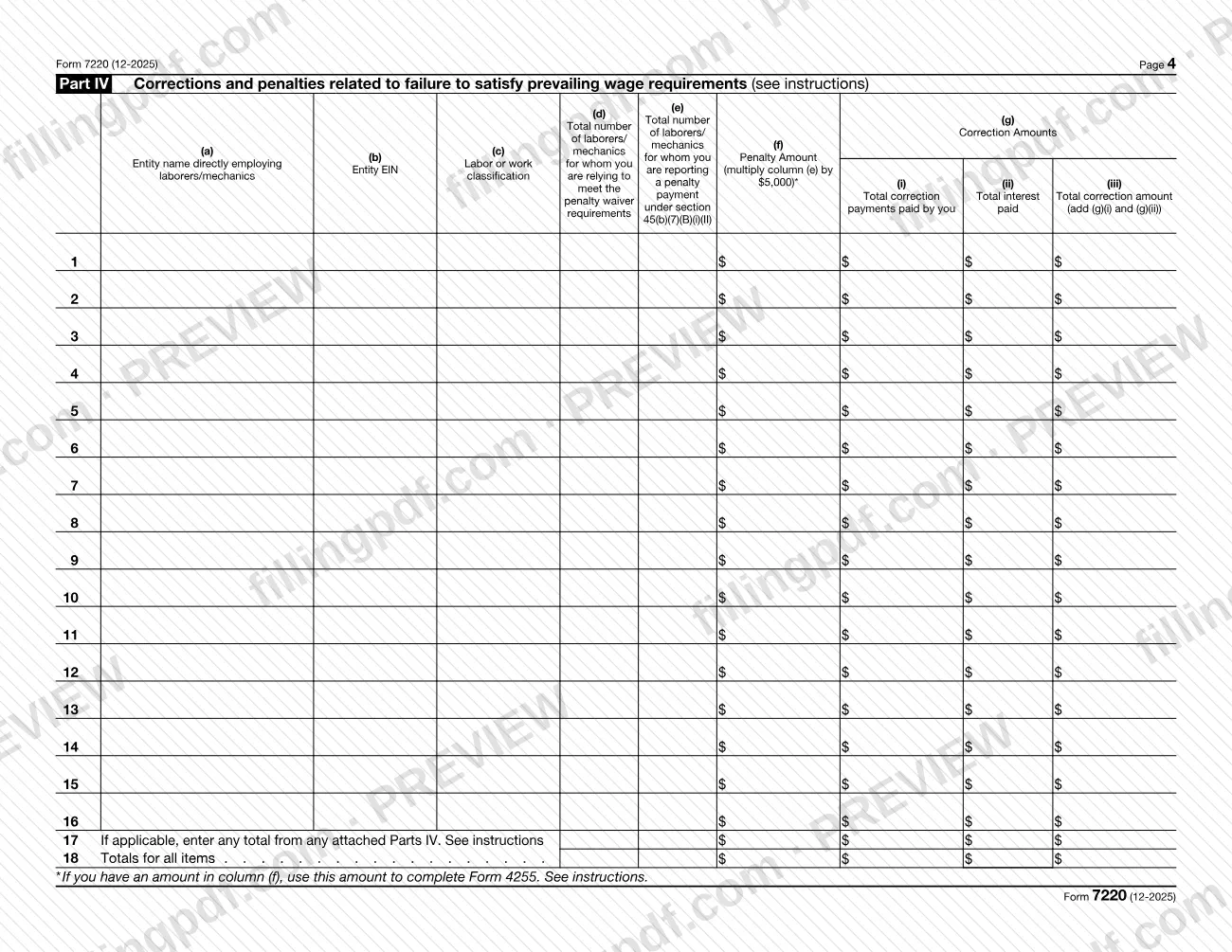
- Part IV: correction payments and penalties for failing the prevailing wage requirements.
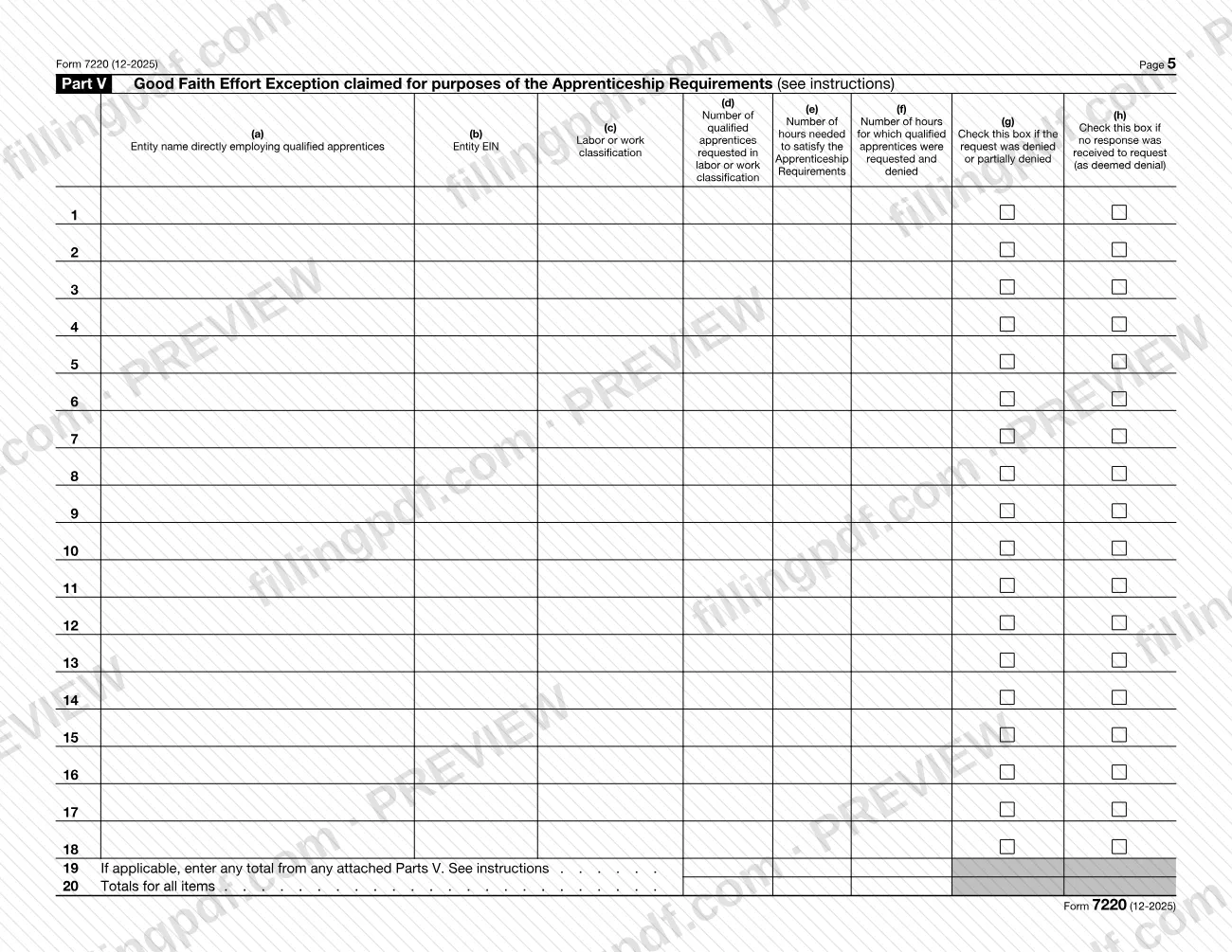
- Part V: the Good Faith Effort Exception for the apprenticeship requirements.
The penalty totals from Parts III and IV feed Form 4255, Part I, according to the IRS instructions. Form 7220 is not a claim for the credit itself: the increased amounts are claimed on the credit or deduction form you file, such as Form 3468, Form 8835 or Form 8933.
Who needs to file Form 7220?
Taxpayers who claim increased credit or deduction amounts for satisfying certain PWA requirements file Form 7220, one for each facility. The increased amounts can be claimed on these forms:
- Form 3468, Investment Credit, Part III, V, or VI.
- Form 7205, Energy Efficient Commercial Buildings Deduction.
- Form 7210, Clean Hydrogen Production Credit.
- Form 7211, Clean Electricity Production Credit.
- Form 7213, Nuclear Power Production Credit, Part II.
- Form 7218, Clean Fuel Production Credit.
- Form 8835, Renewable Electricity Production Credit.
- Form 8908, Energy Efficient Home Credit.
- Schedule A (Form 8911), Alternative Fuel Vehicle Refueling Property, Part II.
- Form 8933, Carbon Oxide Sequestration Credit.
If you filed three Forms 8835 with increased amounts, you submit three Forms 7220. You must also file a separate Form 7220 to report ongoing prevailing wage compliance for alterations or repairs on facilities placed in service in a prior year for which you claimed the increased amounts.
You are not required to file Form 7220 if you claim the increased amounts and satisfy the Beginning of Construction (BOC) or the One Megawatt exception. The instructions point to T.D. 9998, T.D. 10015 and T.D. 10024 for details.
When to file Form 7220
File Form 7220 whenever you claim increased credit or deduction amounts for satisfying certain PWA requirements, because the form is attached to your tax return. It has no separate due date printed on it, so it travels with the return and with the credit or deduction form on which you claim the increased amounts.
Timing depends on the facility. If you placed the facility in service during the current tax year, answer Yes on line 5 and complete Parts II and III (skip Part III for Form 8908 or Form 7213, Part II). If it was placed in service in a prior year, skip lines 6 and 9; a separate Form 7220 is still needed to report ongoing prevailing wage compliance for alterations or repairs. For deadlines that apply to your return, see the instructions for that return.
Documents you need
- Your tax return: Form 7220 is attached to it, along with the credit or deduction form on which you claim the increased amounts.
- A statement attesting that no alterations or repairs were performed during the tax year, only if you check No on line 10.
- In that statement: the taxpayer's name, taxpayer identification number and facility description (with owner information if different from the filer), plus a declaration that no alterations or repairs were performed.
- A declaration under penalties of perjury, signed by the taxpayer or a person authorized to bind the taxpayer, covering the no-alterations statement and any accompanying documents.
- Additional copies of Part II, III, IV or V, only if the rows on one page are not enough; enter their totals on the lines provided for attached parts.
How to fill out Form 7220
Enter name and identifying number
At the top, enter the name(s) shown on your return and your identifying number.
Enter the registration number
Line 1: if you are making an elective payment election or transfer election, enter the IRS-issued registration number for the facility or project.
Describe the facility location
Line 2a: describe the facility or project. Line 2b: enter its address, if applicable. Line 2c: enter the latitude and longitude, using a "+" or "-" sign in the first box of each.
Enter construction and service dates
Line 3: date construction began, in MM/DD/YYYY format. Line 4: date the facility was placed in service, also MM/DD/YYYY.
Answer lines 5 and 6
Line 5: check Yes if you placed the facility in service in the current tax year, then continue to line 6 and Parts II and III; check No to skip lines 6 and 9. Line 6: check the box for the form on which you claim the increased amounts.
Answer lines 7 through 10
Line 7: project labor agreement. Line 8: Yes if you made correction payments for underpaid prevailing wages, then complete Part IV. Line 9: Yes to rely on the Good Faith Effort Exception, then complete Part V. Line 10: Yes if you performed alterations or repairs, then complete Part II; if No, attach the required statement.
Complete Part II wages
For each entity and classification, enter columns (a) name, (b) EIN, (c) classification, (d) number of laborers/mechanics, (e) hours, (f) hourly wages and (g) bona fide fringe benefits. Column (h) is the sum of (f) and (g); use line 19 for totals of attached Parts II and line 20 for totals.
Complete Part III apprenticeship
Enter the entity, EIN, classification, number of qualified apprentices, hours, wages and fringe benefits in columns (a) through (g). Column (h) is hours that did not meet the requirements; column (i) is column (h) multiplied by the per-hour penalty figure printed on the form.
Complete Part IV corrections
Enter laborers/mechanics relying on penalty waiver requirements in (d) and those with a penalty payment in (e); column (f) multiplies (e) by the per-person penalty figure on the form. Columns (g)(i) and (g)(ii) are correction payments and interest paid, and (g)(iii) is their sum.
Complete Part V good faith effort
Enter qualified apprentices requested in (d), hours needed in (e) and hours requested and denied in (f). Check (g) if the request was denied or partially denied, or (h) if the program did not respond.
Review and download the PDF
Check that totals match and that any required statement is ready. Download or print the completed PDF from FillingPDF and attach it to your return as described under How to submit.
How to submit Form 7220
Form 7220 is not filed on its own: it is attached to your tax return, as printed at the top of the form.
- With your tax return: include the completed Form 7220, one for each facility, with the return on which you claim the increased amounts. The mailing address and any e-filing method are those of your income tax return, so check that return's instructions.
- With a statement, if line 10 is No: attach the statement attesting that no alterations or repairs were performed during the tax year.
- With Form 4255: the amounts in column (f), line 18, of Part IV and column (i), line 18, of Part III are reported on Form 4255, Part I, as the instructions describe.
- Extra copies: if one page is not enough, complete additional copies of Part II, III, IV or V and carry their totals to the lines provided.
The IRS publishes the instructions and latest information at www.irs.gov/Form7220. FillingPDF lets you fill out and download the PDF; submission follows the channels above.
Common mistakes to avoid
- Combining several facilities on one Form 7220; the instructions call for a separate form for each facility for which you claim increased amounts.
- Checking No on line 10 without attaching the statement that no alterations or repairs were made during the tax year.
- Completing Part III when you claim increased amounts on Form 8908 or Form 7213, Part II; the form says not to.
- Checking Not applicable on line 9 when you are claiming on a form other than Form 8908 or Form 7213, Part II.
- Completing Parts II and IV for the section 30C, 45L, 179D or 48C claims when the facility was not placed in service during the tax year.
- Using labor or work classifications that are not those defined by the Davis-Bacon Act in column (c).
- Filling in Part IV column (f) when column (e) is blank; the instructions say to leave it blank.
- Checking Part V column (g) when the registered apprenticeship program gave no response; that case belongs in column (h).
- Not carrying the line 18 penalty totals from Parts III and IV to Form 4255, Part I.
Frequently asked questions
What is Form 7220 used for?
Form 7220 reports, for each facility, the prevailing wage and apprenticeship (PWA) information that supports increased credit or deduction amounts claimed on another form. It also calculates any penalties for failing certain PWA requirements, and you attach it to your tax return.
Who has to file Form 7220?
Taxpayers claiming increased credit or deduction amounts for satisfying certain PWA requirements on forms such as Form 3468, Form 8835 or Form 8933 file it, one for each facility. You are not required to file it if you satisfy the BOC or One Megawatt exception.
Do I need a separate Form 7220 for each facility?
Yes. The instructions say to file a separate Form 7220 for each facility for which you claim increased amounts, so three Forms 8835 with increased amounts mean three Forms 7220. Ongoing compliance for alterations or repairs on a facility placed in service earlier also needs its own form.
What do I attach if there were no alterations or repairs?
Check No on line 10 and attach a statement that no alterations or repairs were performed during the tax year. It includes the taxpayer's name, taxpayer identification number and facility description, and a signed declaration under penalties of perjury.
What is the Good Faith Effort Exception on line 9?
It deems the apprenticeship requirements satisfied if you requested qualified apprentices from a registered apprenticeship program and the request was denied, or the program did not respond within 5 days. You complete Part V when you check Yes.
Where do I send Form 7220?
You do not send it separately. It is attached to your tax return, so it goes wherever that return goes. See the instructions for your return for the address or e-filing method, and www.irs.gov/Form7220 for the form's own instructions.
Can I fill out Form 7220 online?
You can fill out the PDF online on FillingPDF and download or print it. FillingPDF is an independent service and does not file the form with the IRS; you attach it to your tax return and submit it through the IRS channels that apply to that return.
How do penalties from Form 7220 get reported?
The line 18 total in column (f) of Part IV and in column (i) of Part III are reported on Form 4255, Part I, in the columns the instructions name. Leave a column blank where the form says to leave it blank because the earlier column is blank.
Ready to fill out Form 7220?
Fill out Form 7220 now