
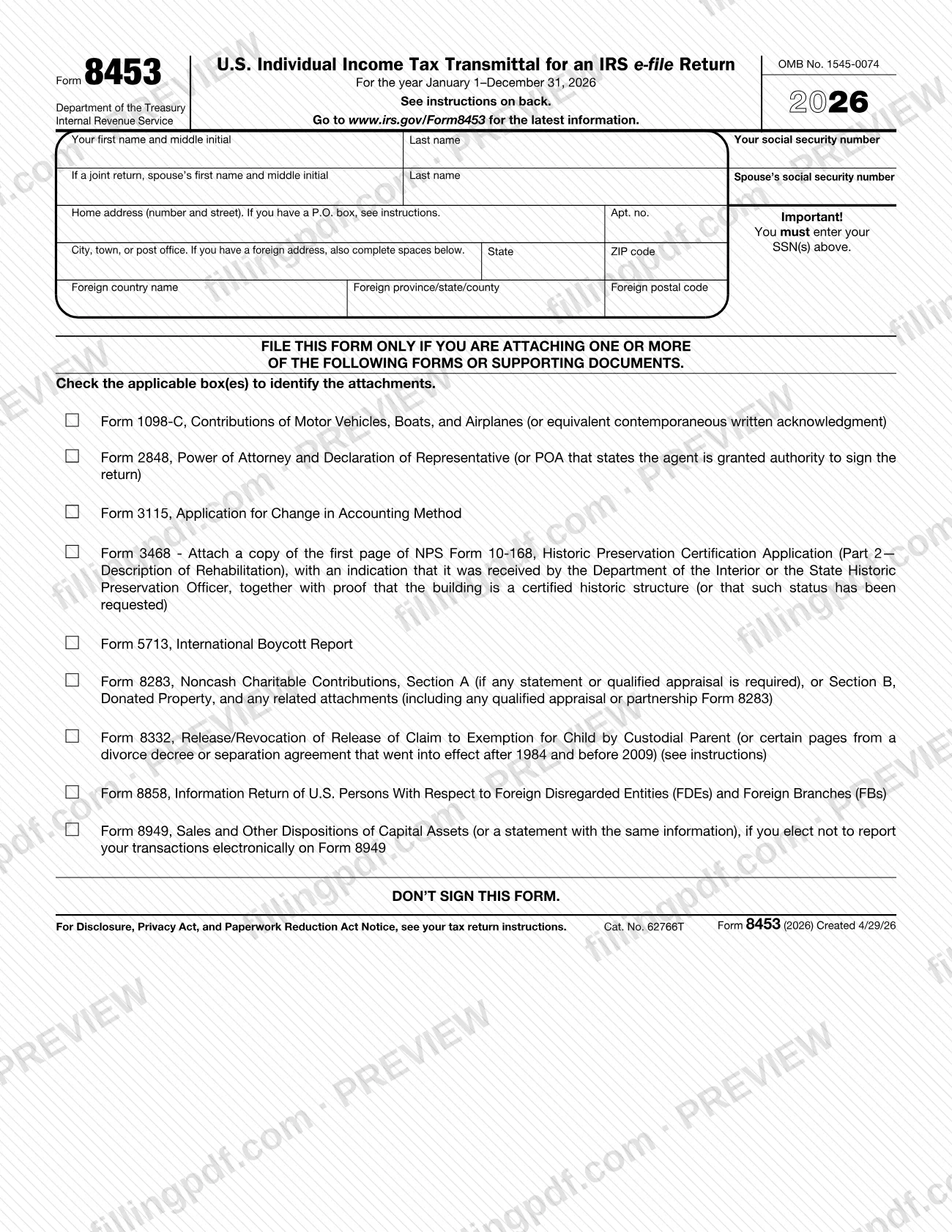
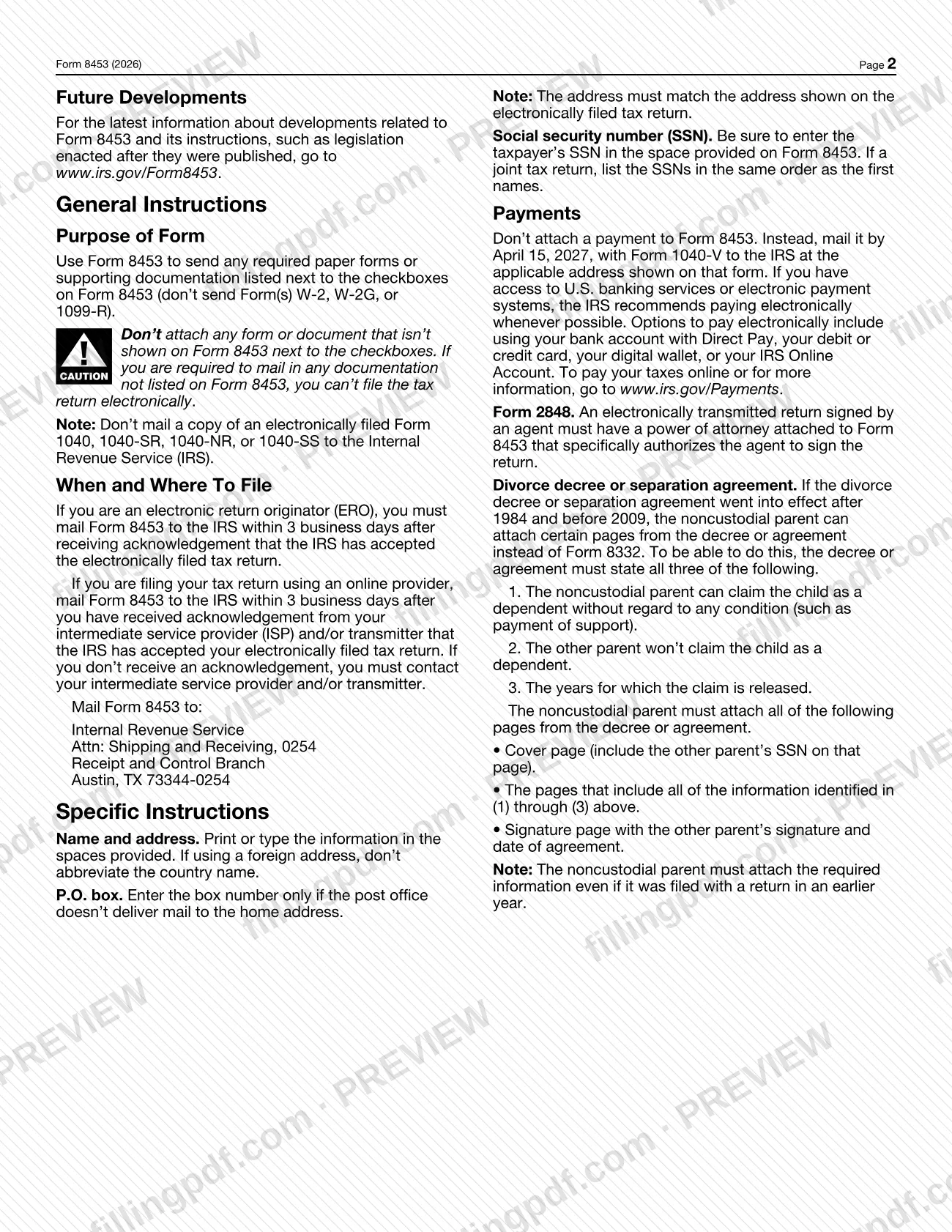
Form 8453, U.S. Individual Income Tax Transmittal for an IRS e-file Return, is the Internal Revenue Service (IRS) form that carries required paper forms and supporting documents for an individual return filed electronically. Taxpayers and electronic return originators (EROs) file it only when they are attaching one of the items listed next to its checkboxes. On FillingPDF you can fill out the form online and download or print the completed PDF; the IRS publishes the form and its latest information at www.irs.gov/Form8453, and the paper package goes to the IRS by mail.
Last updated
What is Form 8453?
Form 8453, U.S. Individual Income Tax Transmittal for an IRS e-file Return, is the Internal Revenue Service (IRS) form used to send any required paper forms or supporting documentation listed next to its checkboxes when an individual income tax return is filed electronically.
The form is a cover sheet, not a return. It collects your name, Social Security number (SSN) and home address, and then lists the attachments it can carry. You check the box for each one you are sending. The IRS agency page describes it as used solely to transmit the forms listed on its front. The 2025 version is printed for the year January 1–December 31, 2025, under OMB No. 1545-0074.
The attachments it can transmit are:
- Form 1098-C, Contributions of Motor Vehicles, Boats, and Airplanes (or an equivalent contemporaneous written acknowledgment)
- Form 2848, Power of Attorney and Declaration of Representative (or a power of attorney that grants the agent authority to sign the return)
- Form 3115, Application for Change in Accounting Method
- Form 3468 support, Form 4136 certificates, Form 5713, Form 8283, Form 8332, Form 8858, Form 8864 certificates and Form 8949 (only if you elect not to report your transactions electronically on it)
Form 8453 does not carry Form(s) W-2, W-2G or 1099-R, and it is not a copy of your return: the instructions say not to mail a copy of an electronically filed Form 1040, 1040-SR, 1040-NR or 1040-SS to the IRS.
Who needs to file Form 8453?
Taxpayers who file an individual income tax return electronically and must send one or more of the paper forms or documents listed beside the checkboxes on Form 8453 use this form. EROs who transmit such a return for a client use it too, and the instructions place the mailing duty on them.
The form itself says to file it only if you are attaching one or more of the listed forms or supporting documents. Examples tied to specific boxes:
- A noncustodial parent claiming a child with Form 8332, or with certain pages of a divorce decree or separation agreement that went into effect after 1984 and before 2009.
- An agent who signs the return for a taxpayer, whose power of attorney must be attached to Form 8453 and must specifically authorize the agent to sign.
- Anyone claiming a credit that requires the certificates or statements named beside the Form 3468, Form 4136 or Form 8864 boxes.
Do not use Form 8453 to send Form(s) W-2, W-2G or 1099-R, or any form or document that is not shown next to the checkboxes. If you must mail documentation that is not listed on the form, you cannot file the return electronically.
When to file Form 8453
Mail Form 8453 within 3 business days after you receive acknowledgement that the IRS has accepted your electronically filed return. If you are an ERO, the acknowledgement comes from the IRS. If you file through an online provider, it comes from your intermediate service provider (ISP) and/or transmitter. If you do not receive an acknowledgement, the instructions say you must contact your ISP and/or transmitter.
Form 8453 has no deadline separate from this mailing window. Any payment is handled apart from the form: do not attach it to Form 8453. The instructions say to mail it by April 15, 2026, with Form 1040-V, to the address shown on that form.
Documents you need
- Form 1098-C, Contributions of Motor Vehicles, Boats, and Airplanes, or an equivalent contemporaneous written acknowledgment, if you check that box.
- Form 2848, Power of Attorney and Declaration of Representative, or a power of attorney stating the agent may sign the return, when an agent signs the electronically transmitted return.
- Form 3115, Application for Change in Accounting Method, if you check that box.
- For Form 3468: a copy of the first page of NPS Form 10-168 (Part 2—Description of Rehabilitation), marked as received by the Department of the Interior or the State Historic Preservation Officer, plus proof of certified historic structure status or that it was requested.
- For Forms 4136 and 8864: the appropriate certificates and, if applicable, reseller statements for biodiesel, renewable diesel and sustainable aviation fuel claims.
- Form 5713, International Boycott Report, if you check that box.
- Form 8283, Noncash Charitable Contributions, Section A (if a statement or qualified appraisal is required) or Section B, with related attachments such as a qualified appraisal or partnership Form 8283.
- Form 8332, Release/Revocation of Release of Claim to Exemption for Child by Custodial Parent, if you check that box.
- Instead of Form 8332: certain pages of a divorce decree or separation agreement in effect after 1984 and before 2009 (cover page with the other parent's SSN, pages with the required statements, and signature page with the other parent's signature and date).
- Form 8858, Information Return of U.S. Persons With Respect to Foreign Disregarded Entities (FDEs) and Foreign Branches (FBs), if you check that box.
- Form 8949, Sales and Other Dispositions of Capital Assets, or a statement with the same information, only if you elect not to report your transactions electronically on Form 8949.
How to fill out Form 8453
Enter your name and SSN
Type your first name and middle initial, last name and Social Security number at the top. On a joint return, add your spouse's first name, middle initial, last name and SSN, listing the SSNs in the same order as the first names; the form says you must enter your SSN(s).
Enter your home address
Write your number and street, apartment number, and city, town or post office, state and ZIP code. The address must match the one on the electronically filed return, and a P.O. box number goes in only if the post office does not deliver to your home.
Complete the foreign address spaces
Only if you have a foreign address, also fill in the foreign country name, province/state/county and postal code. Do not abbreviate the country name.
Check the boxes for your attachments
Check each box that identifies a form or document you are attaching, such as Form 8332, Form 2848 or Form 8949. File the form only if you are attaching at least one listed item.
Match each box to its attachment
Gather what each checked box requires, for example the certificates for Form 4136 or 8864, or the NPS Form 10-168 page and proof for Form 3468. For Form 8332, certain divorce decree or separation agreement pages can replace it only under the conditions in the instructions.
Leave the signature area alone
The form states DON'T SIGN THIS FORM, and it has no signature line. If an agent signs the return, attach the power of attorney that specifically authorizes the agent to sign.
Keep payments separate
Do not attach a check or other payment. If you owe tax, follow the instructions for mailing Form 1040-V or paying electronically.
Review and download the completed PDF
Check that names, SSNs and the address match your e-filed return and that every box you checked has its attachment. Download or print the completed PDF from FillingPDF and mail the package as described under How to submit.
How to submit Form 8453
Form 8453 is submitted by mail to the IRS; the instructions name no online channel for it.
- Mail: Internal Revenue Service, Attn: Shipping and Receiving, 0254, Receipt and Control Branch, Austin, TX 73344-0254. Mail it within 3 business days after the acceptance acknowledgement, with the forms or documents whose boxes you checked.
- Payments: do not attach a payment to Form 8453. If you owe tax, mail the payment by April 15, 2026, with Form 1040-V to the address shown on that form. The IRS recommends paying electronically when you have access to U.S. banking services or electronic payment systems, using Direct Pay, a debit or credit card, a digital wallet or your IRS Online Account; see www.irs.gov/Payments.
Send only the forms and documents shown next to the checkboxes, and do not send Form(s) W-2, W-2G or 1099-R. Do not mail a copy of your electronically filed Form 1040, 1040-SR, 1040-NR or 1040-SS. FillingPDF lets you fill out and download the PDF; submission follows the channels above.
Common mistakes to avoid
- Signing Form 8453. The form says in capital letters not to sign it.
- Attaching Form(s) W-2, W-2G or 1099-R; the instructions say not to send them with Form 8453.
- Attaching a form or document that is not shown next to the checkboxes. Mailing documentation not listed on the form means you cannot file the return electronically.
- Mailing a copy of the electronically filed Form 1040, 1040-SR, 1040-NR or 1040-SS to the IRS along with Form 8453.
- Attaching a payment to Form 8453 instead of mailing it with Form 1040-V to the address on that form.
- Mailing the form later than 3 business days after the acceptance acknowledgement, or before the return has been accepted.
- Using a home address that differs from the address on the electronically filed return; the two must match.
- Abbreviating the country name on a foreign address.
- Entering a P.O. box when the post office delivers mail to the home address; the box number is for homes without delivery.
- Listing joint-return SSNs in a different order from the first names, or leaving the SSN(s) blank.
Frequently asked questions
What is Form 8453 used for?
Form 8453 is the IRS transmittal for sending required paper forms or supporting documents that go with an electronically filed individual income tax return. You check the box for each listed item you attach, such as Form 8332, Form 2848 or Form 8283, and mail the package to the IRS.
Do I have to file Form 8453 with my e-filed return?
Only if you are attaching one or more of the forms or documents listed next to its checkboxes. The form itself says to file it only in that case. If none of the listed items applies to you, there is nothing for Form 8453 to transmit.
Do I sign Form 8453?
No. The form prints DON'T SIGN THIS FORM. If an agent signs your electronically transmitted return, the power of attorney attached to Form 8453, such as Form 2848, must specifically authorize the agent to sign the return.
Where do I mail Form 8453?
Mail it to Internal Revenue Service, Attn: Shipping and Receiving, 0254, Receipt and Control Branch, Austin, TX 73344-0254. Send it within 3 business days after you receive acknowledgement that the IRS accepted your electronic return.
When is Form 8453 due?
It is due within 3 business days after you receive acknowledgement that the IRS accepted your e-filed return, from the IRS for an ERO or from your ISP and/or transmitter if you use an online provider. If no acknowledgement arrives, contact your provider or transmitter.
Can I send W-2s or a copy of my Form 1040 with Form 8453?
No. Do not send Form(s) W-2, W-2G or 1099-R, and do not mail a copy of an electronically filed Form 1040, 1040-SR, 1040-NR or 1040-SS. Attach only the forms and documents shown next to the checkboxes.
Can I attach my tax payment to Form 8453?
No. Do not attach a payment to Form 8453. Mail it by April 15, 2026, with Form 1040-V to the address on that form, or pay electronically through Direct Pay, a card, a digital wallet or your IRS Online Account at www.irs.gov/Payments.
Can I fill out Form 8453 online on FillingPDF?
Yes. You can fill out the fillable PDF online on FillingPDF and download or print it. FillingPDF is an independent service and does not send the form to the IRS; you mail it to the address in the instructions.
Ready to fill out Form 8453?
Fill out Form 8453 now