
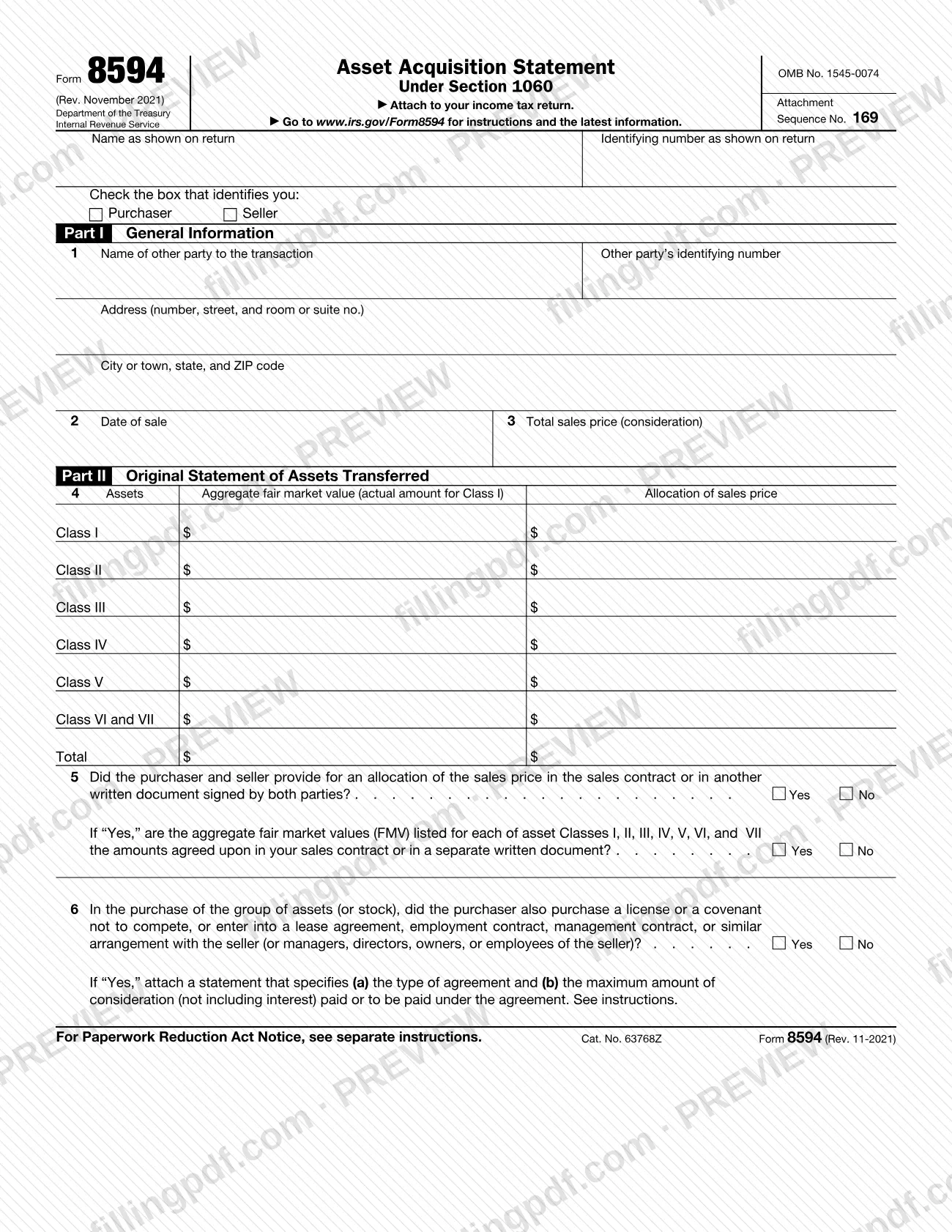
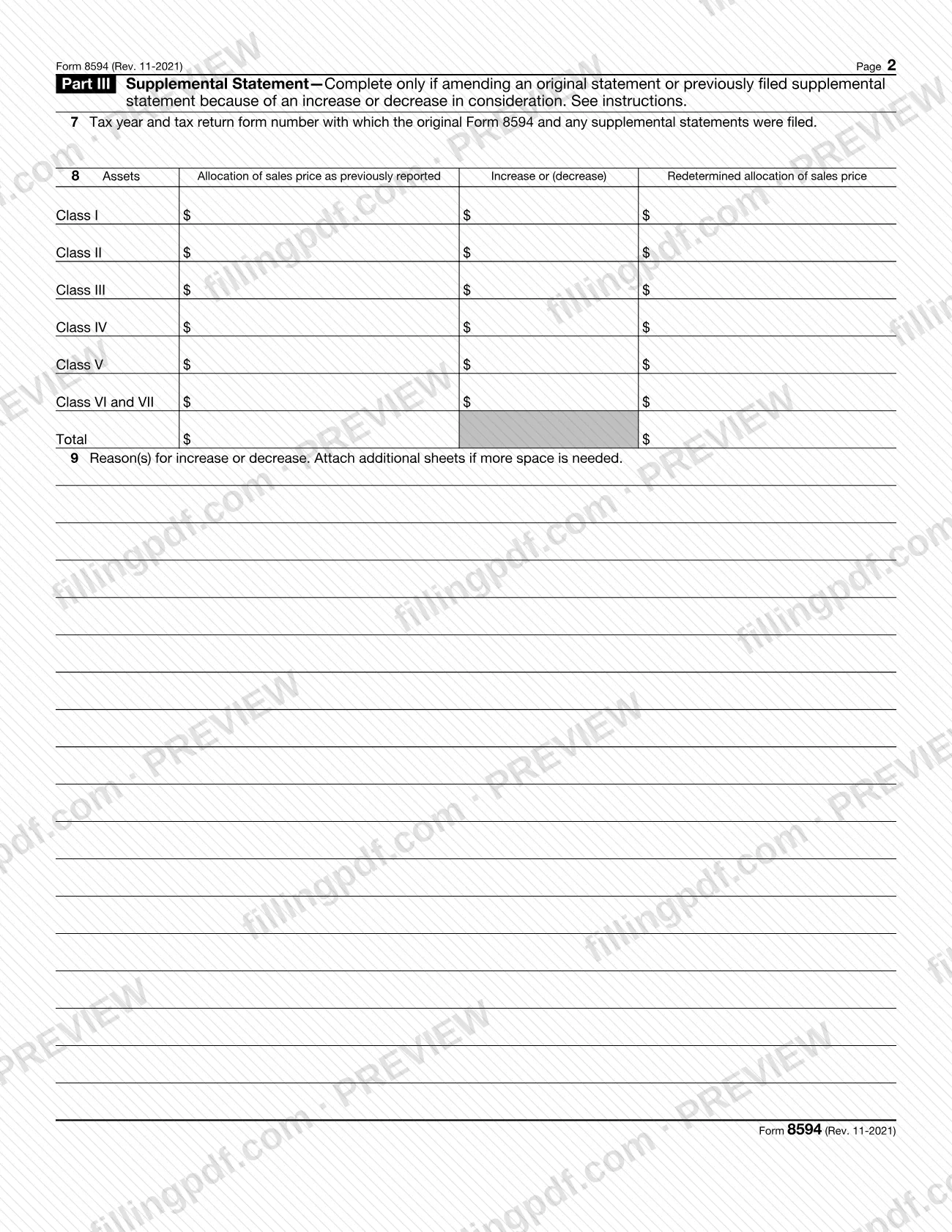
Form 8594 is the Internal Revenue Service (IRS) statement that the purchaser and the seller of a group of assets making up a trade or business attach to their income tax returns. It reports the sale price and how that price is allocated among seven asset classes, and a later part amends the allocation when the consideration changes. On this page you can fill out the form online on FillingPDF and download or print the completed PDF; the form and its instructions are published by the IRS at www.irs.gov/Form8594.
Last updated
What is Form 8594?
Form 8594, Asset Acquisition Statement Under Section 1060, is the IRS form on which the purchaser and the seller of a group of assets that makes up a trade or business report the sale and the allocation of the sales price among asset classes.
The form is required when goodwill or going concern value attaches, or could attach, to the assets and the purchaser's basis in them is determined only by the amount paid. It is not filed alone: it is attached to the filer's income tax return. It carries OMB No. 1545-0074 and Attachment Sequence No. 169.
The form has three parts:
- Part I, General Information: the other party to the transaction, the date of sale and the total sales price (consideration).
- Part II, Original Statement of Assets Transferred: the aggregate fair market value and the allocation of the sales price for Class I, II, III, IV, V, VI and VII assets, plus questions on a written allocation and on side agreements such as a covenant not to compete.
- Part III, Supplemental Statement: used only to amend an original or earlier supplemental statement because consideration increased or decreased.
The IRS instructions define the classes (Class I is cash and general deposit accounts; Class VII is goodwill and going concern value) and explain how consideration is allocated under the residual method. Form 8594 is not for a partnership interest transfer in general; the instructions treat only the purchase of a partnership interest that counts as a purchase of partnership assets forming a trade or business as covered.
Who needs to file Form 8594?
Generally, both the purchaser and the seller must file Form 8594 and attach it to their income tax returns (Forms 1040, 1041, 1065, 1120, 1120-S, etc.) when a group of assets making up a trade or business is transferred and the purchaser's basis in those assets is determined wholly by the amount paid. This applies whether the group of assets is a trade or business in the hands of the seller, the purchaser, or both.
Other filers and situations the instructions name:
- If the purchaser or seller is a controlled foreign corporation (CFC), each U.S. shareholder should attach Form 8594 to its Form 5471.
- If the amount allocated to an asset changes after the year of sale, whichever party is affected completes Parts I and III.
- A purchaser who buys a partnership interest that is treated for federal income tax purposes as a purchase of partnership assets constituting a trade or business must file.
You are not required to file if a group of assets making up a trade or business is exchanged for like-kind property in a transaction to which section 1031 applies. If section 1031 does not apply to all the assets, Form 8594 is still required for the part to which it does not apply. No filing is required when a partnership interest is transferred, except in the case described above.
When to file Form 8594
Generally, attach Form 8594 to your income tax return for the year in which the sale date occurred. It has no separate due date: it is due with that return.
If the amount allocated to any asset is increased or decreased after the year of the sale, the seller, the purchaser or both (whoever is affected) complete Parts I and III and attach the form to the income tax return for the year in which the increase or decrease is taken into account. File a new Form 8594 for each year in which an increase or decrease occurs.
If you do not file a correct Form 8594 by the due date of your return and cannot show reasonable cause, you may be subject to penalties under sections 6721 through 6724, according to the IRS instructions.
Documents you need
- Your income tax return (Form 1040, 1041, 1065, 1120, 1120-S, etc.) for the year of sale: Form 8594 is attached to it.
- For CFC purchasers or sellers: Form 5471, to which each U.S. shareholder should attach Form 8594.
- A statement specifying (a) the type of agreement and (b) the maximum consideration paid or to be paid, attached only if you answer "Yes" on line 6 (license, covenant not to compete, lease, employment or management contract, or similar arrangement).
- Additional sheets for line 9, only if more space is needed to explain the reason(s) for an increase or decrease in consideration.
How to fill out Form 8594
Enter your name and identifying number
At the top, write your name and identifying number as shown on your return. Then check the box that identifies you: Purchaser or Seller.
Identify the other party on line 1
Enter the other party's name, address and identifying number. Use a Social Security number for an individual or sole proprietor and an employer identification number for a corporation, partnership or other entity.
Enter the sale date and price
Line 2: the date on which the sale of the assets occurred. Line 3: the total consideration transferred for the assets.
Complete the asset class table
On line 4, for each of Classes I through V, enter the total fair market value of the assets in the class and the total allocation of the sales price. For Classes VI and VII, enter one combined figure for each column.
Answer the allocation question on line 5
Check Yes or No for whether the purchaser and seller provided for an allocation in the sales contract or another signed written document. If Yes, also answer whether the fair market values on line 4 are the agreed amounts.
Answer line 6 on side agreements
Both purchaser and seller complete line 6. If you check Yes, attach a statement giving the agreement type and the maximum consideration, assuming contingencies are met; if it cannot be determined, state how it will be computed and the payment period.
Skip Part III for an original statement
Complete Parts I and II for an original statement. Complete Part III only to amend because consideration increased or decreased.
Identify the original filing on line 7
For a supplemental statement, enter the tax year and form number of the return with which the original Form 8594 and any supplemental statements were filed, for example "2021 Form 1040".
Redetermine the allocation on line 8
For each class, enter the allocation as previously reported, the increase or (decrease), and the redetermined allocation. Follow the instructions' allocation order for increases and decreases.
Explain the change on line 9
Give the reason(s) for the increase or decrease, attaching additional sheets if you need more space.
Review and download the completed PDF
Check that the class totals agree with line 3 and that each applicable line is complete. Download or print the completed PDF from FillingPDF and attach it to your income tax return.
How to submit Form 8594
Form 8594 is submitted as an attachment to your income tax return; it has no filing address, portal or appointment process of its own.
- With your return: attach the completed form to the return for the year of the sale, such as Form 1040, 1041, 1065, 1120 or 1120-S, and file it by whichever method you use for that return.
- Controlled foreign corporations: each U.S. shareholder should attach Form 8594 to its Form 5471.
- Supplemental statements: attach a new Form 8594, with Parts I and III completed, to the return for the year in which the increase or decrease in consideration is taken into account.
- Extra pages: if you answer "Yes" on line 6, attach the required statement; if line 9 needs more space, attach additional sheets.
The IRS instructions say books or records relating to a form must be kept as long as their contents may become material in the administration of any Internal Revenue law. Comments on the form can be sent to the address in the instructions for the tax return with which it is filed. FillingPDF lets you fill out and download the PDF; submission follows the channels above.
Common mistakes to avoid
- Filing Form 8594 separately instead of attaching it to the income tax return for the year in which the sale date occurred.
- Leaving out the other party's identifying number on line 1; the instructions require it, using an SSN for an individual or sole proprietor and an EIN for other entities.
- Entering Class VI and Class VII on separate lines on line 4; the form combines them, with one total fair market value and one allocation.
- Allocating more to an asset than its fair market value on the purchase date, except for Class VII assets.
- Answering "Yes" on line 6 without attaching the statement of agreement type and maximum consideration.
- Completing Part II when amending a prior allocation; a supplemental statement uses Parts I and III, with a new Form 8594 for each year of change.
- Skipping the purchaser/seller box under the name and number at the top of the form.
- Omitting on line 7 the tax year and return form number of the original statement, for example "2021 Form 1040".
Frequently asked questions
What is Form 8594 used for?
Form 8594 reports the sale of a group of assets that makes up a trade or business. Both purchaser and seller use it to show the sales price and how it is allocated among Classes I through VII, when goodwill or going concern value could attach and the purchaser's basis depends only on the amount paid.
Who has to file Form 8594, the buyer or the seller?
Generally both. The purchaser and the seller each file Form 8594 and attach it to their own income tax returns when a qualifying group of assets is transferred. Each checks the Purchaser or Seller box at the top to show which one they are.
When is Form 8594 due?
With your income tax return for the year in which the sale date occurred. If the allocation later changes, a new Form 8594 with Parts I and III goes with the return for the year the increase or decrease is taken into account.
Where do I send Form 8594?
You do not send it separately. Attach it to your income tax return, such as Form 1040, 1041, 1065, 1120 or 1120-S, and file the return as usual. A U.S. shareholder of a controlled foreign corporation attaches it to Form 5471.
What are the asset classes on Form 8594?
Class I is cash and general deposit accounts, II actively traded personal property, certificates of deposit and foreign currency, III marked-to-market assets and debt instruments, IV inventory, V all other assets, VI section 197 intangibles except goodwill, and VII goodwill and going concern value.
Do I need Form 8594 if I sell a partnership interest?
Generally no, because a partnership interest transfer is an exception. The instructions say the purchase of a partnership interest that is treated for federal income tax purposes as a purchase of partnership assets forming a trade or business is subject to section 1060, and then the purchaser must file.
How do I amend Form 8594 if the price changes?
Complete Parts I and III on a new Form 8594 for each year an increase or decrease in consideration occurs. Enter the original filing's tax year and return form number on line 7, the previous, changed and redetermined allocations on line 8, and the reason on line 9.
Can I fill out Form 8594 online on FillingPDF?
Yes. You can fill out the PDF online on FillingPDF and download or print it. FillingPDF is an independent service and does not file the form with the IRS; you attach it to your income tax return and file that return through the usual IRS channels.
Ready to fill out Form 8594?
Fill out Form 8594 now