
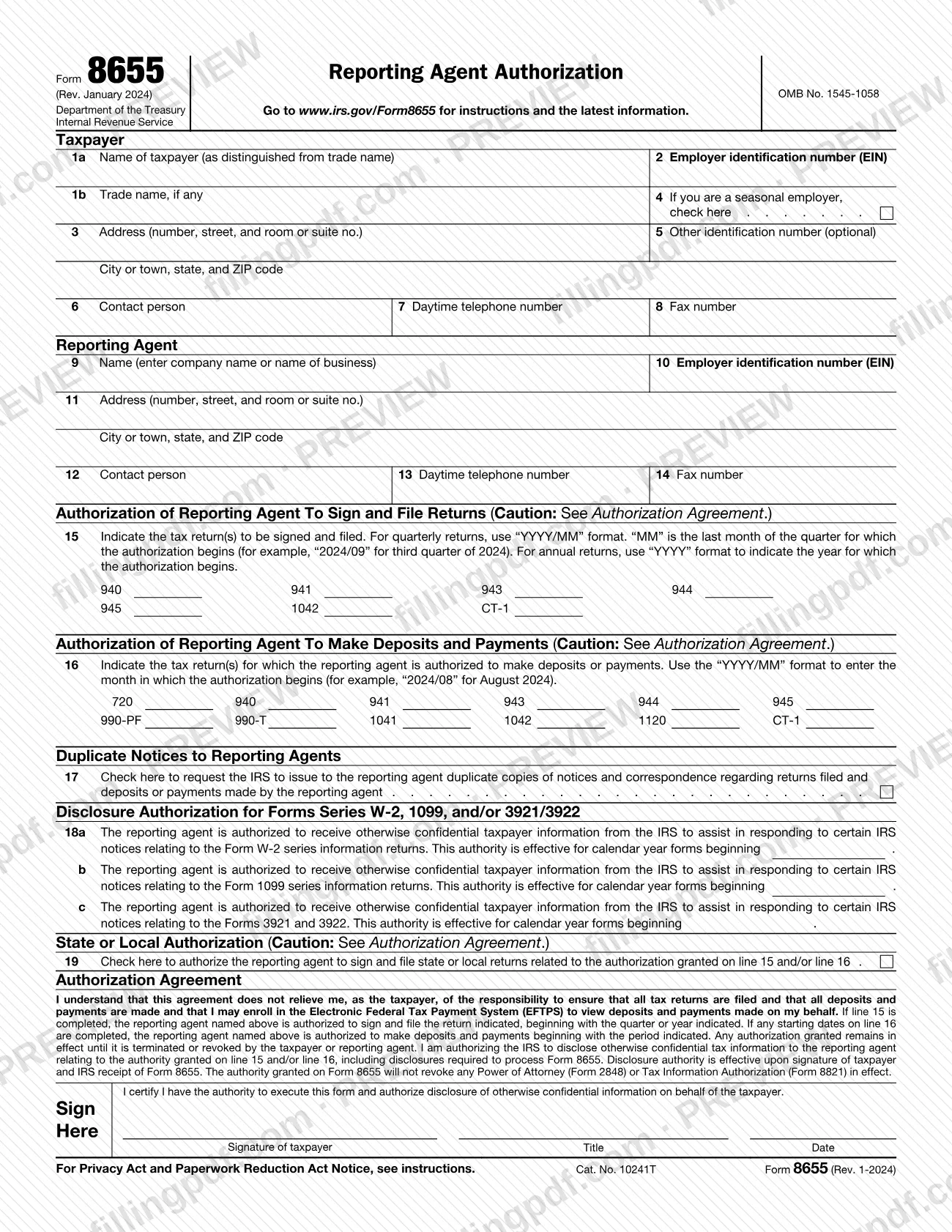
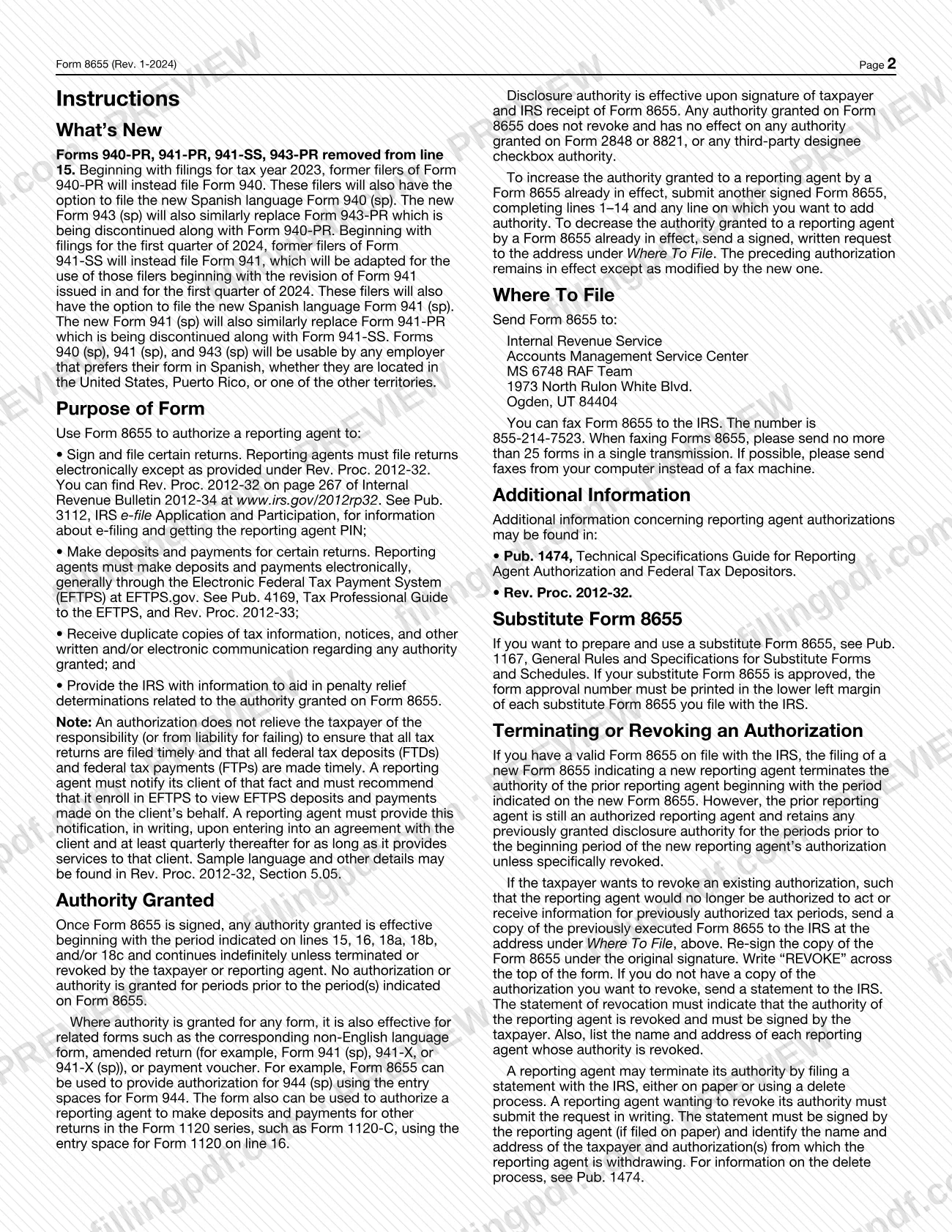

Form 8655, Reporting Agent Authorization, is the Internal Revenue Service (IRS) form a taxpayer signs to authorize a reporting agent to sign and file certain returns, make deposits and payments, and receive duplicate IRS notices. Employers and other filers who hand their payroll and tax filing to a reporting agent use it to record that authority. On FillingPDF you can fill out the form online and download or print the completed PDF; the signed form goes to the IRS by mail or fax, and the IRS publishes the original at the official source link.
Last updated
What is Form 8655?
Form 8655, Reporting Agent Authorization, is the Internal Revenue Service (IRS) form a taxpayer signs to authorize a reporting agent to sign and file certain returns, make deposits and payments, and receive IRS communications about that authority.
The IRS instructions give four purposes: authorizing a reporting agent to sign and file certain returns; to make deposits and payments for certain returns; to receive duplicate copies of tax information, notices and other written or electronic communication about any authority granted; and to give the IRS information that helps decide penalty relief related to that authority. Reporting agents must file returns electronically except as provided under Rev. Proc. 2012-32, and must make deposits and payments electronically, generally through the Electronic Federal Tax Payment System (EFTPS).
The form has a taxpayer block, a reporting agent block, line 15 (returns to sign and file), line 16 (returns for which deposits and payments are made), line 17 (duplicate notices), line 18 (disclosure for the W-2, 1099 and 3921/3922 series) and line 19 (state or local returns).
Authority granted for a form also covers related forms, such as the non-English language version, an amended return or a payment voucher. The authorization does not relieve the taxpayer of responsibility for filing returns and making deposits and payments, and it does not revoke a Power of Attorney (Form 2848) or Tax Information Authorization (Form 8821) already in effect.
Who needs to file Form 8655?
The taxpayer, not the reporting agent, signs Form 8655 to give a reporting agent authority over the returns, deposits and payments listed on lines 15 and 16. The IRS instructions say you are not required to authorize a reporting agent.
The instructions name who signs for each type of taxpayer:
- Sole proprietorship: the individual owning the business.
- Corporation (including an LLC treated as a corporation): generally an officer with legal authority to bind the corporation, a person designated by the board of directors or other governing body, an officer or employee on written request by any principal officer, or any other person authorized to access information under section 6103(e).
- Partnership (including an LLC treated as a partnership) or unincorporated organization: generally any person who was a member of the partnership during any part of the tax period covered.
- Single member LLC treated as a disregarded entity: the owner of the LLC.
- Trust or estate: the fiduciary.
A taxpayer who already has a Form 8655 in effect and wants to add authority submits another signed form, completing lines 1–14 and each line where authority is added.
When to file Form 8655
File Form 8655 when you want a reporting agent to begin acting for you. Once the form is signed, the authority takes effect beginning with the period you enter on lines 15, 16, 18a, 18b and/or 18c, and it continues indefinitely until the taxpayer or the reporting agent terminates or revokes it. No authority is granted for periods before the ones entered. Disclosure authority is effective upon the taxpayer's signature and IRS receipt of the form.
Filing a new Form 8655 that names a new reporting agent ends the prior agent's authority beginning with the period shown on the new form. To increase authority, send another signed Form 8655; to decrease it, send a signed written request to the address under Where To File. The form sets no separate filing deadline. The IRS estimates an average of 1 hour, 7 minutes to complete and file it.
How to fill out Form 8655
Enter the taxpayer's names
Line 1a: the name of the taxpayer as distinguished from trade name. Line 1b: the trade name, if any.
Enter the taxpayer's EIN and address
Line 2: the taxpayer's employer identification number (EIN). Line 3: street address, then city or town, state and ZIP code.
Complete seasonal and other ID lines
Line 4: check the box if you are a seasonal employer. Line 5: enter an other identification number, which is optional.
Add the taxpayer's contact details
Line 6: contact person. Line 7: daytime telephone number. Line 8: fax number.
Identify the reporting agent
Line 9: company or business name. Line 10: the reporting agent's EIN. Line 11: address with city or town, state and ZIP code. Lines 12–14: contact person, daytime telephone number and fax number.
Select returns to sign and file
Line 15: enter the start period beside each return the agent may sign and file (940, 941, 943, 944, 945, 1042 or CT-1). Use "YYYY/MM" for quarterly returns, with MM as the last month of the quarter, and "YYYY" for annual returns.
Select returns for deposits and payments
Line 16: enter the month the authorization begins, in "YYYY/MM" format, beside each return for which the agent may make deposits or payments (720, 940, 941, 943, 944, 945, 990-PF, 990-T, 1041, 1042, 1120 or CT-1).
Request duplicate notices if wanted
Line 17: check the box to have the IRS send the reporting agent duplicate copies of notices and correspondence about returns filed and deposits or payments made by the agent.
Grant information return disclosure
Lines 18a, 18b and 18c: for the Form W-2 series, the Form 1099 series and Forms 3921 and 3922, enter the first calendar year of forms for which the agent may receive confidential information to help respond to certain IRS notices.
Decide on state or local authority
Line 19: check the box to authorize the reporting agent to sign and file state or local returns related to the authority granted on line 15 and/or line 16.
Sign, date and download the PDF
Read the Authorization Agreement, then have the taxpayer's authorized person sign, enter a title and date. Check lines 1–19, then download or print the completed PDF from FillingPDF and send it as described under How to submit.
How to submit Form 8655
You can send Form 8655 to the IRS by mail or by fax.
- Mail: Internal Revenue Service, Accounts Management Service Center, MS 6748 RAF Team, 1973 North Rulon White Blvd., Ogden, UT 84404.
- Fax: 855-214-7523. Send no more than 25 forms in a single transmission, and send from a computer instead of a fax machine if possible.
Do not send the form to the Tax Forms and Publications Division address in Washington, DC, which is only for comments about the form. For optional electronic signature methods, including approved methods of authentication and the items that must appear on the form, the instructions refer to Pub. 1474, section 01.03. A revocation or a decrease in authority also goes to the Ogden address above. FillingPDF lets you fill out and download the PDF; submission follows the channels above.
Common mistakes to avoid
- Entering the line 15 start date in the wrong format; quarterly returns use "YYYY/MM" with MM as the last month of the quarter (for example "2024/09"), and annual returns use "YYYY".
- Entering the line 16 start date as a quarter-end month instead of the month the authorization begins, in "YYYY/MM" format (for example "2024/08").
- Assuming the authorization relieves the taxpayer of responsibility; the taxpayer must still ensure returns are filed and deposits and payments are made timely.
- Expecting authority for earlier periods; none is granted for periods before those entered on lines 15, 16, 18a, 18b and 18c.
- Mailing the form to the Washington, DC address meant for comments instead of the Ogden address under Where To File.
- Faxing more than 25 Forms 8655 in a single transmission.
- Trying to add authority with a letter; an increase requires another signed Form 8655 completing lines 1–14 and each line where authority is added.
- Revoking by sending an unmarked copy; the re-signed copy of the earlier form must have "REVOKE" written across the top.
- Signing for the taxpayer without the authority the instructions require for that entity type.
Frequently asked questions
What is Form 8655 used for?
Form 8655 authorizes a reporting agent to sign and file certain returns and make deposits and payments for certain returns. It can also give the agent duplicate IRS notices and let the agent provide information for penalty relief determinations tied to the authority granted.
Who signs Form 8655?
The taxpayer signs it. For a sole proprietorship, the owner signs; for a corporation, generally an officer with authority to bind it; for a partnership, generally a member; for a disregarded single member LLC, the owner; for a trust or estate, the fiduciary.
Where do I send Form 8655?
Mail it to Internal Revenue Service, Accounts Management Service Center, MS 6748 RAF Team, 1973 North Rulon White Blvd., Ogden, UT 84404, or fax it to 855-214-7523. Send no more than 25 forms in a single fax transmission.
How long does a Form 8655 authorization last?
It continues indefinitely from the period you enter on lines 15, 16, 18a, 18b and 18c, until the taxpayer or reporting agent terminates or revokes it. Authority is not granted for periods before those entered on the form.
How do I revoke a reporting agent authorization?
Send the IRS a copy of the previously executed Form 8655, re-signed under the original signature, with "REVOKE" written across the top. Without a copy, send a signed statement listing each reporting agent whose authority is revoked, with name and address.
Does Form 8655 replace Form 2848 or Form 8821?
No. The authority granted on Form 8655 does not revoke any Power of Attorney (Form 2848) or Tax Information Authorization (Form 8821) already in effect, and it has no effect on them.
How do I add more authority to an existing Form 8655?
Submit another signed Form 8655, completing lines 1–14 and any line on which you want to add authority. To decrease authority, send a signed, written request to the address under Where To File. The earlier authorization stays in effect except as modified.
Can I fill out Form 8655 online on FillingPDF?
Yes. You can fill out the PDF online on FillingPDF and download or print it. FillingPDF is an independent service and does not send the form to the IRS; you mail or fax the signed form to the IRS yourself.
Ready to fill out Form 8655?
Fill out Form 8655 now