
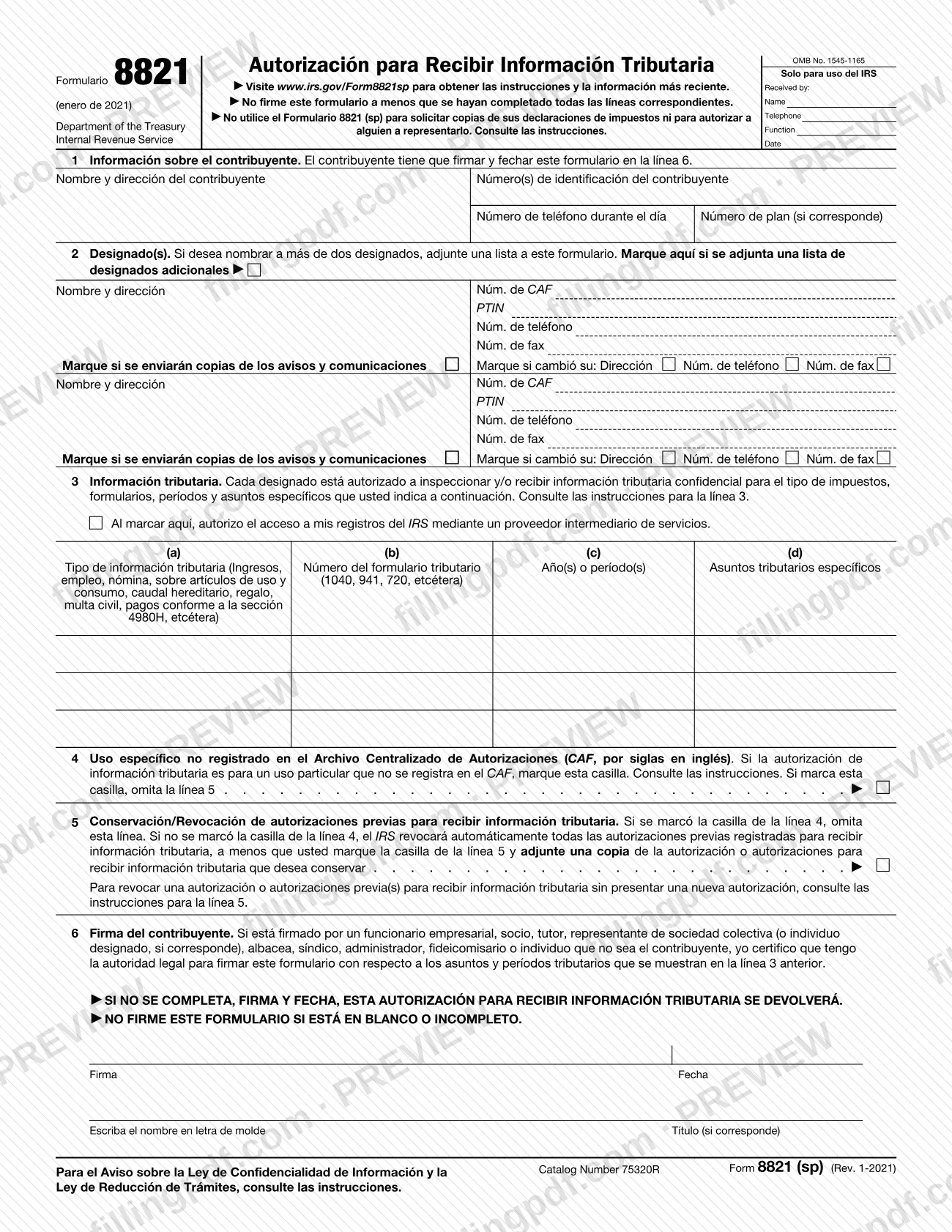
Form 8821 (sp), Tax Information Authorization (Spanish Version), is the Spanish-language edition of the form the Internal Revenue Service (IRS) uses to let a taxpayer name a person or organization who may inspect or receive confidential tax information. It is printed under the title Autorización para Recibir Información Tributaria. You use it to list each designee and the taxes, forms, periods and matters the designee may see. On this page you can fill out the form online on FillingPDF and download or print the completed PDF; the original form and instructions are published by the IRS, and the form itself points to www.irs.gov/Form8821sp.
Last updated
What is 8821 (sp)?
Form 8821 (sp), Tax Information Authorization (Spanish Version), is the Spanish-language edition of the IRS form on which a taxpayer authorizes a designated person or organization to inspect or receive confidential tax information for the taxes, periods and matters listed on line 3.
The form is issued by the Internal Revenue Service (IRS), Department of the Treasury, under OMB No. 1545-1165. Its printed title is Autorización para Recibir Información Tributaria. A properly completed authorization is normally recorded on the IRS Centralized Authorization File (CAF), and the designee can then receive your information verbally or in writing. The IRS instructions add that a designee with a valid Form 8821 on file can also get online tax information through IRS.gov/eServices. The same form is used to revoke earlier authorizations.
What it does not do matters as much. The form states that you must not use it to request copies of your tax returns or to authorize someone to represent you. The instructions explain that it does not let the designee speak for you, sign waivers, consents or closing agreements, or advocate your position; for representation before the IRS use Form 2848, Power of Attorney and Declaration of Representative. A designee can never endorse or negotiate your refund check or receive your refund by direct deposit. To get a copy of return information, the instructions point to IRS transcripts, Form 4506-T, Form 4506T-EZ or Form 4506.
Who needs to file 8821 (sp)?
A taxpayer who wants the IRS to share confidential tax information with someone else completes Form 8821 (sp). The taxpayer can be:
- an individual, who enters their name, TIN and street address on line 1;
- a corporation, partnership or association, with its name, EIN and business address;
- an employee plan or exempt organization, including the plan number when applicable;
- a trust, an estate, or a bond issuer for tax-advantaged bonds.
The designee can be any individual, corporation, firm, organization or partnership. You may name up to two designees on the form and attach a list for more.
Someone other than the taxpayer may sign only with legal authority, which the signer certifies on line 6. The instructions say a corporate officer with authority to bind the corporation, a trustee with authority to bind the trust, an executor with authority to bind the estate, or a partnership member for the covered period may sign. For other situations, such as a taxpayer who has died or a guardian, the IRS generally requires documentation of the signer's status and authority.
If you filed a joint return, your spouse or former spouse must submit a separate Form 8821. Do not use this form to authorize representation or to order copies of returns.
When to file 8821 (sp)
File Form 8821 (sp) whenever you want a designee to be able to inspect or receive your confidential tax information; the form has no annual due date. One time limit applies: if you submit it for a purpose other than addressing or resolving a tax matter with the IRS, such as income verification required by a lender, the IRS must receive it within 120 days of the date you signed it. That 120-day rule does not apply to a form submitted for help with a tax matter with the IRS.
On line 3 you may list the current period, periods that have ended and future periods, but the IRS does not record future periods that go beyond 3 years from December 31 of the year it receives the authorization.
Unless you check the line 4 or line 5 box, a new Form 8821 automatically revokes earlier authorizations on file. The IRS says processing may be delayed, processes forms in the order received and does not notify you when a form is processed; the IRS Form 2848 and 8821 processing status page gives an estimate.
Documents you need
- Copies of any earlier tax information authorizations you want to keep, only if you check the line 5 box; otherwise the IRS revokes the authorizations on file.
- A list of additional designees, only if you name more than two; check the box on line 2 and include each designee's address and requested numbers.
- Documentation of the signer's status and authority, generally required when someone other than the taxpayer signs, such as for a deceased or insolvent taxpayer or a guardian, executor, receiver or administrator.
- Form 56, Notice Concerning Fiduciary Relationship, only for a trust that has not previously submitted it to identify the current trustee, or for an estate to identify the executor.
- A copy of the prior authorization marked "REVOKE" at the top, with a current signature and date under the original signature, only if you revoke an authorization without filing a new one.
How to fill out 8821 (sp)
Enter the taxpayer information
On line 1 (Información sobre el contribuyente), enter the taxpayer's name, address, taxpayer identification number(s) and daytime telephone number. Add the plan number if the taxpayer is an employee plan; do not put a designee's details here.
Enter each designee
On line 2 (Designado(s)), enter the designee's full name and mailing address, using the same full name on all submissions. Add the telephone and fax numbers and the PTIN if the designee has one.
Add the CAF number
Enter the designee's nine-digit CAF number if one was assigned for an earlier Form 8821 or Form 2848. If none was assigned, enter "NONE" and the IRS will issue one.
Set the designee options
Check the box under the designee's name only if the designee should receive copies of notices and communications the IRS sends you, for no more than two designees per matter. Check the box that shows a new address, telephone or fax number since the CAF number was issued.
Attach a list for extra designees
If you want more than two designees, check the box on line 2 and attach a list with each designee's address and requested numbers.
Describe the tax information on line 3
In columns (a) to (c), enter the type of tax information, the form number and the years or periods, for example "Income, 1040" for a calendar year. For ranges write "2017 thru 2019"; for fiscal years use YYYYMM. Do not use general references, and for an estate tax matter enter the decedent's date of death.
Limit or specify the matter
In column (d), enter any specific information you want provided, such as lien information or a balance due, or "not applicable" if you are not limiting the designee. For civil penalty only, write "civil penalty" in column (a) and "N/A" in column (b).
Decide on intermediary service providers
Check the line 3 box only if you authorize access to your IRS records through an intermediary service provider. Without it, the designee gets your information directly from the IRS.
Check line 4 for a specific use
Check the line 4 box only if the authorization is for a specific use the IRS does not record on the CAF, such as disclosure to a loan company or an educational institution. If you check it, skip line 5.
Complete line 5 if needed
If line 4 is unchecked, the IRS revokes all prior authorizations unless you check the line 5 box and attach a copy of each one you want to keep. To revoke without a new authorization, follow the instructions for line 5.
Sign, date and print the name
On line 6 (Firma del contribuyente), the taxpayer signs and dates and prints the name; add the title if signing for an entity. Handwrite the signature if you file by mail or fax.
Review and download the PDF
Confirm that every applicable line is complete and that line 3 has no general references. Download or print the completed PDF from FillingPDF and submit it as described under How to submit.
How to submit 8821 (sp)
You can submit Form 8821 (sp) online, by fax or by mail.
- Online: upload it at IRS.gov/Submit8821. You need a Secure Access account (IRS.gov/SecureAccess). Submit one form at a time, even for spouses filing jointly, and save any attachment in the same file as the form (PDF, JPG or GIF). Electronic signatures are accepted only online. You receive an email when the form is received. If you already faxed or mailed it, do not submit it online.
- Fax or mail: use the address or fax number for your state in the Where To File chart of the IRS instructions. The form needs a handwritten signature; typed or digital signatures are not valid. The numbers may change without notice.
- Memphis: Internal Revenue Service, 5333 Getwell Road, Stop 8423, Memphis, TN 38118; fax 855-214-7519. For Alabama, Arkansas, Connecticut, Delaware, District of Columbia, Florida, Georgia, Illinois, Indiana, Kentucky, Louisiana, Maine, Maryland, Massachusetts, Michigan, Mississippi, New Hampshire, New Jersey, New York, North Carolina, Ohio, Pennsylvania, Rhode Island, South Carolina, Tennessee, Vermont, Virginia and West Virginia.
- Ogden: Internal Revenue Service, 1973 Rulon White Blvd., MS 6737, Ogden, UT 84201; fax 855-214-7522. For Alaska, Arizona, California, Colorado, Hawaii, Idaho, Iowa, Kansas, Minnesota, Missouri, Montana, Nebraska, Nevada, New Mexico, North Dakota, Oklahoma, Oregon, South Dakota, Texas, Utah, Washington, Wisconsin and Wyoming.
- Philadelphia: Internal Revenue Service, International CAF Team, 2970 Market Street, MS 4-H14.123, Philadelphia, PA 19104; fax 855-772-3156 (304-707-9785 outside the United States). For APO and FPO addresses, American Samoa, the Northern Mariana Islands, Guam, the U.S. Virgin Islands, Puerto Rico, a foreign country, or otherwise outside the United States.
If you checked the line 4 box, mail or fax the form to the IRS office handling the specific matter. FillingPDF lets you fill out and download the PDF; submission follows the channels above.
Common mistakes to avoid
- Writing "All years," "All periods" or "All taxes" on line 3; the instructions say an authorization with a general reference will be returned.
- Signing and dating the form while it is blank or incomplete, or leaving line 6 unsigned or undated; the IRS returns the authorization.
- Forgetting to check the line 5 box and attach copies of earlier authorizations you want to keep; they are automatically revoked.
- Mailing or faxing a form with a typed, digital or electronic signature; those are valid only when the form is submitted online.
- Using Form 8821 (sp) to appoint a representative or to order copies of returns; the form says to use Form 2848 or the transcript and copy forms instead.
- Naming more than two designees without checking the line 2 box and attaching a list.
- Expecting one form to cover a spouse on a joint return; the spouse must submit a separate Form 8821.
- Completing line 5 after checking the line 4 box for a specific use not recorded on the CAF; the form says to skip line 5.
- Entering a designee's details in the taxpayer box on line 1.
Frequently asked questions
What is Form 8821 (sp) used for?
Form 8821 (sp) is the Spanish-language IRS Tax Information Authorization. You use it to let a designee inspect or receive your confidential tax information for the taxes, forms, periods and matters you list on line 3. It can also revoke earlier authorizations.
What is the difference between Form 8821 and Form 2848?
Form 8821 only lets your designee see or receive your tax information. It does not let that person speak for you, sign waivers or consents, or represent you before the IRS. To authorize an individual to represent you, use Form 2848, Power of Attorney and Declaration of Representative.
Can I sign Form 8821 (sp) electronically?
Only if you submit it online at IRS.gov/Submit8821. Forms mailed or faxed must carry a handwritten signature, and digital, electronic or typed-font signatures are not valid for those channels. Accepted electronic methods online include a typed name or a scanned image of a handwritten signature.
How long is Form 8821 valid after I sign it?
If you submit it for a purpose other than resolving a tax matter with the IRS, such as lender income verification, the IRS must receive it within 120 days of your signature date. The rule does not apply to forms for help with a tax matter with the IRS.
Where do I send Form 8821 (sp)?
Upload it at IRS.gov/Submit8821, or fax or mail it to the address in the Where To File chart for your state: Memphis, Ogden, or the International CAF Team in Philadelphia for addresses outside the United States. If you checked the line 4 box, send it to the IRS office handling the matter.
How do I revoke a tax information authorization?
Write "REVOKE" across the top of the authorization, then add a current signature and date under the original signature. Without a copy, send the IRS a signed, dated notice naming each designee, the matters and periods, or "revoke all years/periods".
Can I list "all years" on line 3?
No. The instructions say an authorization with a general reference such as "All years," "All periods" or "All taxes" is returned. List the specific tax type, form number and years or periods, for example "Income, 1040" and "2017 thru 2019."
How long does the IRS take to process Form 8821?
The IRS gives no fixed time on its pages. It processes forms in the order received, whether online, by fax or by mail, and does not notify you when the form is processed. Online filers get an email confirming receipt; check the IRS Form 2848 and 8821 processing status page for an estimate.
Can I fill out Form 8821 (sp) online on FillingPDF?
Yes. You can fill out the PDF online on FillingPDF and download or print it. FillingPDF is an independent service and does not submit the form to the IRS; you send it through the IRS online, fax or mail channels.
Ready to fill out 8821 (sp)?
Fill out 8821 (sp) now