
Form 8822, Change of Address, is the Internal Revenue Service (IRS) form for telling the agency that your home mailing address has changed. It covers individual income tax returns and gift, estate, or generation-skipping transfer tax returns, and it is not attached to a tax return. On FillingPDF you can fill out Form 8822 online and download or print the completed PDF; the IRS publishes the original form at irs.gov and you send the finished page to the address that applies to you.
Last updated
What is Form 8822?
Form 8822, Change of Address is the IRS form you use to notify the Internal Revenue Service that you changed your home mailing address. It applies to individual, gift, estate, and generation-skipping transfer tax returns.
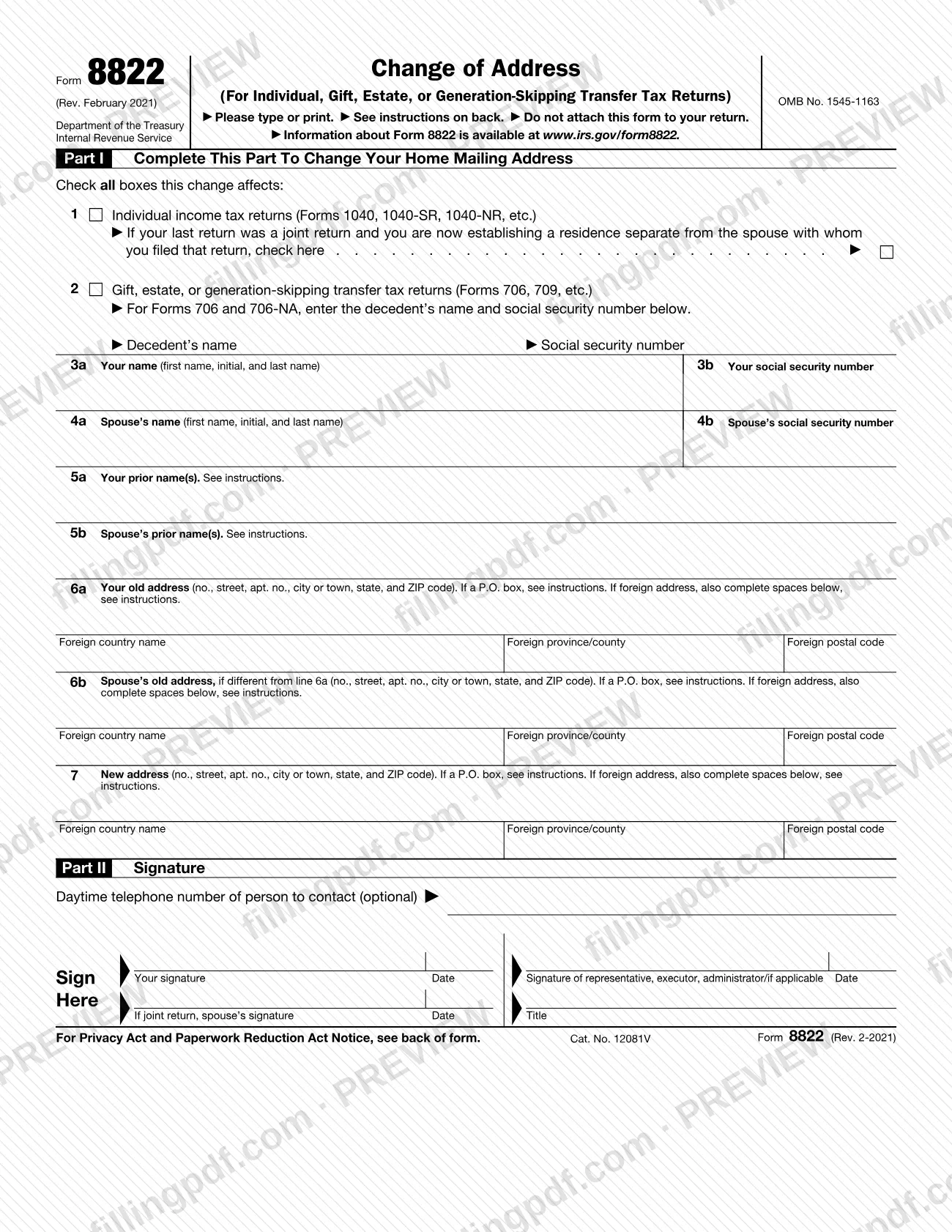
The form has two parts. Part I records which returns the change affects (line 1 for individual income tax returns such as Forms 1040, 1040-SR and 1040-NR; line 2 for gift, estate, or generation-skipping transfer tax returns such as Forms 706 and 709), your name and Social Security number, your spouse's if applicable, any prior names, your old address, and your new address. Part II is the signature block.
The form says not to attach it to your return. It is mailed on its own to the IRS address that depends on where you lived, as explained under Where To File on page 2 of the form.
Form 8822 changes a home address only. If you are changing both home and business addresses, the form directs you to Form 8822-B to change your business address. The IRS agency page for the form describes Form 8822-B as the change of address or responsible party form for businesses. The form carries OMB No. 1545-1163 and the revision printed on it is Rev. February 2021.
Who needs to file Form 8822?
You use Form 8822 if you changed your home mailing address and want the IRS to update it for your individual income tax returns, your gift, estate, or generation-skipping transfer tax returns, or both. Check every box on Part I that the change affects.
- Individual filers (line 1): check the box if the change affects your individual income tax returns. If your last return was a joint return and you are now establishing a residence separate from the spouse you filed with, check the additional box on line 1.
- Gift, estate, and generation-skipping transfer tax filers (line 2): for Forms 706 and 706-NA, also enter the decedent's name and Social Security number.
- Parents of children who filed returns: if the change also affects the mailing address for your children who filed income tax returns, complete and file a separate Form 8822 for each child.
- Representatives: a taxpayer, executor, donor, or authorized representative must sign. A representative must attach a copy of the power of attorney, and the IRS will not complete an address change from an "unauthorized" third party.
Do not use Form 8822 to change a business address; use Form 8822-B.
When to file Form 8822
Send Form 8822 after your home mailing address changes. The form prints no due date, but it explains why timing matters: if the IRS does not have your current mailing address, you may not receive a notice of deficiency or a notice and demand for tax, and penalties and interest continue to accrue on the tax deficiency even though you did not receive the notice.
The form says it generally takes 4 to 6 weeks to process a change of address. If your last return was a joint return and you are now establishing a separate residence, file with the line 1 separate-residence box checked so each spouse's address is handled separately.
If you or your spouse changed your name because of marriage, divorce, or a similar event, complete line 5 and notify the Social Security Administration of the new name as well.
Documents you need
- A copy of the power of attorney, attached to Form 8822, only if a representative signs on behalf of the taxpayer; you can use Form 2848 for this.
How to fill out Form 8822
Check the returns the change affects
In Part I, check line 1 for individual income tax returns, line 2 for gift, estate, or generation-skipping transfer tax returns, or both. Check all boxes this change affects.
Mark a separate residence if needed
Under line 1, check the box only if your last return was a joint return and you are now establishing a residence separate from the spouse with whom you filed it.
Enter decedent details for Forms 706
If you checked line 2 for Forms 706 and 706-NA, enter the decedent's name and Social Security number in the spaces below line 2.
Enter your name and SSN
On lines 3a and 3b, enter your first name, initial and last name and your Social Security number.
Enter your spouse's details
On lines 4a and 4b, enter your spouse's name and Social Security number if your last return was a joint return.
List any prior names
On lines 5a and 5b, enter your prior names and your spouse's, if either of you changed names because of marriage, divorce, or a similar event.
Enter your old address
On line 6a, enter number, street, apartment number, city or town, state and ZIP code. For a foreign address, also fill in the foreign country name (not abbreviated), province/county and postal code.
Add your spouse's old address
On line 6b, enter your spouse's old address only if it is different from line 6a.
Enter your new address
On line 7, enter the new mailing address, including any apartment, room or suite number. Use a P.O. box only if your post office does not deliver to your street address, or "C/O" plus a third party's name for in-care-of mail.
Sign, date and add a phone number
In Part II, sign and date. On a joint return, your spouse also signs. A representative, executor or administrator signs on the representative line with a title and attaches the power of attorney. A daytime telephone number is optional.
Review and download the PDF
Check the names, Social Security numbers and addresses, then download or print the completed PDF from FillingPDF. Mail it to the address that applies to you, as described under How to submit, without attaching it to a return.
How to submit Form 8822
Form 8822 is submitted by mail. The form lists no portal or other channel, and it says not to attach the form to your return. Where you send it depends on line 2 and on your old home mailing address.
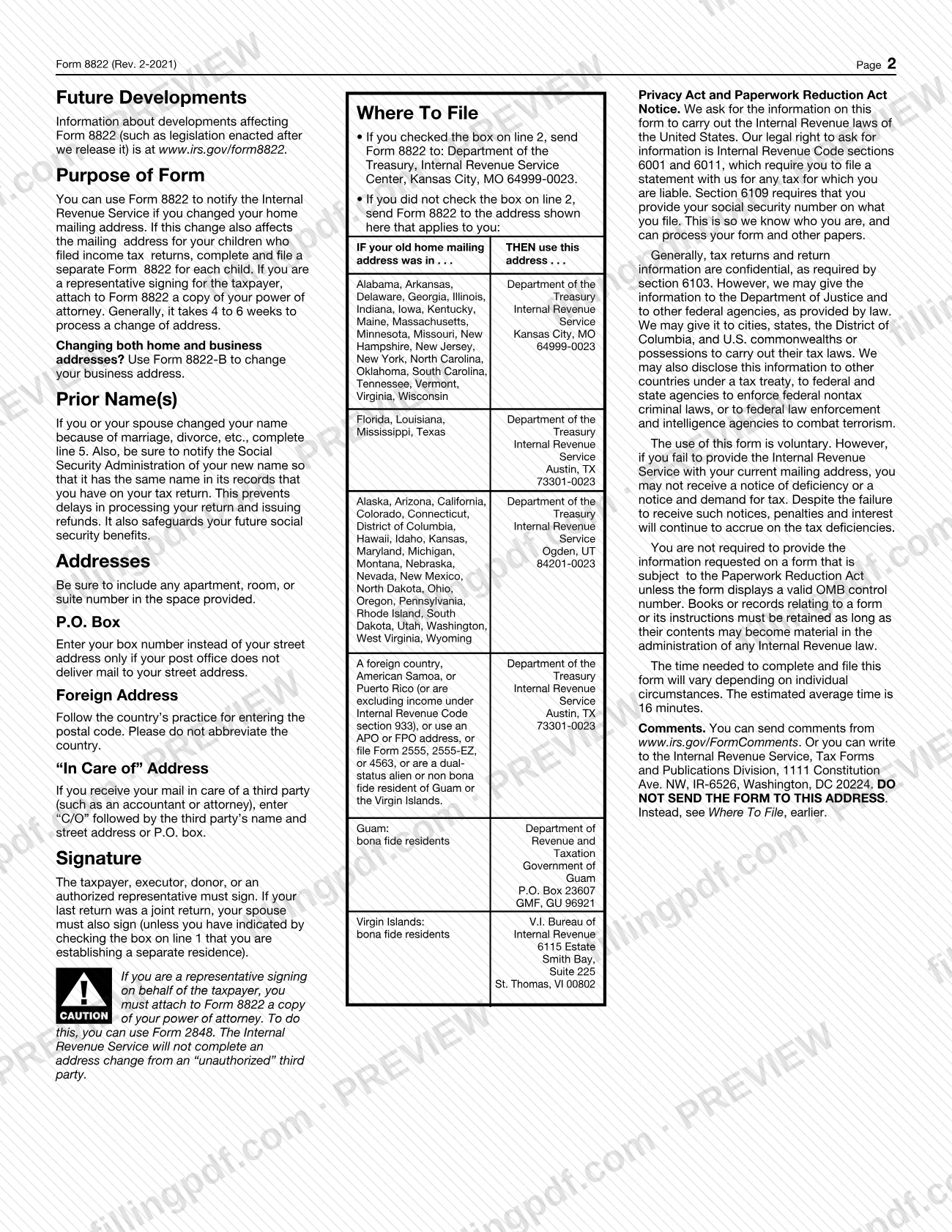
- If you checked the box on line 2: Department of the Treasury, Internal Revenue Service Center, Kansas City, MO 64999-0023.
- If you did not check line 2, use the address for your old state:
- Alabama, Arkansas, Delaware, Georgia, Illinois, Indiana, Iowa, Kentucky, Maine, Massachusetts, Minnesota, Missouri, New Hampshire, New Jersey, New York, North Carolina, Oklahoma, South Carolina, Tennessee, Vermont, Virginia, Wisconsin: Department of the Treasury, Internal Revenue Service, Kansas City, MO 64999-0023.
- Florida, Louisiana, Mississippi, Texas: Department of the Treasury, Internal Revenue Service, Austin, TX 73301-0023.
- Alaska, Arizona, California, Colorado, Connecticut, District of Columbia, Hawaii, Idaho, Kansas, Maryland, Michigan, Montana, Nebraska, Nevada, New Mexico, North Dakota, Ohio, Oregon, Pennsylvania, Rhode Island, South Dakota, Utah, Washington, West Virginia, Wyoming: Department of the Treasury, Internal Revenue Service, Ogden, UT 84201-0023.
- Foreign country, American Samoa, Puerto Rico (or excluding income under section 933), APO or FPO addresses, filers of Form 2555, 2555-EZ or 4563, and dual-status aliens or non bona fide residents of Guam or the Virgin Islands: Department of the Treasury, Internal Revenue Service, Austin, TX 73301-0023.
- Bona fide residents of Guam: Department of Revenue and Taxation, Government of Guam, P.O. Box 23607, GMF, GU 96921.
- Bona fide residents of the Virgin Islands: V.I. Bureau of Internal Revenue, 6115 Estate Smith Bay, Suite 225, St. Thomas, VI 00802.
If a representative signs, attach a copy of the power of attorney. FillingPDF lets you fill out and download the PDF; submission follows the channels above.
Common mistakes to avoid
- Attaching Form 8822 to your tax return; the form says not to attach it to your return.
- Mailing the form to the wrong IRS address instead of the one that matches your old home mailing address, or Kansas City when line 2 is checked.
- Using Form 8822 to change a business address; the form directs you to Form 8822-B for that.
- Signing as a representative without attaching a copy of your power of attorney; the IRS will not complete a change from an unauthorized third party.
- Leaving out the spouse's signature when your last return was a joint return, unless the line 1 separate-residence box is checked.
- Entering a P.O. box when your post office delivers mail to your street address.
- Abbreviating the country name on a foreign address instead of spelling it out.
- Omitting the apartment, room, or suite number from the old or new address.
- Using one Form 8822 for a child who filed a return instead of completing a separate form for each child.
Frequently asked questions
What is Form 8822 used for?
Form 8822 is the IRS form for notifying the agency that your home mailing address changed. It covers individual income tax returns and gift, estate, and generation-skipping transfer tax returns. It does not change a business address.
Where do I mail Form 8822?
Mail it to the IRS address for your old home mailing address: Kansas City, MO 64999-0023, Austin, TX 73301-0023 or Ogden, UT 84201-0023, depending on your state. If you checked line 2, send it to Kansas City. The full list is on page 2 of the form.
Do I attach Form 8822 to my tax return?
No. The form says not to attach it to your return. Mail it separately to the IRS address that applies to you, and enter your new address on your return as the instructions for that return direct.
How long does an IRS change of address take?
The instructions on Form 8822 say it generally takes 4 to 6 weeks to process a change of address. The form gives no separate way to check status.
Can I fill out Form 8822 online?
You can fill out the PDF online on FillingPDF and download or print it. FillingPDF is an independent service and does not send the form to the IRS; you mail the completed Form 8822 to the address that applies to you.
What is the difference between Form 8822 and Form 8822-B?
Form 8822 changes your home mailing address for individual, gift, estate, or generation-skipping transfer tax returns. Form 8822-B changes a business address, and the IRS tells filers changing both home and business addresses to use it for the business address.
Can someone else sign Form 8822 for me?
Yes, an authorized representative can sign, but must attach a copy of a power of attorney; Form 2848 can be used. The IRS will not complete an address change from an unauthorized third party.
Does my spouse have to sign Form 8822?
If your last return was a joint return, your spouse must also sign, unless you check the box on line 1 showing that you are establishing a separate residence.
What happens if I do not tell the IRS my new address?
You may not receive a notice of deficiency or a notice and demand for tax. The form states that penalties and interest continue to accrue on the tax deficiency even if you do not receive those notices.
Ready to fill out Form 8822?
Fill out Form 8822 now