
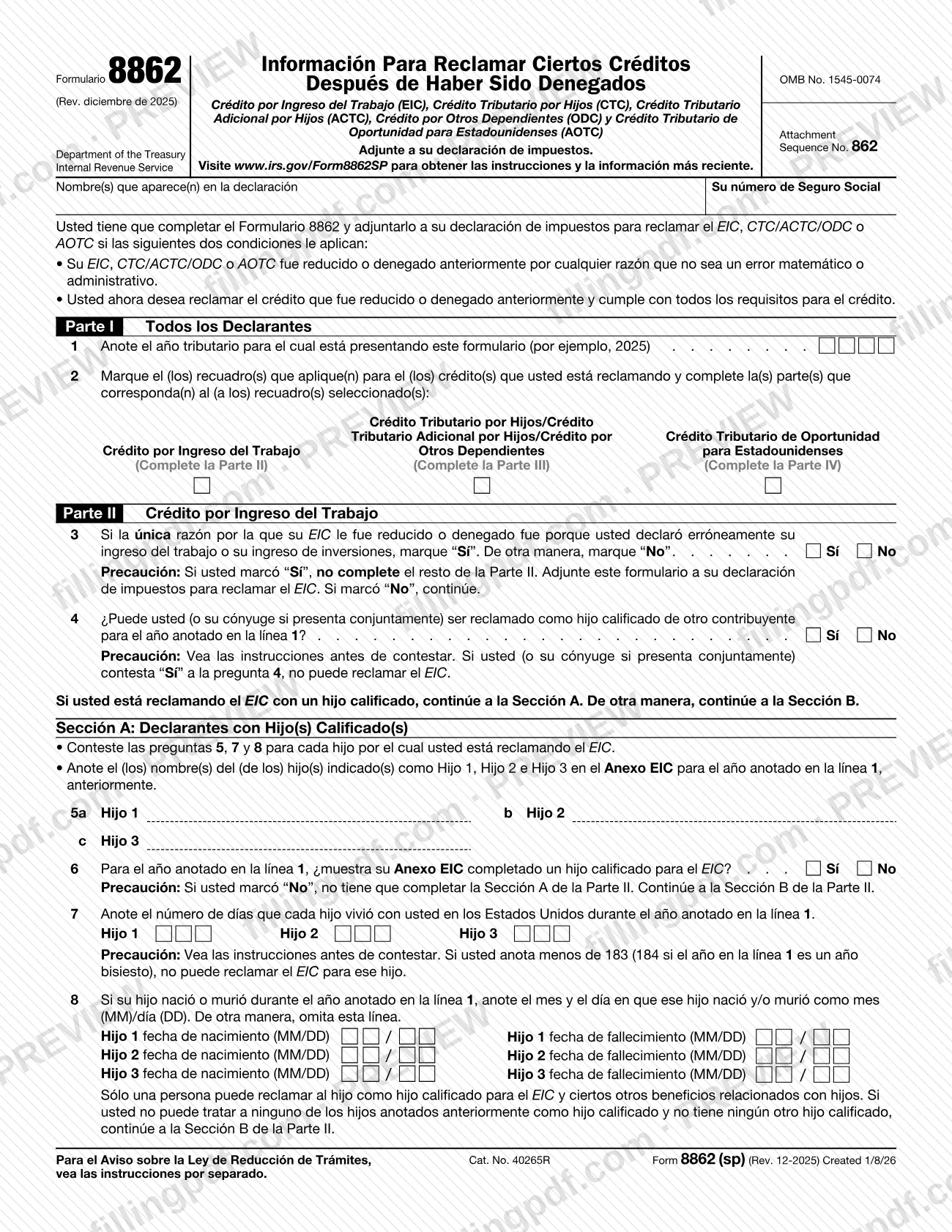
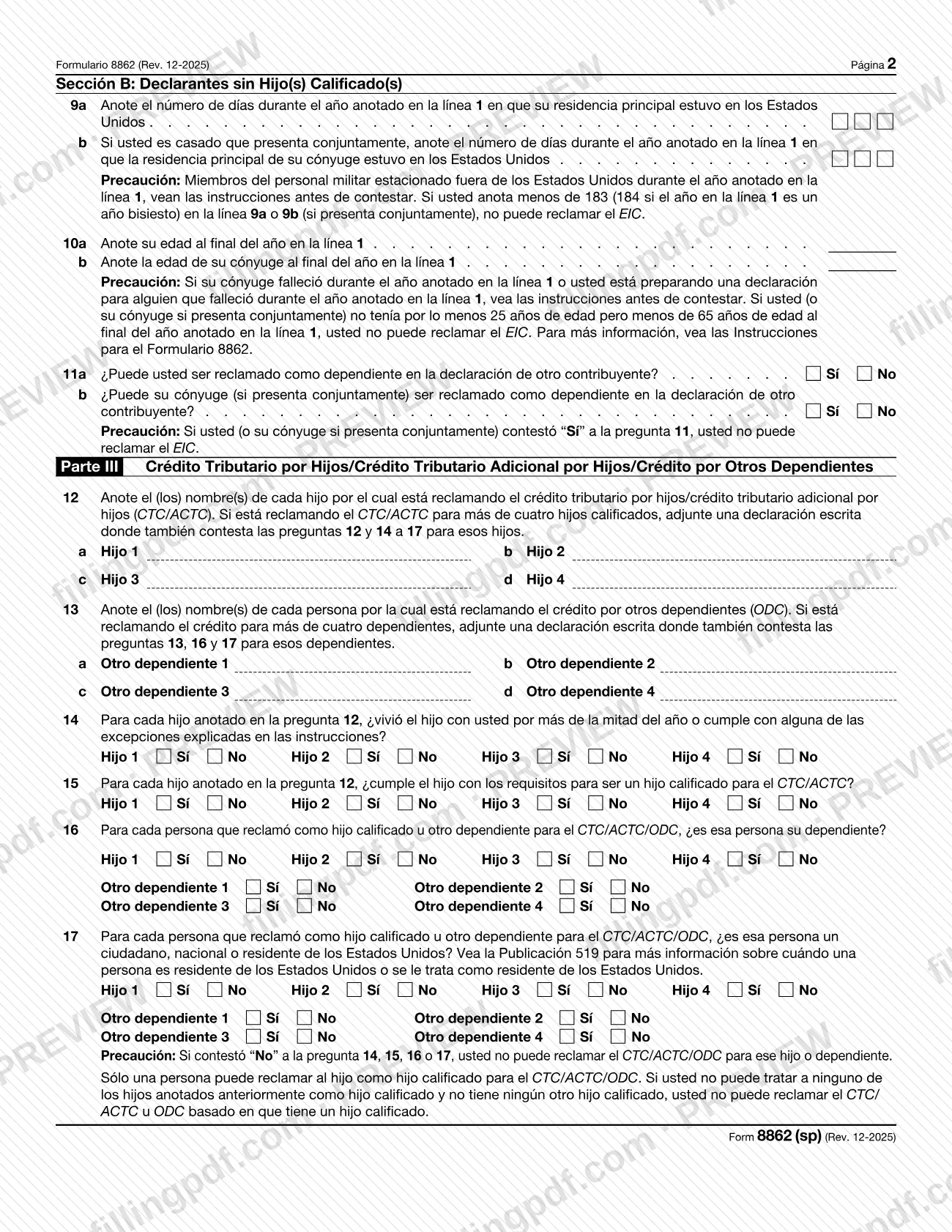
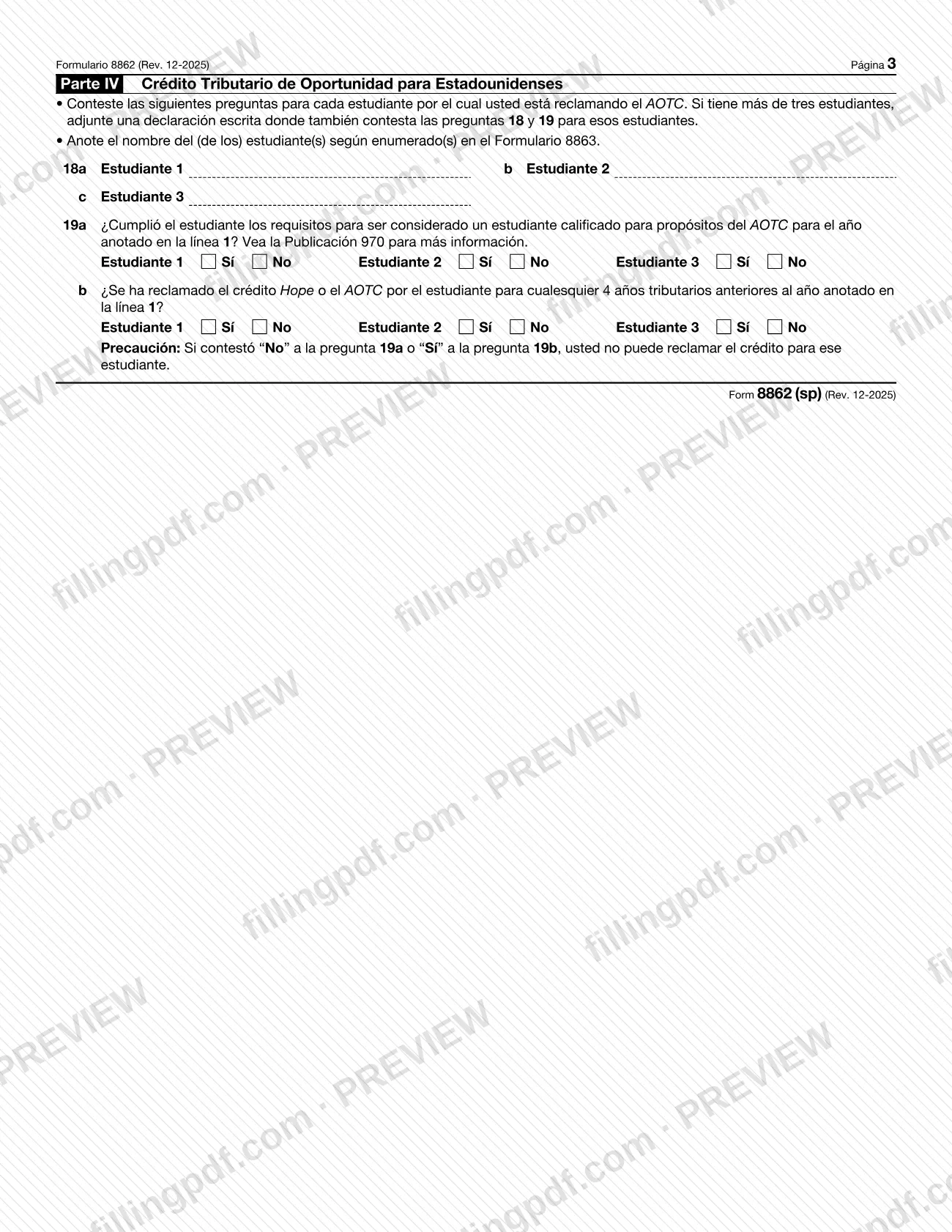
Form 8862 (sp), Information To Claim Certain Credits After Disallowance (Spanish Version), is the Spanish-language edition of the form the Internal Revenue Service (IRS) uses to let you claim the earned income credit (EIC), child tax credit (CTC), additional child tax credit (ACTC), credit for other dependents (ODC) or American opportunity tax credit (AOTC) after an earlier reduction or denial. You attach it to your tax return. On this page you can fill out the form online on FillingPDF and download or print the completed PDF; the IRS publishes the form and its instructions at IRS.gov/Form8862SP.
Last updated
What is Form 8862 (sp)?
Form 8862 (sp), Information To Claim Certain Credits After Disallowance (Spanish Version), is the Spanish-language IRS form attached to a tax return to claim the EIC, CTC/ACTC, ODC or AOTC after the credit was reduced or denied.
The form is printed in Spanish as Formulario 8862, Información Para Reclamar Ciertos Créditos Después de Haber Sido Denegados, under OMB No. 1545-0074 and Attachment Sequence No. 862. It is issued by the Internal Revenue Service (IRS), part of the Department of the Treasury, and is read with the Instructions for Form 8862 (sp) (Rev. 12-2025).
The form is organized in four parts:
- Part I: all filers give the tax year and check the credit or credits they are claiming (line 2).
- Part II: earned income credit, with Section A for filers with a qualifying child and Section B for filers without one.
- Part III: child tax credit, additional child tax credit and credit for other dependents.
- Part IV: American opportunity tax credit, answered for each student.
You complete only the parts that match the boxes you check on line 2. The form is a certification of eligibility for the tax year on line 1. It is not a tax return and is not filed on its own.
Who needs to file Form 8862 (sp)?
You must complete Form 8862 (sp) and attach it to your tax return to claim the EIC, CTC/ACTC/ODC or AOTC if both conditions printed on the form apply: the credit was previously reduced or denied for any reason other than a math or clerical error, and you now want to claim it and meet all the requirements.
The instructions list the years covered:
- EIC reduced or denied for a year after 1996.
- CTC, RCTC (available only for 2021), ACTC or ODC reduced or denied for a year after 2015.
- AOTC reduced or denied for a year after 2015.
Do not file Form 8862 (sp) if:
- After an earlier reduction or denial you filed Form 8862 (or other documents), the credit was approved, and it has not been reduced or denied again for a reason other than a math or clerical error.
- You claim the EIC without a qualifying child, and the only reason it was reduced or denied the prior year was that a child listed on Schedule EIC was not your qualifying child.
- You are within 2 years of a final determination of reckless or intentional disregard of the rules, or within 10 years of a final determination of fraud, unless you disagree and want to appeal the ban, in which case you file the form.
When to file Form 8862 (sp)
File Form 8862 (sp) with the tax return on which you want to claim the credit again, as soon as the credit was previously reduced or denied and you now meet all the requirements. The form has no due date of its own: it follows the due date of the return it is attached to.
On line 1, enter the tax year of the return you are filing, for example 2025, not the year in which the credit was denied.
The instructions bar filing the form for 2 years after the most recent tax year with a final determination of reckless or intentional disregard of the rules, and for 10 years after one based on fraud. To appeal that ban, you file Form 8862 with a return for a later tax year within the ban period for which you would otherwise be eligible.
The IRS cannot issue refunds before mid-February on returns that claim the EIC or ACTC. The instructions say this applies to your entire refund, not just the part tied to these credits.
Documents you need
- Your tax return for the year on line 1: Form 8862 (sp) is attached to it, and the form says to attach it to your tax return.
- Every schedule and form that applies to each credit you claim, as the instructions require for each credit on your return.
- Schedule EIC (Form 1040), if you claim the EIC with a qualifying child: the child names on lines 5a to 5c must be those listed on Schedule EIC.
- Form 8863, if you claim the AOTC: enter each student's name on lines 18a to 18c as listed on Form 8863.
- A written statement answering lines 12 and 14 to 17, if you claim the CTC/ACTC for more than four qualifying children.
- A written statement answering lines 13, 16 and 17, if you claim the ODC for more than four dependents.
- A written statement answering lines 18 and 19, if you claim the AOTC for more than three students.
- Documentation proving you are entitled to the credits, or that your claim was not reckless or intentional disregard (2-year ban) or fraud (10-year ban), if you ask the IRS to reconsider a ban.
How to fill out Form 8862 (sp)
Enter your name and SSN
At the top, write the name(s) shown on your return and your Social Security number. If you have an ITIN, enter it in the space for the Social Security number.
Enter the tax year on line 1
Line 1: the tax year of the return you are filing, for example 2025. Do not enter the year the credit was denied.
Check the credits you claim
Line 2: check the box for each credit you are claiming: earned income credit (Part II), child tax credit/additional child tax credit/credit for other dependents (Part III) or American opportunity tax credit (Part IV). Complete only the matching parts.
Answer the EIC questions in Part II
Line 3: check Sí only if the sole reason the EIC was reduced or denied was a misreported earned or investment income; otherwise No. Line 4: say whether you (or your spouse, if filing jointly) can be claimed as a qualifying child of another taxpayer.
Name children in Section A
If you claim the EIC with a qualifying child, enter Hijo 1, Hijo 2 and Hijo 3 on lines 5a to 5c as listed on Schedule EIC. On line 6, say whether your completed Schedule EIC shows a qualifying child.
Enter days and dates for each child
Line 7: days each child lived with you in the United States during the year on line 1. Line 8: month and day (MM/DD) of birth or death, only if the child was born or died that year.
Complete Section B without a child
Lines 9a and 9b: days your main home (and your spouse's, if filing jointly) was in the United States. Lines 10a and 10b: ages at year end. Lines 11a and 11b: whether you or your spouse can be claimed as a dependent.
List children and dependents in Part III
Line 12: names of each child for the CTC/ACTC, up to four. Line 13: names of each person for the ODC, up to four. Attach a written statement for more than four.
Answer lines 14 to 17
For each person listed, check Sí or No: lived with you more than half the year (line 14), qualifying child for the CTC/ACTC (line 15), your dependent (line 16), and U.S. citizen, national or resident (line 17). A No on any of these means you cannot claim the credit for that person.
Complete Part IV for students
Lines 18a to 18c: student names as listed on Form 8863. Line 19a: whether each was a qualifying student for the AOTC. Line 19b: whether the Hope credit or AOTC was claimed for any 4 earlier tax years.
Review and download the completed PDF
Check each answer and the attachments you need. Download or print the completed PDF from FillingPDF, attach it to your tax return and file as described under How to submit.
How to submit Form 8862 (sp)
Form 8862 (sp) is submitted as an attachment to your tax return, so it follows the channel you use to file that return.
- With your tax return: attach the completed form, plus every schedule and form that applies to each credit you claim. The form's header says to attach it to your tax return, and the instructions for that return explain how to file it. The IRS may ask for more information before any refund is issued.
- When appealing a 2-year or 10-year ban: attach Form 8862 (sp) and the related forms and schedules to the return and send that return to the IRS. The instructions say the IRS will reject an electronically filed return that tries to claim a credit during the ban period.
- After you file: you will receive a notice denying the credit because of the ban. Follow its instructions and answer within the time it gives, and in any later notice. The notice describes further steps to appeal to the U.S. Tax Court, the U.S. District Court or the U.S. Court of Federal Claims. See Publication 5.
- If you need more space: attach a written statement at the end of your return with your name and SSN (or ITIN), numbering each item to match the line number on the form.
Instructions and the latest information are at IRS.gov/Form8862SP. FillingPDF lets you fill out and download the PDF; submission follows the channels above.
Common mistakes to avoid
- Entering on line 1 the year the credit was denied; the instructions say to enter the year of the return you are filing, such as 2025.
- Filing the form when an exception applies, such as after a prior Form 8862 led to the credit being approved and it has not been reduced or denied again.
- Completing the rest of Part II after checking Sí on line 3; the form says to attach it to your return and stop if the only reason was misreported earned or investment income.
- Checking No on line 4 when you could be claimed as a qualifying child of another taxpayer, even if that taxpayer does not claim the EIC; the instructions say to check Sí and you cannot claim the EIC.
- Entering fewer than 183 days (184 in a leap year) on line 7, 9a or 9b and still claiming the EIC; the form says you cannot claim it.
- Filling in line 8 when the child was neither born nor died during the year; the form says to skip the line otherwise.
- Leaving out the written statement when claiming the CTC/ACTC or ODC for more than four people, or the AOTC for more than three students.
- E-filing a return that claims a credit during a 2-year or 10-year ban; the IRS says it will reject it.
- Claiming the CTC or ACTC for 2025 for a child who has only an ITIN or ATIN; the instructions say that child is not a qualifying child for those credits.
Frequently asked questions
What is Form 8862 (sp) used for?
Form 8862 (sp) is the Spanish-language IRS form you attach to your tax return to claim the EIC, CTC/ACTC, ODC or AOTC after the credit was reduced or denied for a reason other than a math or clerical error, when you now meet all the requirements.
Do I need to file Form 8862 (sp) with my tax return?
Yes, if your EIC, CTC/ACTC/ODC or AOTC was previously reduced or denied for a reason other than a math or clerical error and you now want to claim it and meet all requirements. The form lists exceptions, so check them before filing.
When should I not file Form 8862 (sp)?
Do not file if a prior Form 8862 led to the credit being approved and it has not been reduced or denied again, or if you claim the EIC without a qualifying child and the only reason for the earlier denial was that a Schedule EIC child was not your qualifying child.
What is the 2-year or 10-year ban on credits?
The instructions bar claiming the credit for 2 years after a final determination of reckless or intentional disregard of the rules, and 10 years after one based on fraud. If you disagree, you file Form 8862 (sp) with a later return to appeal the ban.
Where do I send Form 8862 (sp)?
Attach it to your tax return and file the return through your usual channel. The form lists no separate address. If you claim a credit during a ban period, the IRS says it rejects e-filed returns, so you must send the return to the IRS.
What if I claim credits for more than four children?
Attach a written statement. For the CTC/ACTC with more than four qualifying children, answer lines 12 and 14 to 17 for the extra children. For the ODC with more than four dependents, answer lines 13, 16 and 17. For more than three AOTC students, answer lines 18 and 19.
Can I use an ITIN instead of an SSN with Form 8862 (sp)?
It depends on the credit. The EIC requires a valid SSN. The ODC and AOTC can be claimed with an ITIN issued by the return's due date, including extensions. From 2025, the CTC and ACTC need a valid SSN, with an ITIN allowed for a 2024 or earlier return.
Why is my refund delayed when I claim the EIC or ACTC?
The IRS cannot issue refunds before mid-February on returns that claim the EIC or ACTC, according to the form's instructions. The delay applies to your entire refund, not only the part related to those credits, and the IRS may request more information first.
Can I fill out Form 8862 (sp) online on FillingPDF?
Yes. You can fill out the fillable PDF online on FillingPDF and download or print it. FillingPDF is an independent service and does not file the form or your return with the IRS; you submit it through the IRS channels for your tax return.
Ready to fill out Form 8862 (sp)?
Fill out Form 8862 (sp) now