
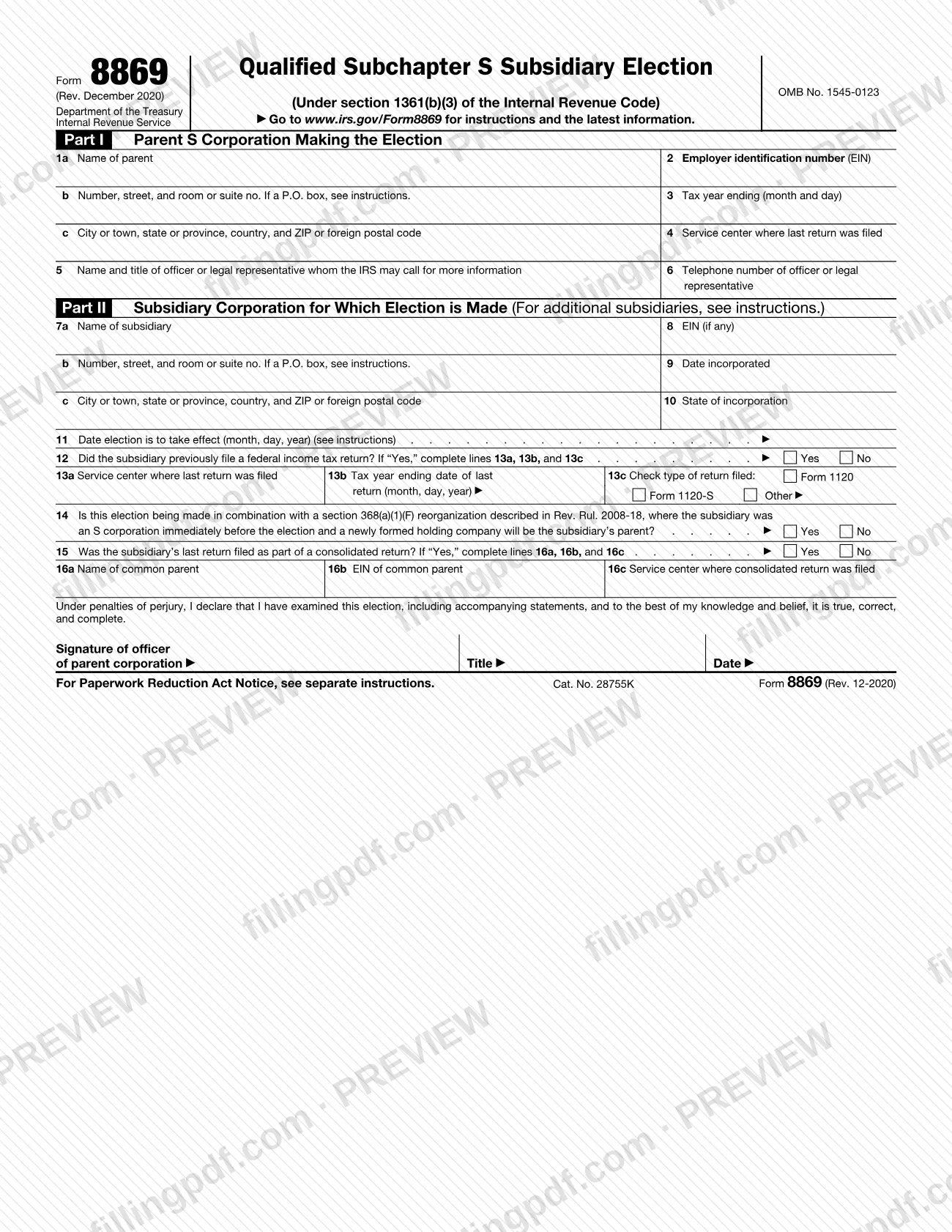
Form 8869 is the Internal Revenue Service (IRS) form a parent S corporation uses to elect to treat one or more eligible subsidiaries as a qualified subchapter S subsidiary (QSub). It is made under section 1361(b)(3) of the Internal Revenue Code and is signed by an officer of the parent. On FillingPDF you can fill out the form online and download or print the completed PDF; the IRS publishes the original form and its instructions at www.irs.gov/Form8869, and the election is filed with the IRS service center described below.
Last updated
What is Form 8869?
Form 8869, Qualified Subchapter S Subsidiary Election, is the IRS form a parent S corporation uses to elect to treat one or more of its eligible subsidiaries as a qualified subchapter S subsidiary (QSub) under section 1361(b)(3) of the Internal Revenue Code.
The election has a specific tax result: a deemed liquidation of the subsidiary into the parent. After it, the QSub is not treated as a separate corporation for federal tax purposes, and all of its assets, liabilities, and items of income, deduction, and credit are treated as those of the parent. Because the liquidation is only deemed, the IRS instructions say not to file Form 966, Corporate Dissolution or Liquidation. A final return for the subsidiary may still be required if it was a separate corporation before the deemed liquidation, but not when the election is made with a reorganization under section 368(a)(1)(F) and Rev. Rul. 2008-18.
The form has two parts. Part I identifies the parent S corporation (lines 1a to 6). Part II identifies the subsidiary, the date the election takes effect, any earlier federal return the subsidiary filed, and the reorganization and consolidated-return questions (lines 7a to 16c). An officer of the parent signs below Part II.
Once made, a QSub election stays in effect until it is terminated. Form 2553, Election by a Small Business Corporation, is a different election; the instructions say the parent does not file it when line 14 applies.
Who needs to file Form 8869?
A parent S corporation files Form 8869 when it wants to treat an eligible subsidiary as a QSub. One form can cover more than one subsidiary if you attach the extra sheets described in the instructions.
An eligible subsidiary is a domestic corporation whose stock is owned 100% by an S corporation. Three kinds of corporation are not eligible:
- a bank or thrift institution that uses the reserve method of accounting for bad debts under section 585;
- an insurance company subject to tax under subchapter L of the Internal Revenue Code;
- a domestic international sales corporation (DISC) or former DISC.
The instructions add that an election is ineffective for a corporation that was formerly eligible but is ineligible when the election is made, even if it is filed within the usual time limits.
The subsidiary itself does not sign. Form 8869 must be signed and dated by the president, vice president, treasurer, assistant treasurer, chief accounting officer, or another corporate officer, such as a tax officer, who is authorized to sign the parent's S corporation return.
If the election is made together with a section 368(a)(1)(F) reorganization described in Rev. Rul. 2008-18, answer Yes on line 14; the parent does not need to file Form 2553.
When to file Form 8869
The parent S corporation can make the QSub election at any time during its tax year, but the effective date you request on line 11 must fall within a window: no more than 12 months after the date the election is filed, and no more than 2 months and 15 days before that date.
An election filed more than 2 months and 15 days after the requested effective date is generally late and takes effect 2 months and 15 days before the filing date. It is still treated as timely if the corporation shows that the failure to file on time was due to reasonable cause. To request that relief, the corporation generally requests a private letter ruling and pays a user fee under Rev. Proc. 2021-1; relief from the ruling and user fee requirements is described in Rev. Proc. 2013-30. An election filed more than 12 months before the requested date is made effective 12 months after the filing date.
For a newly formed subsidiary where you want the election effective on formation, enter the formation date on line 11. The service center generally gives a determination within 60 days after filing.
Documents you need
- One separate sheet for each additional subsidiary, when the election covers more than one: use the same size, format, and line numbers as Part II, with the parent's name and EIN at the top of each sheet.
- An attachment specifying the order of the deemed liquidations, only if you want to set that order for a tiered group of subsidiaries with elections effective on the same date; otherwise the lowest tier is treated first.
How to fill out Form 8869
Enter the parent's name and address
In Part I, line 1a, write the parent S corporation's name. On lines 1b and 1c enter the address, adding the suite or room number after the street; show a P.O. box only if the post office does not deliver to the street address.
Add EIN, tax year and service center
Enter the parent's employer identification number on line 2, the month and day its tax year ends on line 3, and the service center where its last return was filed on line 4.
Name a contact officer
On line 5 give the name and title of the officer or legal representative the IRS may call, and on line 6 that person's telephone number.
Enter the subsidiary's name and address
In Part II, lines 7a to 7c, enter the subsidiary's name and address. If it has the same address as the parent, write "Same as parent".
Complete EIN and incorporation details
Line 8: the subsidiary's EIN, "N/A" if it does not need one, or "Applied For" if it has not yet received it. Line 9: date incorporated. Line 10: state of incorporation.
Set the election's effective date
On line 11, enter the month, day and year the election takes effect. For a new subsidiary that should be covered from formation, enter the formation date.
Report any earlier federal return
Answer line 12. If Yes, give on line 13a the service center where the last return was filed, on line 13b its tax year ending date, and on line 13c the type: Form 1120, Form 1120-S or Other.
Answer the reorganization question
Check Yes on line 14 only if the election is made with a section 368(a)(1)(F) reorganization described in Rev. Rul. 2008-18, where the subsidiary was an S corporation and a newly formed holding company will be its parent. Otherwise check No.
Complete the consolidated return lines
Answer line 15. If the last return was part of a consolidated return, enter on lines 16a to 16c the common parent's name, its EIN, and the service center where the consolidated return was filed.
Attach sheets for more subsidiaries
For each additional subsidiary, prepare a separate sheet in the format of Part II with the parent's name and EIN at the top, and attach it to the form.
Sign and date the election
An authorized officer of the parent signs the penalties-of-perjury declaration, and enters title and date. Allowed signers include the president, vice president, treasurer, assistant treasurer or chief accounting officer.
Review and download the completed PDF
Check names, EINs, dates and the service center against the corporation's records, then download or print the completed PDF from FillingPDF and file it as described under How to submit.
How to submit Form 8869
File Form 8869 with an IRS service center, which depends on which corporation filed its return most recently. The form and instructions print no street address; check www.irs.gov/Form8869 for current filing information.
- Usual rule: file with the service center where the subsidiary filed its most recent return.
- New subsidiary with election effective on formation: if the parent S corporation forms the subsidiary and makes a valid election effective upon formation, file with the service center where the parent filed its most recent return.
After filing, the service center notifies the corporation whether the election is accepted, and when it takes effect, or not accepted. It may also send an administrative letter confirming receipt. If you are not notified within 2 months of the filing (mailing) date, call 800-829-4933.
If the IRS questions whether the form was filed, acceptable proof is a certified or registered mail receipt (timely postmarked) from the U.S. Postal Service, or its equivalent from a designated private delivery service (list at IRS.gov/PDS), a Form 8869 with an accepted stamp, a Form 8869 with a stamped IRS received date, or an IRS letter stating the form was accepted.
FillingPDF lets you fill out and download the PDF; submission follows the IRS channels above.
Common mistakes to avoid
- Filing Form 966, Corporate Dissolution or Liquidation, for the subsidiary; the instructions say not to, because the liquidation is only deemed.
- Leaving the subsidiary's EIN blank on line 8. Enter "N/A" if it has none, or "Applied For" if it has requested one; a missing EIN may bring a notice of delinquent filing to the QSub.
- Requesting an effective date on line 11 more than 12 months after filing or more than 2 months and 15 days before it, which shifts or makes the election late.
- Making the election for a subsidiary that is not 100% owned by the S corporation or is an ineligible corporation, such as a DISC or an insurance company subject to subchapter L.
- Omitting the old EIN on line 8 and the common parent's EIN on line 16b when the subsidiary previously used an EIN on a separate or consolidated return.
- Filing Form 2553 for the parent when the election is made with a section 368(a)(1)(F) reorganization under Rev. Rul. 2008-18; the instructions say none is required.
- Listing several subsidiaries in Part II without attaching a separate sheet for each additional subsidiary.
- Having someone sign who is not a corporate officer authorized to sign the parent's S corporation return.
- Sending the form to the parent's service center when the subsidiary's most recent return went to a different one, unless the election takes effect on formation.
Frequently asked questions
What is Form 8869 used for?
Form 8869 is the IRS election a parent S corporation files to treat an eligible subsidiary as a qualified subchapter S subsidiary (QSub). The election causes a deemed liquidation of the subsidiary into the parent, so the subsidiary's assets, liabilities and tax items are treated as the parent's.
Which subsidiaries are eligible for a QSub election?
A domestic corporation whose stock is 100% owned by an S corporation. Banks or thrifts using the section 585 reserve method, insurance companies taxed under subchapter L, and DISCs or former DISCs are not eligible, per the IRS instructions.
What is the deadline to file Form 8869?
File no earlier than 12 months before and no later than 2 months and 15 days after the effective date you request on line 11. Later filings are generally late, but may be accepted as timely if the corporation shows reasonable cause.
Where do I file Form 8869?
File it with the IRS service center where the subsidiary filed its most recent return. If the parent forms the subsidiary and makes the election effective on formation, file with the service center where the parent filed its most recent return.
Do I need to file Form 966 with Form 8869?
No. The instructions say not to file Form 966, Corporate Dissolution or Liquidation, because the QSub election causes only a deemed liquidation. A final return for the subsidiary may still be required in some cases.
What do I enter on line 8 if the subsidiary has no EIN?
Enter "N/A" if the QSub is not required to have an EIN, or "Applied For" if it has applied but not yet received one. If it previously used an EIN on a return, enter that EIN instead.
How do I know if the IRS accepted my QSub election?
The service center notifies the corporation whether the election is accepted or not, generally within 60 days. If you have not heard within 2 months of the filing date, call 800-829-4933. Keep proof of filing in case the IRS questions it.
Can I fill out Form 8869 online on FillingPDF?
Yes, you can fill out the PDF online on FillingPDF and download or print it. FillingPDF is an independent service and does not file the election with the IRS; you file it with the IRS service center yourself.
Ready to fill out Form 8869?
Fill out Form 8869 now