
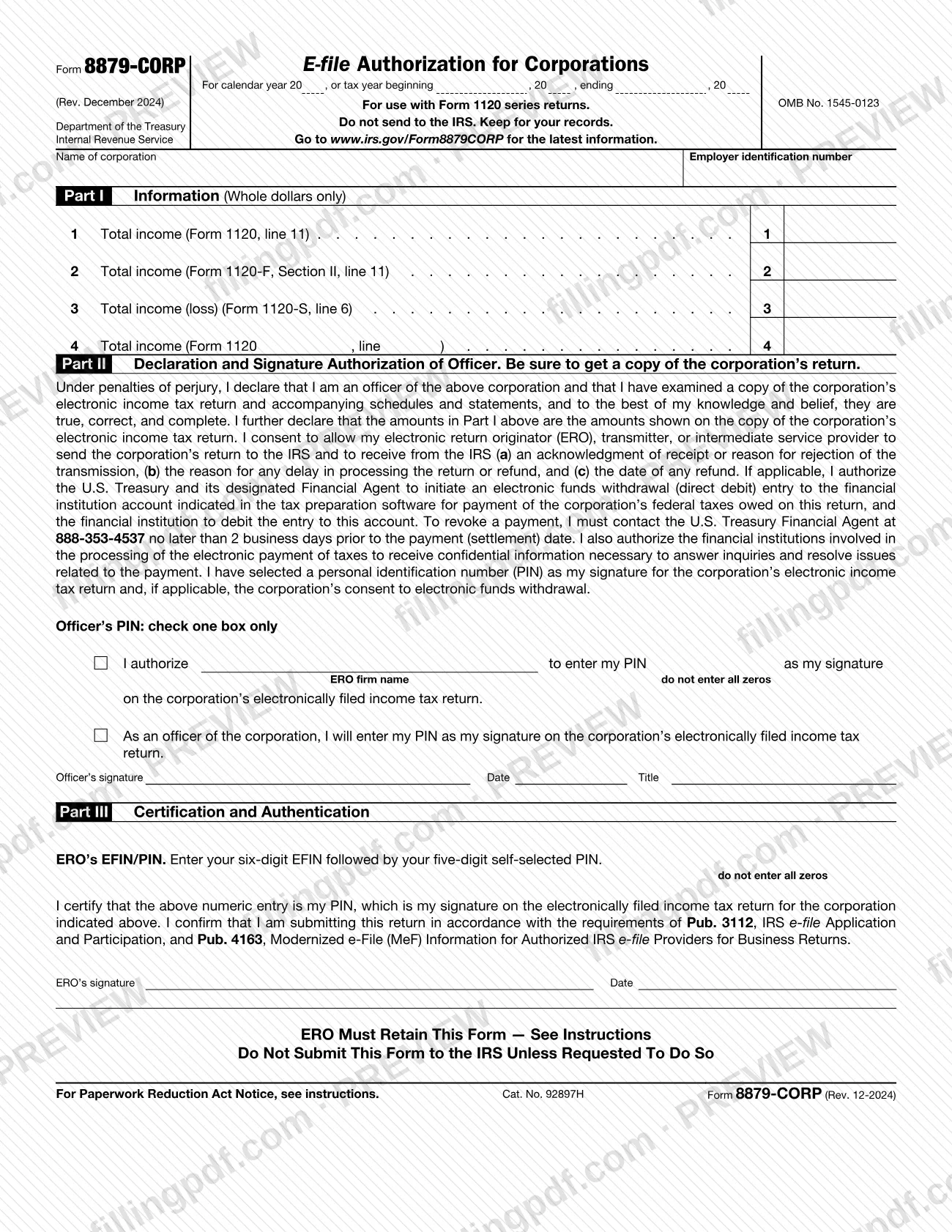
Form 8879-CORP, E-file Authorization for Corporations, is the Internal Revenue Service (IRS) form a corporate officer and an electronic return originator (ERO) use when the officer signs the corporation's electronic income tax return with a personal identification number (PIN). It is used with the Form 1120 series returns. The form is never sent to the IRS: the ERO keeps it. On FillingPDF you can fill out the form online and download or print the completed PDF; the original PDF is published by the IRS at www.irs.gov/Form8879CORP.
Last updated
What is 8879-CORP?
Form 8879-CORP, E-file Authorization for Corporations, is the IRS form used when a corporate officer wants to sign a corporation's electronic income tax return with a PIN and, if applicable, consent to an electronic funds withdrawal for the tax owed.
The form is an electronic signature authorization for Form 1120, U.S. Corporation Income Tax Return; Form 1120-F, U.S. Income Tax Return of a Foreign Corporation; Form 1120-H, U.S. Income Tax Return for Homeowners Associations; Form 1120-S, U.S. Income Tax Return for an S Corporation; or any applicable corporate return filed electronically. It carries OMB No. 1545-0123 and the revision printed on it is Rev. December 2024.
It has three parts. Part I lists the total income from the return. In Part II the officer declares, under penalties of perjury, that the return is true, correct and complete, consents to the ERO or transmitter sending the return, and chooses how the PIN is entered. In Part III the ERO certifies the PIN with its EFIN and signs.
An officer who does not use Form 8879-CORP must use Form 8453-CORP, E-file Declaration for Corporations, for an IRS e-file return. This form is not a tax return and does not report tax.
Who needs to file 8879-CORP?
A corporate officer whose corporation files its Form 1120 series return electronically, and who wants to sign with a PIN, completes Form 8879-CORP together with the ERO who handles the return.
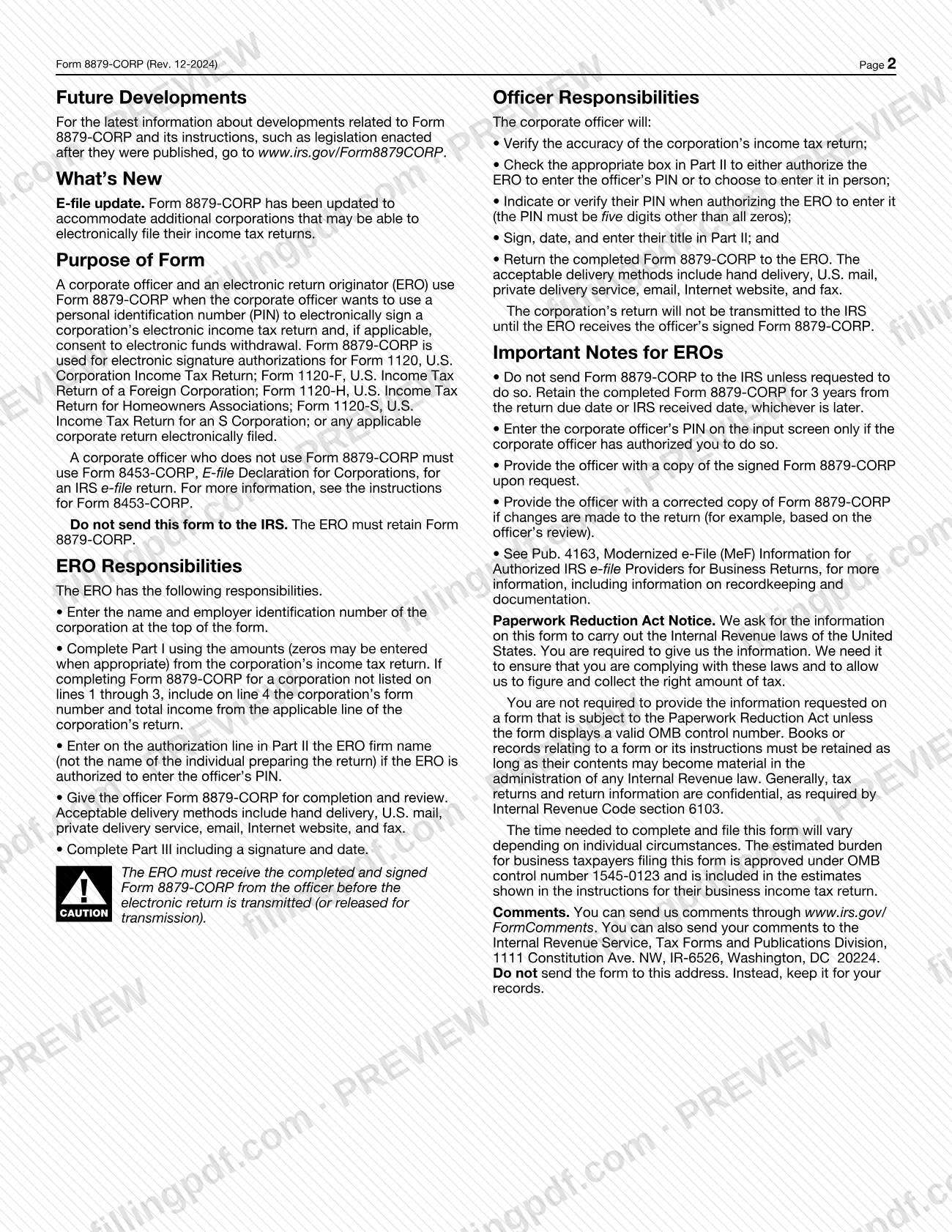
- Corporate officer: reviews a copy of the return, checks one box in Part II, provides or verifies a five-digit PIN (not all zeros), signs, dates and enters a title, then returns the form to the ERO.
- ERO: enters the corporation's name and employer identification number, completes Part I, gives the officer the form, completes Part III with a signature and date, and keeps the form.
The form covers corporations filing Form 1120, 1120-F, 1120-H, 1120-S or another applicable corporate return. The instructions say Form 8879-CORP was updated to accommodate additional corporations that may be able to file electronically.
An officer who does not use Form 8879-CORP must use Form 8453-CORP, E-file Declaration for Corporations, instead. No one signs for the officer in Part II: the declaration is made by an officer of the corporation.
When to file 8879-CORP
The ERO must receive the completed and signed Form 8879-CORP from the officer before the electronic return is transmitted or released for transmission. The corporation's return is not transmitted to the IRS until the ERO has the officer's signed form. The form has no due date of its own: it follows the electronic filing of the corporation's return.
After the return is filed, the ERO retains the completed form for 3 years from the return due date or the IRS received date, whichever is later. If changes are made to the return, for example after the officer's review, the ERO provides the officer with a corrected copy of the form.
Documents you need
- A copy of the corporation's electronic income tax return and accompanying schedules and statements, which the officer must obtain and examine before signing Part II.
- The ERO's EFIN, a six-digit number, and a self-selected five-digit PIN, entered in Part III (not all zeros).
How to fill out 8879-CORP
Enter the tax year
At the top, enter the calendar year, or the tax year beginning and ending dates if the corporation does not use a calendar year.
Enter corporation name and EIN
The ERO writes the corporation's name in Name of corporation and its employer identification number in Employer identification number.
Complete Part I, lines 1 to 3
Enter whole dollars only, from the corporation's return: line 1 total income (Form 1120, line 11), line 2 total income (Form 1120-F, Section II, line 11) or line 3 total income (loss) (Form 1120-S, line 6). Zeros may be entered where appropriate.
Use line 4 for other returns
If the corporation is not listed on lines 1 through 3, enter on line 4 the corporation's form number and the total income from the applicable line of its return.
Choose how the PIN is entered
In Part II, under Officer's PIN: check one box only, check the box authorizing the ERO to enter your PIN, or the box saying you will enter it yourself. If you authorize the ERO, the ERO firm name goes on the authorization line.
Provide a five-digit PIN
Select or verify the PIN used as your signature on the return. It must be five digits and cannot be all zeros.
Sign, date and add your title
The officer signs under the penalties of perjury declaration, enters the date and writes a title. Review a copy of the return before you sign.
Enter the ERO's EFIN and PIN
In Part III, the ERO enters its six-digit EFIN followed by its five-digit self-selected PIN, which cannot be all zeros.
Sign and date as ERO
The ERO signs and dates Part III, certifying the PIN and confirming the return is submitted under the requirements of Pub. 3112 and Pub. 4163.
Review and download the completed PDF
Check names, EIN, amounts and PINs, then download or print the completed PDF from FillingPDF. Keep the signed form with the ERO; do not send it to the IRS.
How to submit 8879-CORP
Form 8879-CORP is not submitted to the IRS. The printed form says "Do not send to the IRS. Keep for your records," and the ERO must retain it. Do not send it to the Tax Forms and Publications address printed for comments either; that address is only for comments.
- Officer to ERO: the officer returns the completed, signed form to the ERO. The instructions list these delivery methods: hand delivery, U.S. mail, private delivery service, email, Internet website and fax. The ERO uses the same methods to give the form to the officer.
- ERO to the IRS, only on request: the ERO sends the form to the IRS only if the IRS asks for it.
- Payment withdrawal: if the officer consented to a direct debit and needs to revoke a payment, the officer must call the U.S. Treasury Financial Agent at 888-353-4537 no later than 2 business days before the payment (settlement) date.
For recordkeeping details the instructions refer to Pub. 4163, Modernized e-File (MeF) Information for Authorized IRS e-file Providers for Business Returns. FillingPDF lets you fill out and download the PDF; submission follows the channels above.
Common mistakes to avoid
- Sending Form 8879-CORP to the IRS; the form says not to send it unless the IRS requests it, and the ERO must keep it.
- Transmitting the electronic return before the ERO has received the officer's signed Form 8879-CORP.
- Entering a PIN of all zeros or a PIN that is not five digits; the officer's PIN must be five digits other than all zeros.
- Entering the preparer's individual name instead of the ERO firm name on the authorization line in Part II.
- Entering the officer's PIN on the input screen when the officer did not authorize the ERO to do so.
- Leaving the officer's signature, date or title blank in Part II.
- Entering amounts in Part I that do not match the corporation's return, or using cents; Part I takes whole dollars only.
- Using a corporate return that is not listed on lines 1 through 3 without completing line 4 with its form number and total income.
Frequently asked questions
What is Form 8879-CORP used for?
Form 8879-CORP is the IRS e-file authorization a corporate officer and an ERO use when the officer signs a corporation's electronic income tax return with a PIN and, if applicable, consents to an electronic funds withdrawal for the tax owed.
Do I send Form 8879-CORP to the IRS?
No. The form says not to send it to the IRS unless the IRS requests it. The ERO must retain the completed form for 3 years from the return due date or the IRS received date, whichever is later.
Which returns does Form 8879-CORP cover?
It covers electronic signature authorizations for Form 1120, Form 1120-F, Form 1120-H, Form 1120-S, or any applicable corporate return filed electronically. For a corporation not listed on lines 1 through 3, enter its form number and total income on line 4.
What is the difference between Form 8879-CORP and Form 8453-CORP?
Form 8879-CORP lets the officer sign the e-filed return with a PIN. An officer who does not use Form 8879-CORP must use Form 8453-CORP, E-file Declaration for Corporations, for an IRS e-file return.
When must the officer sign Form 8879-CORP?
Before the return is transmitted. The ERO must receive the signed form before the electronic return is transmitted or released for transmission, and the return is not sent to the IRS until the ERO has it.
What PIN do I use on Form 8879-CORP?
The officer's PIN must be five digits other than all zeros. The officer either authorizes the ERO to enter it or enters it personally. The ERO also enters its six-digit EFIN and a self-selected five-digit PIN in Part III.
How do I revoke an electronic payment authorized on Form 8879-CORP?
Call the U.S. Treasury Financial Agent at 888-353-4537 no later than 2 business days before the payment (settlement) date. The form states that this is the way to revoke a payment authorized by the officer.
Can I fill out Form 8879-CORP online?
Yes, you can fill out the PDF online on FillingPDF and download or print it. FillingPDF is an independent service and does not file or transmit anything to the IRS; the officer returns the signed form to the ERO.
Ready to fill out 8879-CORP?
Fill out 8879-CORP now