
Form 8880 is the Internal Revenue Service (IRS) form that figures your retirement savings contributions credit, also known as the saver's credit, for tax year 2025. You use it when you, or your spouse on a joint return, put money into an IRA, a 401(k) or similar plan, or an ABLE account. On this page you can fill out the form online on FillingPDF and download or print the completed PDF; the form and the latest information are published by the IRS at www.irs.gov/Form8880.
Last updated
What is Form 8880?
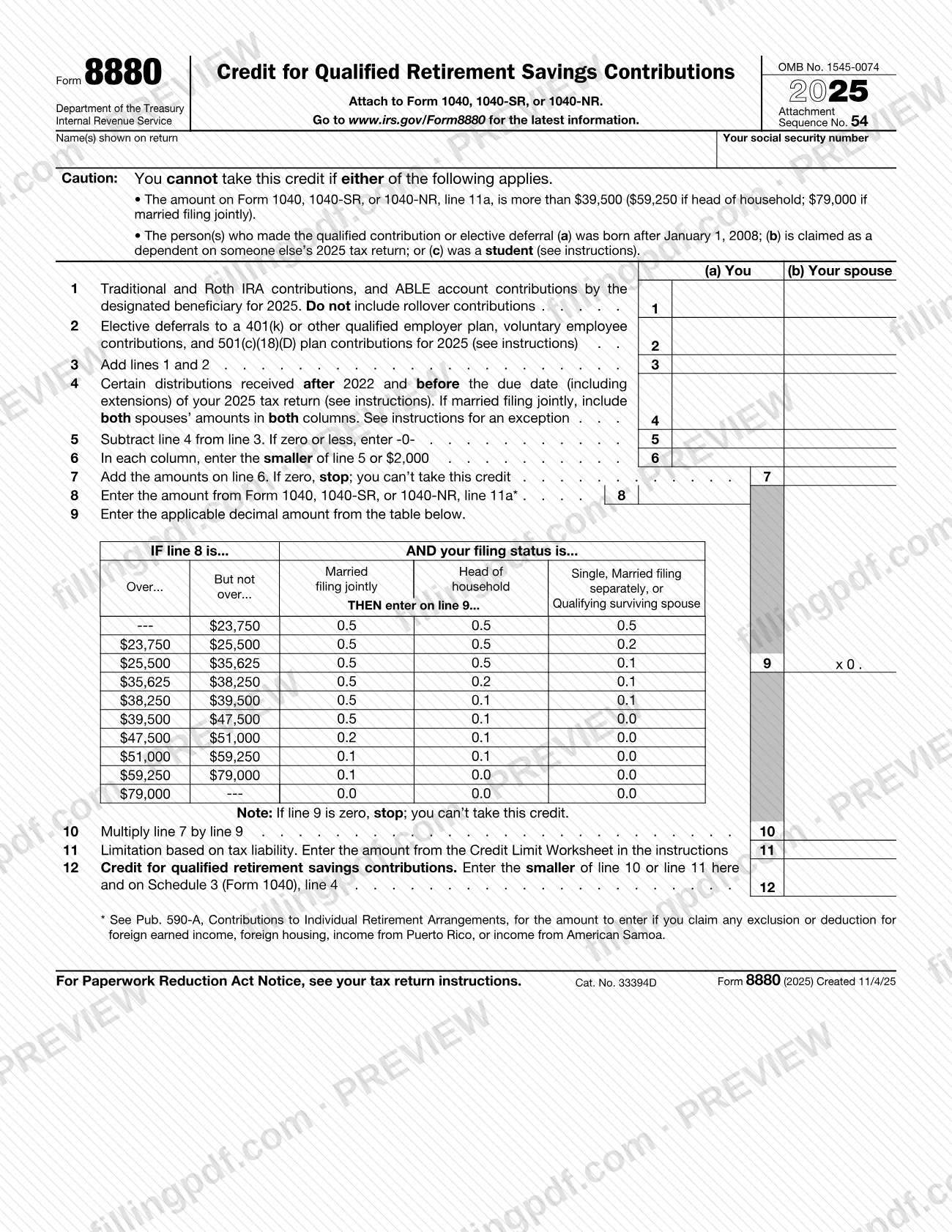
Form 8880, Credit for Qualified Retirement Savings Contributions, is the IRS form used to figure the amount, if any, of the retirement savings contributions credit (the saver's credit) that you can claim on your federal income tax return for 2025.
The form works in three stages. Lines 1 to 7 total the qualifying contributions and elective deferrals of you and, on a joint return, your spouse, reduce them by certain distributions, and apply the contribution limit printed on line 6. Lines 8 to 10 apply a decimal amount from the table on the form, based on the amount from line 11a of your return and your filing status. Lines 11 and 12 limit the credit by your tax liability, using the Credit Limit Worksheet in the instructions, and carry the result to Schedule 3 (Form 1040), line 4.
The instructions note that this credit can be claimed in addition to any IRA deduction on Schedule 1 (Form 1040), line 20. Form 8880 is not filed alone: it is attached to Form 1040, 1040-SR, or 1040-NR.
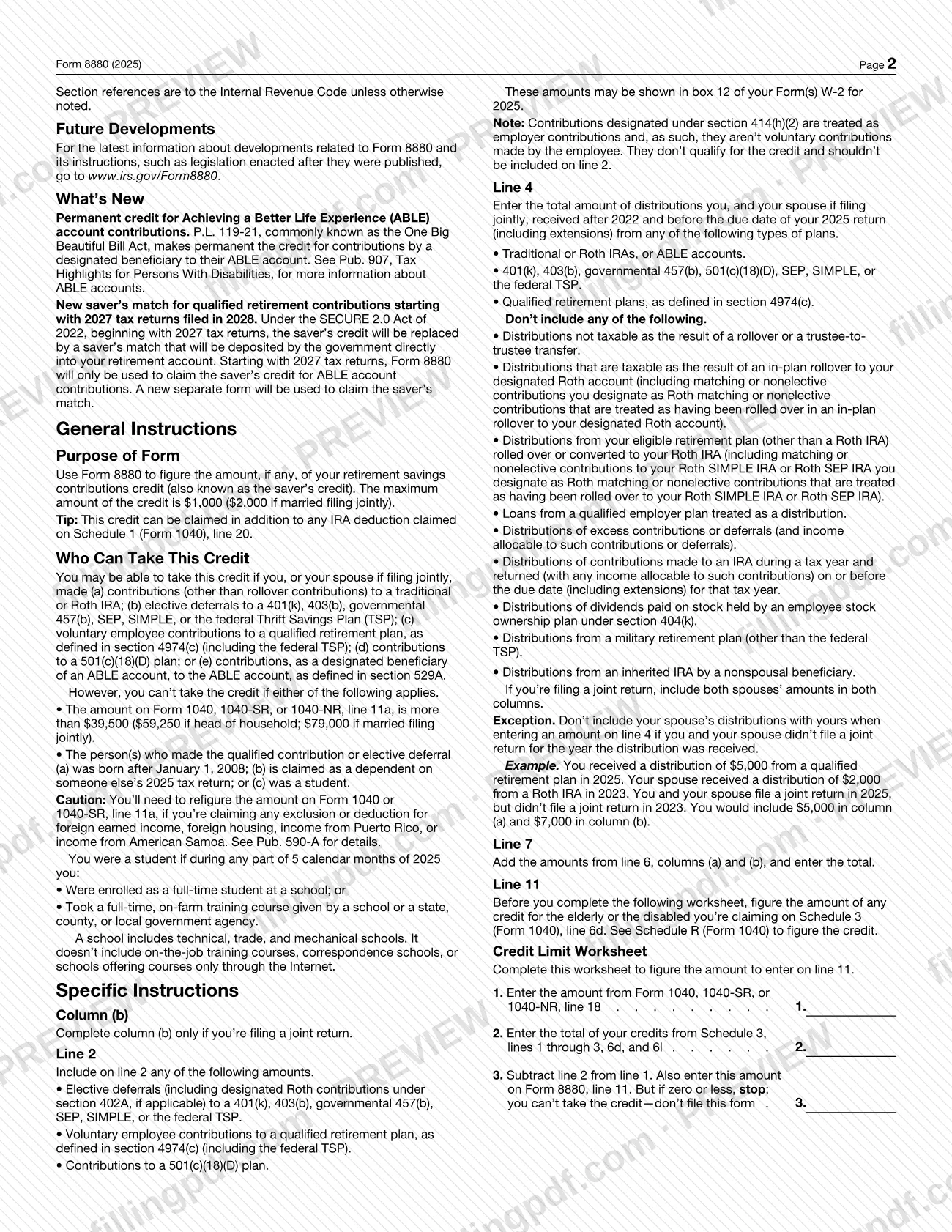
The 2025 instructions also announce changes. Contributions by a designated beneficiary to an ABLE account now have a permanent credit. Starting with 2027 tax returns, the saver's credit is replaced by a saver's match deposited into your retirement account, and Form 8880 will then be used only for the ABLE account credit.
Who needs to file Form 8880?
You may be able to use Form 8880 if you, or your spouse when you file jointly, made any of these contributions for 2025:
- contributions, other than rollovers, to a traditional or Roth IRA;
- elective deferrals to a 401(k), 403(b), governmental 457(b), SEP, SIMPLE or the federal Thrift Savings Plan (TSP);
- voluntary employee contributions to a qualified retirement plan, as defined in section 4974(c);
- contributions to a 501(c)(18)(D) plan;
- contributions, as the designated beneficiary of an ABLE account, to that account.
You cannot take the credit if the amount on line 11a of Form 1040, 1040-SR, or 1040-NR is more than the limit printed on Form 8880 for your filing status (single and other statuses, head of household, or married filing jointly). You also cannot take it for a person who made the contribution and was born after January 1, 2008, is claimed as a dependent on someone else's 2025 tax return, or was a student. The instructions define a student as someone enrolled full time at a school, or taking a full-time on-farm training course, during part of 5 calendar months of 2025.
Complete column (b) only if you are filing a joint return.
When to file Form 8880
Form 8880 has no separate due date: you complete it when you prepare the 2025 return on which you claim the saver's credit, and it is submitted with that return. Contributions counted on lines 1 and 2 are those made for 2025. Distributions on line 4 are those received after 2022 and before the due date, including extensions, of your 2025 tax return, so check for distributions up to that date before you finish the form.
If line 7 or line 9 is zero, the form tells you to stop: you cannot take the credit. If the Credit Limit Worksheet result is zero or less, the instructions say not to file the form.
Starting with 2027 tax returns, Form 8880 will be used only to claim the saver's credit for ABLE account contributions; a separate new form will be used for the saver's match.
How to fill out Form 8880
Enter your name and Social Security number
At the top, write the name(s) shown on your return and your social security number. The form is attached to Form 1040, 1040-SR, or 1040-NR.
Check the credit restrictions
Read the Caution box: you cannot take the credit if the amount on line 11a of your return is over the limit for your filing status, or if the person who made the contribution was born after January 1, 2008, is claimed as a dependent on someone else's 2025 return, or was a student.
Enter IRA and ABLE contributions
On line 1, enter traditional and Roth IRA contributions for 2025, plus ABLE account contributions by the designated beneficiary, in column (a) for you and column (b) for your spouse if filing jointly. Do not include rollover contributions.
Enter elective deferrals on line 2
Include deferrals to a 401(k), 403(b), governmental 457(b), SEP, SIMPLE or the federal TSP, voluntary employee contributions, and 501(c)(18)(D) plan contributions. These amounts may appear in box 12 of your Form(s) W-2; leave out section 414(h)(2) contributions.
Total your contributions on line 3
Add lines 1 and 2 in each column.
Subtract certain distributions
On line 4, enter distributions received after 2022 and before the due date, including extensions, of your 2025 return, following the instructions' list of what to include and exclude. If married filing jointly, include both spouses' amounts in both columns, subject to the exception in the instructions. Then subtract line 4 from line 3 on line 5, entering -0- if zero or less.
Apply the limit and total on lines 6 and 7
On line 6, enter in each column the smaller of line 5 or the amount printed on the form. On line 7, add the line 6 amounts; if the result is zero, stop, because you cannot take the credit.
Enter line 8 and the line 9 decimal
On line 8, enter the amount from line 11a of your return (see Pub. 590-A if you claim foreign income exclusions). Find the row for that amount and the column for your filing status in the table, and enter the decimal on line 9; if it is zero, stop.
Figure line 10 and the tax limit
On line 10, multiply line 7 by line 9. For line 11, complete the Credit Limit Worksheet in the instructions, after figuring any credit for the elderly or the disabled on Schedule 3 (Form 1040), line 6d, and enter the result.
Enter the credit on line 12
Enter the smaller of line 10 or line 11 on line 12, and carry it to Schedule 3 (Form 1040), line 4.
Review and download the completed PDF
Check every column and each stop instruction, then download or print the completed PDF from FillingPDF and attach it to your tax return as described under How to submit.
How to submit Form 8880
Form 8880 has no filing channel of its own. You attach it to Form 1040, 1040-SR, or 1040-NR and submit it together with that return, through the same channel you use for the return.
- With your return: Attach the completed form to the return. The form gives no separate mailing address, portal or appointment rule; the paperwork notice sends you to your tax return instructions.
- Carry the result forward: Enter the amount from line 12 on Schedule 3 (Form 1040), line 4, as the form directs.
- Latest information: Go to www.irs.gov/Form8880 for current developments about the form and its instructions.
Before attaching it, work out any credit for the elderly or the disabled that you claim on Schedule 3 (Form 1040), line 6d, because the Credit Limit Worksheet needs it. FillingPDF lets you fill out and download the PDF; submission follows the channels used for your tax return.
Common mistakes to avoid
- Including rollover contributions on line 1; the form says not to include them.
- Entering contributions designated under section 414(h)(2) on line 2; the instructions treat them as employer contributions that do not qualify for the credit.
- Completing column (b) when you are not filing a joint return; column (b) is for joint filers only.
- Leaving out the distributions on line 4, or including distributions the instructions exclude, such as rollovers, trustee-to-trustee transfers or loans from a plan treated as a distribution.
- Adding your spouse's distributions to yours on line 4 when you did not file a joint return for the year the distribution was received; the instructions give this as an exception.
- Entering a negative result on line 5 instead of -0- when line 4 is larger than line 3.
- Continuing past line 7 or line 9 when the result is zero; the form says to stop because you cannot take the credit.
- Using the unadjusted line 11a amount when you claim an exclusion or deduction for foreign earned income, foreign housing, income from Puerto Rico or income from American Samoa; Pub. 590-A gives the amount to enter on line 8.
- Using the Credit Limit Worksheet before figuring any credit for the elderly or the disabled on Schedule 3 (Form 1040), line 6d.
Frequently asked questions
What is Form 8880 used for?
Form 8880 is the IRS form used to figure your retirement savings contributions credit, also called the saver's credit. It is based on contributions to IRAs, qualified employer plans and ABLE accounts, and the result goes to Schedule 3 (Form 1040), line 4.
Who cannot take the credit on Form 8880?
You cannot take it if the amount on line 11a of your return is above the limit printed for your filing status. It is also unavailable for a contributor who was born after January 1, 2008, is claimed as someone else's dependent for 2025, or was a student.
Who counts as a student for Form 8880?
You were a student if, during any part of 5 calendar months of 2025, you were enrolled full time at a school or took a full-time, on-farm training course given by a school or a government agency. Schools include technical, trade and mechanical schools, but not on-the-job training, correspondence or Internet-only schools.
Do I include rollovers on Form 8880?
No for contributions: line 1 excludes rollover contributions. For line 4, the instructions also tell you not to include distributions that are not taxable because of a rollover or trustee-to-trustee transfer, among other listed exclusions.
Do I attach Form 8880 to my tax return?
Yes. The form says to attach it to Form 1040, 1040-SR, or 1040-NR. It has no separate filing address, so it travels with the return, and the line 12 credit is entered on Schedule 3 (Form 1040), line 4.
What if line 7 or line 9 on Form 8880 is zero?
Stop. The form says that if line 7 is zero or line 9 is zero you cannot take the credit. The instructions add that if the Credit Limit Worksheet result is zero or less, you should not file the form.
Is the saver's credit changing after 2025?
Yes. The 2025 instructions say that beginning with 2027 tax returns the saver's credit is replaced by a saver's match deposited into your retirement account. Form 8880 will then be used only for the ABLE account credit, and a separate form will claim the match.
Can I fill out Form 8880 online on FillingPDF?
Yes. You can fill out the PDF online on FillingPDF and download or print it. FillingPDF is an independent service and does not file anything with the IRS; you submit the form with your tax return through the IRS channels.
Ready to fill out Form 8880?
Fill out Form 8880 now