
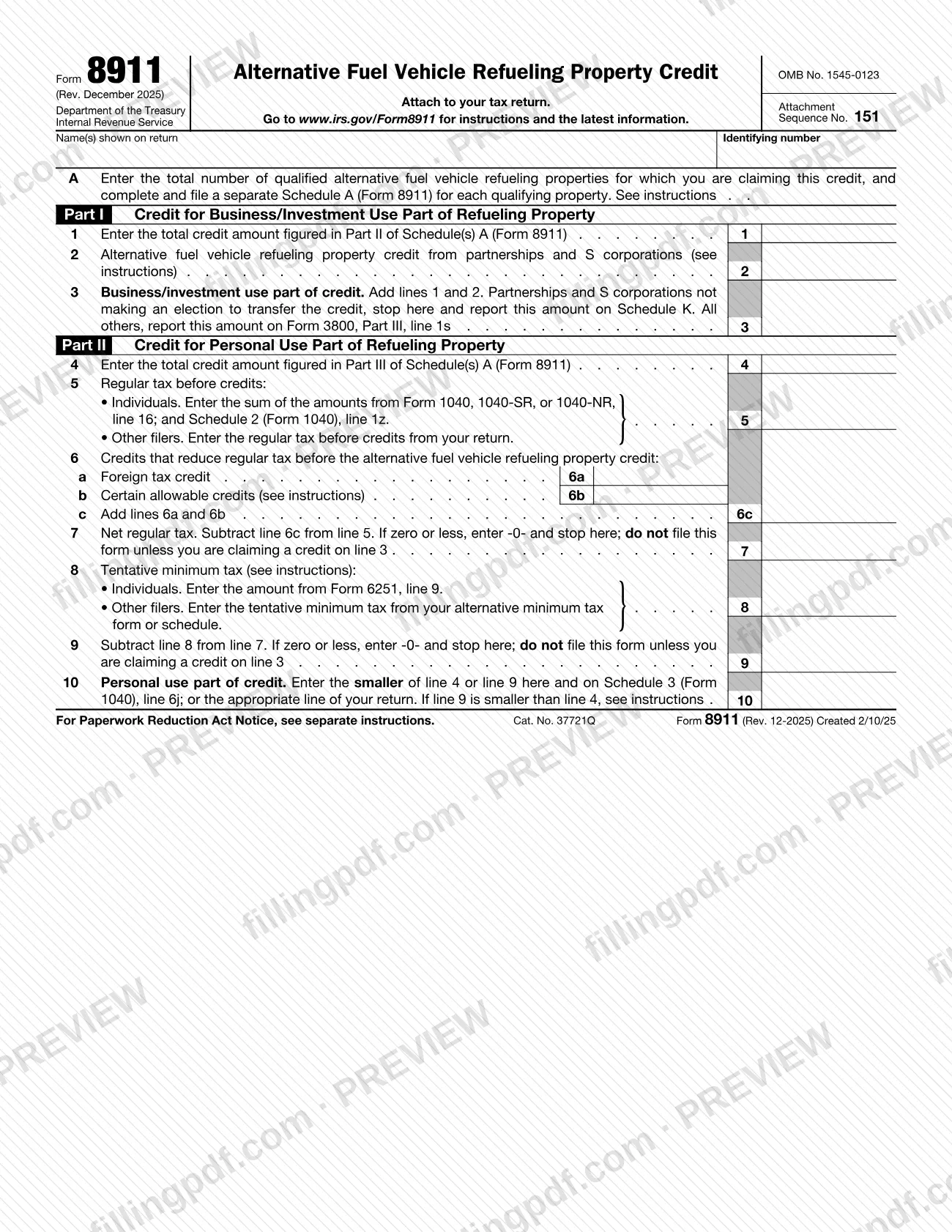
Form 8911 is the Internal Revenue Service (IRS) form for figuring the credit for alternative fuel vehicle refueling property, such as an EV charger, that you placed in service during your tax year. You attach it to your tax return, together with a separate Schedule A (Form 8911) for each property. On FillingPDF you can fill out Form 8911 online and download or print the completed PDF; the IRS publishes the original form and instructions at www.irs.gov/Form8911.
Last updated
What is Form 8911?
Form 8911, Alternative Fuel Vehicle Refueling Property Credit, is the IRS form, used together with Schedule A (Form 8911), to figure the credit for qualified alternative fuel vehicle refueling property you placed in service during your tax year.
The credit is split in two. The part tied to business or investment use is treated as a general business credit and is figured in Part I, which carries to Form 3800, Part III, line 1s (partnerships and S corporations not electing to transfer the credit report it on Schedule K). Any part not tied to business or investment use is a personal credit, figured in Part II and limited by your tax liability; it goes to Schedule 3 (Form 1040), line 6j, or the matching line of your return.
Qualified property is property, other than a building or its structural components, used to store or dispense an alternative fuel into a vehicle's fuel tank or to recharge an electric vehicle at the point of recharging. The IRS instructions also require, among other conditions, that the original use begin with you, that the property not be used predominantly outside the United States and that it sit in an eligible census tract.
The December 2025 instructions report that the credit cannot be claimed for property placed in service after June 30, 2026. Form 8911 is not a stand-alone return: it is attached to your tax return, and Schedule A (Form 8911) holds the property-by-property details.
Who needs to file Form 8911?
You file Form 8911 if you are claiming the alternative fuel vehicle refueling property credit for property you placed in service during your tax year.
- Partnerships and S corporations must file this form to claim the credit.
- Individuals and other taxpayers with property of their own file it, with a Schedule A (Form 8911) for each property. This includes personal-use property installed at your main home.
- Applicable entities that elect to treat the credit as a payment of income tax file Form 8911, Schedule(s) A, Form 3800 and Form 990-T or another applicable income tax return.
You are not required to complete or file Form 8911 if your only source of this credit is a partnership or S corporation. In that case you can report the credit directly on Form 3800, Part III, line 1s.
Do not claim the credit for property placed in service after June 30, 2026, or for property that was not placed in service in an eligible census tract. If line 7 or line 9 is zero or less and you have no credit on line 3, the form says not to file it.
When to file Form 8911
Form 8911 has no due date of its own: you file it with the tax return for the year in which the refueling property was placed in service. Property is generally placed in service when it is ready and available for a specific use, even if it is not yet used; an EV charger at your principal residence is placed in service when it is operational.
Use the December 2025 revision for tax years beginning in 2025 or later, and earlier revisions for earlier years. If you intend to make an elective payment or transfer election on Form 3800 for the Part I credit, complete the pre-filing registration for each property before you file your return, at IRS.gov/EPTRegister. The instructions state that the credit cannot be claimed for property placed in service after June 30, 2026.
Documents you need
- Schedule A (Form 8911), Alternative Fuel Vehicle Refueling Property: one separate schedule for each item of qualified refueling property placed in service during the tax year.
- Form 7220, Prevailing Wage and Apprenticeship (PWA) Verification and Corrections: one for each property for which you claim the increased credit amount for meeting the PWA requirements.
- Form 3800, General Business Credit: for the business/investment use credit on line 3, unless you are a partnership or S corporation not electing to transfer, which reports it on Schedule K.
- Form 6251 or your alternative minimum tax form or schedule: needed to figure the tentative minimum tax entered on line 8.
- Form 4562, Depreciation and Amortization: when you took a section 179 expense deduction for the property, because that amount is entered on Schedule A, line 11.
- IRS-issued registration number from the pre-filing registration: only if you make an elective payment or transfer election, entered on Schedule A, line 1.
How to fill out Form 8911
Complete Schedule A for each property
Before starting Form 8911, complete a separate Schedule A (Form 8911) for each item of qualified refueling property placed in service during the tax year. Schedule A figures the credit amounts that carry to lines 1 and 4.
Enter your name and identifying number
At the top, enter the name(s) shown on your return and your identifying number.
Enter the number of properties in Item A
Item A: enter the total number of qualified refueling properties for which you are claiming the credit. If your only credit is from line 2, enter -0-.
Enter business credit from Schedule A
Line 1: enter the total credit amount figured in Part II of your Schedule(s) A (Form 8911).
Add passed-through credits on line 2
Line 2: enter credits from partnerships and S corporations, from Schedule K-1 (Form 1065), box 15, code AO, or Schedule K-1 (Form 1120-S), box 13, code AO.
Total and carry the business part
Line 3: add lines 1 and 2. Partnerships and S corporations not electing to transfer stop here and report the amount on Schedule K; all others report it on Form 3800, Part III, line 1s.
Enter personal credit on line 4
Line 4: enter the total credit amount figured in Part III of your Schedule(s) A (Form 8911) for the personal use part.
Enter your regular tax before credits
Line 5: individuals enter the sum of line 16 of Form 1040, 1040-SR or 1040-NR and Schedule 2 (Form 1040), line 1z. Other filers enter the regular tax before credits from their return.
Figure credits on lines 6a to 6c
Line 6a: foreign tax credit. Line 6b: certain allowable credits, figured under the line 6b instructions. Line 6c: add lines 6a and 6b.
Subtract to find net regular tax
Line 7: subtract line 6c from line 5. If zero or less, enter -0- and stop; do not file this form unless you are claiming a credit on line 3.
Enter tentative minimum tax and subtract
Line 8: enter the tentative minimum tax (individuals use Form 6251, line 9), even if you may not owe AMT. Line 9: subtract line 8 from line 7; if zero or less, enter -0- and stop unless you claim a credit on line 3.
Find the personal use credit
Line 10: enter the smaller of line 4 or line 9 here and on Schedule 3 (Form 1040), line 6j, or the appropriate line of your return. If line 9 is smaller than line 4, see the instructions.
Review and download the completed PDF
Check that every line matches your Schedule(s) A and your return. Download or print the completed PDF from FillingPDF and attach it to your tax return.
How to submit Form 8911
Form 8911 is not filed on its own: attach it, with its Schedule(s) A, to the tax return you file with the IRS. It has no mailing address or portal of its own, so it goes through whichever channel your return uses.
- Individuals: the personal use part of the credit from line 10 is entered on Schedule 3 (Form 1040), line 6j.
- Business/investment use part: line 3 is reported on Form 3800, Part III, line 1s. Partnerships and S corporations not electing to transfer the credit stop at line 3 and report it on Schedule K; those electing to transfer report the total on Form 3800, Part III, line 1s, not on Schedule K.
- Elective payment or transfer elections: enter the IRS-issued registration number on Schedule A, line 1, obtained through the pre-filing registration at IRS.gov/EPTRegister.
For the latest information, see www.irs.gov/Form8911. FillingPDF lets you fill out and download the PDF; submission follows the channels above.
Common mistakes to avoid
- Filing Form 8911 without a separate Schedule A (Form 8911) for each qualifying property; the form requires one per item placed in service.
- Claiming the credit for property placed in service after June 30, 2026, which the December 2025 instructions say cannot be claimed.
- Claiming property that was not placed in service in an eligible census tract; if the GEOID is not in Appendix B, the credit is not allowed for that property.
- Filing the form when line 7 or line 9 is zero or less and you have no credit on line 3; the form says not to file it in that case.
- Expecting to carry back or forward the unused personal portion of the credit; the instructions say it is lost.
- Reporting a transferred credit on Schedule K when you are a partnership or S corporation electing to transfer; it goes on Form 3800, Part III, line 1s.
- Omitting Form 7220 for a property when claiming the increased credit amount for meeting the PWA requirements.
- Entering anything other than -0- on Item A when your only credit comes from line 2.
- Using an older revision of the form for a tax year beginning in 2025 or later.
Frequently asked questions
What is Form 8911 used for?
Form 8911 is the IRS form used with Schedule A (Form 8911) to figure the credit for alternative fuel vehicle refueling property, such as an EV charger, placed in service during your tax year. The business/investment part is a general business credit and the rest is a personal credit.
Who has to file Form 8911?
Partnerships and S corporations must file it to claim the credit. Other taxpayers file it when they claim the credit for their own property. If your only source is a partnership or S corporation, you are not required to file it and can report the credit on Form 3800, Part III, line 1s.
Can I still claim the credit for property placed in service in 2026?
Only if it was placed in service by June 30, 2026. The December 2025 instructions say the credit cannot be claimed for refueling property placed in service after June 30, 2026, a date changed from December 31, 2032 by P.L. 119-21.
How do I know if my property is in an eligible census tract?
Use the property's address or coordinates with the Census Bureau's 2020 Census Tract Identifier to get the 11-digit GEOID, then look for it in Appendix B. If it is listed, check Yes on Schedule A, line 6a and enter it on line 6b. If not, you cannot claim the credit for that property.
Can I carry forward an unused personal credit from Form 8911?
No. If the tax liability limit keeps you from using part of the personal portion of the credit, the unused amount is lost. The instructions say it cannot be carried back or forward to other tax years.
Where do I send Form 8911?
You do not send it separately. Attach Form 8911 and your Schedule(s) A to the tax return you file with the IRS. The form prints no address of its own, and the instructions refer you to the instructions for your return.
Do I need Form 7220 with Form 8911?
Yes, if you claim the increased credit amount for meeting the prevailing wage and apprenticeship (PWA) requirements. File a separate Form 7220 for each property for which you claim it, as Schedule A, line 13 instructs.
Can I fill out Form 8911 online on FillingPDF?
Yes. You can fill out the fillable PDF online on FillingPDF and download or print it. FillingPDF does not file anything with the IRS; you attach the completed form to your tax return and submit it through the IRS channels for that return.
Ready to fill out Form 8911?
Fill out Form 8911 now