
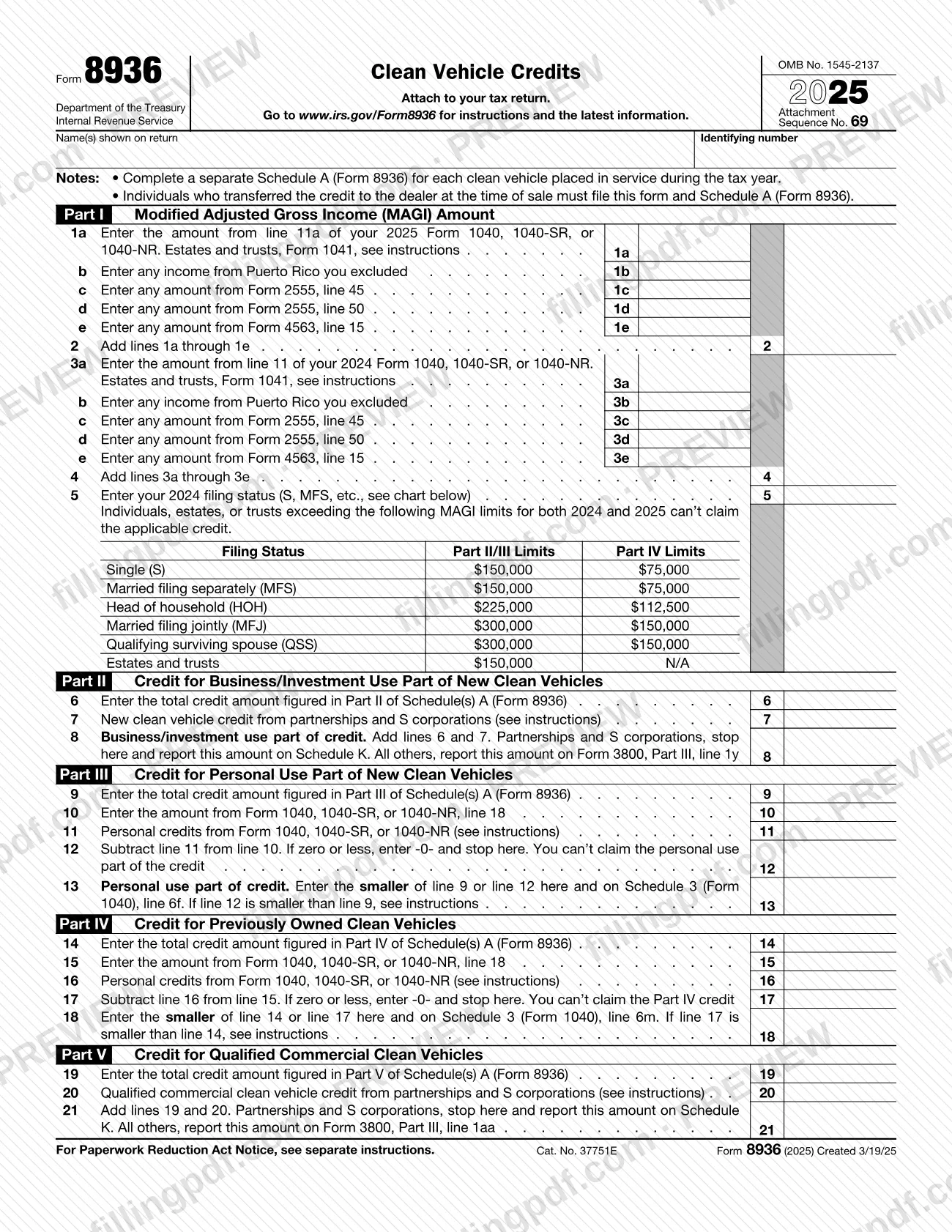
Form 8936, Clean Vehicle Credits, is the Internal Revenue Service (IRS) form that totals the new clean vehicle, previously owned clean vehicle and qualified commercial clean vehicle credits. It is attached to your tax return, together with a separate Schedule A (Form 8936) for each vehicle. It is also the form individuals file when they transferred the credit to a dealer at the time of sale. On this page you can fill out Form 8936 online on FillingPDF and download or print the completed PDF; the IRS publishes the original form and its instructions at www.irs.gov/Form8936.
Last updated
What is 8936?
Form 8936, Clean Vehicle Credits, is the IRS form used, together with Schedule A (Form 8936), Clean Vehicle Credit Amount, to figure the credits for clean vehicles you placed in service during your tax year. It is attached to your tax return (OMB No. 1545-2137, Attachment Sequence No. 69).
The form covers three credits, each in its own part:
- New clean vehicle credit: Parts I, II and III. Part II is the business/investment use portion and Part III the personal use portion.
- Previously owned clean vehicle credit: Parts I and IV.
- Qualified commercial clean vehicle credit: Parts I and V on Schedule A, and Part V on Form 8936.
Part I figures your modified adjusted gross income (MAGI) for 2025 and 2024 and checks it against the limits for your filing status. The credit for each vehicle is figured on its own Schedule A (Form 8936); Form 8936 then adds the results and carries them to the return: Schedule 3 (Form 1040), lines 6f and 6m, or Form 3800, Part III, lines 1y and 1aa, or Schedule K for partnerships and S corporations.
The credit amount for a vehicle is figured on Schedule A. Form 8936 totals those amounts and applies the income and tax-liability limits. The IRS instructions say that no clean vehicle credit can be claimed for a vehicle acquired after September 30, 2025.
Who needs to file 8936?
Taxpayers who claim a clean vehicle credit for a vehicle placed in service during the tax year use Form 8936 and a Schedule A (Form 8936) for each vehicle. The instructions name these groups:
- Individuals who transferred the credit to a registered dealer at the time of sale. They must file Form 8936 and Schedule A (Form 8936) with the return for the year the vehicle was placed in service, whether the vehicle was new or previously owned.
- Individuals, estates and trusts claiming the new or previously owned clean vehicle credit on their return, if their MAGI is within the limit for their filing status for 2024 or 2025.
- Businesses and other taxpayers claiming the qualified commercial clean vehicle credit.
- Partnerships and S corporations. They must file the form to claim the credit.
- Tax-exempt and governmental entities that elect to treat the qualified commercial clean vehicle credit as a payment of income tax.
Who does not have to file: a taxpayer whose only source of the new or qualified commercial credit is a partnership or S corporation does not have to complete or file Form 8936. That taxpayer reports the credit directly on Form 3800, Part III, line 1y (new) or line 1aa (commercial).
Only the owner qualifies: if the vehicle is leased, the lessor and not the lessee is entitled to the credit. A vehicle acquired after September 30, 2025 does not qualify.
When to file 8936
File Form 8936 with your tax return for the tax year in which the vehicle was placed in service; it has no due date of its own. If you transferred the credit to a dealer, the instructions require Form 8936 and Schedule A (Form 8936) with the return for that year.
Eligibility is limited by the acquisition date: no clean vehicle credit can be claimed for a vehicle acquired after September 30, 2025. The instructions treat a vehicle as acquired on the date a written binding contract is entered into and a payment has been made; a nominal down payment or a vehicle trade-in counts as a payment.
The form asks for MAGI for both 2025 and 2024, so gather the prior-year return before you start. Unused credit cannot be carried to another year: the instructions say the unused personal portion, and the unused previously owned credit, are lost.
Documents you need
- Schedule A (Form 8936), Clean Vehicle Credit Amount: complete a separate one for each clean vehicle placed in service during the tax year and attach them to Form 8936.
- Your tax return (for example Form 1040, 1040-SR or 1040-NR, or Form 1041 for estates and trusts): Form 8936 is attached to it and draws MAGI amounts from it.
- Your 2024 return: lines 3a to 5 ask for the 2024 amounts and your 2024 filing status.
- The seller's report from the dealer, if you bought from one: it gives the amounts and vehicle information, including the amount transferred if you made a credit transfer election.
- Form 3800, General Business Credit: used by filers other than partnerships and S corporations to report the business/investment or commercial credit.
- Schedule K-1 (Form 1065) or Schedule K-1 (Form 1120-S): needed only if you take credits from a partnership or S corporation on line 7 or line 20.
- Form 990-T or other applicable income tax return, with Schedule A, Form 8936 and Form 3800: only for tax-exempt and governmental entities electing payment of the commercial credit.
How to fill out 8936
Enter your name and identifying number
At the top, enter the name(s) shown on your return and your identifying number. Note that you need a separate Schedule A (Form 8936) for each clean vehicle placed in service during the tax year.
Complete Schedule A for each vehicle
Figure each vehicle's credit on its own Schedule A first; Parts II, III, IV and V of Form 8936 pull their totals from it. On Schedule A, enter the VIN on line 2 and the date you took possession on line 3, and answer line 4 about any credit transfer to the dealer.
Figure current-year MAGI
Part I, line 1a: enter the amount from line 11a of your 2025 Form 1040, 1040-SR or 1040-NR (estates and trusts follow the instructions for Form 1041). Enter any excluded Puerto Rico income on line 1b, Form 2555 amounts on lines 1c and 1d and Form 4563 on line 1e, then add lines 1a through 1e on line 2.
Figure prior-year MAGI and filing status
Lines 3a to 3e repeat the same items from your 2024 return, using line 11 of the 2024 Form 1040, 1040-SR or 1040-NR; add them on line 4. On line 5 enter your 2024 filing status, then compare your MAGI with the chart's limits.
Complete Part II business/investment credit
Line 6: the total credit from Part II of your Schedule(s) A. Line 7: new clean vehicle credit from partnerships and S corporations. Line 8: add lines 6 and 7. Partnerships and S corporations stop and report it on Schedule K; all others use Form 3800, Part III, line 1y.
Complete Part III personal use credit
Line 9: the total from Part III of your Schedule(s) A. Line 10: Form 1040, 1040-SR or 1040-NR, line 18. Line 11: the personal credits the instructions list. Line 12: subtract line 11 from line 10; if zero or less, enter -0- and stop.
Enter the personal credit limit
Line 13: enter the smaller of line 9 or line 12 here and on Schedule 3 (Form 1040), line 6f. If line 12 is smaller than line 9, see the instructions; the unused personal portion is lost.
Complete Part IV previously owned credit
Line 14: the total from Part IV of your Schedule(s) A. Lines 15 to 17 repeat the line 18 limit steps. Line 18: the smaller of line 14 or line 17, entered here and on Schedule 3 (Form 1040), line 6m.
Complete Part V commercial vehicle credit
Line 19: the total from Part V of your Schedule(s) A. Line 20: qualified commercial clean vehicle credit from partnerships and S corporations. Line 21: add lines 19 and 20; partnerships and S corporations report it on Schedule K, all others on Form 3800, Part III, line 1aa.
Review and download the completed PDF
Check that each part you do not use is left blank or stopped as the form directs, that the amounts carry to the right return lines, and that a Schedule A is attached for every vehicle. Download or print the completed PDF from FillingPDF and attach it to your tax return.
How to submit 8936
Form 8936 has no filing channel of its own: you attach it to your tax return and submit the return as the return's instructions direct. The form prints "Attach to your tax return" and sends you to www.irs.gov/Form8936 for instructions and the latest information.
- With an individual return: attach Form 8936 and a Schedule A (Form 8936) for each vehicle. Part III carries the personal use credit to Schedule 3 (Form 1040), line 6f, and Part IV carries the previously owned credit to Schedule 3, line 6m.
- With Form 3800: business/investment and commercial credits go to Form 3800, Part III, line 1y or line 1aa.
- Partnerships and S corporations: report the amount from line 8 or line 21 on Schedule K.
- Tax-exempt and governmental entities electing payment: file Schedule A (Form 8936), Form 8936, Form 3800 and Form 990-T or another applicable income tax return. The IRS requires pre-filing registration first, at IRS.gov/Credits-Deductions/Register-for-Elective-Payment-or-Transfer-of-Credits.
For vehicles placed in service after December 31, 2023, the seller files its report through the IRS Energy Credits Online (ECO) portal. FillingPDF lets you fill out and download the PDF; submission follows the channels above.
Common mistakes to avoid
- Completing one Schedule A (Form 8936) for several vehicles; the form says to complete a separate Schedule A for each clean vehicle placed in service during the tax year.
- Claiming a credit for a vehicle acquired after September 30, 2025; the instructions say no clean vehicle credit can be claimed for it.
- Not filing Form 8936 and Schedule A after transferring the credit to a dealer at the time of sale; individuals who did so must file them.
- Skipping Part II when claiming the personal use part of the new clean vehicle credit; the instructions say Part II must be filled out even with no business/investment credit.
- Claiming the same vehicle under both Part II (new clean vehicle credit) and Part V (qualified commercial clean vehicle credit); you must choose one.
- Continuing past line 8 or line 21 as a partnership or S corporation; the form says to stop there and report the amount on Schedule K.
- Entering only one year of MAGI; Part I asks for both 2025 (lines 1a to 2) and 2024 (lines 3a to 5).
- Claiming the credit as a lessee; if the vehicle is leased, only the lessor is entitled to it.
- Expecting to carry forward an unused personal use or previously owned credit; the instructions say the unused amount is lost.
- Forgetting to reduce the vehicle's basis by the Schedule A amount when you claimed the credit or transferred it to the dealer.
Frequently asked questions
What is Form 8936 used for?
Form 8936 is the IRS form used with Schedule A (Form 8936) to figure and claim clean vehicle credits: the new clean vehicle credit, the previously owned clean vehicle credit and the qualified commercial clean vehicle credit. It is attached to your tax return.
Do I have to file Form 8936 if I transferred the credit to the dealer?
Yes. Individuals who transferred the credit to a registered dealer at the time of sale must file Form 8936 and Schedule A (Form 8936) with the return for the year the vehicle was placed in service. This applies to new and used vehicles.
Can I still claim a clean vehicle credit in 2025?
Not for a vehicle acquired after September 30, 2025. The IRS instructions say a vehicle is acquired when a written binding contract is entered into and a payment, including a nominal down payment or trade-in, has been made.
What is the difference between Form 8936 and Schedule A (Form 8936)?
Schedule A (Form 8936) figures the credit amount for one vehicle, and you need a separate one for each vehicle placed in service in the year. Form 8936 totals those amounts, checks MAGI and tax-liability limits, and carries the results to your return.
Where do I send Form 8936?
Attach it to your tax return; the form has no separate address or portal. You submit it the way you submit the return, following the return's instructions. Partnerships and S corporations report the credit on Schedule K.
Do partners and S corporation shareholders need to file Form 8936?
Not if their only source of the credit is a partnership or S corporation. They report it directly on Form 3800, Part III, line 1y (new clean vehicle) or line 1aa (commercial). The partnership or S corporation itself must file Form 8936.
Can I fill out Form 8936 online?
You can fill out the PDF online on FillingPDF and download or print it. FillingPDF is an independent service and does not file the form with the IRS; you submit it with your tax return through the IRS channels.
What happens if I no longer qualify after transferring the credit to a dealer?
You must repay the amount of the credit you transferred to the dealer. This applies if you bought a new or previously owned clean vehicle from a registered dealer, reduced the price by transferring the credit, and no longer qualify when you file.
Ready to fill out 8936?
Fill out 8936 now