
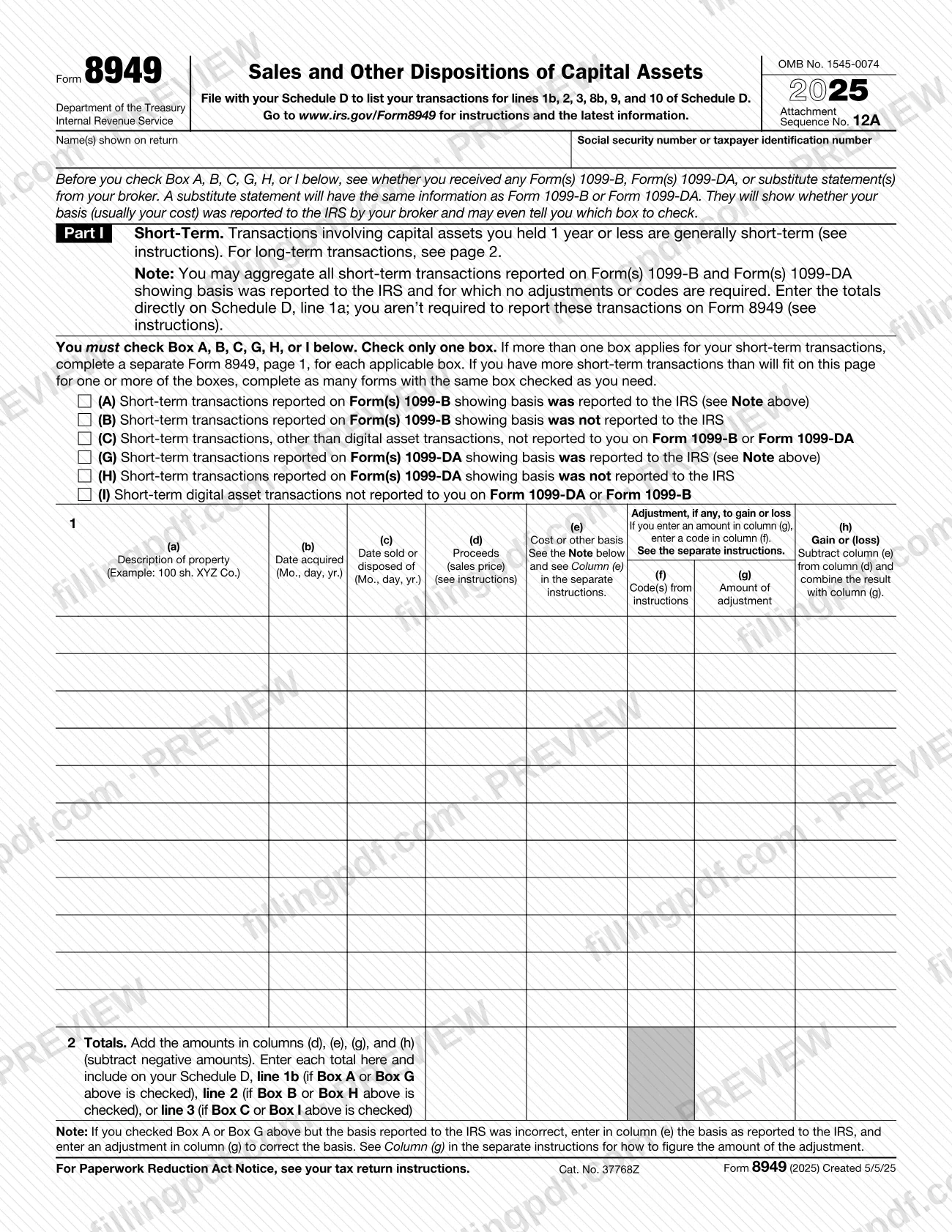
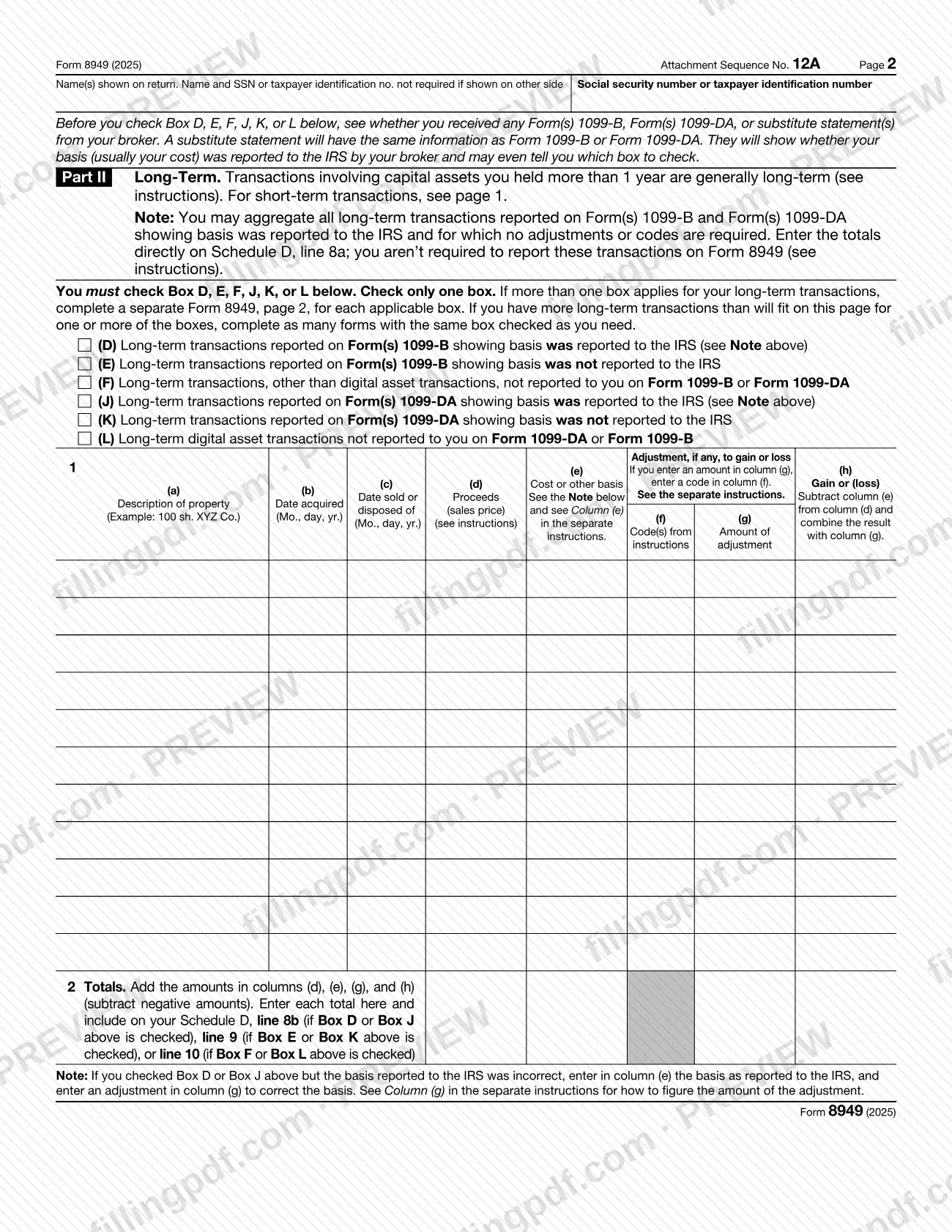
Form 8949, Sales and Other Dispositions of Capital Assets, is the Internal Revenue Service (IRS) form used to list the sales and exchanges of capital assets that feed lines 1b, 2, 3, 8b, 9 and 10 of Schedule D. Individuals, corporations, partnerships, estates and trusts use it, and it is filed with the Schedule D of the return you are filing. On FillingPDF you can fill out form 8949 online and download or print the completed PDF; the form and its instructions are published by the IRS at www.irs.gov/Form8949.
Last updated
What is Form 8949?
Form 8949, Sales and Other Dispositions of Capital Assets, is the Internal Revenue Service (IRS) form on which you list each sale or exchange of a capital asset so that the amounts reported to you and the IRS can be reconciled with your return. Its totals carry to Schedule D.
The IRS instructions say the form lets you and the IRS reconcile what was reported on Form 1099-B, Form 1099-DA or Form 1099-S (or substitute statements) with what you report on your return. Proceeds from the statement go in column (d), the broker-reported basis goes in column (e), and any correction goes in column (g), explained by a code in column (f).
The form has two parts. Part I is for short-term transactions, generally assets held 1 year or less. Part II is for long-term transactions, generally assets held more than 1 year. Each part starts with a box you must check, and you check only one per page:
- Boxes A, B and C for short-term transactions, and D, E and F for long-term transactions, depending on whether a Form 1099-B showed basis reported to the IRS, showed basis not reported, or was not received.
- Boxes G, H and I (short-term) and J, K and L (long-term), which are the same three categories for digital asset transactions reported on Form 1099-DA.
Form 8949 does not figure your overall gain or loss. Schedule D does that, using the totals from line 2 of each Form 8949. The form is issued under OMB No. 1545-0074 with Attachment Sequence No. 12A, and the revision printed on it is 2025.
Who needs to file Form 8949?
The IRS instructions say Form 8949 is filed with the Schedule D for the return you are filing, including Schedule D of Forms 1040, 1040-SR, 1041, 1065, 8865, 1120 and 1120-S, among others.
- Individuals use it for sales or exchanges of capital assets reported on Form 1099-K, 1099-B or 1099-DA, or not reported on another form or schedule. Also for nonbusiness bad debts, worthless securities, qualified opportunity fund (QOF) elections and dispositions, and to elect out of the installment method. Joint filers may list their transactions on separate forms or combine them, but Schedule D must include the totals from all of them.
- Corporations and partnerships use it for capital asset sales not reported elsewhere, undistributed long-term capital gains from Form 2439, and similar items.
- Estates and trusts use it for capital asset sales not reported on another form or schedule, nonbusiness bad debts, worthless securities and QOF items.
You may not need Form 8949 under Exception 1: if every Form 1099-B or 1099-DA shows basis reported to the IRS, you need no adjustments, and the other listed conditions are met, you can report totals directly on Schedule D, line 1a or 8a. Sales of collectibles are outside this exception. If the property was your main home, see the Schedule D (Form 1040) instructions.
When to file Form 8949
Complete Form 8949 whenever you must report capital asset sales or exchanges on the Schedule D of your return, and complete it before you fill in lines 1b, 2, 3, 8b, 9 or 10 of Schedule D. The form has no due date of its own: it travels with Schedule D and the return, so the deadline is the one for that return.
Your holding period decides the part. Short-term gains and losses (generally 1 year or less) go on Part I; long-term (generally more than 1 year) go on Part II. To count the period, begin on the day after you received the property and include the day you disposed of it. Property acquired by inheritance is generally reported as long term regardless of how long you held it.
Applications of the form to the 2025 tax year use the 2025 revision printed on the form.
Documents you need
- Schedule D for the return you are filing: Form 8949 is filed with it, and its totals feed Schedule D lines 1b, 2, 3, 8b, 9 and 10.
- Form(s) 1099-B, 1099-DA or 1099-S (or substitute statements) you received: use them to fill columns (d) and (e) and to choose the box; you keep them rather than attach them.
- An explanation of your basis, attached if you do not use actual cost as basis in column (e), for example for inherited or gifted property or a wash sale.
- An attached statement with all the information of Parts I and II, if you use Exception 2 instead of listing each transaction on a row.
- A statement explaining the difference, if you enter code W and the nondeductible wash sale loss is less than the amount shown on Form 1099-B or 1099-DA.
- Form 8453 (or the appropriate form in the Form 8453 series), if you e-file but choose not to report each transaction on a separate row on the electronic return.
- Schedule A (Form 8971), only if you received it as a beneficiary: it sets the consistent basis you must report in column (e) for property that increased estate tax.
How to fill out Form 8949
Enter your name and SSN or TIN
At the top of page 1, enter the name(s) shown on your return and your social security number or taxpayer identification number. Page 2 does not require them again if they are shown on the other side.
Review your broker statements first
Before choosing a box, check any Form(s) 1099-B, 1099-DA or substitute statements. They show whether basis was reported to the IRS and may tell you which box to check.
Check one box in Part I
For short-term transactions, check A, B, C, G, H or I, one box per page. Use a separate page for each box that applies, and extra copies if rows run out.
Describe the property and dates
Column (a): description, such as 100 sh. XYZ Co.; for digital assets include the name or symbol and exact units. Columns (b) and (c): date acquired and date sold in Mo., day, yr. format. You may enter INHERITED or VARIOUS in column (b) where the instructions allow.
Enter proceeds and cost basis
Column (d): proceeds (sales price), using the amount on your Form 1099-B, 1099-DA or 1099-S if you received one. Column (e): cost or other basis, using the basis the broker reported to the IRS when one was shown.
Add codes and adjustments if needed
If you need to correct basis, exclude gain or report a disallowed loss, enter the code(s) in column (f) and the adjustment in column (g), negative amounts in parentheses. Otherwise leave columns (f) and (g) blank.
Figure gain or loss in column (h)
Subtract column (e) from column (d), then combine the result with column (g). Enter losses in parentheses.
Total Part I on line 2
Add columns (d), (e), (g) and (h) on line 2. Carry the totals to Schedule D, line 1b (box A or G), line 2 (box B or H) or line 3 (box C or I).
Complete Part II for long-term sales
On page 2, check D, E, F, J, K or L and complete columns (a) through (h) the same way. Totals go to Schedule D, line 8b (box D or J), line 9 (box E or K) or line 10 (box F or L).
Review, download and attach to Schedule D
Check that each page has one box checked and the line 2 totals match Schedule D. Download or print the completed PDF from FillingPDF and attach it to your return as described under How to submit.
How to submit Form 8949
Form 8949 is submitted with your tax return, attached to Schedule D, through the same channel you use to file the return: paper or electronic. The form and instructions give no separate address or portal for Form 8949 alone.
- With a paper return: attach Form 8949 to Schedule D. If you attach several Forms 8949, put first the Form(s) 8949 that list code "Z" in column (f).
- With an e-filed return: if you choose not to report each transaction on a separate row on the electronic return, attach Form 8949 to Form 8453 (or the appropriate form in the Form 8453 series) and mail the forms to the IRS. A paper Form 8949 cannot be attached to Form 8453-FE. You may instead attach statements with the same information as Form 8949 in a similar format.
- No attachment needed: for transactions that qualify for Exception 1 or the special provision for certain corporations, partnerships, securities dealers and other qualified entities, an attachment, statement or Form 8453 is not required.
Include on Schedule D the totals from all your Parts I and II. FillingPDF lets you fill out and download the PDF; submission follows the channels above.
Common mistakes to avoid
- Checking more than one box on a single page; the form allows only one per Part I or Part II, so use a separate page for each box that applies.
- Reporting digital asset transactions with box C or box F; the instructions require boxes G, H or I for short-term and J, K or L for long-term.
- Entering code letters in column (f) separated by spaces or commas; enter them together in alphabetical order, for example "BOQ".
- Entering "Available upon request" with summary totals instead of transaction details, unless the special provision for qualified entities applies.
- Using Exception 2 or the summary-totals provision for the election to defer gain invested in a QOF; each QOF investment must be reported on its own row.
- Entering proceeds that differ from the Form 1099-B, 1099-DA or 1099-S in column (d) instead of making corrections through column (g).
- Entering a negative adjustment in column (g) without parentheses; negative amounts must be in parentheses.
- Reporting transactions reported on Form 1099-B with basis reported to the IRS as incorrectly corrected in column (e); enter the reported basis in (e) and fix it in (g) with code B.
- Forgetting to put code "Z" Forms 8949 first when attaching several forms to the return.
Frequently asked questions
What is Form 8949 used for?
Form 8949 is the IRS form used to report sales and exchanges of capital assets. It lets you and the IRS reconcile amounts reported on Form 1099-B, 1099-DA or 1099-S with your return, and its totals carry to Schedule D, where overall gain or loss is figured.
Do I have to file Form 8949 with Schedule D?
Not always. If all your Forms 1099-B or 1099-DA show basis reported to the IRS, need no adjustments and meet the other Exception 1 conditions, you can report the totals directly on Schedule D, line 1a or 8a. Sales of collectibles are not covered by that exception.
Which box do I check on Form 8949?
It depends on how long you held the asset and what you received. Short-term uses A, B, C, G, H or I; long-term uses D, E, F, J, K or L. A and D, and G and J, are for statements showing basis reported to the IRS; B, E, H and K are for basis not reported; C, F, I and L are for no statement.
How do I report crypto on Form 8949?
Use boxes G, H or I for short-term digital asset transactions and J, K or L for long-term ones, not box C or F. In column (a) give the asset's name or symbol, the exact units and the sale transaction ID if available.
What do I do if the basis on my Form 1099-B is wrong?
If basis was not reported to the IRS, enter the correct basis in column (e) and -0- in column (g). If it was reported, enter the reported basis in column (e), enter code B in column (f) and correct it with an adjustment in column (g).
Can I attach a statement instead of listing every transaction?
Yes, under Exception 2 you may attach a statement with the same information as Parts I and II in a similar format, and enter its combined totals on the form. It is not available for the election to defer gain invested in a QOF.
Can I fill out Form 8949 online?
Yes, you can fill out the PDF online on FillingPDF and download or print it. FillingPDF is an independent service and does not file it with the IRS; you submit it with your return through the IRS channels.
How do I file Form 8949 if I e-file my return?
If you e-file but choose not to report each transaction on a separate row, attach Form 8949 to Form 8453 (or the appropriate form in that series) and mail them to the IRS. This does not apply to Exception 1 transactions, where no attachment is required.
Ready to fill out Form 8949?
Fill out Form 8949 now