
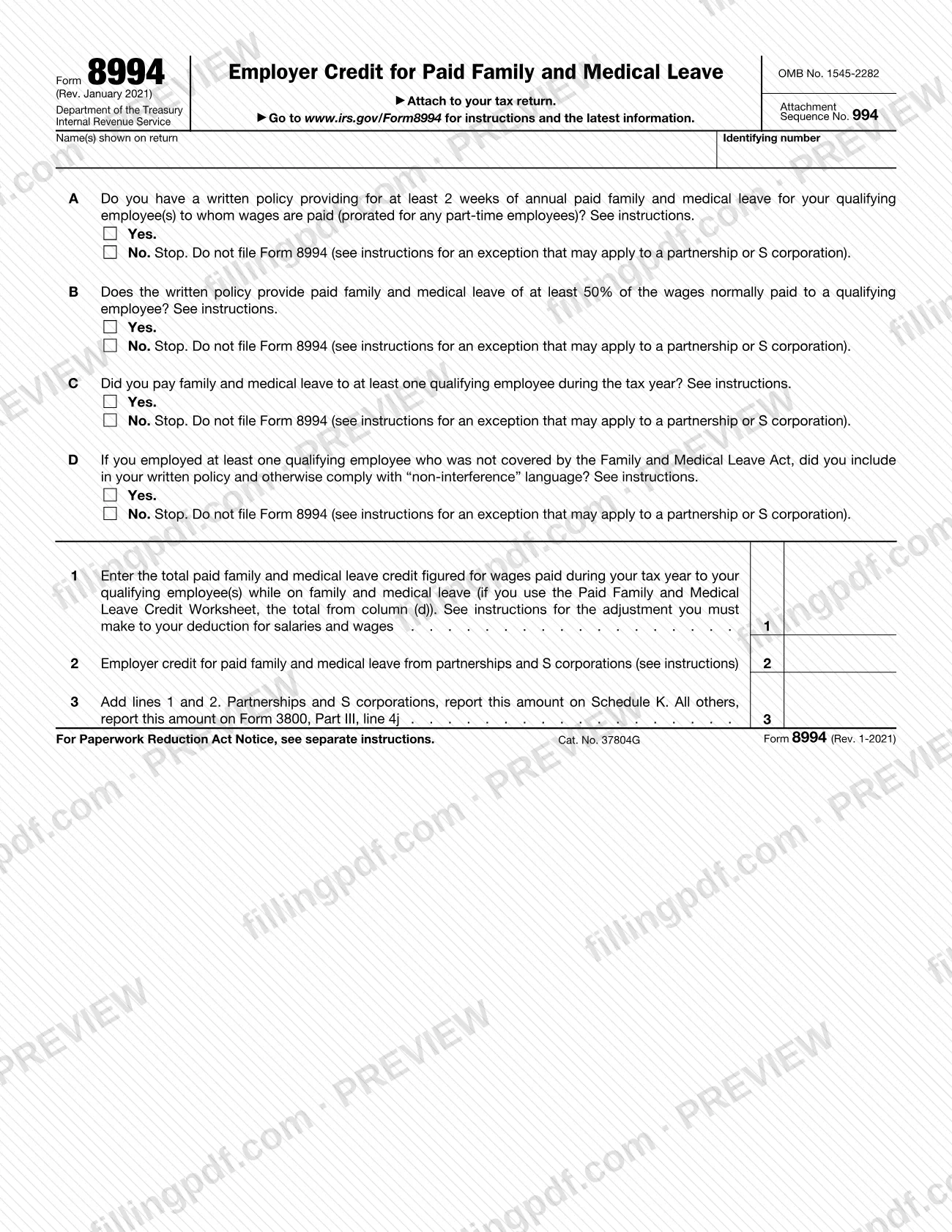
Form 8994 is the Internal Revenue Service (IRS) form an eligible employer uses to figure the employer credit for paid family and medical leave. It is attached to the filer's tax return and carries the credit to Schedule K (partnerships and S corporations) or to Form 3800, Part III, line 4j (everyone else). On this page you can fill out Form 8994 online on FillingPDF and download or print the completed PDF; the form and its instructions are published by the IRS at www.irs.gov/Form8994.
Last updated
What is Form 8994?
Form 8994, Employer Credit for Paid Family and Medical Leave, is the Internal Revenue Service (IRS) attachment that an eligible employer uses to figure the credit for wages paid to qualifying employees while they are on family and medical leave.
The IRS instructions explain that the credit ranges from 12.5% to 25% of certain wages paid to a qualifying employee during leave. The base percentage of 12.5% applies when the written policy pays 50% of normal wages; it rises by 0.25 percentage points for each point above 50%, up to 25%. No more than 12 weeks of leave per employee per tax year count.
The form opens with four yes-or-no questions, lines A to D, about the employer's written policy: at least 2 weeks of annual paid leave, payment of at least 50% of normal wages, leave actually paid to at least one qualifying employee, and "non-interference" language where it applies. A "No" answer means you stop and do not file the form, subject to an exception for partnerships and S corporations. Line 1 is the credit figured for your own wages, line 2 is the credit passed through from partnerships and S corporations, and line 3 is the total.
Form 8994 is not filed on its own: it says to attach it to your tax return. The total on line 3 goes to Schedule K for partnerships and S corporations, and to Form 3800, General Business Credit, Part III, line 4j for all others.
Who needs to file Form 8994?
An eligible employer files Form 8994 to claim the credit. The IRS instructions define an eligible employer as one with a written policy in place that provides paid family and medical leave and meets the minimum paid leave requirements. If the employer has any qualifying employee who is not covered by title I of the Family and Medical Leave Act (FMLA), the written policy must also include "non-interference" language.
Groups the instructions address:
- Partnerships and S corporations: they must file this form to claim the credit, including when they only received a credit from another entity that must be reported on line 2 (the exception to the "No" answers on lines A to D).
- All other taxpayers: do not complete or file Form 8994 if your only source for the credit is a partnership or S corporation. Report that credit directly on Form 3800, Part III, line 4j.
- Employers that answer "No" to line A, B, C or D: stop and do not file, unless the partnership or S corporation exception applies.
Members of a controlled group or of businesses under common control generally make separate elections to claim or not claim the credit; in a consolidated group the agent of the group makes the election.
When to file Form 8994
Form 8994 is filed with the tax return it is attached to, for the tax year in which the leave was paid. The IRS instructions say you can claim, or elect not to claim, the credit any time within 3 years from the due date of your return, on either your original return or an amended return. The election is made for the tax year in which the credit is available by claiming or not claiming it on the return.
The written policy must be in place before the paid leave for which you claim the credit is taken, and it is treated as in place on the later of its adoption date or its effective date. The instructions say the credit covers tax years beginning in 2021 through 2025 under the Taxpayer Certainty and Disaster Tax Relief Act of 2020. Use the January 2021 revision of the form for tax years beginning in 2020 or later until the IRS issues a later revision.
Documents you need
- The tax return the form is attached to: Form 8994 says to attach it to your tax return, and the return's own instructions govern what else is filed.
- Schedule K-1 (Form 1065), box 15 (code BB), or Schedule K-1 (Form 1120-S), box 13 (code BB): the source of any credit entered on line 2 when you receive the credit from a partnership or S corporation.
- Form 3800, General Business Credit: where filers other than partnerships and S corporations carry the line 3 total, on Part III, line 4j.
- Your written paid family and medical leave policy: not attached, but keep it in your records to support the credit, including any "non-interference" language where it applies.
- Paid Family and Medical Leave Credit Worksheet, or similar records: not filed, but keep them to show each qualifying employee's name, wages paid, applicable percentage and credit amount.
How to fill out Form 8994
Enter your name and identifying number
At the top, write the name(s) shown on your return and your identifying number.
Answer line A on minimum leave
Check Yes if your written policy provides at least 2 weeks of annual paid family and medical leave for your qualifying employees (prorated for part-time employees). If No, stop and do not file, unless you are a partnership or S corporation reporting a credit on line 2.
Answer line B on payment rate
Check Yes if the written policy pays at least 50% of the wages normally paid to a qualifying employee. A No answer means you stop under the same exception.
Answer line C on leave paid
Check Yes if you paid family and medical leave to at least one qualifying employee during the tax year.
Answer line D on non-interference
Check Yes if you employed no employees outside FMLA coverage, or if you did and your written policy includes and you comply with "non-interference" language.
Figure the credit for line 1
Use the Paid Family and Medical Leave Credit Worksheet in the instructions: list each qualifying employee, the leave wages paid, and the applicable percentage as a decimal, then multiply. Enter the column (d) total on line 1.
Enter pass-through credits on line 2
Enter credits from Schedule K-1 (Form 1065), box 15 (code BB), or Schedule K-1 (Form 1120-S), box 13 (code BB). Leave blank if you have none.
Add lines 1 and 2 on line 3
Enter the total on line 3. Partnerships and S corporations report it on Schedule K; all others report it on Form 3800, Part III, line 4j.
Adjust your wage deduction
Reduce your deduction for salaries and wages by the line 1 amount, as the instructions require, even if the credit is carried back or forward.
Review and download the completed PDF
Check each yes-or-no answer and the totals, then download or print the completed PDF from FillingPDF and attach it to your tax return as described under How to submit.
How to submit Form 8994
Form 8994 has no filing channel of its own: you attach it to your tax return and file it through whatever channel that return uses.
- With your return: the form states "Attach to your tax return." The instructions refer you to the instructions for the tax return with which the form is filed for filing details.
- Partnerships and S corporations: report the line 3 total on Schedule K.
- All other filers: report the line 3 total on Form 3800, Part III, line 4j. If your only source for the credit is a partnership or S corporation, do not file Form 8994; report the credit directly on that line of Form 3800.
Keep your supporting records. The instructions list the name and Social Security number of each qualifying employee, wages paid, the name and employer identification number of each qualifying employer, the applicable percentage and the family and medical leave policy. The Paid Family and Medical Leave Credit Worksheet in the instructions is one way to keep this information, and it is not filed with the form. FillingPDF lets you fill out and download the PDF; submission follows the channels above.
Common mistakes to avoid
- Filing Form 8994 after answering "No" to line A, B, C or D; the form says to stop unless the partnership or S corporation exception applies.
- Filing the form when your only source for the credit is a partnership or S corporation, instead of reporting it directly on Form 3800, Part III, line 4j.
- Not reducing your deduction for salaries and wages by the line 1 amount; the instructions require this even if you must carry the credit back or forward.
- Counting leave that is not specifically designated for an FMLA purpose, such as vacation, personal or general sick leave, as family and medical leave.
- Using leave paid by a state or local government, or required by state or local law, to meet the 50% payment rate or to figure the credit.
- Claiming wages paid before the employee became a qualifying employee (employed for 1 year or more).
- Omitting "non-interference" language from the written policy when you employ a qualifying employee not covered by title I of the FMLA, then answering "Yes" on line D.
- Counting more than 12 weeks of leave per qualifying employee in a tax year when figuring line 1.
- Entering the applicable percentage as a whole number in the worksheet; column (c) uses a decimal (25% = 0.25).
Frequently asked questions
What is Form 8994 used for?
Form 8994 is the IRS form an eligible employer uses to figure the employer credit for paid family and medical leave. The credit is 12.5% to 25% of certain wages paid to qualifying employees while on family and medical leave, and the form is attached to your tax return.
Who has to file Form 8994?
Partnerships and S corporations must file it to claim the credit. Other taxpayers file it only if they figure their own credit on line 1; if their only source is a partnership or S corporation, they skip the form and report the credit on Form 3800, Part III, line 4j.
Where does the line 3 total of Form 8994 go?
Partnerships and S corporations report line 3 on Schedule K. All other filers report it on Form 3800, General Business Credit, Part III, line 4j. The form itself prints both destinations next to line 3.
What happens if I answer No to line A, B, C or D?
Stop and do not file Form 8994. The form makes one exception: a partnership or S corporation that received a credit from another entity, which must be reported on line 2, still files the form.
How long can I wait to claim the paid family and medical leave credit?
The IRS instructions say you can claim, or elect not to claim, the credit any time within 3 years from the due date of your return, on the original return or an amended return.
What is a qualifying employee for Form 8994?
An employee under section 3(e) of the Fair Labor Standards Act employed for 1 year or more, whose compensation for the preceding year did not exceed 60% of the section 414(q)(1)(B)(i) amount. No minimum hours per year are required.
Can I fill out Form 8994 online?
Yes. You can fill out the PDF online on FillingPDF and download or print it. FillingPDF is an independent service and does not file the form; you attach it to your tax return and file through the IRS channels for that return.
Do I attach the credit worksheet to Form 8994?
No. The Paid Family and Medical Leave Credit Worksheet is in the instructions, and the IRS says to keep it, or other records, to support the credit. You enter only the column (d) total on line 1.
Ready to fill out Form 8994?
Fill out Form 8994 now