
Form 911 is the Internal Revenue Service (IRS) request for help from the Taxpayer Advocate Service (TAS), the independent organization within the IRS that helps taxpayers resolve federal tax issues. It also serves as an application for a Taxpayer Assistance Order. Taxpayers, and representatives acting for them, use it when a tax problem is causing financial difficulty, when they have been unable to resolve it with the IRS, or when an IRS system or process is not working as it should. On this page you can fill out the form online on FillingPDF and download or print the completed PDF; the IRS publishes the original form and its instructions at irs.gov.
Last updated
What is Form 911?
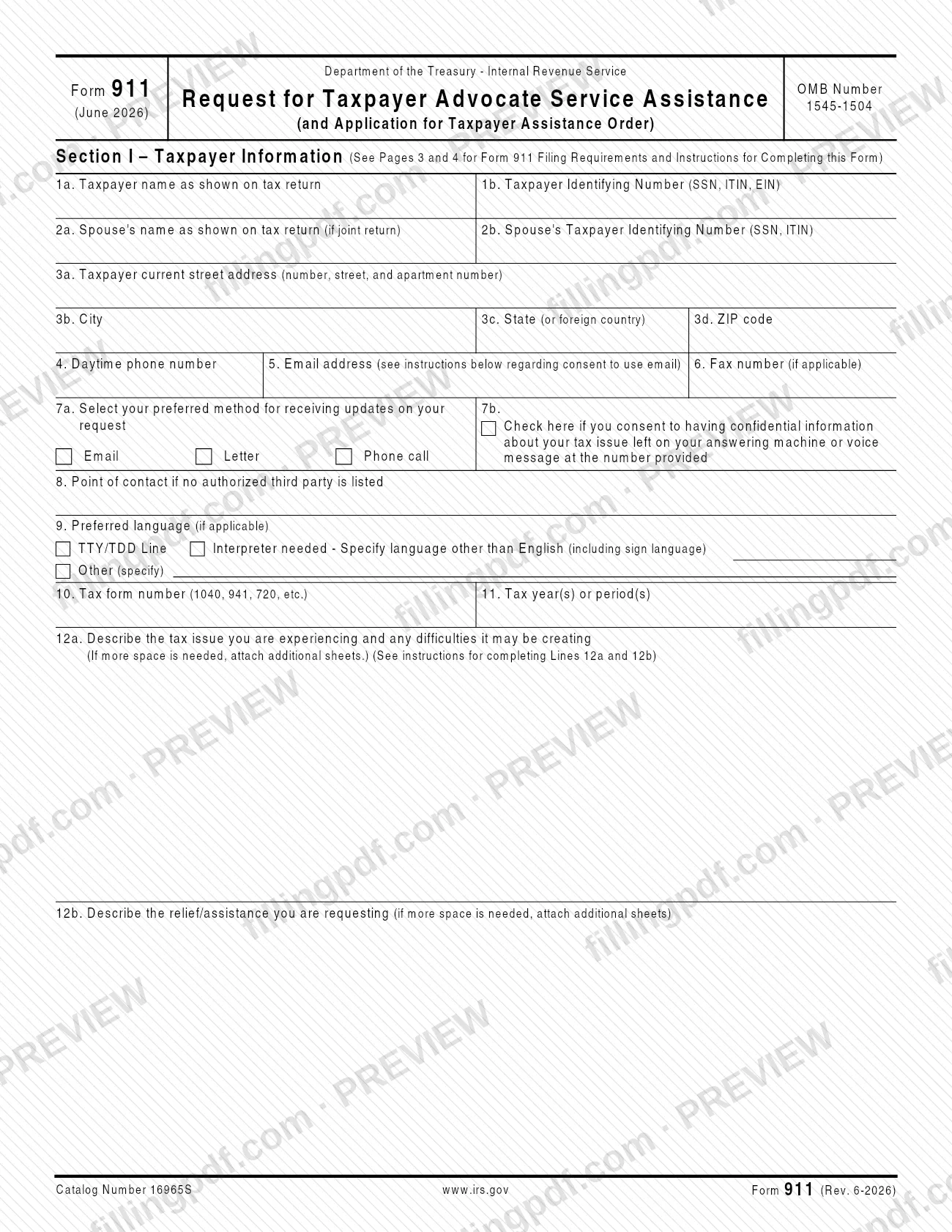
Form 911, Request for Taxpayer Advocate Service Assistance (And Application for Taxpayer Assistance Order), is the IRS form a taxpayer or representative uses to ask the Taxpayer Advocate Service (TAS) for help resolving a federal tax issue and to apply for a Taxpayer Assistance Order.
TAS is an independent organization within the Internal Revenue Service. It helps taxpayers resolve federal tax issues and protects taxpayer rights, and its assistance is always free when you qualify. The form is under OMB Number 1545-1504 and runs to two pages of entries plus two pages of instructions.
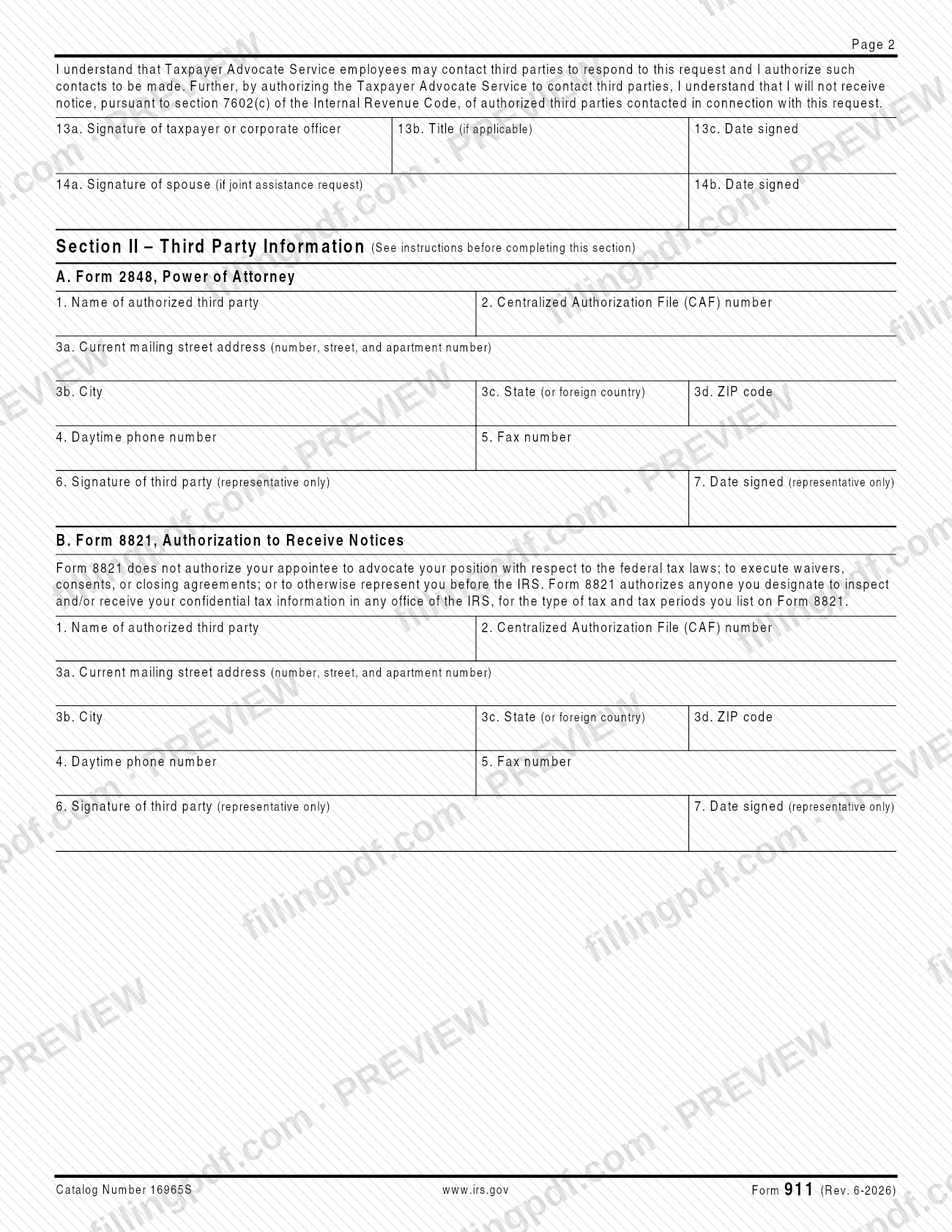
The form has two sections. Section I collects the taxpayer's identity and contact details, the preferred way to receive updates, the tax form and period involved, a description of the tax issue (line 12a) and a description of the relief requested (line 12b). Section II is completed only when a representative acts for the taxpayer: part A is for a representative named on Form 2848, Power of Attorney, and part B is for an appointee named on Form 8821, Authorization to Receive Notices.
The form is not a substitute for other legal or administrative action. The instructions state that signing it does not suspend the periods for acts related to assessment or collection, such as petitioning the Tax Court or requesting a Collection Due Process hearing.
Who needs to file Form 911?
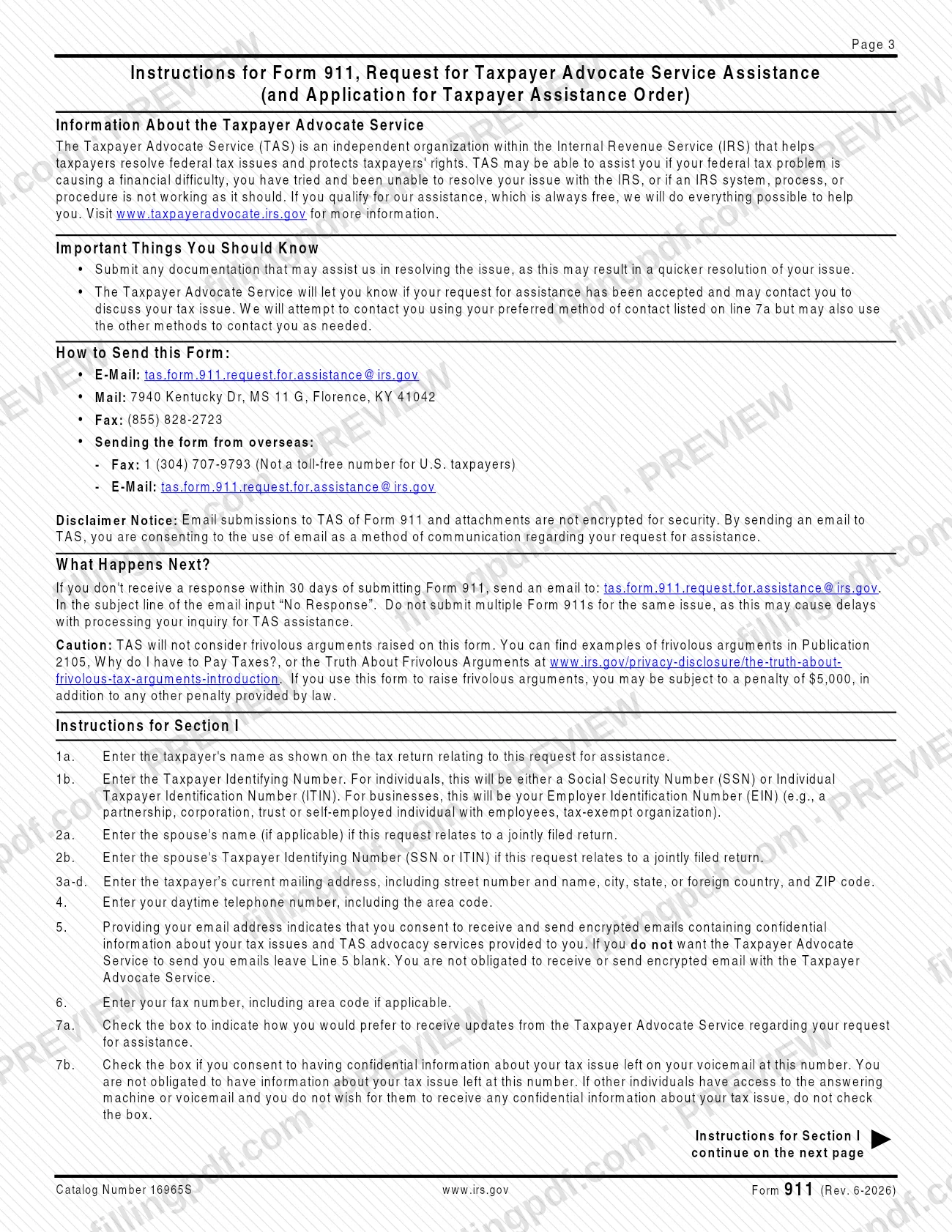
Taxpayers use Form 911 when TAS may be able to help: your federal tax problem is causing a financial difficulty, you have tried and been unable to resolve the issue with the IRS, or an IRS system, process or procedure is not working as it should.
Who signs depends on who is asking:
- Individuals: you sign line 13. On a joint assistance request, both spouses sign and date; if only one spouse is requesting help, only that spouse signs.
- Someone acting for another individual: only a person authorized and empowered to act for that individual may sign.
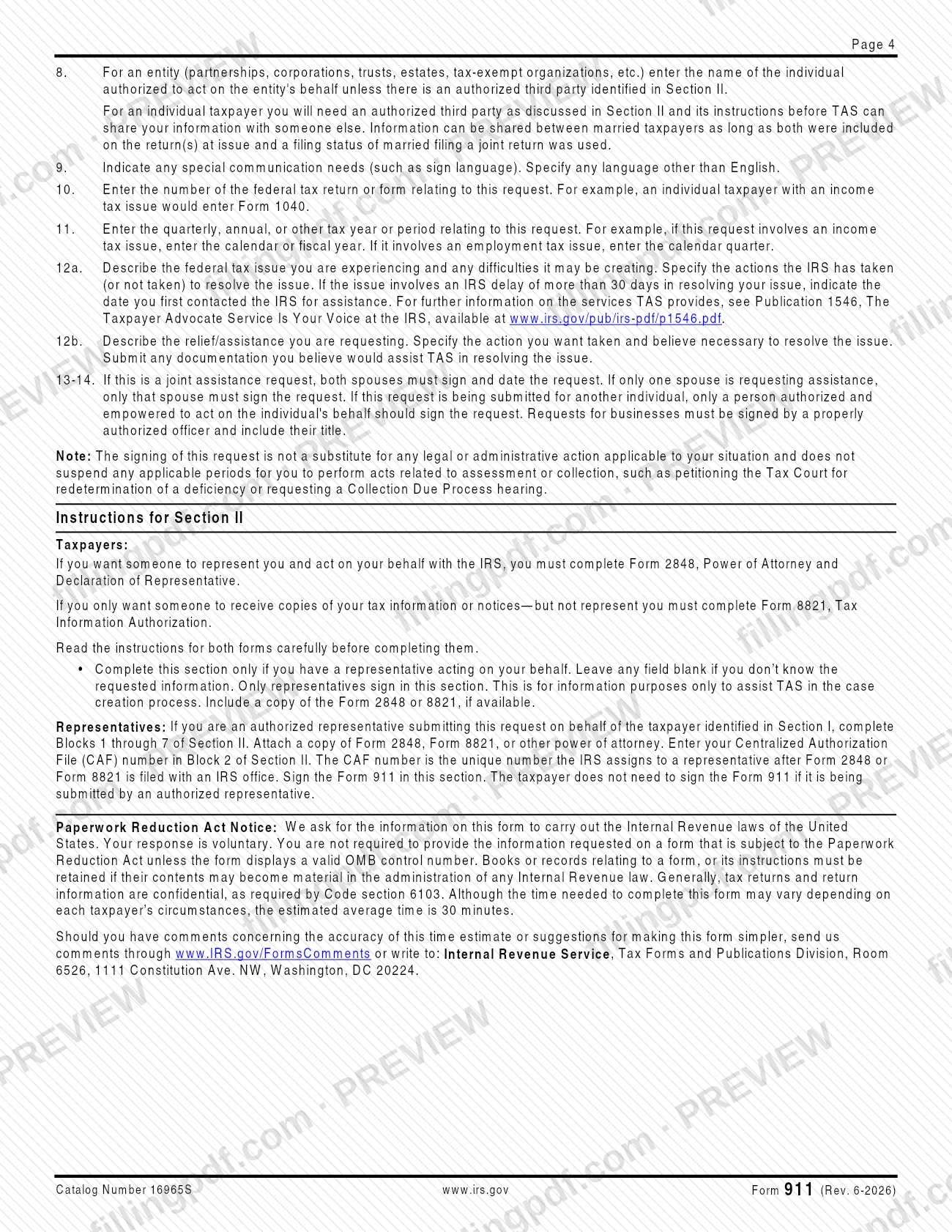
- Businesses and other entities: a properly authorized officer signs and includes a title. On line 8 an entity enters the individual authorized to act on its behalf, unless a third party is listed in Section II.
- Authorized representatives: complete Section II, blocks 1 through 7, attach a copy of Form 2848, Form 8821 or other power of attorney, and sign in that section. The taxpayer does not need to sign when an authorized representative submits the form.
An individual taxpayer needs an authorized third party named in Section II before TAS can share information with someone else. Information can be shared between spouses if both were on the return at issue and filed jointly. TAS does not consider frivolous arguments raised on the form.
When to file Form 911
Submit Form 911 when your federal tax problem meets one of the situations the instructions describe: it is causing a financial difficulty, you have been unable to resolve it with the IRS, or an IRS system, process or procedure is not working as it should. The form prints no filing deadline of its own.
Timing matters in two ways. If the issue involves an IRS delay of more than 30 days, line 12a asks for the date you first contacted the IRS for assistance. And signing the request does not suspend any period you have to act on assessment or collection matters, such as petitioning the Tax Court for redetermination of a deficiency or requesting a Collection Due Process hearing.
After you send the form, TAS tells you whether your request has been accepted. If you receive no response within 30 days, email [email protected] with "No Response" in the subject line.
Documents you need
- Any documentation you believe would help TAS resolve the issue, submitted with the form (line 12b and the Important Things You Should Know section ask for it).
- Additional sheets, if you need more space for line 12a (the tax issue) or line 12b (the relief requested).
- A copy of Form 2848, Power of Attorney and Declaration of Representative, if you want someone to represent you and a copy is available.
- A copy of Form 8821 (Tax Information Authorization), if you only want someone to receive your tax information or notices and a copy is available.
- For a representative submitting the request: a copy of Form 2848, Form 8821 or other power of attorney, required with Section II.
How to fill out Form 911
Enter the taxpayer's name and TIN
On line 1a, enter the taxpayer's name as shown on the tax return related to the request. On line 1b, enter the Social Security number (SSN) or Individual Taxpayer Identification Number (ITIN) for an individual, or the Employer Identification Number (EIN) for a business.
Add spouse details if joint
On lines 2a and 2b, enter the spouse's name and SSN or ITIN, only if the request relates to a jointly filed return.
Enter the current mailing address
On lines 3a through 3d, enter the street number and name (and apartment number), city, state or foreign country, and ZIP code.
Provide phone, email and fax
Line 4: daytime phone number with area code. Line 5: your email address; entering it means you consent to encrypted emails about your tax issue, so leave it blank if you do not want TAS to email you. Line 6: fax number, if applicable.
Choose how to receive updates
On line 7a, check Email, Letter or Phone call. Check the box on line 7b only if you consent to confidential information being left on your voicemail or answering machine at the number provided.
Name a contact and language needs
Line 8: an entity enters the individual authorized to act for it, unless a third party is listed in Section II. Line 9: note a TTY/TDD line, an interpreter (including sign language) or another language.
Identify the tax form and period
On line 10, enter the number of the federal tax form, such as 1040 for an individual income tax issue. On line 11, enter the tax year or period; for an employment tax issue, enter the calendar quarter.
Describe the issue and requested relief
On line 12a, describe the federal tax issue, any difficulties it creates and what the IRS has or has not done; add the date you first contacted the IRS if the delay exceeds 30 days. On line 12b, state the action you want taken, and attach extra sheets if needed.
Sign and date the request
On lines 13a through 13c, sign, add your title if signing for a business, and date it. On lines 14a and 14b, a spouse signs and dates a joint request. A representative signing in Section II replaces the taxpayer's signature.
Complete Section II for a representative
Only if someone acts for you, fill in blocks 1 through 7 of part A (Form 2848) or part B (Form 8821): name, CAF number, address, phone, fax, signature and date. Leave blank any item you do not know.
Review and download the completed PDF
Check every line and attach your documentation. Download or print the completed PDF from FillingPDF and send it through one of the channels under How to submit.
How to submit Form 911
You can send Form 911 to TAS by email, mail or fax; the instructions give separate details for sending it from overseas.
- Email: [email protected]
- Mail: 7940 Kentucky Dr, MS 11 G, Florence, KY 41042
- Fax: (855) 828-2723
- From overseas: fax 1 (304) 707-9793 (not a toll-free number for U.S. taxpayers), or email the address above.
Email submissions of Form 911 and attachments are not encrypted. By emailing TAS you consent to the use of email as a method of communication about your request. Include any documentation that may help TAS resolve the issue, because the instructions say this may speed resolution.
If you hear nothing within 30 days, email the same address with "No Response" as the subject line. Do not submit multiple Form 911s for the same issue; the instructions warn that this may delay processing. The instructions mention no fee. FillingPDF lets you fill out and download the PDF; submission follows the channels above.
Common mistakes to avoid
- Sending several Form 911s for the same issue; the instructions say this may delay processing of your TAS request.
- Signing only one line on a joint assistance request; both spouses must sign and date, unless only one spouse is requesting assistance.
- Having an unauthorized person sign for another individual; only someone authorized and empowered to act for that person may sign.
- Leaving the title off a business request; it must be signed by a properly authorized officer who includes their title.
- Raising frivolous arguments on the form; TAS will not consider them and a penalty may apply.
- Assuming that signing Form 911 stops a deadline, such as a Tax Court petition or a Collection Due Process hearing request; it does not suspend those periods.
- Entering an email address on line 5 without wanting encrypted email; the instructions say to leave line 5 blank if you do not want TAS to email you.
- Checking the voicemail consent box on line 7b when other people can hear your answering machine and you do not want them to receive confidential information.
- Omitting the date you first contacted the IRS on line 12a when the IRS delay exceeds 30 days.
Frequently asked questions
What is Form 911 used for?
Form 911 asks the Taxpayer Advocate Service (TAS), an independent organization within the IRS, to help resolve a federal tax issue, and it doubles as an application for a Taxpayer Assistance Order. TAS assistance is always free if you qualify.
Who qualifies for help from the Taxpayer Advocate Service?
TAS may be able to help if your federal tax problem is causing a financial difficulty, you have tried and been unable to resolve it with the IRS, or an IRS system, process or procedure is not working as it should.
Where do I send Form 911?
Email [email protected], mail it to 7940 Kentucky Dr, MS 11 G, Florence, KY 41042, or fax (855) 828-2723. From overseas, fax 1 (304) 707-9793 or use the email address. Email is not encrypted.
Can I fill out Form 911 online?
You can complete the Form 911 PDF online on FillingPDF and download or print it. FillingPDF is an independent service and does not send the form to the IRS; you submit it by email, mail or fax to TAS.
What if I don't hear back after submitting Form 911?
If you get no response within 30 days, email [email protected] with "No Response" in the subject line. Do not send another Form 911 for the same issue, since duplicates may delay processing.
Does filing Form 911 stop IRS deadlines?
No. The instructions say signing the request does not suspend any period for acts related to assessment or collection, such as petitioning the Tax Court for redetermination of a deficiency or requesting a Collection Due Process hearing.
Can someone else file Form 911 for me?
Yes. An authorized representative completes Section II, blocks 1 through 7, attaches Form 2848, Form 8821 or another power of attorney, and signs there. The taxpayer then does not need to sign the form.
Do both spouses have to sign Form 911?
On a joint assistance request, both spouses must sign and date it (lines 13 and 14). If only one spouse is requesting assistance, only that spouse signs.
Ready to fill out Form 911?
Fill out Form 911 now