
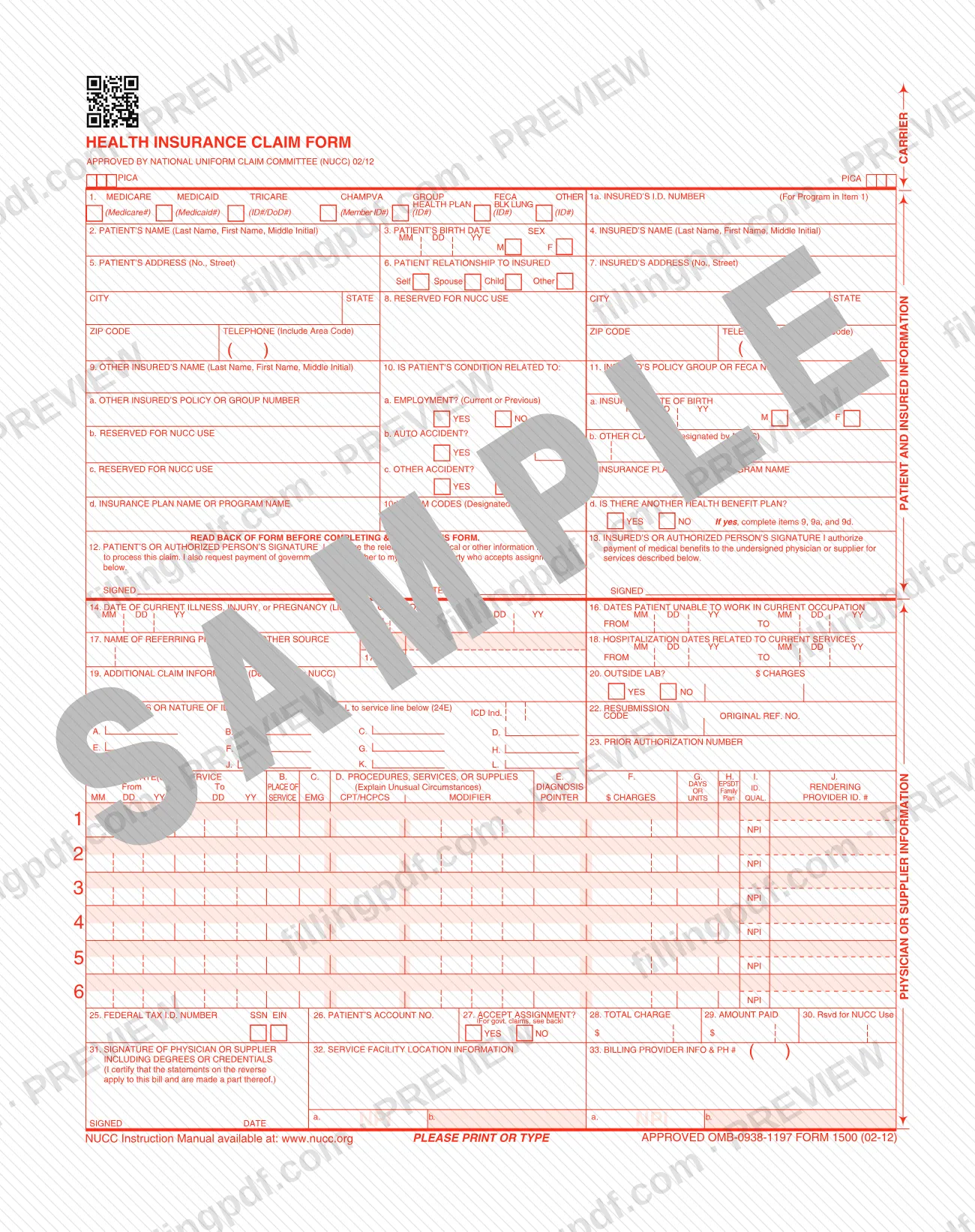
The CMS-1500 is the Health Insurance Claim Form that the Centers for Medicare & Medicaid Services (CMS) publishes and that the National Uniform Claim Committee (NUCC) approved in its 02/12 version. It collects patient and insured information, the diagnoses, up to six service lines with charges, and the billing provider's details. On this page you can fill out the CMS-1500 online on FillingPDF and download or print the completed PDF. The official PDF is published by CMS, and the NUCC Instruction Manual is available at www.nucc.org.
Last updated
What is CMS-1500?
The CMS-1500, titled Health Insurance Claim Form, is a claim form approved by the National Uniform Claim Committee (NUCC) in 02/12 and published on the CMS website, on which the services of a physician or supplier are itemized, with their charges, for payment of medical benefits.
The form is printed as FORM 1500 (02-12) under OMB-0938-1197, and its header says to print or type. It is organized in numbered items:
- Item 1 names the program: Medicare, Medicaid, TRICARE, CHAMPVA, Group Health Plan, FECA Blk Lung or Other, with the insured's ID number in item 1a.
- Items 2 to 13 hold patient and insured information, other coverage, whether the condition is related to employment, an auto accident or another accident, and the signatures in items 12 and 13.
- Items 14 to 23 cover the dates of the illness, injury or pregnancy, the referring provider, hospitalization dates, outside lab charges, diagnoses A to L, resubmission and prior authorization.
- Item 24 has six service lines, each with dates, place of service, CPT/HCPCS code, modifier, diagnosis pointer, charges, units and rendering provider ID.
- Items 25 to 33 give the federal tax ID number, the patient's account number, assignment, total charge, amount paid, the provider's signature, the service facility and the billing provider.
Several items (8, 9b, 9c and 30) are marked Reserved for NUCC use, and items 10d, 11b and 19 are designated by NUCC. The form tells you to read the back of the form before completing and signing it, and refers to the NUCC Instruction Manual at www.nucc.org.
Who needs to file CMS-1500?
The form is built for the physician or supplier who bills for services and for the patient or insured person whose coverage is being billed. Its numbered items show who does what:
- The billing physician or supplier completes the service lines in item 24, the totals in items 25 to 29, the service facility in item 32 and the billing provider in item 33, and signs item 31, certifying that the statements on the reverse apply to the bill.
- The patient or an authorized person signs item 12, which authorizes the release of any medical or other information needed to process the claim and requests payment of government benefits either to the patient or to the party who accepts assignment.
- The insured or an authorized person signs item 13, which authorizes payment of medical benefits to the undersigned physician or supplier for the services described on the form.
Item 1 lists the programs the form covers: Medicare, Medicaid, TRICARE, CHAMPVA, Group Health Plan, FECA Blk Lung and Other. When another health benefit plan exists (item 11d), the form directs you to complete items 9, 9a and 9d as well. The form does not state which payers require it or who is exempt, so confirm that with the program or plan receiving the claim.
When to file CMS-1500
The CMS-1500 is completed for the services you are billing: each line of item 24 carries its own From and To dates of service, so the claim follows the service. A claim that replaces an earlier one uses item 22, Resubmission, with the code and the original reference number, and a claim that needs authorization carries the number in item 23. The form prints no filing deadline of its own, and the back of the form and the NUCC Instruction Manual at www.nucc.org are the places it points to for further instructions.
How to fill out CMS-1500
Select the program and insured ID
In item 1, mark the program: Medicare, Medicaid, TRICARE, CHAMPVA, Group Health Plan, FECA Blk Lung or Other. Enter the insured's ID number in item 1a for that program.
Enter patient information
Item 2: patient's name (last name, first name, middle initial). Item 3: birth date as MM DD YY and sex. Item 5: address, city, state, ZIP code and telephone with area code. Item 6: relationship to insured (Self, Spouse, Child or Other).
Enter insured information
Item 4: insured's name. Item 7: insured's address, city, state, ZIP code and telephone. Item 11: policy group or FECA number, with 11a insured's date of birth and sex, 11b other claim ID, 11c insurance plan name or program name.
Report any other coverage
In item 11d, mark YES or NO for another health benefit plan. If yes, complete item 9 (other insured's name), 9a (policy or group number) and 9d (insurance plan name or program name). Items 9b and 9c are reserved for NUCC use.
Answer the condition-related questions
Item 10: mark YES or NO for whether the condition is related to employment (current or previous), an auto accident (with the state in PLACE) or another accident. Item 10d is for claim codes designated by NUCC.
Sign items 12 and 13
Item 12: the patient or authorized person signs and dates to authorize release of information and payment of government benefits. Item 13: the insured or authorized person signs to authorize payment of medical benefits to the physician or supplier.
Enter dates and provider details
Item 14: date of current illness, injury or pregnancy (LMP) with its qualifier. Item 15: other date. Item 16: dates unable to work. Item 17: referring provider with 17a and the NPI in 17b. Item 18: hospitalization dates. Items 19 and 20: additional claim information and outside lab charges.
Enter diagnoses and authorization
Item 21: enter the ICD indicator and up to twelve diagnosis codes, A through L. Item 22: resubmission code and original reference number, if this resubmits a claim. Item 23: prior authorization number.
Complete the service lines
For each of the six lines in item 24, enter dates of service (24A), place of service (24B), EMG (24C), CPT/HCPCS and modifier (24D), diagnosis pointer (24E), charges (24F), units (24G), EPSDT/Family Plan (24H), ID qualifier (24I) and rendering provider ID (24J) with its NPI.
Enter billing and payment details
Item 25: federal tax ID number, marked SSN or EIN. Item 26: patient's account number. Item 27: accept assignment YES or NO. Item 28: total charge. Item 29: amount paid. Item 30 is reserved for NUCC use.
Complete facility and billing provider
Item 31: signature of physician or supplier including degrees or credentials, and date. Item 32: service facility location with NPI in 32a. Item 33: billing provider information and telephone, with NPI in 33a.
Review, sign and download the PDF
Check each item against the NUCC Instruction Manual and confirm items 12, 13 and 31 are signed. Download or print the completed PDF from FillingPDF.
How to submit CMS-1500
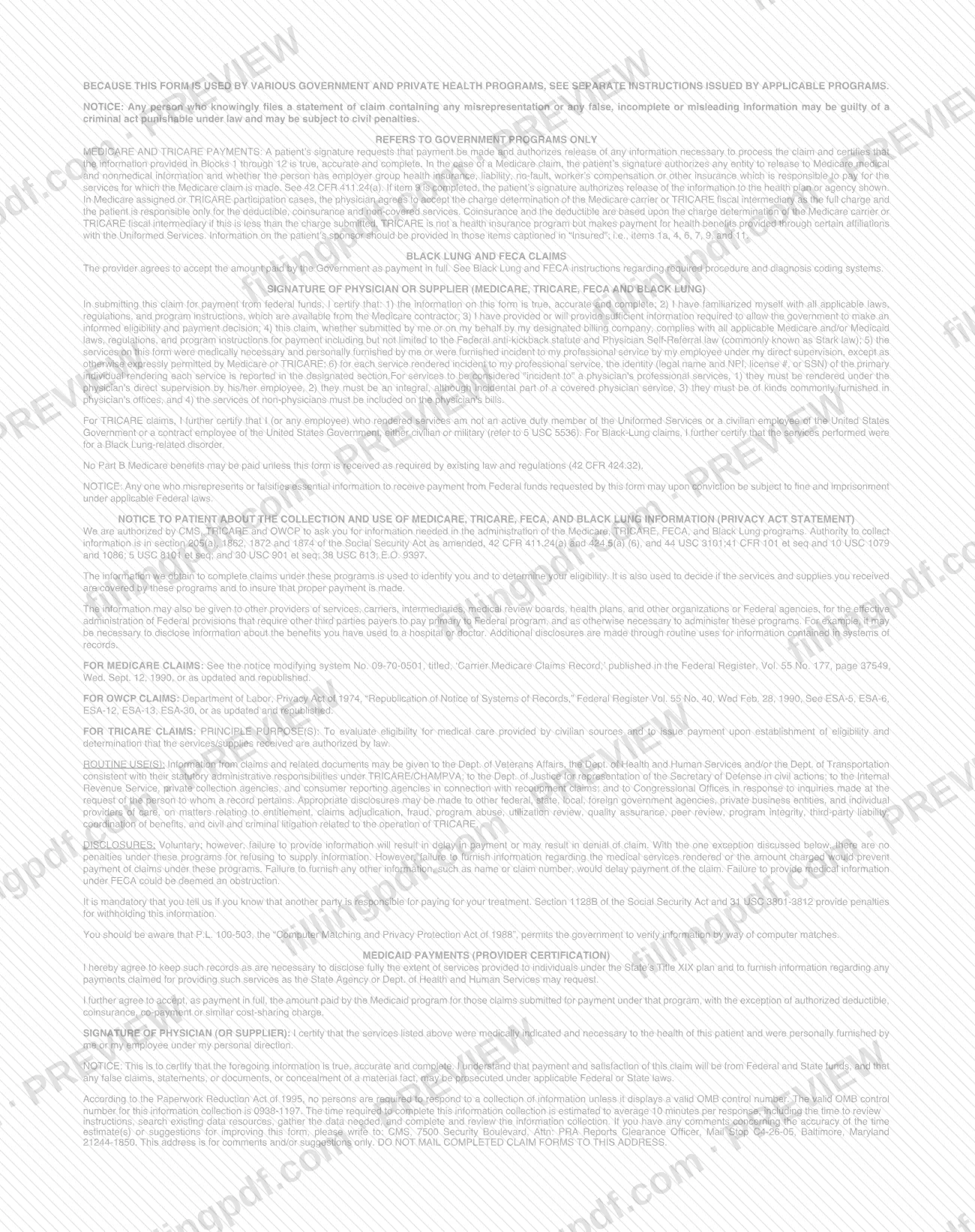
The form itself names no mailing address, portal or other channel. It has a CARRIER area at the top and tells you to read the back of the form before completing and signing it; for anything beyond the printed items, it refers to the NUCC Instruction Manual at www.nucc.org.
Before the claim goes out, check that the signature items are done: item 12 (patient or authorized person), item 13 (insured or authorized person) and item 31 (physician or supplier, with degrees or credentials, and the date). FillingPDF lets you fill out and download the PDF; submission follows the channels that apply to the payer receiving the claim.
Common mistakes to avoid
- Skipping the back of the form: the front says to read the back before completing and signing, and item 31 certifies that the statements on the reverse apply to the bill.
- Answering Yes to item 11d, Is there another health benefit plan?, without completing items 9, 9a and 9d, as the form directs.
- Entering information in items marked Reserved for NUCC use (8, 9b, 9c and 30) instead of following the NUCC Instruction Manual.
- Listing diagnoses in item 21 without relating them to each service line through the diagnosis pointer in item 24E, which refers to codes A to L.
- Leaving item 12 or item 13 unsigned, although they authorize release of information and payment of benefits to the physician or supplier.
- Submitting without signing and dating item 31, the physician or supplier signature with degrees or credentials.
- Handwriting illegibly when the form is printed: the header says PLEASE PRINT OR TYPE.
- Mixing up item 25 identifiers: the federal tax ID number must be marked as SSN or EIN.
Frequently asked questions
What is the CMS-1500 form?
The CMS-1500 is the Health Insurance Claim Form approved by the National Uniform Claim Committee (NUCC) in 02/12 and published on the CMS website. It lists the patient, the insured, the diagnoses, the services with charges and the billing provider so a physician or supplier can bill for medical benefits.
Can I fill out the CMS-1500 online?
Yes. You can fill out the CMS-1500 PDF online on FillingPDF and download or print it. FillingPDF is an independent service and does not submit the claim; you send it through the channels that apply to the payer receiving the claim.
Where can I find instructions for the CMS-1500?
The form says the NUCC Instruction Manual is available at www.nucc.org, and it tells you to read the back of the form before completing and signing. Items marked Reserved for NUCC use are covered by that manual.
When do I complete items 9, 9a and 9d?
When the answer to item 11d, Is there another health benefit plan?, is YES. The form prints the instruction directly under that item: if yes, complete items 9, 9a and 9d with the other insured's name, policy or group number and plan name.
How many services and diagnoses fit on one CMS-1500?
Item 24 has six service lines, numbered 1 to 6, and item 21 has room for twelve diagnosis codes, labeled A to L. Each service line points to its diagnoses through the diagnosis pointer in column 24E.
Who signs the CMS-1500?
Three signatures appear: the patient or authorized person in item 12, the insured or authorized person in item 13, and the physician or supplier in item 31, including degrees or credentials. Items 12 and 13 are authorizations; item 31 certifies the statements on the reverse.
What does the diagnosis pointer in item 24E do?
It relates a service line to the diagnoses entered in item 21. The form labels item 21 Relate A-L to service line below (24E), so each line in item 24 references the letters of the diagnoses that apply to it.
What does Accept assignment mean in item 27?
Item 27 asks YES or NO on whether the provider accepts assignment. Item 12 also refers to payment of government benefits either to the patient or to the party who accepts assignment. The form says that for government claims you should see the back of the form.
Ready to fill out CMS-1500?
Fill out CMS-1500 now