
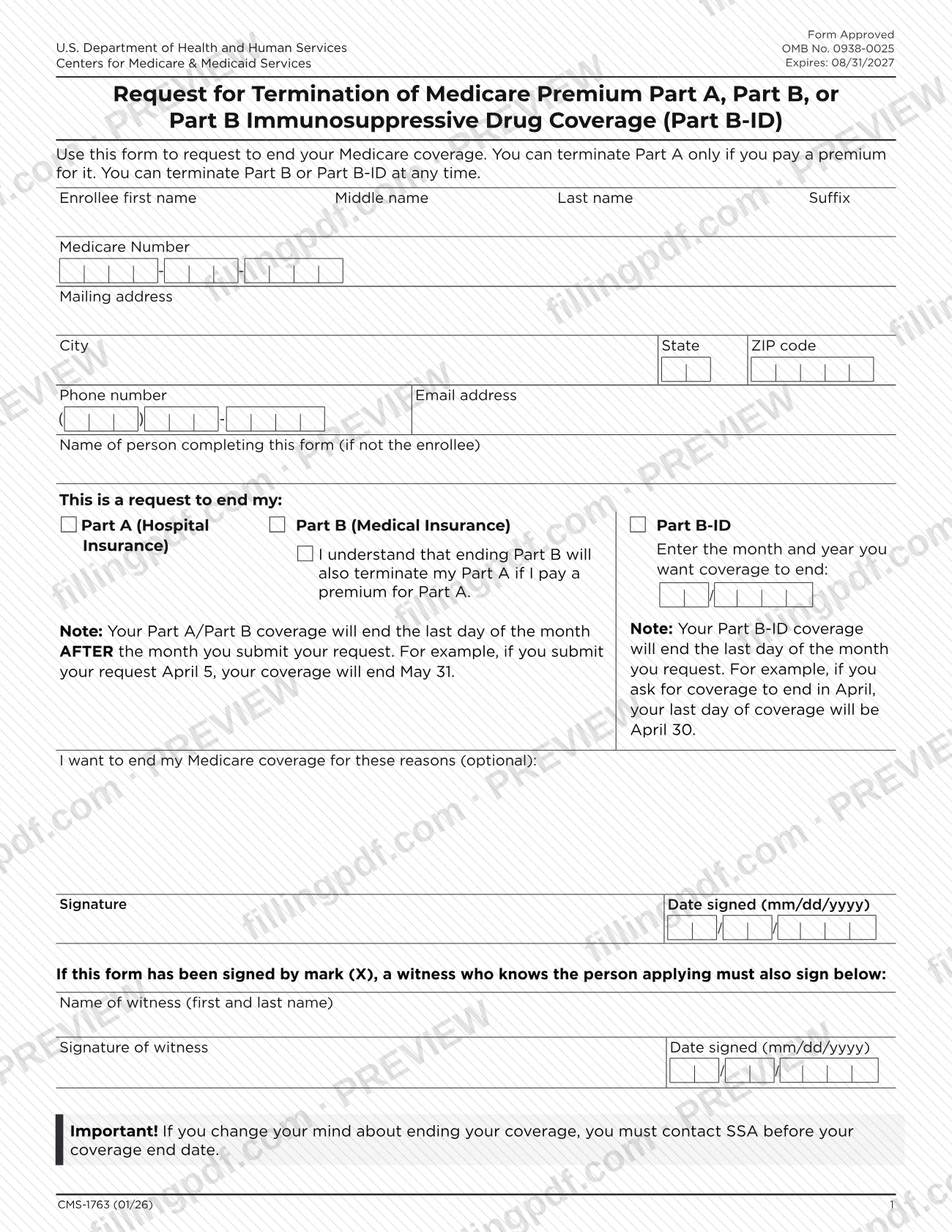

CMS-1763 is the Centers for Medicare & Medicaid Services (CMS) form you use to ask to end your Medicare coverage: premium Part A, Part B or Part B Immunosuppressive Drug Coverage (Part B-ID). You complete it, sign it and send it to your local Social Security office by mail or fax. On FillingPDF you can fill out the form online and download or print the completed PDF; the official PDF is published by CMS at cms.gov.
Last updated
What is CMS-1763?
Form CMS-1763, Request for Termination of Premium Hospital Insurance of Supplementary Medical Insurance, is the CMS form on which an enrollee asks to end Medicare Part A (when a premium is paid for it), Part B or Part B Immunosuppressive Drug Coverage (Part B-ID).
The current PDF prints a longer title: Request for Termination of Medicare Premium Part A, Part B, or Part B Immunosuppressive Drug Coverage (Part B-ID). It carries OMB No. 0938-0025, which the form shows as expiring 08/31/2027, and the revision mark CMS-1763 (01/26).
The form collects the enrollee's name, Medicare Number, mailing address, phone number and email address. You then mark which coverage you want to end, enter the month and year it should end, and may give your reasons, which are optional. The enrollee signs and dates it.
The form states two rules. You can terminate Part A only if you pay a premium for it, while Part B or Part B-ID can be terminated at any time. Ending Part B also terminates Part A if you pay a premium for Part A. The form notes that Sections 1838(b) and 1818A(c)(2)(B) of the Social Security Act require a notice to the Social Security Administration (SSA) when termination is requested.
Who needs to file CMS-1763?
Medicare enrollees who want to end their coverage use Form CMS-1763. The form sets conditions for each type of coverage:
- Part A (Hospital Insurance): you can terminate it only if you pay a premium for it.
- Part B (Medical Insurance): you can terminate it at any time. If you pay a premium for Part A, ending Part B also ends Part A, and you confirm that you understand this by checking the statement printed on the form.
- Part B-ID (Part B Immunosuppressive Drug Coverage): you can terminate it at any time.
The form has a line for the name of the person completing it if that person is not the enrollee, so someone other than the enrollee may fill it in. The form does not describe who is allowed to sign for an enrollee.
If the form is signed with a mark (X), a witness who knows the person applying must also sign it, with the witness's name and the date.
When to file CMS-1763
Submit Form CMS-1763 when you decide to end your Part A (premium), Part B or Part B-ID coverage. The form sets no deadline of its own: Part B and Part B-ID can be terminated at any time, and Part A only if you pay a premium for it.
The date you submit decides when coverage ends:
- Part A and Part B: coverage ends on the last day of the month after the month you submit the request. If you submit it April 5, coverage ends May 31.
- Part B-ID: coverage ends on the last day of the month you request. If you ask for coverage to end in April, your last day of coverage is April 30.
If you change your mind, the form says you must contact SSA before your coverage end date.
How to fill out CMS-1763
Enter the enrollee's name
Write the enrollee's first name, middle name, last name and suffix in the first row of the form.
Enter the Medicare Number
In the Medicare Number box, write the enrollee's Medicare Number.
Add address and contact details
Fill in the mailing address, city, state, ZIP code, phone number and email address.
Name the person completing the form
Use Name of person completing this form (if not the enrollee) only when someone other than the enrollee fills it in; otherwise leave it blank.
Mark the coverage to end
Under This is a request to end my: check Part A (Hospital Insurance), Part B (Medical Insurance) or Part B-ID. If you check Part B, read the statement that ending Part B also terminates Part A if you pay a premium for Part A.
Enter the month and year coverage ends
Write the month and year you want coverage to end. Part A and Part B end the last day of the month after you submit the request; Part B-ID ends the last day of the month you request.
Give your reasons if you wish
The reasons line is optional. Use it if you want to explain why you are ending coverage.
Sign and date the form
Sign on the Signature line and enter the Date signed as mm/dd/yyyy.
Add a witness if signed by mark
If the form is signed with a mark (X), a witness who knows the person applying prints a first and last name, signs and enters the date signed as mm/dd/yyyy.
Review, download and send
Check every entry and the end month, then download or print the completed PDF from FillingPDF and mail or fax it to your local Social Security office as described under How to submit.
How to submit CMS-1763
You can submit Form CMS-1763 by mail or by fax to your local Social Security office.
- By mail: send the completed, signed form to your local Social Security office.
- By fax: fax the completed, signed form to your local Social Security office.
- Finding the office: the form directs you to SSA.gov/locator to find an office near you.
The form prints no street address or fax number, so get them for your office through the locator. It does not mention a fee.
Because ending coverage takes effect by the month you submit, send the form before the month in which you want coverage to stop being counted. FillingPDF lets you fill out and download the PDF; submission follows the channels above.
Common mistakes to avoid
- Requesting to end Part A when you do not pay a premium for it; the form allows Part A termination only if you pay a premium.
- Ending Part B without realizing it also terminates Part A if you pay a premium for Part A.
- Expecting Part A or Part B coverage to end in the month you submit; it ends the last day of the month after you submit.
- Entering the wrong end month for Part B-ID, which ends the last day of the month you request.
- Leaving the form unsigned or without the date signed in mm/dd/yyyy format.
- Signing with a mark (X) and not adding the name, signature and date of a witness who knows the person applying.
- Waiting until after the coverage end date to change your mind; you must contact SSA before that date.
- Sending the form to CMS instead of mailing or faxing it to your local Social Security office.
Frequently asked questions
What is the CMS-1763 form used for?
CMS-1763 is the form you use to request ending your Medicare coverage. It covers premium Part A, Part B and Part B Immunosuppressive Drug Coverage (Part B-ID). You complete and sign it, then send it to your local Social Security office.
Can I cancel Medicare Part A with Form CMS-1763?
Only if you pay a premium for Part A. The form states that you can terminate Part A only if you pay a premium for it. Part B or Part B-ID, by contrast, can be terminated at any time.
When does my coverage end after I submit CMS-1763?
Part A and Part B coverage ends on the last day of the month after the month you submit. If you submit on April 5, it ends May 31. Part B-ID ends on the last day of the month you request, such as April 30 for April.
Does ending Part B also end Part A?
Yes, if you pay a premium for Part A. The form includes a statement, which you confirm when you check Part B, that ending Part B also terminates Part A if you pay a premium for it.
Where do I send Form CMS-1763?
Mail or fax the completed, signed form to your local Social Security office. The form directs you to SSA.gov/locator to find an office near you and prints no address or fax number of its own.
What if I change my mind after sending the form?
Contact SSA before your coverage end date. The form warns that you must do so before that date if you change your mind about ending your coverage.
Do I have to give a reason for ending my Medicare coverage?
No. The reasons line on the form is marked optional, so you can leave it blank. The signature and the date signed in mm/dd/yyyy format are still needed.
Can I fill out the CMS-1763 PDF online?
You can fill out the PDF online on FillingPDF and download or print it. FillingPDF is an independent service and does not send the form; you mail or fax it to your local Social Security office.
Ready to fill out CMS-1763?
Fill out CMS-1763 now