
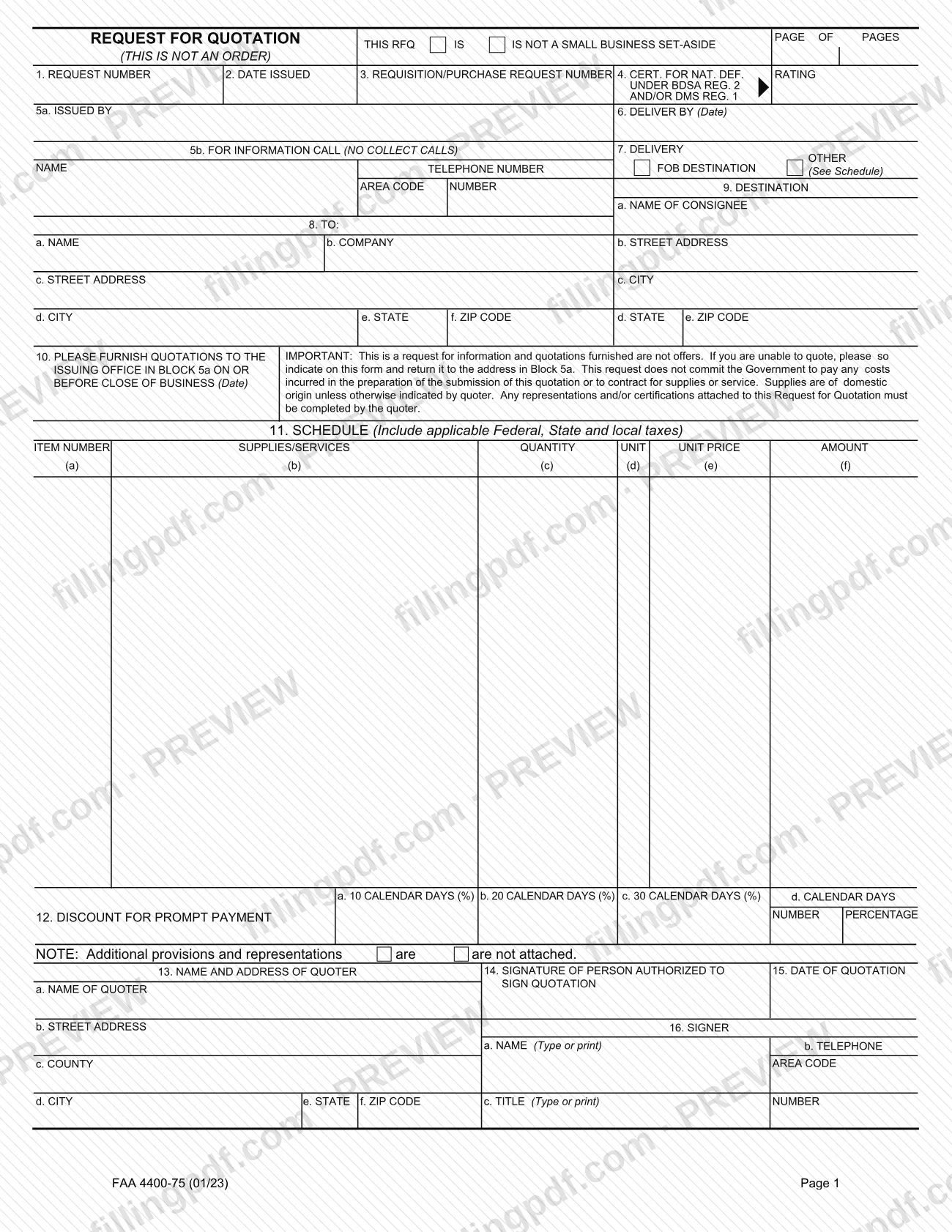
The request for quotation on Form FAA 4400-75 is the document the Federal Aviation Administration (FAA) uses to ask vendors to quote prices for supplies or services. The form states that it is not an order, and the quotations it collects are not offers. You use it when you issue a request to vendors or when you answer one as the quoter. On this page you can fill out the form online on FillingPDF and download or print the completed PDF; the original PDF is published by the FAA at faa.gov.
Last updated
What is FAA 4400-75?
Form FAA 4400-75, Request for Quotation, is the Federal Aviation Administration (FAA) form an issuing office uses to ask vendors for quotations on supplies or services, and on which the vendor states its prices and signs its quotation. The header of the form says plainly: "This is not an order."
The form has two halves. Blocks 1 to 10 describe the request: the request number, date issued, requisition or purchase request number, any national defense rating, the issuing office (Block 5a), a contact telephone number (Block 5b), the delivery date and terms, the addressee, the destination and the date by which quotations are due. A box at the top says whether the request is or is not a small business set-aside. Block 11 is the schedule of items, with quantity, unit, unit price and amount for each line. Blocks 12 to 16 belong to the quoter: prompt-payment discount, name and address of the quoter, the signature of the person authorized to sign, the date of the quotation and the signer's name, title and telephone number.
A notice printed in Block 10 sets the ground rules. The request is for information, quotations are not offers, and it does not commit the Government to pay any cost of preparing a quotation or to contract for supplies or services. Supplies are of domestic origin unless the quoter indicates otherwise.
The FAA form page lists the edition date as January 1, 2023 (printed "01/23" on the form) and names AAP-100, Acquisition Policy Division, as the office of primary responsibility.
Who needs to file FAA 4400-75?
Two groups work with Form FAA 4400-75.
- The issuing office. The office named in Block 5a uses the form to ask vendors for quotations, sets the due date in Block 10 and states whether the request is a small business set-aside.
- The quoter. A vendor that receives the request and wants to respond completes the quoter blocks: the schedule prices in Block 11, any prompt-payment discount in Block 12, its name and address in Block 13, and the signature, date and signer details in Blocks 14 to 16. Any representations or certifications attached to the request must be completed by the quoter.
A vendor that cannot quote is not left without an option: the form says to indicate that on the form and return it to the address in Block 5a.
The form is a request for information, not an order, so it does not create a purchase on its own. The form does not describe who may sign for a company beyond calling the signer the "person authorized to sign quotation", so check the request itself or ask the issuing office when in doubt.
When to file FAA 4400-75
A quotation is due on or before close of business on the date printed in Block 10, "Please furnish quotations to the issuing office in Block 5a on or before close of business (Date)." That date is set by the issuing office for each request; the form carries no fixed deadline of its own.
The form also has a "Deliver by" date in Block 6, which concerns delivery of the supplies or services rather than the return of the quotation, and a Block 15 for the date you prepare your quotation. If you cannot quote, the form tells you to say so on the form and return it to the Block 5a address; it does not set a separate date for that response. No processing time is printed on the form.
Documents you need
- Any additional provisions and representations or certifications attached to the request: the quoter must complete them and return them with the form. The note above Block 13 states whether they are attached.
How to fill out FAA 4400-75
Check the small business set-aside box
At the top, mark whether the RFQ IS or IS NOT a small business set-aside. Enter the page number in the Page of Pages space.
Enter the request identifiers
Complete Block 1 (Request Number), Block 2 (Date Issued) and Block 3 (Requisition/Purchase Request Number). In Block 4, enter the certification for national defense rating under BDSA Reg. 2 and/or DMS Reg. 1 when one applies.
Identify the issuing office
In Block 5a enter the issuing office, which is also where quotations are returned. In Block 5b enter the name, area code and telephone number of the contact; the form says no collect calls.
Set delivery date and terms
Block 6 is the date by which delivery is required. In Block 7, mark FOB Destination or Other (See Schedule).
Enter the addressee and destination
Block 8 (To) takes the name, company, street address, city, state and ZIP code. Block 9 (Destination) takes the name of the consignee, street address, city, state and ZIP code.
Set the quotation due date
In Block 10, enter the date by which quotations must reach the issuing office in Block 5a, on or before close of business.
Complete the schedule in Block 11
For each line enter the item number (a), supplies or services (b), quantity (c), unit (d), unit price (e) and amount (f). Include applicable Federal, State and local taxes.
Enter any prompt-payment discount
In Block 12, give the percentage for payment within 10, 20 or 30 calendar days, or enter a percentage and a number of days in the last column (d).
Complete the quoter's name and address
In Block 13 enter the quoter's name (a), street address (b), county (c), city (d), state (e) and ZIP code (f). Mark whether additional provisions and representations are or are not attached.
Sign, date and identify the signer
The person authorized to sign signs in Block 14 and dates the quotation in Block 15. In Block 16 type or print the signer's name (a), the area code and telephone number (b) and the title (c).
Review and download the completed PDF
Check the due date, the taxes in the schedule and the signature, then download or print the completed PDF from FillingPDF and return it as described under How to submit.
How to submit FAA 4400-75
The form names one channel: return the completed request to the issuing office at the address in Block 5a, on or before close of business on the date in Block 10. This applies whether you are quoting or declining to quote. The form prints no other mailing address, portal or email for returning quotations.
- Questions about the request: Block 5b gives a telephone number "for information"; the form says no collect calls.
- Attachments: if additional provisions and representations are attached to the request, the quoter completes them and returns them with the form, as the note above Block 13 indicates.
- Questions about the form itself: the FAA's form page lists [email protected] as the contact for the office of primary responsibility, AAP-100, Acquisition Policy Division.
Quotations are not offers and the Government is not committed to pay quotation costs. FillingPDF lets you fill out and download the PDF; submission follows the channel above.
Common mistakes to avoid
- Returning the quotation to an address other than the issuing office in Block 5a, which is where the form says responses and declinations go.
- Missing the close-of-business date in Block 10; the quotation is due on or before that date.
- Leaving out Federal, State and local taxes in the Block 11 schedule; the heading says to include applicable taxes.
- Not completing representations or certifications attached to the request; the form says the quoter must complete them.
- Staying silent when you cannot quote; the form says to indicate that on the form and return it to the Block 5a address.
- Failing to indicate non-domestic origin when the supplies are not of domestic origin; the form treats supplies as domestic unless the quoter says otherwise.
- Submitting without a signature in Block 14 or without the signer's name, title and telephone number in Block 16.
- Assuming the form is an order or that the Government will reimburse quotation costs; the form says it is not an order and commits the Government to neither.
Frequently asked questions
What is the request for quotation on Form FAA 4400-75?
It is the FAA form an issuing office uses to ask vendors for quotations on supplies or services. The form says it is not an order, and quotations furnished in response are not offers. The vendor completes the schedule prices, signature and quoter details.
Is a request for quotation an order or a contract?
No. The form states "This is not an order." Its Block 10 notice adds that it does not commit the Government to pay any cost of preparing a quotation or to contract for supplies or services.
Where do I return Form FAA 4400-75?
To the issuing office at the address in Block 5a, on or before close of business on the date in Block 10. The form names no other return channel. Block 5b gives a telephone number for questions; collect calls are not accepted.
What if I cannot quote on the request?
Indicate that you are unable to quote on the form and return it to the address in Block 5a. The form gives this instruction in the Block 10 notice, so you do not need to leave the request unanswered.
When is the quotation due?
On or before close of business on the date in Block 10. The issuing office sets that date for each request; the form has no fixed deadline. Block 6 is a separate delivery date for the supplies or services.
Should my prices include taxes?
Yes. The Block 11 schedule heading says to include applicable Federal, State and local taxes. Enter unit price in column (e) and the line total in column (f).
Can I fill out Form FAA 4400-75 online?
Yes. You can fill out the PDF online on FillingPDF and download or print it. FillingPDF is independent of the FAA and does not send quotations; you return the form to the issuing office in Block 5a.
What are the prompt-payment discount options in Block 12?
Block 12 offers 10, 20 and 30 calendar days, each with a percentage, plus a fourth option where you enter your own number of calendar days and percentage. Enter only the terms you are offering.
Ready to fill out FAA 4400-75?
Fill out FAA 4400-75 now