
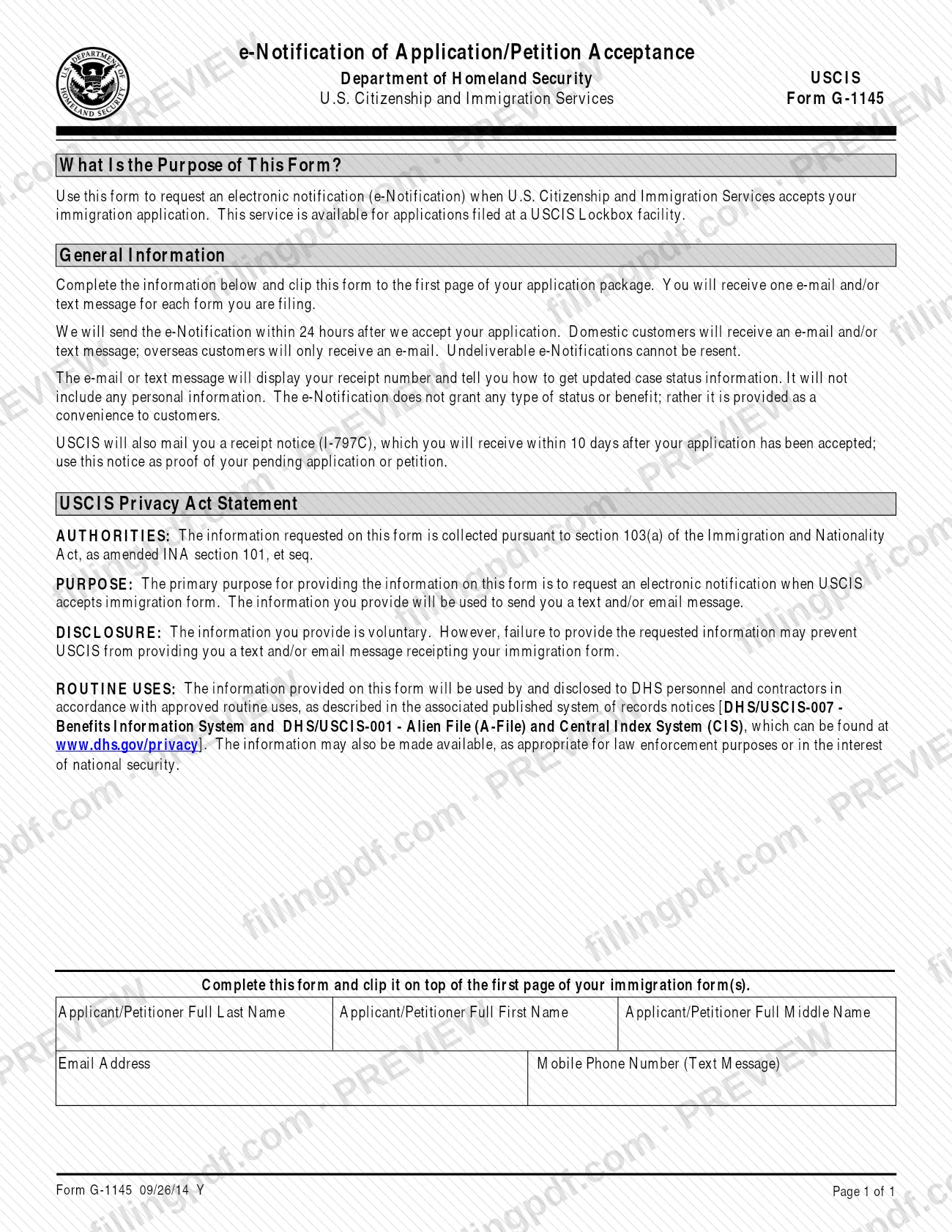
Form G-1145, e-Notification of Application/Petition Acceptance, is the form you clip to the front of an immigration application to ask U.S. Citizenship and Immigration Services (USCIS) for an email and/or text message when it accepts your filing; many people search for it as g1145. It works only for certain forms filed at a USCIS Lockbox facility. On FillingPDF you can fill out the form online and download or print the completed PDF; the official PDF is published by USCIS at uscis.gov.
Last updated
What is G-1145?
Form G-1145, e-Notification of Application/Petition Acceptance, is the U.S. Citizenship and Immigration Services (USCIS) form used to request an electronic notification, by email and/or text message, when USCIS accepts your immigration application or petition.
The form is one page. It asks for the applicant or petitioner's full last, first and middle name, an email address and a mobile phone number for text messages. You clip it on top of the first page of your application package, and you receive one message for each form you file.
USCIS says it sends the e-Notification within 24 hours after it accepts the application. The message shows your receipt number and tells you how to get case status information. It carries no personal information, not even your name, because email and text are not secure ways to send it. The e-Notification does not grant any status or benefit; USCIS describes it as a convenience.
It does not replace the paper receipt. USCIS also mails a receipt notice (I-797C) within 10 days after acceptance, and that notice is your proof of a pending application or petition. Form G-1145 is a request attached to another form, not an application of its own, and it is available only for the forms listed by USCIS.
The printed edition date on the form is 09/26/14 Y.
Who needs to file G-1145?
Form G-1145 is for anyone filing one of the USCIS forms that accept it who wants an email and/or text message when USCIS accepts the filing. USCIS lists these forms: I-90, I-102, I-130, I-131, I-140, I-212, I-360, I-485, I-485 Supp A, I-601, I-601A, I-694, I-698, I-751, I-765, I-800, I-800A, I-817, I-821, I-821D, I-824, N-400, N-565 and N-600K.
The service is available only for those forms filed at one of the four USCIS Lockbox locations: Lewisville, Texas; Chicago, Illinois; Elgin, Illinois; and Phoenix, Arizona. If your form is not on the list, or you do not file at a Lockbox facility, the form does not apply.
Notification channels differ by location. Domestic customers receive an email and/or text message; overseas customers receive only an email. Use the name of the applicant or petitioner on the form. The form does not describe a separate representative or signer, because it has no signature block.
When to file G-1145
Submit Form G-1145 at the moment you file the application or petition it accompanies. It has no deadline or filing window of its own: it is clipped to the front of the package, so it travels with that filing.
After USCIS accepts the application, the e-Notification is sent within 24 hours. Undeliverable e-Notifications cannot be resent, so check that the email address and mobile number are correct before you file. The paper receipt notice (I-797C) follows by mail within 10 days after acceptance.
How to fill out G-1145
Confirm your form is eligible
Check that the application or petition you are filing is one of the forms USCIS lists for Form G-1145 and that it goes to a USCIS Lockbox facility.
Enter the applicant's last name
In the box labeled Applicant/Petitioner Full Last Name, type the last name of the person who is filing the application or petition.
Enter the applicant's first name
In the box labeled Applicant/Petitioner Full First Name, type the first name of the same person.
Enter the applicant's middle name
In the box labeled Applicant/Petitioner Full Middle Name, type the full middle name, if the person has one.
Enter your email address
In the Email Address box, type an address you can check. USCIS sends the e-Notification there, and an undeliverable message cannot be resent.
Enter your mobile phone number
In the Mobile Phone Number (Text Message) box, enter the number that should receive the text message. Overseas customers receive only an email.
Review, download and clip the form
Check the spelling of names, the email address and the phone number. Download or print the completed PDF from FillingPDF with the edition date and page number visible, then clip it on top of the first page of your application package.
How to submit G-1145
You do not file Form G-1145 on its own: you submit it with your application package, clipped to the top of the first page, at a USCIS Lockbox facility.
- With the application: Place the completed G-1145 on top of the first page of the immigration form you are filing. The form itself prints no separate address.
- Where it works: The service is limited to certain forms filed at the four Lockbox locations in Lewisville, Texas; Chicago, Illinois; Elgin, Illinois; and Phoenix, Arizona.
- If you print it: Make sure the form edition date and page numbers are visible at the bottom of every page and that all pages come from the same edition. USCIS says it may reject a form with missing pages or pages from a different edition.
- Fee: The USCIS page for Form G-1145 refers you to its Fee Schedule page for fee information; the amount is not stated here.
After acceptance, watch for the e-Notification within 24 hours and for the I-797C receipt notice by mail within 10 days. FillingPDF lets you fill out and download the PDF; submission follows the channels above.
Common mistakes to avoid
- Attaching Form G-1145 to a form that is not on the USCIS list of eligible forms, or to a filing that does not go to a USCIS Lockbox facility.
- Leaving the email address or mobile phone number wrong or incomplete; undeliverable e-Notifications cannot be resent.
- Expecting a text message while living overseas; overseas customers receive only an email.
- Printing the form with the edition date or page numbers cut off, or mixing pages from different editions, which can lead USCIS to reject the form.
- Treating the e-Notification as proof of a pending case; USCIS says to use the mailed receipt notice (I-797C) for that.
- Expecting the message to show your name or personal details; it lists only the receipt number and how to check case status.
- Mailing the form separately instead of clipping it on top of the first page of the application package.
Frequently asked questions
What is g1145 used for?
G1145, officially Form G-1145, is the USCIS request for an email and/or text message when USCIS accepts your immigration application. The message shows your receipt number and how to get case status information. It does not grant any status or benefit.
Which forms can I file with Form G-1145?
USCIS lists I-90, I-102, I-130, I-131, I-140, I-212, I-360, I-485, I-485 Supp A, I-601, I-601A, I-694, I-698, I-751, I-765, I-800, I-800A, I-817, I-821, I-821D, I-824, N-400, N-565 and N-600K. The service applies only to those forms filed at a USCIS Lockbox facility.
How soon will I get the e-Notification?
USCIS says it sends the e-Notification within 24 hours after it accepts your application. Domestic customers receive an email and/or text message; overseas customers receive only an email. Undeliverable notifications cannot be resent.
Does the e-Notification replace the I-797C receipt notice?
No. USCIS also mails a receipt notice (I-797C) within 10 days after your application is accepted, and you use that notice as proof of your pending application or petition. The e-Notification is only a convenience message.
Where do I send Form G-1145?
Clip it to the front of the first page of the application or petition you are filing. The form prints no separate address. The service works only for certain forms filed at the USCIS Lockbox locations in Lewisville, Chicago, Elgin and Phoenix.
Can I fill out Form G-1145 online?
Yes. You can fill out the PDF online on FillingPDF and download or print it. FillingPDF is an independent service and does not file the form with USCIS; you clip the printed form to your application package and submit it through the USCIS channels.
Will the message include my name or personal information?
No. USCIS says e-Notifications contain no personal information, including your name, because email and text are not secure. The message lists your receipt number and tells you how to get case status information.
Is there a fee for Form G-1145?
USCIS directs you to its Fee Schedule page for the filing fee information for Form G-1145. Check that page for the current figure before you file, since this page does not state amounts.
Ready to fill out G-1145?
Fill out G-1145 now