
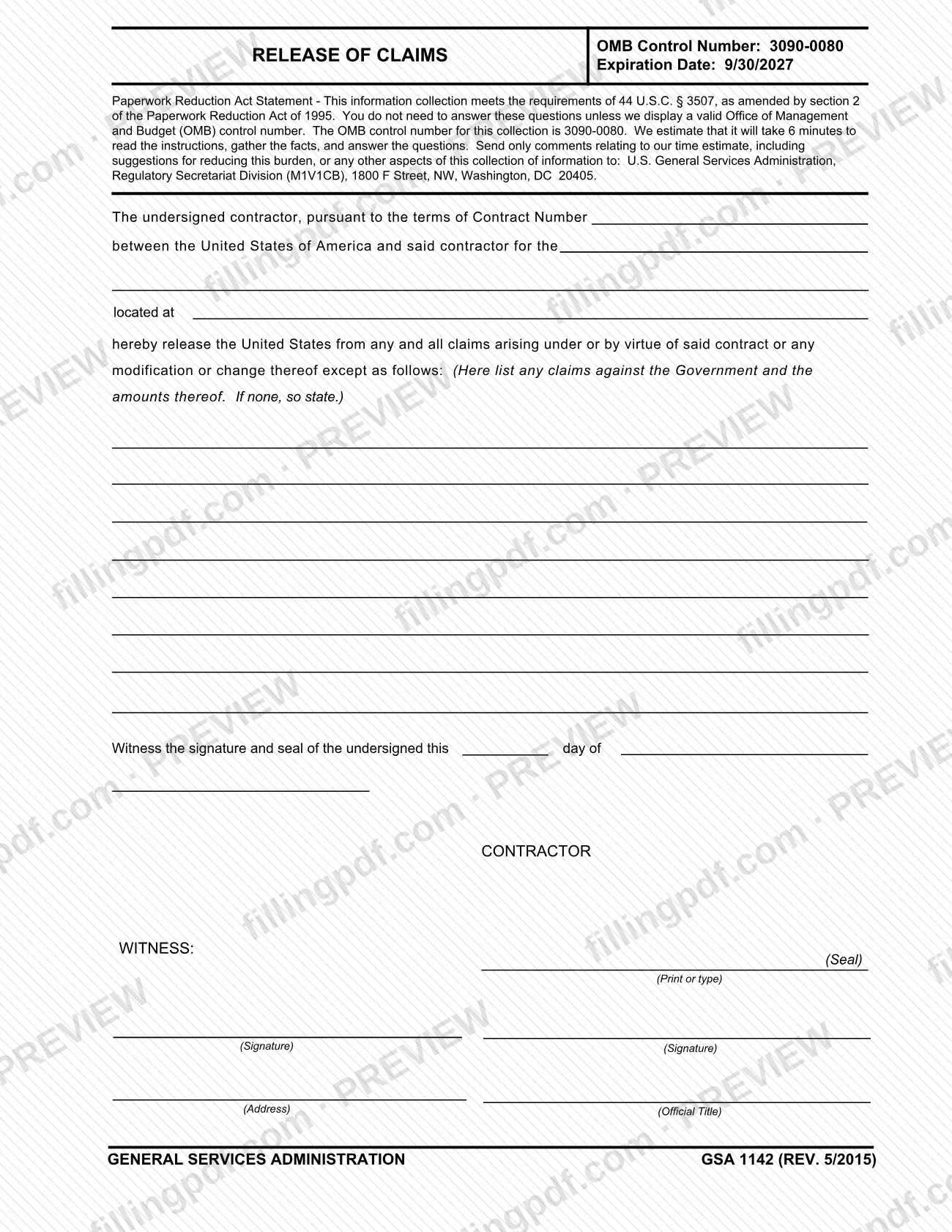
A release of claims on Form GSA 1142 is the statement in which a contractor releases the United States from any and all claims arising under a named contract, except the claims the contractor lists on the form. The General Services Administration (GSA) publishes the form, and it is completed by the contractor and a witness. On FillingPDF you can fill out the form online and download or print the completed PDF; the original PDF and the GSA form page are published by GSA.
Last updated
What is GSA 1142?
Release of Claims (Form GSA 1142) is the General Services Administration (GSA) form on which a contractor releases the United States of America from all claims arising under or by virtue of a specific contract, or any modification or change to it, except the claims the contractor lists.
The text is a single paragraph. It identifies the contract by its contract number, names the work the contract covers and where it is located, and then states the release. Immediately after the release, the form leaves room to list any claims against the Government and the amounts of those claims; the form says that if there are none, the contractor must so state. The contractor then signs and seals the form on a stated date, and a witness signs.
The GSA form page lists the form as GSA1142, current revision date 05/2015, with the authority or regulation PBS P 2800.6A. The PDF carries the printed edition "GSA 1142 (REV. 5/2015)", OMB Control Number 3090-0080 and an expiration date of 9/30/2027. The Paperwork Reduction Act statement on the form estimates 6 minutes to read the instructions, gather the facts and answer the questions.
The form is a release signed by the contractor. It is not a claim form and it does not itself state any amount owed to the contractor, other than the exceptions the contractor chooses to list.
Who needs to file GSA 1142?
The form is written for a contractor that has a contract with the United States of America and is releasing the United States from claims under that contract. The contractor identifies the contract by number, describes what the contract is for and where it is located, and signs the release.
Who signs:
- The contractor prints or types the contractor's name, signs, and adds an address and an official title, so the form is meant to be signed by a person acting for the contractor in an official capacity. The form also provides a place for a seal.
- A witness signs on the line marked WITNESS.
A contractor that has claims against the Government should read the exceptions wording before signing: the release covers every claim under the contract except the ones listed on the form with their amounts. The form gives no other category of person who may use it, and it contains no instruction for signing on behalf of someone else beyond the official-title line.
When to file GSA 1142
No deadline is printed on Form GSA 1142. The form is completed for one specific contract, whose number you enter in the first blank, and it takes effect as a release of claims under that contract on the date you enter in the signature line ("this day of"). Complete and date it when you are ready to sign the release for that contract, and list any exceptions at that time, because the release covers every claim arising under the contract except those you name. The form's own revision printed on the PDF is GSA 1142 (REV. 5/2015).
How to fill out GSA 1142
Enter the contract number
In the first blank, write the Contract Number of the contract between the United States of America and the contractor. Use the number exactly as it appears on the contract.
Describe the work and its location
Complete the blank after "for the" with the work or project the contract covers, and the blank after "located at" with where it is located.
List any exceptions
Under "except as follows," list each claim against the Government and its amount. If the contractor has no claims, state "none" as the form directs.
Enter the signing date
Complete the "this day of" blanks in the line beginning "Witness the signature and seal of the undersigned" with the day and month on which the contractor signs.
Print the contractor's name
In the CONTRACTOR block, print or type the name of the contractor in the space marked (Print or type).
Sign and seal as the contractor
Have the contractor's representative sign on the (Signature) line and add a seal at the (Seal) mark, if one is used.
Add the address and official title
Enter the contractor's address on the (Address) line and the signer's title on the (Official Title) line.
Have the witness sign
The witness signs on the (Signature) line under WITNESS.
Review and download the completed PDF
Check the contract number, the exceptions and amounts, the date and both signatures. Download or print the completed PDF from FillingPDF and keep a copy for your records.
How to submit GSA 1142
The form prints no submission channel, mailing address, portal or appointment rule of its own. After the contractor and the witness have signed, the completed form goes to the party on the Government side of the contract named in the first blank.
The only address printed on the form is for comments about the paperwork burden: U.S. General Services Administration, Regulatory Secretariat Division (M1V1CB), 1800 F Street, NW, Washington, DC 20405. That address is for comments on the time estimate and the burden of the information collection, not for sending the completed release.
Keep the signed original or a copy with your contract records. GSA publishes the form and its details at https://www.gsa.gov/reference/forms/release-of-claims. FillingPDF lets you fill out and download the PDF; submission follows the channels that apply to your contract.
Common mistakes to avoid
- Leaving the exceptions space blank when the contractor has no claims; the form says to so state if there are none.
- Signing without listing an existing claim and its amount, which leaves it covered by the release of all claims under the contract.
- Entering the wrong contract number, so the release refers to a different contract than the one intended.
- Skipping the lines that describe the contract's work and its location, which the release wording refers to directly.
- Submitting the form without the witness signature on the line marked WITNESS.
- Leaving out the contractor's printed name, address or official title next to the signature.
- Mailing the completed release to the Regulatory Secretariat Division address, which is printed only for comments on the paperwork burden.
Frequently asked questions
What is a release of claims on GSA Form 1142?
It is the GSA form in which a contractor releases the United States from all claims arising under a named contract, or any modification or change to it, except the claims the contractor lists on the form with their amounts.
What do I write if I have no claims against the Government?
State that there are none. The form's exceptions instruction says to list any claims against the Government and their amounts and, if there are none, to so state. Do not leave the space empty.
Who signs Form GSA 1142?
The contractor signs, printing or typing its name and adding an address and official title, and a witness signs on the WITNESS line. The form also has a place for the contractor's seal.
Can I fill out Form GSA 1142 online?
Yes. You can fill out the PDF online on FillingPDF and download or print it. FillingPDF is an independent service and does not file or send the release to GSA or anyone else; you deliver it yourself.
Is there a deadline to file the release of claims?
The form prints no deadline. It is completed for one contract, identified by the contract number in the first blank, and it is dated on the signing line. Check your contract for any timing rule that applies to it.
Where do I send the completed GSA 1142?
The form prints no address for the completed release. The Regulatory Secretariat Division address on it is only for comments about the time estimate and burden of the information collection.
How long does Form GSA 1142 take to complete?
The Paperwork Reduction Act statement on the form estimates 6 minutes to read the instructions, gather the facts and answer the questions. The form also shows OMB Control Number 3090-0080.
What revision of GSA 1142 is this?
The PDF is printed GSA 1142 (REV. 5/2015), and the GSA form page lists the current revision date as 05/2015. The form shows an OMB expiration date of 9/30/2027.
Ready to fill out GSA 1142?
Fill out GSA 1142 now