
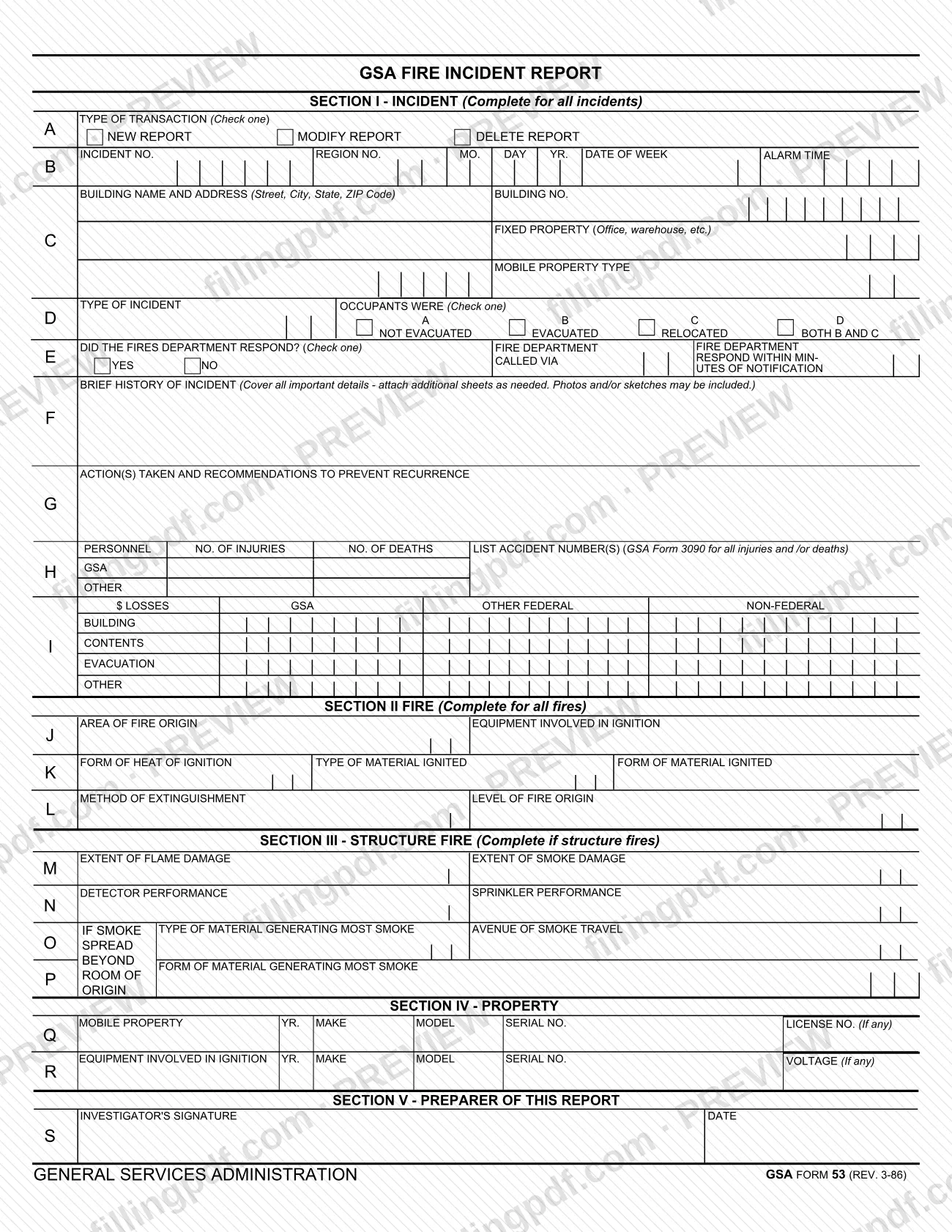
The fire incident report on GSA Form 53 is the General Services Administration (GSA) form for recording a fire incident: when and where it happened, how it was handled, who was hurt, what was lost and what should change to prevent a repeat. Section I is completed for every incident, while Sections II and III apply to fires and structure fires. On this page you can fill out the form online on FillingPDF and download or print the completed PDF; the original is published by GSA at gsa.gov.
Last updated
What is GSA 53?
GSA Form 53, Fire Incident Report, is the General Services Administration (GSA) form used to document a fire incident: its date and alarm time, the building, what was ignited and how, how the fire was put out, injuries, deaths and losses, and the investigator who prepared the report.
The form has five sections:
- Section I – Incident, completed for all incidents: transaction type, incident number, building and property, type of incident, occupant evacuation, fire department response, a brief history, actions and recommendations to prevent recurrence, personnel injuries and deaths, and losses.
- Section II – Fire, completed for all fires: area of origin, equipment, heat and material ignited, method of extinguishment and level of origin.
- Section III – Structure Fire, completed only for structure fires: extent of flame and smoke damage, detector and sprinkler performance, and smoke travel.
- Section IV – Property: mobile property and equipment involved in ignition.
- Section V – Preparer of this Report: the investigator's signature and date.
The GSA forms page lists the form number as GSA53, the current revision date as 03/1986 and the authority as PBS P 5900.2C. For injuries and deaths, the form refers to GSA Form 3090, whose accident numbers are listed on this report.
Who needs to file GSA 53?
The form is completed by the investigator who prepares the report on a fire incident; Section V, Preparer of this Report, carries the investigator's signature and date.
How much of the form applies depends on the incident:
- All incidents: complete Section I.
- All fires: also complete Section II.
- Structure fires: also complete Section III.
- Mobile property or equipment involved in ignition: list it in Section IV with year, make, model, serial number and license number or voltage, if any.
Where people were injured or killed, the personnel block of Section I asks for the number of injuries and deaths and for the accident number(s) from GSA Form 3090. The form does not print rules on who else may sign for the investigator.
When to file GSA 53
The triggering event is a fire incident: Section I is completed for all incidents, Section II for all fires and Section III for structure fires. The form prints no due date or filing window of its own.
The Type of Transaction box at the top lets you mark the report as a new report, a modification of an earlier report or a deletion of one, so the same form is used both for the first report and for later changes. Record the alarm time and the date in Section I as the incident happened.
Documents you need
- Additional sheets for the brief history of the incident, attached as needed when the space on the form is not enough.
- Photos and/or sketches of the incident, which the form says may be included with the brief history.
- Accident number(s) from GSA Form 3090, listed in the personnel block when there are injuries and/or deaths.
How to fill out GSA 53
Mark the type of transaction
At the top of Section I, check one box: New Report, Modify Report or Delete Report.
Enter incident identifiers and timing
In block B, enter the incident number, region number, the date (month, day, year), the day of the week and the alarm time.
Identify the building or property
In block C, give the building name and address (street, city, state, ZIP Code) and the building number, then describe the fixed property (office, warehouse, etc.) or the mobile property type.
Describe incident type and occupants
In block D, enter the type of incident and check one box for occupants: not evacuated, evacuated, relocated, or both evacuated and relocated.
Record the fire department response
In block E, check Yes or No for whether the fire department responded, how it was called and, if it responded, how many minutes after notification.
Write the history and recommendations
In block F, cover all important details of the incident and attach additional sheets as needed. In block G, list the actions taken and recommendations to prevent recurrence.
Report personnel and losses
In block H, enter the number of injuries and deaths and the GSA Form 3090 accident number(s). In block I, enter dollar losses by category (building, contents, evacuation, other) under GSA, other federal and non-federal.
Complete Section II for fires
In blocks J to L, enter the area of fire origin, equipment involved in ignition, form of heat of ignition, type and form of material ignited, method of extinguishment and level of fire origin.
Complete Section III for structure fires
In blocks M to P, enter the extent of flame and smoke damage, detector and sprinkler performance, the material generating most smoke, its form, the avenue of smoke travel and, if smoke spread beyond the room of origin, that information.
List mobile property and equipment
In Section IV, blocks Q and R, enter year, make, model, serial number and license number for mobile property, and year, make, model, serial number and voltage for equipment involved in ignition, if any.
Review, sign and download the PDF
In Section V, block S, the investigator signs and dates the report. Check every section that applies, then download or print the completed PDF from FillingPDF and submit it as GSA directs.
How to submit GSA 53
The form prints no mailing address, portal or other submission channel, and the GSA page for the form gives none either. GSA publishes the form at https://www.gsa.gov/reference/forms/fire-incident-report, where the authority is listed as PBS P 5900.2C. Photos and sketches may be included with the report, and additional sheets may be attached to the brief history. FillingPDF lets you fill out and download the PDF; submission follows the channels GSA directs for your report.
Common mistakes to avoid
- Completing only Section I for a fire, when the form says Section II is completed for all fires.
- Leaving Section III blank for a structure fire; the form says to complete it if the incident is a structure fire.
- Reporting injuries or deaths without listing the GSA Form 3090 accident number(s) in the personnel block.
- Not marking the Type of Transaction box as New Report, Modify Report or Delete Report.
- Checking more than one box where the form says to check one, such as occupants were evacuated, relocated or not evacuated.
- Squeezing a long account into the space provided instead of attaching additional sheets to the brief history.
- Submitting the report without the investigator's signature and date in Section V.
Frequently asked questions
What is GSA Form 53?
GSA Form 53 is the General Services Administration's Fire Incident Report. It records the date, place and cause details of a fire incident, how it was extinguished, injuries, deaths and losses, and recommendations to prevent recurrence. It is signed by the investigator who prepares it.
Do I fill out every section of the fire incident report?
No. Section I is completed for all incidents, Section II for all fires and Section III only for structure fires. Section IV lists mobile property and equipment involved in ignition, and Section V is the investigator's signature and date.
Can I modify or delete a fire incident report already made?
The form has a Type of Transaction box at the top with three choices: New Report, Modify Report and Delete Report. Check the one that matches what you are doing; the form prints no further rules on how changes are processed.
What is GSA Form 3090 and why does this form mention it?
The personnel block of GSA Form 53 asks you to list the accident number(s) from GSA Form 3090 for all injuries and/or deaths, along with the number of injuries and deaths. The form does not describe Form 3090 beyond that reference.
Can I attach photos or extra pages to the report?
Yes. The brief history block says to cover all important details and attach additional sheets as needed, and that photos and/or sketches may be included. Use the attachments when the space on the form is not enough.
What revision of the GSA fire incident report is this?
The form is printed as GSA Form 53 (REV. 3-86). The GSA forms page lists the form number as GSA53, the current revision date as 03/1986 and the authority as PBS P 5900.2C.
Can I fill out the fire incident report online?
You can fill out the PDF online on FillingPDF and download or print it. FillingPDF is an independent service and does not submit the report to GSA; you send it through the channels GSA directs.
Ready to fill out GSA 53?
Fill out GSA 53 now